2014 HONDA CIVIC warning
[x] Cancel search: warningPage 401 of 469
400Maintenance
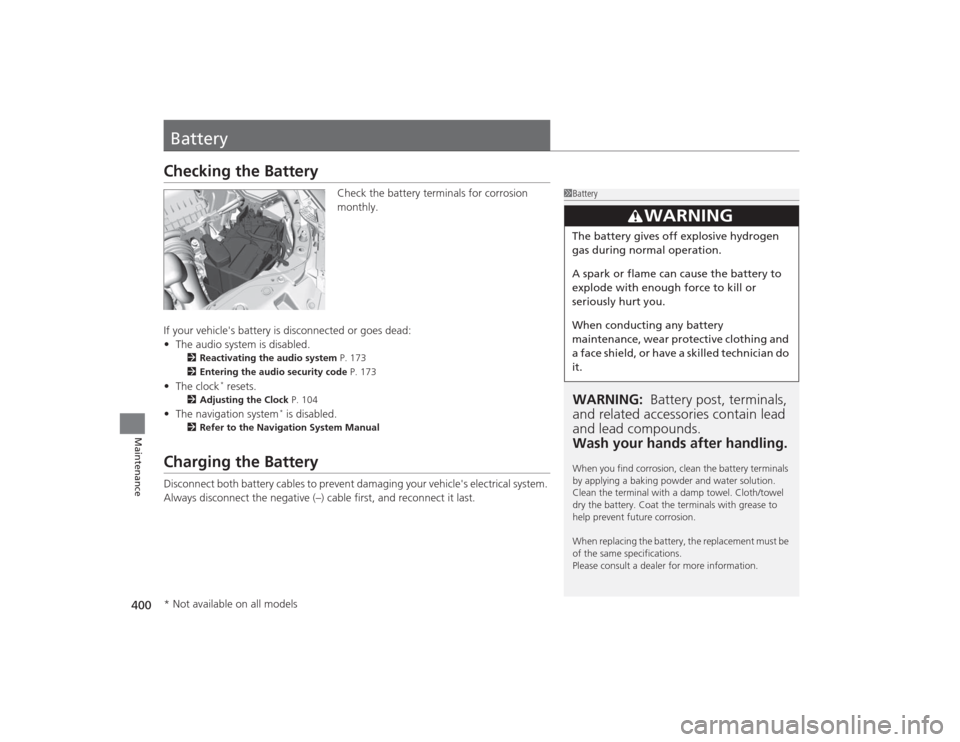
BatteryChecking the Battery
Check the battery terminals for corrosion
monthly.
If your vehicle's battery is disconnected or goes dead:
• The audio system is disabled.
2 Reactivating the audio system P. 173
2 Entering the audio security code P. 173
•The clock
* resets.
2 Adjusting the Clock P. 104
•The navigation system
* is disabled.
2 Refer to the Navigation System Manual
Charging the BatteryDisconnect both battery cables to prevent damaging your vehicle's electrical system.
Always disconnect the negative (–) cable first, and reconnect it last.
1BatteryWARNING: Battery post, terminals,
and related accessori es contain lead
and lead compounds.
Wash your hands after handling.When you find corrosion, clean the battery terminals
by applying a baking powder and water solution.
Clean the terminal with a damp towel. Cloth/towel
dry the battery. Coat the terminals with grease to
help prevent future corrosion.
When replacing the battery, the replacement must be
of the same specifications.
Please consult a dealer for more information.
3
WARNING
The battery gives off explosive hydrogen
gas during normal operation.
A spark or flame can cause the battery to
explode with enough force to kill or
seriously hurt you.
When conducting any battery
maintenance, wear protective clothing and
a face shield, or have a skilled technician do
it.
* Not available on all models
Page 412 of 469

411
Continued
Handling the Unexpected
If a Tire Goes FlatChanging a Flat TireIf a tire goes flat while driving, grasp the steering wheel firmly, and brake gradually
to reduce speed. Then, stop in a safe place. Replace the flat tire with a compact
spare tire. Go to a dealer as soon as possible to have the full-size tire repaired or
replaced.
1.Park the vehicle on firm, level, and non-slippery surface, and apply the parking
brake.
2. Put the shift lever in
(P
.
2. Put the shift lever in
(R
.
3. Turn on the hazard warning lights and turn the ignition switch to LOCK
(0
*1.
*1: Models with the smart entry system have an ENGINE START/STOP button instead of an
ignition switch.Models with compact spare tire
1 Changing a Flat Tire
Periodically check the tire pressure of the compact
spare. It should be set to the specified pressure.
Specified Pressure: 60 psi (420 kPa, 4.2 kgf/cm
2)
When driving with the compact spare tire, keep the
vehicle speed under 50 mph (80 km/h). Replace with
a full-size tire as soon as possible.
The compact spare tire and wheel in your vehicle are
specifically for this model. Do not use them with
another vehicle. Do not use another type of compact
spare tire or wheel with your vehicle.
Do not mount tire chains on a compact spare tire.
If a chain-mounted front tire goes flat, remove one of
the full-size rear tires and replace it with the compact
spare tire. Remove the flat front tire and replace it
with the full-size tire that was removed from the rear.
Mount the tire chains on the front tire.
Automatic transmission (CVT) modelsManual transmission modelsAll models
Page 415 of 469

uuIf a Tire Goes Flat uChanging a Flat Tire
414Handling the Unexpected
1. Place the jack under the jacking point
closest to the tire to be changed.
2. Turn the end bracket clockwise as shown in
the image until the top of the jack contacts
the jacking point.
u Make sure that the jacking point tab is
resting in the jack notch.
3. Raise the vehicle, using the jack handle bar
and the jack handle, until the tire is off the
ground.
■
How to Set Up the Jack
1How to Set Up the Jack
Do not use the jack with people or luggage in the
vehicle.
Use the jack provided in your vehicle.
Other jacks may not support the weight (“load”) or
may not fit the jacking point.
The following instructions must be followed to use
the jack safely:•Do not use while the engine is running.•Use only where the ground is firm and level.•Use only at the jacking points.•Do not get in the vehicle while using the jack.•Do not put anything on top of or underneath the
jack.
3
WARNING
The vehicle can easily roll off the jack,
seriously injuring anyone underneath.
Follow the directions for changing a tire
exactly, and never get under the vehicle
when it is supported only by the jack.
Jack
Handle
Bar Wheel Nut
Wrench as Jack Handle
Page 417 of 469
uuIf a Tire Goes Flat uChanging a Flat Tire
416Handling the Unexpected
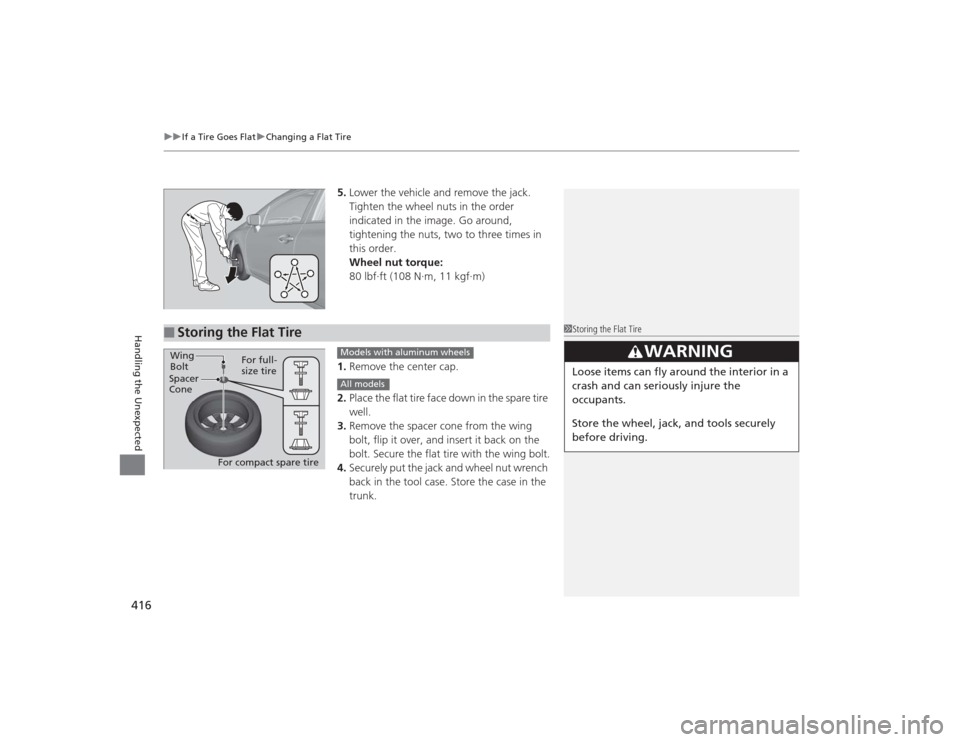
5. Lower the vehicle and remove the jack.
Tighten the wheel nuts in the order
indicated in the image. Go around,
tightening the nuts, two to three times in
this order.
Wheel nut torque:
80 lbf∙ft (108 N∙m, 11 kgf∙m)
1. Remove the center cap.
2. Place the flat tire face down in the spare tire
well.
3. Remove the spacer cone from the wing
bolt, flip it over, and insert it back on the
bolt. Secure the flat tire with the wing bolt.
4. Securely put the jack and wheel nut wrench
back in the tool case. Store the case in the
trunk.
■
Storing the Flat Tire
1Storing the Flat Tire
3
WARNING
Loose items can fly around the interior in a
crash and can seriously injure the
occupants.
Store the wheel, jack, and tools securely
before driving.
Spacer
ConeWing
Bolt
For compact spare tireFor full-
size tire
Models with aluminum wheelsAll models
Page 419 of 469
418
uuIf a Tire Goes Flat uTemporarily Repairing a Flat Tire
Handling the Unexpected
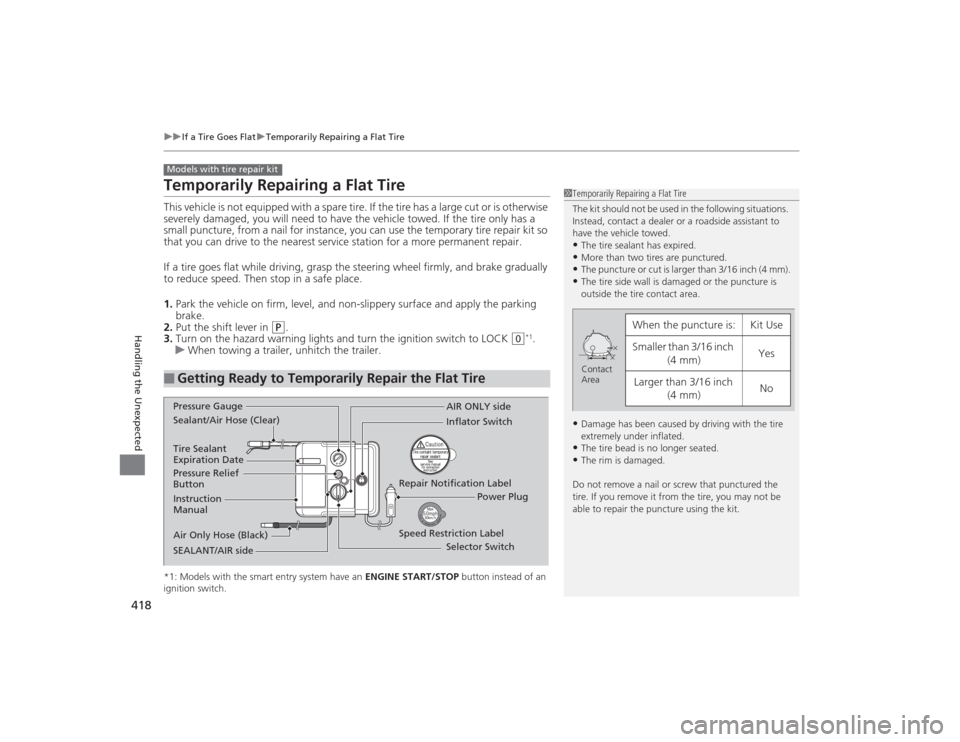
Temporarily Repairing a Flat TireThis vehicle is not equipped with a spare tire. If the tire has a large cut or is otherwise
severely damaged, you will need to have the vehicle towed. If the tire only has a
small puncture, from a nail for instance, you can use the temporary tire repair kit so
that you can drive to the nearest service station for a more permanent repair.
If a tire goes flat while driving, grasp the steering wheel firmly, and brake gradually
to reduce speed. Then stop in a safe place.
1. Park the vehicle on firm, level, and non-slippery surface and apply the parking
brake.
2. Put the shift lever in
(P
.
3. Turn on the hazard warning lights and turn the ignition switch to LOCK
(0
*1.
u When towing a trailer, unhitch the trailer.
*1: Models with the smart entry system have an ENGINE START/STOP button instead of an
ignition switch.■
Getting Ready to Temporarily Repair the Flat TireModels with tire repair kit
1 Temporarily Repairing a Flat Tire
The kit should not be used in the following situations.
Instead, contact a dealer or a roadside assistant to
have the vehicle towed.•The tire sealant has expired.•More than two tires are punctured.•The puncture or cut is larger than 3/16 inch (4 mm).•The tire side wall is damaged or the puncture is
outside the tire contact area.•Damage has been caused by driving with the tire
extremely under inflated.•The tire bead is no longer seated.•The rim is damaged.
Do not remove a nail or screw that punctured the
tire. If you remove it from the tire, you may not be
able to repair the puncture using the kit.
When the puncture is:
Kit Use
Smaller than 3/16 inch (4 mm)
Yes
Larger than 3/16 inch (4 mm)
No
Contact
Area
Instruction
Manual
Air Only Hose (Black) Speed Restriction Label Repair Notification Label
Pressure Relief
Button Inflator Switch
Selector Switch
SEALANT/AIR side Sealant/Air Hose (Clear) AIR ONLY side
Power Plug
Pressure Gauge
Tire Sealant
Expiration Date
Page 421 of 469
uuIf a Tire Goes Flat uTemporarily Repairing a Flat Tire
420Handling the Unexpected
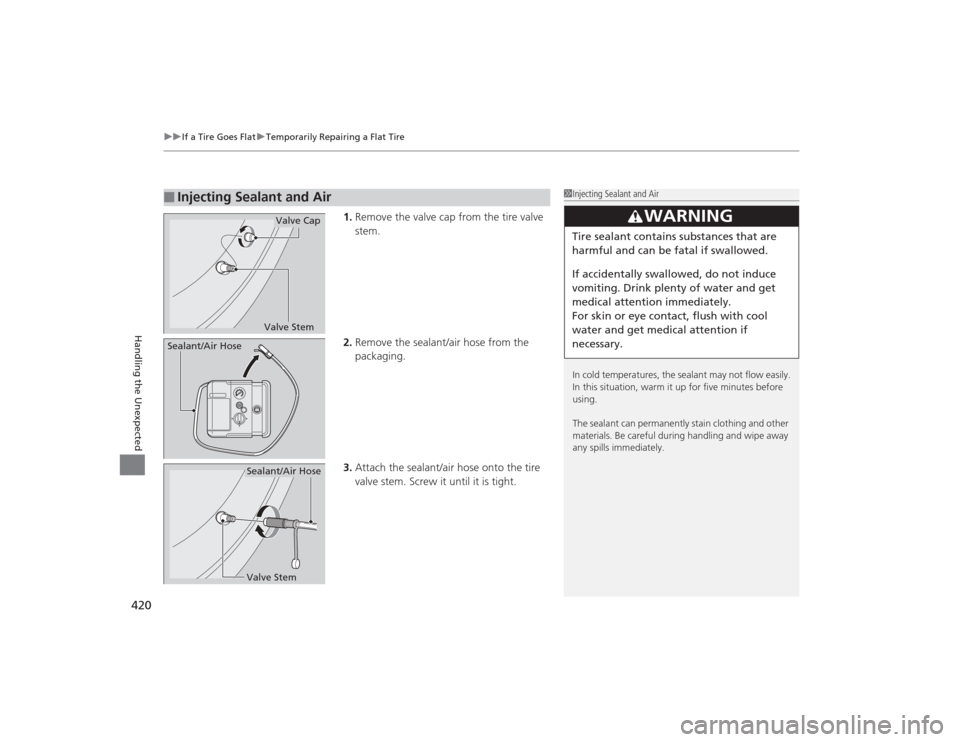
1. Remove the valve cap from the tire valve
stem.
2. Remove the sealant/air hose from the
packaging.
3. Attach the sealant/air hose onto the tire
valve stem. Screw it until it is tight.
■
Injecting Sealant and Air
1Injecting Sealant and Air
In cold temperatures, the sealant may not flow easily.
In this situation, warm it up for five minutes before
using.
The sealant can permanently stain clothing and other
materials. Be careful during handling and wipe away
any spills immediately.
3
WARNING
Tire sealant contains substances that are
harmful and can be fatal if swallowed.
If accidentally swallowed, do not induce
vomiting. Drink plenty of water and get
medical attention immediately.
For skin or eye contact, flush with cool
water and get medical attention if
necessary.
Valve StemValve Cap
Sealant/Air Hose
Valve StemSealant/Air Hose
Page 422 of 469
Continued
421
uuIf a Tire Goes Flat uTemporarily Repairing a Flat Tire
Handling the Unexpected
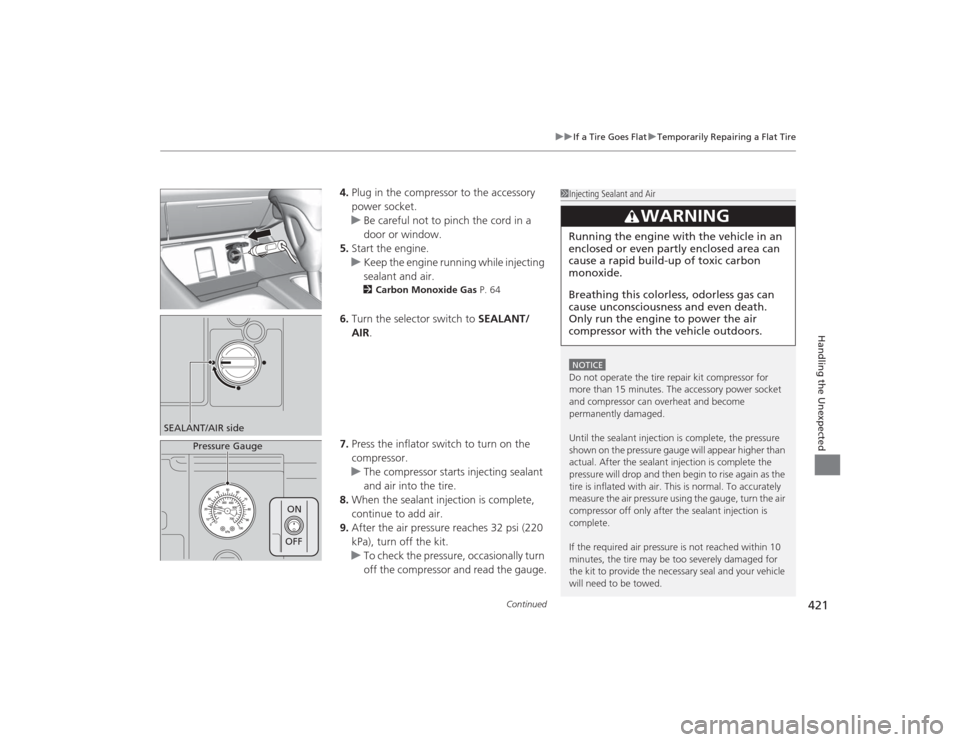
4. Plug in the compressor to the accessory
power socket.
u Be careful not to pinch the cord in a
door or window.
5. Start the engine.
u Keep the engine running while injecting
sealant and air.
2 Carbon Monoxide Gas P. 64
6.Turn the selector switch to SEALANT/
AIR .
7. Press the inflator switch to turn on the
compressor.
u The compressor starts injecting sealant
and air into the tire.
8. When the sealant injection is complete,
continue to add air.
9. After the air pressure reaches 32 psi (220
kPa), turn off the kit.
u To check the pressure, occasionally turn
off the compressor and read the gauge.
1Injecting Sealant and AirNOTICEDo not operate the tire repair kit compressor for
more than 15 minutes. The accessory power socket
and compressor can overheat and become
permanently damaged.
Until the sealant injection is complete, the pressure
shown on the pressure gauge will appear higher than
actual. After the sealan t injection is complete the
pressure will drop and then begin to rise again as the
tire is inflated with air. This is normal. To accurately
measure the air pressure using the gauge, turn the air
compressor off only after the sealant injection is
complete.
If the required air pressure is not reached within 10
minutes, the tire may be too severely damaged for
the kit to provide the necessary seal and your vehicle
will need to be towed.
3
WARNING
Running the engine with the vehicle in an
enclosed or even partly enclosed area can
cause a rapid build-up of toxic carbon
monoxide.
Breathing this colorless, odorless gas can
cause unconsciousness and even death.
Only run the engi ne to power the air
compressor with the vehicle outdoors.
SEALANT/AIR side
Pressure Gauge
ON
OFF
Page 424 of 469
Continued
423
uuIf a Tire Goes Flat uTemporarily Repairing a Flat Tire
Handling the Unexpected
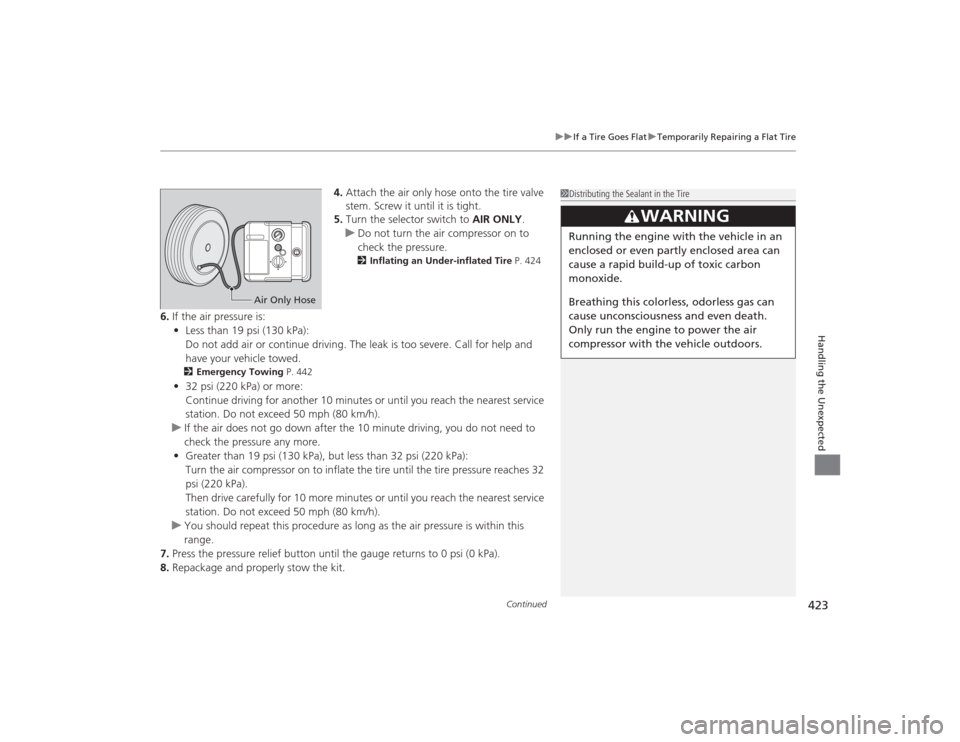
4. Attach the air only hose onto the tire valve
stem. Screw it until it is tight.
5. Turn the selector switch to AIR ONLY.
u Do not turn the air compressor on to
check the pressure.
2 Inflating an Under-inflated Tire P. 424
6.If the air pressure is:
• Less than 19 psi (130 kPa):
Do not add air or continue driving. The leak is too severe. Call for help and
have your vehicle towed.
2 Emergency Towing P. 442•32 psi (220 kPa) or more:
Continue driving for another 10 minutes or until you reach the nearest service
station. Do not exceed 50 mph (80 km/h).
u If the air does not go down after the 10 minute driving, you do not need to
check the pressure any more.
• Greater than 19 psi (130 kPa), but less than 32 psi (220 kPa):
Turn the air compressor on to inflate the tire until the tire pressure reaches 32
psi (220 kPa).
Then drive carefully for 10 more minutes or until you reach the nearest service
station. Do not exceed 50 mph (80 km/h).
u You should repeat this procedure as long as the air pressure is within this
range.
7. Press the pressure relief button until the gauge returns to 0 psi (0 kPa).
8. Repackage and properly stow the kit.
1Distributing the Sealant in the Tire
3
WARNING
Running the engine with the vehicle in an
enclosed or even partly enclosed area can
cause a rapid build-up of toxic carbon
monoxide.
Breathing this colorless, odorless gas can
cause unconsciousness and even death.
Only run the engi ne to power the air
compressor with the vehicle outdoors.
Air Only Hose