Page 25 of 469
24Quick Reference Guide
California Proposition 65 WarningEvent Data RecordersThis vehicle is equipped with an event data recorder (EDR).
The main purpose of an EDR is to record, in certain crash or near
crash-like situations, such as an air bag deployment or hitting a
road obstacle, data that will assist in understanding how a vehicle’s
systems performed. The EDR is designed to record data related
to vehicle dynamics and safety systems for a short period of
time, typically 30 second s or less. The EDR in this vehicle is
designed to record such data as:
• How various syst ems in your vehicle were operating;
• Whether or not the driver and passenger safety belts were
buckled/fastened;
• How far (if at all) the driver was depressing the accelerator
and/or brake pedal; and,
• How fast the vehicle was traveling.
These data can help provide a better understanding of the
circumstances in which crashes and injuries occur. NOTE: EDR data
are recorded by your vehicle only if a non-trivial crash situation
occurs; no data are recorded by the EDR under normal driving
conditions and no personal data (e.g., name, gender, age, and
crash location) are recorded. However, other parties, such as law
enforcement, could combine the EDR data with the type of
personally identifying data routinely acquired during a crash
investigation.WARNING: This product contains or emits
chemicals known to the state of California to cause
cancer and birth defects or other reproductive
harm.
To read data recorded by an EDR, special equipment is required,
and access to the vehicle or the EDR is needed. In addition to the
vehicle manufacturer, other parties, such as law enforcement, that
have the special equipment, can read the information if they have
access to the vehicle or the EDR.
The data belongs to the vehicle owner and may not be accessed by
anyone else except as legally required or with the permission of the
vehicle owner.Service Diagnostic RecordersThis vehicle is equipped with service-related devices that record
information about powertrain performance. The data can be used
to verify emissions law requirements and/or help technicians
diagnose and solve service problems. It may also be combined with
data from other sources for research purposes, but it remains
confidential.California Perchlorate Contamination Prevention ActThe airbags, seat belt tensioners, and CR type batteries in this
vehicle may contain perchlorate materials - special handling may
apply. See www.dtsc.ca.gov/hazardouswaste/perchlorate/
As you read this manual, you will find information that is preceded
by a symbol. This information is intended to help you avoid
damage to your vehicle, other property, or the environment.
NOTICE
Page 69 of 469
68Instrument Panel
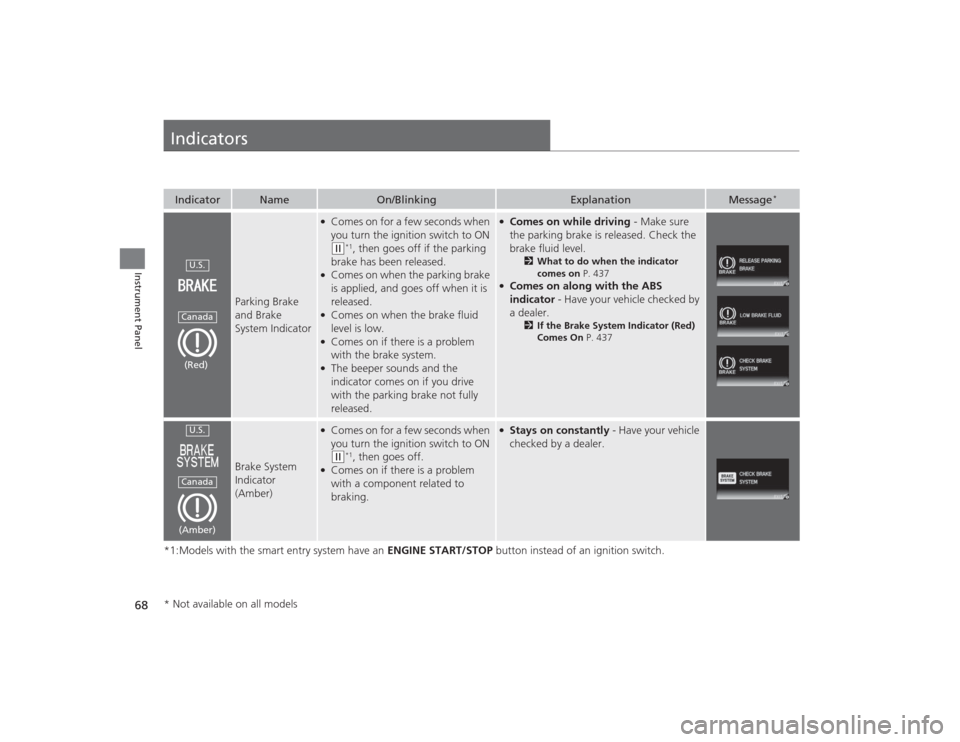
Indicators*1:Models with the smart entry system have an ENGINE START/STOP button instead of an ignition switch.Indicator
Name
On/Blinking
Explanation
Message
*
Parking Brake
and Brake
System Indicator
●Comes on for a few seconds when
you turn the ignition switch to ON (w
*1, then goes off if the parking
brake has been released.
●Comes on when the parking brake
is applied, and goes off when it is
released.●Comes on when the brake fluid
level is low.●Comes on if there is a problem
with the brake system.●The beeper sounds and the
indicator comes on if you drive
with the parking brake not fully
released.
●Comes on while driving - Make sure
the parking brake is released. Check the
brake fluid level.
2 What to do when the indicator
comes on P. 437
●Comes on along with the ABS
indicator - Have your vehicle checked by
a dealer.
2 If the Brake System Indicator (Red)
Comes On P. 437
Brake System
Indicator
(Amber)
●Comes on for a few seconds when
you turn the ignition switch to ON (w
*1, then goes off.
●Comes on if there is a problem
with a component related to
braking.
●Stays on constantly - Have your vehicle
checked by a dealer.
U.S.Canada(Red)U.S.Canada(Amber)
* Not available on all models
Page 72 of 469
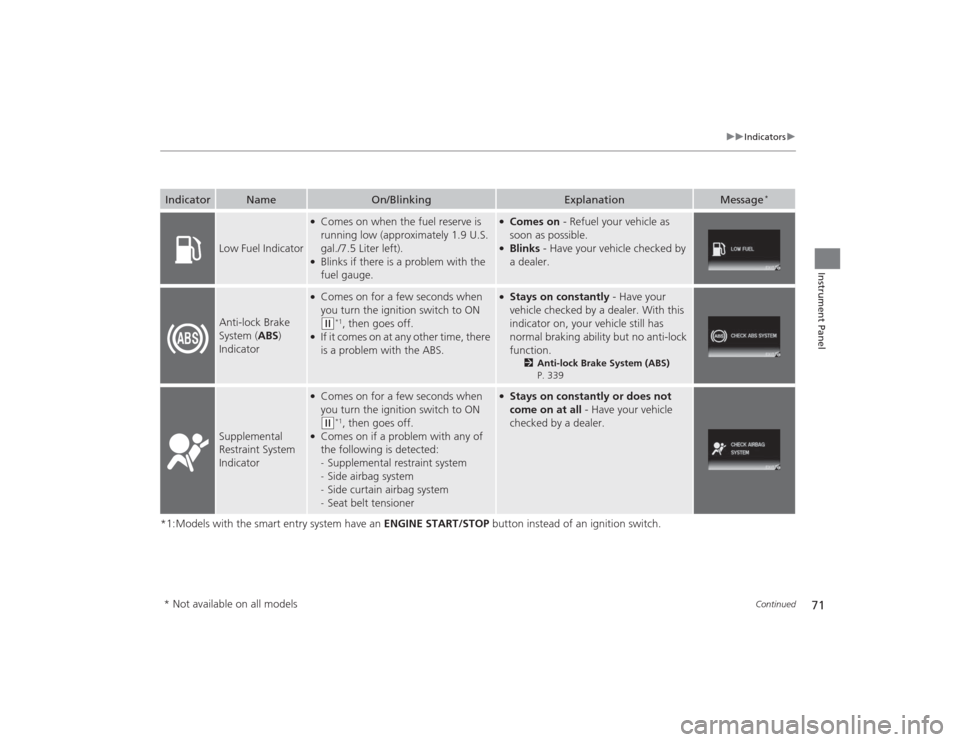
71
uuIndicators u
Continued
Instrument Panel
*1:Models with the smart entry system have an ENGINE START/STOP button instead of an ignition switch.Indicator
Name
On/Blinking
Explanation
Message
*
Low Fuel Indicator
●Comes on when the fuel reserve is
running low (approximately 1.9 U.S.
gal./7.5 Liter left).●Blinks if there is a problem with the
fuel gauge.
●Comes on - Refuel your vehicle as
soon as possible.●Blinks - Have your vehicle checked by
a dealer.
Anti-lock Brake
System ( ABS)
Indicator
●Comes on for a few seconds when
you turn the ignition switch to ON (w
*1, then goes off.
●If it comes on at any other time, there
is a problem with the ABS.
●Stays on constantly - Have your
vehicle checked by a dealer. With this
indicator on, your vehicle still has
normal braking ability but no anti-lock
function.
2 Anti-lock Brake System (ABS)
P. 339
Supplemental
Restraint System
Indicator
●Comes on for a few seconds when
you turn the ignition switch to ON (w
*1, then goes off.
●Comes on if a problem with any of
the following is detected:
- Supplemental restraint system
- Side airbag system
- Side curtain airbag system
- Seat belt tensioner
●Stays on constantly or does not
come on at all - Have your vehicle
checked by a dealer.
* Not available on all models
Page 81 of 469
80
uuIndicators uintelligent Multi-Information Display (i -MID) Warning and Information Messages
*
Instrument Panel
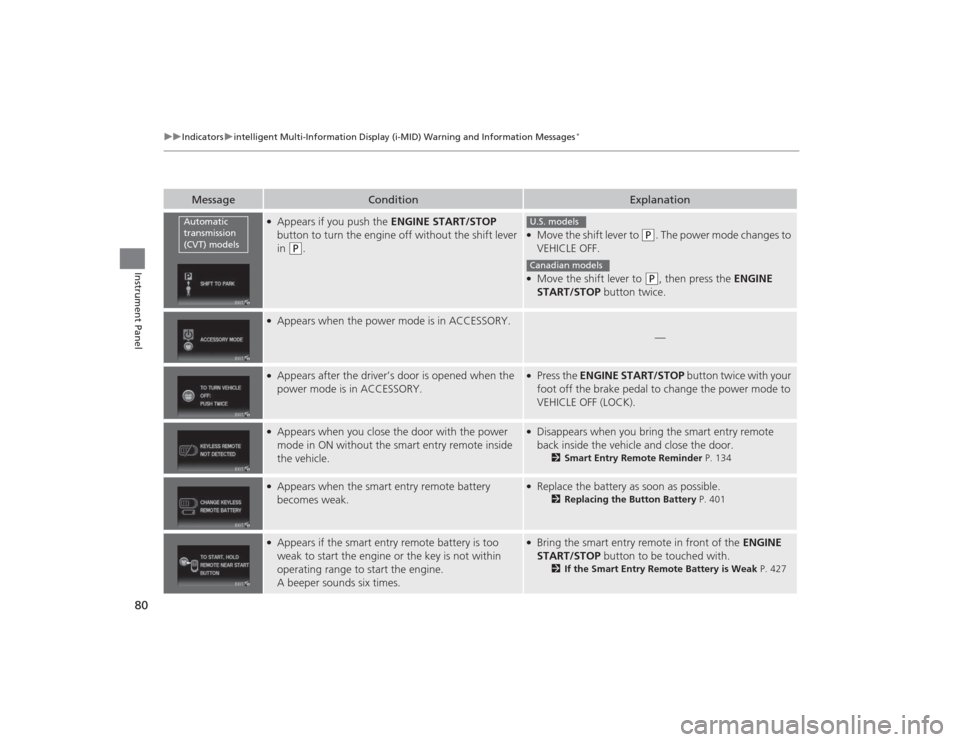
Message
Condition
Explanation
●Appears if you push the ENGINE START/STOP
button to turn the engine off without the shift lever
in
(P
.
●Move the shift lever to
(P
. The power mode changes to
VEHICLE OFF.
●Move the shift lever to
( P
, then press the ENGINE
START/STOP button twice.
●Appears when the power mode is in ACCESSORY.
—
●Appears after the driver’s door is opened when the
power mode is in ACCESSORY.
●Press the ENGINE START/STOP button twice with your
foot off the brake pedal to change the power mode to
VEHICLE OFF (LOCK).
●Appears when you close the door with the power
mode in ON without the smart entry remote inside
the vehicle.
●Disappears when you bring the smart entry remote
back inside the vehicle and close the door.
2 Smart Entry Remote Reminder P. 134
●Appears when the smart entry remote battery
becomes weak.
●Replace the battery as soon as possible.
2Replacing the Button Battery P. 401
●Appears if the smart entry remote battery is too
weak to start the engine or the key is not within
operating range to start the engine.
A beeper sounds six times.
●Bring the smart entry remote in front of the ENGINE
START/STOP button to be touched with.
2If the Smart Entry Remote Battery is Weak P. 427
Automatic
transmission
(CVT) models
U.S. modelsCanadian models
Page 82 of 469
81
uuIndicators uintelligent Multi-Information Display (i -MID) Warning and Information Messages
*
Instrument Panel
Message
Condition
Explanation
●Appears three seconds after the TO START ENGINE:
BRAKE + PUSH (CVT models)/TO START ENGINE:
CLUTCH +PUSH (manual transmission models)
messages appears.●Appears three seconds after you bring the smart
entry remote in front of the ENGINE START/STOP
button when TO START, HOLD REMOTE NEAR
START BUTTON appears. TO START ENGINE:
BRAKE + PUSH (CVT models)/TO START ENGINE:
CLUTCH + PUSH (manual transmission models)
appears sequentially.
2 Changing the Power Mode P. 132
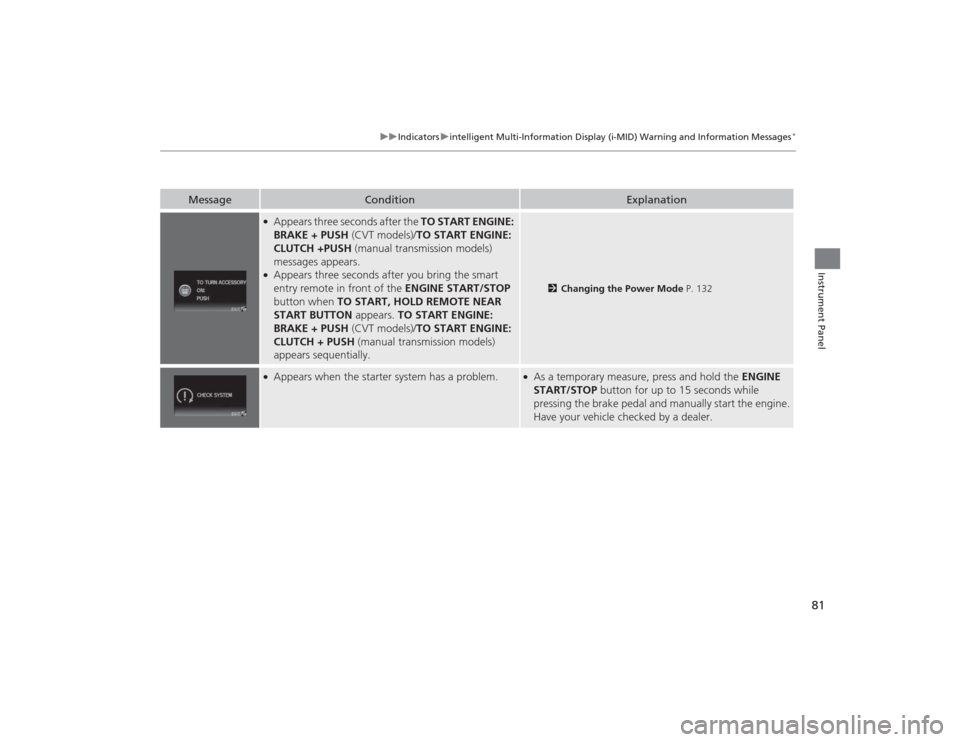
●Appears when the starter system has a problem.
●As a temporary measure, press and hold the ENGINE
START/STOP button for up to 15 seconds while
pressing the brake pedal and manually start the engine.
Have your vehicle checked by a dealer.
Page 119 of 469
118
uuLocking and Unlocking the Doors uCustomizing the Auto Door Locking/Unlocking Setting
*
Controls
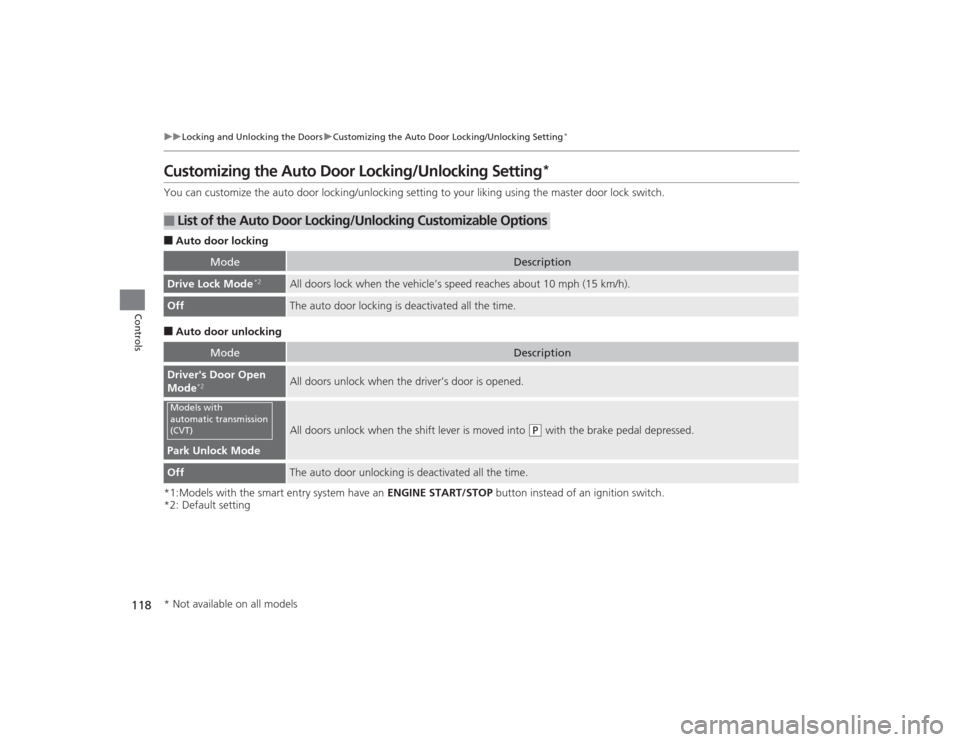
Customizing the Auto Door Locking/Unlocking Setting
*
You can customize the auto door locking/unlocking setting to your liking using the master door lock switch.■Auto door locking■Auto door unlocking
*1:Models with the smart entry system have an ENGINE START/STOP button instead of an ignition switch.
*2: Default setting■
List of the Auto Door Lockin g/Unlocking Customizable Options
Mode
Description
Drive Lock Mode
*2
All doors lock when the vehicle’s speed reaches about 10 mph (15 km/h).
Off
The auto door locking is deactivated all the time.
Mode
Description
Driver's Door Open
Mode
*2
All doors unlock when the driver’s door is opened.
Park Unlock Mode
All doors unlock when the shift lever is moved into
(P
with the brake pedal depressed.
Off
The auto door unlocking is deactivated all the time.
Models with
automatic transmission
(CVT)* Not available on all models
Page 120 of 469
119
uuLocking and Unlocking the Doors uCustomizing the Auto Door Locking/Unlocking Setting
*
Continued
Controls
*1:Models with the smart entry system have an ENGINE START/STOP button instead of an ignition switch.
*2: Default setting■
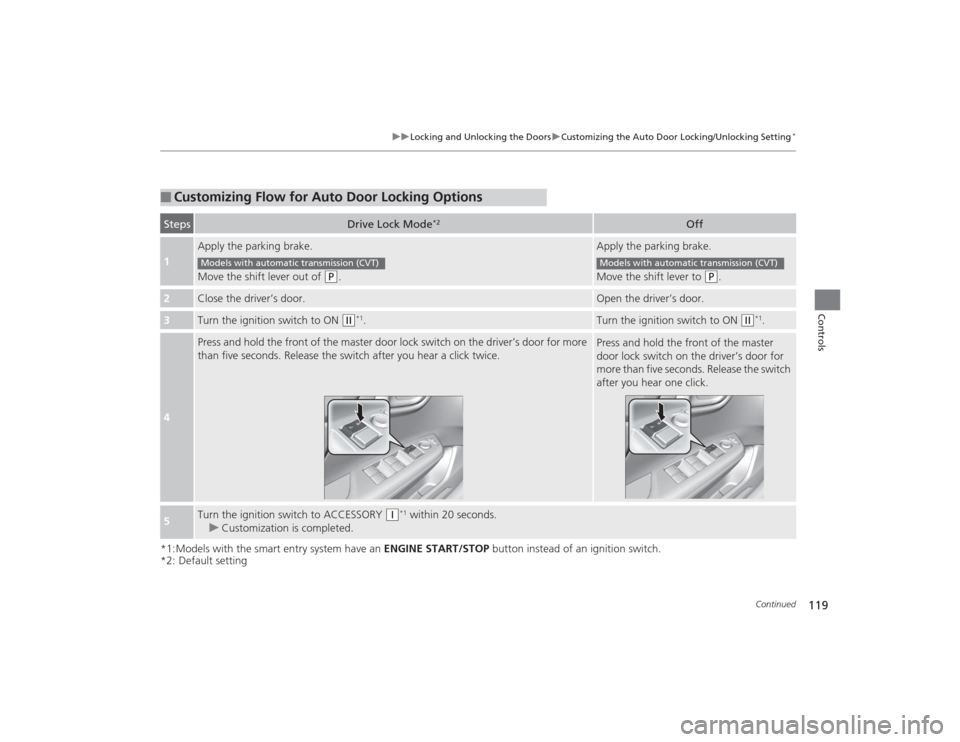
Customizing Flow for Auto Door Locking OptionsSteps
Drive Lock Mode
*2
Off
1
Apply the parking brake.
Move the shift lever out of
(P
.
Apply the parking brake.
Move the shift lever to
(P
.
2
Close the driver’s door.
Open the driver’s door.
3
Turn the ignition switch to ON
(w
*1.
Turn the ignition switch to ON
(w
*1.
4
Press and hold the front of the master door lock switch on the driver’s door for more
than five seconds. Release the switch after you hear a click twice.
Press and hold the front of the master
door lock switch on the driver’s door for
more than five seconds. Release the switch
after you hear one click.
5
Turn the ignition switch to ACCESSORY
(q
*1 within 20 seconds.
u Customization is completed.
Models with automatic transmission (CVT)
Models with automatic transmission (CVT)
Page 121 of 469
120
uuLocking and Unlocking the Doors uCustomizing the Auto Door Locking/Unlocking Setting
*
Controls
*1:Models with the smart entry system have an ENGINE START/STOP button instead of an ignition switch.
*2: Default setting■
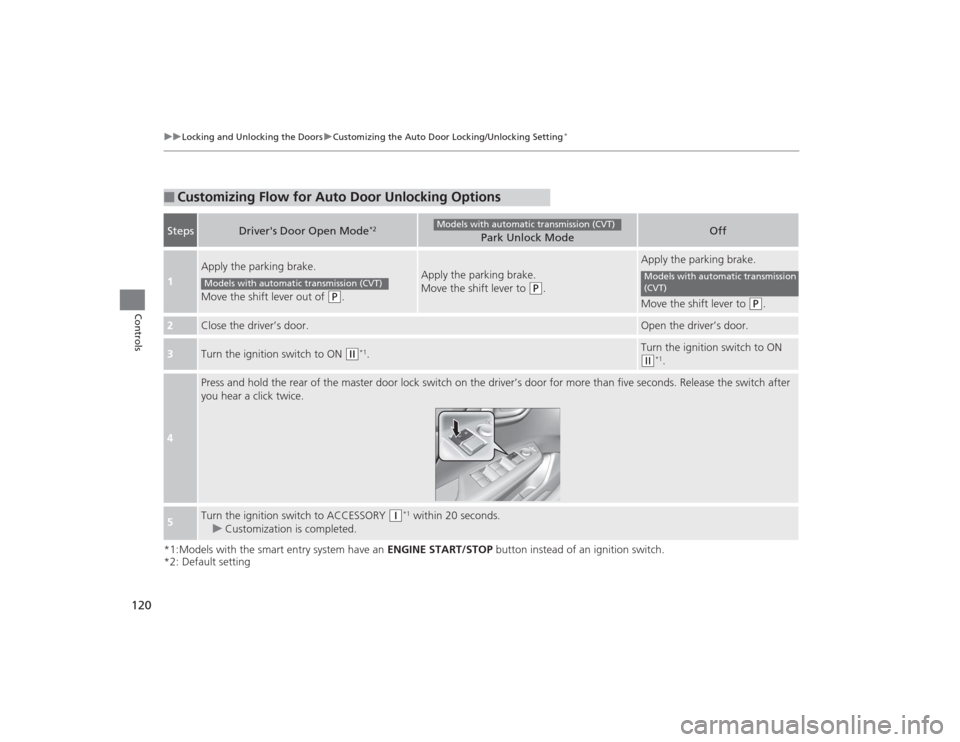
Customizing Flow for Auto Door Unlocking OptionsSteps
Driver's Door Open Mode
*2
Park Unlock Mode
Off
1
Apply the parking brake.
Move the shift lever out of
(P
.
Apply the parking brake.
Move the shift lever to
(P
.
Apply the parking brake.
Move the shift lever to
(P
.
2
Close the driver’s door.
Open the driver’s door.
3
Turn the ignition switch to ON
(w
*1.
Turn the ignition switch to ON (w
*1.
4
Press and hold the rear of the master door lock switch on the driver’s door for more than five seconds. Release the switch after
you hear a click twice.
5
Turn the ignition switch to ACCESSORY
(q
*1 within 20 seconds.
u Customization is completed.
Models with automatic transmission (CVT)
Models with automatic transmission (CVT)
Models with automatic transmission
(CVT)