2014 HONDA CIVIC ECO mode
[x] Cancel search: ECO modePage 327 of 469
326
uuWhen Driving uCruise Control
*
Driving
Cruise Control
*
Maintains a constant vehicle speed without having to keep your foot on the
accelerator pedal. Use cruise control on freeways or open roads where you can
travel at a constant speed with little acceleration or deceleration.
1Cruise Control
*
It may not be possible to maintain a constant speed
when driving uphill or downhill.
When not using cruise control:
Turn off cruise control by pressing the CRUISE
button.
While in the ECON mode, it may take relatively more
time to accelerate to maintain the set speed.
When the engine speed slows down, try to
downshift.
You can maintain the set speed if you change gear
within five seconds.
3
WARNING
Improper use of the cruise control can lead
to a crash.
Use the cruise control only when traveling
on open highways in good weather.1.8 ℓ engine modelsManual transmission models
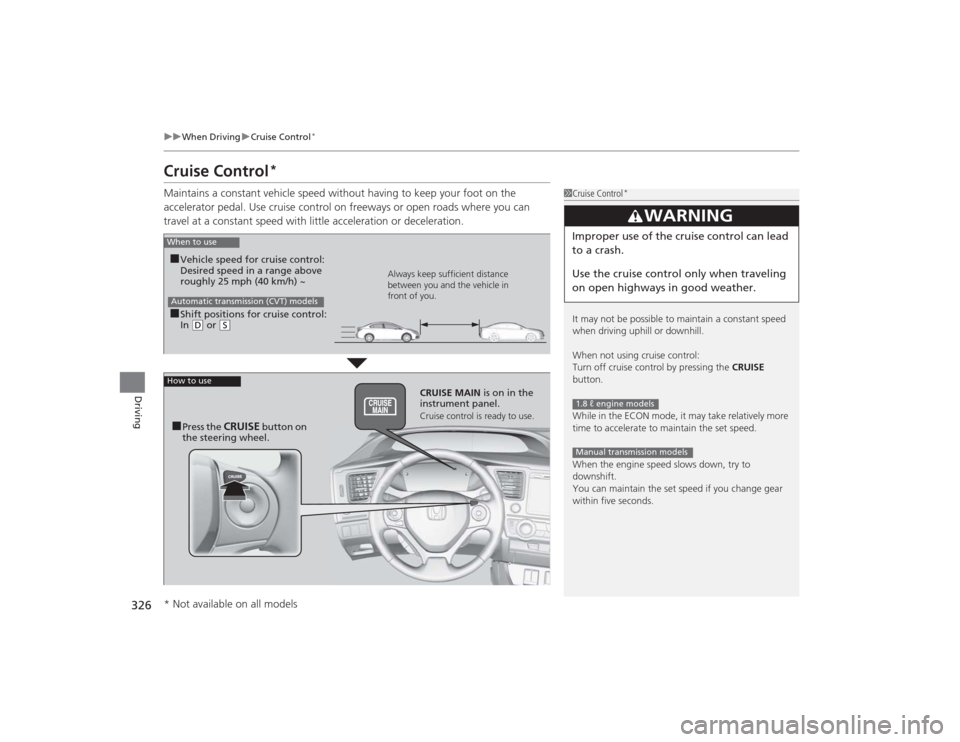
When to use■Shift positions for cruise control:
In ( D or
(S Always keep sufficient distance
between you and the vehicle in
front of you.
Automatic transmission (CVT) models■Vehicle speed for cruise control:
Desired speed in a range above
roughly 25 mph (40 km/h) ~
How to use
CRUISE MAIN
is on in the
instrument panel.Cruise control is ready to use.
■Press the
CRUISE
button on
the steering wheel.
* Not available on all models
Page 331 of 469
uuWhen Driving uVehicle Stability Assist (VSA® ), aka Electronic Stability Control (ESC), System
330Driving
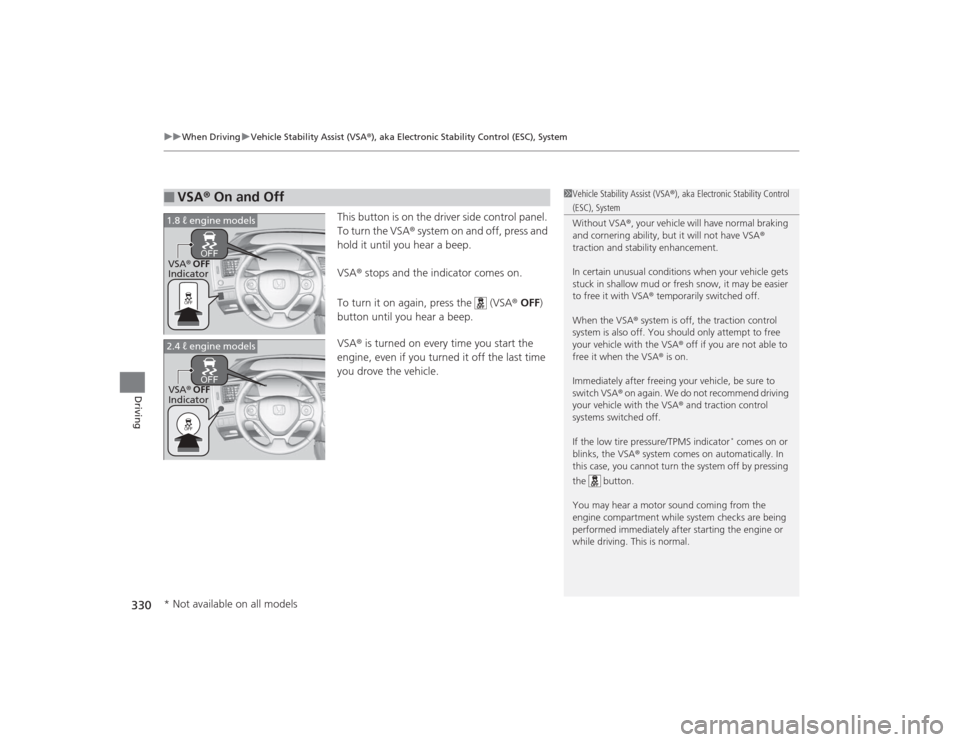
This button is on the driver side control panel.
To turn the VSA® system on and off, press and
hold it until you hear a beep.
VSA® stops and the indicator comes on.
To turn it on again, press the (VSA ® OFF )
button until you hear a beep.
VSA ® is turned on every time you start the
engine, even if you turned it off the last time
you drove the vehicle.
■
VSA ® On and Off
1 Vehicle Stability Assist (VSA ®), aka Electronic Stability Control (ESC), System
Without VSA ®, your vehicle will have normal braking
and cornering ability, but it will not have VSA ®
traction and stability enhancement.
In certain unusual conditions when your vehicle gets
stuck in shallow mud or fresh snow, it may be easier
to free it with VSA ® temporarily switched off.
When the VSA ® system is off, the traction control
system is also off. You should only attempt to free
your vehicle with the VSA ® off if you are not able to
free it when the VSA ® is on.
Immediately after freeing your vehicle, be sure to
switch VSA® on again. We do not recommend driving
your vehicle with the VSA ® and traction control
systems switched off.
If the low tire pressure/TPMS indicator
* comes on or
blinks, the VSA ® system comes on automatically. In
this case, you cannot turn the system off by pressing
the button.
You may hear a motor sound coming from the
engine compartment while system checks are being
performed immediatel y after starting the engine or
while driving. This is normal.
VSA ® OFF
Indicator
1.8 ℓ engine modelsVSA
® OFF
Indicator
2.4 ℓ engine models* Not available on all models
Page 334 of 469
333
uuWhen Driving uTire Pressure Monitoring System (TPMS)
Continued
Driving
Tire Pressure Monitoring System (TPMS)Instead of directly measuring the pressure in each tire, the TPMS on this vehicle
monitors and compares the rolling radius and rotational characteristics of each
wheel and tire while you are driving to determine if one or more tires are
significantly under-inflated. This will cause th e low tire pressure/TPMS indicator to
come on and a message to appear on the i-MID.
You must start TPMS calibration every time you:
• Adjust the pressure in one or more tires.
• Rotate the tires.
• Replace one or more tires.
Before calibrating the TPMS:
• Set the cold tire pressure in all four tires.
2 Checking Tires P. 391
Make sure:
•The vehicle is at a complete stop.
• The shift lever is in
(N
.
• The shift lever is in
(P
.
• The ignition switch is in ON
(w
*1.
*1: Models with the smart entry system have an ENGINE START/STOP button instead of an
ignition switch.■
TPMS CalibrationU.S. models
1 Tire Pressure Monitoring System (TPMS)
The system does not monitor the tires when driving
at low speed.
Conditions such as low ambient temperature and
altitude change directly affect tire pressure and can
trigger the low tire pressure/TPMS indicator to come on.
Tire pressure checked and inflated in:•Warm weather can become under-inflated in
colder weather.•Cold weather can become over-inflated in warmer
weather.
The low tire pressure i ndicator will not come on as a
result of over inflation.
The TPMS may not function properly if tire type and
size are mixed. Make sure to use the same size and
type of tire. 2 Checking and Maintaining Tires P. 391
The low tire pressure/TPMS indicator may come on
with a delay or may not come on at all when:•You rapidly accele rate, decelerate, or turn the
steering wheel.•You drive on snowy or slippery roads.•Snow chains are used.
The low tire pressure/TPMS indicator may come on
under the following conditions:•A compact spare tire
* is used.
•There is a heavier and uneven load on the tires,
such as when towing a trailer, than the condition at
calibration.•Snow chains are used.
Manual transmission modelsAutomatic transmission (CVT) modelsAll models* Not available on all models
Page 335 of 469
uuWhen Driving uTire Pressure Monitoring System (TPMS)
334Driving
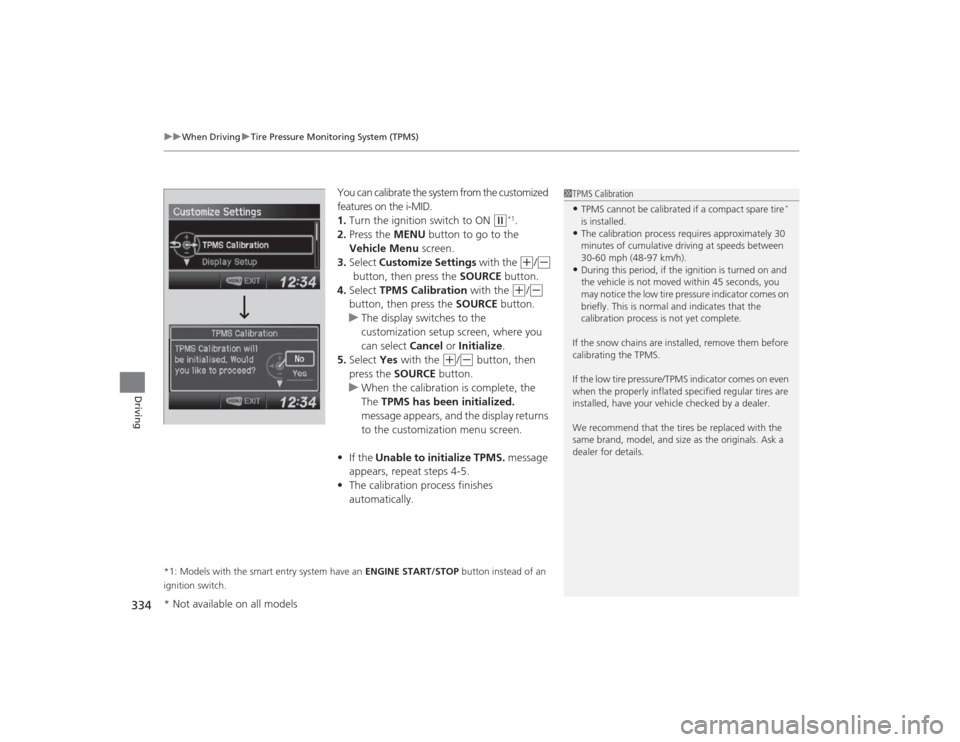
You can calibrate the system from the customized
features on the i-MID.
1. Turn the ignition switch to ON
(w
*1.
2. Press the MENU button to go to the
Vehicle Menu screen.
3. Select Customize Settings with the (+
/(-
button, then press the SOURCE button.
4. Select TPMS Calibration with the
(+
/(-
button, then press the SOURCE button.
u The display switches to the
customization setup screen, where you
can select Cancel or Initialize .
5. Select Yes with the
(+
/(-
button, then
press the SOURCE button.
u When the calibration is complete, the
The TPMS has been initialized.
message appears, and the display returns
to the customization menu screen.
• If the Unable to initialize TPMS. message
appears, repeat steps 4-5.
• The calibration process finishes
automatically.
*1: Models with the smart entry system have an ENGINE START/STOP button instead of an
ignition switch.
1 TPMS Calibration•TPMS cannot be calibrated if a compact spare tire
*
is installed.
•The calibration process requires approximately 30
minutes of cumulative driving at speeds between
30-60 mph (48-97 km/h).•During this period, if the ignition is turned on and
the vehicle is not moved within 45 seconds, you
may notice the low tire pressure indicator comes on
briefly. This is normal and indicates that the
calibration process is not yet complete.
If the snow chains are installed, remove them before
calibrating the TPMS.
If the low tire pressure/TPMS indicator comes on even
when the properly inflated specified regular tires are
installed, have your vehicle checked by a dealer.
We recommend that the tires be replaced with the
same brand, model, and size as the originals. Ask a
dealer for details.
* Not available on all models
Page 336 of 469
335
uuWhen Driving uTire Pressure Monitoring System (TPMS) - Required Federal Explanation
Continued
Driving
Tire Pressure Monitoring System (TPMS) - Required Federal ExplanationEach tire, including th e spare (if provided), should be checked
monthly when cold and inflated to the inflation pressure
recommended by the vehicle manufacturer on the vehicle placard
or tire inflation pressure label.
(If your vehicle has tires of a different size than the size indicated
on the vehicle placard or tire inflation pressure label, you should
determine the proper tire inflation pressure for those tires.)
As an added safety feature, your vehicle has been equipped with
a tire pressure monitoring system (TPMS) that illuminates a low
tire pressure telltale
when one or more of your tires is significantly under-inflated.
Accordingly, when the low tire pressure telltale illuminates, you
should stop and check your tires as soon as possible, and inflate
them to the proper pressure.
Driving on a significantly under-inflated tire causes the tire to
overheat and can lead to tire failure. Un der-inflation also reduces
fuel efficiency and tire tread life, and may affect the vehicle's
handling and stopping ability.U.S. models
Page 344 of 469
343
Continued
Driving
RefuelingFuel Information■Fuel recommendation
Use of a lower octane gasoline can cause a persistent, heavy metallic knocking noise
that can lead to engine damage.
Use of a lower octane gasoline can cause occasional metallic knocking noise in the
engine and will result in decreased engine performance.
Use of a gasoline with a pump octane less than 87 can lead to engine damage.■Top tier detergent gasoline
Because the level of detergency and additives in gasoline vary in the market, Honda
endorses the use of “TOP TIER Detergent Gasoline” where available to help
maintain the performance and reliability of your vehicle. TOP TIER Detergent
Gasoline meets a new gasoline standard jointly established by leading automotive
manufacturers to meet the needs of today’s advanced engines.Unleaded gasoline, pump octane number 87 or higherUnleaded premium gasoline, pump octane number 91 or higher
1Fuel InformationNOTICEWe recommend quality gasoline containing
detergent additives that help prevent fuel system and
engine deposits. In addition, in order to maintain
good performance, fuel economy, and emissions
control, we strongly recommend the use of gasoline
that does NOT contain harmful manganese-based
fuel additives such as MMT, if such gasoline is
available.
Use of gasoline with these additives may adversely
affect performance, and cause the malfunction
indicator lamp on your instrument panel to come on.
If this happens, contact a dealer for service.
Some gasoline today is blended with oxygenates such
as ethanol. Your vehicle is designed to operate on
oxygenated gasoline containing up to 15% ethanol
by volume. Do not use gasoline containing methanol.
If you notice any undesirable operating symptoms, try
another service station or switch to another brand of
gasoline.
1.8 ℓ engine models2.4 ℓ engine models
Page 347 of 469
346Driving
Fuel EconomyImproving Fuel EconomyFuel economy depends on several conditions, including driving conditions, your
driving habits, the condition of your vehicle, and loading. Depending on these and
other conditions, you may or may not achieve the rated fuel economy of this vehicle.
You can optimize your fuel economy with proper maintenance of your vehicle.
Always maintain your vehicle in accordance with the messages displayed on the
information display
*/i-MID
*.
• Use the recommended viscosity engine oil, displaying the API Certification Seal.
• Maintain the specified tire pressure.
• Do not load the vehicle with excess cargo.
• Keep your vehicle clean. A buildup of snow or mud on your vehicle's underside
adds weight and increases wind resistance.
■
Maintenance and Fuel Economy
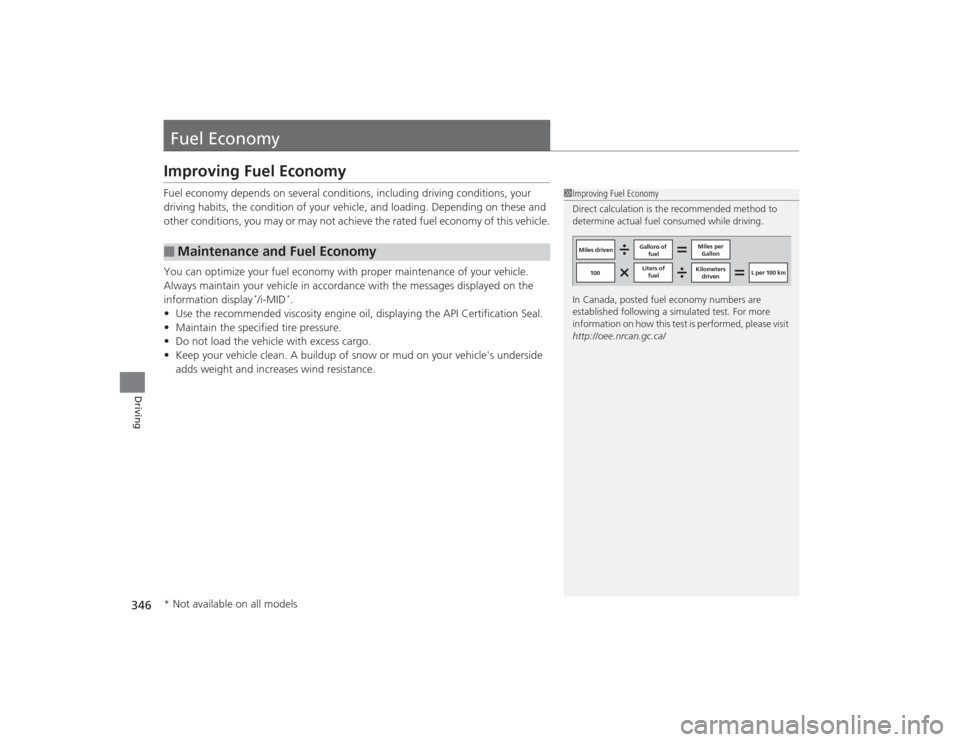
1Improving Fuel Economy
Direct calculation is the recommended method to
determine actual fuel consumed while driving.
In Canada, posted fuel economy numbers are
established following a simulated test. For more
information on how this test is performed, please visit
http://oee.nrcan.gc.ca/
Miles driven Gallons of
fuel Miles per
Gallon
100 Liters of
fuel Kilometers
driven L per 100 km
* Not available on all models
Page 350 of 469

349
Maintenance
This chapter discusses basic maintenance.
Before Performing MaintenanceInspection and Maintenance ............ 350Safety When Performing Maintenance..... 351Parts and Fluids Used in Maintenance Service ........................................... 352
Maintenance Minder
TM..................... 353
Maintenance Under the Hood
Maintenance Items Under the Hood ..... 361Opening the Hood ........................... 363
Recommended Engine Oil ................ 364
Oil Check ......................................... 365
Adding Engine Oil ............................ 367Changing the Engine Oil and Oil Filter ..... 368
Engine Coolant ................................ 371
Transmission Fluid ............................ 373
Brake/Clutch Fluid ............................ 374
Refilling Window Washer Fluid......... 375
Replacing Light Bulbs ....................... 376Checking and Maintaining Wiper
Blades .......................................... 389Checking and Maintaining Tires
Checking Tires ................................. 391Tire and Loading Information Label ...... 392Tire Labeling .................................... 392DOT Tire Quality Grading (U.S. Vehicles)....... 394Wear Indicators................................ 396 Tire Service Life ................................ 396
Tire and Wheel Replacement ........... 397
Tire Rotation .................................... 398
Winter Tires ..................................... 399
Battery ............................................... 400
Remote Transmitter Care
*
Replacing the Button Battery ........... 401
Heating and Cooling System
*/Climate
Control System
* Maintenance ....... 403
Cleaning
Interior Care .................................... 404
Exterior Care.................................... 406
* Not available on all models