Page 242 of 377
241
uuWhen Driving uPrecautions While Driving
Driving
Precautions While Driving
Avoid driving in deep water and on flooded roads. This can damage the engine or
driveline, or cause electrical component failure.
If there is a strong impact with something under the vehicle, stop in a safe location.
Check the underside of the vehicle for damage or any fluid leaks.
■In Rain
■Other Precautions
1Precautions While Driving
NOTICE
Do not operate the shift lever while pressing the
accelerator pedal. You could damage the
transmission.
NOTICE
If you repeatedly turn the steering wheel at an
extremely low speed, or hold the steering wheel on
the full left or right position for a while, the electric
power steering (EPS) system heats up. The system
goes into a protective mode, and limits its
performance. The steering wheel becomes harder
and harder to operate. Once the system cools down,
the EPS system is restored.
Repeated operation under these conditions can
eventually damage the system.
If the power mode is set to ACCESSORY while
driving, the engine will shut down and all steering
and brake power assist functi ons will stop, making it
difficult to control the vehicle.
Do not put the shift lever in
( N, as you will lose
engine braking (and acce leration) performance.
During the first 600 miles (1,000 km) of operation,
avoid sudden acceleration or full throttle operation so
as not to damage the engine or powertrain.
14 CIVIC IMA-31TR26200.book 241 ページ 2013年12月23日 月曜日 午後4時9分
Page 243 of 377
242
uuWhen Driving uAutomatic Transmission (CVT)
Driving
Automatic Transmission (CVT)
The engine runs at a higher id le speed and creeping increases.
Keep the brake pedal firmly depressed when stopped.
Quickly depressing the accelerator pedal while driving uphill may cause the
transmission to drop to a lower ratio, unexpectedly increasing vehicle speed.
Depress the accelerator pedal carefully, es pecially on slippery roads and curves.
■Creeping
■Kickdown
1Precautions While Driving
Avoid hard braking for the first 200 miles (300 km).
You should also follow this when the brake pads are
replaced.
NOTICE
Following can damage the under spoiler:
•Parking the vehicle by a parking block
•Parallel pa rking along the road shoulder•Driving towards the bottom of a hill
•Driving up or down to a different surface level
(such as a road shoulder)
•Driving on a rutted or bumpy road
•Driving on a road with potholes
14 CIVIC IMA-31TR26200.book 242 ページ 2013年12月23日 月曜日 午後4時9分
Page 244 of 377
243
uuWhen Driving uShifting
Continued
Driving
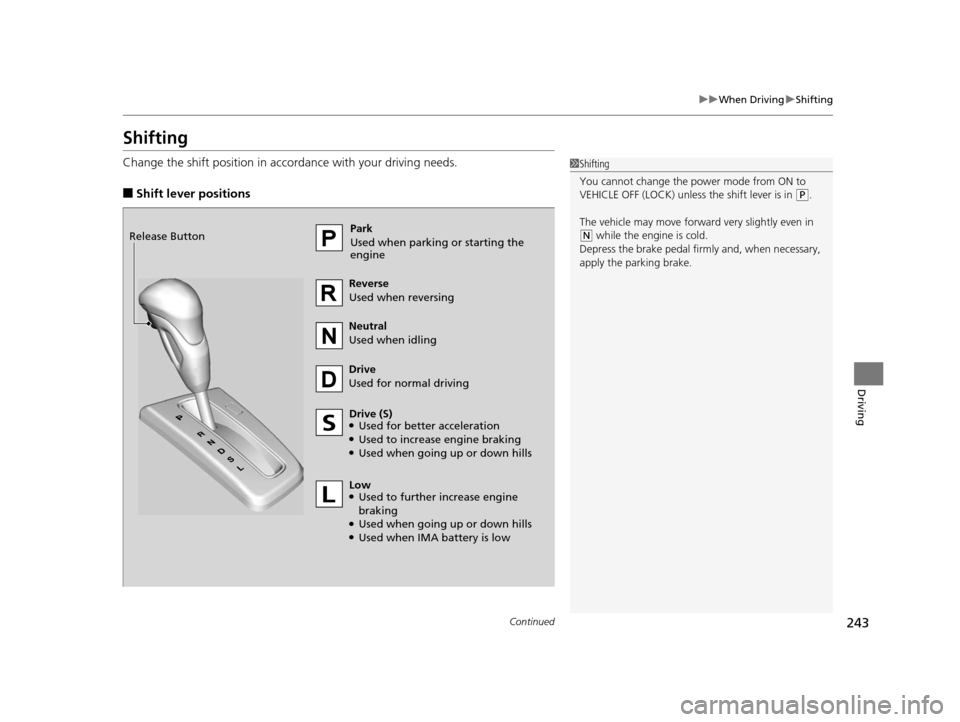
Shifting
Change the shift position in accordance with your driving needs.
■Shift lever positions
1Shifting
You cannot change the power mode from ON to
VEHICLE OFF (LOCK) unless the shift lever is in
(P.
The vehicle may move forward very slightly even in
(N while the engine is cold.
Depress the brake pe dal firmly and, when necessary,
apply the parking brake.Park
Used when parking or starting the
engine
Reverse
Used when reversing
Neutral
Used when idling
Drive
Used for normal driving
Drive (S)
●Used for better acceleration●Used to increase engine braking●Used when going up or down hills
Release Button
Low
●Used to further increase engine
braking
●Used when going up or down hills●Used when IMA battery is low
14 CIVIC IMA-31TR26200.book 243 ページ 2013年12月23日 月曜日 午後4時9分
Page 245 of 377
uuWhen Driving uShifting
244
Driving
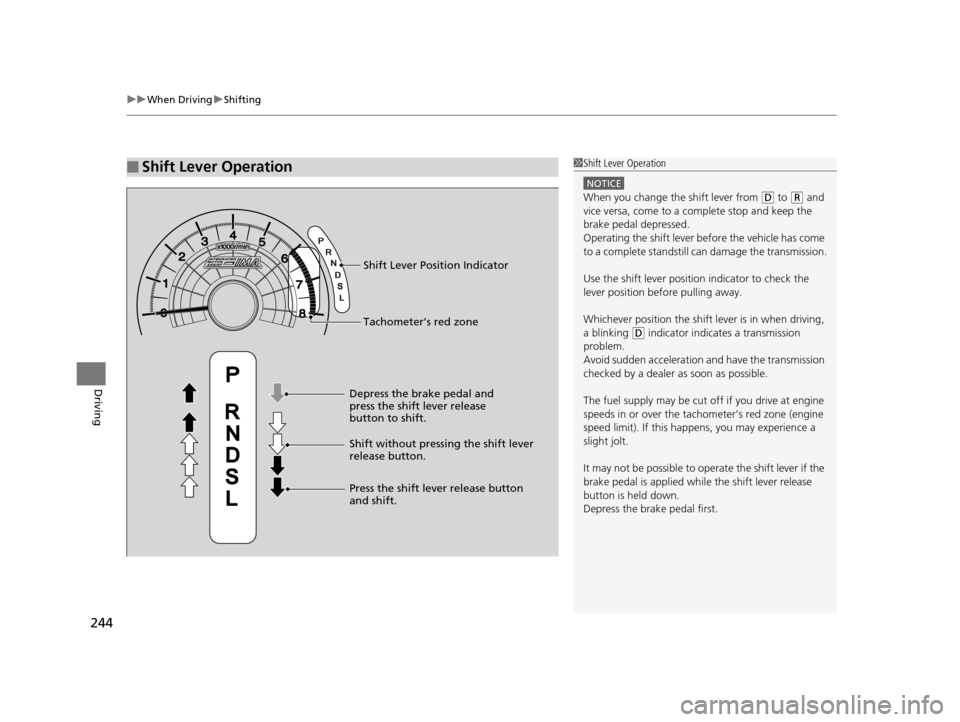
■Shift Lever Operation1Shift Lever Operation
NOTICE
When you change the shift lever from (D to (R and
vice versa, come to a complete stop and keep the
brake pedal depressed.
Operating the shift lever be fore the vehicle has come
to a complete standstill can damage the transmission.
Use the shift lever position indicator to check the
lever position befo re pulling away.
Whichever position the shift lever is in when driving,
a blinking
( D indicator indicates a transmission
problem.
Avoid sudden acceleration and have the transmission
checked by a dealer as soon as possible.
The fuel supply may be cut of f if you drive at engine
speeds in or over the tac hometer’s red zone (engine
speed limit). If this happe ns, you may experience a
slight jolt.
It may not be possible to operate the shift lever if the
brake pedal is applied while the shift lever release
button is held down.
Depress the brake pedal first.Tachometer’s red zone Shift Lever Position Indicator
Depress the brake pedal and
press the shift lever release
button to shift.
Shift without pressing the shift lever
release button.
Press the shift lever release button
and shift.
14 CIVIC IMA-31TR26200.book 244 ページ 2013年12月23日 月曜日 午後4時9分
Page 248 of 377
Continued247
uuWhen Driving uAuto Idle Stop
Driving
The vehicle stops with the shift lever in (D and the brake pedal depressed.
■Auto idle stop does not activate when:
• The low temperature indicator is on.
• The IMA battery charge is low.
• The bars of the electric motor power flow monitor do not move when
accelerating or decelerating.
• The transmission fluid temperature is low.
• The vehicle comes to a stop again befo re the vehicle speed reaches 9 mph (15
km/h) after the engine starts.
• Stopped on a steep incline.
• The shift lever is in a position other than
(D or (N.
■Auto idle stop may not activate when:
• Certain ambient conditions (strong sunlight, high or low temperatures, etc.) can
prevent Auto Idle Stop from activating, even if the set temperature and the actual
interior temperature are around the same.
• The vehicle is stopped by braking suddenly.
■Auto Idle Stop Activates When:1Auto Idle Stop Activates When:
The Auto Idle Stop may also activate when the brake
pedal is depressed, and th e vehicle slows down to a
speed below 6 mph (10 km/h).
14 CIVIC IMA-31TR26200.book 247 ページ 2013年12月23日 月曜日 午後4時9分
Page 249 of 377
248
uuWhen Driving uAuto Idle Stop
Driving
The brake pedal is released.
■The engine restarts even if the brake pedal is depressed when:
• The shift position is changed to
(R or (L.
• The accelerator pedal is depressed.
• The pressure to the brake pedal is reduced and the vehicle starts moving while
stopped on an incline.
• The IMA battery charge becomes low.
• The low temperature indicator comes on.
• Ambient conditions that may differentiate the interior temperature from the set
temperature can also be the cause to start the engine.
■The Engine Automatically Restarts When:
14 CIVIC IMA-31TR26200.book 248 ページ 2013年12月23日 月曜日 午後4時9分
Page 252 of 377
251
uuWhen Driving uCruise Control
Driving
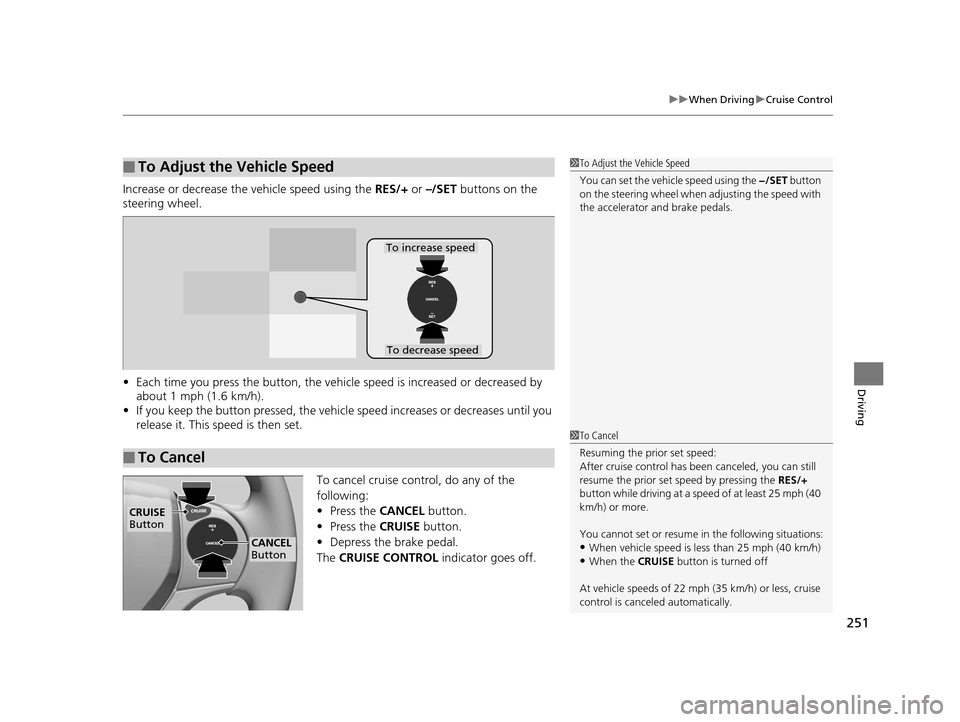
Increase or decrease the vehicle speed using the RES/+ or –/SET buttons on the
steering wheel.
• Each time you press the button, the vehicl e speed is increased or decreased by
about 1 mph (1.6 km/h).
• If you keep the button pressed, the vehicl e speed increases or decreases until you
release it. This speed is then set.
To cancel cruise control, do any of the
following:
•Press the CANCEL button.
• Press the CRUISE button.
• Depress the brake pedal.
The CRUISE CONTROL indicator goes off.
■To Adjust the Vehicle Speed1To Adjust the Vehicle Speed
You can set the vehicle speed using the −/SET button
on the steering wheel when adjusting the speed with
the accelerator and brake pedals.
■To Cancel
To decrease speed
To increase speed
1 To Cancel
Resuming the prior set speed:
After cruise control has be en canceled, you can still
resume the prior set speed by pressing the RES/+
button while driving at a speed of at least 25 mph (40
km/h) or more.
You cannot set or resume in the following situations:
•When vehicle speed is less than 25 mph (40 km/h)
•When the CRUISE button is turned off
At vehicle speeds of 22 m ph (35 km/h) or less, cruise
control is canceled automatically.
CRUISE
Button
CANCEL
Button
14 CIVIC IMA-31TR26200.book 251 ページ 2013年12月23日 月曜日 午後4時9分
Page 253 of 377
252
uuWhen Driving uForward Collision Warning (FCW)*
Driving
Forward Collision Warning (FCW)*
Alerts you when it detects the possibility of your vehicle colliding with the vehicle in
front of yours.
If the system determines a collision is possible, it gives both visual and audible alerts.
u Take appropriate action to prevent a col lision (apply the brakes, change lanes,
etc.).
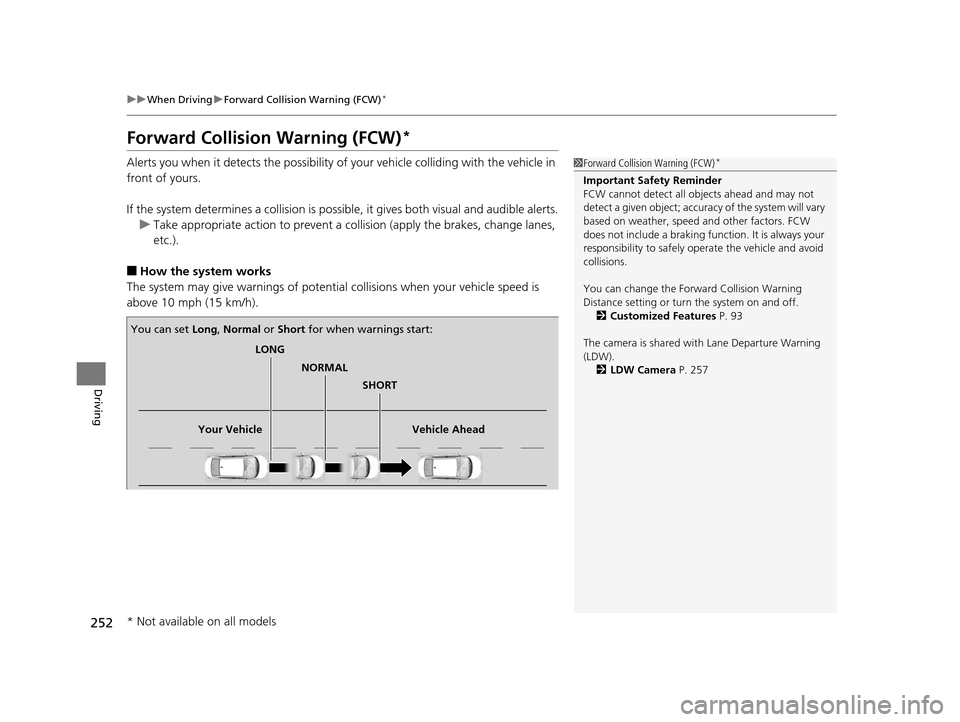
■How the system works
The system may give warnings of potential collisions when your vehicle speed is
above 10 mph (15 km/h).
1 Forward Collision Warning (FCW)*
Important Safety Reminder
FCW cannot detect all ob jects ahead and may not
detect a given object; accura cy of the system will vary
based on weather, speed and other factors. FCW
does not include a braking func tion. It is always your
responsibility to sa fely operate the vehicle and avoid
collisions.
You can change the Forward Collision Warning
Distance setting or turn the system on and off. 2 Customized Features P. 93
The camera is shared with Lane Departure Warning
(LDW). 2 LDW Camera P. 257
LONG
NORMAL SHORT
Your Vehicle Vehicle Ahead
You can set
Long, Normal or Short for when warnings start:
* Not available on all models
14 CIVIC IMA-31TR26200.book 252 ページ 2013年12月23日 月曜日 午後4時9分