Page 225 of 441

224
uuCustomized Features*u
Features
■List of customizable options
*1:Default Setting Setup
Group Customizable Features Descri
ption Selectable Settings
System
HomeHome Screen Edit OrderChanges the HOME screen icon layout.—
Display
Display
Settings
BrightnessChanges the brightness of the audio/information
screen.—
ContrastChanges the contrast of the audio/information
screen.—
Black LevelChanges the black level of the audio/information
screen.—
Background ColorChanges the background color of the audio/
information screen.Blue*1/Amber /Red /
Violet
Sound/
BeepVolumeChanges the sound volume.0 ~6*1~11
Beep VolumeChanges the beep volume.Off*1/1 /2 /3
Voice
Recog.
Voice PromptTurns the voice prompt on and off.On*1/Off
VolumeChanges the volume of the voice prompt.0 ~6*1~11
Phonebook Phonetic
ModificationModifies a voice command for the phonebook.—
Automatic Phone SyncSets a phonebook data to be automatically
imported when a phone is paired to HFL.On*1/Off
14 CIVIC 2D_SI-31TS86210.book 224 ページ 2014年1月29日 水曜日 午後8時9分
Page 226 of 441
225
uuCustomized Features*u
Continued
Features
*1:Default SettingSetup
Group Customizable Features Desc
ription Selectable Settings
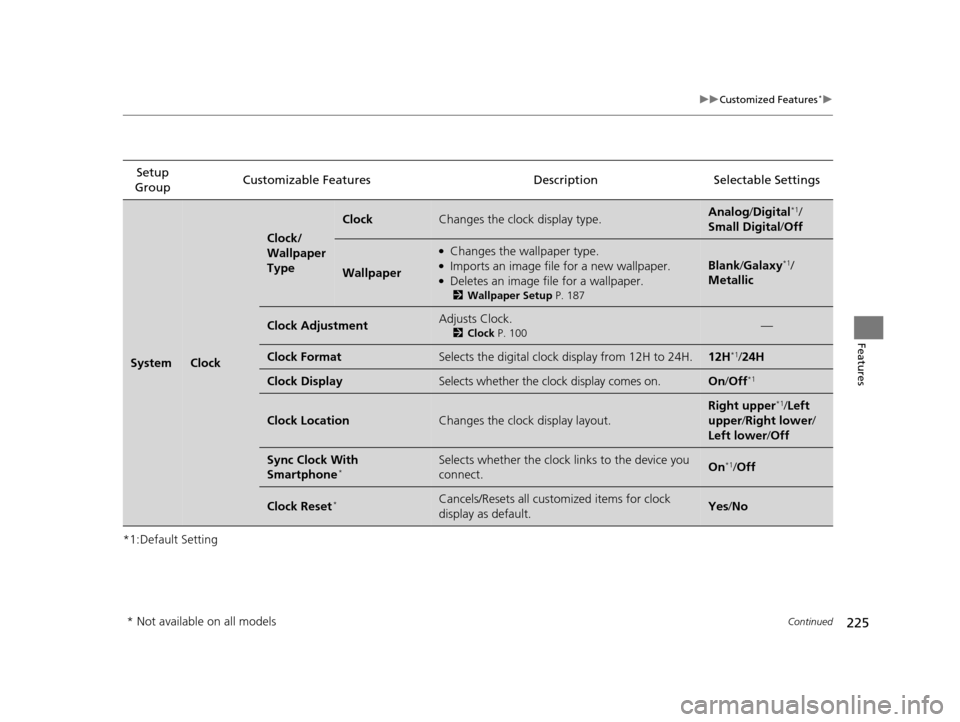
SystemClock
Clock/
Wallpaper
Type
ClockChanges the clock display type.Analog/Digital*1/
Small Digital /Off
Wallpaper
●Changes the wallpaper type.●Imports an image file for a new wallpaper.●Deletes an image file for a wallpaper.
2 Wallpaper Setup P. 187
Blank/Galaxy*1/
Metallic
Clock AdjustmentAdjusts Clock.
2 Clock P. 100—
Clock FormatSelects the digital clock display from 12H to 24H.12H*1/24H
Clock DisplaySelects whether the clock display comes on.On /Off*1
Clock LocationChanges the clock display layout.
Right upper*1/Left
upper /Right lower /
Left lower /Off
Sync Clock With
Smartphone*Selects whether the clock links to the device you
connect. On*1/ Off
Clock Reset*Cancels/Resets all cust omized items for clock
display as default. Yes /No
* Not available on all models
14 CIVIC 2D_SI-31TS86210.book 225 ページ 2014年1月29日 水曜日 午後8時9分
Page 228 of 441
227
uuCustomized Features*u
Continued
Features
*1:Default SettingSetup
Group Customizable Features Descri
ption Selectable Settings
Audio [Your selected media]
Cover Art Turns on and off the cover art display.
On
*1/Off
Display
Adjustment Display
Brightness
See System on P. 226
Contrast
Black Level
Color Color
Changes the color of the audio/information
screen. —
Tint Changes the tint of the audio/information screen. —
Aspect Ratio Adjustment Changes the aspect ratio and zoom settings of
the audio/information screen.
Normal
/Full
*1/Zoom
Change Bluetooth Audio Device Connects, disconnects or pairs a
Bluetooth®
Audio device to HFL. —
Bluetooth Device List Pairs a new phone to HFL, edits or deletes a
paired phone.
2
Phone Setup P. 240
—
Default Cancels/Resets all customized items in the Audio
group as default. Yes
/No
iPod or USB mode
HDMI ® mode
HDMI ® mode
Bluetooth ® Audio mode
Bluetooth ® Audio mode
14 CIVIC 2D_SI-31TS86210.book 227 ページ 2014年1月29日 水曜日 午後8時9分
Page 229 of 441
228
uuCustomized Features*u
Features
*1:Default SettingSetup
Group Customizable Features Descri
ption Selectable Settings
Info
Clock
Clock/Wall-
paper typeClock
See System on P. 226
Wallpaper
Clock Adjustment
Clock Format
Clock Display
Clock Location
Sync Clock With
Smartphone*
Clock Reset*
OtherInfo Screen PreferenceChanges the Info Screen type.Info Top /Info Menu /
Off*1
DefaultCancels/Resets all customized items in the Info
group as default.Yes /No
* Not available on all models
14 CIVIC 2D_SI-31TS86210.book 228 ページ 2014年1月29日 水曜日 午後8時9分
Page 230 of 441

229
uuCustomized Features*u
Continued
Features
*1:Default Setting Setup
Group Customizable Features Descri
ption Selectable Settings
Phone PhoneConnect Phone
Pairs a new phone to HFL, connects or disconnects a
paired phone.
2
Phone Setup P. 240
—
Bluetooth
Device List Pairs a new phone to HFL,
edits or deletes a paired
phone.
2 Phone Setup P. 240
—
Edit Speed Dial Edits, adds or deletes a speed dial entry.
2
Speed Dial P. 250—
Ring Tone Selects the ring tone. Fixed/Mobile Phone
*1
Automatic
Phone Sync Sets a phonebook data to be automatically imported
when a phone is paired to HFL.
On
/Off
HondaLink
Assist Turns HondaLink Assist on and off.
On/Off
*1
Text/Email Enable Text/
Email
Turns the text message/e-
mail function on and off. On
*1/Off
Select Account Selects a mail or text message account. —
New Message
Notification Selects whether a pop-up alert comes on the screen
when HFL receives a new text message/e-mail.
On
/Off
*1
Default Cancels/Resets all customized items in the
Phone and
Text/Email groups as default. Yes
/No
14 CIVIC 2D_SI-31TS86210.book 229 ページ 2014年1月29日 水曜日 午後8時9分
Page 232 of 441
231
uuCustomized Features*u
Features
*1:Default SettingSetup
Group Customizable Features Description Selectable Settings
Bluetooth Blue-
toothBluetooth On/Off Status
Changes the Bluetooth® status. On
*1/Off
Bluetooth Device List Pairs a new phone to HFL, edits or deletes a
paired phone, or creates a security PIN.
2
Phone Setup P. 240
—
Edit Pairing Code Edits
Pairing Code.
2To change the pairing code setting P. 271Random /Fixed*1
Default Cancels/Resets all customized items in the
Bluetooth
group as default. Yes
/No
14 CIVIC 2D_SI-31TS86210.book 231 ページ 2014年1月29日 水曜日 午後8時9分
Page 233 of 441
232
uuCustomized Features*uDefaulting All the Settings
Features
Defaulting All the Settings
Reset all the menu and customized settings as the factory defaults.
1. Select Settings .
2. Select System .
u Repeat the procedure to select Others
tab, then Factory Data Reset .
u The confirmation message will appear.
3. Select Yes to reset the settings.
4. Select Yes again to reset the settings.
u The confirmation message will appear.
Select OK.1Defaulting All the Settings
When you transfer the vehicle to a third party, reset
all settings to default a nd delete all personal data.
The following settings will be reset:
•Audio preset settings
•Phonebook entries•Other display and personal settings.
14 CIVIC 2D_SI-31TS86210.book 232 ページ 2014年1月29日 水曜日 午後8時9分
Page 234 of 441

233Continued
Features
Bluetooth® HandsFreeLink ®
For models with the navigation system, see the Navigation System Manual for how
to operate the Bluetooth ® HandsFreeLink®.
Bluetooth ® HandsFreeLink ® (HFL) allows you to place and receive phone calls using
your vehicle's audio system, without handling your cell phone.
Using HFL
(Pick-up) button: Press to go directly to the Phone screen or to answer an
incoming call.
(Hang-up/back) button: Press to end a call or to cancel a command.
(Talk) button: Press to call a number with a stored voice tag.
PHONE button: Press to go directly to the Phone screen.
Selector knob: Rotate to select an item on the screen, then press .
■HFL Buttons
1Bluetooth ® HandsFreeLink ®
To use HFL, you need a Bluetooth-compatible cell
phone. For a list of compatible phones, pairing
procedures, and special feature capabilities:
•U.S.: Visit www.handsfreelink.honda.com , or call
1-888-528-7876.
•Canada: Visit www.handsfreelink.ca , or call 1-888-
528 -7876.
Voice control tips
•Aim the vents away from the ceiling and close the
windows, as noise coming fr om them may interfere
with the microphone.
•Press and release the button when you want to
call a number using a st ored voice tag. Speak
clearly and naturally after a beep.
•If the microphone picks up vo ices other than yours,
the command may be misinterpreted.
•To change the volume level, use the audio system's
volume knob or the remote audio controls on the
steering wheel.
State or local laws may pr ohibit the operation of
handheld electronic devices while operating a
vehicle.
If you receive a call while using the audio system, the
system resumes its operati on after ending the call.
Models with navigation system
Models without navigation systemModels with one display
Talk Button
Volume up
Microphone
Hang-up/Back Button
Pick-up
Button
Volume
down
Selector
Knob
PHONE
Button
14 CIVIC 2D_SI-31TS86210.book 233 ページ 2014年1月29日 水曜日 午後8時9分
![HONDA CIVIC COUPE 2014 9.G Navigation Manual 227
uuCustomized Features*u
Continued
Features
*1:Default SettingSetup
Group Customizable Features Descri
ption Selectable Settings
Audio [Your selected media]
Cover Art Turns on and off the cover a](/manual-img/13/5859/w960_5859-227.png "HONDA CIVIC COUPE 2014 9.G Navigation Manual 227
uuCustomized Features*u
Continued
Features
*1:Default SettingSetup
Group Customizable Features Descri
ption Selectable Settings
Audio [Your selected media]
Cover Art Turns on and off the cover a")


