Page 118 of 441

Continued117
uuSecurity System uSecurity System Alarm
Controls
■Setting the security system alarm
The security system alarm automatically sets when the following conditions have
been met:
• The ignition switch is in LOCK
(0*1, and the key has been removed from the
ignition switch.
• The hood and trunk are closed.
• Both doors are locked with the key, the remote transmitter, or smart entry
system.
■When the security system alarm sets
The security system indicator in the in strument panel blinks. When the blinking
interval changes after about 15 seconds, the security system is set.
■To cancel the security system alarm
The security system is canc eled when the vehicle is unlocked using the remote
transmitter, smart entry system, or th e ignition switch is turned to ON
(w*1. The
security system indicator go es off at the same time.
*1: Models with the smart entry system have an ENGINE START/STOP button instead of an
ignition switch.
1 Security System Alarm
Do not set the security system alarm when someone
is in the vehicle or a window is open. The system can
accidentally activate when:
•Unlocking the door with the lock tab.•Opening the trunk with the trunk release or the
emergency trunk opener.
•Opening the hood with the hood release.
•Moving the shift lever out of ( P.
If the battery goes dead after you have set the
security system alarm, the security alarm may go off
once the battery is re charged or replaced.
If this occurs, deactivate the security system alarm by
unlocking a door using the remote transmitter.
Do not attempt to alter th is system or add another
device to it.
Automatic transmission/CVT models
14 CIVIC 2D_SI-31TS86210.book 117 ページ 2014年1月29日 水曜日 午後8時9分
Page 123 of 441
122
Controls
Operating the Switches Around the Steering Wheel
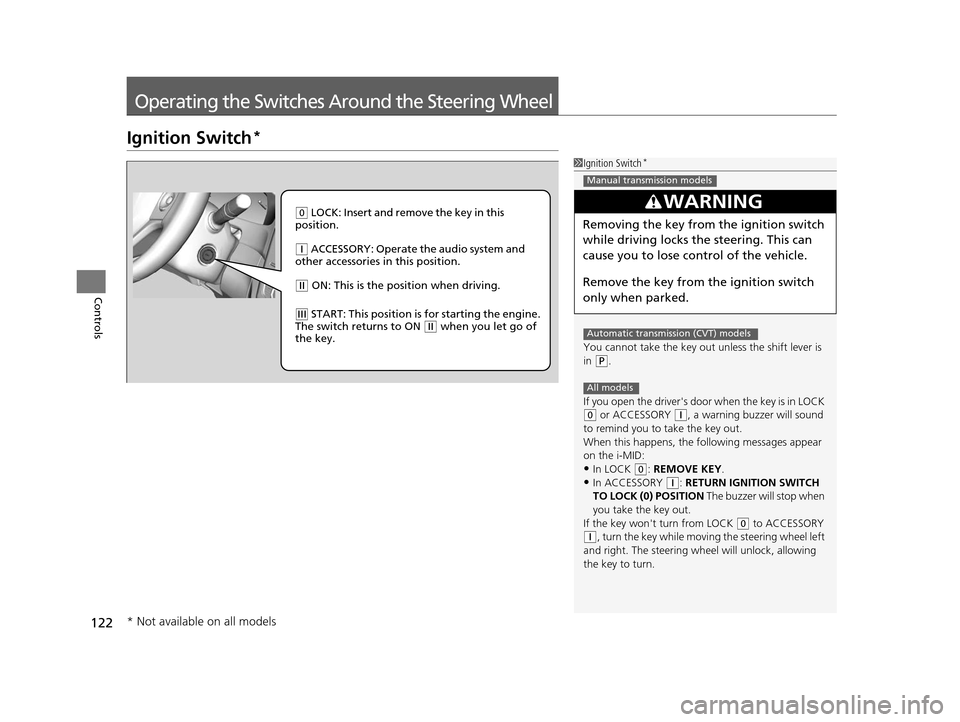
Ignition Switch*
1Ignition Switch*
You cannot take the key out unless the shift lever is
in
( P.
If you open the driver's door when the key is in LOCK
(0 or ACCESSORY ( q, a warning buzzer will sound
to remind you to take the key out.
When this happens, the following messages appear
on the i-MID:
•In LOCK ( 0: REMOVE KEY .
•In ACCESSORY (q: RETURN IGNITION SWITCH
TO LOCK (0) POSITION The buzzer will stop when
you take the key out.
If the key won't turn from LOCK
( 0 to ACCESSORY
(q, turn the key while moving the steering wheel left
and right. The steering wh eel will unlock, allowing
the key to turn.
3WARNING
Removing the key from the ignition switch
while driving locks the steering. This can
cause you to lose control of the vehicle.
Remove the key from the ignition switch
only when parked.
Manual transmission models
Automatic transmission (CVT) models
All models
( 0 LOCK: Insert and remove the key in this
position.
( q ACCESSORY: Operate the audio system and
other accessories in this position.
( w ON: This is the position when driving.
(e START: This position is for starting the engine.
The switch returns to ON ( w when you let go of
the key.
* Not available on all models
14 CIVIC 2D_SI-31TS86210.book 122 ページ 2014年1月29日 水曜日 午後8時9分
Page 124 of 441

123
uuOperating the Switches Around the Steering Wheel uENGINE START/STOP Button*
Continued
Controls
ENGINE START/STOP Button*
*1: Except U.S. models with automatic transmission (CVT)
■Changing the Power Mode1ENGINE START/STOP Button*
ENGINE START/STOP Button Operating Range
You can start the engine when the smart entry
remote is inside the vehicle.
The engine may also run if the smart entry remote is
close to the door or window, ev en if it is outside the
vehicle.
ON mode:
Indicator in the button is of f, if the engine is running.
If the smart entry remote battery is weak, the beeper
sounds and the TO START, HOLD REMOTE NEAR
START BUTTON message appears on the i-MID.
2 If the Smart Entry Remote Battery is Weak
P. 401
Do not leave the power mode in ACCESSORY or ON
when you get out.
Operating RangeAutomatic Transmission (CVT) Manual Transmission
VEHICLE OFF (LOCK)
Indicator in th e button is off.
The steering wheel is locked
*1.
The power to all electrical
components is turned off.
Press the button without the shift
lever in
( P.
Shift to
( P then press the button. Press the button.Without pressing
the clutch pedal
Without pressing
the brake pedal ACCESSORY
Indicator in the button is on.
Indicator in th
e button blinks
(from ON to ACCESSORY).
Operate the audio system and
other accessories in this position.
ON
Indicator in the button is on.
All electrical components can be
used.
Indicator
Indicator
Shift to (
P.
U.S. models
* Not available on all models
14 CIVIC 2D_SI-31TS86210.book 123 ページ 2014年1月29日 水曜日 午後8時9分
Page 125 of 441
124
uuOperating the Switches Around the Steering Wheel uENGINE START/STOP Button*
Controls
If you leave the vehicle for 30 to 60 minutes with the shift lever in (P*1 and the
power mode in ACCESSORY, the vehicle automa tically goes into the mode similar to
VEHICLE OFF (LOCK) to avoid the battery drain.
When in this mode:
The steering wheel does not lock.
You cannot lock or unlock doors with th e remote transmitter or the smart entry
system.
Press the ENGINE START/STOP button twice to switch the mode to VEHICLE OFF
(LOCK).
*1: Automatic transmission (CVT) models
■Automatic Power Off
14 CIVIC 2D_SI-31TS86210.book 124 ページ 2014年1月29日 水曜日 午後8時9分
Page 127 of 441

126
uuOperating the Switches Around the Steering Wheel uIgnition Switch and Power Mode Comparison
Controls
Ignition Switch and Power Mode Comparison
*1:Except U.S. models with automatic transmission (CVT)
Ignition Switch
PositionLOCK (0)
(with/without
the key)ACCESSORY (I)ON (II)START (III)
Without Smart Entry
System●Engine is turned off and
power is shut down.
●The steering wheel is
locked*1.●No electrical
components can be
used.
●Engine is turned off.●Some electrical
components such as the
audio system and the
accessory power socket
can be operated.
●Normal key position
while driving.
●All electrical components
can be used.
●Use this position to start
the engine.
●The ignition switch
returns to the ON (II)
position when you
release the key.
Power ModeVEHICLE OFF
(LOCK)ACCESSORYONSTART
With Smart Entry
System and ENGINE
START/STOP
ButtonIndicator-Off●Engine is turned off and
power is shut down.
●The steering wheel is
locked*1.●No electrical
components can be
used.
Indicator-On or blinking●Engine is turned off.●Some electrical
components such as the
audio system and the
accessory power socket
can be operated.
Indicator-
On (engine is turned off)
Off (engine is running)
●All electrical components
can be used.
Indicator-Off●The mode automatically
returns to ON after the
engine starts.
Indicator is: On Off
14 CIVIC 2D_SI-31TS86210.book 126 ページ 2014年1月29日 水曜日 午後8時9分
Page 221 of 441
220
Features
Customized Features*
Use the audio/information screen to customize certain features.
■How to customize
While the vehicle is at a complete stop with the power mode in ON, select Settings,
then select a setting item.
1 Customized Features*
When you customize settings:•Make sure that the vehicle is at a complete stop.
•Shift to (P.
•Set the parking brake.
To customize other features, select Settings.
2 List of customizable options P. 224
Automatic transmission (CVT) models
Manual transmission models
Audio/Information Screen
* Not available on all models
14 CIVIC 2D_SI-31TS86210.book 220 ページ 2014年1月29日 水曜日 午後8時9分
Page 292 of 441

291
Driving
This chapter discusses driving, refueling, and information on items such as accessories.
Before Driving
Driving Preparation .......................... 292
Maximum Load Limit........................ 295
Towing a Trailer
Towing Your Vehicle ........................ 297
When Driving Starting the Engine .................. 298, 300
Precautions While Driving................. 303
Automatic Transmission (CVT) .......... 304
Shifting ............................ 305, 307, 311
ECON Button
*................................. 314 Cruise Control ................................. 315
Vehicle Stability Assist (VSA®), aka Electronic
Stability Control (ESC), System ............... 318
LaneWatch
TM*.......................................... 320
Tire Pressure Monitoring System (TPMS) ... 322
Tire Pressure Monitoring System (TPMS) - Required Federal Explanation ............. 324
Braking
Brake System ................................... 326
Anti-lock Brake System (ABS) ........... 328
Brake Assist System.......................... 329 Parking Your Vehicle
When Stopped ................................ 330
Rearview Camera
*............................ 331
Refueling Fuel Information .............................. 332
How to Refuel ................................. 333
Fuel Economy Improving Fuel Economy .................. 335
Accessories and Modifications Accessories ...................................... 336
Modifications................................... 336
* Not available on all models
14 CIVIC 2D_SI-31TS86210.book 291 ページ 2014年1月29日 水曜日 午後8時9分
Page 299 of 441

298
Driving
When Driving
Starting the Engine
1.Make sure the parking brake is applied.
2. Check that the shift lever is in
(P, then
depress the brake pedal.
u Although it is possible to start the vehicle
in
(N, it is safer to start it in (P.
2. Check that the shift lever is in
(N. Then
depress the brake pedal with your right
foot, and the clutch pedal with your left
foot.
u The clutch pedal must be fully depressed
to start the engine.
Models without smart entry system
1Starting the Engine
Keep your foot firmly on the brake pedal when
starting the engine.
The engine is harder to st art in cold weather and in
thinner air found at altitudes above 8,000 feet (2,400
meters).
When starting the engine in cold weather, turn off all
electrical accessories such as the lights, heating and
cooling system
*/climate control system*, and rear
defogger in order to reduce battery drain.
If you live in a region where winter is extremely cold,
an engine block heater will improve starting and
warming of the engine. If temperatures consistently
below -22°F (-30°C) are expected, the coolant
mixture should be changed to a higher concentration
to prevent freezing. Cons ult a dealer for details.
If the exhaust system sounds abnormal or you can
smell exhaust gas inside the vehicle, have your vehicle
checked by a dealer. There may be a problem with
the engine or exhaust system.Brake PedalAutomatic transmission (CVT) models
Brake Pedal
Clutch Pedal
Manual transmission models
* Not available on all models
14 CIVIC 2D_SI-31TS86210.book 298 ページ 2014年1月29日 水曜日 午後8時9分

