Page 156 of 561
155
Continued
Controls
Interior Lights/Interior Convenience Items
Interior Lights
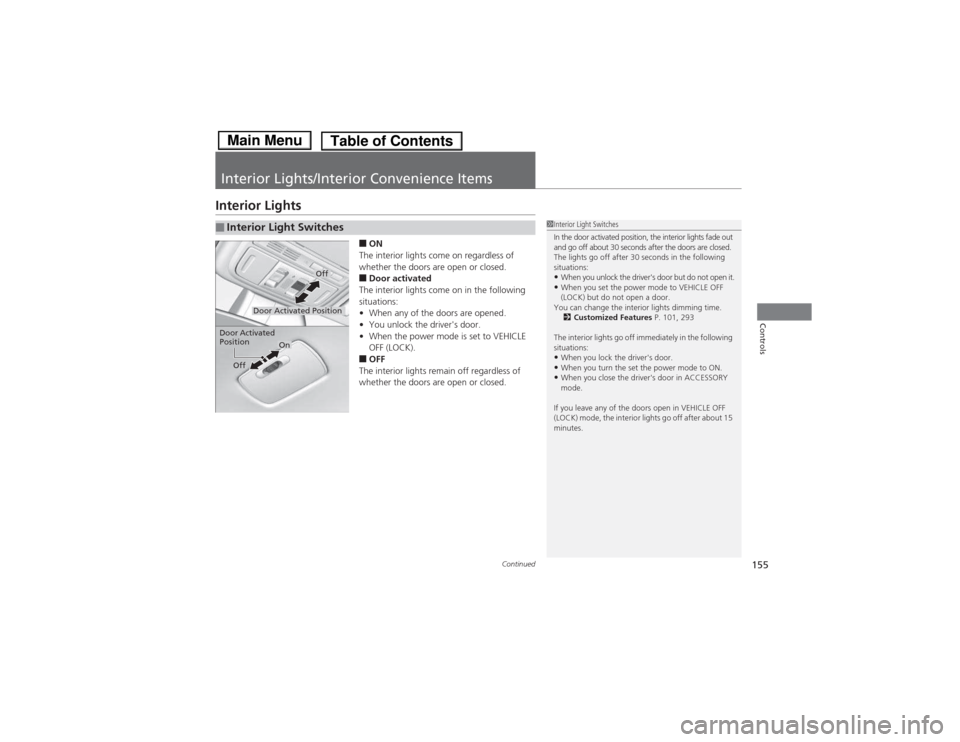
■ON
The interior lights come on regardless of
whether the doors are open or closed. ■ Door activated
The interior lights come on in the following situations: • When any of the doors are opened.
• You unlock the driver's door.
• When the power mode is set to VEHICLE
OFF (LOCK).
■ OFF
The interior lights remain off regardless of
whether the doors are open or closed.
■Interior Light Switches1Interior Light Switches
In the door activated position, the interior lights fade out
and go off about 30 seconds after the doors are closed.
The lights go off after 30 seconds in the following
situations: • When you unlock the driver's door but do not open it.
• When you set the power mode to VEHICLE OFF
(LOCK) but do not open a door.
You can change the interior lights dimming time. 2 Customized Features P. 101, 293
The interior lights go off immediately in the following
situations:
• When you lock the driver's door.
• When you turn the set the power mode to ON.
• When you close the driver's door in ACCESSORY
mode.
If you leave any of the doors open in VEHICLE OFF
(LOCK) mode, the interior lights go off after about 15
minutes.
Door Activated Position
Off
Door Activated Position
On
Off
Main MenuTable of Contents
Page 176 of 561

175
Features
Audio System Basic Operation
To use the audio system function, the power mode must be in ACCESSORY or ON.Use the selector knob or MENU button to
access some audio functions.
Press to switch between the normal and
extended display for some functions.
Selector knob: Rotate left or right to scroll
through the available choices. Press to set
your selection.
MENU button: Press to select any mode.
The available mode includes Change Source,
Station List , Save Preset , Radio Text ,
Music Search , and play modes. Play modes
can be also selected from Scan, Random/
Repeat , and so on.
BACK button: Press to go back to the
previous display.
button: Press to change the audio/
information screen brightness.
Press once and make an adjustment.
uEach time you press , the mode
switches between the daytime mode,
nighttime mode and OFF mode.
Models with one display1Audio System Basic Operation
These indications are used to show how to operate
the selector knob.
Rotate to select.
Press to enter.
Audio Menu Items
2 Station List P. 183
2 Radio text P. 183
2 Music Search P. 185, 188, 193
2 Scan P. 186, 194
2 Random/Repeat P. 186, 189, 194
ButtonSelector Knob
MENU ButtonBACK Button
Main MenuTable of Contents
Page 179 of 561

uuAudio System Basic OperationuAudio/Information Screen
178
Features
You can change, store, and delete the wallpaper on the audio/information screen. ■ Import wallpaper
You can import up to three images, one at a time, for wallpaper from a USB flash
drive. 1.Connect the USB flash drive to the USB port.
2 USB Port P. 171
2. Press the SETTINGS button.
3. Rotate to select System Settings, then
press .
uRepeat the procedure to select Clock,
Clock/Wallpaper Type , then
Wallpaper .
4. Rotate to select Add New Wallpaper ,
then press .
uThe preview of the imported data is
displayed.
5. Rotate to select a desired picture.
uThe preview is displayed on the left side
on the screen.
6. Press to save the data.
uThe confirmation message will appear.
Then the display will return to the
wallpaper list.
■Wallpaper Setup1Wallpaper Setup •When importing wallpaper files, the image must be
in the USB flash drive’s root directory.
Images in a folder cannot be imported.
• The file name must be fewer than 64 characters.
• The file format of the image that can be imported
is BMP (bmp) or JPEG (jpg).
• The individual file size limit is 2 MB.
• The maximum image size is 1,680 x 936 pixels. If
the image size is less than 420 × 234 pixels, the
image is displayed in the middle of the screen with
the extra area appearing in black.
• Up to 255 files can be selected.
• If the USB flash drive does not have any pictures, the No files detected message appears.
Main MenuTable of Contents
Page 184 of 561

183
uuAudio System Basic OperationuPlaying AM/FM Radio
Features
Provides text data information related to your selected RDS-capable FM station. ■To find an RDS station from Station List
1. Press while listening to an FM station.
2. Rotate to select the station, then press .
■ Manual update
Updates your available station list at any time. 1. Press while listening to an FM station.
2. Rotate to select Refresh, then press .
■ Radio text
Displays the radio text information of the selected RDS station. 1. Press the MENU button.
2. Rotate to select Radio Text, then press .
■ Scan
Samples each of the strongest stations on the selected band for 10 seconds. 1. Press the MENU button.
2. Rotate to select Scan, then press .
To turn off scan, press to select Stop, or press the BACK button.
■Radio Data System (RDS)1Playing AM/FM Radio
The ST indicator appears on the display indicating
stereo FM broadcasts.
Stereo reproduction in AM is not available.
Switching the Audio Mode
Press the SOURCE button on the steering wheel.
2 Audio Remote Controls P. 174
You can also switch the mode by pressing the MENU
button and selecting Change Source on the MENU
screen.
You can store 6 AM stations and 12 FM stations into
the preset memory.
1Radio Data System (RDS)
When you select an RDS-capable FM station, the RDS
automatically turns on, and the frequency display
changes to the station name. However, when the
signals of that station become weak, the display
changes from the station name to the frequency.
Main MenuTable of Contents
Page 198 of 561
197
Features
Audio System Basic Operation
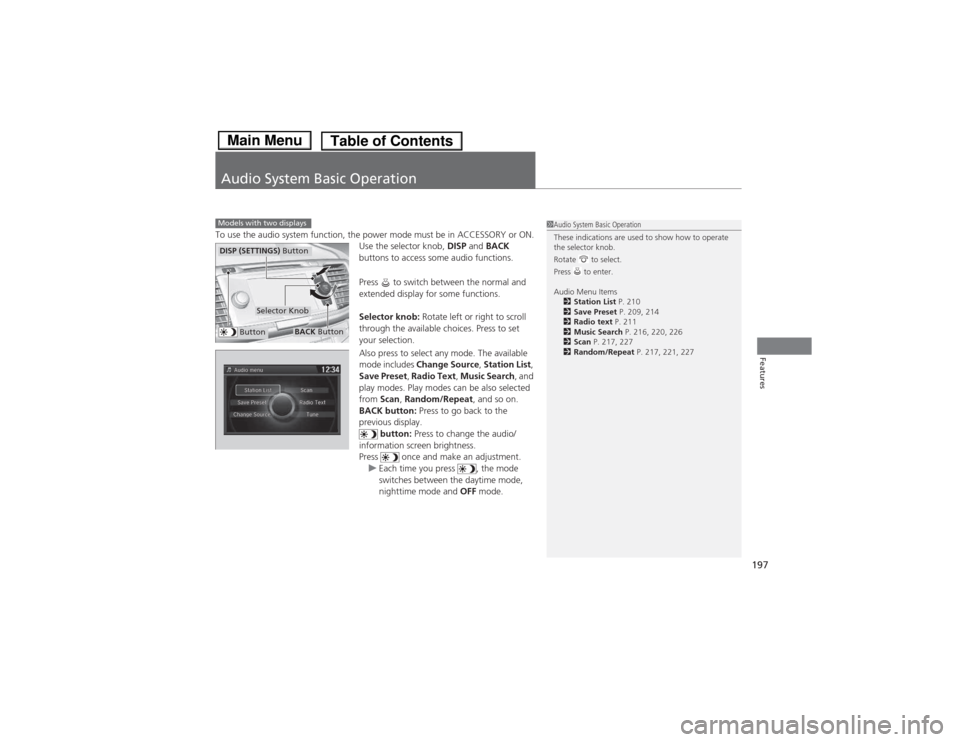
To use the audio system function, the power mode must be in ACCESSORY or ON.Use the selector knob, DISP and BACK
buttons to access some audio functions.
Press to switch between the normal and
extended display for some functions.
Selector knob: Rotate left or right to scroll
through the available choices. Press to set
your selection.
Also press to select any mode. The available
mode includes Change Source , Station List ,
Save Preset , Radio Text , Music Search , and
play modes. Play modes can be also selected from Scan, Random/Repeat , and so on.
BACK button: Press to go back to the
previous display. button: Press to change the audio/
information screen brightness.
Press once and make an adjustment.
uEach time you press , the mode
switches between the daytime mode,
nighttime mode and OFF mode.
Models with two displays1Audio System Basic Operation
These indications are used to show how to operate
the selector knob.
Rotate to select.
Press to enter.
Audio Menu Items
2 Station List P. 210
2 Save Preset P. 209, 214
2 Radio text P. 211
2 Music Search P. 216, 220, 226
2 Scan P. 217, 227
2 Random/Repeat P. 217, 221, 227
Button
Selector Knob
DISP (SETTINGS) Button
BACK Button
Main MenuTable of Contents
Page 200 of 561
Continued199
uuAudio System Basic OperationuAudio with Touch Screen
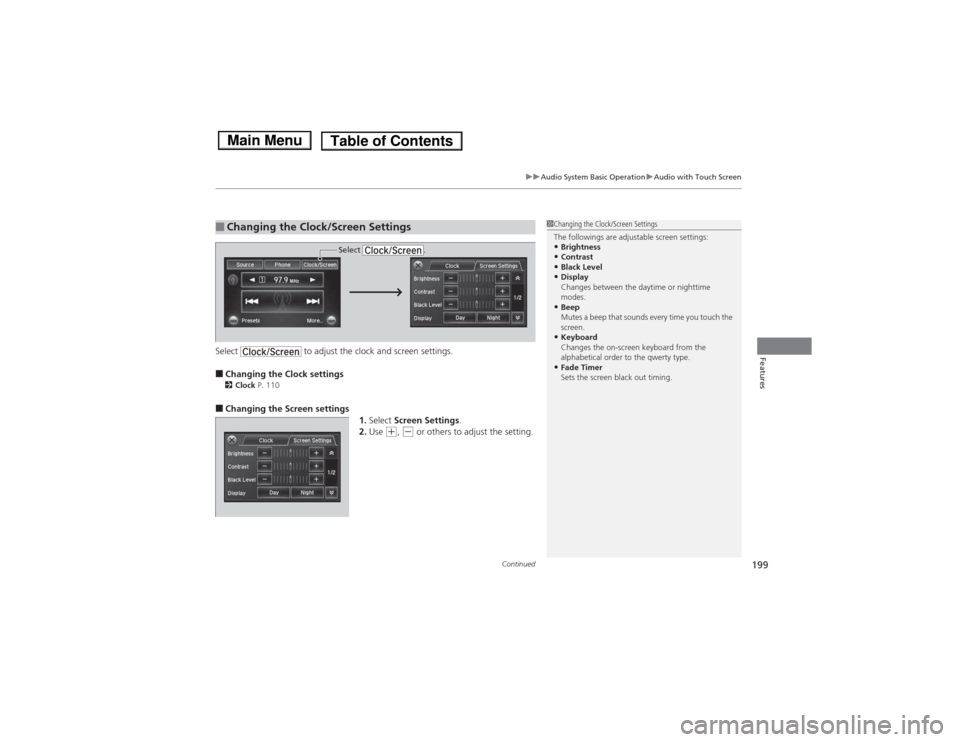
FeaturesSelect to adjust the clock and screen settings. ■Changing the Clock settings
2 Clock P. 110
■ Changing the Screen settings
1.Select Screen Settings .
2. Use
(+ , (- or others to adjust the setting.
■Changing the Clock/Screen Settings1Changing the Clock/Screen Settings
The followings are adjustable screen settings: •Brightness
• Contrast
• Black Level
• Display
Changes between the daytime or nighttime
modes.
• Beep
Mutes a beep that sounds every time you touch the
screen.
• Keyboard
Changes the on-screen keyboard from the
alphabetical order to the qwerty type.
• Fade Timer
Sets the screen black out timing.
Select .
Main MenuTable of Contents
Page 205 of 561

uuAudio System Basic OperationuAudio/Information Screen
204
Features
You can change, store, and delete the wallpaper on the audio/information screen. ■ Import wallpaper
You can import up to three images, one at a time, for wallpaper from a USB flash
drive. 1.Connect the USB flash drive to the USB port.
2 USB Port P. 171
2. Press and hold the DISP button to go to the
Settings screen.
3. Rotate to select System Settings, then
press .
uRepeat the procedure to select Clock,
Clock/Wallpaper Type , then
Wallpaper .
4. Rotate to select Add New, then press .
uThe picture name is displayed on the list.
5. Rotate to select a desired picture.
uThe preview is displayed on the left side
on the screen.
6. Press to save the data.
uThe confirmation message will appear.
Then the display will return to the
wallpaper list.
■Wallpaper Setup1Wallpaper Setup •When importing wallpaper files, the image must be
in the USB flash drive’s root directory.
Images in a folder cannot be imported.
• The file name must be fewer than 64 characters.
• The file format of the image that can be imported
is BMP (bmp) or JPEG (jpg).
• The individual file size limit is 2 MB.
• The maximum image size is 1,680 x 936 pixels. If
the image size is less than 420 × 234 pixels, the
image is displayed in the middle of the screen with
the extra area appearing in black.
• Up to 255 files can be selected.
• If the USB flash drive does not have any pictures, the No files detected message appears.
Main MenuTable of Contents
Page 211 of 561
uuAudio System Basic OperationuPlaying AM/FM Radio
210
Features
Provides text data information related to your selected RDS-capable FM station. ■ To find an RDS station from Station List
1. Press to switch to the Audio menu screen while listening to an FM station.
2. Rotate to select Station List, then press .
3. Rotate to select the station, then press .
■ Manual update
Updates your available station list at any time. 1. Press to switch to the Audio menu screen while listening to an FM station.
2. Rotate to select Station List, then press .
3. Rotate to select UPDATE LIST, then press .
■Radio Data System (RDS)1Radio Data System (RDS)
When you select an RDS-capable FM station, the RDS
automatically turns on, and the frequency display
changes to the station name. However, when the
signals of that station become weak, the display
changes from the station name to the frequency.
Main MenuTable of Contents