Page 303 of 593
302
uuCustomized Features u
Features
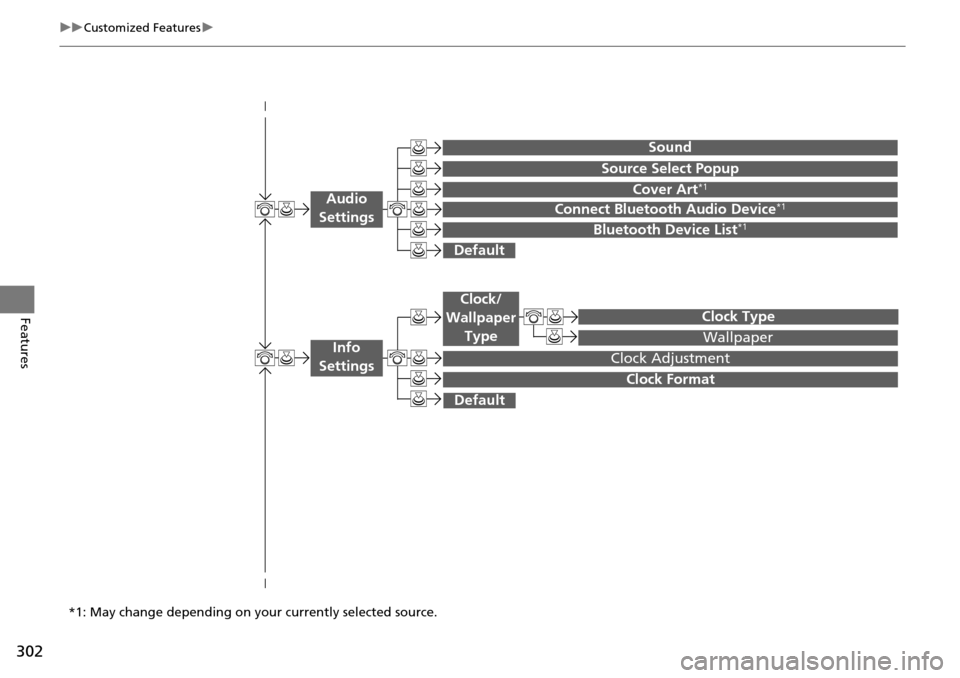
Wallpaper
Source Select Popup
Clock Type
Sound
Default
Cover Art*1
Connect Bluetooth Audio Device*1
Bluetooth Device List*1
Default
Clock Adjustment
Clock Format
Audio
Settings
Clock/
Wallpaper Type
Info
Settings
*1: May change depending on your currently selected source.
Page 307 of 593
306
uuCustomized Features u
Features
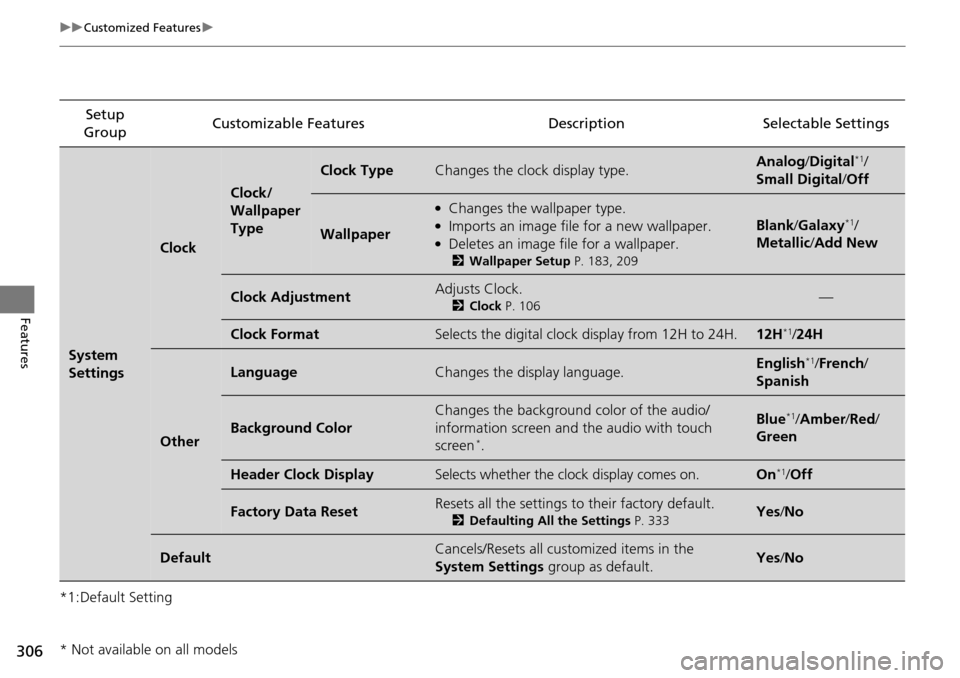
*1:Default SettingSetup
Group Customizable Features Descri
ption Selectable Settings
System
Settings
Clock
Clock/
Wallpaper
Type
Clock TypeChanges the clock display type.Analog/Digital*1/
Small Digital /Off
Wallpaper
●Changes the wallpaper type.●Imports an image file for a new wallpaper.●Deletes an image file for a wallpaper.
2 Wallpaper Setup P. 183, 209
Blank/Galaxy*1/
Metallic /Add New
Clock AdjustmentAdjusts Clock.
2 Clock P. 106—
Clock FormatSelects the digital clock display from 12H to 24H.12H*1/24H
Other
LanguageChanges the display language.English*1/French /
Spanish
Background Color
Changes the background color of the audio/
information screen and the audio with touch
screen
*.
Blue*1/ Amber /Red/
Green
Header Clock DisplaySelects whether the clock display comes on.On*1/ Off
Factory Data ResetResets all the settings to their factory default.
2 Defaulting All the Settings P. 333Yes/No
DefaultCancels/Resets all cust omized items in the
System Settings group as default.Yes/No
* Not available on all models
Page 312 of 593
311
uuCustomized Features u
Continued
Features
Setup
Group Customizable Features
DescriptionSelectable Settings
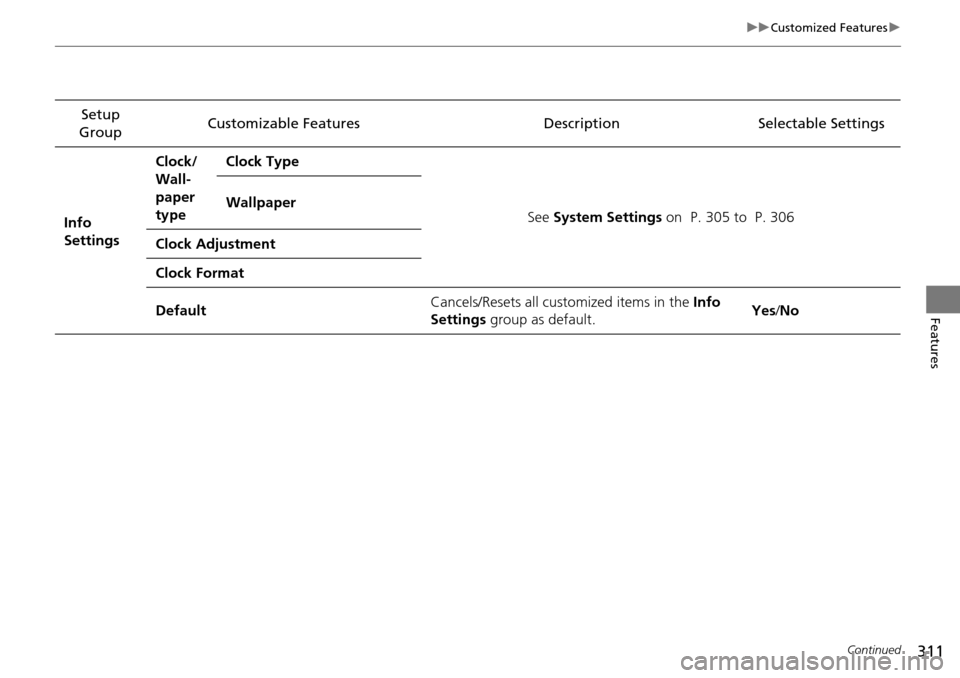
Info
Settings Clock/
Wall-
paper
type
Clock Type
See System Settings on P. 305 to P. 306
Wallpaper
Clock Adjustment
Clock Format
Default Cancels/Resets all customized items in the
Info
Settings group as default. Yes
/No
Page 318 of 593
317
uuCustomized Features u
Continued
Features
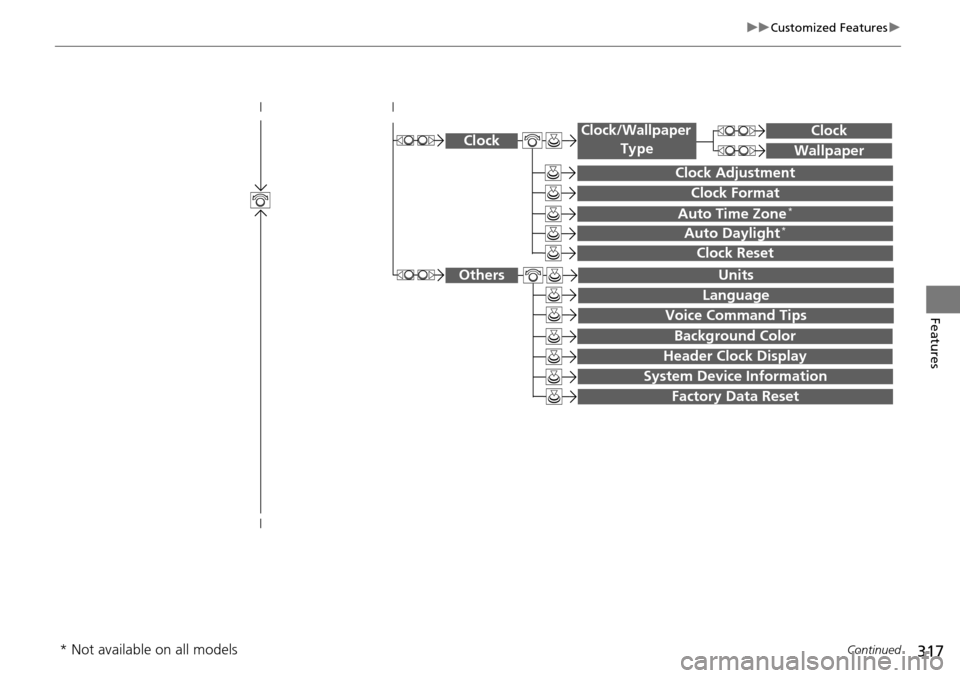
System Device Information
Factory Data Reset
Background Color
Header Clock Display
Clock Reset
Auto Time Zone*
Auto Daylight*
Clock
Clock Adjustment
Clock Format
Clock
Units
Language
Voice Command Tips
Others
Wallpaper
Clock/Wallpaper
Type
* Not available on all models
Page 322 of 593
321
uuCustomized Features u
Continued
Features
Auto Daylight*
Clock Reset
Info Screen Preference
Clock Format
Auto Time Zone*
Clock/Wallpaper Type
Clock Adjustment
Clock
Default
Others
Info
Settings
Navi
SettingsSee Navigation System Manual.
* Not available on all models
Page 324 of 593

323
uuCustomized Features u
Continued
Features
*1:Default SettingSetup
Group Customizable Features Description Selectable Settings
System
Settings
Voice
Rec
VolumeChanges the volume of the voice prompt.—
Voice PromptTurns the voice prompt on and off.On*1/
Off
Song by VoiceTurns the Song By VoiceTM on and off.
2 Song By VoiceTM (SBV) P. 276On*1/Off
Song by Voice Phonetic
ModificationModifies a voice command for music stored in
the HDD or an iPod.
2 Phonetic Modification P. 278—
Phonebook Phonetic
ModificationModifies a voice command for the phonebook.
2Phonebook Phonetic Modification P. 396—
Clock
Clock/
Wallpaper
Type
ClockChanges the clock display type.Analog/Digital*1/
Small Digital/ Off
Wallpaper
●Changes the wallpaper type.●Imports an image file for a new wallpaper.●Deletes an image file for a wallpaper.2Wallpaper Setup P. 240
Blank/Galaxy*1/
Metallic
Clock AdjustmentAdjusts Clock.
2 Clock P. 106—
Clock FormatSelects the digital clock display from 12H to 24H.12H*1/24H
Auto Time Zone*Sets the navigation syst em to automatically
adjust the clock when driving through different
time zones.On*1/ Off
* Not available on all models
Page 325 of 593

324
uuCustomized Features u
Features
*1:Default SettingSetup
Group Customizable Features Descri
ption Selectable Settings
System
Settings
ClockAuto Daylight*Sets the navigation system to automatically adjust
the clock (“spring ahead” or “fall back” by one
hour) when a daylight saving time change occurs.
On*1/Off
Clock ResetResets the settings of all items in the Clock group.—
Others
UnitsChanges the distance unit on the navigation map
screen.mile*1/km (U.S.)
mile /km*1 (Canada)
LanguageChanges the display language.English*1/French /
Spanish
Voice Command Tips
Alerts you when manual control of the system is
disabled to prevent distraction while driving. Only
voice commands are available.
On*1/ Off
Background ColorChanges the background color of the audio/
information screen and the audio with touch screen.Blue*1/Amber /Red/
Green
Header Clock DisplaySelects whether the clock display comes on.On*1/ Off
System Device InformationDisplays the system /Device information.—
Factory Data ResetResets all the settings to their factory default.
2Defaulting All the Settings P. 334—
DefaultCancels /Resets all customized items in the
System Settings group as default.Default/OK
* Not available on all models
Page 333 of 593
332
uuCustomized Features u
Features
*1:Default SettingSetup
Group Customizable Features Descri
ption Selectable Settings
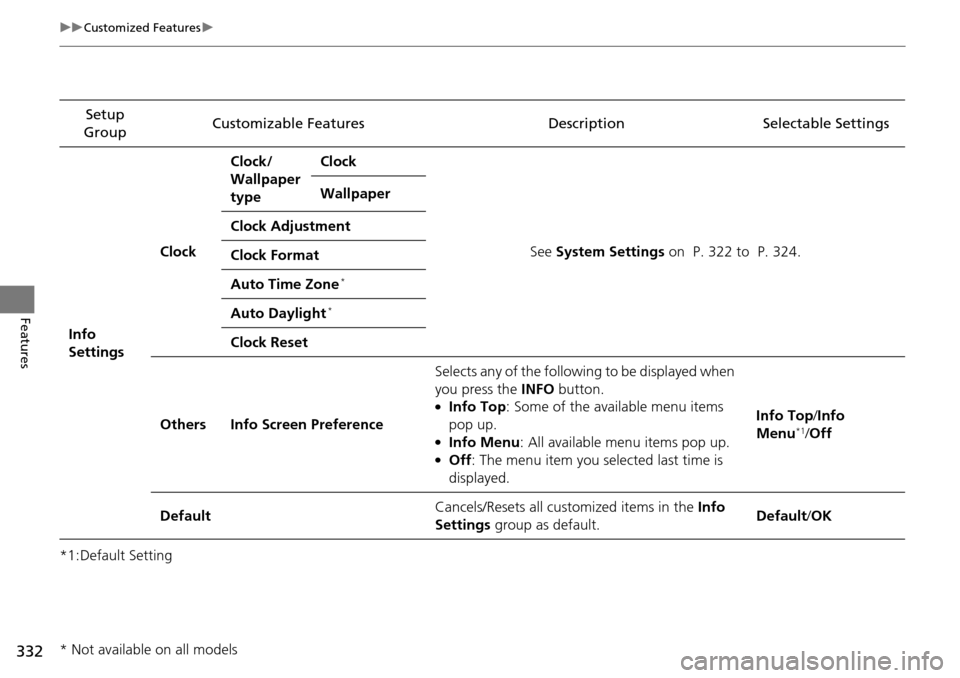
Info
Settings Clock
Clock/
Wallpaper
type
Clock
See System Settings on P. 322 to P. 324.
Wallpaper
Clock Adjustment
Clock Format
Auto Time Zone
*
Auto Daylight*
Clock Reset
Others Info Screen Preference Selects any of the following to be displayed when
you press the
INFO button.
●Info Top : Some of the available menu items
pop up.
●Info Menu: All available menu items pop up.●Off : The menu item you selected last time is
displayed. Info Top
/Info
Menu
*1/ Off
Default Cancels/Resets all cust
omized items in the Info
Settings group as default. Default
/OK
* Not available on all models