Page 78 of 593
77
uuIndicators u
Continued
Instrument Panel
*1:Models with the smart entry system have an ENGINE START/STOP button instead of an ignition switch.
IndicatorNameOn/BlinkingExplanationMessage*
Fog Light
Indicator*
●Comes on when the fog lights are
on.——
Immobilizer
System Indicator
●Comes on briefly when you turn the
ignition switch to ON
(w*1, then
goes off.
●Comes on if the immobilizer system
cannot recognize the key
information.
●Blinks - You cannot start the engine.
Turn the ignition switch to LOCK
(0*1,
pull the key out, and then insert the key
and turn it to ON
(w*1 again.●Repeatedly blinks - The system may
be malfunctioning. Have the vehicle
checked by a dealer.
●Do not attempt to alter this system or
add other devices to it. Electrical
problems can occur.
—
Security System
Alarm Indicator
●Blinks when the security system
alarm has been set.
2 Security System Alarm P. 124—
Indicator
* Not available on all models
Page 79 of 593

78
uuIndicators u
Instrument Panel
*1:Models with the smart entry system have an ENGINE START/STOP button instead of an ignition switch.
*2:On the left: Models with information display On the right: Models with multi-information display
IndicatorNameOn/BlinkingExplanationMessage*2
Forward
Collision
Warning
(FCW )
Indicator
*
●Comes on for a few seconds
when you turn the ignition
switch to ON
(w*1, then goes off.●Comes on when you have
customized FCW to turn off.
●Comes on if there is a problem
with the FCW system.
●Stays on constantly without FCW off - Have the vehicle
checked by a dealer.
●Blinks when the system detects
a likely collision with a vehicle in
front of you. The beeper sounds.
●Blinks while driving - Take appropriate action to prevent
a collision (apply the br akes, change lanes, etc.).
——
●Comes on when the FCW
system shuts itself off.●Stays on - The temperature inside the FCW system is too high.
The system activates when the temperature inside the system
cools down.
2 Automatic shutoff P. 458
—
●Stays on - The radar sensor or the area around the camera is
blocked by dirt, mud, etc. Stop your vehicle in a safe place, and
wipe it off with a soft cloth.
●Have your vehicle checked by a dealer if:
The indicator and message stay on after you cleaned the
radar sensor cover.
The indicator and message come back on after you cleaned
the area around the camera.
2 Automatic shutoff P. 458
2Automatic shutoff P. 458——
Models with information display
All modelsModels with information display
Models with multi- information display
Models with information display
* Not available on all models
Page 80 of 593

79
uuIndicators u
Continued
Instrument Panel
*1:Models with the smart entry system have an ENGINE START/STOP button instead of an ignition switch.
*2:On the left: Models wi th information display
On the right: Models with multi-information display
IndicatorNameOn/BlinkingExplanationMessage*2
Lane Departure
Warning (LDW)
Indicator
*
●Comes on for a few seconds when
you turn the ignition switch to ON
(w*1, then goes off.●Comes on if there is a problem with
the LDW system.
●Stays on constantly - Have the vehicle
checked by a dealer.
●Blinks when your ve hicle is too close
to the lane lines. The beeper sounds.
●Blinks while driving - Take
appropriate action to keep your vehicle
within the lane lines.
——
●Comes on when the LDW system
shuts itself off.●Stays on - The temperature inside the
LDW camera is too high.
The system acti vates when the
temperature inside the camera cools
down.
2 LDW Camera P. 461
●Stays on - The area around the camera
is blocked by dirt, mud, etc. Stop your
vehicle in a safe place, and wipe it off
with a soft cloth.
●Have your vehicle checked by a dealer if
the indicator and message come back
on after you cleaned the area around
the camera.
2 LDW Camera P. 461
Models with info rmation display
* Not available on all models
Page 81 of 593

80
uuIndicators u
Instrument Panel
*1:Models with the smart entry system have an ENGINE START/STOP button instead of an ignition switch.
IndicatorNameOn/BlinkingExplanationMessage*
Adaptive Cruise
Control (ACC)
Indicator
(Amber)
*
●Comes on for a few seconds when
you turn the ignition switch to ON
(w*1, then goes off.●Comes on if there is a problem with
ACC.
●Comes on while driving - Have the
vehicle checked by a dealer.
ECON Mode
Indicator
●Comes on for a few seconds when
you turn the ignition switch to ON
(w*1, then goes off.●Comes on when you press the
ECON button.
2ECON Button P. 444
CRUISE MAIN
Indicator*●Comes on when you press the
CRUISE button.2Cruise Control * P. 445—
CRUISE
CONTROL
Indicator
*
●Comes on if you have set a speed for
cruise control.
2 Cruise Control * P. 445—
Washer Level
Indicator*
●Comes on when the washer fluid
gets low.●Refill the washer fluid.
2Refilling Window Washer Fluid
P. 510—
Maintenance
Minder Indicator*
●Comes on when the scheduled
maintenance is due soon.2 Maintenance MinderTM P. 487—
* Not available on all models
Page 82 of 593

81
uuIndicators u
Instrument Panel
*1:Models with the smart entry system have an ENGINE START/STOP button instead of an ignition switch.
IndicatorNameOn/BlinkingExplanationMessage*
Smart Entry
System
Indicator
*
●Comes on for a few seconds when
you change the power mode to ON.
●Comes on as soon as a problem is
detected in the smart entry system
or push button starting system.
●Stays on constantly or does not come
on at all - Have your vehicle checked by a
dealer.
Starter System
Indicator*
●Comes on for a few seconds when
you turn the ignition switch to ON
(w*1, then goes off.●Comes on if the starter system has a
problem.
●As a temporary measure, press and hold
the ENGINE START/STOP button for up to
15 seconds while pressing the brake pedal
and manually start the engine. Have the
vehicle checked by a dealer.
—
Light Control
Indicator*
●Comes on if there is a problem with
the automatic lighting control
system or low beam headlights
*.
●Comes on while driving - Turn the lights
on manually and have the vehicle checked
by a dealer.
—
U.S.
Canada
* Not available on all models
Page 90 of 593

89
Instrument Panel
Gauges and Displays
Gauges
Gauges include the speedometer, tachometer, fuel gauge, and related indicators.
They are displayed when the ignition switch is in ON
(w*1.
Displays your driving speed in mph (U.S.) or km/h (Canada).
Shows the number of engine revolutions per minute.
Displays the amount of fuel left in the fuel tank.
Displays the temperature of the engine coolant.
*1: Models with the smart entry system have an ENGINE START/STOP button instead of an
ignition switch.
■Speedometer
■Tachometer
■Fuel Gauge
■Temperature Gauge
1 Fuel Gauge
NOTICE
You should refuel when the reading approaches .
Running out of fuel can cause the engine to misfire,
damaging the cata lytic converter.
The actual amount of remain ing fuel may differ from
the fuel gauge reading.E
1 Temperature Gauge
NOTICE
Driving with the temperat ure gauge pointer in the
upper zone can cause serious engine damage. Pull
safely to the side of th e road and allow engine
temperature to return to normal. 2 Overheating P. 556
Page 93 of 593

uuGauges and Displays uInformation Display*
92
Instrument Panel
Shows the outside temperature in Fahr enheit (U.S.) or Celsius (Canada).
■Adjusting the outside temperature indicator
Adjust the temperature reading up to ± 5° F or ± 3°C if the temperature reading
seems incorrect.
1. Turn the ignition switch to ON
(w*1.
2. Press and hold the (Select/Reset) kn ob for 10 seconds or more while the
outside temperature is show n on the information display.
u The information display goes into temp erature adjustment mode. The display
starts showing from -5°F to +5°F (U .S.) or -3°C to +3°C (Canada).
3. Release the knob when the righ t adjustment amount is shown.
u The adjustment is complete.
Shows the estimated distance you can travel on the remaining fuel. This distance is
estimated from the fuel economy of your previous trips.
*1: Models with the smart entry system have an ENGINE START/STOP button instead of an
ignition switch.
■Outside Temperature*
■Range
1 Outside Temperature*
The temperature sensor is in the front bumper.
Road heat and exhaust from another vehicle can
affect the temperature reading when your vehicle
speed is less than 19 mph (30 km/h).
It may take several minutes for the display to be
updated after the temperature reading has stabilized.
1Adjusting the outside temperature indicator
Adjust the temperature read ing up to ± 5°F or ± 3°C.
* Not available on all models
Page 103 of 593
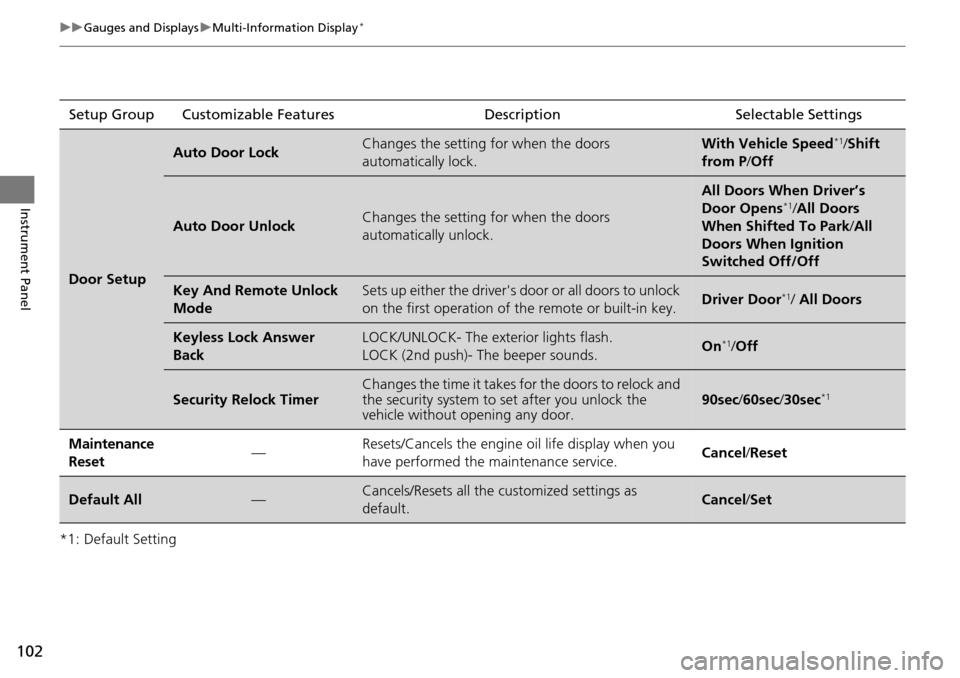
102
uuGauges and Displays uMulti-Information Display*
Instrument Panel
*1: Default SettingSetup Group Customizable Features Description Selectable Settings
Door Setup
Auto Door LockChanges the setting for when the doors
automatically lock.With Vehicle Speed*1/
Shift
from P /Off
Auto Door UnlockChanges the setting for when the doors
automatically unlock.
All Doors When Driver’s
Door Opens*1/All Doors
When Shifted To Park /All
Doors When Ignition
Switched Off/Off
Key And Remote Unlock
ModeSets up either the driver's door or all doors to unlock
on the first operation of the remote or built-in key.Driver Door*1/ All Doors
Keyless Lock Answer
BackLOCK/UNLOCK- The exterior lights flash.
LOCK (2nd push)- The beeper sounds.On*1/ Off
Security Relock TimerChanges the time it takes for the doors to relock and
the security system to set after you unlock the
vehicle without opening any door.90sec /60sec /30sec*1
Maintenance
Reset—Resets/Cancels the engine oil life display when you
have performed the maintenance service. Cancel /Reset
Default All—Cancels/Resets all the customized settings as
default.Cancel /Set
