2014 GMC TERRAIN park assist
[x] Cancel search: park assistPage 178 of 360
Black plate (22,1)GMC Terrain/Terrain Denali Owner Manual (GMNA-Localizing-U.S./Canada/
Mexico-6081485) - 2014 - CRC - 12/6/13
9-22 Driving and Operating
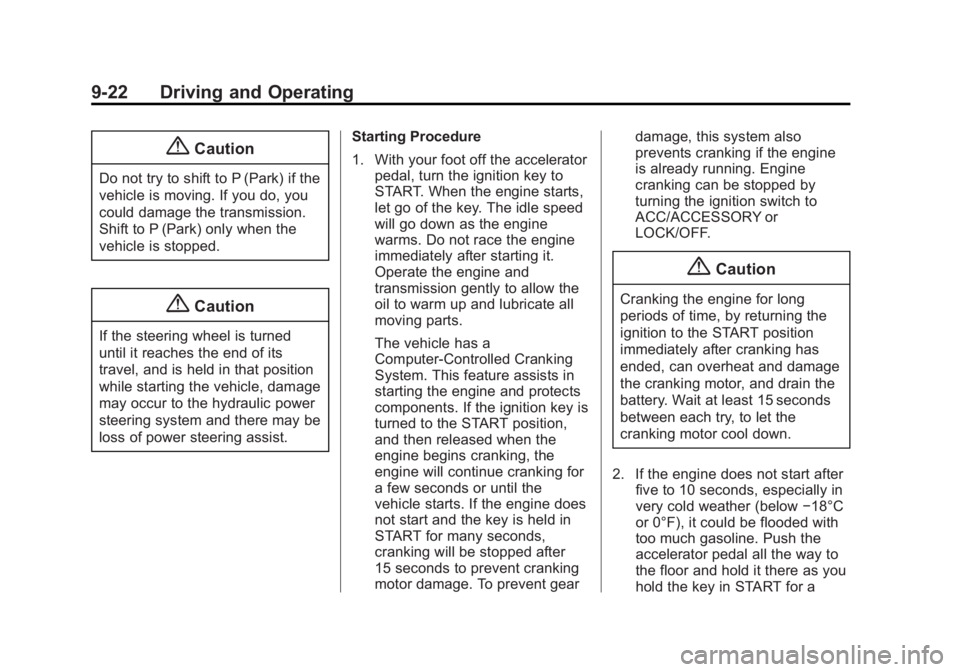
{Caution
Do not try to shift to P (Park) if the
vehicle is moving. If you do, you
could damage the transmission.
Shift to P (Park) only when the
vehicle is stopped.
{Caution
If the steering wheel is turned
until it reaches the end of its
travel, and is held in that position
while starting the vehicle, damage
may occur to the hydraulic power
steering system and there may be
loss of power steering assist.Starting Procedure
1. With your foot off the accelerator
pedal, turn the ignition key to
START. When the engine starts,
let go of the key. The idle speed
will go down as the engine
warms. Do not race the engine
immediately after starting it.
Operate the engine and
transmission gently to allow the
oil to warm up and lubricate all
moving parts.
The vehicle has a
Computer-Controlled Cranking
System. This feature assists in
starting the engine and protects
components. If the ignition key is
turned to the START position,
and then released when the
engine begins cranking, the
engine will continue cranking for
a few seconds or until the
vehicle starts. If the engine does
not start and the key is held in
START for many seconds,
cranking will be stopped after
15 seconds to prevent cranking
motor damage. To prevent gear damage, this system also
prevents cranking if the engine
is already running. Engine
cranking can be stopped by
turning the ignition switch to
ACC/ACCESSORY or
LOCK/OFF.
{Caution
Cranking the engine for long
periods of time, by returning the
ignition to the START position
immediately after cranking has
ended, can overheat and damage
the cranking motor, and drain the
battery. Wait at least 15 seconds
between each try, to let the
cranking motor cool down.
2. If the engine does not start after five to 10 seconds, especially in
very cold weather (below −18°C
or 0°F), it could be flooded with
too much gasoline. Push the
accelerator pedal all the way to
the floor and hold it there as you
hold the key in START for a
Page 188 of 360

Black plate (32,1)GMC Terrain/Terrain Denali Owner Manual (GMNA-Localizing-U.S./Canada/
Mexico-6081485) - 2014 - CRC - 12/6/13
9-32 Driving and Operating
Parking Brake
To set the parking brake, hold the
regular brake pedal down, then
push the parking brake pedal down.
If the ignition is on, the brake
system warning light will come on.
SeeBrake System Warning Light on
page 5-15.
{Caution
Driving with the parking brake on
can overheat the brake system
and cause premature wear or
damage to brake system parts.
Make sure that the parking brake
is fully released and the brake
warning light is off before driving.
To release the parking brake, hold
the regular brake pedal down, then
push down momentarily on the
parking brake pedal until you feel
the pedal release. Slowly pull your
foot up off the park brake pedal.
If the parking brake is not released
when you begin to drive, the brake
system warning light will be on and
a chime will sound warning you that
the parking brake is still on.
If you are towing a trailer and are
parking on a hill, see Driving
Characteristics and Towing Tips on
page 9-53.
Brake Assist
The Brake Assist feature is
designed to assist the driver in
stopping or decreasing vehicle
speed in emergency driving
conditions. This feature uses the
stability system hydraulic brake
control module to supplement the
power brake system under
conditions where the driver has
quickly and forcefully applied the
brake pedal in an attempt to quickly
stop or slow down the vehicle. The
stability system hydraulic brake
control module increases brake
pressure at each corner of the
vehicle until the ABS activates.
Minor brake pedal pulsation or
pedal movement during this time is
normal and the driver should
continue to apply the brake pedal as
the driving situation dictates The
Brake Assist feature will
automatically disengage when the
brake pedal is released or brake
pedal pressure is quickly
decreased.
Page 196 of 360

Black plate (40,1)GMC Terrain/Terrain Denali Owner Manual (GMNA-Localizing-U.S./Canada/
Mexico-6081485) - 2014 - CRC - 12/6/13
9-40 Driving and Operating
Other Messages
There are messages that may
appear on the Driver Information
Center (DIC) in the instrument
cluster to provide information about
FCA. SeeObject Detection System
Messages on page 5-27.
Cleaning the System
If the FCA system does not seem to
operate properly, clean the outside
of the windshield area in front of the
camera sensor before considering
taking the vehicle in for service.
Ultrasonic Parking Assist
For vehicles with the Ultrasonic
Rear Parking Assist (URPA) system,
it assists the driver with parking and
avoiding objects while in
R (Reverse). URPA operates at
speeds less than 8 km/h (5 mph),
and the sensors on the rear bumper
detect objects up to 2.5 m (8 ft)
behind the vehicle, and at least
20 cm (8 in) off the ground. The distance objects can be detected
may be less during warmer or humid
weather.
{Warning
The URPA system does not
detect children, pedestrians,
bicyclists, animals, or objects
below the bumper or that are too
close or too far from the vehicle.
It is not available at speeds
greater than 8 km/h (5 mph). To
prevent injury, death, or vehicle
damage, even with URPA, always
check the area around the vehicle
and check all mirrors before
backing.
How the System Works
URPA comes on automatically when
the shift lever is moved into
R (Reverse). A single beep sounds
to indicate the system is working.
URPA operates only at speeds less
than 8 km/h (5 mph).A detected obstacle is indicated by
audible beeps. The interval between
the beeps becomes shorter as the
vehicle gets closer to the obstacle.
When the distance is less than
30 cm (12 in) the beeping is
continuous for five seconds.
Turning the System On and Off
The URPA system can be turned on
and off using the infotainment
system controls. See
Vehicle
Personalization on page 5-31 for
more information.
The On with Tow Bar Attached
setting allows for the parking assist
to work properly with a small item
attached to the trailer hitch.
When the system is off, PARK
ASSIST OFF displays on the Driver
Information Center (DIC). The
message disappears after a short
period of time.
URPA defaults to the on setting
each time the vehicle is started.
Turn URPA off when towing a trailer.
Page 197 of 360

Black plate (41,1)GMC Terrain/Terrain Denali Owner Manual (GMNA-Localizing-U.S./Canada/
Mexico-6081485) - 2014 - CRC - 12/6/13
Driving and Operating 9-41
When the System Does Not
Seem to Work Properly
The following messages may be
displayed on the DIC:
SERVICE PARKING ASSIST:If
this message occurs, check the
following conditions:
.The ultrasonic sensors are not
clean. Keep the vehicle's rear
bumper free of mud, dirt, snow,
ice, and slush. For cleaning
instructions, see Exterior Care
on page 10-75.
.The park assist sensors are
covered by frost or ice. Frost or
ice can form around and behind
the sensors and may not always
be seen; this can occur after
washing the vehicle in cold
weather. The message may not
clear until the frost or ice has
melted.
If the above conditions do not exist,
take the vehicle to your dealer to
repair the system. PARK ASSIST OFF:
If the URPA
system does not activate due to a
temporary condition, the message
displays on the DIC. This can occur
under the following conditions:
.The driver has disabled the
system.
.A trailer was attached to the
vehicle, or an object was
hanging out of the liftgate during
the last drive cycle. Once the
object is removed, URPA will
return to normal operation.
.A tow bar is attached to the
vehicle.
.The bumper is damaged. Take
the vehicle to your dealer to
repair the system.
.Other conditions, such as
vibrations from a jackhammer or
the compression of air brakes on
a very large truck, are affecting
system performance.
Side Blind Zone
Alert (SBZA)
If equipped, the SBZA system is a
lane-changing aid that assists
drivers with avoiding crashes that
occur with vehicles in the side blind
zone (or spot) areas. The SBZA
warning display will light up in the
corresponding outside side mirror
and will flash if the turn signal is on.
{Warning
SBZA does not alert the driver to
vehicles rapidly approaching
outside of the side blind zones,
pedestrians, bicyclists,
or animals. It may not provide
alerts when changing lanes under
all driving conditions. Failure to
use proper care when changing
lanes may result in injury, death,
or vehicle damage. Before
making a lane change, always
(Continued)
Page 200 of 360

Black plate (44,1)GMC Terrain/Terrain Denali Owner Manual (GMNA-Localizing-U.S./Canada/
Mexico-6081485) - 2014 - CRC - 12/6/13
9-44 Driving and Operating
To see the previous screen sooner,
do one of the following:
.Press a hard key on the
navigation system.
.Shift into P (Park).
.Reach a vehicle speed of
8 km/h (5 mph).
Turning the Rear Vision Camera
System On or Off
To turn the rear vision camera
system on or off:
1. Shift into P (Park).
2. Press the CONFIG button.
3. Select Display.
4. Select Rear Camera Options.
5. Select Camera. When a check mark appears next to the
Camera option, then the RVC
system is on.
Symbols and Guidelines
The RVC system may have a
feature that lets the driver view
parking assist symbols on the infotainment screen while using the
RVC. The Ultrasonic Rear Park
Assist (URPA) system must not be
disabled to use the caution symbols.
The error message Rear Parking
Assist Symbols Unavailable may
display if URPA has been disabled
and the symbols have been turned
on. See
Ultrasonic Parking Assist
on page 9-40.
On vehicles with the Rear Cross
Traffic Alert (RCTA), a warning
triangle with an arrow may also
display on the RVC screen to warn
of traffic coming from either
direction, and three beeps will
sound. This system detects objects
coming from up to 20 m (65 ft) from
the left or right side of the vehicle.
The parking assist and RCTA
symbols appear and may cover an
object when viewing the
infotainment screen when an object
is detected by the URPA or RCTA
system. The RVC system may also have a
guideline overlay that can help the
driver align the vehicle when
backing into a parking spot.
To turn the symbols or guidelines on
or off:
1. Shift into P (Park).
2. Press the CONFIG button.
3. Select Display.
4. Select Rear Camera Options.
5. Select Rear Cross Traffic Alert,
Parking Assist Symbols or
Guidelines. The feature is on
when a check mark appears
next to it.
Rear Vision Camera Error
Messages
SERVICE REAR VISION CAMERA
SYSTEM: This message can
display on the infotainment screen
when the system is not working
properly.
If any other problem occurs or if a
problem persists, see your dealer.
Page 209 of 360

Black plate (53,1)GMC Terrain/Terrain Denali Owner Manual (GMNA-Localizing-U.S./Canada/
Mexico-6081485) - 2014 - CRC - 12/6/13
Driving and Operating 9-53
Trailer Towing
General Towing
Information
Only use towing equipment that has
been designed for the vehicle.
Contact your dealer or trailering
dealer for assistance with preparing
the vehicle for towing a trailer. Read
the entire section before towing a
trailer.
For towing a disabled vehicle, see
Towing the Vehicle on page 10-72.
For towing the vehicle behind
another vehicle such as a motor
home, seeRecreational Vehicle
Towing on page 10-72.
Driving Characteristics
and Towing Tips
Driving with a Trailer
When towing a trailer:
.Become familiar with the state
and local laws that apply
specifically to trailer towing.
.Do not tow a trailer during the
first 800 km (500 miles), to
prevent damage to the engine,
axle or other parts.
.Then, during the first 800 km
(500 miles) trailer towing, do not
drive over 80 km/h (50 mph) and
do not make starts at full throttle.
.The vehicle can tow in D (Drive).
Use a lower gear if the
transmission shifts too often.
.Do not use the Fuel Economy
Mode when towing.
.Turn off Park Assist when
towing.
{Warning
When towing a trailer, exhaust
gases may collect at the rear of
the vehicle and enter if the
liftgate, trunk/hatch, or rear-most
window is open.
When towing a trailer:
.Do not drive with the liftgate,
trunk/hatch, or rear-most
window open.
.Fully open the air outlets on
or under the instrument
panel.
.Also adjust the Climate
Control system to a setting
that brings in only outside air.
See “Climate Control
Systems” in the Index.
For more information about
Carbon Monoxide, see Engine
Exhaust on page 9-26.
Page 234 of 360

Black plate (18,1)GMC Terrain/Terrain Denali Owner Manual (GMNA-Localizing-U.S./Canada/
Mexico-6081485) - 2014 - CRC - 12/6/13
10-18 Vehicle Care
This will allow any pressure still
left to be vented out the
discharge hose.
2. Keep turning the pressure cap slowly, and remove it.
3. Fill the coolant surge tank withthe proper DEX-COOL coolant
mixture, to the COLD FILL line. 4. With the coolant surge tank
pressure cap off, start the
engine and let it run until the
upper radiator hose can be felt
getting hot. Watch out for the
engine cooling fan(s).
By this time, the coolant level
inside the coolant surge tank
may be lower. If the level is
lower, add more of the proper
DEX-COOL coolant mixture to
the coolant surge tank until the
level reaches the COLD
FILL line.
5. Replace the pressure cap. Be sure the pressure cap is
hand-tight.{Caution
If the pressure cap is not tightly
installed, coolant loss and
possible engine damage may
occur. Be sure the cap is properly
and tightly secured. Check the level in the coolant
surge tank when the cooling system
has cooled down. If the coolant is
not at the proper level, repeat
Steps 1–3 and reinstall the pressure
cap. If the coolant still is not at the
proper level when the system cools
down again, see your dealer.
Engine Overheating
The vehicle has an indicator to warn
of engine overheating. There is an
engine coolant temperature warning
light on the vehicle's instrument
panel. See
Engine Coolant
Temperature Gauge on page 5-9.
The decision may be made not to lift
the hood when this warning
appears, but instead get service
help right away. See Roadside
Assistance Program on page 13-5.
If the decision to lift the hood is
made, make sure the vehicle is
parked on a level surface.
Page 254 of 360
Black plate (38,1)GMC Terrain/Terrain Denali Owner Manual (GMNA-Localizing-U.S./Canada/
Mexico-6081485) - 2014 - CRC - 12/6/13
10-38 Vehicle Care
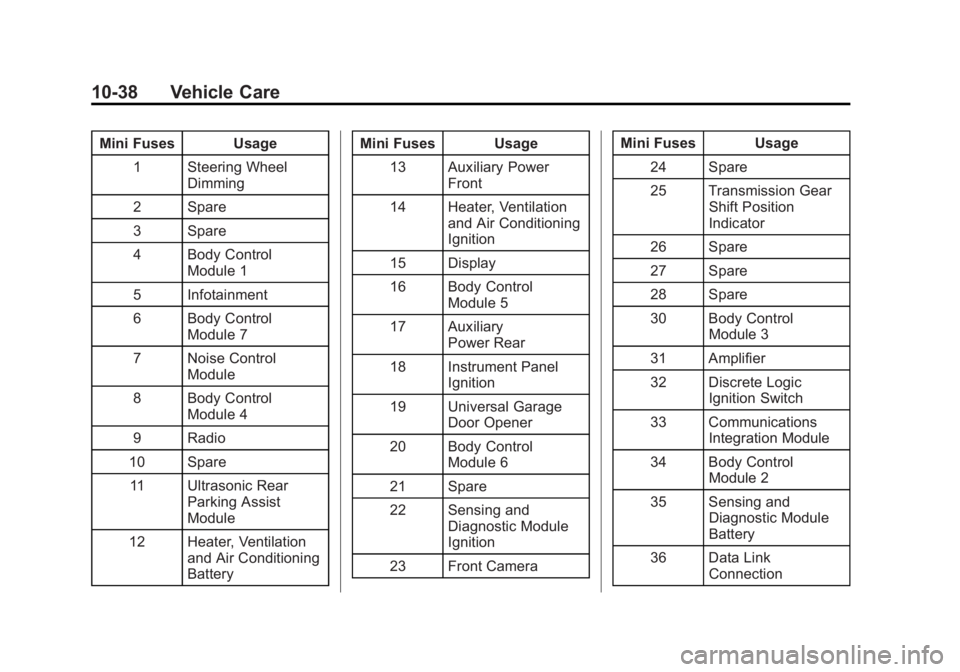
Mini Fuses Usage1 Steering Wheel Dimming
2 Spare
3 Spare
4 Body Control Module 1
5 Infotainment
6 Body Control Module 7
7 Noise Control Module
8 Body Control Module 4
9 Radio
10 Spare 11 Ultrasonic Rear Parking Assist
Module
12 Heater, Ventilation and Air Conditioning
Battery Mini Fuses Usage
13 Auxiliary Power Front
14 Heater, Ventilation and Air Conditioning
Ignition
15 Display
16 Body Control Module 5
17 Auxiliary Power Rear
18 Instrument Panel Ignition
19 Universal Garage Door Opener
20 Body Control Module 6
21 Spare
22 Sensing and Diagnostic Module
Ignition
23 Front Camera Mini Fuses Usage
24 Spare
25 Transmission Gear Shift Position
Indicator
26 Spare
27 Spare
28 Spare
30 Body Control Module 3
31 Amplifier
32 Discrete Logic Ignition Switch
33 Communications Integration Module
34 Body Control Module 2
35 Sensing and Diagnostic Module
Battery
36 Data Link Connection