2014 FORD SUPER DUTY fuel
[x] Cancel search: fuelPage 5 of 458

Lighting
Lighting Control..............................................64
Autolamps........................................................64
Instrument Lighting Dimmer.....................65
Daytime Running Lamps............................65
Front Fog Lamps............................................66
Direction Indicators
.......................................66
Interior Lamps.................................................66
Windows and Mirrors
Power Windows
.............................................68
Global Opening
..............................................69
Exterior Mirrors
................................................69
Interior Mirror
.....................................................71
Sun Visors
..........................................................72
Moonroof...........................................................72
Instrument Cluster
Gauges................................................................74
Warning Lamps and Indicators.................75
Audible Warnings and Indicators
.............79
Information Displays
General Information
.....................................80
Information Messages
..................................91
Climate Control
Manual Climate Control............................102
Automatic Climate Control......................103
Hints on Controlling the Interior Climate........................................................104
Heated Windows and Mirrors..................105
Remote Start
.................................................105
Seats
Sitting in the Correct Position..................107
Head Restraints
.............................................107
Manual Seats
.................................................109
Power Seats
....................................................110 Memory Function
..........................................110
Rear Seats.........................................................111
Heated Seats...................................................114
Ventilated Seats.............................................115
Front Seat Armrest.......................................116
Rear Seat Armrest.........................................117
Universal Garage Door Opener
Universal Garage Door Opener
................118
Auxiliary Power Points
Auxiliary Power Points................................126
Storage Compartments
Center Console
..............................................128
Overhead Console
........................................128
Starting and Stopping the Engine
General Information....................................129
Ignition Switch
...............................................129
Starting a Gasoline Engine.......................130
Engine Block Heater.....................................131
Fuel and Refueling
Safety Precautions
.......................................133
Fuel Quality
.....................................................134
Running Out of Fuel.....................................134
Refueling..........................................................135
Fuel Consumption
........................................136
Emission Control System...........................137
Transmission
Automatic Transmission...........................140
Power Take-Off.............................................146
Four-Wheel Drive
Using Four-Wheel Drive.............................147
2
Super Duty (TFA) Table of Contents
Page 6 of 458
Rear Axle
Limited Slip Differential.............................156
Electronic Locking Differential................156
Brakes
General Information
....................................158
Hints on Driving With Anti-Lock Brakes...........................................................158
Parking Brake.................................................159
Hill Start Assist..............................................159
Traction Control
Principle of Operation..................................161
Using Traction Control
.................................161
Stability Control
Principle of Operation.................................163
Using Stability Control...............................163
Terrain Response
Principle of Operation................................166
Using Hill Descent Control........................166
Parking Aids
Parking Aid......................................................168
Rear View Camera.......................................169
Cruise Control
Principle of Operation
.................................172
Using Cruise Control....................................172
Driving Aids
Steering
.............................................................173
Load Carrying
Load Limit
........................................................174
Tailgate..............................................................181 Towing
Towing a Trailer
.............................................185
Trailer Sway Control....................................186
Recommended Towing Weights
............186
Essential Towing Checks...........................187
Towing Points
................................................194
Transporting the Vehicle............................195
Towing the Vehicle on Four Wheels......196
Driving Hints
Breaking-In.....................................................198
Economical Driving
......................................198
Driving Through Water...............................199
Floor Mats.......................................................199
Snowplowing................................................200
Roadside Emergencies
Roadside Assistance
..................................203
Hazard Warning Flashers.........................204
Fuel Shutoff
..................................................204
Jump-Starting the Vehicle
.......................204
Post-Crash Alert System
..........................206
Customer Assistance
Getting the Services You Need...............207
In California (U.S. Only)............................208
The Better Business Bureau (BBB) Auto Line Program (U.S. Only).....................209
Utilizing the Mediation/Arbitration Program (Canada Only).......................209
Getting Assistance Outside the U.S. and Canada.........................................................210
Ordering Additional Owner's Literature.......................................................211
Reporting Safety Defects (U.S. Only)...............................................................211
Reporting Safety Defects (Canada Only)..............................................................212
Fuses
Changing a Fuse
............................................213
3
Super Duty (TFA) Table of Contents
Page 7 of 458

Fuse Specification Chart...........................214
Maintenance
General Information....................................222
Opening and Closing the Hood..............222
Under Hood Overview - 6.2L...................223
Under Hood Overview - 6.8L...................224
Engine Oil Dipstick.......................................225
Engine Oil Check..........................................225
Engine Coolant Check
...............................226
Automatic Transmission Fluid Check...........................................................230
Transfer Case Fluid Check........................233
Brake Fluid Check
........................................233
Power Steering Fluid Check.....................233
Washer Fluid Check....................................234
Fuel Filter
........................................................234
Changing the 12V Battery.........................234
Checking the Wiper Blades
.....................236
Changing the Wiper Blades.....................236
Adjusting the Headlamps.........................237
Removing a Headlamp..............................238
Changing a Bulb..........................................240
Bulb Specification Chart...........................242
Changing the Engine Air Filter................244
Vehicle Care
General Information
...................................246
Cleaning Products
.......................................246
Cleaning the Exterior..................................246
Waxing.............................................................247
Cleaning the Engine
....................................247
Cleaning the Exhaust.................................248
Cleaning the Windows and Wiper Blades..........................................................248
Cleaning the Interior...................................249
Cleaning the Instrument Panel and Instrument Cluster Lens.......................249
Cleaning Leather Seats
.............................250
Repairing Minor Paint Damage................251 Cleaning the Alloy Wheels
........................251
Vehicle Storage
..............................................251
Wheels and Tires
General Information
...................................254
Tire Care
..........................................................256
Using Snow Chains
......................................273
Tire Pressure Monitoring System
...........273
Changing a Road Wheel
............................279
Technical Specifications
..........................290
Capacities and Specific- ations
Engine Specifications
................................292
Motorcraft Parts
...........................................293
Vehicle Identification Number................294
Vehicle Certification Label.......................294
Transmission Code Designation............295
Technical Specifications..........................296
Audio System
General Information
..................................300
Audio unit - Vehicles With: AM/FM.......301
Audio unit - Vehicles With: AM/FM/CD/SYNC...................................302
Audio unit - Vehicles With: Sony AM/FM/CD................................................304
Digital Audio..................................................305
Satellite Radio
..............................................308
Auxiliary Input Jack......................................310
USB Port
............................................................311
Media Hub
........................................................311
SYNC™
General Information
....................................312
Using Voice Recognition............................314
Using SYNC™ With Your Phone.............316
SYNC™ Applications and Services
.......327
Using SYNC™ With Your Media Player...........................................................334
4
Super Duty (TFA) Table of Contents
Page 11 of 458
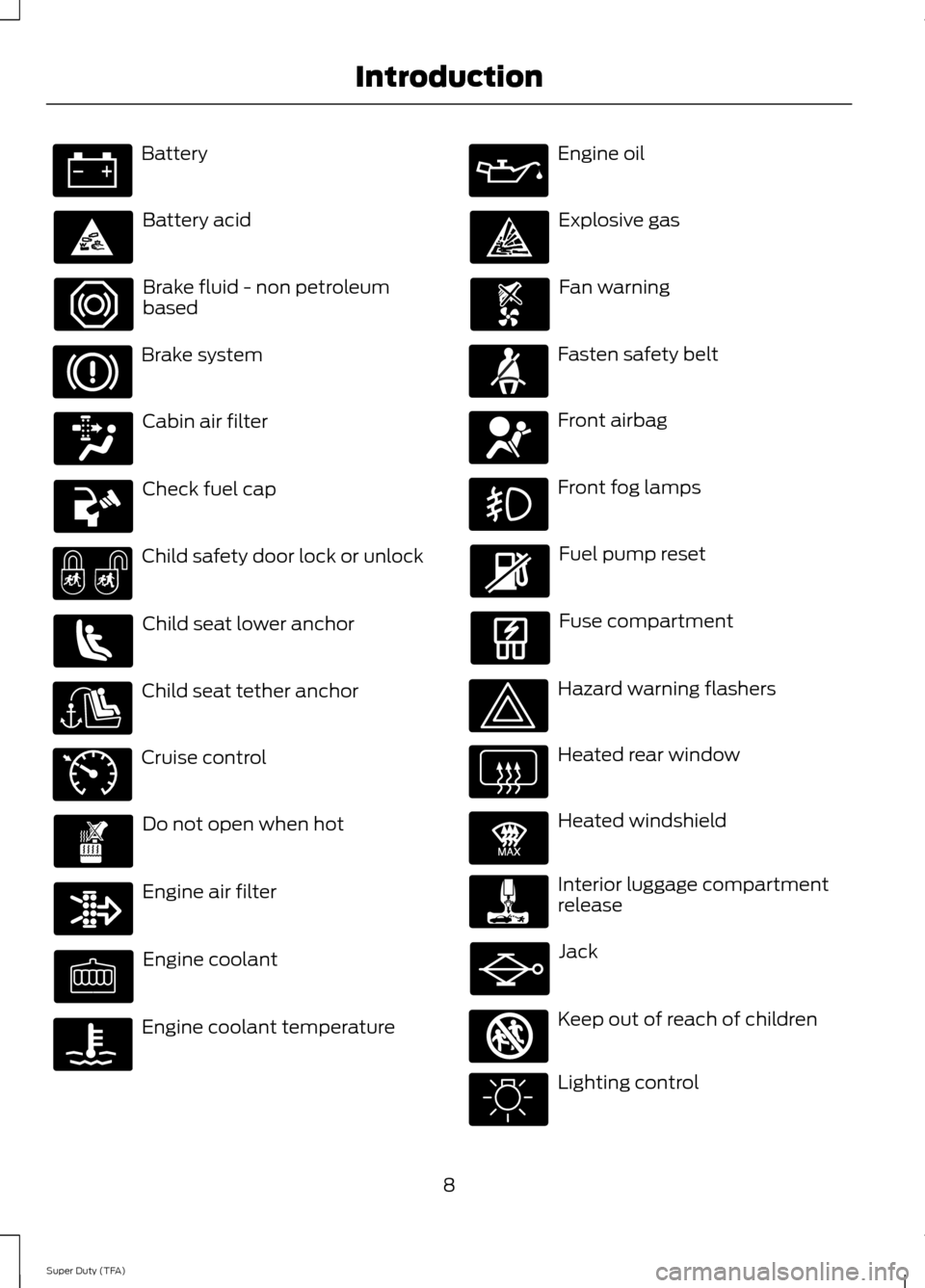
Battery
Battery acid
Brake fluid - non petroleum
based
Brake system
Cabin air filter
Check fuel cap
Child safety door lock or unlock
Child seat lower anchor
Child seat tether anchor
Cruise control
Do not open when hot
Engine air filter
Engine coolant
Engine coolant temperature Engine oil
Explosive gas
Fan warning
Fasten safety belt
Front airbag
Front fog lamps
Fuel pump reset
Fuse compartment
Hazard warning flashers
Heated rear window
Heated windshield
Interior luggage compartment
release
Jack
Keep out of reach of children
Lighting control
8
Super Duty (TFA) Introduction E71340 E91392 E161353
Page 13 of 458

The event data recorder in this vehicle
is designed to record such data as:
•
How various systems in your vehicle
were operating;
• Whether or not the driver and
passenger safety belts were
buckled/fastened;
• How far (if at all) the driver was
depressing the accelerator and/or
the brake pedal; and
• How fast the vehicle was travelling;
and
• Where the driver was positioning
the steering wheel.
This data can help provide a better
understanding of the circumstances in
which crashes and injuries occur.
Note: Event data recorder data is
recorded by your vehicle only if a
non-trivial crash situation occurs; no data
is recorded by the event data recorder
under normal driving conditions and no
personal data or information (e.g., name,
gender, age, and crash location) is
recorded (see limitations regarding 911
Assist and Traffic, directions and
Information privacy below). However,
parties, such as law enforcement, could
combine the event data recorder data
with the type of personally identifying
data routinely acquired during a crash
investigation.
To read data recorded by an event data
recorder, special equipment is required,
and access to the vehicle or the event
data recorder is needed. In addition to
the vehicle manufacturer, other
parties, such as law enforcement, that
have such special equipment, can read
the information if they have access to
the vehicle or the event data recorder.
Ford Motor Company and Ford of
Canada do not access event data
recorder information without obtaining
consent, unless pursuant to court order or where required by law enforcement,
other government authorities or other
third parties acting with lawful
authority. Other parties may seek to
access the information independently
of Ford Motor Company and Ford of
Canada.
Note:
Including to the extent that any
law pertaining to Event Data Recorders
applies to SYNC or its features, please
note the following: Once 911 Assist (if
equipped) is enabled (set ON), 911 Assist
may, through any paired and connected
cell phone, disclose to emergency
services that the vehicle has been in a
crash involving the deployment of an
airbag or, in certain vehicles, the
activation of the fuel pump shut-off.
Certain versions or updates to 911 Assist
may also be capable of being used to
electronically or verbally provide to 911
operators the vehicle location (such as
latitude and longitude), and/or other
details about the vehicle or crash or
personal information about the
occupants to assist 911 operators to
provide the most appropriate emergency
services. If you do not want to disclose
this information, do not activate the 911
Assist feature. See SYNC™ (page 312).
Additionally, when you connect to
Traffic, Directions and Information (if
equipped, U.S. only), the service uses
GPS technology and advanced vehicle
sensors to collect the vehicle ’s current
location, travel direction, and speed
(“ vehicle travel information ”), only to
help provide you with the directions,
traffic reports, or business searches
that you request. If you do not want
Ford or its vendors to receive this
information, do not activate the
service. Ford Motor Company and the
10
Super Duty (TFA) Introduction
Page 15 of 458
Warranty on Replacement Parts
Genuine Ford and Motorcraft replacement
parts are the only replacement parts that
benefit from a Ford Warranty. Damage
caused to your vehicle as a result of the
failure of non-Ford parts may not be
covered by the Ford Warranty. For
additional information, refer to the terms
and conditions of the Ford Warranty.
SPECIAL NOTICES
New Vehicle Limited Warranty
For a detailed description of what is
covered and what is not covered by your
vehicle
’s New Vehicle Limited Warranty,
refer to the Warranty Manual that is
provided to you along with your Owner ’s
Manual.
Special Instructions
For your added safety, your vehicle is fitted
with sophisticated electronic controls. WARNINGS
Failure to follow the specific
warnings and instructions could
result in personal injury. See
Supplementary Restraints System
(page 35). Front seat mounted rear-facing child
or infant seats should
NEVER be
placed in front of an active
passenger airbag. Using your Vehicle with a
Snowplow
More information and guidelines for using
your vehicle with a snowplow in this
Owner's Manual. See Snowplowing (page
200
). Using your Vehicle as an
Ambulance
If your light truck is equipped with the Ford
Ambulance Preparation Package, it may
be utilized as an ambulance. Ford urges
ambulance manufacturers to follow the
recommendations of the Ford Incomplete
Vehicle Manual, Ford Truck Body Builder
’s
Layout Book and the Qualified Vehicle
Modifiers (QVM) Guidelines as well as
pertinent supplements. For additional
information, please contact the Truck Body
Builders Advisory Service at
http://www.fleet.ford.com/truckbbas/
and then by selecting Contact Us or by
phone at 1–877 –840–4338.
Use of your Ford light truck as an
ambulance, without the Ford Ambulance
Preparation Package voids the Ford New
Vehicle Limited Warranty and may void
the emissions warranties. In addition,
ambulance usage without the preparation
package could cause high underbody
temperatures, overpressurized fuel and a
risk of spraying fuel which could lead to
fires.
If your vehicle is equipped with the Ford
Ambulance Preparation Package, it will be
indicated on the Safety Compliance
Certification Label. The label is located on
the driver ’s side door pillar or on the rear
edge of the driver ’s door. You can
determine whether the ambulance
manufacturer followed Ford ’s
recommendations by directly contacting
that manufacturer. Ford Ambulance
Preparation Package is only available on
certain Diesel engine equipped vehicles.
Using your Vehicle as a Stationary
Power Source
Information and guidelines for operating a
vehicle equipped with an aftermarket
power take-off system can be found in this
Owner's Manual.
See Power Take-Off
(page 146).
12
Super Duty (TFA) Introduction
Page 50 of 458

Sounding a Panic Alarm
Note:
The panic alarm will only operate
when the ignition is off. Press the button to activate the
alarm. Press the button again or
turn the ignition on to deactivate
it.
Remote Start (If Equipped) WARNING
To avoid exhaust fumes, do not use
remote start if your vehicle is parked
indoors or areas that are not well
ventilated. Note:
Do not use remote start if your vehicle
is low on fuel. The remote start button is on the
transmitter.
This feature allows you to start your
vehicle from outside the vehicle. The
transmitter has an extended operating
range.
Vehicles with automatic climate control
can be set to operate when you remote
start the vehicle. See
Climate Control
(page 102). A manual climate control
system will run at the setting it was set to
when you switch the vehicle off.
Many states and provinces have
restrictions for the use of remote start.
Check your local and state or provincial
laws for specific requirements regarding
remote start systems.
The remote start system will not work if:
• the ignition is on
• the alarm system is triggered
• you disable the feature
• the hood is open
• the transmission is not in
P •
the vehicle battery voltage is too low
• the service engine soon indicator is on.
Remote Starting the Vehicle
Note: You must press each button within
three seconds of each other. Your vehicle
will not remote start and the horn will not
sound if you do not follow this sequence. The label on your transmitter details the
starting procedure.
To remote start your vehicle:
1. Press the lock button to lock all the
doors.
2. Press the remote start button twice. The exterior lamps will flash twice.
The horn will sound if the system fails to
start.
Note: If you remote start your vehicle with
an integrated keyhead transmitter, you must
switch the ignition on before driving your
vehicle. If you remote start your vehicle with
an intelligent access transmitter, you must
press the
START/STOP button on the
instrument panel once while applying the
brake pedal before driving your vehicle.
The power windows will not work during
the remote start and the radio will not turn
on automatically.
The parking lamps will remain on and the
vehicle will run for 5, 10, or 15 minutes,
depending on the setting.
47
Super Duty (TFA) Keys and Remote ControlsE138624 E138625 E138626
Page 52 of 458
PRINCIPLE OF OPERATION
MyKey allows you to program keys with
restricted driving modes to promote good
driving habits. All but one of the keys
programmed to the vehicle can be
activated with these restricted modes.
Any keys that have not been programmed
are referred to as administrator keys or
admin keys. They can be used to:
•
create a MyKey
• program configurable MyKey settings
• clear all MyKey features.
When you have programmed a MyKey, you
can access the following information using
the information display:
• How many admin keys and MyKeys are
programmed to your vehicle.
• The total distance your vehicle has
traveled using a MyKey.
Note: All MyKeys are programmed to the
same settings. You cannot program them
individually.
Non-configurable Settings
The following settings cannot be changed
by an admin key user:
• Belt-Minder. You cannot disable this
feature. The audio system will mute
when the front seat occupants’ safety
belts are not fastened. Note: If your
vehicle is equipped with AM/FM radio
only, then the radio will not mute.
• Early low fuel. The low fuel warning is
activated earlier, giving the MyKey user
more time to refuel.
• Driver assist features, if equipped on
your vehicle, are forced on: parking aid,
blind spot information system (BLIS)
with cross traffic alert, lane departure
warning and forward collision warning
system. Configurable Settings
With an admin key, you can configure
certain MyKey settings when you first
create a MyKey and before you recycle the
key or restart the vehicle. You can also
change the settings afterward with an
admin key:
•
A vehicle speed limit can be set.
Warnings will be shown in the display
followed by an audible tone when your
vehicle reaches the set speed. You
cannot override the set speed by fully
depressing the accelerator pedal or by
setting cruise control.
• Vehicle speed minders of 45, 55 or 65
mph (75, 90 or 105 km/h). Once you
select a speed, it will be shown in the
display, followed by an audible tone
when the preselected vehicle speed is
exceeded.
• Audio system maximum volume of
45%. A message will be shown in the
display when you attempt to exceed
the limited volume. Also, the
speed-sensitive or compensated
automatic volume control will be
disabled. Note:
If your vehicle is
equipped with AM/FM radio only, then
the radio volume will not be limited.
• Always on setting. When this is
selected, you will not be able to turn
off AdvanceTrac (if your vehicle is
equipped with this feature).
CREATING A MYKEY
Use the information display to create a
MyKey. There are two types of information
displays, and their controls and messaging
vary. To determine which type of display
you have, you will need to reference
another chapter. See
General
Information (page 80).
If You Have a Type 1 Information
Display:
49
Super Duty (TFA) MyKey
™