2014 FORD SUPER DUTY fuel
[x] Cancel search: fuelPage 295 of 458

ENGINE SPECIFICATIONS
6.8L V10 Engine
6.2L V8 Engine
Engine
413
378
Cubic inches
Minimum 87 octane
Minimum 87 octane
Required fuel
Ethanol
1-6-5-10-2-7-3-8-4-9
1-5-4-8-6-3-7-2
Firing order
Coil on plug
Coil on plug
Ignition system
0.039-0.043 inch (1.00-1.10mm)
0.041-0.047 inch (1.04-1.20
mm)
Spark plug gap
9.2:1
9.8:1
Compression ratio
Drivebelt Routing
6.2L Engines 6.8L Engines with A/C
6.8L Engines without A/C
292
Super Duty (TFA) Capacities and SpecificationsE163761 E163762 E163763
Page 299 of 458

TECHNICAL SPECIFICATIONS
Ford part number /
Ford specification
Ford part name or
equivalent
Capacity
Item
XY-80W-90–QL /
Motorcraft™ SAE
80W-90 Premium
Rear Axle Lubricant
5.8 pints (2.8L)
Front axle
WSP-M2C197–A
XG-11 /
High Temperature
4X4 Front Axle and Wheel Bearing Grease
—
Spindle bearing
WSS-M1C267-A1
XY-75W140–QL /
Motorcraft SAE
75W-140 Synthetic
Rear Axle Lubricant
6.9 pints (3.3L)
Rear axle - F-250/350
(10.50 inch axle) 1
WSL-M2C192-A
XY-75W90–QLS /
Motorcraft SAE
75W-90 Synthetic
Rear Axle Lubricant
8.5 pints (4.0L)
Rear axle - F-350 (Dana
M80) WSS–M2C918–A
XY-75W140–QL /
Motorcraft SAE
75W-140 Synthetic
Rear Axle Lubricant
14.0 pints (6.6L)
Rear axle - F-450/550
(Dana S110/S130) WSL-M2C192-A
PM-20 / WSS-
M6C65-A2 and
ISO4925 Class 6
Motorcraft High
Performance DOT 4 LV Motor Vehicle Brake Fluid
Between MIN/
MAX on brakefluid reservoir
Brake fluid
VC-3DIL-B (US),
Motorcraft Orange
Antifreeze/Coolant Prediluted
21.3 quarts
(20.2L)
Engine coolant (6.2L
V8)2
CVC-3DIL-B
(Canada) /
26.7 quarts (25.3L)
Engine coolant (6.8L
V10)2 WSS-M97B44-D2
Refer to the diesel supplement.
Engine and fuel coolant
(diesel engine)
WSS-M2C945-A
Motorcraft or equi-
valent SAE 5W-20 motor oil
7.0 quarts (6.6L
Engine oil (6.2L V8 and
6.8L V10 gasoline
engines) 3, 4
Refer to the diesel supplement.
Engine oil (Diesel
engines)
296
Super Duty (TFA) Capacities and Specifications
Page 300 of 458
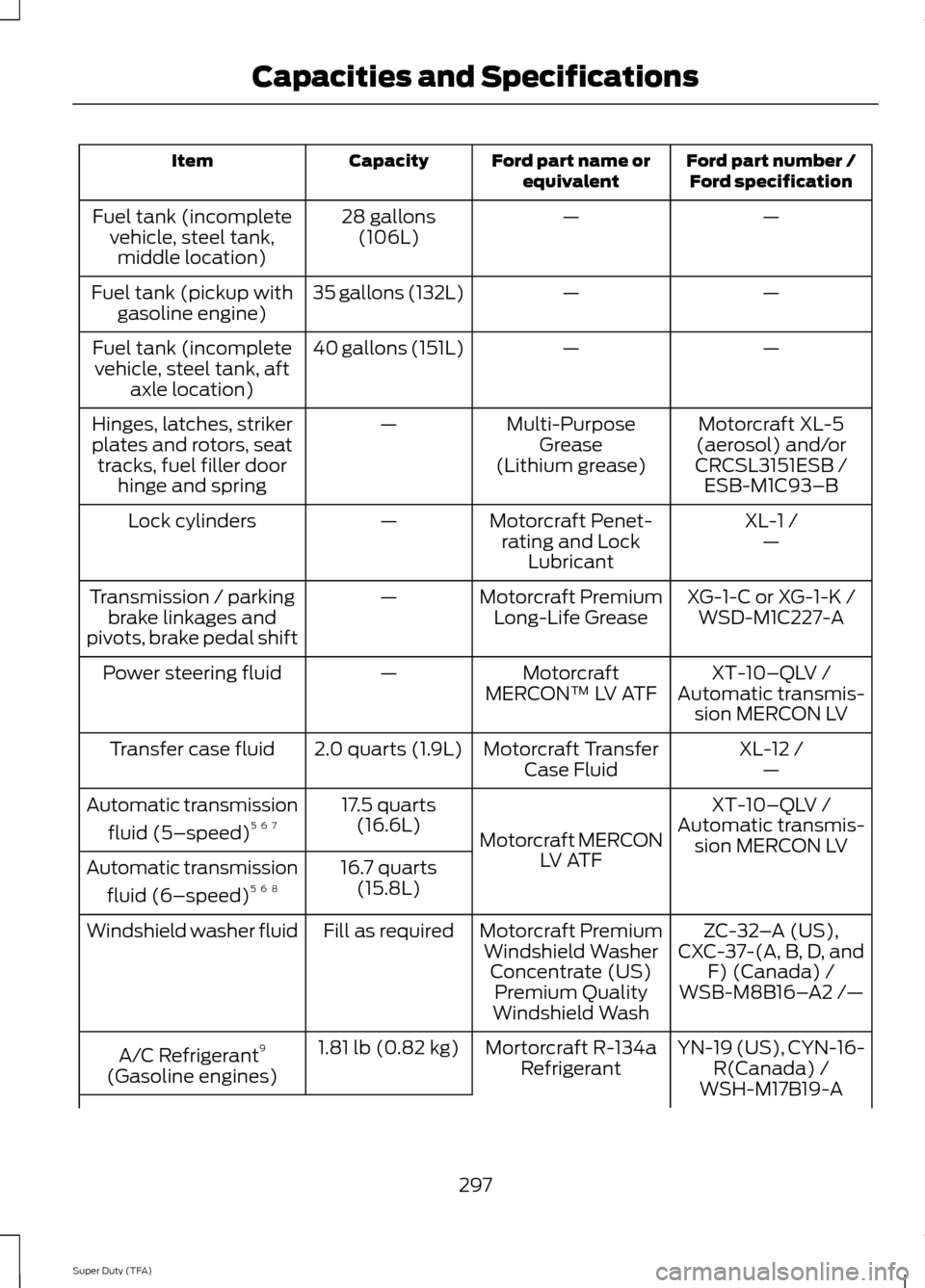
Ford part number /
Ford specification
Ford part name or
equivalent
Capacity
Item
—
—
28 gallons
(106L)
Fuel tank (incomplete
vehicle, steel tank,middle location)
—
—
35 gallons (132L)
Fuel tank (pickup with
gasoline engine)
—
—
40 gallons (151L)
Fuel tank (incomplete
vehicle, steel tank, aft axle location)
Motorcraft XL-5
(aerosol) and/or
CRCSL3151ESB /
Multi-Purpose
Grease
(Lithium grease)
—
Hinges, latches, striker
plates and rotors, seat
tracks, fuel filler door hinge and spring ESB-M1C93–B
XL-1 /
Motorcraft Penet-
rating and Lock Lubricant
—
Lock cylinders
—
XG-1-C or XG-1-K /
Motorcraft Premium
Long-Life Grease
—
Transmission / parking
brake linkages and
pivots, brake pedal shift WSD-M1C227-A
XT-10–QLV /
Motorcraft
MERCON™ LV ATF
—
Power steering fluid
Automatic transmis-sion MERCON LV
XL-12 /
Motorcraft Transfer
Case Fluid
2.0 quarts (1.9L)
Transfer case fluid
—
XT-10–QLV /
Motorcraft MERCON LV ATF
17.5 quarts
(16.6L)
Automatic transmission
fluid (5–speed) 5 6 7
Automatic transmis-
sion MERCON LV
16.7 quarts (15.8L)
Automatic transmission
fluid (6–speed) 5 6 8
ZC-32–A (US),
Motorcraft Premium
Windshield Washer Concentrate (US)Premium Quality
Windshield Wash
Fill as required
Windshield washer fluid
CXC-37-(A, B, D, andF) (Canada) /
WSB-M8B16– A2 /—
YN-19 (US), CYN-16- R(Canada) /
Mortorcraft R-134a
Refrigerant
1.81 lb (0.82 kg)
A/C Refrigerant 9
(Gasoline engines) WSH-M17B19-A
297
Super Duty (TFA) Capacities and Specifications
Page 331 of 458
![FORD SUPER DUTY 2014 3.G Owners Manual If a crash deploys an airbag (excluding
knee airbags and rear inflatable safety
belts [if equipped]) or activates the fuel
pump shut-off, your SYNC-equipped
vehicle may be able to contact emergency
se](/manual-img/11/5307/w960_5307-330.png "FORD SUPER DUTY 2014 3.G Owners Manual If a crash deploys an airbag (excluding
knee airbags and rear inflatable safety
belts [if equipped]) or activates the fuel
pump shut-off, your SYNC-equipped
vehicle may be able to contact emergency
se")
If a crash deploys an airbag (excluding
knee airbags and rear inflatable safety
belts [if equipped]) or activates the fuel
pump shut-off, your SYNC-equipped
vehicle may be able to contact emergency
services by dialing 911 through a paired and
connected Bluetooth-enabled phone. You
can learn more about the 911 Assist
feature, visit www.SYNCMyRide.com,
www.SYNCMyRide.ca or
www.syncmaroute.ca.
See Supplementary Restraints System
(page 35). Important information about
airbag deployment is in this chapter.
See Roadside Emergencies (page 203).
Important information about the fuel pump
shut-off is in this chapter.
Setting 911 Assist On
1. Press the phone button to enter the phone menu.
2. Scroll to select 911 Assist.
3. Press
OK to confirm and enter the 911
Assist menu.
4. Scroll to select between On and Off.
5. Press
OK when the desired option
appears in the radio display. Set On or
Set Off
appears in the display as
confirmation.
Off selections include:
• Off with reminder: Provides a display
and voice reminder at phone
connection at vehicle start.
• Off without reminder: Provides a
display reminder only without a voice
reminder at phone connection.
To make sure that 911 Assist works
properly:
• SYNC must be powered and working
properly at the time of the incident and
throughout feature activation and use.
• The 911 Assist feature must be set on
before the incident. •
You must pair and connect a
Bluetooth-enabled and compatible
cell phone to SYNC.
• A connected Bluetooth-enabled phone
must have the ability to make and
maintain an outgoing call at the time
of the incident.
• A connected Bluetooth-enabled phone
must have adequate network coverage,
battery power and signal strength.
• The vehicle must have battery power
and be located in the U.S., Canada or
in a territory in which 911 is the
emergency number.
In the Event of a Crash
Not all crashes will deploy an airbag or
activate the fuel pump shut-off (the
triggers for 911 Assist). If a connected cell
phone sustains damage or loses its
connection to SYNC during a crash, SYNC
will search for and try to connect to a
previously paired cell phone; SYNC will
then attempt to call the emergency
services.
Before making the call:
• SYNC provides a short window of time
(about 10 seconds) to cancel the call.
If you fail to cancel the call, SYNC
attempts to dial 911.
• SYNC says the following, or a similar
message: "SYNC will attempt to call
911, to cancel the call, press Cancel on
your screen or press and hold the
phone button on your steering wheel."
If you do not cancel the call, and SYNC
makes a successful call, a pre-recorded
message plays for the 911 operator, and
then the occupant(s) in your vehicle is able
to talk with the operator. Be prepared to
provide your name, phone number and
location immediately, because not all 911
systems are capable of receiving this
information electronically.
328
Super Duty (TFA) SYNC™
Page 332 of 458
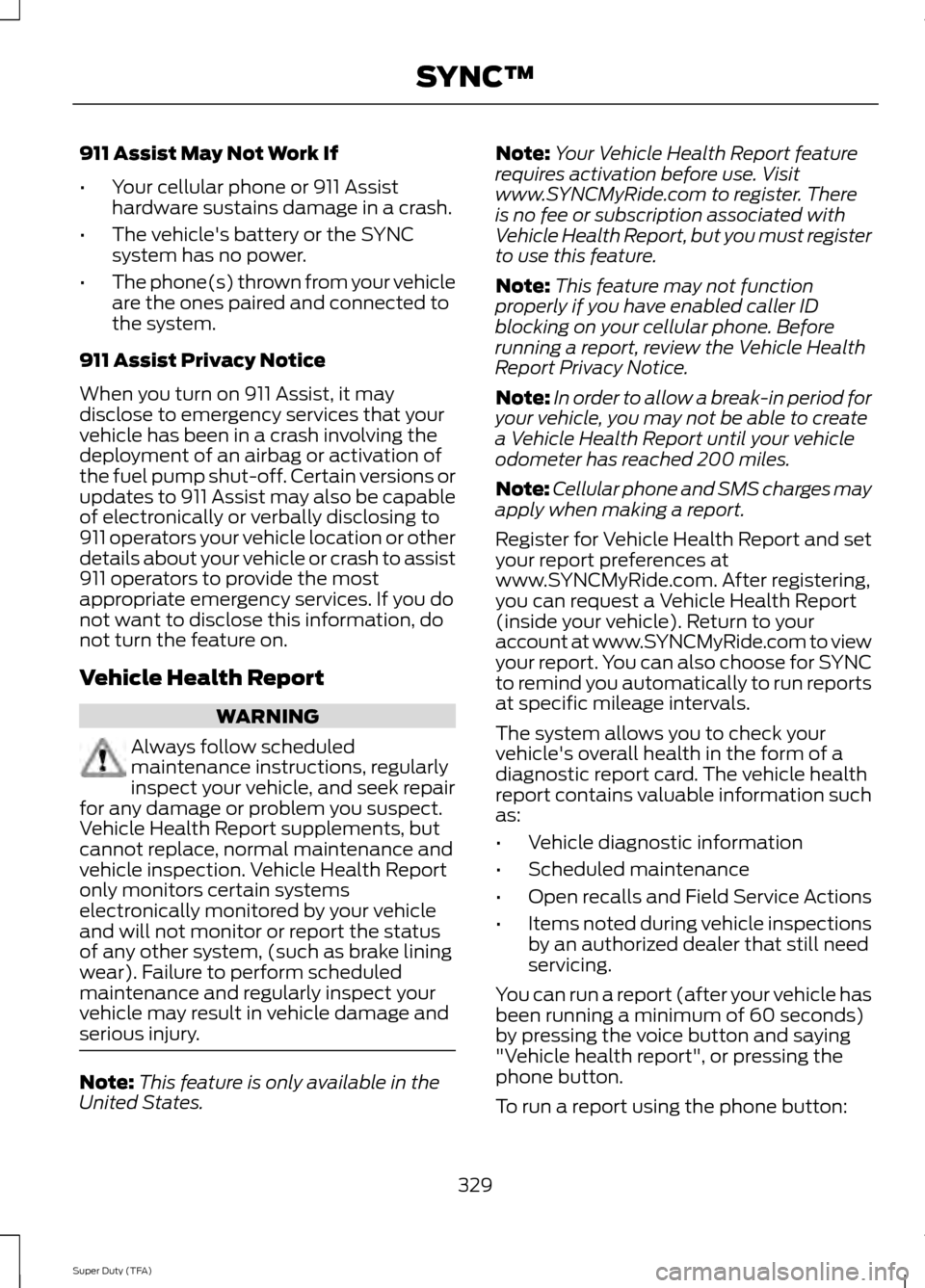
911 Assist May Not Work If
•
Your cellular phone or 911 Assist
hardware sustains damage in a crash.
• The vehicle's battery or the SYNC
system has no power.
• The phone(s) thrown from your vehicle
are the ones paired and connected to
the system.
911 Assist Privacy Notice
When you turn on 911 Assist, it may
disclose to emergency services that your
vehicle has been in a crash involving the
deployment of an airbag or activation of
the fuel pump shut-off. Certain versions or
updates to 911 Assist may also be capable
of electronically or verbally disclosing to
911 operators your vehicle location or other
details about your vehicle or crash to assist
911 operators to provide the most
appropriate emergency services. If you do
not want to disclose this information, do
not turn the feature on.
Vehicle Health Report WARNING
Always follow scheduled
maintenance instructions, regularly
inspect your vehicle, and seek repair
for any damage or problem you suspect.
Vehicle Health Report supplements, but
cannot replace, normal maintenance and
vehicle inspection. Vehicle Health Report
only monitors certain systems
electronically monitored by your vehicle
and will not monitor or report the status
of any other system, (such as brake lining
wear). Failure to perform scheduled
maintenance and regularly inspect your
vehicle may result in vehicle damage and
serious injury. Note:
This feature is only available in the
United States. Note:
Your Vehicle Health Report feature
requires activation before use. Visit
www.SYNCMyRide.com to register. There
is no fee or subscription associated with
Vehicle Health Report, but you must register
to use this feature.
Note: This feature may not function
properly if you have enabled caller ID
blocking on your cellular phone. Before
running a report, review the Vehicle Health
Report Privacy Notice.
Note: In order to allow a break-in period for
your vehicle, you may not be able to create
a Vehicle Health Report until your vehicle
odometer has reached 200 miles.
Note: Cellular phone and SMS charges may
apply when making a report.
Register for Vehicle Health Report and set
your report preferences at
www.SYNCMyRide.com. After registering,
you can request a Vehicle Health Report
(inside your vehicle). Return to your
account at www.SYNCMyRide.com to view
your report. You can also choose for SYNC
to remind you automatically to run reports
at specific mileage intervals.
The system allows you to check your
vehicle's overall health in the form of a
diagnostic report card. The vehicle health
report contains valuable information such
as:
• Vehicle diagnostic information
• Scheduled maintenance
• Open recalls and Field Service Actions
• Items noted during vehicle inspections
by an authorized dealer that still need
servicing.
You can run a report (after your vehicle has
been running a minimum of 60 seconds)
by pressing the voice button and saying
"Vehicle health report", or pressing the
phone button.
To run a report using the phone button:
329
Super Duty (TFA) SYNC™
Page 394 of 458

Note:
In order to use SIRIUS Travel Link,
your vehicle must be equipped with
navigation and your navigation SD card
must be in the SD card slot.
Note: A paid subscription is required to
access and use these features. Go to
www.siriusxm.com/travellink for more
information.
Note: Visit www.siriusxm.com/traffic# and
click on Coverage map and details for a
complete listing of all traffic areas covered
by SIRIUS Travel Link.
Note: Neither SIRIUS nor Ford is responsible
for any errors or inaccuracies in the SIRIUS
Travel Link services or its use in vehicles.
When you subscribe to SIRIUS Travel Link,
it can help you locate the best gas prices,
find movie listings, get current traffic alerts,
view the current weather map, get
accurate ski conditions and see scores to
current sports games. If your vehicle is equipped with
Navigation, touch the i
(Information) button to access
these features. If your vehicle is not
equipped with Navigation, touch the corner
of the touchscreen with the green tab.
Traffic On Route and Traffic Nearby
Touch these buttons to identify traffic
incidents on your route, nearby your
vehicle ’s current location or near any of
your favorite places, if programmed.
Fuel Prices
Touch this button to view fuel prices at
stations close to your vehicle ’s location or
on an active navigation route.
Movie Listings
Touch this button to view nearby movie
theaters and their show times, if available. Weather
Touch this button to view the nearby
weather, current weather, or the five day
forecast for the chosen area. Select Map
to see the weather map, which can show
storms, radar information, charts and
winds. Select Area to select from a listing
of weather locations.
Sports Info
Touch this button to view scores and
schedules from a variety of sports. You can
also save up to 10 favorite teams for easier
access. The score automatically refreshes
when a game is in progress.
Ski Conditions
Touch this button to view ski conditions
for a specific area.
SIRIUS Travel Link Voice Commands Press the voice button on the
steering wheel controls. When
prompted, say any of the
following commands: "SIRIUS TRAVEL LINK"
"5-day weather forecast" "Fuel prices"
"Movie listings"
"Sports headlines" *
"Sports schedules" *
"Sports scores" *
"Traffic"
"Weather"
391
Super Duty (TFA) MyFord Touch
™
(If Equipped)E142608 E142599
Page 397 of 458
![FORD SUPER DUTY 2014 3.G Owners Manual If a crash deploys an airbag (excludes knee
airbags and rear inflatable safety belts [if
equipped]) or activates the fuel pump
shut-off, your SYNC-equipped vehicle may
be able to contact emergency ser](/manual-img/11/5307/w960_5307-396.png "FORD SUPER DUTY 2014 3.G Owners Manual If a crash deploys an airbag (excludes knee
airbags and rear inflatable safety belts [if
equipped]) or activates the fuel pump
shut-off, your SYNC-equipped vehicle may
be able to contact emergency ser")
If a crash deploys an airbag (excludes knee
airbags and rear inflatable safety belts [if
equipped]) or activates the fuel pump
shut-off, your SYNC-equipped vehicle may
be able to contact emergency services by
dialing 911 through a paired and connected
Bluetooth-enabled phone. You can learn
more about the 911 Assist feature, visit
www.SYNCMyRide.com,
www.SYNCMyRide.ca or
www.syncmaroute.ca.
See Supplementary Restraints System
(page 35). Important information
regarding airbag deployment is in this
chapter.
See Roadside Emergencies (page 203).
Important information regarding the fuel
pump shut-off is in this chapter.
Setting 911 Assist On If your vehicle is equipped with
Navigation, touch the i
(Information) button to access
these features. If your vehicle is not
equipped with Navigation, touch the corner
of the touchscreen with the green tab.
Touch
Apps > 911 Assist, then select On. You can also access 911 Assist
by:
• Pressing the Settings icon >
Settings
> Phone > 911 Assist, or
• Pressing the Settings icon > Help > 911
Assist
.
To make sure that 911 Assist works
properly:
• SYNC must be powered and working
properly at the time of the incident and
throughout feature activation and use.
• The 911 Assist feature must be set on
prior to the incident. •
You must pair and connect a
Bluetooth-enabled and compatible
phone to SYNC.
• A connected Bluetooth-enabled phone
must have the ability to make and
maintain an outgoing call at the time
of the incident.
• A connected Bluetooth-enabled phone
must have adequate network coverage,
battery power and signal strength.
• The vehicle must have battery power
and be located in the United States,
Canada or in a territory in which 911 is
the emergency number.
In the Event of a Crash
Not all crashes deploy an airbag or activate
the fuel pump shut-off (which would
trigger 911 Assist); however, SYNC tries to
contact emergency services if 911 Assist
triggers. If a connected phone sustains
damage or loses connection to SYNC,
SYNC searches for, and tries to connect
to, any available previously paired phone
and tries to make the call to 911.
Before making the call:
• SYNC provides a short window of time
(about 10 seconds) to cancel the call.
If you fail to cancel the call, SYNC
attempts to dial 911.
• SYNC says the following, or a similar
message: "SYNC will attempt to call
911, to cancel the call, press Cancel on
your screen or press and hold the
phone button on your steering wheel."
If you do not cancel the call, and SYNC
makes a successful call, a pre-recorded
message plays for the 911 operator, and
then the occupant(s) in your vehicle is able
to talk with the operator. Be prepared to
provide your name, phone number and
location immediately, because not all 911
systems are capable of receiving this
information electronically.
394
Super Duty (TFA) MyFord Touch
™
(If Equipped)E142608 E142607
Page 398 of 458
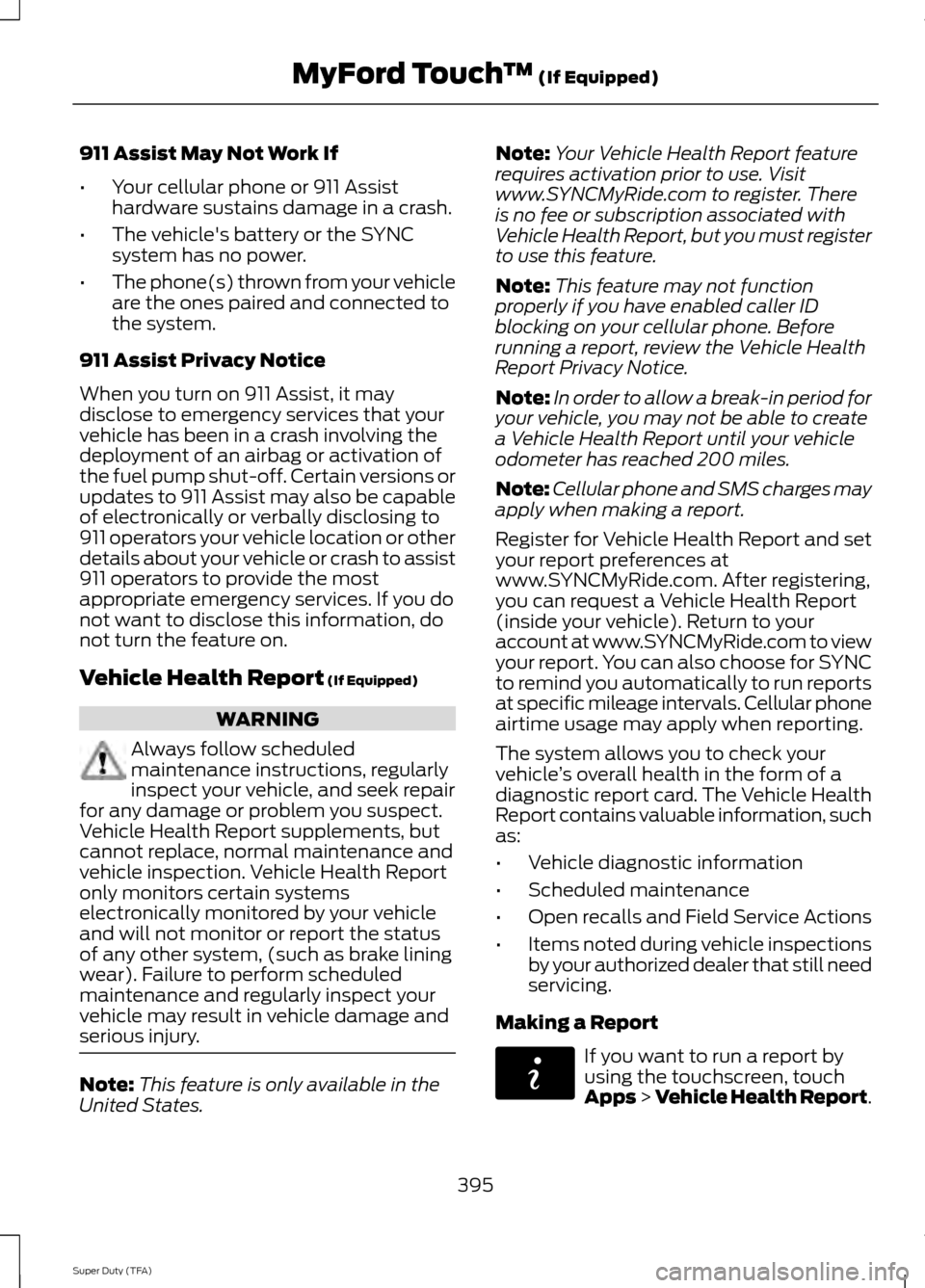
911 Assist May Not Work If
•
Your cellular phone or 911 Assist
hardware sustains damage in a crash.
• The vehicle's battery or the SYNC
system has no power.
• The phone(s) thrown from your vehicle
are the ones paired and connected to
the system.
911 Assist Privacy Notice
When you turn on 911 Assist, it may
disclose to emergency services that your
vehicle has been in a crash involving the
deployment of an airbag or activation of
the fuel pump shut-off. Certain versions or
updates to 911 Assist may also be capable
of electronically or verbally disclosing to
911 operators your vehicle location or other
details about your vehicle or crash to assist
911 operators to provide the most
appropriate emergency services. If you do
not want to disclose this information, do
not turn the feature on.
Vehicle Health Report (If Equipped) WARNING
Always follow scheduled
maintenance instructions, regularly
inspect your vehicle, and seek repair
for any damage or problem you suspect.
Vehicle Health Report supplements, but
cannot replace, normal maintenance and
vehicle inspection. Vehicle Health Report
only monitors certain systems
electronically monitored by your vehicle
and will not monitor or report the status
of any other system, (such as brake lining
wear). Failure to perform scheduled
maintenance and regularly inspect your
vehicle may result in vehicle damage and
serious injury. Note:
This feature is only available in the
United States. Note:
Your Vehicle Health Report feature
requires activation prior to use. Visit
www.SYNCMyRide.com to register. There
is no fee or subscription associated with
Vehicle Health Report, but you must register
to use this feature.
Note: This feature may not function
properly if you have enabled caller ID
blocking on your cellular phone. Before
running a report, review the Vehicle Health
Report Privacy Notice.
Note: In order to allow a break-in period for
your vehicle, you may not be able to create
a Vehicle Health Report until your vehicle
odometer has reached 200 miles.
Note: Cellular phone and SMS charges may
apply when making a report.
Register for Vehicle Health Report and set
your report preferences at
www.SYNCMyRide.com. After registering,
you can request a Vehicle Health Report
(inside your vehicle). Return to your
account at www.SYNCMyRide.com to view
your report. You can also choose for SYNC
to remind you automatically to run reports
at specific mileage intervals. Cellular phone
airtime usage may apply when reporting.
The system allows you to check your
vehicle ’s overall health in the form of a
diagnostic report card. The Vehicle Health
Report contains valuable information, such
as:
• Vehicle diagnostic information
• Scheduled maintenance
• Open recalls and Field Service Actions
• Items noted during vehicle inspections
by your authorized dealer that still need
servicing.
Making a Report If you want to run a report by
using the touchscreen, touch
Apps > Vehicle Health Report.
395
Super Duty (TFA) MyFord Touch
™
(If Equipped)E142608