2014 FORD SUPER DUTY brake
[x] Cancel search: brakePage 90 of 458
Fuel Hist.
Shows fuel usage as a bar graph based on
time. The graph is updated each minute
with the fuel economy that was achieved
during the prior 5, 10, 30 minutes of driving.
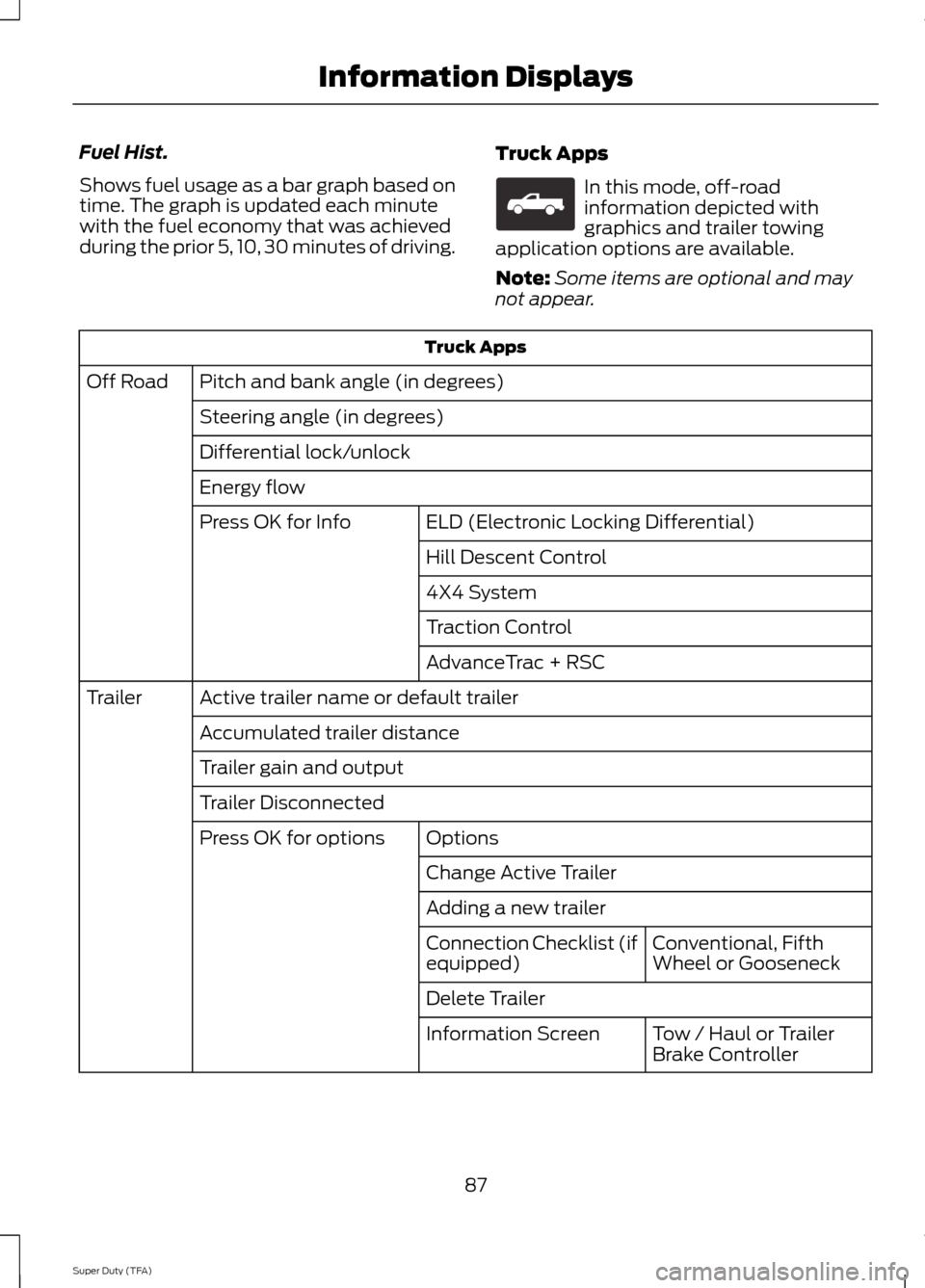
Truck Apps In this mode, off-road
information depicted with
graphics and trailer towing
application options are available.
Note: Some items are optional and may
not appear. Truck Apps
Pitch and bank angle (in degrees)
Off Road
Steering angle (in degrees)
Differential lock/unlock
Energy flow ELD (Electronic Locking Differential)
Press OK for Info
Hill Descent Control
4X4 System
Traction Control
AdvanceTrac + RSC
Active trailer name or default trailer
Trailer
Accumulated trailer distance
Trailer gain and output
Trailer Disconnected Options
Press OK for options
Change Active Trailer
Adding a new trailerConventional, Fifth
Wheel or Gooseneck
Connection Checklist (if
equipped)
Delete Trailer
Tow / Haul or Trailer
Brake Controller
Information Screen
87
Super Duty (TFA) Information DisplaysE163181
Page 91 of 458
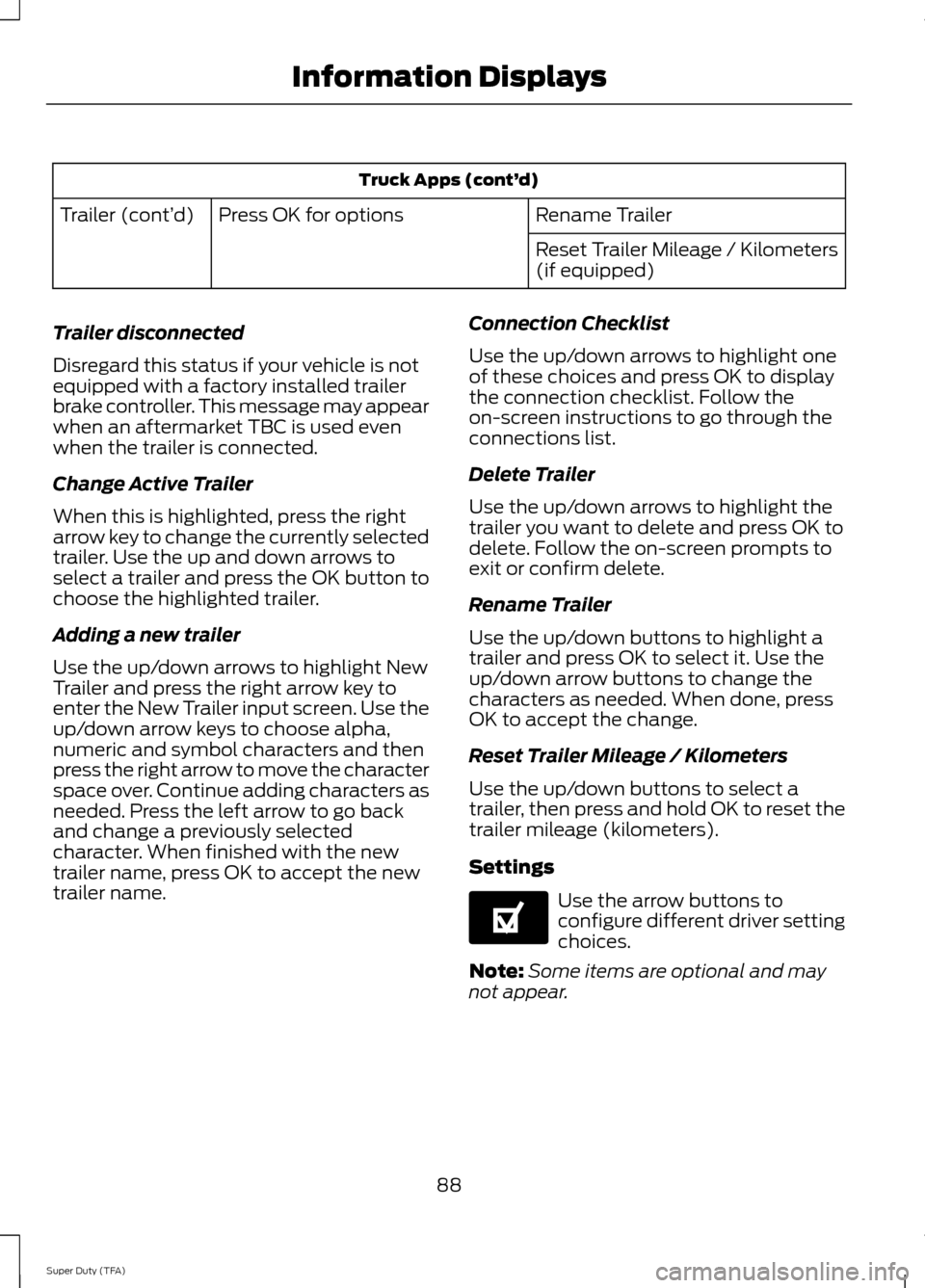
Truck Apps (cont’
d)
Rename Trailer
Press OK for options
Trailer (cont’ d)
Reset Trailer Mileage / Kilometers
(if equipped)
Trailer disconnected
Disregard this status if your vehicle is not
equipped with a factory installed trailer
brake controller. This message may appear
when an aftermarket TBC is used even
when the trailer is connected.
Change Active Trailer
When this is highlighted, press the right
arrow key to change the currently selected
trailer. Use the up and down arrows to
select a trailer and press the OK button to
choose the highlighted trailer.
Adding a new trailer
Use the up/down arrows to highlight New
Trailer and press the right arrow key to
enter the New Trailer input screen. Use the
up/down arrow keys to choose alpha,
numeric and symbol characters and then
press the right arrow to move the character
space over. Continue adding characters as
needed. Press the left arrow to go back
and change a previously selected
character. When finished with the new
trailer name, press OK to accept the new
trailer name. Connection Checklist
Use the up/down arrows to highlight one
of these choices and press OK to display
the connection checklist. Follow the
on-screen instructions to go through the
connections list.
Delete Trailer
Use the up/down arrows to highlight the
trailer you want to delete and press OK to
delete. Follow the on-screen prompts to
exit or confirm delete.
Rename Trailer
Use the up/down buttons to highlight a
trailer and press OK to select it. Use the
up/down arrow buttons to change the
characters as needed. When done, press
OK to accept the change.
Reset Trailer Mileage / Kilometers
Use the up/down buttons to select a
trailer, then press and hold OK to reset the
trailer mileage (kilometers).
Settings
Use the arrow buttons to
configure different driver setting
choices.
Note: Some items are optional and may
not appear.
88
Super Duty (TFA) Information DisplaysE144641
Page 92 of 458
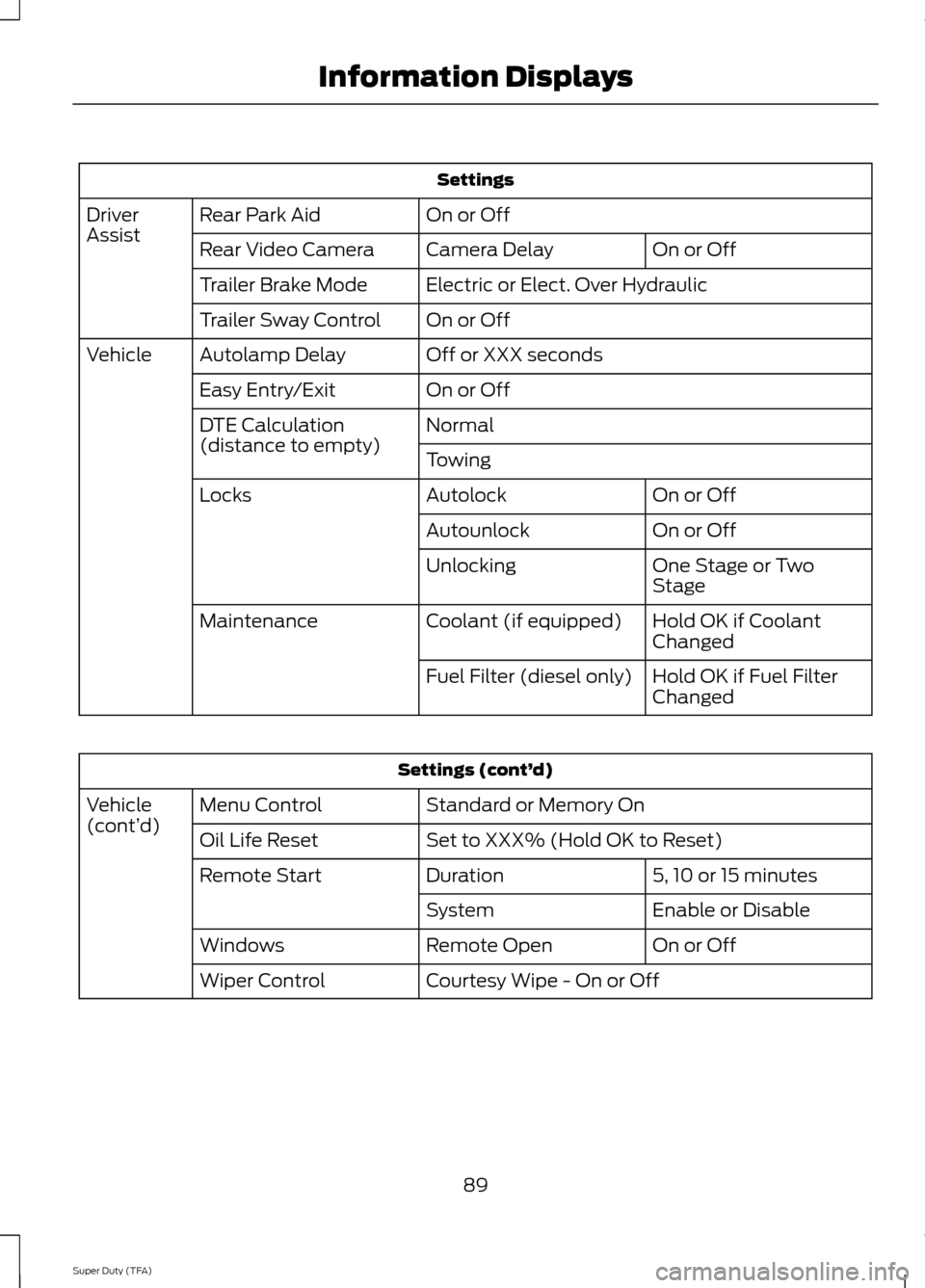
Settings
On or Off
Rear Park Aid
Driver
Assist
On or Off
Camera Delay
Rear Video Camera
Electric or Elect. Over Hydraulic
Trailer Brake Mode
On or Off
Trailer Sway Control
Off or XXX seconds
Autolamp Delay
Vehicle
On or Off
Easy Entry/Exit
Normal
DTE Calculation
(distance to empty)
Towing
On or Off
Autolock
Locks
On or Off
Autounlock
One Stage or Two
Stage
Unlocking
Hold OK if Coolant
Changed
Coolant (if equipped)
Maintenance
Hold OK if Fuel Filter
Changed
Fuel Filter (diesel only) Settings (cont’
d)
Standard or Memory On
Menu Control
Vehicle
(cont’ d)
Set to XXX% (Hold OK to Reset)
Oil Life Reset
5, 10 or 15 minutes
Duration
Remote Start
Enable or Disable
System
On or Off
Remote Open
Windows
Courtesy Wipe - On or Off
Wiper Control
89
Super Duty (TFA) Information Displays
Page 100 of 458
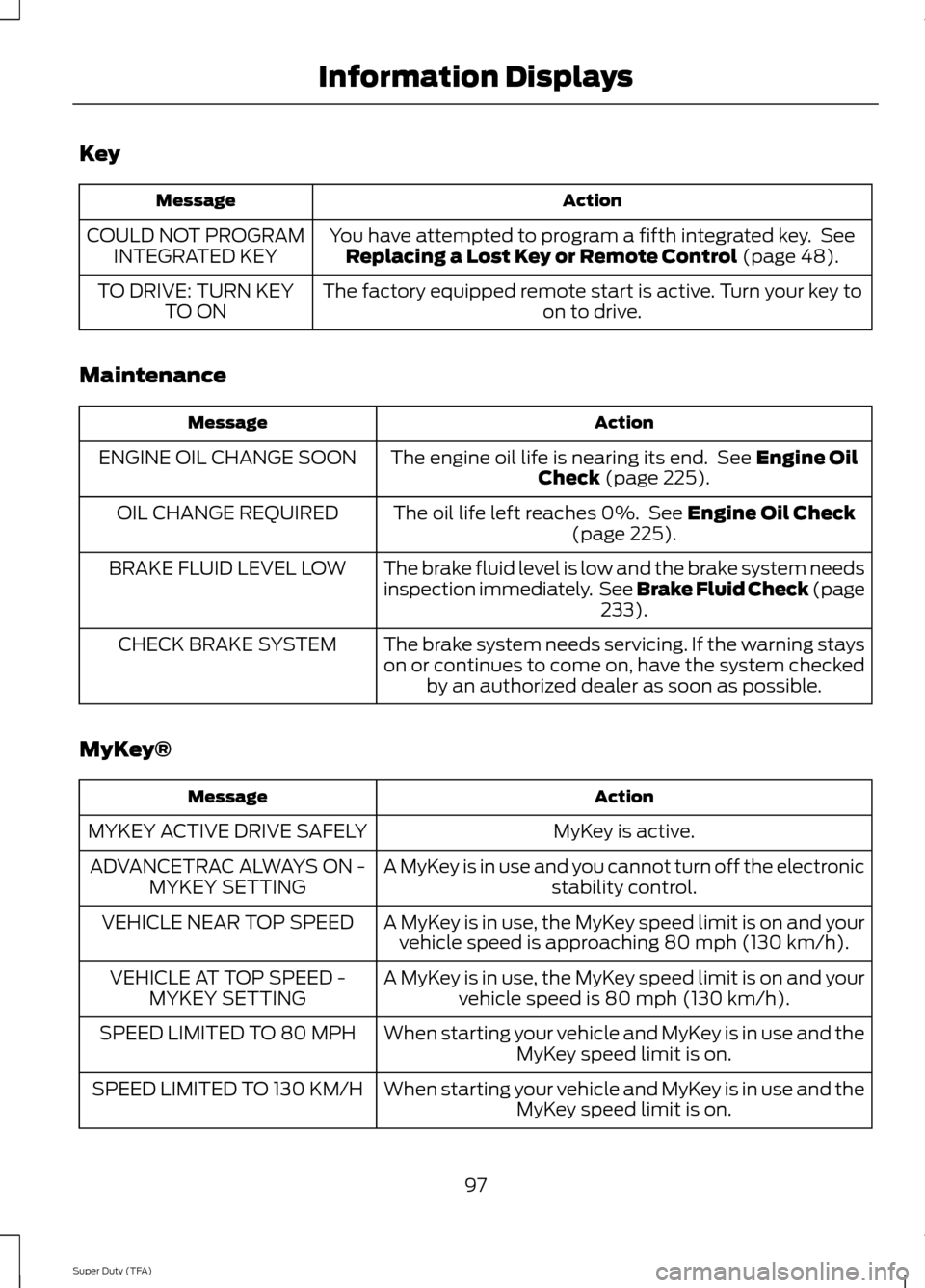
Key
Action
Message
You have attempted to program a fifth integrated key. SeeReplacing a Lost Key or Remote Control (page 48).
COULD NOT PROGRAM
INTEGRATED KEY
The factory equipped remote start is active. Turn your key to on to drive.
TO DRIVE: TURN KEY
TO ON
Maintenance Action
Message
The engine oil life is nearing its end. See
Engine Oil
Check (page 225).
ENGINE OIL CHANGE SOON
The oil life left reaches 0%. See
Engine Oil Check
(page 225).
OIL CHANGE REQUIRED
The brake fluid level is low and the brake system needs
inspection immediately. See Brake Fluid Check (page233
).
BRAKE FLUID LEVEL LOW
The brake system needs servicing. If the warning stays
on or continues to come on, have the system checkedby an authorized dealer as soon as possible.
CHECK BRAKE SYSTEM
MyKey® Action
Message
MyKey is active.
MYKEY ACTIVE DRIVE SAFELY
A MyKey is in use and you cannot turn off the electronicstability control.
ADVANCETRAC ALWAYS ON -
MYKEY SETTING
A MyKey is in use, the MyKey speed limit is on and yourvehicle speed is approaching 80 mph (130 km/h).
VEHICLE NEAR TOP SPEED
A MyKey is in use, the MyKey speed limit is on and yourvehicle speed is 80 mph (130 km/h).
VEHICLE AT TOP SPEED -
MYKEY SETTING
When starting your vehicle and MyKey is in use and theMyKey speed limit is on.
SPEED LIMITED TO 80 MPH
When starting your vehicle and MyKey is in use and theMyKey speed limit is on.
SPEED LIMITED TO 130 KM/H
97
Super Duty (TFA) Information Displays
Page 101 of 458
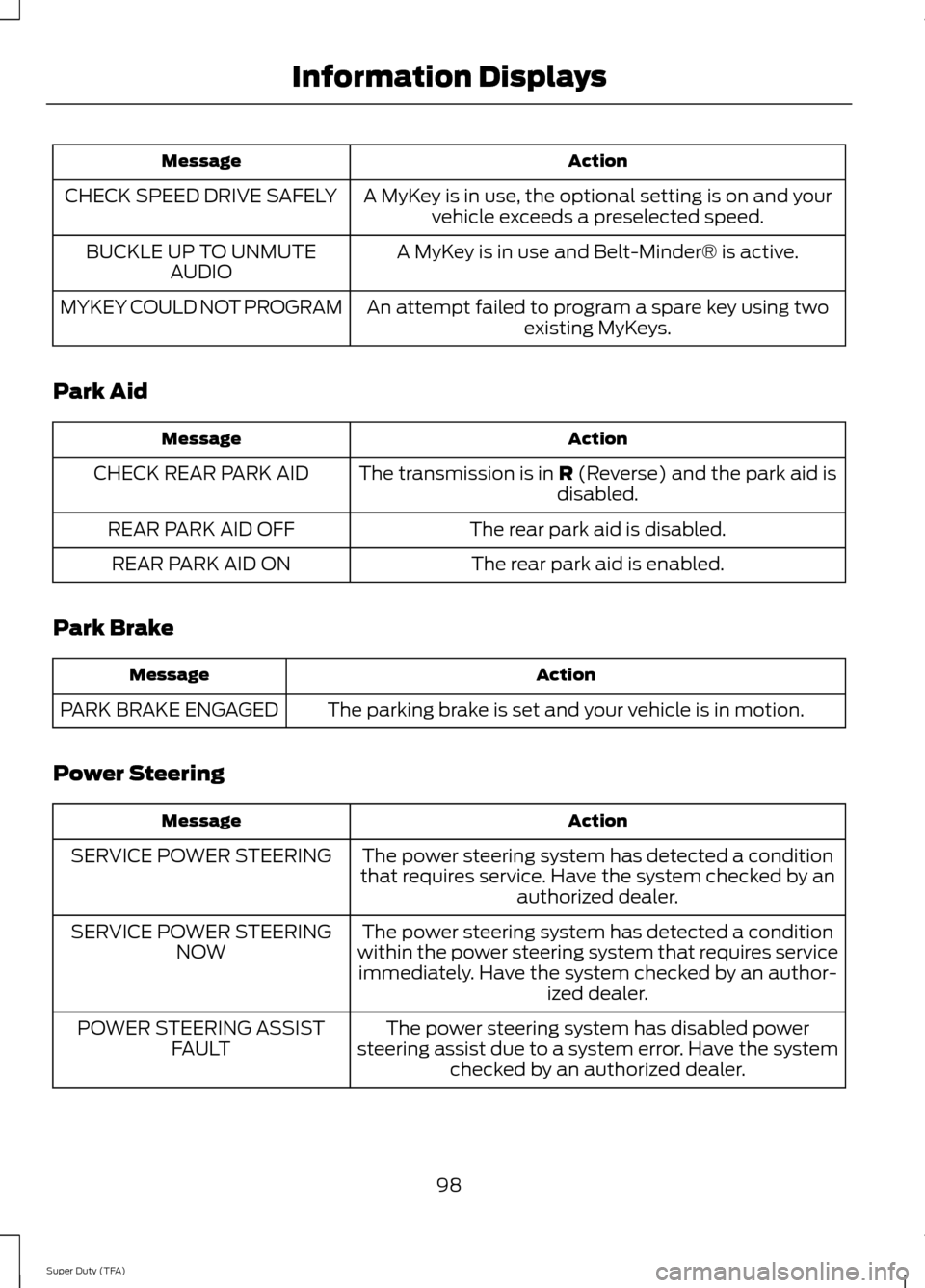
Action
Message
A MyKey is in use, the optional setting is on and yourvehicle exceeds a preselected speed.
CHECK SPEED DRIVE SAFELY
A MyKey is in use and Belt-Minder® is active.
BUCKLE UP TO UNMUTE
AUDIO
An attempt failed to program a spare key using twoexisting MyKeys.
MYKEY COULD NOT PROGRAM
Park Aid Action
Message
The transmission is in R (Reverse) and the park aid is
disabled.
CHECK REAR PARK AID
The rear park aid is disabled.
REAR PARK AID OFF
The rear park aid is enabled.
REAR PARK AID ON
Park Brake Action
Message
The parking brake is set and your vehicle is in motion.
PARK BRAKE ENGAGED
Power Steering Action
Message
The power steering system has detected a condition
that requires service. Have the system checked by an authorized dealer.
SERVICE POWER STEERING
The power steering system has detected a condition
within the power steering system that requires service immediately. Have the system checked by an author- ized dealer.
SERVICE POWER STEERING
NOW
The power steering system has disabled power
steering assist due to a system error. Have the system checked by an authorized dealer.
POWER STEERING ASSIST
FAULT
98
Super Duty (TFA) Information Displays
Page 103 of 458
![FORD SUPER DUTY 2014 3.G Owners Manual Trailer
Action
Message
The current gain setting for the trailer brake.
TRAILER BRAKE GAIN: XX.X
[OUTPUT]
The current gain setting for the trailer brake when atrailer is not connected.
TRAILER BRAKE GA](/manual-img/11/5307/w960_5307-102.png "FORD SUPER DUTY 2014 3.G Owners Manual Trailer
Action
Message
The current gain setting for the trailer brake.
TRAILER BRAKE GAIN: XX.X
[OUTPUT]
The current gain setting for the trailer brake when atrailer is not connected.
TRAILER BRAKE GA")
Trailer
Action
Message
The current gain setting for the trailer brake.
TRAILER BRAKE GAIN: XX.X
[OUTPUT]
The current gain setting for the trailer brake when atrailer is not connected.
TRAILER BRAKE GAIN: XX.X NO
TRAILER
Accompanied by a single chime, in response to faults
sensed by the TBC. See Trailer Sway Control (page 186).
TRAILER BRAKE MODULE
FAULT
A correct trailer connection (a trailer with electric trailerbrakes) is sensed during a given ignition cycle.
TRAILER CONNECTED
A trailer connection becomes disconnected, either
intentionally or unintentionally, and has been sensed during a given ignition cycle. Disregard this status if
your vehicle is not equipped with a factory installed
trailer brake controller. This message may appear when an aftermarket TBC is used even when the trailer is connected.
TRAILER DISCONNECTED
Your trailer sway control has detected trailer sway soyou need to reduce your speed.
TRAILER SWAY REDUCE
SPEED
Faults with your vehicle wiring and trailer wiring orbrake system. See
Towing a Trailer (page 185).
WIRING FAULT ON TRAILER
4WD Action
Message
A fault is present in your 4X4 system. See
Using
Four-Wheel Drive (page 147).
CHECK 4X4
Your 4X4 system is making a shift.
4X4 SHIFT IN PROGRESS
You need to apply the brake in order to shift into4X4 LOW.
FOR 4X4 LOW APPLY BRAKE
When your vehicle is at a stop and you need to shiftinto Neutral before you select 4X4 LOW.
FOR 4X4 LOW SHIFT TO N
When your vehicle is moving and you need toreduce your speed to select 4X4 LOW.
FOR 4X4 LOW SLOW TO 3 MPH
100
Super Duty (TFA) Information Displays
Page 104 of 458
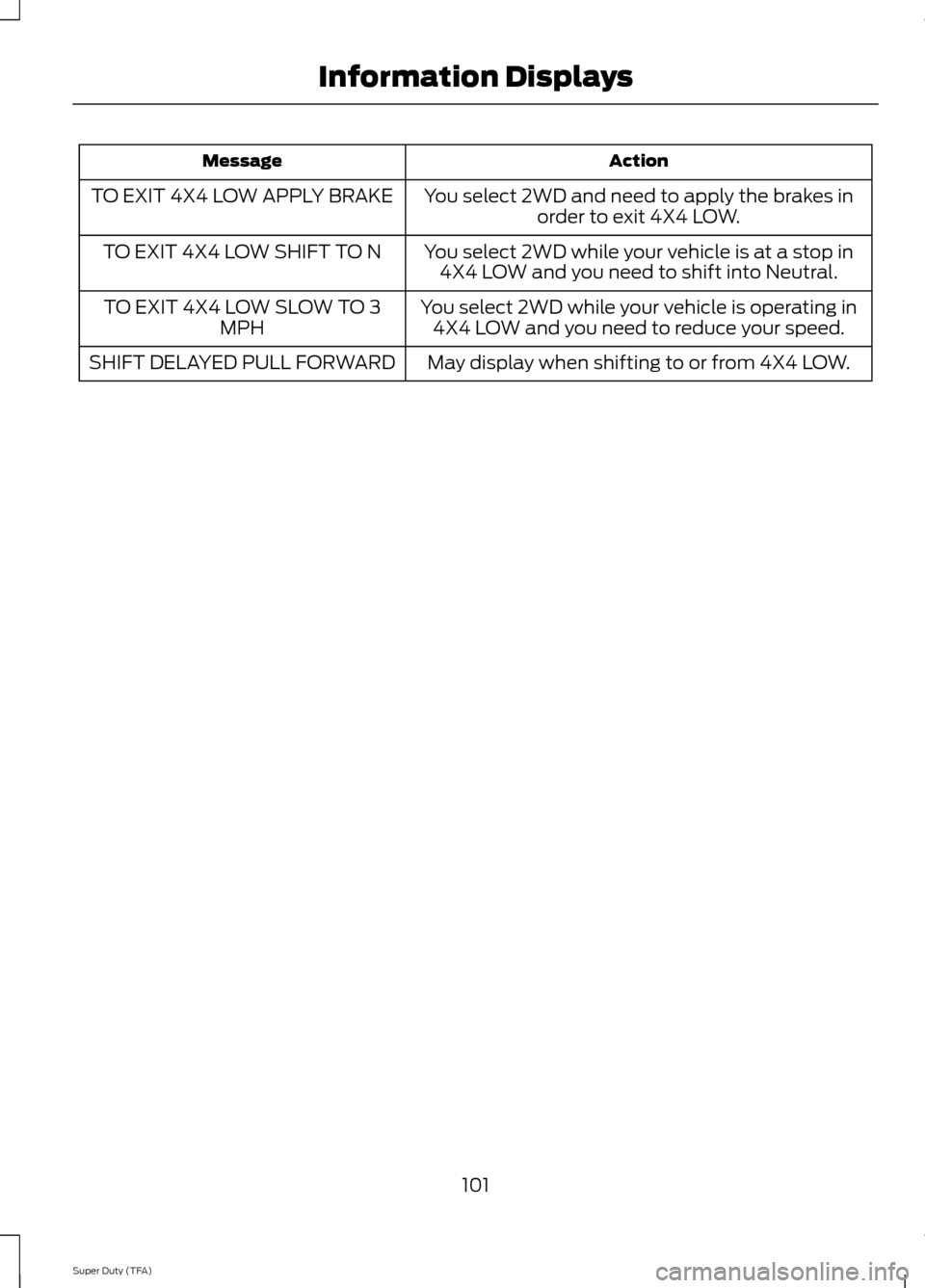
Action
Message
You select 2WD and need to apply the brakes inorder to exit 4X4 LOW.
TO EXIT 4X4 LOW APPLY BRAKE
You select 2WD while your vehicle is at a stop in4X4 LOW and you need to shift into Neutral.
TO EXIT 4X4 LOW SHIFT TO N
You select 2WD while your vehicle is operating in4X4 LOW and you need to reduce your speed.
TO EXIT 4X4 LOW SLOW TO 3
MPH
May display when shifting to or from 4X4 LOW.
SHIFT DELAYED PULL FORWARD
101
Super Duty (TFA) Information Displays
Page 133 of 458
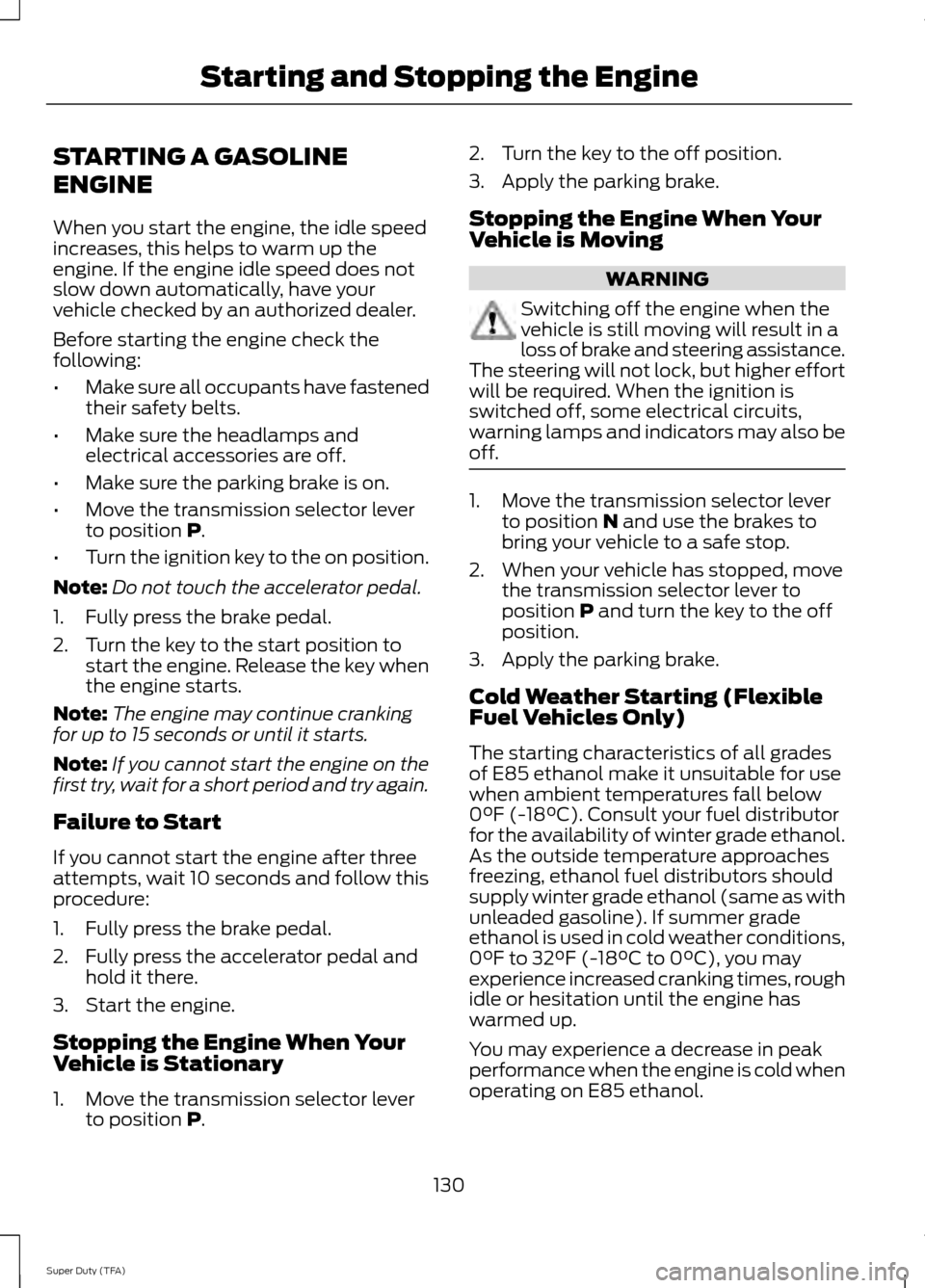
STARTING A GASOLINE
ENGINE
When you start the engine, the idle speed
increases, this helps to warm up the
engine. If the engine idle speed does not
slow down automatically, have your
vehicle checked by an authorized dealer.
Before starting the engine check the
following:
•
Make sure all occupants have fastened
their safety belts.
• Make sure the headlamps and
electrical accessories are off.
• Make sure the parking brake is on.
• Move the transmission selector lever
to position P.
• Turn the ignition key to the on position.
Note: Do not touch the accelerator pedal.
1. Fully press the brake pedal.
2. Turn the key to the start position to start the engine. Release the key when
the engine starts.
Note: The engine may continue cranking
for up to 15 seconds or until it starts.
Note: If you cannot start the engine on the
first try, wait for a short period and try again.
Failure to Start
If you cannot start the engine after three
attempts, wait 10 seconds and follow this
procedure:
1. Fully press the brake pedal.
2. Fully press the accelerator pedal and hold it there.
3. Start the engine.
Stopping the Engine When Your
Vehicle is Stationary
1. Move the transmission selector lever to position
P. 2. Turn the key to the off position.
3. Apply the parking brake.
Stopping the Engine When Your
Vehicle is Moving
WARNING
Switching off the engine when the
vehicle is still moving will result in a
loss of brake and steering assistance.
The steering will not lock, but higher effort
will be required. When the ignition is
switched off, some electrical circuits,
warning lamps and indicators may also be
off. 1. Move the transmission selector lever
to position
N and use the brakes to
bring your vehicle to a safe stop.
2. When your vehicle has stopped, move the transmission selector lever to
position
P and turn the key to the off
position.
3. Apply the parking brake.
Cold Weather Starting (Flexible
Fuel Vehicles Only)
The starting characteristics of all grades
of E85 ethanol make it unsuitable for use
when ambient temperatures fall below
0°F (-18°C). Consult your fuel distributor
for the availability of winter grade ethanol.
As the outside temperature approaches
freezing, ethanol fuel distributors should
supply winter grade ethanol (same as with
unleaded gasoline). If summer grade
ethanol is used in cold weather conditions,
0°F to 32°F (-18°C to 0°C), you may
experience increased cranking times, rough
idle or hesitation until the engine has
warmed up.
You may experience a decrease in peak
performance when the engine is cold when
operating on E85 ethanol.
130
Super Duty (TFA) Starting and Stopping the Engine