2014 FORD MONDEO key
[x] Cancel search: keyPage 270 of 446
Downloaded from www.Manualslib.com manuals search engine CHANGING A ROAD WHEEL
Lug Nuts
You can obtain a replacement locking lugnut key and replacement locking lug nutsfrom your dealer using the referencenumber certificate.
Vehicles with a Spare Wheel
If the spare wheel is exactly the same typeand size as the other fitted road wheels,you can replace the existing road wheelwith the spare wheel and continue to drivein the normal manner.
If the spare wheel is different to the otherroad wheels, it will carry a yellow label withthe appropriate speed limit.
Refer to the following information beforechanging the road wheel.
WARNINGS
Drive the shortest possible distances.
Do not fit more than one spare wheelon your vehicle at any one time.
Do not carry out any tire repairs on aspare wheel.
Do not drive through an automaticcar wash.
If you are unsure what type of sparewheel you have do not exceed 80km/h (50 mph).
Only fit snow chains to specifiedtires. See Using Snow Chains(page 264).
The ground clearance of your vehiclemay be reduced. Take care whenparking next to a curb.
Note:Your vehicle may exhibit someunusual driving characteristics.
Vehicle Jack
WARNINGS
The vehicle jack supplied with yourvehicle should only be used whenchanging a wheel in emergencysituations.
Before using the vehicle jack, checkthat it is not damaged or deformedand that the thread is lubricated andfree from foreign matter.
Never place anything between thejack and the ground, or the jack andyour vehicle.
Note:Vehicles with a temporary mobilitykit do not have a vehicle jack or a lug nutwrench
It is recommended to use a workshop typehydraulic jack for changing betweensummer and winter tires.
Note:Use a jack with a minimum liftingcapacity of 1.5 tonnes and a lifting plate witha minimum diameter of 3.1 inches (80millimeters).
Vehicles without a Temporary MobilityKit
Your vehicle jack, lug nut wrench andscrew-in towing eye are located in thespare wheel well or behind the rear seatwith the fuel funnel.
Jacking and Lifting Points
WARNING
Use only the specified jacking points.If you use other positions, you maydamage the body, steering,suspension, engine, braking system or thefuel lines.
268Mondeo (CNG) Vehicles Built From: 08-09-2014 Vehicles Built Up To: 19-04-2015, CG3633en enGBR, Edition date: 10/2014, First PrintingWheels and Tires
Page 273 of 446
Downloaded from www.Manualslib.com manuals search engine WARNINGS
Make sure that the jack is vertical tothe jacking point and the base is flaton the ground.
Do not lay alloy wheels face downon the ground, this will damage thepaint.
Note:The spare wheel is located under thefloor cover in the luggage compartment.
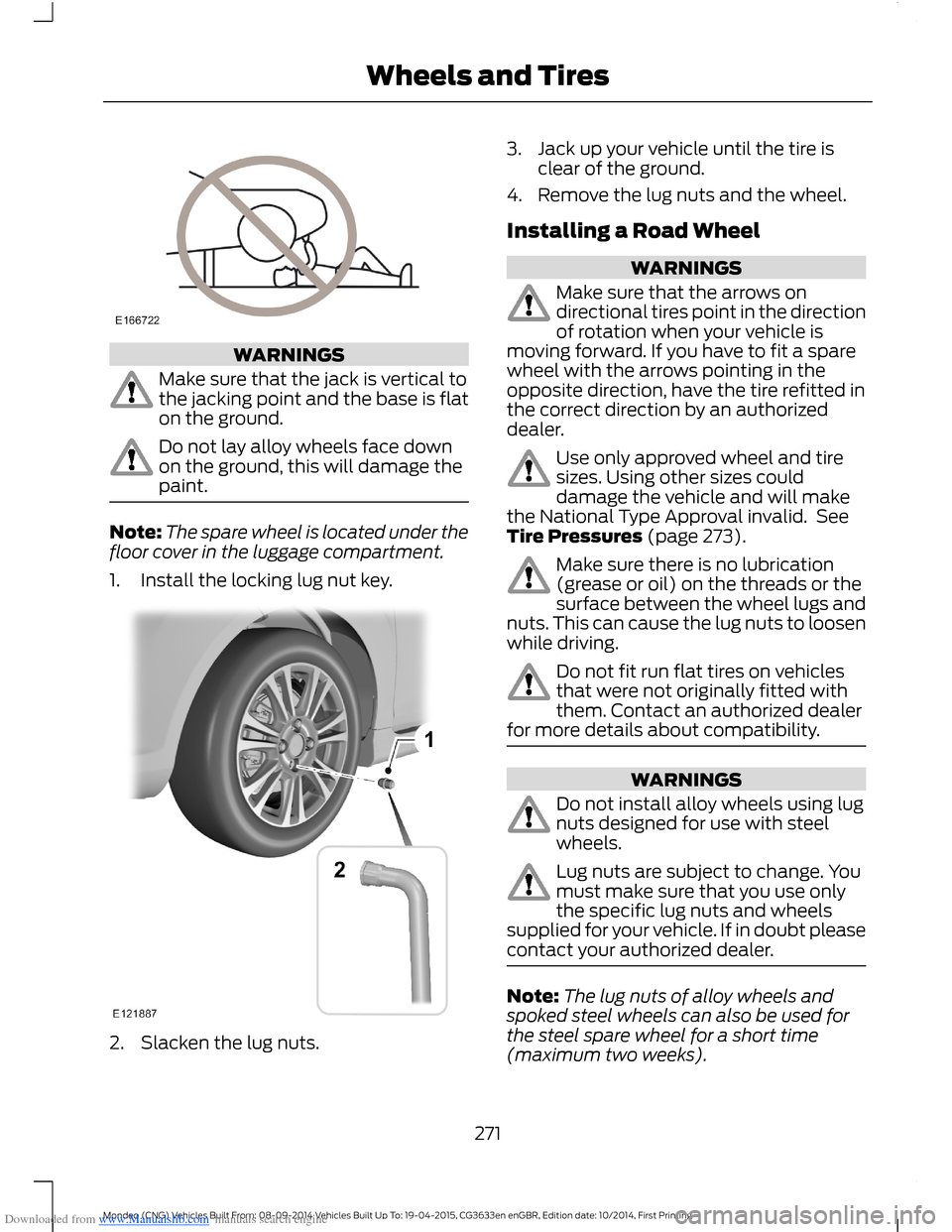
1.Install the locking lug nut key.
2.Slacken the lug nuts.
3.Jack up your vehicle until the tire isclear of the ground.
4.Remove the lug nuts and the wheel.
Installing a Road Wheel
WARNINGS
Make sure that the arrows ondirectional tires point in the directionof rotation when your vehicle ismoving forward. If you have to fit a sparewheel with the arrows pointing in theopposite direction, have the tire refitted inthe correct direction by an authorizeddealer.
Use only approved wheel and tiresizes. Using other sizes coulddamage the vehicle and will makethe National Type Approval invalid. SeeTire Pressures (page 273).
Make sure there is no lubrication(grease or oil) on the threads or thesurface between the wheel lugs andnuts. This can cause the lug nuts to loosenwhile driving.
Do not fit run flat tires on vehiclesthat were not originally fitted withthem. Contact an authorized dealerfor more details about compatibility.
WARNINGS
Do not install alloy wheels using lugnuts designed for use with steelwheels.
Lug nuts are subject to change. Youmust make sure that you use onlythe specific lug nuts and wheelssupplied for your vehicle. If in doubt pleasecontact your authorized dealer.
Note:The lug nuts of alloy wheels andspoked steel wheels can also be used forthe steel spare wheel for a short time(maximum two weeks).
271Mondeo (CNG) Vehicles Built From: 08-09-2014 Vehicles Built Up To: 19-04-2015, CG3633en enGBR, Edition date: 10/2014, First PrintingWheels and Tires
Page 274 of 446
Downloaded from www.Manualslib.com manuals search engine Note:Make sure the wheel and hub contactsurfaces are free from foreign matter.
Note:Make sure that the cones on the lugnuts are against the wheel.
1.Install the wheel.
2.Install the lug nuts finger tight.
3.Install the locking lug nut key.
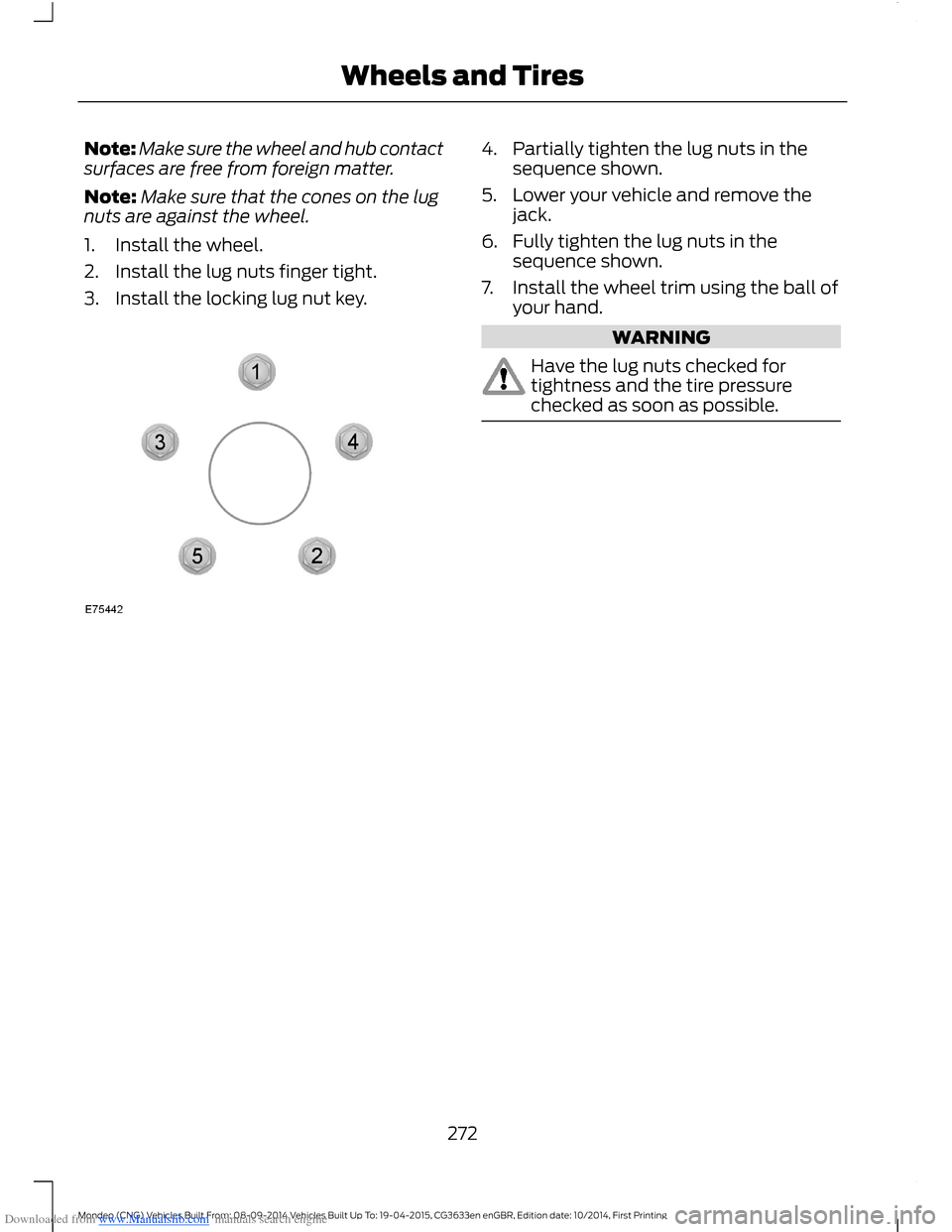
4.Partially tighten the lug nuts in thesequence shown.
5.Lower your vehicle and remove thejack.
6.Fully tighten the lug nuts in thesequence shown.
7.Install the wheel trim using the ball ofyour hand.
WARNING
Have the lug nuts checked fortightness and the tire pressurechecked as soon as possible.
272Mondeo (CNG) Vehicles Built From: 08-09-2014 Vehicles Built Up To: 19-04-2015, CG3633en enGBR, Edition date: 10/2014, First PrintingWheels and Tires
Page 315 of 446
Downloaded from www.Manualslib.com manuals search engine Receiving a Call
When receiving a call, you can:
•Answer the call by pressing the acceptcall button on the steering wheel or byselecting the accept call option in theaudio display. Press the OK button.
•Reject the call by pressing the rejectcall button on the steering wheel or byselecting the reject call option in theaudio display. Press the OK button.
•Ignore the call by doing nothing.
Cell Phone Options During anActive Call
During an active call, you have extra menufeatures which become available, forexample putting a call on hold.
To access this menu, choose one of theoptions available at the bottom of theaudio display or select the option for more.
Description and ActionMessage
Turn your vehicle's microphone off. To turn the microphoneon, select the option again.Mic. off
Switch a call from an active hands-free environment to yourcell phone for a more private conversation. When selected,the audio display will indicate the call is private.
Privacy
Put an active call on hold. When selected, the audio displaywill indicate the call is on hold.Hold
Enter numbers using the audio system numeric keypad, forexample numbers for passwords.Dial a number
Join two separate calls. The system supports a maximum ofthree callers on a multi-party or conference call.Join calls
1.Select the option for more.
2.Access the desired contact through the system or usevoice commands to place the second call. Once activelyin the second call, select the option for more.
3.Scroll to the option to join calls and press the OK button.
Access your phonebook contacts.Phonebook
1.Select the option for more.
2.Scroll to the option for phonebook and press the OKbutton.
3.Scroll through your phonebook contacts.
313Mondeo (CNG) Vehicles Built From: 08-09-2014 Vehicles Built Up To: 19-04-2015, CG3633en enGBR, Edition date: 10/2014, First PrintingSYNC™
Page 316 of 446

Downloaded from www.Manualslib.com manuals search engine Description and ActionMessage
4.Press the OK button again when the desired selectionappears in the audio display.
5.Press the OK button or dial button to call the selection.
Access your call history log.Call history
1.Select the option for more.
2.Scroll to the option until call history appears. Press theOK button.
3.Scroll through your call history options (incoming,outgoing or missed).
4.Press the OK button again when the desired selectionappears in the audio display.
5.Press the OK button or dial button to call the selection.
Accessing Features Through theCell Phone Menu
You can access your call history,phonebook, sent text messages as well asaccess cell phone and system settings.You can also access advanced featuressuch as emergency assistance.
The system attempts to automaticallyre-download your phonebook and callhistory each time your cell phone connectsto the system. You must turn on the autodownload feature if your cell phonesupports it.
Note:This is a cell phone dependentfeature.
1.Press the PHONE button to enter thecell phone menu.
2.Select one of the options available.
Description and ActionMessage
Dial a number using the audio system numeric keypad.Dial a number
Redial the last number called (if available). Press the OKbutton to select.Redial
Access your downloaded phonebook.Phonebook
1.Press the OK button to confirm and enter. You can usethe options at the bottom of the screen to quickly accessan alphabetical category. You can also use the letters onthe keypad to jump in the list.
2.Scroll through your phonebook contacts.
314Mondeo (CNG) Vehicles Built From: 08-09-2014 Vehicles Built Up To: 19-04-2015, CG3633en enGBR, Edition date: 10/2014, First PrintingSYNC™
Page 317 of 446

Downloaded from www.Manualslib.com manuals search engine Description and ActionMessage
3.Press the OK button again when the desired selectionappears in the audio display.
4.Press the OK button or dial button to call the selection.
Access any previously dialed, received or missed calls.Call history
1.Press the OK button to select.
2.Scroll to select either incoming calls, outgoing calls ormissed calls. Press the OK button to make your selection.
3.Press the OK button or dial button to call the selection.
Select one of 10 speed dial entries. To set a speed dial entry,go to the phonebook and press and hold one of the numberson the audio system numeric keypad.
Speed Dial
Send, download and delete text messages.Text messaging
Access the option for Bluetooth device menu listings (add,connect, set as primary, on or off, delete).BT Devices
View various settings and features on your cell phone.Phone settings
Turn the SYNC emergency assistance feature on or off.Emergency Assistance
Text Messaging
The system allows you to receive, send,download and delete text messages. Thesystem can also read incoming textmessages to you so that you do not haveto take your eyes off the road.
Note:This is a cell phone dependentfeature.
Receiving a Text Message
When a new message arrives, an audibletone sounds and the audio displayindicates you have a new message.
You have these options:
•Select the listen option to have thesystem read the message to you.
•Select the view option to open the textmessage. Select the ignore option ordo nothing and the message goes intoyour text message inbox. Onceselected, you have the ability to havethe message read out to you, to viewother messages or to select the moreoption.
•Press the voice button and say "Readtext message".
•Select the more option and use thearrow buttons to scroll through furtheroptions.
Note:Your cell phone must supportdownloading text messages using Bluetoothto receive incoming text messages.
Choose from the following:
315Mondeo (CNG) Vehicles Built From: 08-09-2014 Vehicles Built Up To: 19-04-2015, CG3633en enGBR, Edition date: 10/2014, First PrintingSYNC™
Page 328 of 446

Downloaded from www.Manualslib.com manuals search engine App Status
You can view the current status of an app
in the settings menu. There are threepossible statuses:
Description and ActionMessage
The system has detected a new app requiring authorizationor a general permissions update is required.Update needed
No update is required.Up-to-date
The system is trying to receive an update.Updating...
Options in the settings menu:
Description and ActionMessage
If an update is required and you want to manually requestthe update, for example when you are in a Wi-Fi hotspot.Request Update
Select this option to disable automatic updates.Disable Updates
App Permissions
Permissions are divided by groups. You cangrant these group permissions individually.You can change a permission group statusany time when not driving, by using thesettings menu.
When you launch an app using SYNC, thesystem may ask you to grant certainpermissions, for example:
•To allow your vehicle to provide vehicleinformation to the app including, butnot limited to: Fuel level, fuelconsumption, engine speed, batteryvoltage, odometer, VIN, externaltemperature, gear position, tirepressure, ambient temperature, dateand time.
•To allow your vehicle to provide drivingcharacteristic information, including,but not limited to: MyKey, seat beltstatus, engine speeds, braking events,brake pedal switch, acceleration,accelerator pedal position, clutch pedalswitch, trip length, trip time, trip cost,percent engine on time, and percent oftime at speed.
326Mondeo (CNG) Vehicles Built From: 08-09-2014 Vehicles Built Up To: 19-04-2015, CG3633en enGBR, Edition date: 10/2014, First PrintingSYNC™
Page 335 of 446
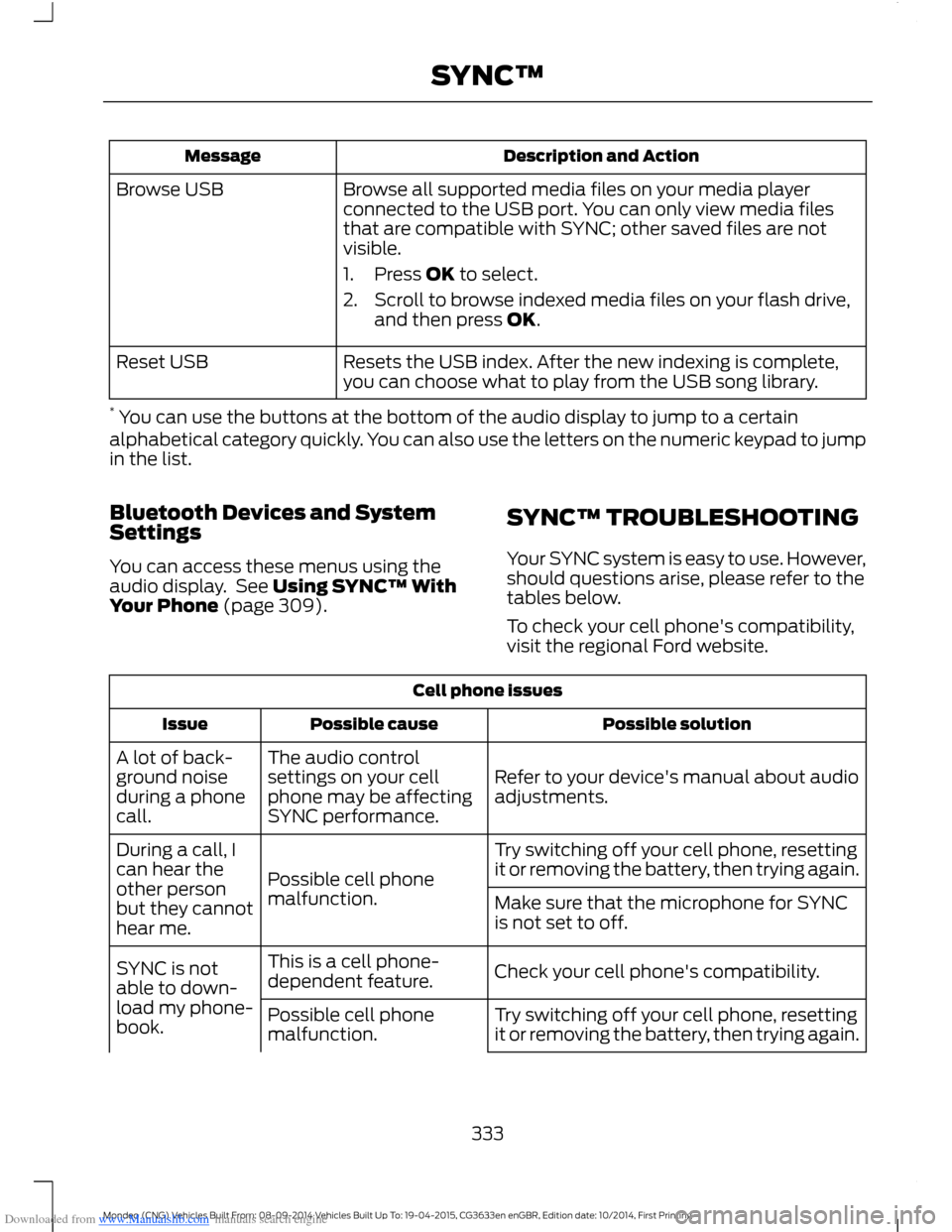
Downloaded from www.Manualslib.com manuals search engine Description and ActionMessage
Browse all supported media files on your media playerconnected to the USB port. You can only view media filesthat are compatible with SYNC; other saved files are notvisible.
1.Press OK to select.
2.Scroll to browse indexed media files on your flash drive,and then press OK.
Browse USB
Resets the USB index. After the new indexing is complete,you can choose what to play from the USB song library.Reset USB
* You can use the buttons at the bottom of the audio display to jump to a certainalphabetical category quickly. You can also use the letters on the numeric keypad to jumpin the list.
Bluetooth Devices and SystemSettings
You can access these menus using theaudio display. See Using SYNC™ WithYour Phone (page 309).
SYNC™ TROUBLESHOOTING
Your SYNC system is easy to use. However,should questions arise, please refer to thetables below.
To check your cell phone's compatibility,visit the regional Ford website.
Cell phone issues
Possible solutionPossible causeIssue
Refer to your device's manual about audioadjustments.
The audio controlsettings on your cellphone may be affectingSYNC performance.
A lot of back-ground noiseduring a phonecall.
Try switching off your cell phone, resettingit or removing the battery, then trying again.Possible cell phonemalfunction.
During a call, Ican hear theother personbut they cannothear me.
Make sure that the microphone for SYNCis not set to off.
Check your cell phone's compatibility.This is a cell phone-dependent feature.SYNC is notable to down-load my phone-book.Try switching off your cell phone, resettingit or removing the battery, then trying again.Possible cell phonemalfunction.
333Mondeo (CNG) Vehicles Built From: 08-09-2014 Vehicles Built Up To: 19-04-2015, CG3633en enGBR, Edition date: 10/2014, First PrintingSYNC™