2014 FORD MONDEO display
[x] Cancel search: displayPage 75 of 446
Downloaded from www.Manualslib.com manuals search engine GLOBAL OPENING AND
CLOSING
You can use the remote control to operatethe windows with the ignition off.
Note:You can enable or disable this featurein the information display or see anauthorized dealer. See (page 86).
Note:To operate this feature, accessorydelay must not be active.
Opening the Windows
You can only open the windows for a shorttime after you unlock your vehicle with theremote control. After you unlock yourvehicle, press and hold the remote controlunlock button to open the windows andvent the moonroof. Release the buttononce movement starts. Press the lock orunlock button to stop movement.
Closing the Windows
WARNING
When closing the windows andmoonroof, you should verify they arefree of obstructions and make surethat children and pets are not in theproximity of the window openings.
To close the windows and moonroof, pressand hold the remote control lock button.Release the button once movement starts.Press the lock or unlock button to stopmovement.
EXTERIOR MIRRORS
Power Exterior Mirrors
WARNING
Do not adjust the mirrors when yourvehicle is moving.
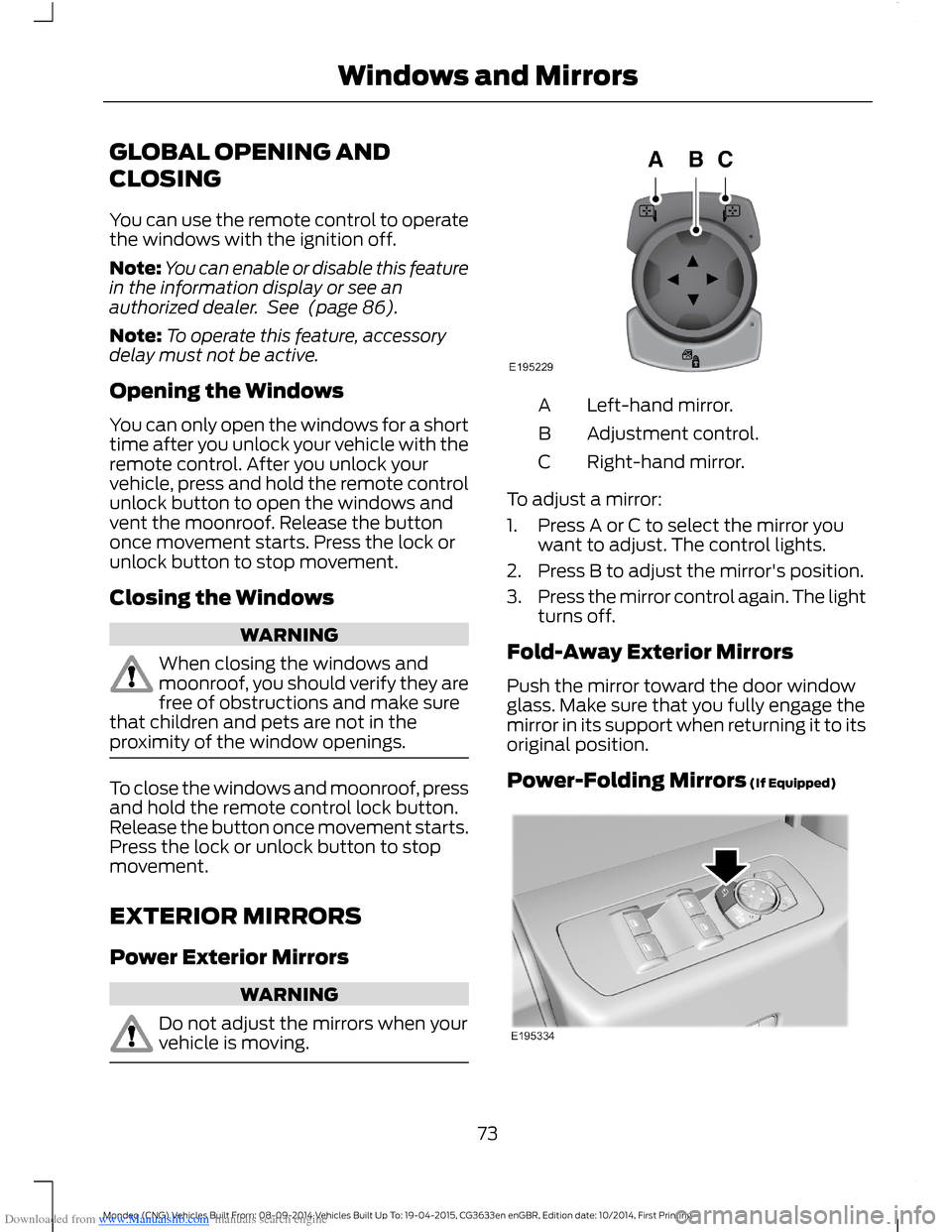
Left-hand mirror.A
Adjustment control.B
Right-hand mirror.C
To adjust a mirror:
1.Press A or C to select the mirror youwant to adjust. The control lights.
2.Press B to adjust the mirror's position.
3.Press the mirror control again. The lightturns off.
Fold-Away Exterior Mirrors
Push the mirror toward the door windowglass. Make sure that you fully engage themirror in its support when returning it to itsoriginal position.
Power-Folding Mirrors (If Equipped)
73Mondeo (CNG) Vehicles Built From: 08-09-2014 Vehicles Built Up To: 19-04-2015, CG3633en enGBR, Edition date: 10/2014, First PrintingWindows and Mirrors
Page 80 of 446
Downloaded from www.Manualslib.com manuals search engine GAUGES
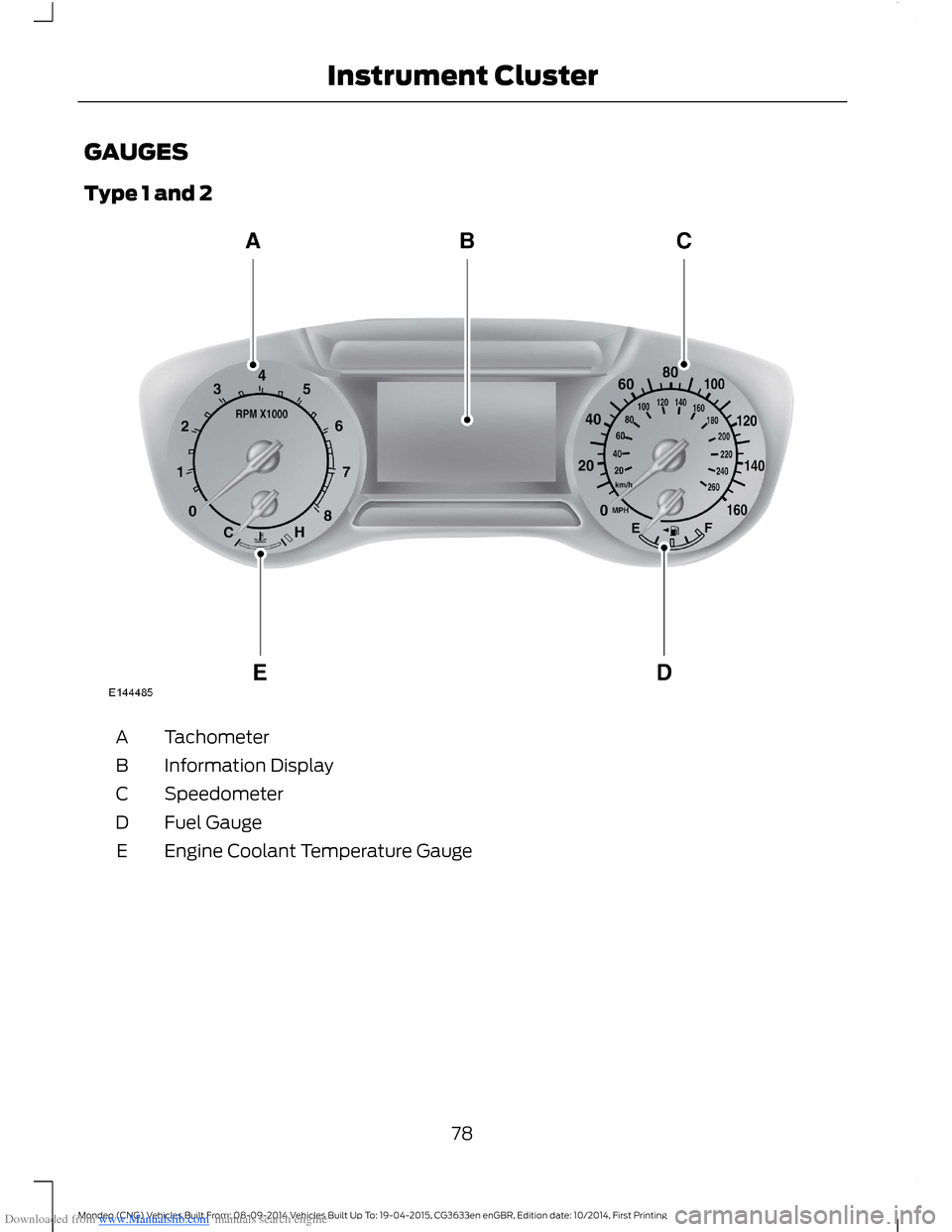
Type 1 and 2
TachometerA
Information DisplayB
SpeedometerC
Fuel GaugeD
Engine Coolant Temperature GaugeE
78Mondeo (CNG) Vehicles Built From: 08-09-2014 Vehicles Built Up To: 19-04-2015, CG3633en enGBR, Edition date: 10/2014, First PrintingInstrument Cluster
Page 81 of 446
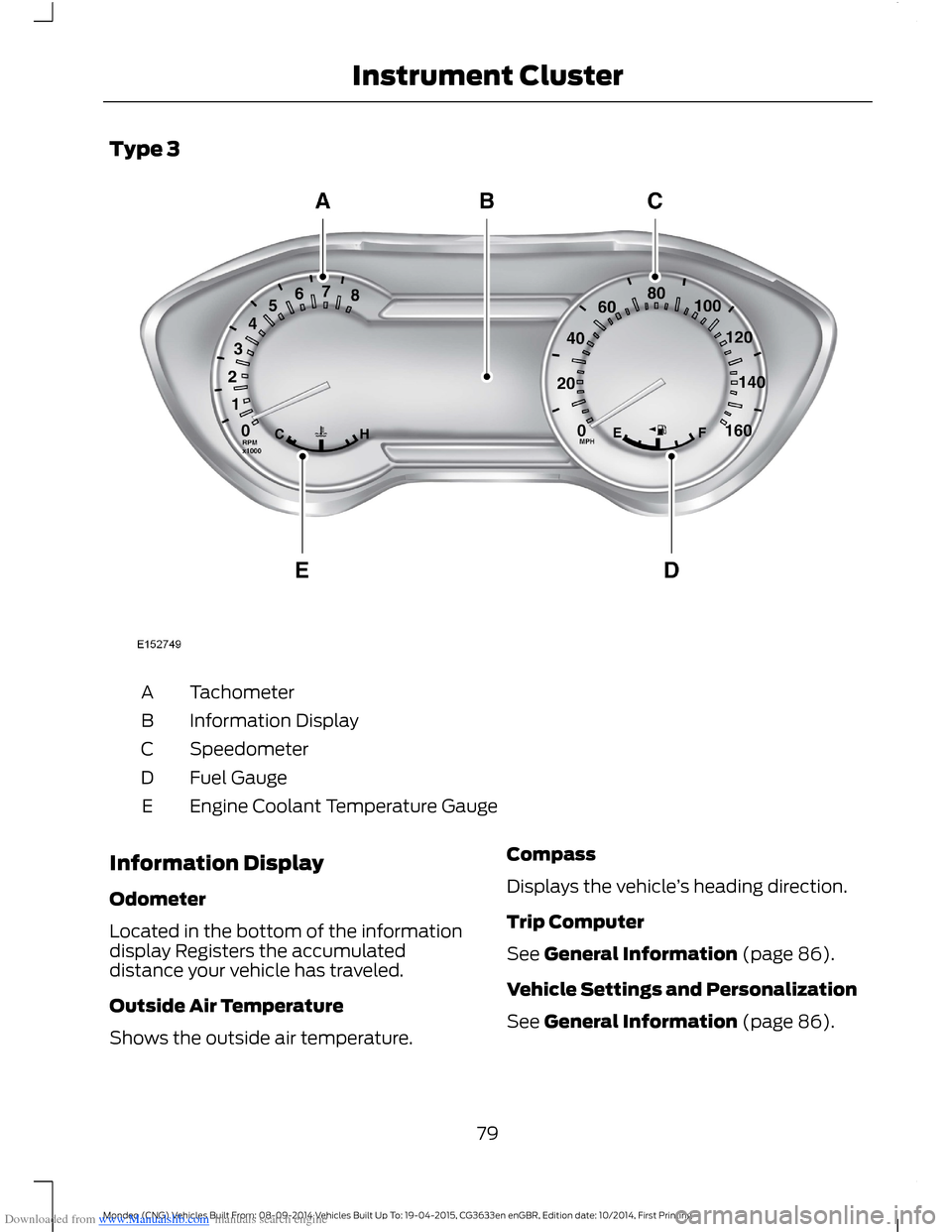
Downloaded from www.Manualslib.com manuals search engine Type 3
TachometerA
Information DisplayB
SpeedometerC
Fuel GaugeD
Engine Coolant Temperature GaugeE
Information Display
Odometer
Located in the bottom of the informationdisplay Registers the accumulateddistance your vehicle has traveled.
Outside Air Temperature
Shows the outside air temperature.
Compass
Displays the vehicle’s heading direction.
Trip Computer
See General Information (page 86).
Vehicle Settings and Personalization
See General Information (page 86).
79Mondeo (CNG) Vehicles Built From: 08-09-2014 Vehicles Built Up To: 19-04-2015, CG3633en enGBR, Edition date: 10/2014, First PrintingInstrument Cluster
Page 83 of 446

Downloaded from www.Manualslib.com manuals search engine WARNING LAMPS AND
INDICATORS
The following warning lamps andindicators alert you to a vehicle conditionthat may become serious. Some lampsilluminate when you start your vehicle tomake sure they work. If any lamps remainon after starting your vehicle, refer to therespective system warning lamp for furtherinformation.
Note:Some warning indicators appear inthe information display and operate thesame as a warning lamp but do notilluminate when you start your vehicle.
Adaptive Cruise Control Lamp
The speed control systemindicator light changes color toindicate what mode the systemis in: See Using Cruise Control (page 181).
On (white light): Illuminates when theadaptive cruise control system is turnedon. Turns off when the speed controlsystem is turned off.
Engaged (green light): Illuminates whenthe adaptive cruise control system isengaged. Turns off when the speed controlsystem is disengaged.
Anti-Lock Braking System WarningLamp
If it illuminates when you aredriving, this indicates amalfunction. You will continueto have the normal braking system(without anti-lock braking system) unlessthe brake system warning lamp is alsoilluminated. Have your vehicle checked byan authorized dealer.
Automatic High Beam Lamp
It will illuminate when thisfeature is on. See AutomaticHigh Beam Control (page 65).
Auto Start-stop Lamp
It will illuminate to inform youwhen the engine shuts down orin conjunction with a message.
Battery Warning Lamp
If it illuminates when driving, thisindicates a malfunction. Switchoff all unnecessary electricalequipment. Have your vehicle checked byan authorized dealer immediately.
Blind Spot Monitor Indicator
It will illuminate when you switchthis feature off or in conjunctionwith a message. See Blind SpotInformation System (page 194). SeeInformation Messages (page 96).
Brake System Warning Lamp
It will illuminate when youengage the parking brake withthe ignition on.
If it illuminates when you are driving, checkthat the parking brake is not engaged. Ifthe parking brake is not engaged, thisindicates low brake fluid level or a brakesystem malfunction. Have your vehiclechecked by an authorized dealerimmediately.
81Mondeo (CNG) Vehicles Built From: 08-09-2014 Vehicles Built Up To: 19-04-2015, CG3633en enGBR, Edition date: 10/2014, First PrintingInstrument Cluster
Page 85 of 446

Downloaded from www.Manualslib.com manuals search engine Frost Warning Lamp
WARNING
Even if the temperature rises toabove 39°F (4°C) there is noguarantee that the road is free ofhazards caused by inclement weather.
It will illuminate when theoutside air temperature is 39°F(4°C) or below.
Fuel Operated Heater EnabledIndicator
It will illuminate when you switchthe fuel operated heater on.
Fuel Operated Heater OperatingIndicator
It will illuminate to inform youthe fuel operated heater iscurrently in operation.
Glow Plug Indicator
With the key in the on position,illuminates when the glow plugheat is necessary as a startingaid. Wait until the light goes off beforestarting.
After you start the engine, the light shouldturn off. When the engine is cold, the lightshould always illuminate for a short period.
Heads Up Display (If Equipped)
A red beam of lights willilluminate on the windshield incertain instances when usingadaptive cruise control or the pre-collisionwarning system. It will also lightmomentarily when you start your vehicleto make sure the display works.
High Beam Indicator
It will illuminate when you switchthe high beam headlamps on. Itwill flash when you use theheadlamp flasher.
Hood Ajar Warning Lamp
It will illuminate when theignition is on and the hood is notcompletely closed.
Lane Keeping Aid Indicator
It will illuminate when youactivate the lane keepingsystem.
Liftgate Ajar Warning Lamp
It will illuminate when theliftgate is not completely closed.
Low Beam Malfunction WarningLamp
It will illuminate when there is amalfunction with the low beamheadlamp bulb.
Low Fuel Level Warning Lamp
If it illuminates when you aredriving, refuel as soon aspossible.
Low Tire Pressure Warning Lamp
It will illuminate when your tirepressure is low. If the lampremains on with the enginerunning or when driving, checkyour tire pressure as soon as possible.
83Mondeo (CNG) Vehicles Built From: 08-09-2014 Vehicles Built Up To: 19-04-2015, CG3633en enGBR, Edition date: 10/2014, First PrintingInstrument Cluster
Page 88 of 446

Downloaded from www.Manualslib.com manuals search engine GENERAL INFORMATION
WARNING
Driving while distracted can result inloss of vehicle control, crash andinjury. We strongly recommend thatyou use extreme caution when using anydevice that may take your focus off theroad. Your primary responsibility is the safeoperation of your vehicle. We recommendagainst the use of any hand-held devicewhile driving and encourage the use ofvoice-operated systems when possible.Make sure you are aware of all applicablelocal laws that may affect the use ofelectronic devices while driving.
You can control various systems on yourvehicle using the information displaycontrols on the steering wheel.
The information display shows thecorresponding information.
Information Display Controls(Type 1 and 2)
•Press the up and down arrow buttonsto scroll through and highlight theoptions within a menu.
•Press the right arrow button to enter asubmenu.
•Press the left arrow button to exit asubmenu.
•Press and hold the left arrow button atany time to return to the main menudisplay (escape button).
•Press the OK button to choose andconfirm settings or messages.
Menu
You can access the menu using theinformation display control.
Note:It may describe options not fitted tothe vehicle you have purchased.
Trip 1 and 2
Digital Speedo
Distance to E
Trip Odometer
Trip Timer
Fuel Used
86Mondeo (CNG) Vehicles Built From: 08-09-2014 Vehicles Built Up To: 19-04-2015, CG3633en enGBR, Edition date: 10/2014, First PrintingInformation Displays
Page 89 of 446

Downloaded from www.Manualslib.com manuals search engine Trip 1 and 2
Average Fuel
Outside Temp
All Values 1
1 Type 2
•Resetting the Trip Computer — Press and hold OK on the current screen to reset therespective trip, distance, time and fuel information.
•Digital Speedo - Shows a digital display of your vehicle speed.
•Distance to E - Shows the approximate distance your vehicle can travel before runningout of fuel.
•Trip Odometer — Registers the distance of individual journeys.
•Trip Timer — The timer stops when you turn your vehicle off and restarts when yourestart your vehicle.
•Fuel Used — Shows the amount of fuel used for a given trip.
•Average Fuel — Shows the average fuel economy for a given trip.
•Outside Temp — Shows the outside air temperature.
•All Values — Shows the Distance to E, Trip Odometer, Trip Timer and Average Fuel.
Note:Press and hold OK on the current screen to reset the respective trip, distance, timeand fuel information.
Fuel Economy
Distance to E
Inst Fuel Economy
Avg MPG 1
Average Fuel
Fuel History 1
Average Speed
87Mondeo (CNG) Vehicles Built From: 08-09-2014 Vehicles Built Up To: 19-04-2015, CG3633en enGBR, Edition date: 10/2014, First PrintingInformation Displays
Page 90 of 446

Downloaded from www.Manualslib.com manuals search engine Fuel Economy
All Values 1
Auto StartStop
1 Type 2
•Distance to Empty - Shows the approximate distance your vehicle can travel beforerunning out of fuel.
•Inst Fuel Economy - Shows a visual graph of your instantaneous fuel economy alongwith your Avg MPG since the function was last reset.
•Long Term Fuel Economy - Shows your long term fuel economy.
•Fuel History - Shows a bar chart of your fuel history.
•Average Speed - Shows your vehicles average speed since the function was last reset.
•All Values — Shows all fuel economy values (DTE, Inst Fuel Econ, Long Term Fuel,Avg Speed).
•Auto StartStop - Available Auto Start-Stop messaging will provide details about whatis happening with your system. See Information Messages (page 96).
Note:You can reset your average fuel economy by pressing and holding the OK button onthe left hand steering wheel controls.
Driver Assist
Traction Ctrl - check enabled or uncheck disabled
Active City Stop - check enabled or uncheck disabled
Blind Spot - check enabled or uncheck disabled 1
Cross Traffic - check enabled or uncheck disabled 1
Adaptive or NormalCruise Control 1
Driver Alert or Driver Alert DisplayDriver Alert 1
Sport, Normal or ComfortDriver Select Suspension 1
Hill Start Assist - check enabled or uncheck disabled
Intelligent AWD 1
Alert, Aid or BothModeLane Keeping System 1
High, Normal or LowIntensity
88Mondeo (CNG) Vehicles Built From: 08-09-2014 Vehicles Built Up To: 19-04-2015, CG3633en enGBR, Edition date: 10/2014, First PrintingInformation Displays