2014 FORD MONDEO ad blue
[x] Cancel search: ad bluePage 337 of 446
Downloaded from www.Manualslib.com manuals search engine Cell phone issues
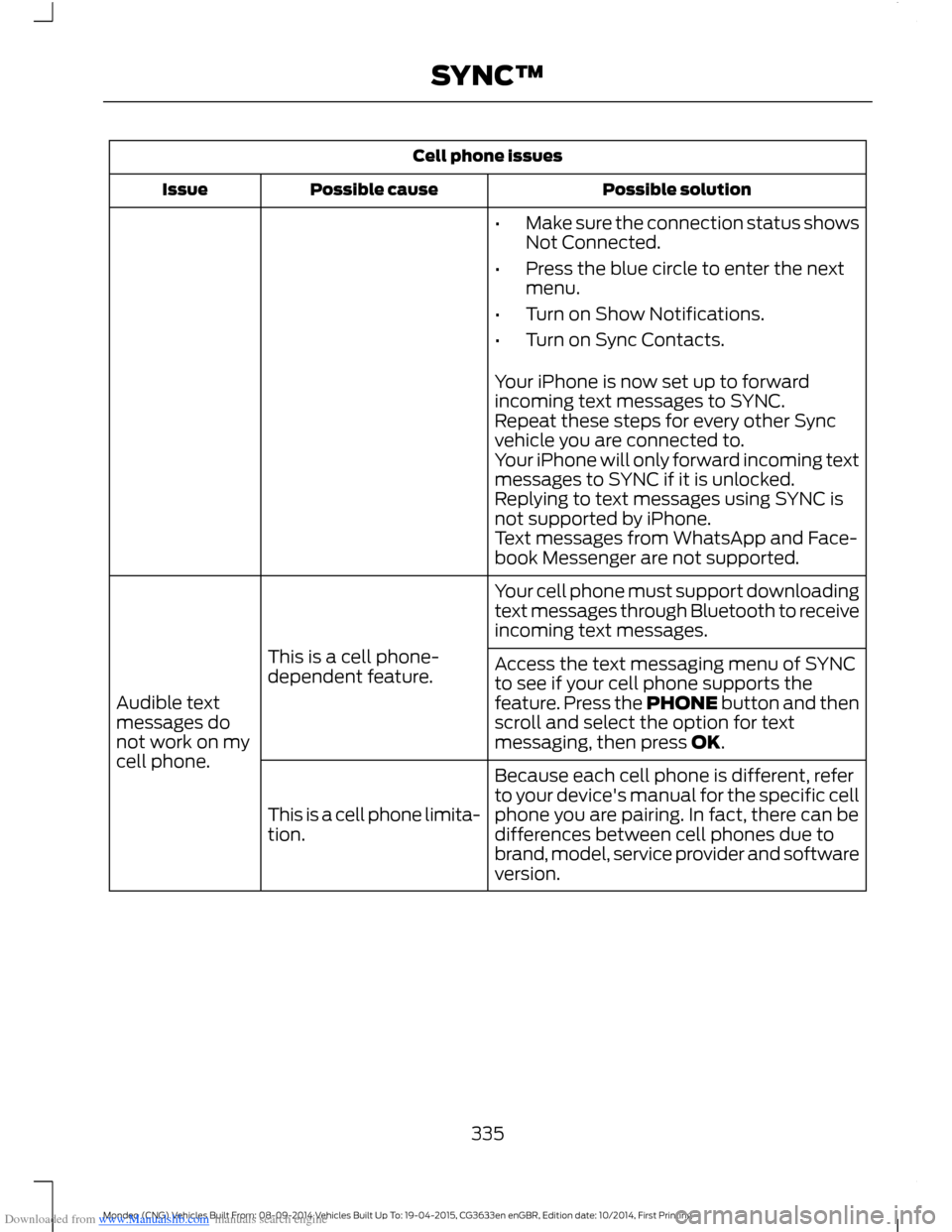
Possible solutionPossible causeIssue
•Make sure the connection status showsNot Connected.
•Press the blue circle to enter the nextmenu.
•Turn on Show Notifications.
•Turn on Sync Contacts.
Your iPhone is now set up to forwardincoming text messages to SYNC.Repeat these steps for every other Syncvehicle you are connected to.Your iPhone will only forward incoming textmessages to SYNC if it is unlocked.Replying to text messages using SYNC isnot supported by iPhone.Text messages from WhatsApp and Face-book Messenger are not supported.
Your cell phone must support downloadingtext messages through Bluetooth to receiveincoming text messages.
This is a cell phone-dependent feature.
Audible textmessages donot work on mycell phone.
Access the text messaging menu of SYNCto see if your cell phone supports thefeature. Press the PHONE button and thenscroll and select the option for textmessaging, then press OK.
Because each cell phone is different, referto your device's manual for the specific cellphone you are pairing. In fact, there can bedifferences between cell phones due tobrand, model, service provider and softwareversion.
This is a cell phone limita-tion.
335Mondeo (CNG) Vehicles Built From: 08-09-2014 Vehicles Built Up To: 19-04-2015, CG3633en enGBR, Edition date: 10/2014, First PrintingSYNC™
Page 338 of 446
Downloaded from www.Manualslib.com manuals search engine USB and media issues
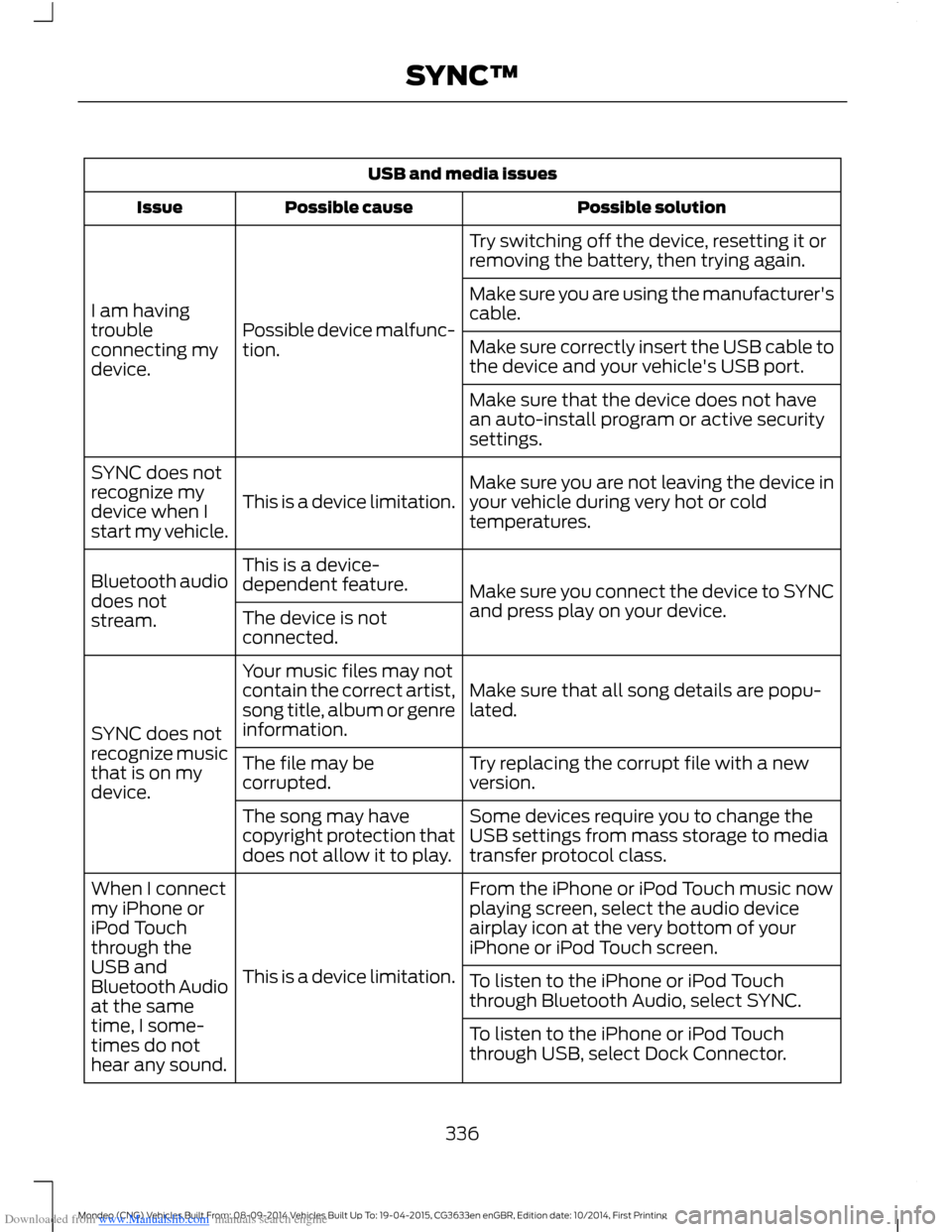
Possible solutionPossible causeIssue
Try switching off the device, resetting it orremoving the battery, then trying again.
Possible device malfunc-tion.
I am havingtroubleconnecting mydevice.
Make sure you are using the manufacturer'scable.
Make sure correctly insert the USB cable tothe device and your vehicle's USB port.
Make sure that the device does not havean auto-install program or active securitysettings.
Make sure you are not leaving the device inyour vehicle during very hot or coldtemperatures.This is a device limitation.
SYNC does notrecognize mydevice when Istart my vehicle.
Make sure you connect the device to SYNCand press play on your device.
This is a device-dependent feature.Bluetooth audiodoes notstream.The device is notconnected.
Make sure that all song details are popu-lated.
Your music files may notcontain the correct artist,song title, album or genreinformation.SYNC does notrecognize musicthat is on mydevice.
Try replacing the corrupt file with a newversion.The file may becorrupted.
Some devices require you to change theUSB settings from mass storage to mediatransfer protocol class.
The song may havecopyright protection thatdoes not allow it to play.
From the iPhone or iPod Touch music nowplaying screen, select the audio deviceairplay icon at the very bottom of youriPhone or iPod Touch screen.
This is a device limitation.
When I connectmy iPhone oriPod Touchthrough theUSB andBluetooth Audioat the sametime, I some-times do nothear any sound.
To listen to the iPhone or iPod Touchthrough Bluetooth Audio, select SYNC.
To listen to the iPhone or iPod Touchthrough USB, select Dock Connector.
336Mondeo (CNG) Vehicles Built From: 08-09-2014 Vehicles Built Up To: 19-04-2015, CG3633en enGBR, Edition date: 10/2014, First PrintingSYNC™
Page 341 of 446

Downloaded from www.Manualslib.com manuals search engine Voice command issues
Possible solutionPossible causeIssue
SYNC uses a synthetically generated voicerather than pre-recorded human voice.
SYNC uses text-to-speech voice prompttechnology.
The systemgenerates voiceprompts andthe pronunci-ation of somewords may notbe accurate formy language.
SYNC offers several new voice controlfeatures for a wide range of languages.Dialing a contact name directly from thephonebook without pre-recording (forexample,“call John Smith”) or selecting atrack, artist, album, genre or playlist directlyfrom your media player (for example," playartist Madonna).
SYNC offers significant capability beyondthe previous system such as dialing acontact name directly from the phonebookwithout pre-recording (for example,“callJohn Smith”) or selecting a track, artist,album, genre or playlist directly from yourmedia player (for example, " play artistMadonna).
The focus of SYNC is tocontrol your mobiledevices and the contentstored on them.
My previousBluetooth voicecontrol systemallowed me tocontrol theradio, CD, andclimate controlsystems. Whycan I not controlthese systemswith SYNC?
339Mondeo (CNG) Vehicles Built From: 08-09-2014 Vehicles Built Up To: 19-04-2015, CG3633en enGBR, Edition date: 10/2014, First PrintingSYNC™
Page 342 of 446
Downloaded from www.Manualslib.com manuals search engine General
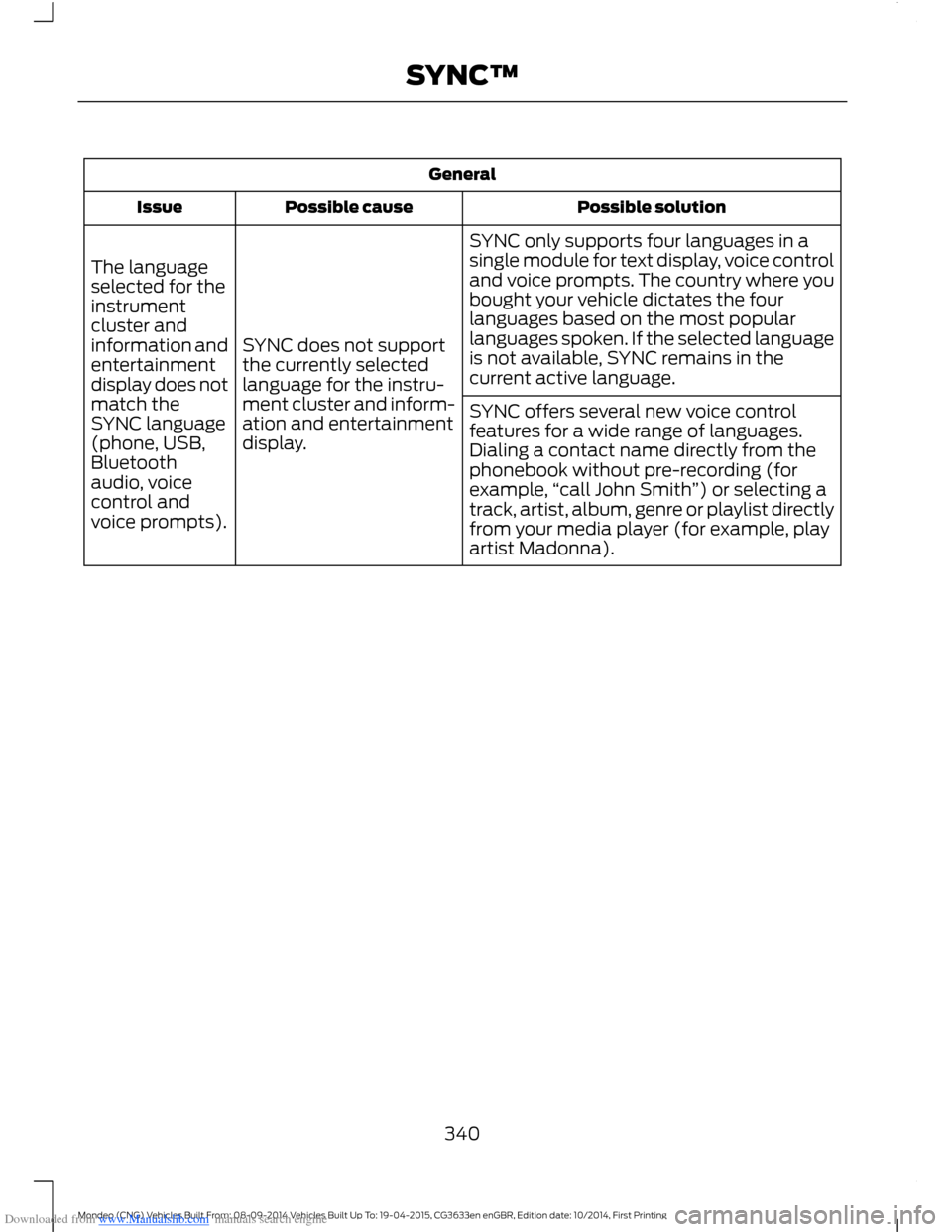
Possible solutionPossible causeIssue
SYNC only supports four languages in asingle module for text display, voice controland voice prompts. The country where youbought your vehicle dictates the fourlanguages based on the most popularlanguages spoken. If the selected languageis not available, SYNC remains in thecurrent active language.
SYNC does not supportthe currently selectedlanguage for the instru-ment cluster and inform-ation and entertainmentdisplay.
The languageselected for theinstrumentcluster andinformation andentertainmentdisplay does notmatch theSYNC language(phone, USB,Bluetoothaudio, voicecontrol andvoice prompts).
SYNC offers several new voice controlfeatures for a wide range of languages.Dialing a contact name directly from thephonebook without pre-recording (forexample,“call John Smith”) or selecting atrack, artist, album, genre or playlist directlyfrom your media player (for example, playartist Madonna).
340Mondeo (CNG) Vehicles Built From: 08-09-2014 Vehicles Built Up To: 19-04-2015, CG3633en enGBR, Edition date: 10/2014, First PrintingSYNC™
Page 344 of 446

Downloaded from www.Manualslib.com manuals search engine AppLink issues
Possible solution(s)Possible cause(s)Issue
Reset the Bluetooth on your phone byturning it off and then turning Bluetoothback on. If you are in your vehicle, SYNCshould be able to automatically re-connectto your phone if you press the "Phone"button.
There is a bluetooth bugon some order versionsof the Android OS thatmay cause apps thatwere found on yourprevious vehicle drive tonot be found again if youhave not turned offbluetooth.
My Androidphone isconnected, myapp(s) arerunning, Irestarted them,but I still cannotfind any apps.
Unplug the USB cable from the phone, waita moment, and plug the USB cable back into the phone. After a few seconds, the appshould appear in SYNC's Mobile AppsMenu. If not, "Force Close" the applicationand restart it.
The USB connection toSYNC may need to bereset.
My iPhonephone isconnected, myapp is running, Irestarted theapp but I stillcannot find it onSYNC.
Try increasing the Bluetooth volume of thedevice by using the device's volume controlbuttons which are most often found on theside of the device.
The bluetooth volume onthe phone may be low.I have anAndroid phone.I found andstarted mymedia app onSYNC, but thereis no sound orthe sound isvery low.
Force close or uninstall the apps you do notwant SYNC to find. If the app has a "FordSYNC" setting, disable that setting in theapp's settings menu on the phone.
Some Android deviceshave a limited number ofbluetooth ports apps canuse to connect. If youhave more AppLink appson your phone than thenumber of availbleBluetooth ports, you willnot see all of your appslisted in SYNC's mobileapps menu.
I can only seesome of theAppLink appsrunning on myphone listed inSYNC's MobileApps Menu.
342Mondeo (CNG) Vehicles Built From: 08-09-2014 Vehicles Built Up To: 19-04-2015, CG3633en enGBR, Edition date: 10/2014, First PrintingSYNC™
Page 361 of 446
Downloaded from www.Manualslib.com manuals search engine Media Player
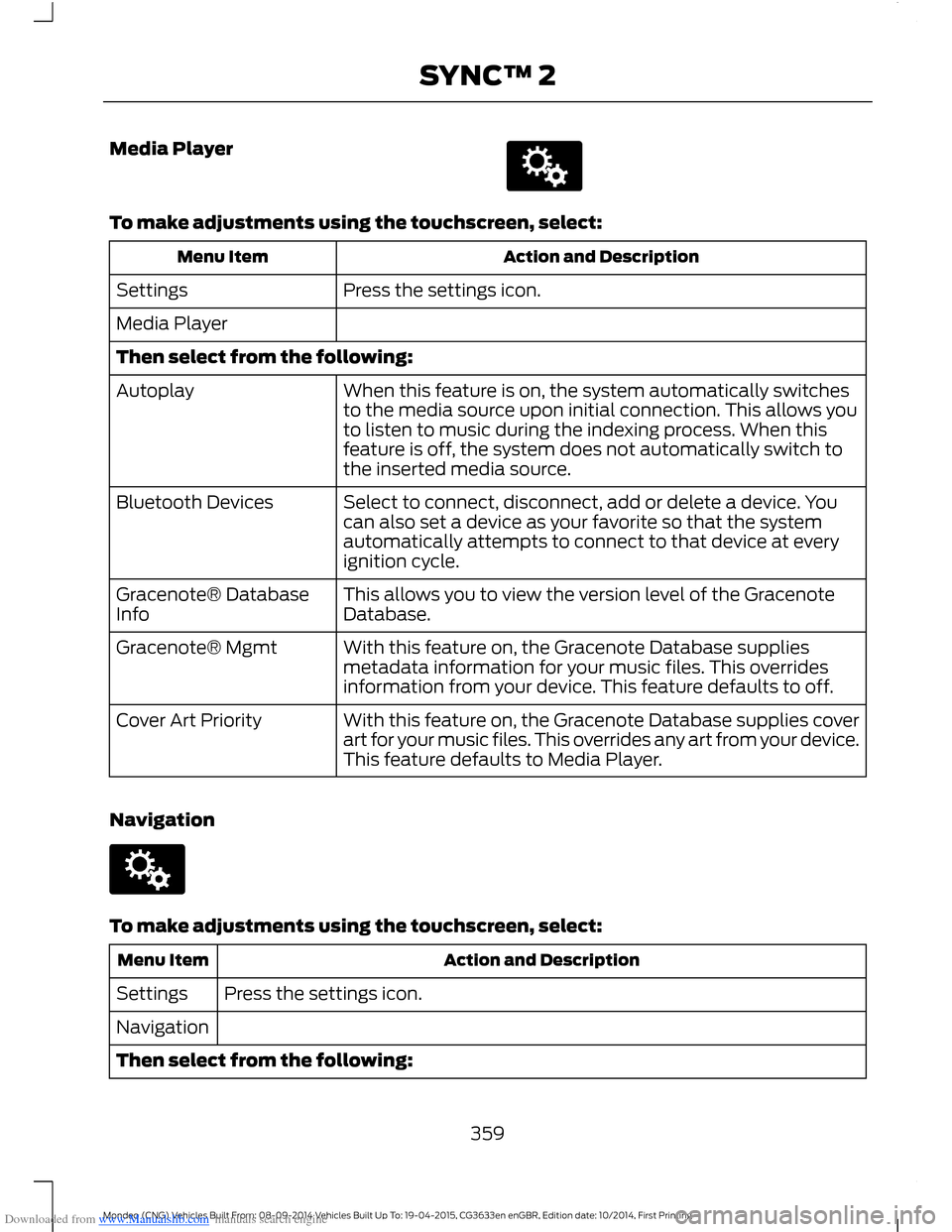
To make adjustments using the touchscreen, select:
Action and DescriptionMenu Item
Press the settings icon.Settings
Media Player
Then select from the following:
When this feature is on, the system automatically switchesto the media source upon initial connection. This allows youto listen to music during the indexing process. When thisfeature is off, the system does not automatically switch tothe inserted media source.
Autoplay
Select to connect, disconnect, add or delete a device. Youcan also set a device as your favorite so that the systemautomatically attempts to connect to that device at everyignition cycle.
Bluetooth Devices
This allows you to view the version level of the GracenoteDatabase.Gracenote® DatabaseInfo
With this feature on, the Gracenote Database suppliesmetadata information for your music files. This overridesinformation from your device. This feature defaults to off.
Gracenote® Mgmt
With this feature on, the Gracenote Database supplies coverart for your music files. This overrides any art from your device.This feature defaults to Media Player.
Cover Art Priority
Navigation
To make adjustments using the touchscreen, select:
Action and DescriptionMenu Item
Press the settings icon.Settings
Navigation
Then select from the following:
359Mondeo (CNG) Vehicles Built From: 08-09-2014 Vehicles Built Up To: 19-04-2015, CG3633en enGBR, Edition date: 10/2014, First PrintingSYNC™ 2
Page 363 of 446
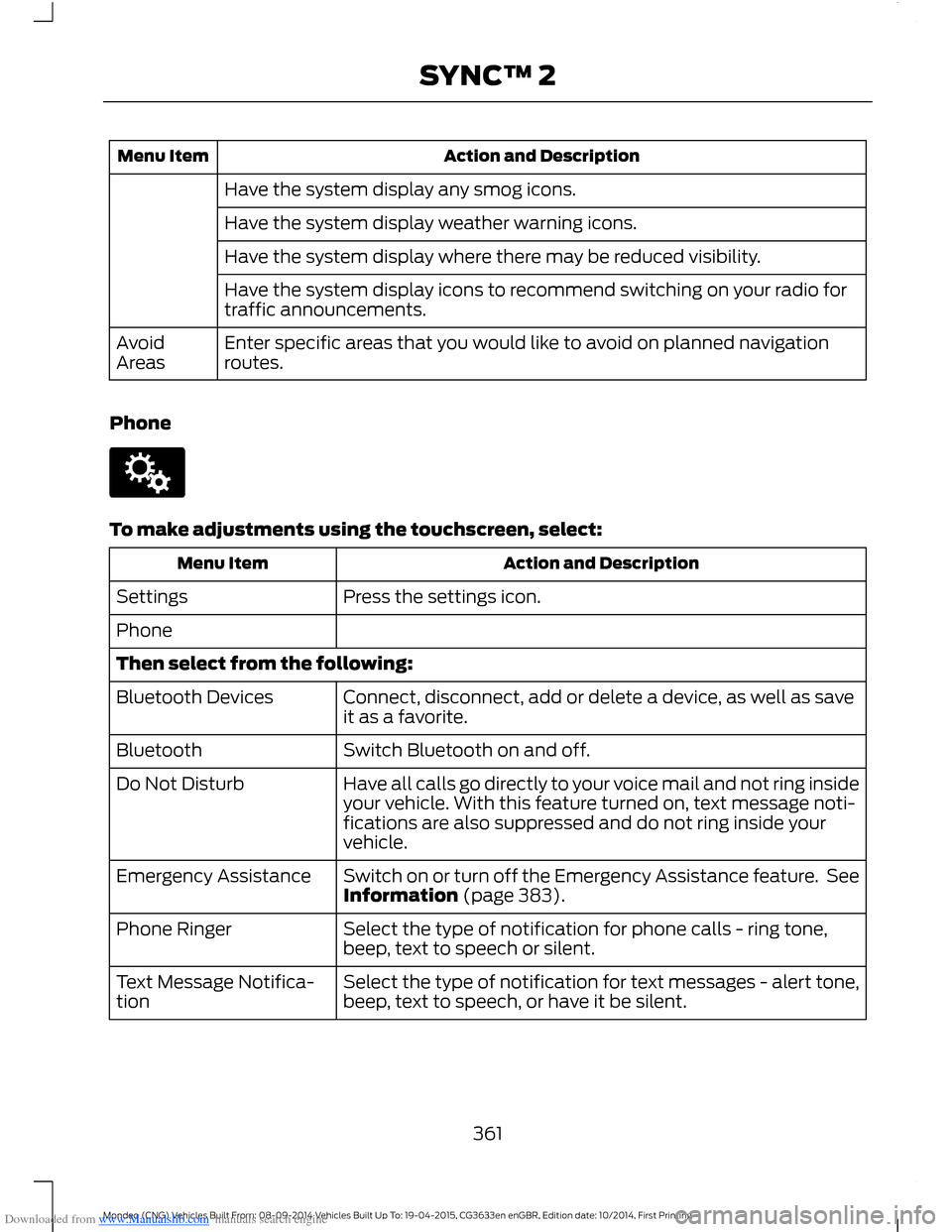
Downloaded from www.Manualslib.com manuals search engine Action and DescriptionMenu Item
Have the system display any smog icons.
Have the system display weather warning icons.
Have the system display where there may be reduced visibility.
Have the system display icons to recommend switching on your radio fortraffic announcements.
Enter specific areas that you would like to avoid on planned navigationroutes.AvoidAreas
Phone
To make adjustments using the touchscreen, select:
Action and DescriptionMenu Item
Press the settings icon.Settings
Phone
Then select from the following:
Connect, disconnect, add or delete a device, as well as saveit as a favorite.Bluetooth Devices
Switch Bluetooth on and off.Bluetooth
Have all calls go directly to your voice mail and not ring insideyour vehicle. With this feature turned on, text message noti-fications are also suppressed and do not ring inside yourvehicle.
Do Not Disturb
Switch on or turn off the Emergency Assistance feature. SeeInformation (page 383).Emergency Assistance
Select the type of notification for phone calls - ring tone,beep, text to speech or silent.Phone Ringer
Select the type of notification for text messages - alert tone,beep, text to speech, or have it be silent.Text Message Notifica-tion
361Mondeo (CNG) Vehicles Built From: 08-09-2014 Vehicles Built Up To: 19-04-2015, CG3633en enGBR, Edition date: 10/2014, First PrintingSYNC™ 2
Page 365 of 446

Downloaded from www.Manualslib.com manuals search engine Action and DescriptionMenu Item
Makes SYNC an access point for a phone or a computer whenturned on. This forms the local area network within yourvehicle for things, such as game playing, file transfer andinternet browsing. Press ? for more information.
Gateway (Access Point) Settings
Allows you to view and change settings for using SYNC asthe internet gateway.
Gateway (Access Point) Devices List
Allows you to view recent connections to your Wi-Fi system.
Instead of using Wi-Fi, your system can also use a USB mobilebroadband connection to access the internet. (You mustswitch on your mobile broadband device on your personalcomputer before connecting it to the system.) This screenallows you to set up what is your typical area for your USBmobile broadband connection. (USB mobile broadbandsettings may not display if the device is already on.) You canselect the following:
USB Mobile Broadband
Country
Carrier
Phone Number
User Name
Password
Shows you the currently paired devices as well as giving youyour typical Bluetooth options to connect, disconnect, set asfavorite, delete and add device. Bluetooth is a registeredtrademark of the Bluetooth SIG.
Bluetooth Settings
Choose your connection methods and change them asneeded. You can select to change order and have the systemeither always attempt to connect using a USB mobilebroadband or using Wi-Fi.
Prioritize ConnectionMethods
363Mondeo (CNG) Vehicles Built From: 08-09-2014 Vehicles Built Up To: 19-04-2015, CG3633en enGBR, Edition date: 10/2014, First PrintingSYNC™ 2