2014 FORD MONDEO stop start
[x] Cancel search: stop startPage 90 of 446

Downloaded from www.Manualslib.com manuals search engine Fuel Economy
All Values 1
Auto StartStop
1 Type 2
•Distance to Empty - Shows the approximate distance your vehicle can travel beforerunning out of fuel.
•Inst Fuel Economy - Shows a visual graph of your instantaneous fuel economy alongwith your Avg MPG since the function was last reset.
•Long Term Fuel Economy - Shows your long term fuel economy.
•Fuel History - Shows a bar chart of your fuel history.
•Average Speed - Shows your vehicles average speed since the function was last reset.
•All Values — Shows all fuel economy values (DTE, Inst Fuel Econ, Long Term Fuel,Avg Speed).
•Auto StartStop - Available Auto Start-Stop messaging will provide details about whatis happening with your system. See Information Messages (page 96).
Note:You can reset your average fuel economy by pressing and holding the OK button onthe left hand steering wheel controls.
Driver Assist
Traction Ctrl - check enabled or uncheck disabled
Active City Stop - check enabled or uncheck disabled
Blind Spot - check enabled or uncheck disabled 1
Cross Traffic - check enabled or uncheck disabled 1
Adaptive or NormalCruise Control 1
Driver Alert or Driver Alert DisplayDriver Alert 1
Sport, Normal or ComfortDriver Select Suspension 1
Hill Start Assist - check enabled or uncheck disabled
Intelligent AWD 1
Alert, Aid or BothModeLane Keeping System 1
High, Normal or LowIntensity
88Mondeo (CNG) Vehicles Built From: 08-09-2014 Vehicles Built Up To: 19-04-2015, CG3633en enGBR, Edition date: 10/2014, First PrintingInformation Displays
Page 94 of 446

Downloaded from www.Manualslib.com manuals search engine Information Display Controls(Type 3)•Press the up and down arrow buttonsto scroll through and highlight theoptions within a menu.
•Press the right arrow button to enter asubmenu.
•Press the left arrow button to exit asubmenu.
•Press and hold the left arrow button atany time to return to the main menudisplay (escape button).
•Press the OK button to choose andconfirm settings or messages.
Menu
You can access the menu using theinformation display control.
Note:It may describe options not fitted tothe vehicle you have purchased.
Trip 1 and 2
All Values
All Values — shows all trip values (Trip Timer, Odometer and Average Fuel).
Note:You can reset your trip information by pressing and holding the OK button on the lefthand steering wheel controls.
Fuel Economy
Instant Fuel Economy
Fuel History
Average Speed
Auto StartStop
•Inst Fuel Economy - shows a visual graph of your instantaneous fuel economy.
•Fuel History - shows a bar chart of your fuel history.
•Average Speed - shows your vehicles average speed since the function was last reset.
•Auto StartStop - available Auto Start-Stop messaging will provide details about whatis happening with your system. See Information Messages (page 96).
Note:You can reset your average fuel economy by pressing and holding the OK button onthe left hand steering wheel controls.
92Mondeo (CNG) Vehicles Built From: 08-09-2014 Vehicles Built Up To: 19-04-2015, CG3633en enGBR, Edition date: 10/2014, First PrintingInformation Displays
Page 95 of 446
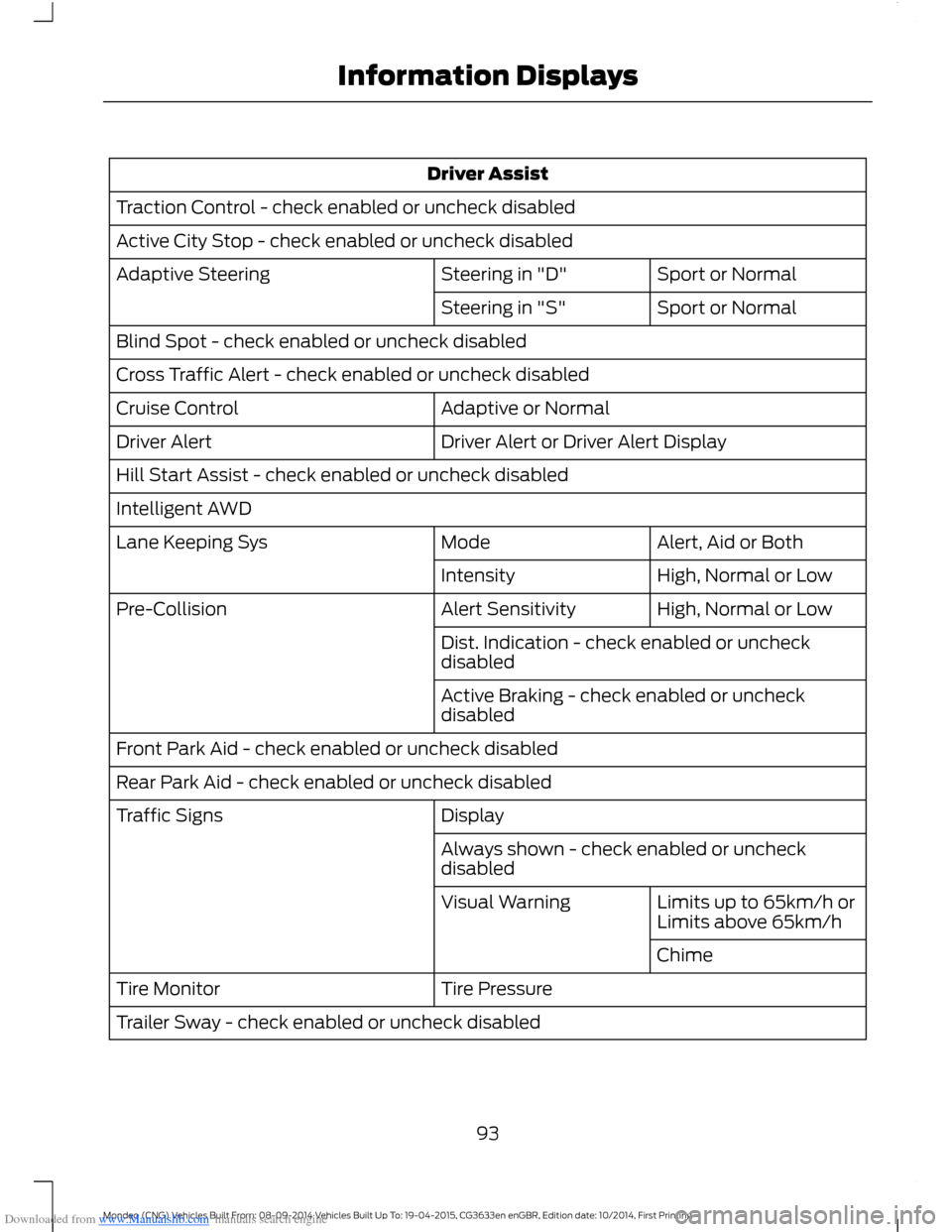
Downloaded from www.Manualslib.com manuals search engine Driver Assist
Traction Control - check enabled or uncheck disabled
Active City Stop - check enabled or uncheck disabled
Sport or NormalSteering in "D"Adaptive Steering
Sport or NormalSteering in "S"
Blind Spot - check enabled or uncheck disabled
Cross Traffic Alert - check enabled or uncheck disabled
Adaptive or NormalCruise Control
Driver Alert or Driver Alert DisplayDriver Alert
Hill Start Assist - check enabled or uncheck disabled
Intelligent AWD
Alert, Aid or BothModeLane Keeping Sys
High, Normal or LowIntensity
High, Normal or LowAlert SensitivityPre-Collision
Dist. Indication - check enabled or uncheckdisabled
Active Braking - check enabled or uncheckdisabled
Front Park Aid - check enabled or uncheck disabled
Rear Park Aid - check enabled or uncheck disabled
DisplayTraffic Signs
Always shown - check enabled or uncheckdisabled
Limits up to 65km/h orLimits above 65km/hVisual Warning
Chime
Tire PressureTire Monitor
Trailer Sway - check enabled or uncheck disabled
93Mondeo (CNG) Vehicles Built From: 08-09-2014 Vehicles Built Up To: 19-04-2015, CG3633en enGBR, Edition date: 10/2014, First PrintingInformation Displays
Page 100 of 446

Downloaded from www.Manualslib.com manuals search engine Alarm
ActionMessage
Alarm triggered due to unauthorized entry. See Anti-TheftAlarm (page 51).Vehicle Alarm To StopAlarm, Start Vehicle.
Displays when the system requires service due to amalfunction. Contact an authorized dealer.Alarm fault Service required
All-Wheel Drive
ActionMessage
The all-wheel drive system temporarily turns off to protectitself from overheating.AWD TemporarilyDisabled
The all-wheel drive system temporarily turns off to protectitself from overheating or if you are using the temporary sparetire.
AWD OFF
The all-wheel drive system will resume normal function andclear this message after driving a short distance with the roadtire re-installed or after the system cools.
AWD Restored
The all-wheel drive system is not operating properly. If thewarning stays on or continues to come on, contact anauthorized dealer.
AWD MalfunctionService Required
Automatic Engine Shutdown
ActionMessage
The engine is getting ready to shut off.Engine Shuts Off In{seconds to shut off:#0}Seconds
The engine has shut off to help increase fuel economy.Engine Shut Off For FuelEconomy
The engine is getting ready to shut off. You can press OK onthe left steering wheel button to override the shut down.Engine Shuts Off in{seconds to shut off:#0}Seconds Press Ok toOverride
98Mondeo (CNG) Vehicles Built From: 08-09-2014 Vehicles Built Up To: 19-04-2015, CG3633en enGBR, Edition date: 10/2014, First PrintingInformation Displays
Page 101 of 446

Downloaded from www.Manualslib.com manuals search engine Automatic High Beam Control
ActionMessage
The front camera sensor has reduced visibility. Clean thewindshield.Front Camera Low VisibilityClean Screen
The system requires service due to a malfunction. Contactan authorized dealer.Front Camera MalfunctionService Required
The front camera sensor has malfunctioned. Wait a shortperiod of time for the sensor to cool down.Front Camera TemporarilyNot Available
Auto Start-Stop
ActionMessage
The engine needs to be restarted, press the brake pedal tostart.Auto StartStop PressBrake to Start Engine
The engine needs to be restarted, press the brake pedal harderto start.Auto StartStop PressBrake Harder to Activate
The engine needs to be restarted, press the clutch pedal tostart.Auto StartStop PressClutch to Start Engine
The engine needs to be restarted, press the clutch pedal tostart. See Auto-Start-Stop (page 146).Auto StartStop Press aPedal to Start Engine
Select neutral for the system to restart the engine. See Auto-Start-Stop (page 146).Auto StartStop SelectNeutral To Start EngineSelect neutral for the system to restart the engine.
Select park for the system to restart the engine.Auto StartStop Shift toP, then Restart Engine
The system is not functioning. A manual restart is required.Auto StartStop ManualRestart Required
Conditions are not met for the Auto StartStop system tofunction properly.Auto StartStop NotAvailable
99Mondeo (CNG) Vehicles Built From: 08-09-2014 Vehicles Built Up To: 19-04-2015, CG3633en enGBR, Edition date: 10/2014, First PrintingInformation Displays
Page 105 of 446
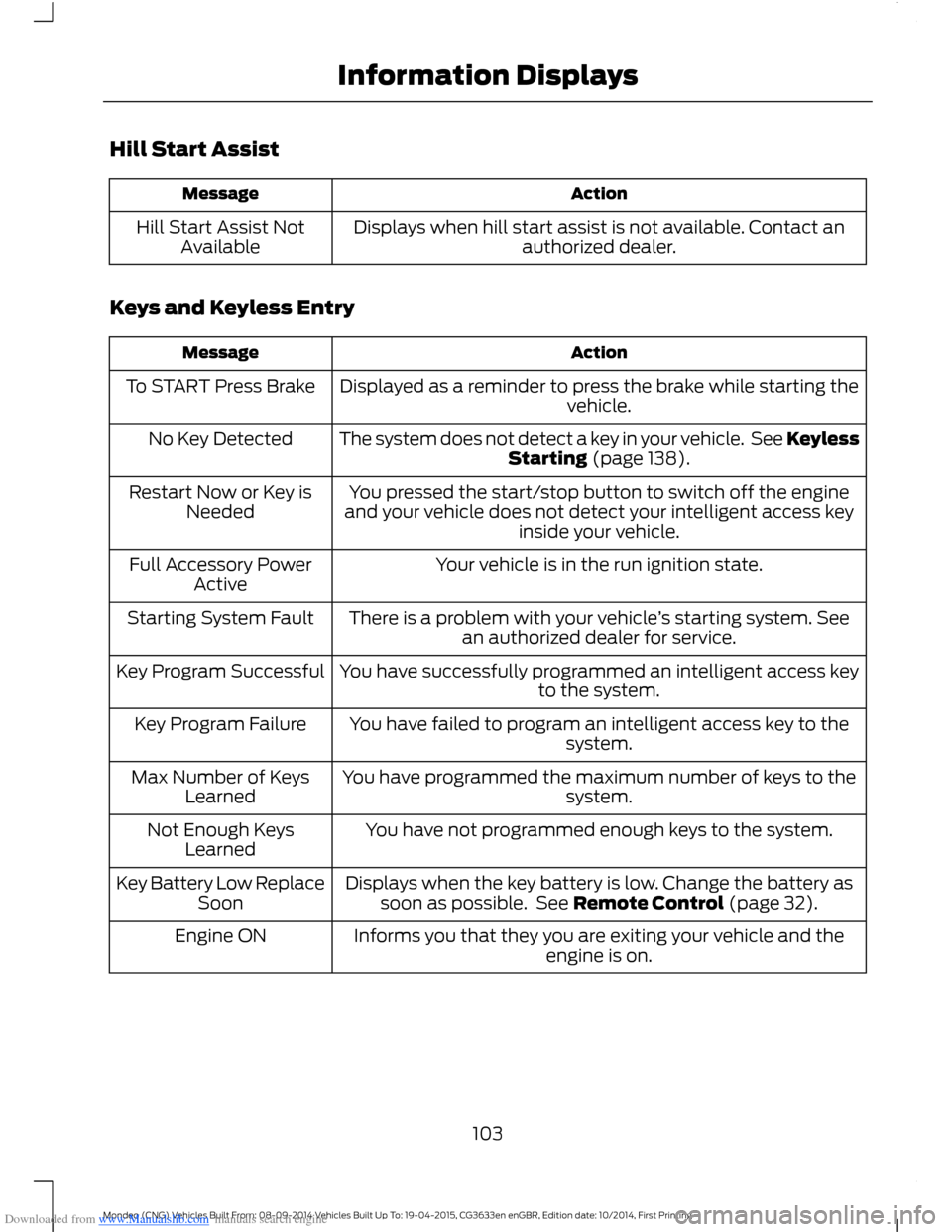
Downloaded from www.Manualslib.com manuals search engine Hill Start Assist
ActionMessage
Displays when hill start assist is not available. Contact anauthorized dealer.Hill Start Assist NotAvailable
Keys and Keyless Entry
ActionMessage
Displayed as a reminder to press the brake while starting thevehicle.To START Press Brake
The system does not detect a key in your vehicle. See KeylessStarting (page 138).No Key Detected
You pressed the start/stop button to switch off the engineand your vehicle does not detect your intelligent access keyinside your vehicle.
Restart Now or Key isNeeded
Your vehicle is in the run ignition state.Full Accessory PowerActive
There is a problem with your vehicle’s starting system. Seean authorized dealer for service.Starting System Fault
You have successfully programmed an intelligent access keyto the system.Key Program Successful
You have failed to program an intelligent access key to thesystem.Key Program Failure
You have programmed the maximum number of keys to thesystem.Max Number of KeysLearned
You have not programmed enough keys to the system.Not Enough KeysLearned
Displays when the key battery is low. Change the battery assoon as possible. See Remote Control (page 32).Key Battery Low ReplaceSoon
Informs you that they you are exiting your vehicle and theengine is on.Engine ON
103Mondeo (CNG) Vehicles Built From: 08-09-2014 Vehicles Built Up To: 19-04-2015, CG3633en enGBR, Edition date: 10/2014, First PrintingInformation Displays
Page 109 of 446
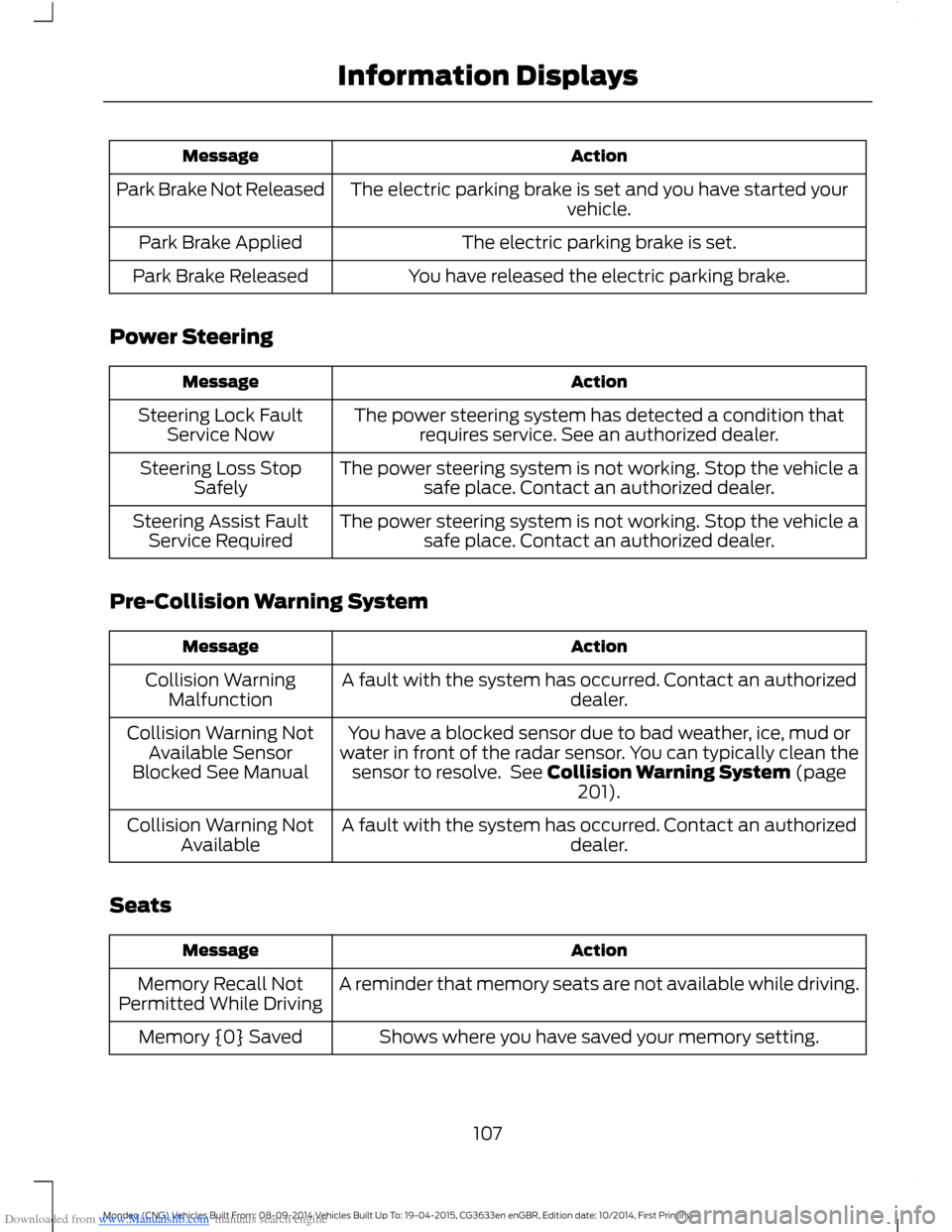
Downloaded from www.Manualslib.com manuals search engine ActionMessage
The electric parking brake is set and you have started yourvehicle.Park Brake Not Released
The electric parking brake is set.Park Brake Applied
You have released the electric parking brake.Park Brake Released
Power Steering
ActionMessage
The power steering system has detected a condition thatrequires service. See an authorized dealer.Steering Lock FaultService Now
The power steering system is not working. Stop the vehicle asafe place. Contact an authorized dealer.Steering Loss StopSafely
The power steering system is not working. Stop the vehicle asafe place. Contact an authorized dealer.Steering Assist FaultService Required
Pre-Collision Warning System
ActionMessage
A fault with the system has occurred. Contact an authorizeddealer.Collision WarningMalfunction
You have a blocked sensor due to bad weather, ice, mud orwater in front of the radar sensor. You can typically clean thesensor to resolve. See Collision Warning System (page201).
Collision Warning NotAvailable SensorBlocked See Manual
A fault with the system has occurred. Contact an authorizeddealer.Collision Warning NotAvailable
Seats
ActionMessage
A reminder that memory seats are not available while driving.Memory Recall NotPermitted While Driving
Shows where you have saved your memory setting.Memory {0} Saved
107Mondeo (CNG) Vehicles Built From: 08-09-2014 Vehicles Built Up To: 19-04-2015, CG3633en enGBR, Edition date: 10/2014, First PrintingInformation Displays
Page 134 of 446

Downloaded from www.Manualslib.com manuals search engine Saving a PreSet Position
1.Switch the ignition on.
2.Adjust the seat, exterior mirrors andsteering column to your desiredposition.
3.Press and hold the desired presetbutton until you hear a single tone.
You can save up to three preset memorypositions. You can save a memory presetat any time.
Recalling a PreSet Position
Press and release the preset buttonassociated with your desired drivingposition. The seat, mirrors and steeringcolumn move to the position stored forthat preset.
Note:You can only recall a preset memoryposition when the ignition is off, or when thetransmission is in park (P) or neutral (N)(and your vehicle is not moving) if theignition is on.
You can recall a preset memory positionby pressing the unlock button on yourremote control or intelligent access key ifit is linked to a preset position.
Linking a PreSet Position to YourRemote Control or IntelligentAccess Key
Your vehicle can save the preset memorypositions for up to three remote controlsor intelligent access keys.
1.With the ignition on, move the memorypositions to the desired positions.
2.Press and hold the desired presetbutton for about five seconds. A tonesounds after about two seconds.Continue holding until a second toneis heard.
3.Within three seconds, press the lockbutton on the remote control you arelinking.
To unlink a remote control, follow thesame procedure – except in step 3, pressthe unlock button on the remote control.
Note:Pressing any active memory featureadjustment control - power seat, mirror, oroptional steering column switch or anymemory button – during a memory recallcancels the operation.
A seat recall movement will also stop ifyou drive your vehicle.
Note:If more than one linked remotecontrol or intelligent access key is in range,the memory function moves to the settingsof the first key stored.
Easy Entry and Exit Function
If you enable the easy entry and exitfeature, it automatically moves the driverseat position rearward up to fivecentimeters when the transmission is inpark (P) and you remove the key or turnoff the keyless start ignition.
The driver seat returns to the previousposition when you put the key in theignition or you activate the keyless startignition.
You can switch off the easy entry and exitfeature by using the driver informationdisplay.
132Mondeo (CNG) Vehicles Built From: 08-09-2014 Vehicles Built Up To: 19-04-2015, CG3633en enGBR, Edition date: 10/2014, First PrintingSeats