2014 FORD MONDEO change wheel
[x] Cancel search: change wheelPage 262 of 446
Downloaded from www.Manualslib.com manuals search engine GENERAL INFORMATION
A decal with tire pressure data is locatedin the driver’s door opening.
Check and set the tire pressure at theambient temperature in which you areintending to drive your vehicle and whenthe tires are cold.
Note:Check your tire pressures regularly tooptimize fuel economy.
Note:Use only approved wheel and tiresizes. Using other sizes could damage yourvehicle and will make the National TypeApproval invalid.
Note:If you change the diameter of the tiresfrom that fitted at the factory, thespeedometer may not display the correctspeed. Take your vehicle to an authorizeddealer to have the engine managementsystem reprogrammed.
Note:If you intend to change the size of thewheels from that fitted at the factory, checkthe suitability with an authorized dealer.
TEMPORARY MOBILITY KIT
Your vehicle may not have a spare wheeland tire. In these cases it will be suppliedwith a temporary mobility kit which willonly repair one damaged tire.
The kit is located in the spare wheel well.
General Information
WARNINGS
Depending on the type and extent oftire damage, some tires can only bepartially sealed or not sealed at all.Loss of tire pressure can affect vehiclehandling, leading to loss of vehicle control.
Do not use the temporary mobilitykit on a previously damaged tire. Forexample, when a tire has been drivenunder inflated.
WARNINGS
Do not use the temporary mobilitykit on run flat tires.
Do not use the temporary mobilitykit to repair the sidewall of adamaged tire.
The temporary mobility kit seals most tirepunctures with a diameter of up to ¼ in (6mm) to temporarily restore mobility.
You must observe the following rules whenusing the temporary mobility kit:
•Drive with caution and avoid makingsudden steering or driving manoeuvresespecially if your vehicle is heavilyloaded or towing a trailer.
•Only continue your journey to the nextvehicle or tire dealer or drive amaximum distance of 125 mi (200 km).
•Do not exceed a maximum speed of50 mph (80 km/h).
•Keep the temporary mobility kit out ofthe reach of children.
•Only use the temporary mobility kitwhen the ambient temperature isbetween -30° and 70° C (-22° and158° F).
Using the Temporary Mobility Kit
WARNINGS
Park your vehicle so that you do notobstruct the flow of traffic or placeyourself in any danger and set up awarning triangle.
Compressed air can act as anexplosive or propellant.
Never leave the temporary mobilitykit unattended while in use.
Do not keep the compressoroperating for longer than 10 minutes.
260Mondeo (CNG) Vehicles Built From: 08-09-2014 Vehicles Built Up To: 19-04-2015, CG3633en enGBR, Edition date: 10/2014, First PrintingWheels and Tires
Page 273 of 446
Downloaded from www.Manualslib.com manuals search engine WARNINGS
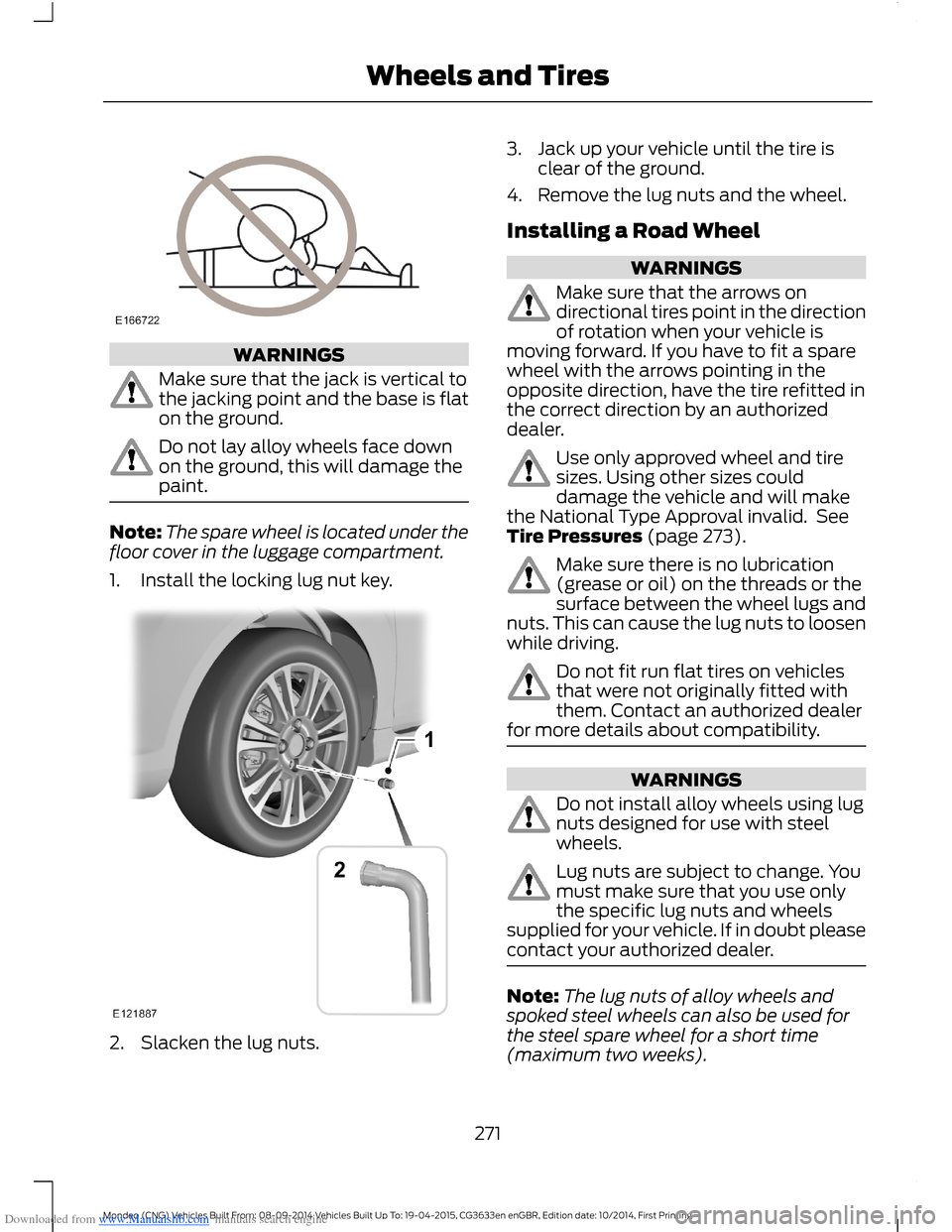
Make sure that the jack is vertical tothe jacking point and the base is flaton the ground.
Do not lay alloy wheels face downon the ground, this will damage thepaint.
Note:The spare wheel is located under thefloor cover in the luggage compartment.
1.Install the locking lug nut key.
2.Slacken the lug nuts.
3.Jack up your vehicle until the tire isclear of the ground.
4.Remove the lug nuts and the wheel.
Installing a Road Wheel
WARNINGS
Make sure that the arrows ondirectional tires point in the directionof rotation when your vehicle ismoving forward. If you have to fit a sparewheel with the arrows pointing in theopposite direction, have the tire refitted inthe correct direction by an authorizeddealer.
Use only approved wheel and tiresizes. Using other sizes coulddamage the vehicle and will makethe National Type Approval invalid. SeeTire Pressures (page 273).
Make sure there is no lubrication(grease or oil) on the threads or thesurface between the wheel lugs andnuts. This can cause the lug nuts to loosenwhile driving.
Do not fit run flat tires on vehiclesthat were not originally fitted withthem. Contact an authorized dealerfor more details about compatibility.
WARNINGS
Do not install alloy wheels using lugnuts designed for use with steelwheels.
Lug nuts are subject to change. Youmust make sure that you use onlythe specific lug nuts and wheelssupplied for your vehicle. If in doubt pleasecontact your authorized dealer.
Note:The lug nuts of alloy wheels andspoked steel wheels can also be used forthe steel spare wheel for a short time(maximum two weeks).
271Mondeo (CNG) Vehicles Built From: 08-09-2014 Vehicles Built Up To: 19-04-2015, CG3633en enGBR, Edition date: 10/2014, First PrintingWheels and Tires
Page 351 of 446
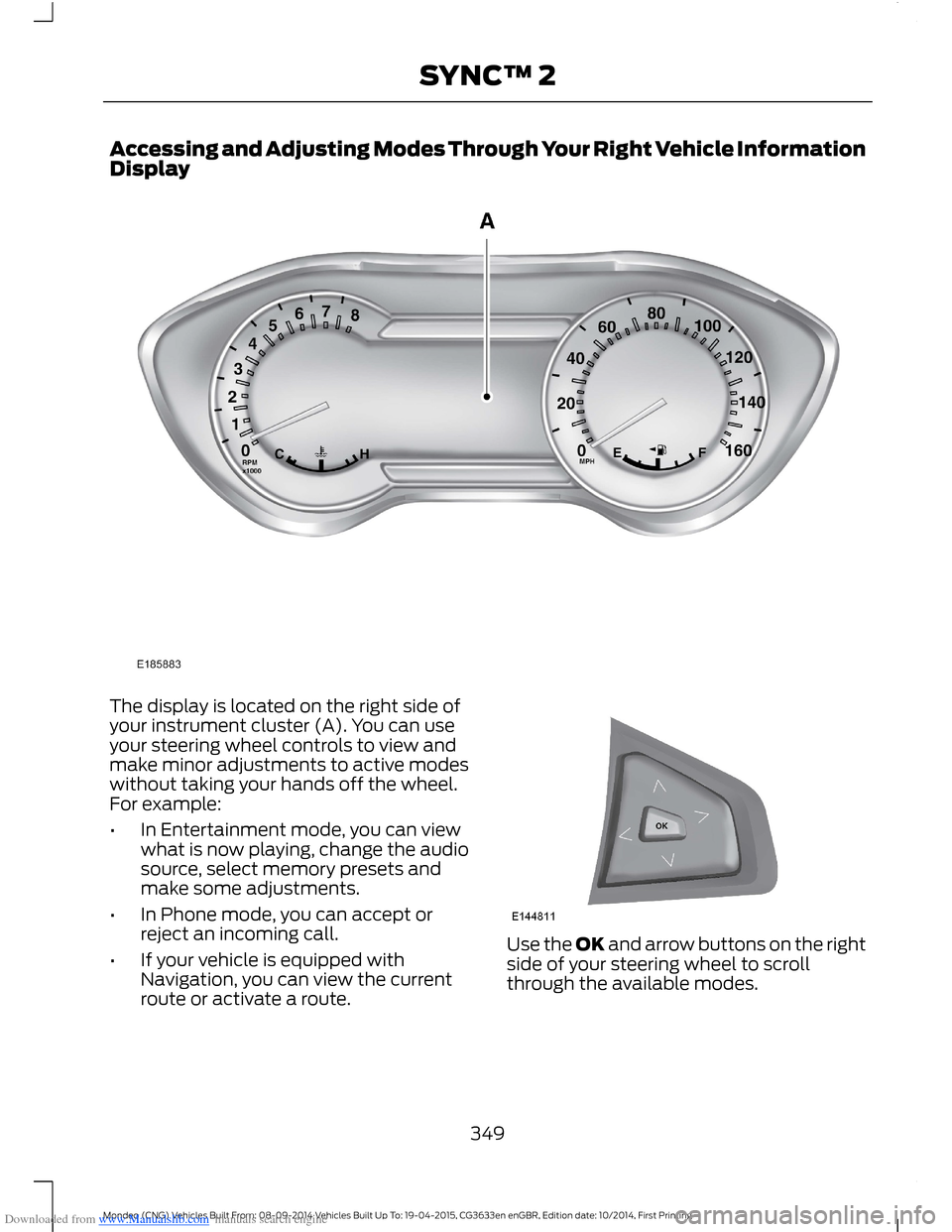
Downloaded from www.Manualslib.com manuals search engine Accessing and Adjusting Modes Through Your Right Vehicle InformationDisplay
The display is located on the right side ofyour instrument cluster (A). You can useyour steering wheel controls to view andmake minor adjustments to active modeswithout taking your hands off the wheel.For example:
•In Entertainment mode, you can viewwhat is now playing, change the audiosource, select memory presets andmake some adjustments.
•In Phone mode, you can accept orreject an incoming call.
•If your vehicle is equipped withNavigation, you can view the currentroute or activate a route.
Use the OK and arrow buttons on the rightside of your steering wheel to scrollthrough the available modes.
349Mondeo (CNG) Vehicles Built From: 08-09-2014 Vehicles Built Up To: 19-04-2015, CG3633en enGBR, Edition date: 10/2014, First PrintingSYNC™ 2
Page 355 of 446

Downloaded from www.Manualslib.com manuals search engine Clock
Under this menu, you can set theclock, access and adjust the
display, sound and vehicle settings as wellas access settings for specific modes orthe help feature.
To make adjustments using the touchscreen, select:
Action and DescriptionMenu Item
Press the settings icon.Settings
Press the + or - to adjust the time.ClockFrom this screen, you can also make other adjustments suchas 12-hour or 24-hour mode, activate GPS time synchroniza-tion and have the system automatically update new timezones.You can also switch the outside air temperature display offand on. It appears at the top center of the touchscreen, nextto the time and date.
Note:You cannot manually set the date. Your vehicle’s GPS does this for you.
Note:If the battery has been disconnected, your vehicle needs to acquire a GPS signal toupdate the clock. Once your vehicle acquires the signal, it may take a few minutes for theupdate to display the correct time.
Display
You can adjust the display usingthe touchscreen or the voicebutton on the steering wheelcontrols.
To make adjustments using the touchscreen, select:
Action and DescriptionMenu Item
Press the settings icon.Settings
Display
Then select from the following:
Allows you to switch the display off. It also allows you to set the screento a certain brightness or have the system automatically change basedon the outside light level.
Mode
If you also select:
These features will allow you to adjust the dimming ofyour screen.Auto
Night
353Mondeo (CNG) Vehicles Built From: 08-09-2014 Vehicles Built Up To: 19-04-2015, CG3633en enGBR, Edition date: 10/2014, First PrintingSYNC™ 2
Page 416 of 446
![FORD MONDEO 2014 4.G Owners Manual Downloaded from www.Manualslib.com manuals search engine •THERE ARE NO WARRANTIES OTHERTHAN THOSE THAT MAY EXPRESSLYBE PROVIDED FOR YOUR NEWVEHICLE.
Adobe
Contains Adobe® [Flash® Player] or[AIR®]](/manual-img/11/5483/w960_5483-415.png "FORD MONDEO 2014 4.G Owners Manual Downloaded from www.Manualslib.com manuals search engine •THERE ARE NO WARRANTIES OTHERTHAN THOSE THAT MAY EXPRESSLYBE PROVIDED FOR YOUR NEWVEHICLE.
Adobe
Contains Adobe® [Flash® Player] or[AIR®]")
Downloaded from www.Manualslib.com manuals search engine •THERE ARE NO WARRANTIES OTHERTHAN THOSE THAT MAY EXPRESSLYBE PROVIDED FOR YOUR NEWVEHICLE.
Adobe
Contains Adobe® [Flash® Player] or[AIR®] technology by Adobe SystemsIncorporated. This [Licensee Product]contains [Adobe® Flash® Player][Adobe® AIR®] software under licensefrom Adobe Systems Incorporated,Copyright ©1995-2009 AdobeMacromedia Software LLC. All rightsreserved. Adobe, Flash and AIR aretrademarks of Adobe SystemsIncorporated.
End User Notice
Microsoft® Windows® Mobile forAutomotive Important SafetyInformation
This system Ford SYNC contains softwarethat is licensed to Manufacturer FORDMOTOR COMPANY by an affiliate ofMicrosoft Corporation pursuant to a licenseagreement. Any removal, reproduction,reverse engineering or other unauthorizeduse of the software from this system inviolation of the license agreement is strictlyprohibited and may subject you to legalaction.
Read and follow instructions: Beforeusing your Windows Automotive- basedsystem, read and follow all instructionsand safety information provided in this enduser manual ("User's Guide"). Notfollowing precautions found in this User'sGuide can lead to an accident or otherserious consequences.
Keep User's Guide in vehicle: When keptin the vehicle, the User's Guide will be aready reference for you and other usersunfamiliar with the WindowsAutomotive-based system. Please makecertain that before using the system forthe first time, all persons have access tothe User's Guide and read its instructionsand safety information carefully.
WARNING
Operating certain parts of thissystem while driving can distractyour attention away from the road,and possibly cause an accident or otherserious consequences. Do not changesystem settings or enter data non-verbally(using your hands) while driving. Stop thevehicle in a safe and legal manner beforeattempting these operations. This isimportant since while setting up orchanging some functions you might berequired to distract your attention awayfrom the road and remove your hands fromthe wheel.
General Operation
Voice Command Control: Functionswithin the Windows Automotive-basedsystem may be accomplished using onlyvoice commands. Using voice commandswhile driving allows you to operate thesystem without removing your hands fromthe wheel.
Prolonged Views of Screen: Do notaccess any function requiring a prolongedview of the screen while you are driving.Pull over in a safe and legal manner beforeattempting to access a function of thesystem requiring prolonged attention. Evenoccasional short scans to the screen maybe hazardous if your attention has beendiverted away from your driving task at acritical time.
414Mondeo (CNG) Vehicles Built From: 08-09-2014 Vehicles Built Up To: 19-04-2015, CG3633en enGBR, Edition date: 10/2014, First PrintingAppendices