Page 297 of 446

Downloaded from www.Manualslib.com manuals search engine Cursor arrows and OK: Use the up and down arrow buttons to select thevarious settings. When you make your selection, press the left and right arrowbuttons to change the settings. Press OK to set or press MENU to exit.
J
CD slot: Insert a CD.K
Pick-up or Make phone call: Press this button to either pick-up an incomingphone call or to make a phone call.L
Seek: In radio mode, select a frequency band and press this button. The systemstops at the first station down the band. Press and hold the button to movequickly to the previous strong radio station. In CD mode, press this button toselect the previous track. Press and hold the button to move quickly backwardthrough the current track.
M
Play/Pause: Press to either play or pause a track when listening to a CD.N
VOL and Power: Press this button to switch the system off and on. Turn it toadjust the volume.O
PHONE: Press this button to access the phone features of the SYNC® system.See SYNC™ (page 305).P
MENU: Press this button to access different audio system features. See MenuStructure later in this chapter.Q
MEDIA: Press this button to access your auxiliary input jack or switch betweendevices you plug into the input jack or USB port.R
Clock: Press this button to access the clock setting. Use the center arrowcontrols to change the hours and minutes. You can also set the clock by pressingthe MENU button and scrolling to Clock Settings.
S
RADIO: Press this button to listen to the radio or change radio frequency bands.Press the function buttons below the radio screen to select different radiofunctions.
T
TA: The system interrupts the active audio source to provide incoming trafficannouncements.U
295Mondeo (CNG) Vehicles Built From: 08-09-2014 Vehicles Built Up To: 19-04-2015, CG3633en enGBR, Edition date: 10/2014, First PrintingAudio System
Page 302 of 446

Downloaded from www.Manualslib.com manuals search engine Audio Settings
Automatically adjusts the volume tocompensate for speed and wind noise. Youcan set the system between 0 and +7.
Speed Compensated Volume
Select to adjust settings for Treble,Midrange, Bass, Fade and Balance.Sound
Select to optimize sound quality for thechosen seating position.Occupancy Mode
Choose between STEREO SURROUNDmode and STEREO mode. Only with theexternal sound systems.
DPS
CD Settings
Select to scan all disc selections.Scan All
Select to scan all music in the current MP3 folder.Scan Folder
Clock Settings
Select to set the time.Set Time
Select to set the calendar date.Set Date
Select to view clock time in a 12-hour mode or 24-hourmode.24h Mode
Display Settings
Select to change display brightness.Dimming
Select to display the language in English, French orSpanish.Language
Select to display the outside temperature in Fahrenheitor Celsius.Temp. setting
300Mondeo (CNG) Vehicles Built From: 08-09-2014 Vehicles Built Up To: 19-04-2015, CG3633en enGBR, Edition date: 10/2014, First PrintingAudio System
Page 337 of 446
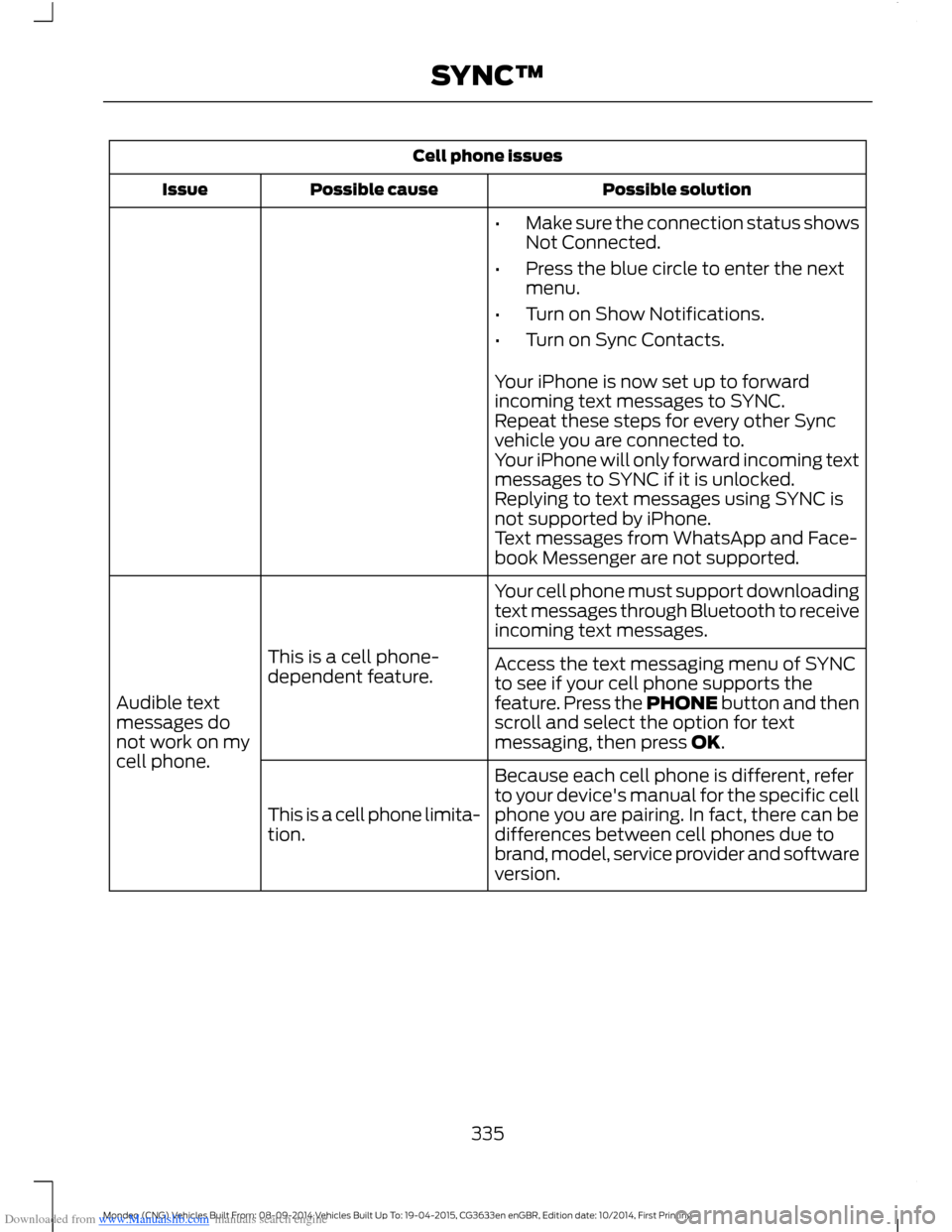
Downloaded from www.Manualslib.com manuals search engine Cell phone issues
Possible solutionPossible causeIssue
•Make sure the connection status showsNot Connected.
•Press the blue circle to enter the nextmenu.
•Turn on Show Notifications.
•Turn on Sync Contacts.
Your iPhone is now set up to forwardincoming text messages to SYNC.Repeat these steps for every other Syncvehicle you are connected to.Your iPhone will only forward incoming textmessages to SYNC if it is unlocked.Replying to text messages using SYNC isnot supported by iPhone.Text messages from WhatsApp and Face-book Messenger are not supported.
Your cell phone must support downloadingtext messages through Bluetooth to receiveincoming text messages.
This is a cell phone-dependent feature.
Audible textmessages donot work on mycell phone.
Access the text messaging menu of SYNCto see if your cell phone supports thefeature. Press the PHONE button and thenscroll and select the option for textmessaging, then press OK.
Because each cell phone is different, referto your device's manual for the specific cellphone you are pairing. In fact, there can bedifferences between cell phones due tobrand, model, service provider and softwareversion.
This is a cell phone limita-tion.
335Mondeo (CNG) Vehicles Built From: 08-09-2014 Vehicles Built Up To: 19-04-2015, CG3633en enGBR, Edition date: 10/2014, First PrintingSYNC™
Page 346 of 446

Downloaded from www.Manualslib.com manuals search engine This system uses a four-corner strategy toprovide quick access to several vehiclefeatures and settings. The touchscreenprovides easy interaction with your cellularphone, multimedia, climate control andnavigation system. The corners display anyactive modes within those menus, such asphone status or the climate temperature.
Note:Some features are not available whileyour vehicle is moving.
Note:Your system is equipped with afeature that allows you to access andcontrol audio features for 10 minutes afteryou switch the ignition off (and no doorsopen).
PHONE
Press to select any of the following:
Message
Phone
Quick Dial
Phonebook
History
Messaging
Settings
NAVIGATION
Press to select any of the following:
Message
My Home
Favorites
Previous Destinations
Point of Interest
Emergency
Street Address
Message
Intersection
City Center
Latitude/Longitude
Edit Route
Cancel Route
CLIMATE
Press the corresponding icons to controlthe following options:
•Driver Settings
•Recirculated Air
•Auto
•Dual
•Passenger Settings
•A/C
•Defrost
SETTINGS
Press to select any of the following:
Message
Clock
Display
Sound
Vehicle
Settings
Help
344Mondeo (CNG) Vehicles Built From: 08-09-2014 Vehicles Built Up To: 19-04-2015, CG3633en enGBR, Edition date: 10/2014, First PrintingSYNC™ 2
Page 354 of 446
Downloaded from www.Manualslib.com manuals search engine Using Voice Commands with theTouchscreen Options
The voice command system has a dualmode feature which allows you to switchbetween using voice commands andmaking on-screen selections. This is
available only when the system displays alist of candidates generated during a voicecommand session. For example, this canbe used when entering a street address ortrying to call a contact from a cell phonepaired to the system.
SETTINGS
Menu ItemItem
ClockA
DisplayB
SoundC
VehicleD
SettingsE
HelpF
352Mondeo (CNG) Vehicles Built From: 08-09-2014 Vehicles Built Up To: 19-04-2015, CG3633en enGBR, Edition date: 10/2014, First PrintingSYNC™ 2
Page 355 of 446

Downloaded from www.Manualslib.com manuals search engine Clock
Under this menu, you can set theclock, access and adjust the
display, sound and vehicle settings as wellas access settings for specific modes orthe help feature.
To make adjustments using the touchscreen, select:
Action and DescriptionMenu Item
Press the settings icon.Settings
Press the + or - to adjust the time.ClockFrom this screen, you can also make other adjustments suchas 12-hour or 24-hour mode, activate GPS time synchroniza-tion and have the system automatically update new timezones.You can also switch the outside air temperature display offand on. It appears at the top center of the touchscreen, nextto the time and date.
Note:You cannot manually set the date. Your vehicle’s GPS does this for you.
Note:If the battery has been disconnected, your vehicle needs to acquire a GPS signal toupdate the clock. Once your vehicle acquires the signal, it may take a few minutes for theupdate to display the correct time.
Display
You can adjust the display usingthe touchscreen or the voicebutton on the steering wheelcontrols.
To make adjustments using the touchscreen, select:
Action and DescriptionMenu Item
Press the settings icon.Settings
Display
Then select from the following:
Allows you to switch the display off. It also allows you to set the screento a certain brightness or have the system automatically change basedon the outside light level.
Mode
If you also select:
These features will allow you to adjust the dimming ofyour screen.Auto
Night
353Mondeo (CNG) Vehicles Built From: 08-09-2014 Vehicles Built Up To: 19-04-2015, CG3633en enGBR, Edition date: 10/2014, First PrintingSYNC™ 2
Page 358 of 446

Downloaded from www.Manualslib.com manuals search engine Ambient Lighting (If Equipped)
When you switch this feature on, ambient
lighting illuminates footwells andcupholders with a choice of colors.
To make adjustments using the touchscreen, select:
Action and DescriptionMenu Item
Press the settings icon.Settings
Vehicle
Ambient Lighting
•You can then touch the desired color.
•Use the scroll bar to increase or decrease the intensity.
•To switch the feature on or off, press the power button.
Camera Settings
This menu allows you to accesssettings for your rear viewcamera.
To make adjustments using the touchscreen, select:
Action and DescriptionMenu Item
Press the settings icon.Settings
Vehicle
Camera Settings
Then select from the following:
Enhanced Park Aids
Rear Camera Delay
You can find more information on the rear view camera system in another chapter. SeeParking Aids (page 167).
Enable Valet Mode
Valet mode allows you to lockthe system. No information isaccessible until the system isunlocked with the correct PIN.
Note:If the system locks, and you need toreset the PIN, enter 3681 and the systemunlocks.
356Mondeo (CNG) Vehicles Built From: 08-09-2014 Vehicles Built Up To: 19-04-2015, CG3633en enGBR, Edition date: 10/2014, First PrintingSYNC™ 2
Page 359 of 446
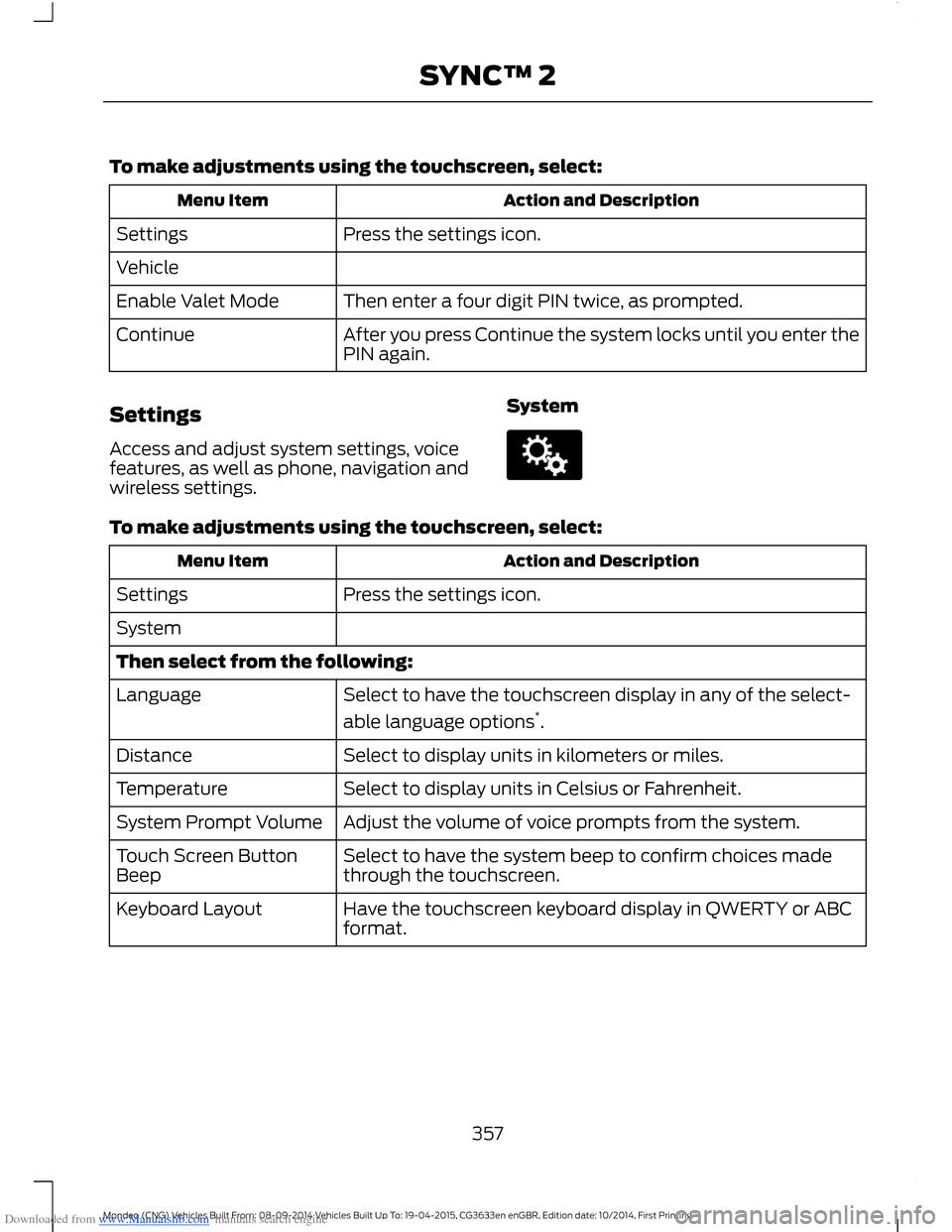
Downloaded from www.Manualslib.com manuals search engine To make adjustments using the touchscreen, select:
Action and DescriptionMenu Item
Press the settings icon.Settings
Vehicle
Then enter a four digit PIN twice, as prompted.Enable Valet Mode
After you press Continue the system locks until you enter thePIN again.Continue
Settings
Access and adjust system settings, voicefeatures, as well as phone, navigation andwireless settings.
System
To make adjustments using the touchscreen, select:
Action and DescriptionMenu Item
Press the settings icon.Settings
System
Then select from the following:
Select to have the touchscreen display in any of the select-
able language options*.
Language
Select to display units in kilometers or miles.Distance
Select to display units in Celsius or Fahrenheit.Temperature
Adjust the volume of voice prompts from the system.System Prompt Volume
Select to have the system beep to confirm choices madethrough the touchscreen.Touch Screen ButtonBeep
Have the touchscreen keyboard display in QWERTY or ABCformat.Keyboard Layout
357Mondeo (CNG) Vehicles Built From: 08-09-2014 Vehicles Built Up To: 19-04-2015, CG3633en enGBR, Edition date: 10/2014, First PrintingSYNC™ 2
