2014 FORD MONDEO ignition
[x] Cancel search: ignitionPage 272 of 446
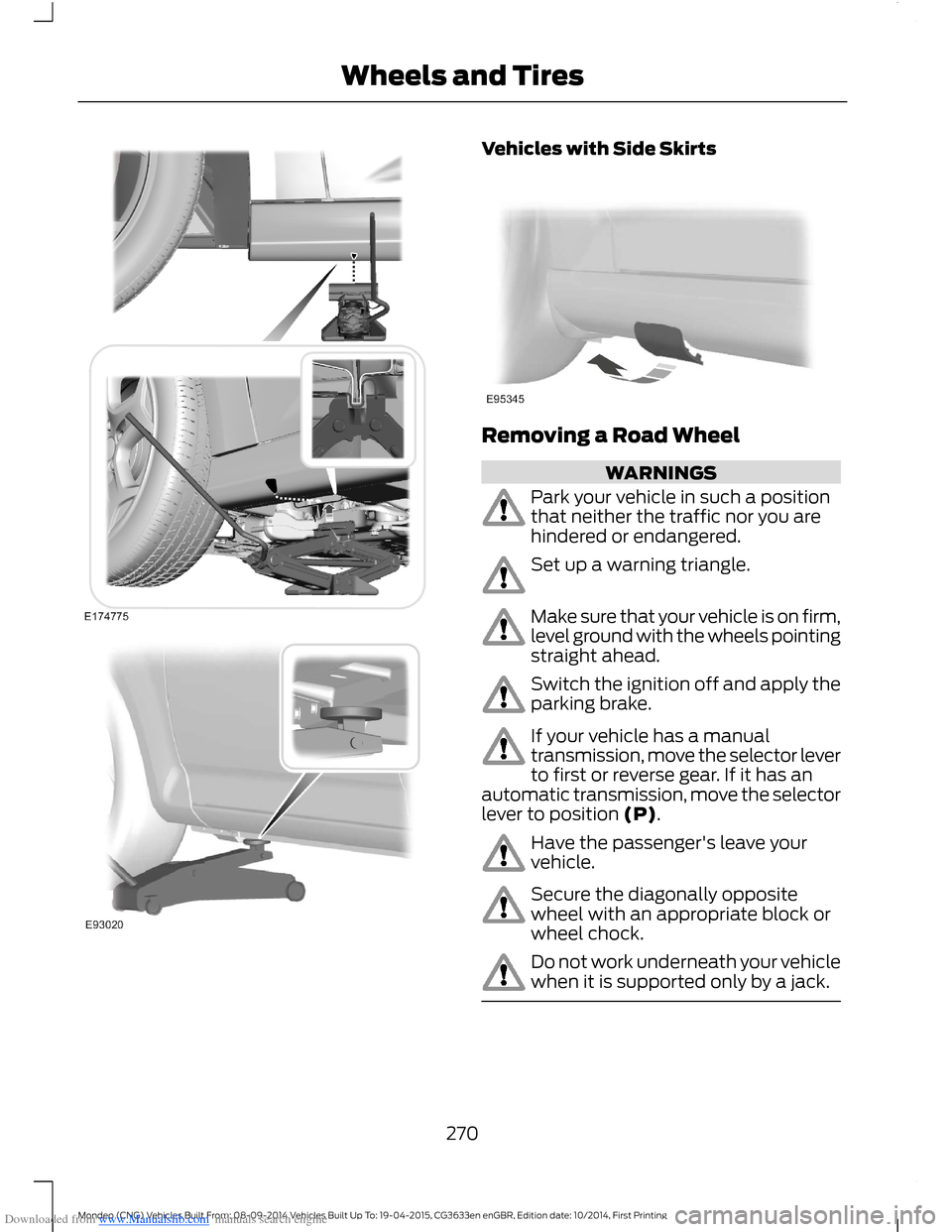
Downloaded from www.Manualslib.com manuals search engine Vehicles with Side Skirts
Removing a Road Wheel
WARNINGS
Park your vehicle in such a positionthat neither the traffic nor you arehindered or endangered.
Set up a warning triangle.
Make sure that your vehicle is on firm,level ground with the wheels pointingstraight ahead.
Switch the ignition off and apply theparking brake.
If your vehicle has a manualtransmission, move the selector leverto first or reverse gear. If it has anautomatic transmission, move the selectorlever to position (P).
Have the passenger's leave yourvehicle.
Secure the diagonally oppositewheel with an appropriate block orwheel chock.
Do not work underneath your vehiclewhen it is supported only by a jack.
270Mondeo (CNG) Vehicles Built From: 08-09-2014 Vehicles Built Up To: 19-04-2015, CG3633en enGBR, Edition date: 10/2014, First PrintingWheels and Tires
Page 311 of 446
Downloaded from www.Manualslib.com manuals search engine Changing the Voice Settings
You can change the voice settings using
the information and entertainment display.
Press the MENU button.
MessageAction
SYNC-Settings1
Voice settings2
USING SYNC™ WITH YOUR
PHONE
Hands-free calling is one of the mainfeatures of SYNC. While the systemsupports a variety of features, many aredependent on your cell phone'sfunctionality.
At a minimum, most cell phones withBluetooth wireless technology support thefollowing functions:
•Answering an incoming call.
•Ending a call.
•Using privacy mode.
•Dialing a number.
•Redialing.
•Call waiting notification.
•Caller ID.
Other features such as text messagingusing Bluetooth and automatic phonebookdownload are cell phone dependentfeatures. To check your cell phone'scompatibility, refer to your device's manualor visit the regional Ford website.
Pairing a Cell Phone For the FirstTime
Wirelessly pairing your cell phone with thesystem allows you to make and receivehands-free calls.
Note:You must switch the ignition andradio on.
Note:To scroll through the menus, pressthe up or down arrows on your audio system.
1.Make sure the Bluetooth feature onyour cell phone is switched on beforestarting the search. Refer to yourdevice's manual if necessary.
2.Press the PHONE button. When theaudio display indicates that no phonesare paired, select the option to add.
3.When a message to begin pairingappears in the audio display, search forSYNC on your cell phone to start thepairing process.
4.Select SYNC on your cell phone.
5.Wait until the PIN appears on thephone display. Compare the PIN on thephone with the PIN shown in the audiodisplay and accept the request on thephone and the vehicle display. Thedisplay indicates when the pairing issuccessful.
Note:In some cases the phone will requestto enter a PIN. Enter the six-digit PINprovided by the system in the audio display.The display indicates when the pairing issuccessful.
Depending on your cell phone's capabilityand your market, the system may promptyou with questions such as setting thecurrent cell phone as the primary cellphone (the cell phone the systemautomatically tries to connect with firstwhen you switch the ignition on) ordownloading your phonebook.
309Mondeo (CNG) Vehicles Built From: 08-09-2014 Vehicles Built Up To: 19-04-2015, CG3633en enGBR, Edition date: 10/2014, First PrintingSYNC™
Page 312 of 446
Downloaded from www.Manualslib.com manuals search engine The information display mayshow your cell phone's batterycharge level and signal strength.
Pairing Subsequent Cell Phones
Wirelessly pairing your cell phone with thesystem allows you to make and receivehands-free calls.
Note:You must switch the ignition andradio on.
Note:To scroll through the menus, pressthe up or down arrows on your audio system.
1.Make sure the Bluetooth feature onyour cell phone is switched on beforestarting the search. Refer to yourdevice's manual if necessary.
2.Press the PHONE button.
3.Select the option for Bluetooth devices.
4.Press the OK button.
5.Select the option to add. This startsthe pairing process.
6.When a message to begin pairingappears in the audio display, search forSYNC on your device to start thepairing process.
7.Select SYNC on your cell phone.
8.Wait until the PIN appears on thephone display. Compare the PIN on thephone with the PIN shown in the audiodisplay and accept the request on thephone and the vehicle display. Thedisplay indicates when the pairing issuccessful.
Note:In some cases the phone will requestto enter a PIN. Enter the six-digit PINprovided by the system in the audio display.The display indicates when the pairing issuccessful.
The system may prompt you withquestions such as setting the current cellphone as the primary cell phone ordownloading your phonebook.
Cell Phone Voice Commands
Press the voice button and whenprompted say either:
ActionCommand
You do not need to say "phone" prior to these commands.call (someone | [[a]name])
You do not need to say "phone" prior to these commands.Call
You do not need to say "phone" prior to these commands.Call
You do not need to say "phone" prior to these commands.Call
You do not need to say "phone" prior to these commands.Call
You do not need to say "phone" prior to these commands.Call
You do not need to say "phone" prior to these commands.dial [[a] number]
These commands are only available during a call.([go to] privacy [on] |transfer to phone |handsfree off)
310Mondeo (CNG) Vehicles Built From: 08-09-2014 Vehicles Built Up To: 19-04-2015, CG3633en enGBR, Edition date: 10/2014, First PrintingSYNC™
Page 321 of 446
Downloaded from www.Manualslib.com manuals search engine Description and ActionMessage
4.Wait until the PIN appears on the phone display. Comparethe PIN on the phone with the PIN shown in the audiodisplay and accept the request on the phones and thevehicles display. The display indicates when the pairing
is successful.*
5.When the option to set the cell phone as the primary cellphone appears, select either yes or no.
6.Depending on the functionality of your cell phone, thesystem may ask you extra questions (for example, if youwould like to download your phonebook). Select eitheryes or no to confirm your response.
After deleting a cell phone from the list, the cell phone canonly be connected again by repeating the full pairing process.Select the delete option and confirm when the system asksto delete the selected device.
Delete
The system attempts to connect with the primary cell phoneevery time you switch the ignition on. When a cell phone isselected as primary, it appears first in the list and is markedwith an asterisk.
Master
Set a previously paired cell phone as your primary cell phone.Select the master option to confirm the primary cell phone.
Connect a previously paired cell phone. You can only haveone cell phone connected at a time to use the cell phonefunctionality. When another cell phone is connected, theprevious cell phone will be disconnected from the telephoneservices. The system allows you to use different Bluetoothdevices for the cell phone functionality and the Bluetoothaudio music playback feature at the same time.
Conn.
Disconnects the selected cell phone. Select this option andconfirm when asked to. After disconnecting a cell phone, itcan be connected again without repeating the full pairingprocess.
Discon.
*In some cases the phone will request to enter a PIN. Enter the six-digit PIN provided bythe system in the audio display. The display indicates when the pairing is successful.
System Settings
1.Press the MENU button.
2.Select the SYNC settings option, thenpress the OK button.
3.Scroll to select from the followingoptions:
319Mondeo (CNG) Vehicles Built From: 08-09-2014 Vehicles Built Up To: 19-04-2015, CG3633en enGBR, Edition date: 10/2014, First PrintingSYNC™
Page 323 of 446

Downloaded from www.Manualslib.com manuals search engine Description and ActionMessage
Scroll to this option, and then press OK.SYNC-Apps
SYNC Emergency Assistance
WARNINGS
For this feature to work, your cellphone must have Bluetooth and becompatible with the system.
Always place your cell phone in asecure location inside your vehicle.Failure to do so may cause seriousinjury to someone or damage the cellphone which could prevent this featurefrom working correctly.
Unless the feature setting is switchedon prior to a crash, the system willnot attempt to place an emergencycall which could delay the response time,potentially increasing the risk of seriousinjury or death. Do not wait for the systemto make an emergency call if you can do ityourself. Dial emergency servicesimmediately to avoid a delayed responsetime. If you do not hear EmergencyAssistance within five seconds of the crash,the system or cell phone may be damagedor non-functional.
If a crash deploys an airbag or triggers thefuel pump shut off, the system maycontact emergency services by dialing 112(the wireless emergency number thatworks in most European countries) througha paired and connected cell phone. Formore information about the system andEmergency Assistance, visit the regionalFord website.
Note:Before selecting this feature, youmust read the Emergency Assistance privacynotice later in this section for importantinformation.
Note:When you switch this feature on oroff, that setting applies for all paired cellphones. If you have turned this feature offand a previously paired phone connectswhen you switch on the ignition, either avoice message plays, a display message oricon is shown, or both.
Note:Every cell phone operates differently.While this feature works with most cellphones, some cell phones may experiencedifficulties using this feature.
Note:Make sure you are familiar with theinformation about airbag deployment. SeeSupplementary Restraints System (page27).
Switching Emergency AssistanceOn and Off
Press the MENU button then select:
ActionMessage
Press OK.SYNC-Apps
Press OK. Select the option you require and press OK.Emergency Assistance
321Mondeo (CNG) Vehicles Built From: 08-09-2014 Vehicles Built Up To: 19-04-2015, CG3633en enGBR, Edition date: 10/2014, First PrintingSYNC™
Page 343 of 446
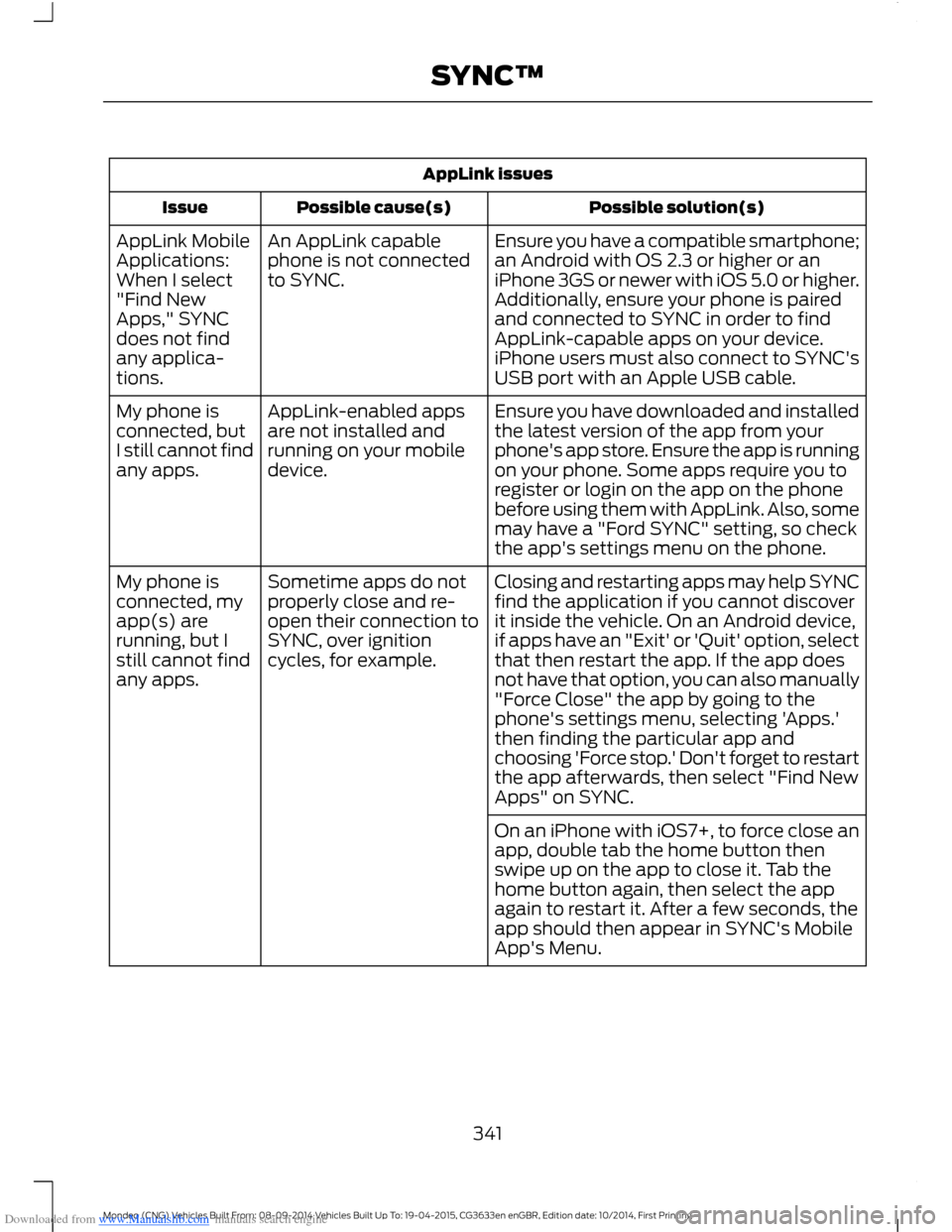
Downloaded from www.Manualslib.com manuals search engine AppLink issues
Possible solution(s)Possible cause(s)Issue
Ensure you have a compatible smartphone;an Android with OS 2.3 or higher or aniPhone 3GS or newer with iOS 5.0 or higher.Additionally, ensure your phone is pairedand connected to SYNC in order to findAppLink-capable apps on your device.iPhone users must also connect to SYNC'sUSB port with an Apple USB cable.
An AppLink capablephone is not connectedto SYNC.
AppLink MobileApplications:When I select"Find NewApps," SYNCdoes not findany applica-tions.
Ensure you have downloaded and installedthe latest version of the app from yourphone's app store. Ensure the app is runningon your phone. Some apps require you toregister or login on the app on the phonebefore using them with AppLink. Also, somemay have a "Ford SYNC" setting, so checkthe app's settings menu on the phone.
AppLink-enabled appsare not installed andrunning on your mobiledevice.
My phone isconnected, butI still cannot findany apps.
Closing and restarting apps may help SYNCfind the application if you cannot discoverit inside the vehicle. On an Android device,if apps have an "Exit' or 'Quit' option, selectthat then restart the app. If the app doesnot have that option, you can also manually
Sometime apps do notproperly close and re-open their connection toSYNC, over ignitioncycles, for example.
My phone isconnected, myapp(s) arerunning, but Istill cannot findany apps."Force Close" the app by going to thephone's settings menu, selecting 'Apps.'then finding the particular app andchoosing 'Force stop.' Don't forget to restartthe app afterwards, then select "Find NewApps" on SYNC.
On an iPhone with iOS7+, to force close anapp, double tab the home button thenswipe up on the app to close it. Tab thehome button again, then select the appagain to restart it. After a few seconds, theapp should then appear in SYNC's MobileApp's Menu.
341Mondeo (CNG) Vehicles Built From: 08-09-2014 Vehicles Built Up To: 19-04-2015, CG3633en enGBR, Edition date: 10/2014, First PrintingSYNC™
Page 346 of 446

Downloaded from www.Manualslib.com manuals search engine This system uses a four-corner strategy toprovide quick access to several vehiclefeatures and settings. The touchscreenprovides easy interaction with your cellularphone, multimedia, climate control andnavigation system. The corners display anyactive modes within those menus, such asphone status or the climate temperature.
Note:Some features are not available whileyour vehicle is moving.
Note:Your system is equipped with afeature that allows you to access andcontrol audio features for 10 minutes afteryou switch the ignition off (and no doorsopen).
PHONE
Press to select any of the following:
Message
Phone
Quick Dial
Phonebook
History
Messaging
Settings
NAVIGATION
Press to select any of the following:
Message
My Home
Favorites
Previous Destinations
Point of Interest
Emergency
Street Address
Message
Intersection
City Center
Latitude/Longitude
Edit Route
Cancel Route
CLIMATE
Press the corresponding icons to controlthe following options:
•Driver Settings
•Recirculated Air
•Auto
•Dual
•Passenger Settings
•A/C
•Defrost
SETTINGS
Press to select any of the following:
Message
Clock
Display
Sound
Vehicle
Settings
Help
344Mondeo (CNG) Vehicles Built From: 08-09-2014 Vehicles Built Up To: 19-04-2015, CG3633en enGBR, Edition date: 10/2014, First PrintingSYNC™ 2
Page 361 of 446
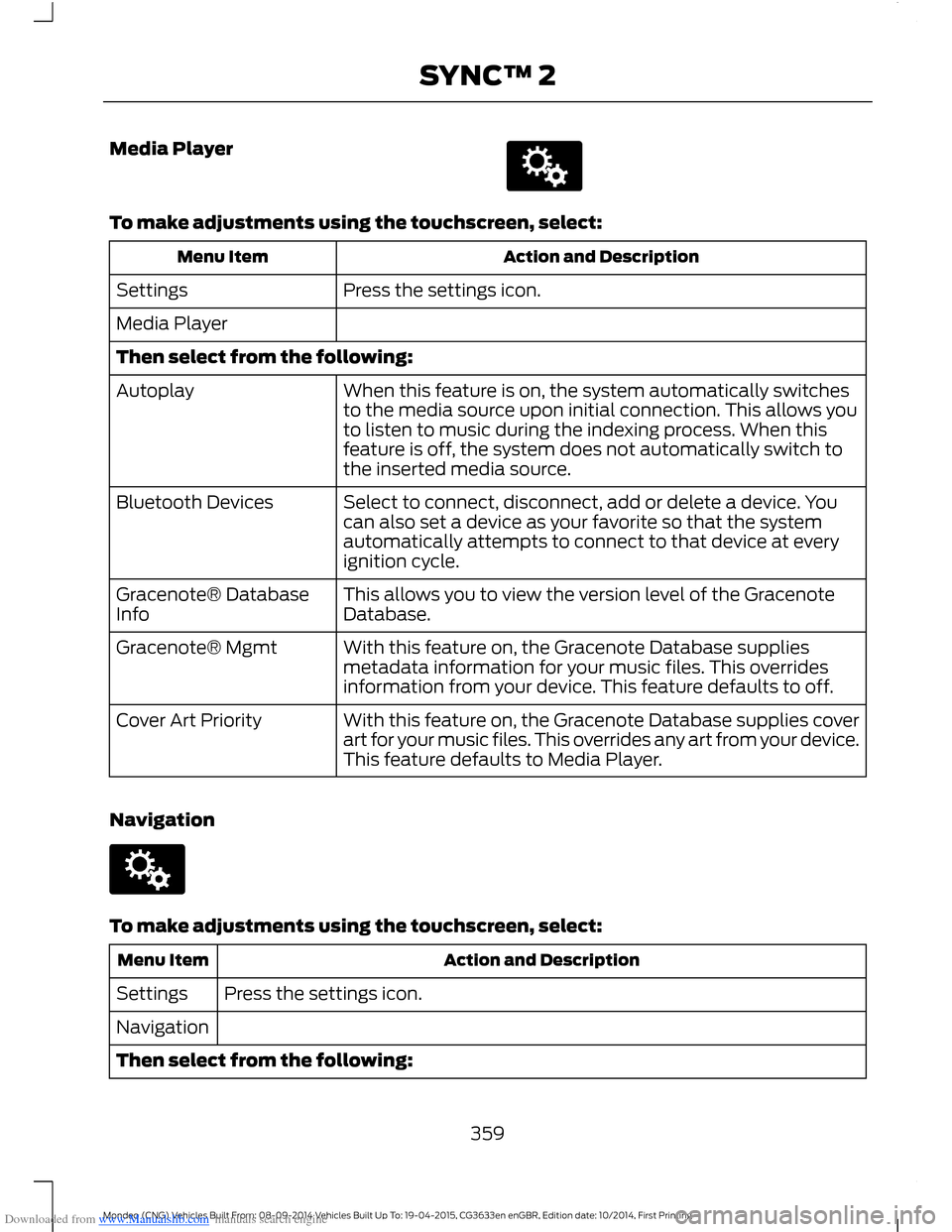
Downloaded from www.Manualslib.com manuals search engine Media Player
To make adjustments using the touchscreen, select:
Action and DescriptionMenu Item
Press the settings icon.Settings
Media Player
Then select from the following:
When this feature is on, the system automatically switchesto the media source upon initial connection. This allows youto listen to music during the indexing process. When thisfeature is off, the system does not automatically switch tothe inserted media source.
Autoplay
Select to connect, disconnect, add or delete a device. Youcan also set a device as your favorite so that the systemautomatically attempts to connect to that device at everyignition cycle.
Bluetooth Devices
This allows you to view the version level of the GracenoteDatabase.Gracenote® DatabaseInfo
With this feature on, the Gracenote Database suppliesmetadata information for your music files. This overridesinformation from your device. This feature defaults to off.
Gracenote® Mgmt
With this feature on, the Gracenote Database supplies coverart for your music files. This overrides any art from your device.This feature defaults to Media Player.
Cover Art Priority
Navigation
To make adjustments using the touchscreen, select:
Action and DescriptionMenu Item
Press the settings icon.Settings
Navigation
Then select from the following:
359Mondeo (CNG) Vehicles Built From: 08-09-2014 Vehicles Built Up To: 19-04-2015, CG3633en enGBR, Edition date: 10/2014, First PrintingSYNC™ 2