2014 FORD FUSION (AMERICAS) ECO mode
[x] Cancel search: ECO modePage 115 of 458
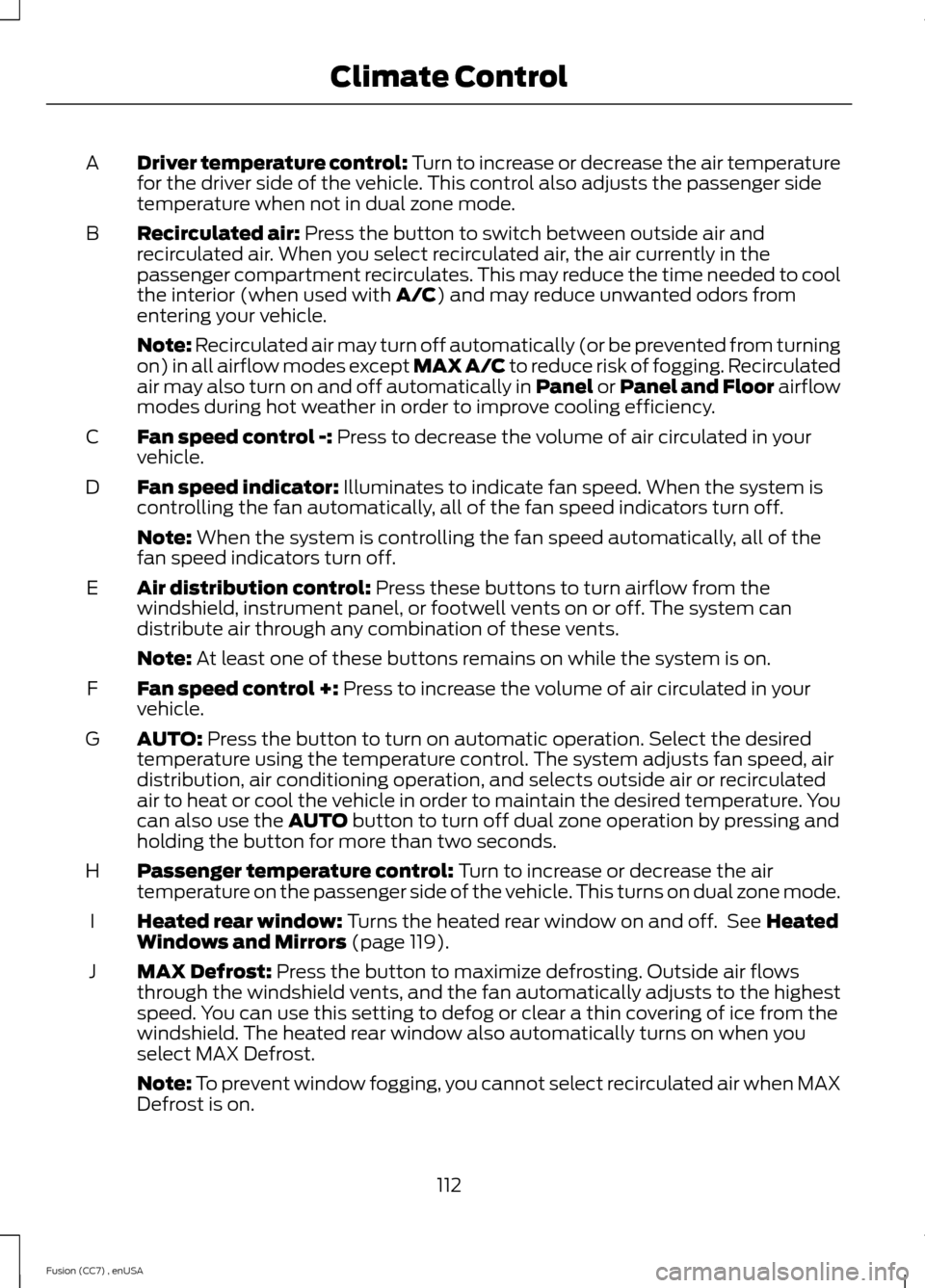
Driver temperature control: Turn to increase or decrease the air temperaturefor the driver side of the vehicle. This control also adjusts the passenger sidetemperature when not in dual zone mode.
A
Recirculated air: Press the button to switch between outside air andrecirculated air. When you select recirculated air, the air currently in thepassenger compartment recirculates. This may reduce the time needed to coolthe interior (when used with A/C) and may reduce unwanted odors fromentering your vehicle.
B
Note: Recirculated air may turn off automatically (or be prevented from turningon) in all airflow modes except MAX A/C to reduce risk of fogging. Recirculatedair may also turn on and off automatically in Panel or Panel and Floor airflowmodes during hot weather in order to improve cooling efficiency.
Fan speed control -: Press to decrease the volume of air circulated in yourvehicle.C
Fan speed indicator: Illuminates to indicate fan speed. When the system iscontrolling the fan automatically, all of the fan speed indicators turn off.D
Note: When the system is controlling the fan speed automatically, all of thefan speed indicators turn off.
Air distribution control: Press these buttons to turn airflow from thewindshield, instrument panel, or footwell vents on or off. The system candistribute air through any combination of these vents.
E
Note: At least one of these buttons remains on while the system is on.
Fan speed control +: Press to increase the volume of air circulated in yourvehicle.F
AUTO: Press the button to turn on automatic operation. Select the desiredtemperature using the temperature control. The system adjusts fan speed, airdistribution, air conditioning operation, and selects outside air or recirculatedair to heat or cool the vehicle in order to maintain the desired temperature. Youcan also use the AUTO button to turn off dual zone operation by pressing andholding the button for more than two seconds.
G
Passenger temperature control: Turn to increase or decrease the airtemperature on the passenger side of the vehicle. This turns on dual zone mode.H
Heated rear window: Turns the heated rear window on and off. See HeatedWindows and Mirrors (page 119).I
MAX Defrost: Press the button to maximize defrosting. Outside air flowsthrough the windshield vents, and the fan automatically adjusts to the highestspeed. You can use this setting to defog or clear a thin covering of ice from thewindshield. The heated rear window also automatically turns on when youselect MAX Defrost.
J
Note: To prevent window fogging, you cannot select recirculated air when MAXDefrost is on.
112Fusion (CC7) , enUSAClimate Control
Page 117 of 458
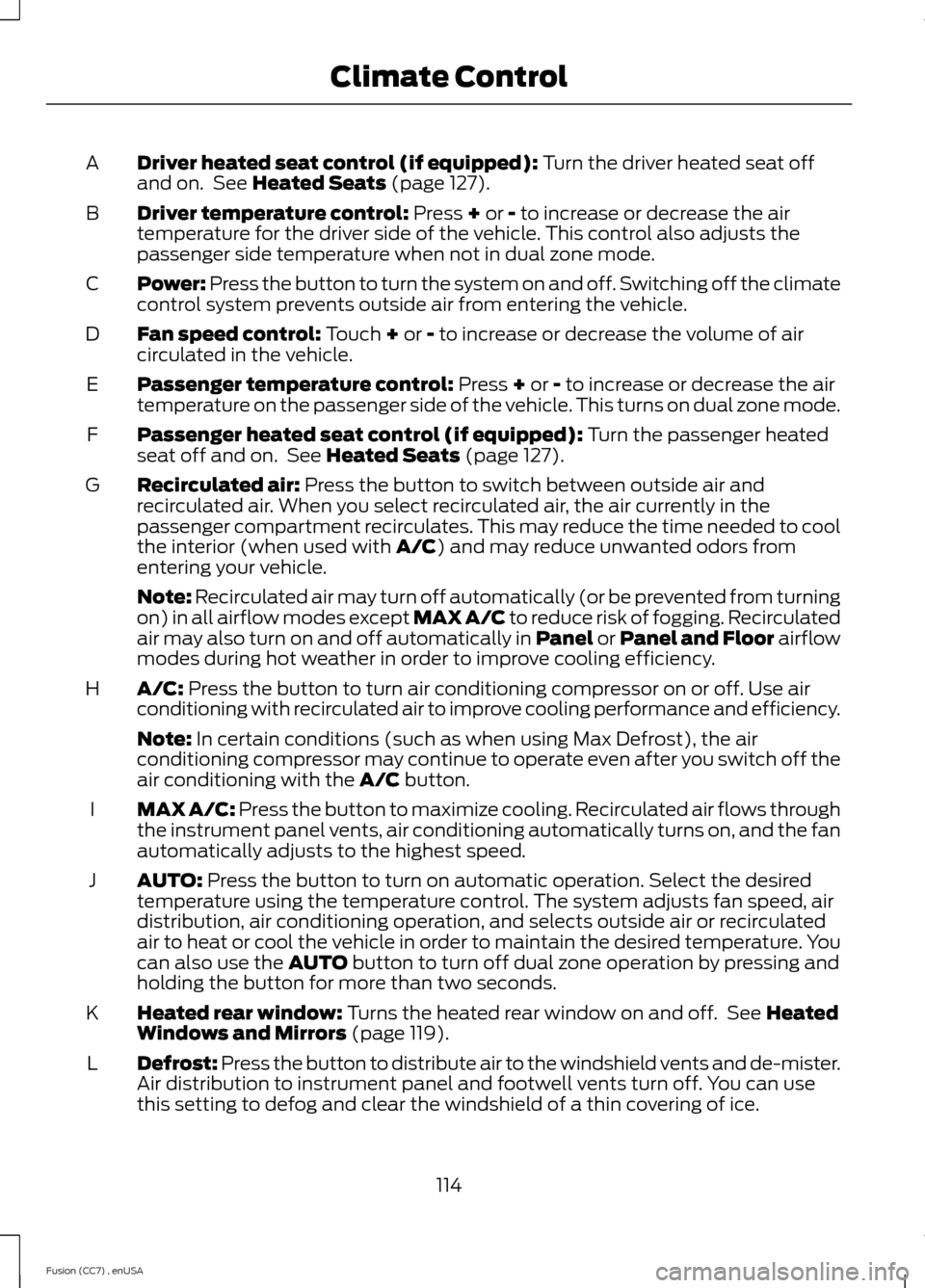
Driver heated seat control (if equipped): Turn the driver heated seat offand on. See Heated Seats (page 127).A
Driver temperature control: Press + or - to increase or decrease the airtemperature for the driver side of the vehicle. This control also adjusts thepassenger side temperature when not in dual zone mode.
B
Power: Press the button to turn the system on and off. Switching off the climatecontrol system prevents outside air from entering the vehicle.C
Fan speed control: Touch + or - to increase or decrease the volume of aircirculated in the vehicle.D
Passenger temperature control: Press + or - to increase or decrease the airtemperature on the passenger side of the vehicle. This turns on dual zone mode.E
Passenger heated seat control (if equipped): Turn the passenger heatedseat off and on. See Heated Seats (page 127).F
Recirculated air: Press the button to switch between outside air andrecirculated air. When you select recirculated air, the air currently in thepassenger compartment recirculates. This may reduce the time needed to coolthe interior (when used with A/C) and may reduce unwanted odors fromentering your vehicle.
G
Note: Recirculated air may turn off automatically (or be prevented from turningon) in all airflow modes except MAX A/C to reduce risk of fogging. Recirculatedair may also turn on and off automatically in Panel or Panel and Floor airflowmodes during hot weather in order to improve cooling efficiency.
A/C: Press the button to turn air conditioning compressor on or off. Use airconditioning with recirculated air to improve cooling performance and efficiency.H
Note: In certain conditions (such as when using Max Defrost), the airconditioning compressor may continue to operate even after you switch off theair conditioning with the A/C button.
MAX A/C: Press the button to maximize cooling. Recirculated air flows throughthe instrument panel vents, air conditioning automatically turns on, and the fanautomatically adjusts to the highest speed.
I
AUTO: Press the button to turn on automatic operation. Select the desiredtemperature using the temperature control. The system adjusts fan speed, airdistribution, air conditioning operation, and selects outside air or recirculatedair to heat or cool the vehicle in order to maintain the desired temperature. Youcan also use the AUTO button to turn off dual zone operation by pressing andholding the button for more than two seconds.
J
Heated rear window: Turns the heated rear window on and off. See HeatedWindows and Mirrors (page 119).K
Defrost: Press the button to distribute air to the windshield vents and de-mister.Air distribution to instrument panel and footwell vents turn off. You can usethis setting to defog and clear the windshield of a thin covering of ice.
L
114Fusion (CC7) , enUSAClimate Control
Page 134 of 458
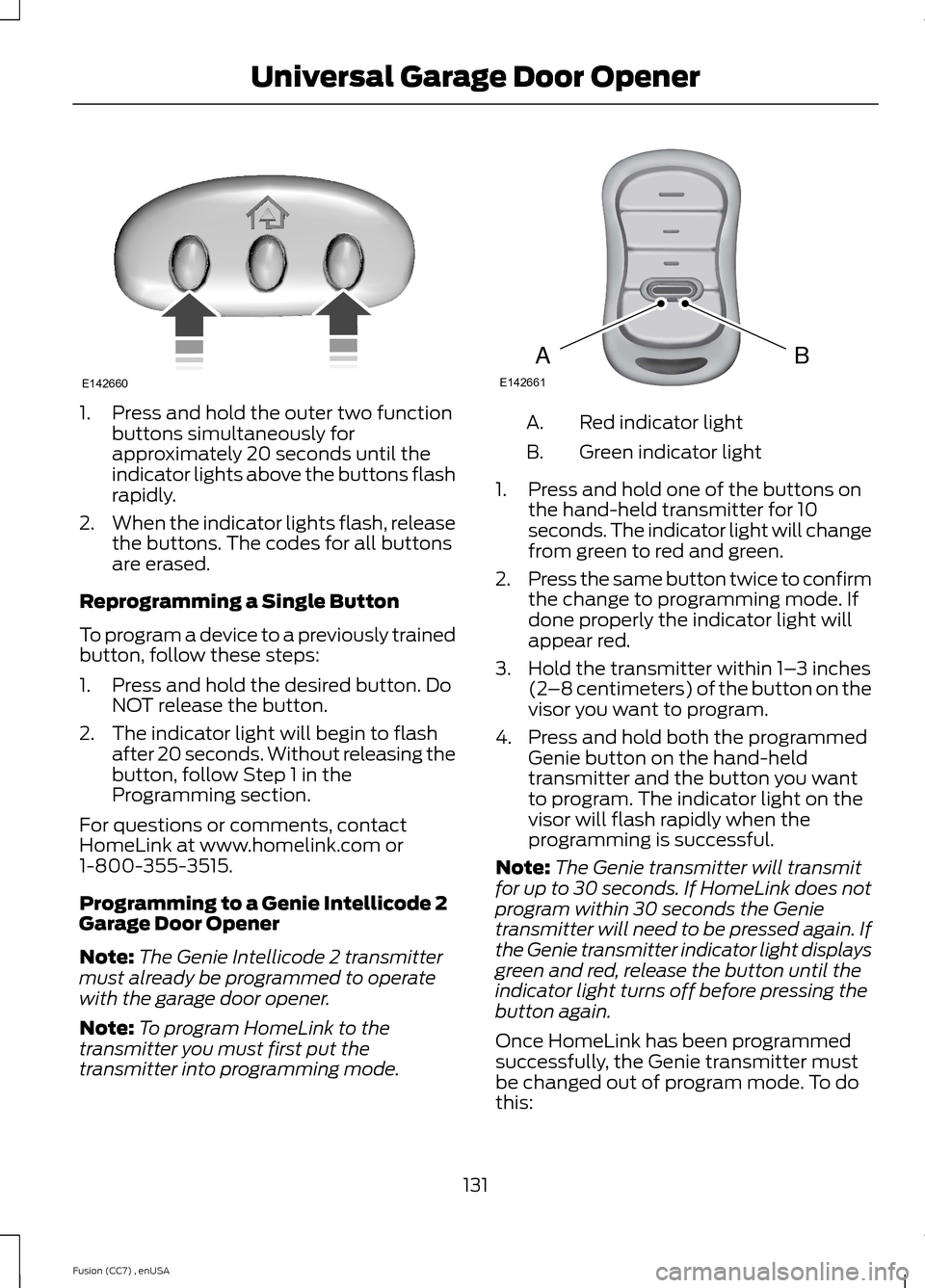
1.Press and hold the outer two functionbuttons simultaneously forapproximately 20 seconds until theindicator lights above the buttons flashrapidly.
2.When the indicator lights flash, releasethe buttons. The codes for all buttonsare erased.
Reprogramming a Single Button
To program a device to a previously trainedbutton, follow these steps:
1.Press and hold the desired button. DoNOT release the button.
2.The indicator light will begin to flashafter 20 seconds. Without releasing thebutton, follow Step 1 in theProgramming section.
For questions or comments, contactHomeLink at www.homelink.com or1-800-355-3515.
Programming to a Genie Intellicode 2Garage Door Opener
Note:The Genie Intellicode 2 transmittermust already be programmed to operatewith the garage door opener.
Note:To program HomeLink to thetransmitter you must first put thetransmitter into programming mode.
Red indicator lightA.
Green indicator lightB.
1.Press and hold one of the buttons onthe hand-held transmitter for 10seconds. The indicator light will changefrom green to red and green.
2.Press the same button twice to confirmthe change to programming mode. Ifdone properly the indicator light willappear red.
3.Hold the transmitter within 1–3 inches(2–8 centimeters) of the button on thevisor you want to program.
4.Press and hold both the programmedGenie button on the hand-heldtransmitter and the button you wantto program. The indicator light on thevisor will flash rapidly when theprogramming is successful.
Note:The Genie transmitter will transmitfor up to 30 seconds. If HomeLink does notprogram within 30 seconds the Genietransmitter will need to be pressed again. Ifthe Genie transmitter indicator light displaysgreen and red, release the button until theindicator light turns off before pressing thebutton again.
Once HomeLink has been programmedsuccessfully, the Genie transmitter mustbe changed out of program mode. To dothis:
131Fusion (CC7) , enUSAUniversal Garage Door OpenerE142660 BAE142661
Page 135 of 458
1.Press and hold the previouslyprogrammed Genie button on thehand-held transmitter for 10 seconds.The indicator light will change from redto red and green.
2.Press the same button twice to confirmthe change. If done correctly theindicator light will turn green.
Programming HomeLink to the GenieIntellicode Garage Door Opener Motor
Note:You may need a ladder to access thegarage door opener motor.
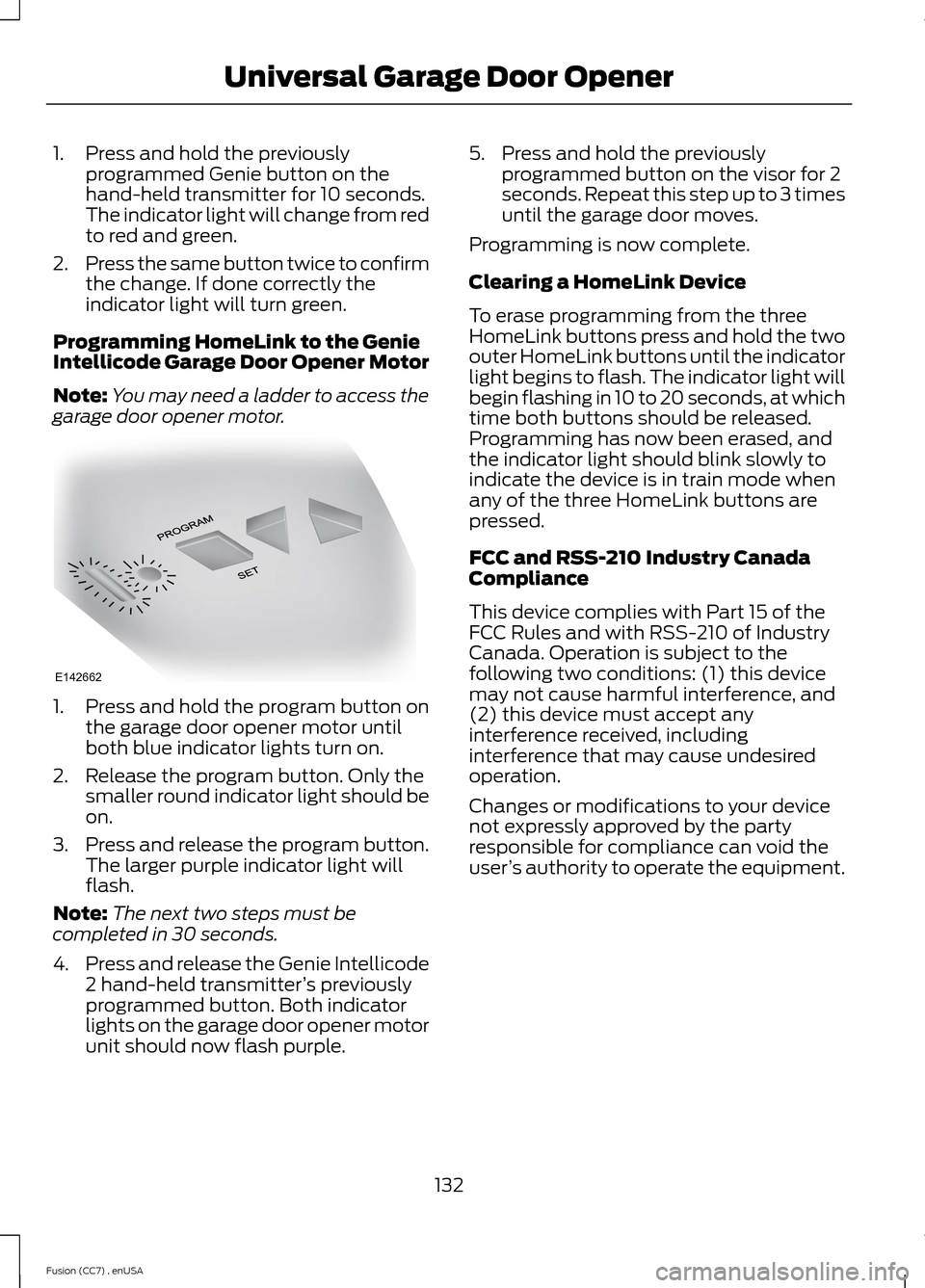
1.Press and hold the program button onthe garage door opener motor untilboth blue indicator lights turn on.
2.Release the program button. Only thesmaller round indicator light should beon.
3.Press and release the program button.The larger purple indicator light willflash.
Note:The next two steps must becompleted in 30 seconds.
4.Press and release the Genie Intellicode2 hand-held transmitter’s previouslyprogrammed button. Both indicatorlights on the garage door opener motorunit should now flash purple.
5.Press and hold the previouslyprogrammed button on the visor for 2seconds. Repeat this step up to 3 timesuntil the garage door moves.
Programming is now complete.
Clearing a HomeLink Device
To erase programming from the threeHomeLink buttons press and hold the twoouter HomeLink buttons until the indicatorlight begins to flash. The indicator light willbegin flashing in 10 to 20 seconds, at whichtime both buttons should be released.Programming has now been erased, andthe indicator light should blink slowly toindicate the device is in train mode whenany of the three HomeLink buttons arepressed.
FCC and RSS-210 Industry CanadaCompliance
This device complies with Part 15 of theFCC Rules and with RSS-210 of IndustryCanada. Operation is subject to thefollowing two conditions: (1) this devicemay not cause harmful interference, and(2) this device must accept anyinterference received, includinginterference that may cause undesiredoperation.
Changes or modifications to your devicenot expressly approved by the partyresponsible for compliance can void theuser’s authority to operate the equipment.
132Fusion (CC7) , enUSAUniversal Garage Door OpenerE142662
Page 140 of 458

Ignition Modes
The keyless starting system has threemodes:
Off: Turns the ignition off.
•Without applying the brake pedal,press and release the button oncewhen the ignition is in the on mode, orwhen the engine is running but thevehicle is not moving.
On: All electrical circuits are operationaland the warning lamps and indicatorsilluminate.
•Without applying the brake pedal,press and release the button once.
Start: Starts the engine.
•Press the brake pedal, and then pressthe button for any length of time. Anindicator light on the button illuminateswhen then ignition is on and when theengine starts.
STARTING A GASOLINE
ENGINE
When you start the engine, the idle speedincreases, this helps to warm up theengine. If the engine idle speed does notslow down automatically, have yourvehicle checked by an authorized dealer.
Note:You can crank the engine for a totalof 60 seconds (without the engine starting)before the starting system temporarilydisables. The 60 seconds does not have tobe all at once. For example, if you crank theengine three times for 20 seconds eachtime, without the engine starting, youreached the 60-second time limit. Amessage appears in the information displayalerting you that you exceeded the crankingtime. You cannot attempt to start the enginefor at least 15 minutes. After 15 minutes, youare limited to a 15-second engine crankingtime. You need to wait 60 minutes beforeyou can crank the engine for 60 secondsagain.
Before starting the engine, check thefollowing:
•Make sure all occupants have fastenedtheir safety belts.
•Make sure the headlamps andelectrical accessories are off.
•Make sure the parking brake is on.
•Move the transmission selector leverto position P (automatic transmission)or neutral (manual transmission).
•Turn the ignition key to position II. Ifyour vehicle is equipped with a keylessignition, see the following instructions.
Vehicles with an Ignition Key
Note:Do not touch the accelerator pedal.
1.Fully press the brake pedal. If yourvehicle is equipped with a manualtransmission, fully press the clutchpedal also.
2.Turn the key to position III to start theengine. Release the key when theengine starts.
Note:The engine may continue crankingfor up to 15 seconds or until it starts.
Note:If you cannot start the engine on thefirst try, wait for a short period and try again.
137Fusion (CC7) , enUSAStarting and Stopping the EngineE144447
Page 161 of 458

USING ALL-WHEEL DRIVE
All-wheel drive uses all four wheels topower the vehicle. This increases traction,enabling you to drive over terrain and roadconditions that a conventional two-wheeldrive vehicle cannot. The AWD system isactive all the time and requires no inputfrom the operator.
Note:Your AWD vehicle is not intended foroff-road use. The AWD feature gives yourvehicle some limited off-road capabilitiesin which driving surfaces are relatively level,obstruction-free and otherwise similar tonormal on-road driving conditions.Operating your vehicle under other thanthose conditions could subject the vehicleto excessive stress which might result indamage which is not covered under yourwarranty.
Note:A warning message will be displayedin the information display when an AWDsystem fault is present See InformationMessages (page 95). An AWD system faultwill cause the AWD system to default tofront-wheel drive only mode. When thiswarning message is displayed, have yourvehicle serviced at an authorized dealer
Note:A warning message will be displayedin the information display if the AWD systemhas overheated See InformationMessages (page 95). This condition mayoccur if the vehicle was operated in extremeconditions with excessive wheel slip, suchas deep sand. To resume normal AWDfunction as soon as possible, stop thevehicle in a safe location and stop theengine for at least 10 minutes. After theengine has been restarted and the AWDsystem has adequately cooled, the warningmessage will turn off and normal AWDfunction will return.
Do not use a spare tire of a different sizeother than the tire provided. If themini-spare tire is installed, the AWDsystem may disable automatically andenter front-wheel drive only mode toprotect driveline components. Thiscondition will be indicated by a warning inthe information display See InformationMessages (page 95). If there is a warningmessage in the information display fromusing the spare tire, this indicator shouldturn off after reinstalling the repaired orreplaced normal road tire and cycling theignition off and on. It is recommended toreinstall the repaired or replaced road tireas soon as possible. Major dissimilar tiresizes between the front and rear axlescould cause the AWD system to stopfunctioning and default to front-wheeldrive or damage the AWD system.
Driving In Special Conditions WithAll-Wheel Drive (AWD)
AWD vehicles are equipped for driving onsand, snow, mud and rough roads and haveoperating characteristics that aresomewhat different from conventionalvehicles, both on and off the highway.
Under severe operating conditions, the A/Cmay cycle on and off to protectoverheating of the engine.
Basic operating principles in specialconditions
•Drive slower in strong crosswinds whichcan affect the normal steeringcharacteristics of your vehicle.
•Be extremely careful when driving onpavement made slippery by loose sand,water, gravel, snow or ice.
158Fusion (CC7) , enUSAAll-Wheel Drive (If Equipped)
Page 188 of 458

A message displays if something obstructsthe radar signals from the sensor. Thesensor is located behind a fascia covernear the driver side of the lower grille. Thesystem cannot detect a vehicle ahead and
will not function when something obstructsthe radar signals. The following table listspossible causes and actions for thismessage displaying.
ActionCause
Clean the grille surface in front of the radaror remove the object causing the obstruc-tion.
The surface of the radar in the grille is dirtyor obstructed in some way.
Wait a short time. It may take severalminutes for the radar to detect that it is freefrom obstruction.
The surface of the radar in the grille is cleanbut the message remains in the display.
Do not use the system in these conditionsbecause it may not detect any vehiclesahead.
Heavy rain or snow is interfering with theradar signals.
Do not use the system in these conditionsbecause it may not detect any vehiclesahead.
Swirling water, or snow or ice on the surfaceof the road may interfere with the radarsignals.
Wait a short time or switch to normal cruisecontrol.You are in a desert or remote area with noother vehicles and no roadside objects.
Due to the nature of radar technology, it ispossible to get a blockage warning and notbe blocked. This can happen, for example,when driving in sparse rural or desertenvironments. A false blocked conditionwill either self clear or clear after a keycycle.
Switching to Normal CruiseControl
WARNING
Normal cruise control will not brakedue to slower vehicles. Always beaware of which mode you haveselected and apply the brakes whennecessary.
You can manually change from adaptivecruise control to normal cruise controlthrough the information display.
The cruise control indicator lightreplaces the adaptive cruisecontrol indicator light if youselect normal cruise control. The gapsetting will not display, the system will notautomatically respond to lead vehicles andautomatic braking will not activate. Thesystem defaults to adaptive cruise controlwhen you start the vehicle.
185Fusion (CC7) , enUSACruise ControlE71340
Page 190 of 458

The current assessment of your alertnessindicates that you should rest as soon assafely possible.
The status bar will travel from left to rightas the calculated alertness leveldecreases. As the rest icon is approachedthe color turns from green to yellow to red.
The yellow position indicates the firstwarning is active and the red positionindicates the second warning is active.
Note:If you have recently received awarning; you should consider resting, evenif the current assessment is within thetypical range.
Note:If the camera sensor cannot track theroad lane markings or if your vehicle speeddrops below approximately 40 mph (64km/h), the alertness level will change togrey for a short time and the informationdisplay will inform you that the system isunavailable.
Resetting the System
You can reset the system by either:
•Switching the ignition off and on.
•Stopping the vehicle and then openingand closing the driver’s door.
LANE KEEPING SYSTEM (IF
EQUIPPED)
WARNING
The system is designed to aid thedriver. It is not intended to replacethe driver’s attention and judgment.The driver is still responsible to drive withdue care and attention.
Note:The system works above 40 mph (64km/h).
Note:The system works as long as one lanemarking can be detected by the camera.
Note:If the camera is blocked or if thewindshield is damaged, the system may notfunction.
Note:When Aid mode is on and the systemdetects no driver steering activity for a shortcontinuous period of time, the system alertsthe driver to put their hands on the steeringwheel. The system may detect a lightgrip/touch on the steering wheel as handsoff driving.
The system detects unintentional driftingtoward the outside of the lane and alertsand/or aids the driver to stay in the lanethrough the steering system andinstrument cluster display. The systemautomatically detects and tracks the roadlane markings using a camera that ismounted behind the interior rear viewmirror.
Switching the System On and Off
Note:The system on or off setting is storeduntil it is manually changed, unless aMyKey® is detected. If a MyKey® isdetected, the system is defaulted to on andthe mode is set to Alert.
187Fusion (CC7) , enUSADriving AidsE131359