2014 FORD FUSION (AMERICAS) ad blue
[x] Cancel search: ad bluePage 320 of 458

You can:When you select:
2. Access the desired contact through SYNC or use voicecommands to place the second call. Once actively in thesecond call, press MENU.3. Scroll to Join Calls, and press OK. Press OK again whenJoin Calls? appears.
Access your phonebook contacts.Phonebook1. Press OK to select, and then scroll through your phone-book contacts.2. Press OK again when the desired selection appears inthe display.3. Press the phone button.
Access your call history log.Call History1. Press OK to select, then scroll through your call historyoptions (incoming, outgoing or missed).2. Press OK when the desired selection appears in thedisplay.3. Press the phone button to call the selection.
Exit the current menu.Return
Accessing Features through thePhone Menu
SYNC's phone menu allows you to rediala number, access your call history andphonebook and sends text messages aswell as access phone and system settings.You can also access advanced features,such as 911 Assist, Vehicle Health Reportand SYNC Services.
1.Press the phone button to enter thephone menu.
2.Scroll to cycle through:
You can:When you select:
Redial the last number called (if available). Press OK toselect, and then press OK again to confirm.Phone Redial
Access any previously dialed, received or missed calls afteryou connect your Bluetooth-enabled phone to SYNC.Call History1
1. Press OK to select.2. Scroll to select from Call History Incoming, Call HistoryOutgoing or Call History Missed. Press OK to make yourselection.3. Press OK or the phone button to call the desired selec-tion.
317Fusion (CC7) , enUSASYNC™
Page 321 of 458

You can:When you select:
Note: The system attempts to automatically re-downloadyour phonebook and call history each time your phoneconnects to SYNC (if the auto download feature is on andyour Bluetooth-enabled cellular phone supports thisfeature).
Access and call any contacts in your previously down-loaded phonebook.Phonebook1,2
1. Press OK to confirm and enter. If your phonebook hasfewer than 255 listings, they appear alphabetically in flatfile mode. If there are more than 255 entries, the systemorganizes them into alphabetical categories.2. Scroll until the desired contact appears, then press OK.3. Press OK or the phone button.
Send, download and delete text messages.Text Message1
View your phone's status, set ring tones, select yourmessage notification, change phone book entries andautomatically download your cellular phone among otherfeatures.
Phone Settings 1
Access the SYNC Services portal where you can requestvarious types of information, traffic reports and directions.SYNC Services3
Place an emergency call to a 911 operator for you after anaccident, when used properly.911 Assist4
Create and receive a diagnostic report card on your vehicle.Vehicle Health Report3
Interact with SYNC-capable mobile applications on yoursmartphone.Mobile Apps3
Access Bluetooth Devices menu listings (Add, Connect,Set as Primary, On and Off, Delete) as well as Advancedmenu listings (prompts, languages, defaults, master reset,install application and system information).
System Settings
Exit the phone menu by pressing OK.Exit Phone Menu
1 This is a phone-dependent feature.2 This is a phone-dependent and speed-dependent feature.3 This is an optional feature and available in the United States only.4 This is an optional feature and available in the United States and Canada only.
318Fusion (CC7) , enUSASYNC™
Page 322 of 458

Text Messaging
Note:This is a phone-dependent feature.
SYNC allows you to receive, send,download and delete text messages. Thesystem can also read incoming textmessages to you so that you do not haveto take your eyes off the road.
Receiving a Text Message
Note:This is a phone-dependent feature.Your phone must support downloading textmessages using Bluetooth to receiveincoming text messages.
When a new message arrives, an audibletone sounds and the display indicates youhave a new message. You have theseoptions:
•Press the voice button, wait for theprompt and say "Read message" tohave SYNC read the message to you.
•Press OK to receive and open the textmessage or do nothing and themessage goes into your text messageinbox. Press OK again and SYNC readsyour message aloud as you are not ableto view the message. You can then alsochoose to reply or forward themessage.
•Press OK and scroll to choosebetween:
•Reply to Text Message: Press OKto access and then scroll throughthe list of pre-defined messages tosend.
•Forward Text Message: Press OKto forward the message to anyonein your Phonebook or Call History.You can also choose Enter Number.
Sending, Downloading and DeletingYour Text Messages
Note:Forwarding a text message is aspeed-dependent feature and is onlyavailable done when your vehicle is travelingat 3 mph (5 km/h) or less.
Note:You can only have one recipient pertext message.
Text messaging is a phone-dependentfeature. If your phone is compatible, SYNCallows you to receive, send, download anddelete text messages.
1.Press the phone button.
2.Scroll to Text Message, and then pressOK.
Scroll to select from the following options:
•Send Text Message? allows you tosend a new text message based on apre-defined set of 15 messages.
•Download Unread Msgs allows youto download your unread messages(only) to SYNC. To download themessages, press OK to select. Thedisplay indicates that it is downloadingyour messages. When it is complete,SYNC takes you to your inbox.
•Delete All Messages? allows you todelete current text messages fromSYNC (not your phone). To delete themessages, press OK to select. Thedisplay indicates when it is finisheddeleting all your text messages. SYNCreturns you to the text message menu.
•Return exits the current menu whenyou press OK.
If you select Send Text Message?:
1.Press OK to select. If the systemdetects your phone does not supportthis feature,Unsupported appears inthe display and SYNC returns to themain menu.
2.Scroll to cycle through the messageoptions in the following chart.
319Fusion (CC7) , enUSASYNC™
Page 325 of 458
You can:When you select:
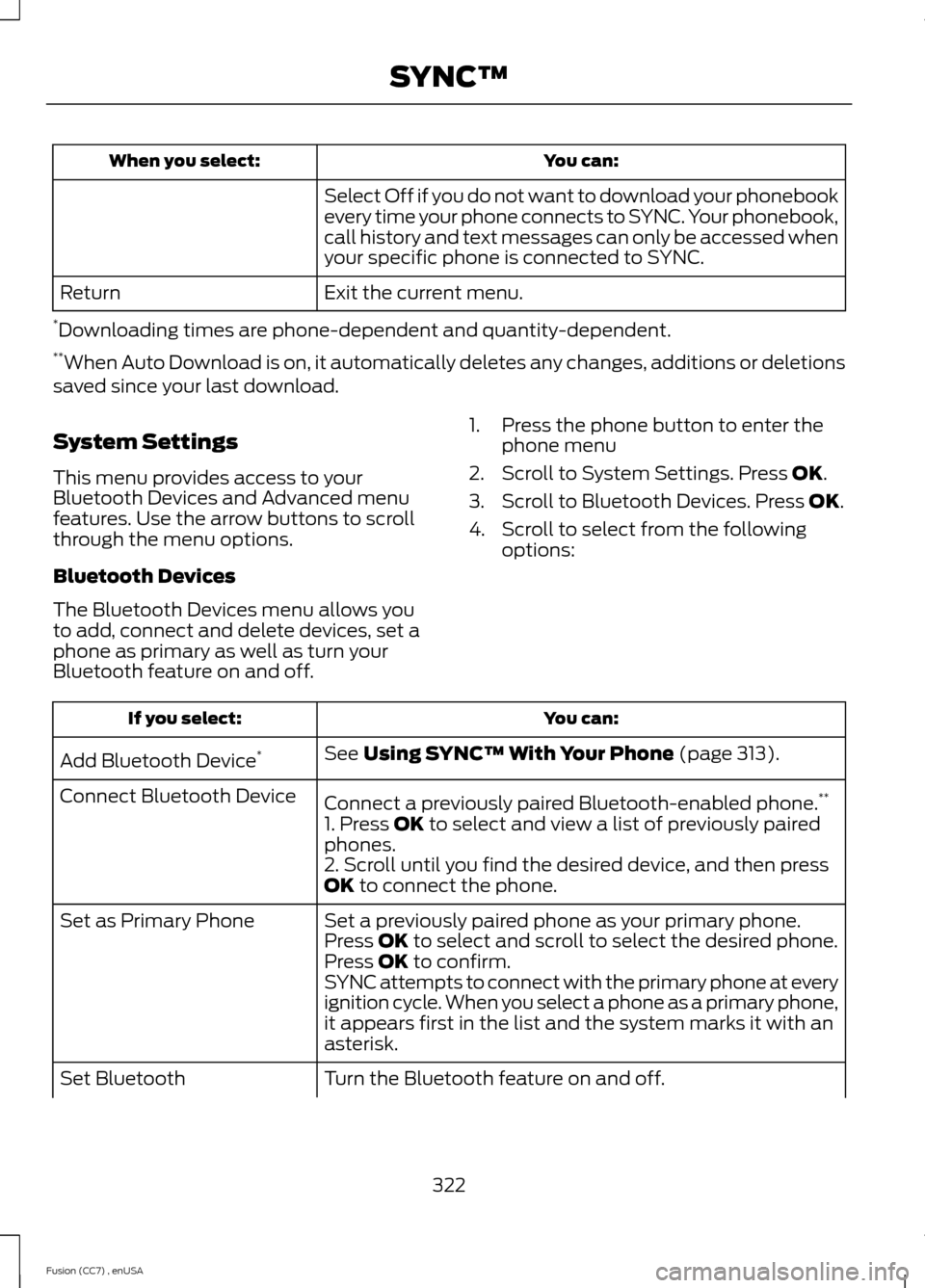
Select Off if you do not want to download your phonebookevery time your phone connects to SYNC. Your phonebook,call history and text messages can only be accessed whenyour specific phone is connected to SYNC.
Exit the current menu.Return
*Downloading times are phone-dependent and quantity-dependent.**When Auto Download is on, it automatically deletes any changes, additions or deletionssaved since your last download.
System Settings
This menu provides access to yourBluetooth Devices and Advanced menufeatures. Use the arrow buttons to scrollthrough the menu options.
Bluetooth Devices
The Bluetooth Devices menu allows youto add, connect and delete devices, set aphone as primary as well as turn yourBluetooth feature on and off.
1.Press the phone button to enter thephone menu
2.Scroll to System Settings. Press OK.
3.Scroll to Bluetooth Devices. Press OK.
4.Scroll to select from the followingoptions:
You can:If you select:
See Using SYNC™ With Your Phone (page 313).Add Bluetooth Device*
Connect a previously paired Bluetooth-enabled phone.**Connect Bluetooth Device
1. Press OK to select and view a list of previously pairedphones.2. Scroll until you find the desired device, and then pressOK to connect the phone.
Set a previously paired phone as your primary phone.Set as Primary PhonePress OK to select and scroll to select the desired phone.Press OK to confirm.SYNC attempts to connect with the primary phone at everyignition cycle. When you select a phone as a primary phone,it appears first in the list and the system marks it with anasterisk.
Turn the Bluetooth feature on and off.Set Bluetooth
322Fusion (CC7) , enUSASYNC™
Page 326 of 458

You can:If you select:
Press OK and scroll to toggle between On and Off. Makea selection, and then press OK.Setting Bluetooth to off disconnects all Bluetooth devicesand turns off all Bluetooth features.
Delete a paired phone.Delete DevicePress OK and scroll to select the device. Press OK toconfirm.
Delete all previously paired phones (and all informationoriginally saved with those phones).Delete All Devices
Press OK to select.
Exit the current menu.Return
* This is a speed-dependent feature.**You can only connect one device at a time. When another phone is connected, theprevious one is disconnected.
Advanced
The Advanced menu allows you to accessand set prompts, languages, defaults,perform a master reset, install anapplication and view system information.
1.Press the phone button to enter thephone menu
2.Scroll to System Settings. Press OK.
3.Scroll to Advanced. Press OK.
4.Scroll to select from the followingoptions:
You can:If you select:
Get help from SYNC by using questions, helpful hints orasking you for a specific action. To turn these prompts onor off:
Prompts
1. Press OK to select and scroll to select between On andOff.2. Press OK when the desired selection appears in thedisplay. SYNC takes you back to the Advanced menu.
Choose between English, Français and Español. Onceselected, all of the radio displays and prompts are in theselected language.
Languages
1. Press OK to select and then scroll through the languages.
323Fusion (CC7) , enUSASYNC™
Page 327 of 458

You can:If you select:
2. Press OK when the desired selection appears in thedisplay. If you change the language setting, the displayindicates that the system is updating. When complete,SYNC takes you back to the Advanced menu.
Return to the factory default settings. This selection doesnot erase your indexed information (phonebook, callhistory, text messages and paired devices).
Factory Defaults
1. Press OK to select and then press OK again whenRestore Defaults? appears in the display.2. Press OK to confirm.
Completely erase all information stored on SYNC(phonebook, call history, text messages and paireddevices) and return to the factory default settings.
Master Reset
Press OK to select. The display indicates when completeand SYNC takes you back to the Advanced menu.
Install applications you have downloaded.Install Application?Press OK and scroll to select. Press OK to confirm.
Delete all previously paired phones (and all informationoriginally saved with those phones).Delete All Devices
Press OK to select.
Access the Auto Version number as well as the FDNnumber.System Info
Press OK to select.
This is a Bluetooth component, which can further helpyour phone with the exchange of text messages.MAP Profile
Exit the current menu.Return
324Fusion (CC7) , enUSASYNC™
Page 328 of 458
SYNC™ APPLICATIONS AND
SERVICES (IF EQUIPPED)
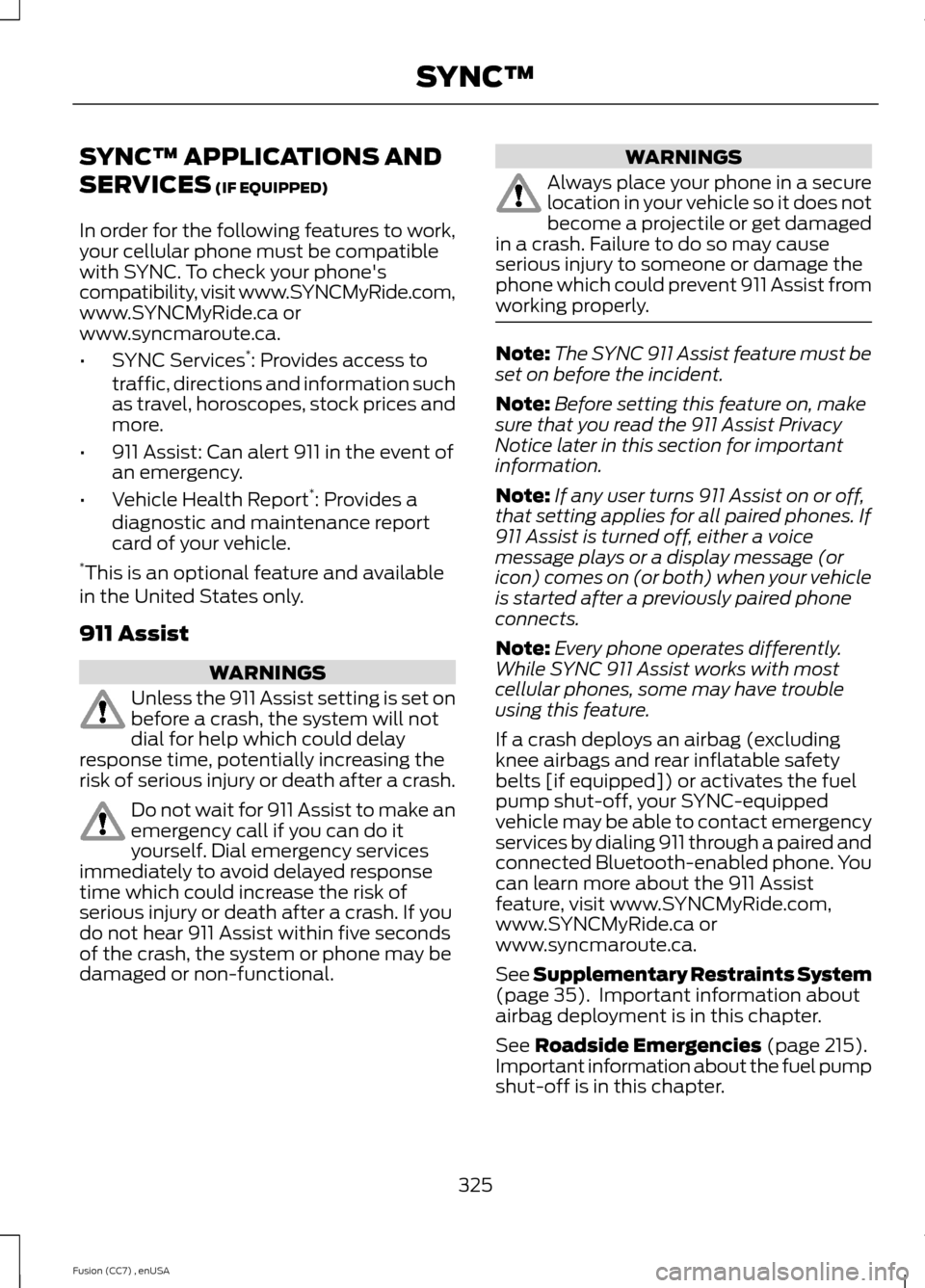
In order for the following features to work,your cellular phone must be compatiblewith SYNC. To check your phone'scompatibility, visit www.SYNCMyRide.com,www.SYNCMyRide.ca orwww.syncmaroute.ca.
•SYNC Services*: Provides access totraffic, directions and information suchas travel, horoscopes, stock prices andmore.
•911 Assist: Can alert 911 in the event ofan emergency.
•Vehicle Health Report*: Provides adiagnostic and maintenance reportcard of your vehicle.*This is an optional feature and availablein the United States only.
911 Assist
WARNINGS
Unless the 911 Assist setting is set onbefore a crash, the system will notdial for help which could delayresponse time, potentially increasing therisk of serious injury or death after a crash.
Do not wait for 911 Assist to make anemergency call if you can do ityourself. Dial emergency servicesimmediately to avoid delayed responsetime which could increase the risk ofserious injury or death after a crash. If youdo not hear 911 Assist within five secondsof the crash, the system or phone may bedamaged or non-functional.
WARNINGS
Always place your phone in a securelocation in your vehicle so it does notbecome a projectile or get damagedin a crash. Failure to do so may causeserious injury to someone or damage thephone which could prevent 911 Assist fromworking properly.
Note:The SYNC 911 Assist feature must beset on before the incident.
Note:Before setting this feature on, makesure that you read the 911 Assist PrivacyNotice later in this section for importantinformation.
Note:If any user turns 911 Assist on or off,that setting applies for all paired phones. If911 Assist is turned off, either a voicemessage plays or a display message (oricon) comes on (or both) when your vehicleis started after a previously paired phoneconnects.
Note:Every phone operates differently.While SYNC 911 Assist works with mostcellular phones, some may have troubleusing this feature.
If a crash deploys an airbag (excludingknee airbags and rear inflatable safetybelts [if equipped]) or activates the fuelpump shut-off, your SYNC-equippedvehicle may be able to contact emergencyservices by dialing 911 through a paired andconnected Bluetooth-enabled phone. Youcan learn more about the 911 Assistfeature, visit www.SYNCMyRide.com,www.SYNCMyRide.ca orwww.syncmaroute.ca.
See Supplementary Restraints System(page 35). Important information aboutairbag deployment is in this chapter.
See Roadside Emergencies (page 215).Important information about the fuel pumpshut-off is in this chapter.
325Fusion (CC7) , enUSASYNC™
Page 329 of 458
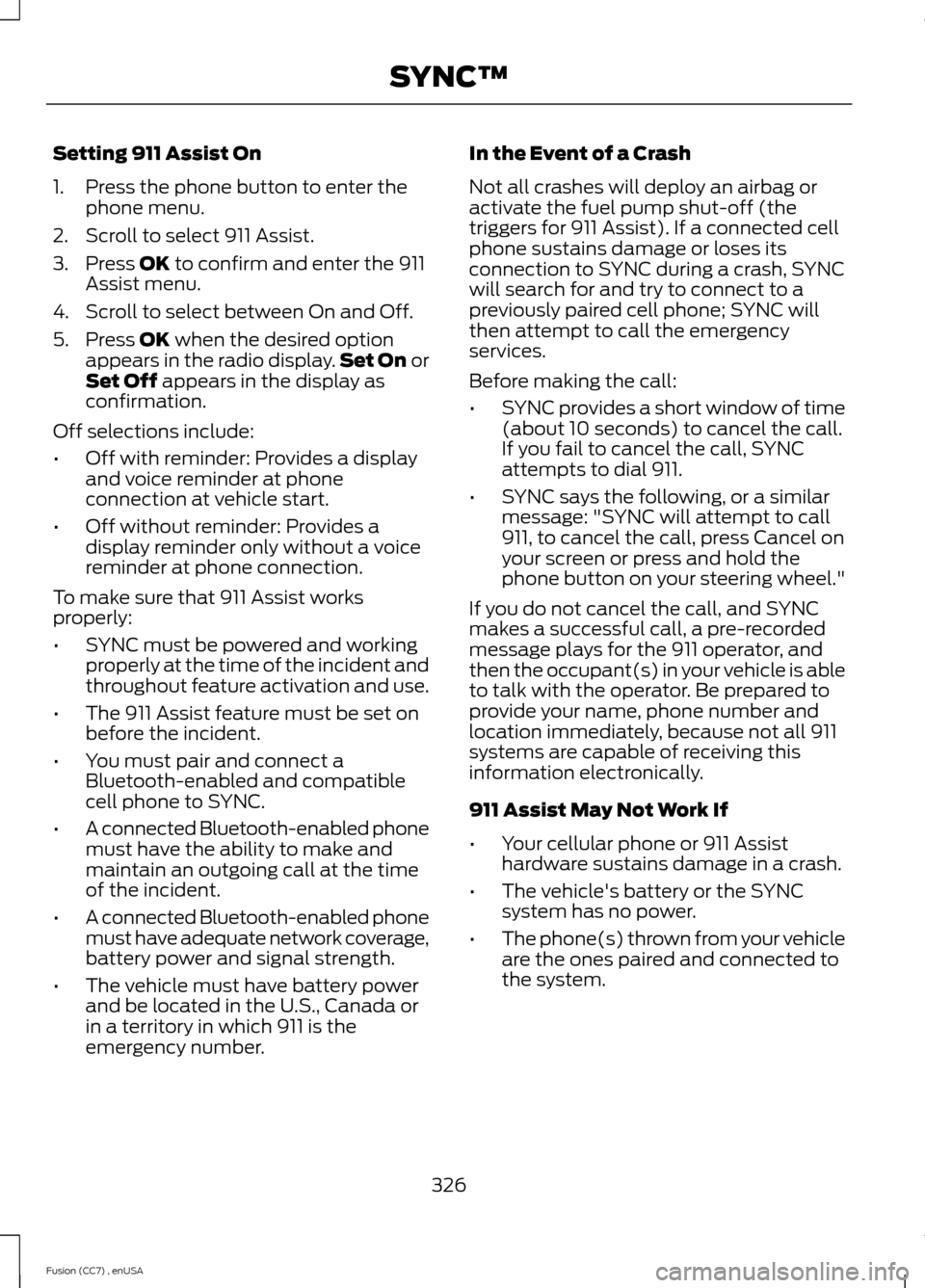
Setting 911 Assist On
1.Press the phone button to enter thephone menu.
2.Scroll to select 911 Assist.
3.Press OK to confirm and enter the 911Assist menu.
4.Scroll to select between On and Off.
5.Press OK when the desired optionappears in the radio display.Set On orSet Off appears in the display asconfirmation.
Off selections include:
•Off with reminder: Provides a displayand voice reminder at phoneconnection at vehicle start.
•Off without reminder: Provides adisplay reminder only without a voicereminder at phone connection.
To make sure that 911 Assist worksproperly:
•SYNC must be powered and workingproperly at the time of the incident andthroughout feature activation and use.
•The 911 Assist feature must be set onbefore the incident.
•You must pair and connect aBluetooth-enabled and compatiblecell phone to SYNC.
•A connected Bluetooth-enabled phonemust have the ability to make andmaintain an outgoing call at the timeof the incident.
•A connected Bluetooth-enabled phonemust have adequate network coverage,battery power and signal strength.
•The vehicle must have battery powerand be located in the U.S., Canada orin a territory in which 911 is theemergency number.
In the Event of a Crash
Not all crashes will deploy an airbag oractivate the fuel pump shut-off (thetriggers for 911 Assist). If a connected cellphone sustains damage or loses itsconnection to SYNC during a crash, SYNCwill search for and try to connect to apreviously paired cell phone; SYNC willthen attempt to call the emergencyservices.
Before making the call:
•SYNC provides a short window of time(about 10 seconds) to cancel the call.If you fail to cancel the call, SYNCattempts to dial 911.
•SYNC says the following, or a similarmessage: "SYNC will attempt to call911, to cancel the call, press Cancel onyour screen or press and hold thephone button on your steering wheel."
If you do not cancel the call, and SYNCmakes a successful call, a pre-recordedmessage plays for the 911 operator, andthen the occupant(s) in your vehicle is ableto talk with the operator. Be prepared toprovide your name, phone number andlocation immediately, because not all 911systems are capable of receiving thisinformation electronically.
911 Assist May Not Work If
•Your cellular phone or 911 Assisthardware sustains damage in a crash.
•The vehicle's battery or the SYNCsystem has no power.
•The phone(s) thrown from your vehicleare the ones paired and connected tothe system.
326Fusion (CC7) , enUSASYNC™