2014 FORD FOCUS ELECTRIC battery
[x] Cancel search: batteryPage 324 of 403
Value Chargeif you want to take advantage of off-peak electricity rates.
The vehicle optimizes the charge schedule to be complete by the next
GO Time. This button illuminates when Value Charge is the charge mode
selected for the presently detected charge profile.
Charging Status and Actual Times
This is the status of the charging system, which includes the charging
plug, high-voltage battery and charger.
Next Chargemeans the vehicle is unplugged. Charge Start and
Complete information is for the present vehicle location.
Waiting to Chargemeans the vehicle is plugged in and ready to charge.
Typical of Value Charge mode, the vehicle may not start charging right
away because it is set to charge at times with lower utility costs.
Chargingmeans the high-voltage battery is charging.
Chargedmeans the high-voltage battery is fully charged and not
currently scheduled for further charging.
Charge Faultmeans a fault is present that is preventing the
high-voltage battery from charging. Inspect the charge plug connection,
charge cord and charging station.
Startis the scheduled start time of charging.
•At Plug In:When the vehicle is in Charge Now mode, and
unplugged, the message At Plug In appears, indicating the vehicle
immediately starts charging once you plug it in. Once you plug it in,
the system shows the actual charge start time.
•Scheduled Charge Start Time:When the vehicle is in Value Charge
mode, the system displays the scheduled charge start time (for
example, 8:00 PM). Once charging starts, the system continues to
display the actual charge start time.
Completeis the estimated time of charge completion.
•Charge Now Duration:When the vehicle is in Charge Now mode,
and unplugged, the system displays the charging duration in hours.
Once you plug in the vehicle, the value shows the estimated time to
finish charging.
•Scheduled Charge Complete:When the vehicle is in Value Charge
mode, the system displays the estimated charge complete time. It is
normal for the estimated complete time to change while charging.
The vehicle keeps charging until the high-voltage battery is fully
charged.
MyFord Touch®323
2014 Focus Electric Vehicle(fob)
Owners Guide gf, 1st Printing, May 2013
USA(fus)
Page 327 of 403
StartandFinishdisplay the times, which you can modify, using the
following:
•+and-allow you to change the hours and minutes of your start and
finish times.
•AMandPMallow you to change the time of your start and finish
time. This setting is viewable in 12-hour mode.
240Vand120Vrepresent the voltage service the default profile is using.
The system uses this selection to calculate estimated charge times.
Clearerases the Default Value Charge preferences.
Save Allstores your Default Value Charge preferences.
•Note:Make sure you save your settings before returning to the
previous screen. If you do not touchSave,your settings are not
stored in the system.
Power
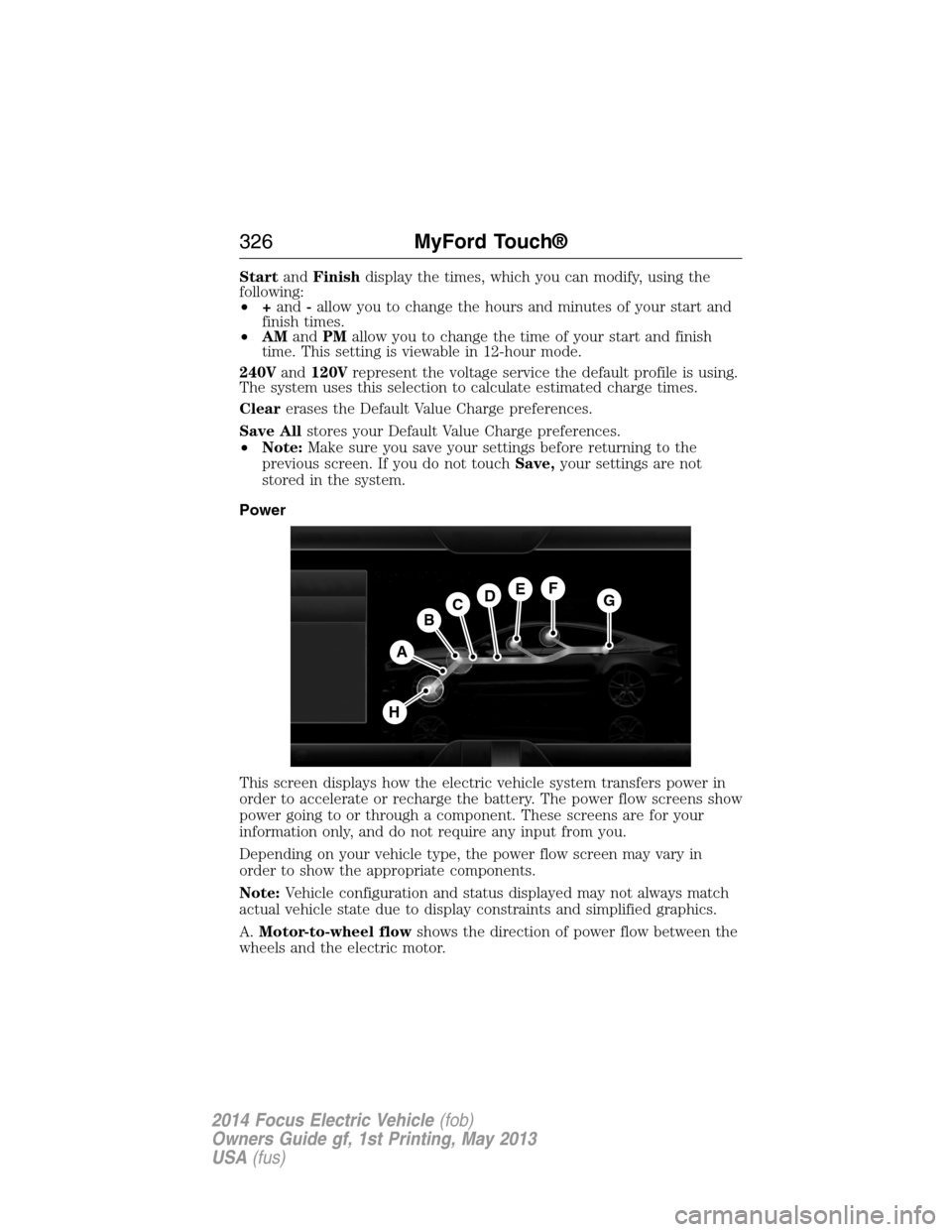
This screen displays how the electric vehicle system transfers power in
order to accelerate or recharge the battery. The power flow screens show
power going to or through a component. These screens are for your
information only, and do not require any input from you.
Depending on your vehicle type, the power flow screen may vary in
order to show the appropriate components.
Note:Vehicle configuration and status displayed may not always match
actual vehicle state due to display constraints and simplified graphics.
A.Motor-to-wheel flowshows the direction of power flow between the
wheels and the electric motor.
A
DGEF
BC
H
326MyFord Touch®
2014 Focus Electric Vehicle(fob)
Owners Guide gf, 1st Printing, May 2013
USA(fus)
Page 328 of 403
B.Electric Motorrepresents the electric motor. The higher the motor
power is, the larger the circle around this node. Any time the vehicle is
ready to be driven, the motor node illuminates.
C.Battery-to-motor flowshows the direction of power flow between
the high-voltage battery and the electric motor. Flow toward the motor
indicates the battery is providing power to accelerate the vehicle
(discharging the battery). Flow toward the battery indicates the electric
motor is providing power to the battery (charging the battery).
Note:The battery-to-motor flow includes battery power the vehicle is
using for acceleration. It does not include energy the vehicle is using for
accessories (such as air conditioning, headlights and radio). This screen
displays accessories and climate usage separately.
D.Plugappears when you plug your vehicle into the wall. When
charging the high voltage battery from the wall, you can see flow from
the plug to the battery on the screen.
•Accessoriesindicates electrical power demands from your vehicle’s
accessory systems. Accessories use power but do not contribute to
making the vehicle move. The power flow displays power usage from
the climate control system and other accessories separately.
E.Otherincludes all power usage from the low voltage accessories such
as the climate control fan, headlights and heated seats. The higher the
power usage is from these accessories, the larger the circle around the
node. This node illuminates anytime the vehicle is on since there is
always some low level power in use.
F.Climateincludes the power usage from the high-voltage climate
control components such as the electric A/C compressor and the electric
heater. The higher the power usage is from these components, the larger
the circle around this node.
Note:The climate control system may determine A/C is necessary even
when you turn it off. In this case, you may see some climate power when
the A/C is off.
G.High voltage battery powerrepresents your high-voltage battery.
A circle illuminates around the node when the high-voltage battery is
receiving power from regenerative braking or external charging (when
you plug it in). The higher the power going into the high-voltage battery,
the larger the circle around this node.
H.Drive powerrepresents the power going to the wheels. The higher
the wheel power is, the larger the circle around this node.
MyFord Touch®327
2014 Focus Electric Vehicle(fob)
Owners Guide gf, 1st Printing, May 2013
USA(fus)
Page 329 of 403
Status
This indicates which mode is active within the vehicle system.
Charging HV Battery
The hybrid system is storing power in the high-voltage battery.
Idle
The vehicle is either at rest, or sharing very little power between the
electric system parts.
Idle with Charging
The high-voltage battery is receiving power in order to recharge.
Electric Drive
The vehicle is driving in electric mode.
Charge Complete
The high-voltage battery charging from the wall is complete.
INFORMATION
If your vehicle is equipped with Navigation, touch the i
(Information) button to access these features. If your vehicle is
not equipped with Navigation, touch the corner of the
touchscreen with the green tab.
328MyFord Touch®
2014 Focus Electric Vehicle(fob)
Owners Guide gf, 1st Printing, May 2013
USA(fus)
Page 339 of 403
Setting 911 Assist On
If your vehicle is equipped with Navigation, touch the i
(Information) button to access these features. If your vehicle
is not equipped with Navigation, touch the corner of the
touchscreen with the green tab.
PressApps>911 Assist,>On.
You can also access 911 Assist by:
•Pressing the Settings icon >Settings>Phone>911
Assist,or
•Pressing the Settings icon >Help>911 Assist.
To Make Sure that 911 Assist Works Properly
•SYNC must be powered and working properly at the time of the
incident and throughout feature activation and use.
•The 911 Assist feature must be set on before the incident.
•You must pair and connect a Bluetooth-enabled and compatible phone
to SYNC.
•A connected Bluetooth-enabled phone must have the ability to make
and maintain an outgoing call at the time of the incident.
•A connected Bluetooth-enabled phone must have adequate network
coverage, battery power and signal strength.
•The vehicle must have battery power and be located in the United
States, Canada or in a territory in which 911 is the emergency
number.
In the Event of a Crash
Not all crashes deploy an airbag or activate the fuel pump shut-off
(which would trigger 911 Assist); however, SYNC tries to contact
emergency services if 911 Assist triggers. If a connected phone sustains
damage or loses connection to SYNC, SYNC searches for, and tries to
connect to, any available previously paired phone and tries to make the
call to 911.
Before making the call:
•SYNC provides a short window of time (about 10 seconds) to cancel
the call. If you fail to cancel the call, SYNC attempts to dial 911.
•SYNC says the following, or a similar message: “SYNC will attempt to
call 911, to cancel the call, press Cancel on your screen or press and
hold the phone button on your steering wheel.”
338MyFord Touch®
2014 Focus Electric Vehicle(fob)
Owners Guide gf, 1st Printing, May 2013
USA(fus)
Page 340 of 403
If you do not cancel the call, and SYNC makes a successful call, a
pre-recorded message plays for the 911 operator, and then the occupant(s)
in your vehicle is able to talk with the operator. Be prepared to provide
your name, phone number and location immediately, because not all 911
systems are capable of receiving this information electronically.
911 Assist May Not Work If
•Your cellular phone or 911 Assist hardware sustains damage in a
crash.
•The vehicle’s battery or SYNC system has no power.
•The phone(s) thrown from your vehicle are the ones paired and
connected to the system.
911 Assist Privacy Notice
When you turn on 911 Assist, it may disclose to emergency services that
your vehicle has been in a crash involving the deployment of an airbag or
activation of the fuel pump shut-off. Certain versions or updates to 911
Assist may also be capable of electronically or verbally disclosing to 911
operators your vehicle location or other details about your vehicle or
crash to assist 911 operators to provide the most appropriate emergency
services. If you do not want to disclose this information, do not turn the
feature on.
Vehicle Health Report (If Equipped, United States Only)
WARNING:Always follow scheduled maintenance instructions,
regularly inspect your vehicle, and seek repair for any damage or
problem you suspect. Vehicle Health Report supplements, but cannot
replace, normal maintenance and vehicle inspection. Vehicle Health
Report only monitors certain systems electronically monitored by your
vehicle and will not monitor or report the status of any other system,
(such as brake lining wear). Failure to perform scheduled maintenance
and regularly inspect your vehicle may result in vehicle damage and
serious injury.
Note:Your Vehicle Health Report feature requires activation prior to
use. Visit www.SYNCMyRide.com to register. There is no fee or
subscription associated with Vehicle Health Report, but you must register
to use this feature.
Note:This feature may not function properly if you have enabled caller
ID blocking on your mobile phone. Before running a report, review the
Vehicle Health Report Privacy Notice.
MyFord Touch®339
2014 Focus Electric Vehicle(fob)
Owners Guide gf, 1st Printing, May 2013
USA(fus)
Page 342 of 403
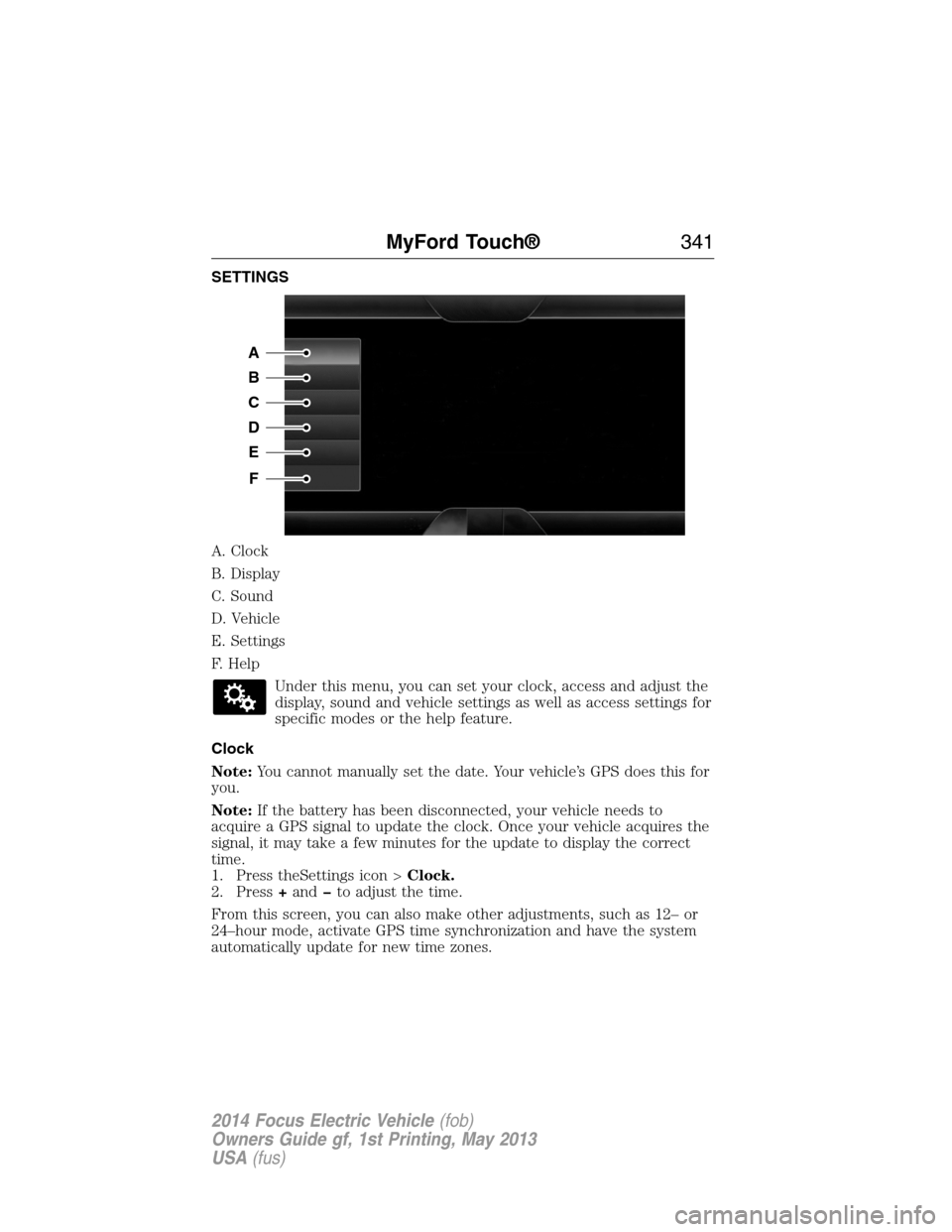
SETTINGS
A. Clock
B. Display
C. Sound
D. Vehicle
E. Settings
F. Help
Under this menu, you can set your clock, access and adjust the
display, sound and vehicle settings as well as access settings for
specific modes or the help feature.
Clock
Note:You cannot manually set the date. Your vehicle’s GPS does this for
you.
Note:If the battery has been disconnected, your vehicle needs to
acquire a GPS signal to update the clock. Once your vehicle acquires the
signal, it may take a few minutes for the update to display the correct
time.
1. Press theSettings icon >Clock.
2. Press+andto adjust the time.
From this screen, you can also make other adjustments, such as 12– or
24–hour mode, activate GPS time synchronization and have the system
automatically update for new time zones.
A
B
C
D
E
F
MyFord Touch®341
2014 Focus Electric Vehicle(fob)
Owners Guide gf, 1st Printing, May 2013
USA(fus)
Page 346 of 403
Charge Point Light Ring
Press the Settings icon >Settings>Charge Port Light Ring,
then select from the following:
Charge port light ring
OnIlluminates when plugging in, opening doors,
pressing the unlock button on your remote,
and while charging.
OffDoes not illuminate.
Limited Cord Acknowledgement:Illuminates when
plugging in.
Charge Status:Illuminates when opening
doors or pressing the unlock button on your
remote.
Note:See theHigh Voltage Batterychapter for details on the charge
port light ring functions.
Voice Control
Press the Settings icon >Settings>Voice Control,then
select from the following:
Voice control
Interaction ModeStandard interaction mode provides more
detailed interaction and guidance. Advanced
mode has less audible interaction and more
tone prompts.
Confirmation
PromptsHave the system ask you short questions if it
has not clearly heard or understood your
request.
Note:Even with confirmation prompts turned
off, the system may occasionally ask you to
confirm settings.
Media Candidate
ListsCandidate lists are possible results from your
voice commands. The system simply makes a
best guess at your request with these turned
off.
MyFord Touch®345
2014 Focus Electric Vehicle(fob)
Owners Guide gf, 1st Printing, May 2013
USA(fus)