Page 161 of 403
Using the Rear Sensing System
The rear sensors are only active when the transmission is inR.Asthe
vehicle moves closer to the obstacle, the rate of the audible warning
increases. When the obstacle is fewer than 12 inches (30 centimeters)
away, the warning sounds continuously. If a stationary or receding object
is detected farther than 12 inches (30 centimeters) from the side of the
vehicle, the tone sounds for only three seconds. Once the system detects
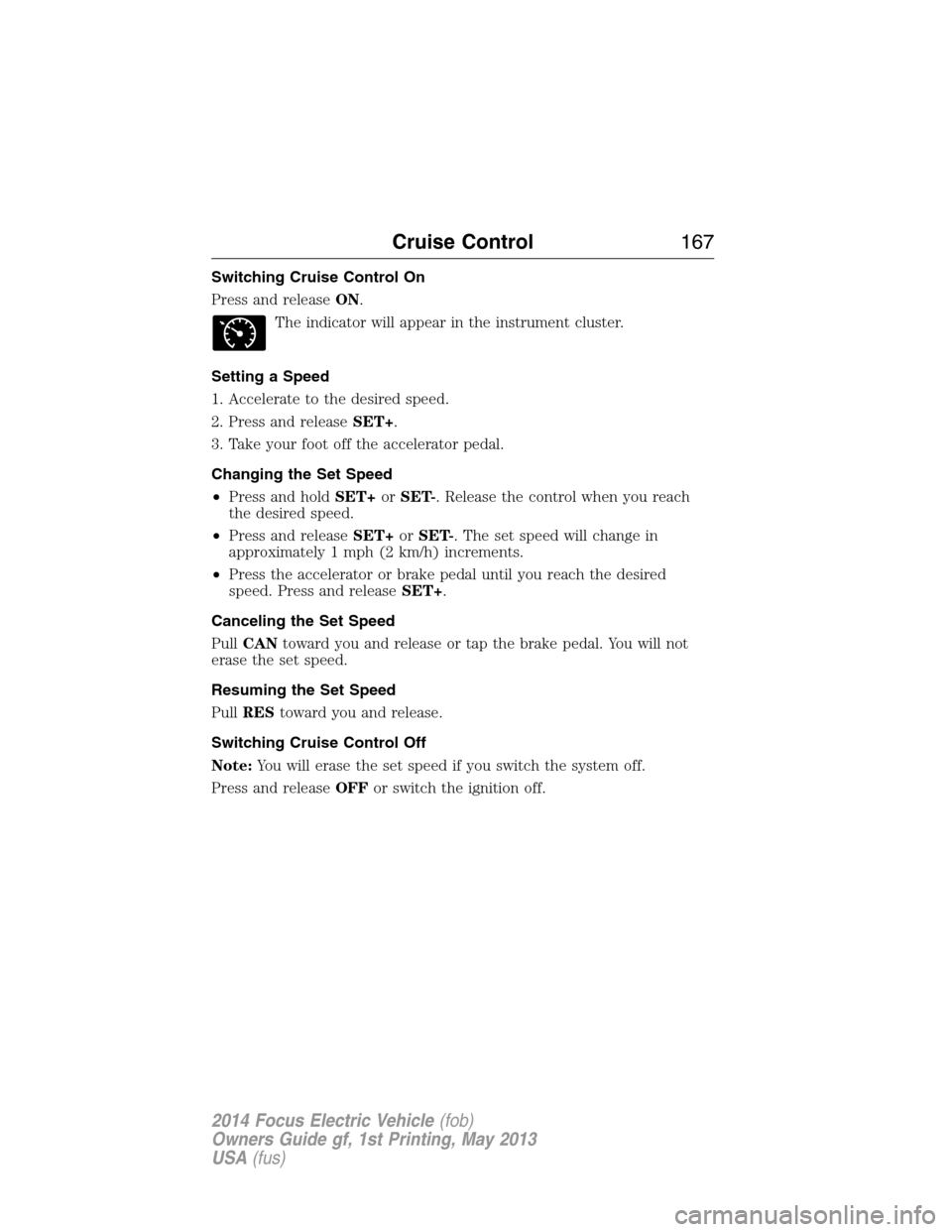
an object approaching, the warning sounds again.
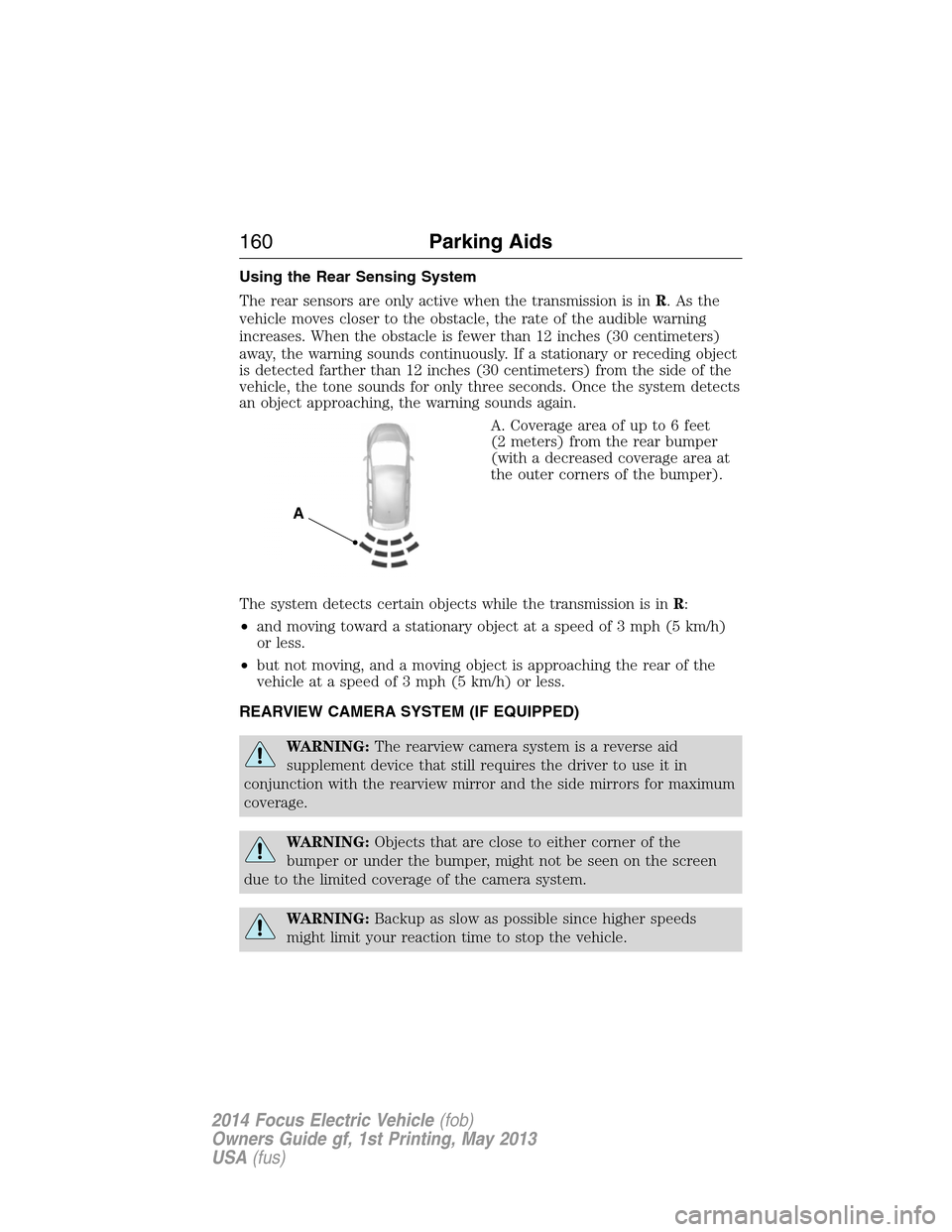
A. Coverage area of up to 6 feet
(2 meters) from the rear bumper
(with a decreased coverage area at
the outer corners of the bumper).
The system detects certain objects while the transmission is inR:
•and moving toward a stationary object at a speed of 3 mph (5 km/h)
or less.
•but not moving, and a moving object is approaching the rear of the
vehicle at a speed of 3 mph (5 km/h) or less.
REARVIEW CAMERA SYSTEM (IF EQUIPPED)
WARNING:The rearview camera system is a reverse aid
supplement device that still requires the driver to use it in
conjunction with the rearview mirror and the side mirrors for maximum
coverage.
WARNING:Objects that are close to either corner of the
bumper or under the bumper, might not be seen on the screen
due to the limited coverage of the camera system.
WARNING:Backup as slow as possible since higher speeds
might limit your reaction time to stop the vehicle.
A
160Parking Aids
2014 Focus Electric Vehicle(fob)
Owners Guide gf, 1st Printing, May 2013
USA(fus)
Page 163 of 403
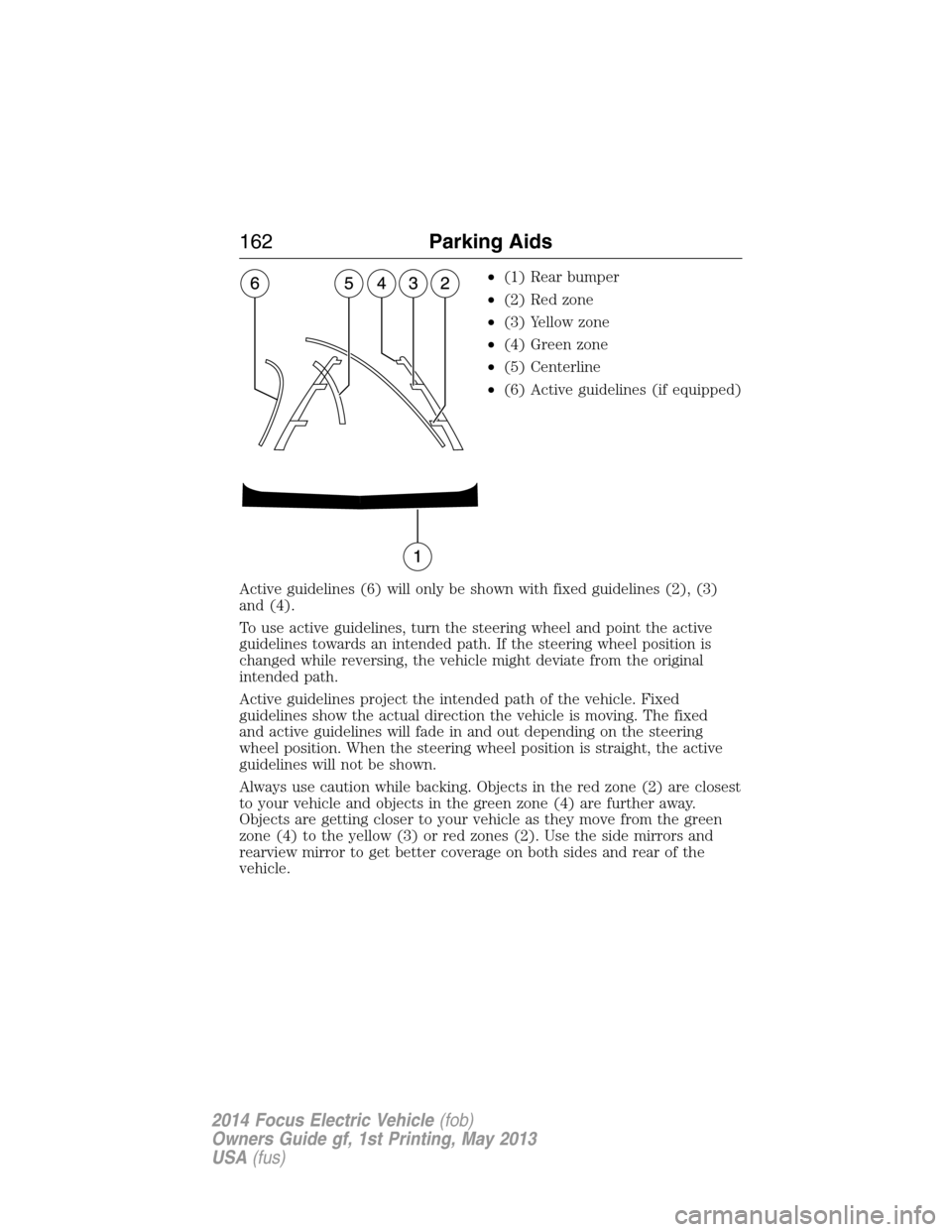
•(1) Rear bumper
•(2) Red zone
•(3) Yellow zone
•(4) Green zone
•(5) Centerline
•(6) Active guidelines (if equipped)
Active guidelines (6) will only be shown with fixed guidelines (2), (3)
and (4).
To use active guidelines, turn the steering wheel and point the active
guidelines towards an intended path. If the steering wheel position is
changed while reversing, the vehicle might deviate from the original
intended path.
Active guidelines project the intended path of the vehicle. Fixed
guidelines show the actual direction the vehicle is moving. The fixed
and active guidelines will fade in and out depending on the steering
wheel position. When the steering wheel position is straight, the active
guidelines will not be shown.
Always use caution while backing. Objects in the red zone (2) are closest
to your vehicle and objects in the green zone (4) are further away.
Objects are getting closer to your vehicle as they move from the green
zone (4) to the yellow (3) or red zones (2). Use the side mirrors and
rearview mirror to get better coverage on both sides and rear of the
vehicle.
162Parking Aids
2014 Focus Electric Vehicle(fob)
Owners Guide gf, 1st Printing, May 2013
USA(fus)
Page 165 of 403
Rear camera delay
After shifting out of R (Reverse) and into any gear other than P (Park),
the image will remain until the vehicle speed reaches 6 mph (10 km/h).
This will only occur if the rear camera delay feature is on, or until any
radio button is selected.
The default setting for the rear camera delay is OFF. To turn this feature
on or off when the vehicle is not in R (Reverse), do the following:
1. Select Menu
2. Select Vehicle
3. Select Rear View Camera
The rear camera delay options are ON and OFF.
The camera lens for the reverse camera system is located on the liftgate.
Keep the lens clean so the video image remains clear and undistorted.
Clean the lens with a soft, lint-free cloth and non-abrasive cleaner.
When towing, the reverse camera system will only see what is being towed
behind the vehicle. This might not provide adequate coverage as it usually
provides in normal operation and some objects might not be seen.
Active guidelines, fixed guidelines, visual park aid alert and manual zoom
features are only available when the vehicle is in R (Reverse).
If the vehicle is in R (Reverse) and the liftgate is ajar, no rear video
camera features will be displayed. A message will be displayed on the
touchscreen if the liftgate is ajar.
164Parking Aids
2014 Focus Electric Vehicle(fob)
Owners Guide gf, 1st Printing, May 2013
USA(fus)
Page 168 of 403
Switching Cruise Control On
Press and releaseON.
The indicator will appear in the instrument cluster.
Setting a Speed
1. Accelerate to the desired speed.
2. Press and releaseSET+.
3. Take your foot off the accelerator pedal.
Changing the Set Speed
•Press and holdSET+orSET-. Release the control when you reach
the desired speed.
•Press and releaseSET+orSET-. The set speed will change in
approximately 1 mph (2 km/h) increments.
•Press the accelerator or brake pedal until you reach the desired
speed. Press and releaseSET+.
Canceling the Set Speed
PullCANtoward you and release or tap the brake pedal. You will not
erase the set speed.
Resuming the Set Speed
PullREStoward you and release.
Switching Cruise Control Off
Note:You will erase the set speed if you switch the system off.
Press and releaseOFFor switch the ignition off.
Cruise Control167
2014 Focus Electric Vehicle(fob)
Owners Guide gf, 1st Printing, May 2013
USA(fus)
Page 171 of 403
REAR UNDER FLOOR STORAGE
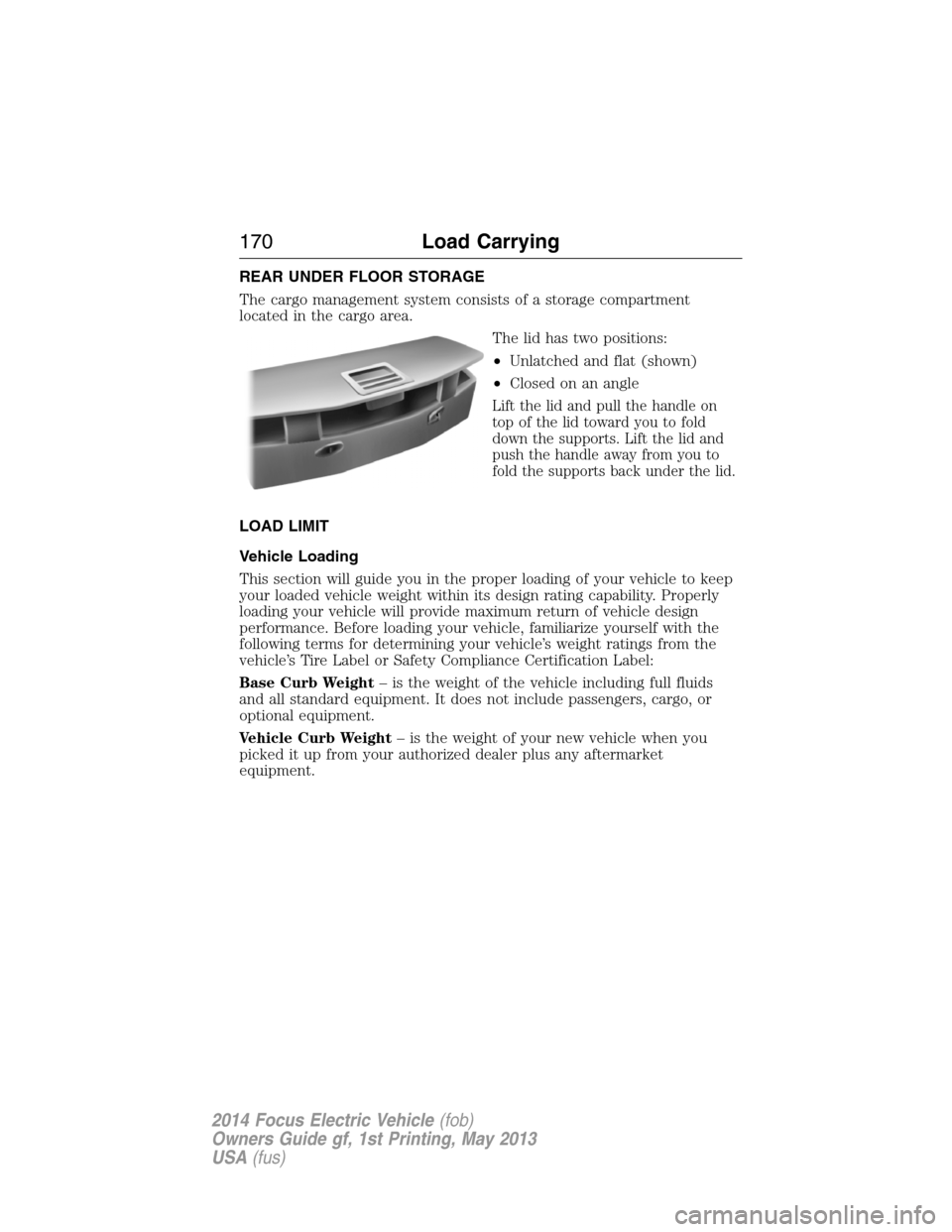
The cargo management system consists of a storage compartment
located in the cargo area.
The lid has two positions:
•Unlatched and flat (shown)
•Closed on an angle
Lift the lid and pull the handle on
top of the lid toward you to fold
down the supports. Lift the lid and
push the handle away from you to
fold the supports back under the lid.
LOAD LIMIT
Vehicle Loading
This section will guide you in the proper loading of your vehicle to keep
your loaded vehicle weight within its design rating capability. Properly
loading your vehicle will provide maximum return of vehicle design
performance. Before loading your vehicle, familiarize yourself with the
following terms for determining your vehicle’s weight ratings from the
vehicle’s Tire Label or Safety Compliance Certification Label:
Base Curb Weight– is the weight of the vehicle including full fluids
and all standard equipment. It does not include passengers, cargo, or
optional equipment.
Vehicle Curb Weight– is the weight of your new vehicle when you
picked it up from your authorized dealer plus any aftermarket
equipment.
170Load Carrying
2014 Focus Electric Vehicle(fob)
Owners Guide gf, 1st Printing, May 2013
USA(fus)
Page 178 of 403
TOWING A TRAILER
WARNING:Never tow a trailer with this vehicle. Your vehicle is
not equipped to tow. No towing packages are available through
an authorized dealer.
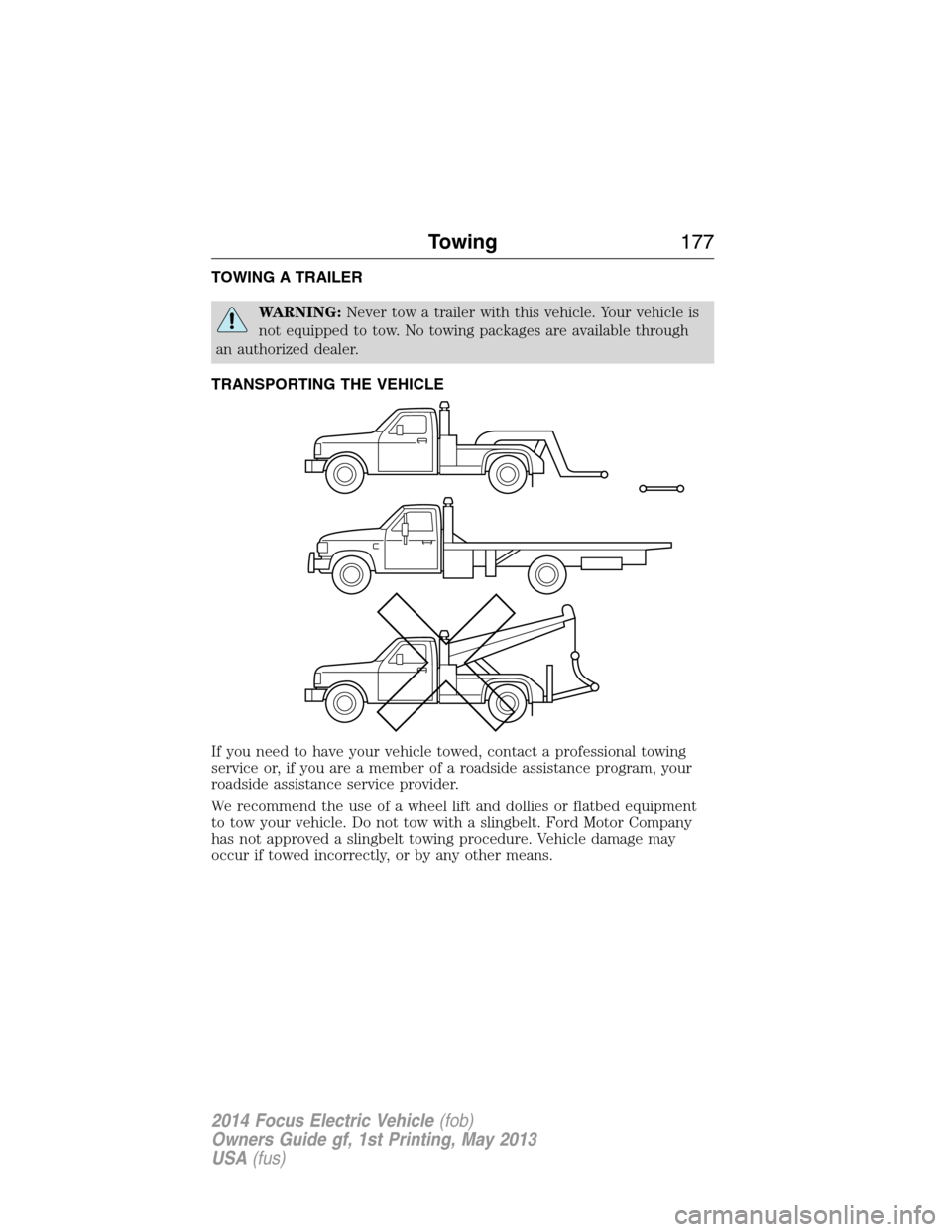
TRANSPORTING THE VEHICLE
If you need to have your vehicle towed, contact a professional towing
service or, if you are a member of a roadside assistance program, your
roadside assistance service provider.
We recommend the use of a wheel lift and dollies or flatbed equipment
to tow your vehicle. Do not tow with a slingbelt. Ford Motor Company
has not approved a slingbelt towing procedure. Vehicle damage may
occur if towed incorrectly, or by any other means.
Towing177
2014 Focus Electric Vehicle(fob)
Owners Guide gf, 1st Printing, May 2013
USA(fus)
Page 179 of 403
Ford Motor Company produces a towing manual for all authorized tow
truck operators. Have your tow truck operator refer to this manual for
proper hook-up and towing procedures for your vehicle.
It is acceptable to have your vehicle towed from the front if using proper
wheel lift equipment to raise the front wheels off the ground. When
towing in this manner, the rear wheels can remain on the ground.
The front wheels must be on a tow dolly when towing your vehicle from
the rear using wheel lift equipment. This prevents damage to the
transmission.
TOWING THE VEHICLE ON FOUR WHEELS
Emergency Towing
If your vehicle becomes inoperable (without access to wheel dollies,
car-hauling trailer, or flatbed transport vehicle), it can be flat-towed (all
wheels on the ground, regardless of the powertrain and transmission
configuration) under the following conditions:
•Your vehicle is facing forward for towing in a forward direction.
•
Place the transmission in positionN.SeeAutomatic transmissionin
theTransmissionchapter if you cannot move the transmission intoN.
•Maximum speed is 35 mph (56 km/h).
•Maximum distance is 50 miles (80 kilometers).
Recreational Towing
Follow these guidelines if you have a need for recreational towing,
such as towing your vehicle behind a motorhome. We designed these
guidelines to prevent damage to your transmission.
Do not tow your vehicle with any wheels on the ground, as vehicle or
transmission damage may occur. It is recommended to tow your vehicle
with all four (4) wheels off the ground such as when using a car-hauling
trailer. Otherwise, you cannot tow your vehicle.
178Towing
2014 Focus Electric Vehicle(fob)
Owners Guide gf, 1st Printing, May 2013
USA(fus)
Page 180 of 403

BREAKING-IN
You need to break in new tires for approximately 300 miles
(480 kilometers). During this time, your vehicle may exhibit some unique
driving characteristics. Avoid driving too fast during the first 1000 miles
(1600 kilometers). Vary your speed frequently and change up through
the gears early. Do not labor the engine. Do not tow during the first
1000 miles (1600 kilometers).
DRIVING THROUGH WATER
Note:Driving through deep water may allow water into the transmission
and motor causing internal damage. If you drove through deep water,
check the transmission and engine; if water is found, replace the fluid.
Do not drive quickly through standing water, especially if the depth is
unknown. Traction or brake capability may be limited and if enough
water is present, the vehicle may stall.
If driving through deep or standing
water is unavoidable , proceed very
slowly. Never drive through water
that is higher than the bottom of
the wheel rims.
Once through the water, always try the brakes. Wet brakes do not stop
the vehicle as effectively as dry brakes. Drying can be improved by
moving your vehicle slowly while applying light pressure on the brake
pedal.
Driving Hints179
2014 Focus Electric Vehicle(fob)
Owners Guide gf, 1st Printing, May 2013
USA(fus)