Page 110 of 403
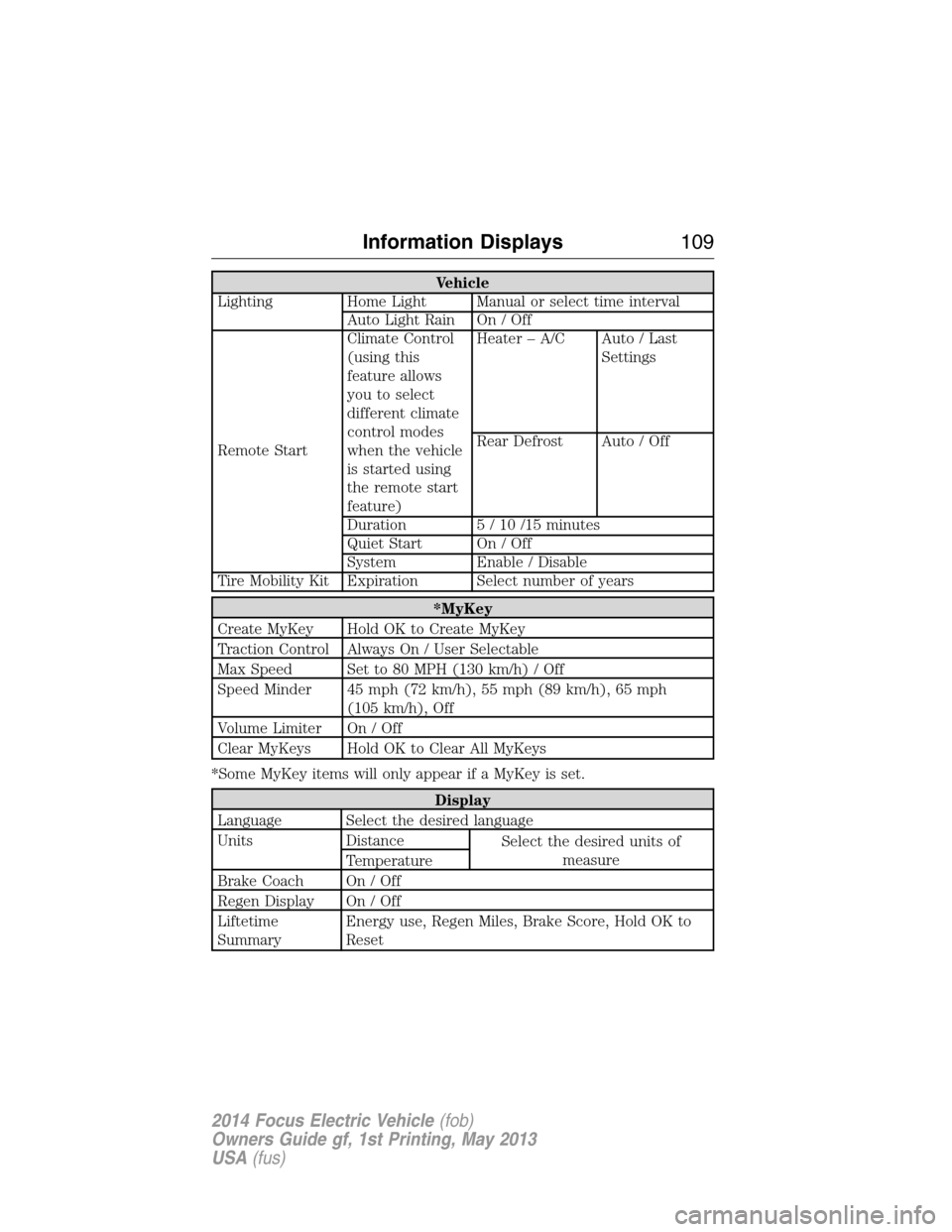
Vehicle
Lighting Home Light Manual or select time interval
Auto Light Rain On / Off
Remote StartClimate Control
(using this
feature allows
you to select
different climate
control modes
when the vehicle
is started using
the remote start
feature)Heater – A/C Auto / Last
Settings
Rear Defrost Auto / Off
Duration 5 / 10 /15 minutes
Quiet Start On / Off
System Enable / Disable
Tire Mobility Kit Expiration Select number of years
*MyKey
Create MyKey Hold OK to Create MyKey
Traction Control Always On / User Selectable
Max Speed Set to 80 MPH (130 km/h) / Off
Speed Minder 45 mph (72 km/h), 55 mph (89 km/h), 65 mph
(105 km/h), Off
Volume Limiter On / Off
Clear MyKeys Hold OK to Clear All MyKeys
*Some MyKey items will only appear if a MyKey is set.
Display
Language Select the desired language
Units Distance
Select the desired units of
measure
Temperature
Brake Coach On / Off
Regen Display On / Off
Liftetime
SummaryEnergy use, Regen Miles, Brake Score, Hold OK to
Reset
Information Displays109
2014 Focus Electric Vehicle(fob)
Owners Guide gf, 1st Printing, May 2013
USA(fus)
Page 126 of 403
CABIN AIR FILTER
Note:Make sure you have a cabin air filter installed at all times. This
prevents foreign objects from entering the system. Running the system
without a filter in place could result in degradation or damage to the
system.
Your cabin air filter is located under the instrument panel in the
passenger footwell area. The particulate filtration system reduces the
concentration of airborne particles such as dust, spores and pollen in
the air supplied to the interior of your vehicle. The particulate filtration
system gives you and your passengers the following benefits:
•It improves your driving comfort by reducing particle concentration.
•It improves the interior compartment cleanliness.
•It protects the climate control components from particle deposits.
Replace the filter at regular intervals. See theScheduled Maintenance
chapter.
For more information about your filter, see an authorized dealer.
REMOTE START CLIMATE OPERATION
The climate control system adjusts the cabin temperature during remote
start.
You cannot adjust the system during remote start operation. Turn the
ignition on to return the system to its previous settings. You can now
make adjustments. You will need to turn certain vehicle-dependent
features back on, such as:
•heated seats
•heated mirrors
•heated rear window.
You can adjust the settings using the information display controls.
See theInformation Displayschapter.
Climate Control125
2014 Focus Electric Vehicle(fob)
Owners Guide gf, 1st Printing, May 2013
USA(fus)
Page 127 of 403
Automatic Climate Systems
Automatic Settings
You can set the climate control to operate in AUTO mode through the
information display setting: Remote Start > Climate Control > Heater –
A/C > Auto. The climate control system automatically sets the interior
temperature to 72°F (22°C).
In hot weather, the system is set to 72°F (22°C).
In moderate weather, the system either heats or cools (based on
previous settings). The rear defroster, heated mirrors and heated seats
do not automatically turn on.
In cold weather, the system is set to 72°F (22°C). The rear defroster and
heated mirrors automatically turn on.
Last Settings
You can set the climate control to operate using the last climate control
settings through the information display setting: Remote Start > Climate
Control > Heater – A/C > Last Settings. The climate control system
automatically uses the settings last selected before you turned off the
vehicle.
Heated and Cooled Devices
The climate control system controls other heated and cooled devices
inside the vehicle. You can switch these devices on (if available, and
selected toAUTOin the information displays) during remote start.
Heated devices usually switch on during cold weather, and cooled
devices during hot weather.
126Climate Control
2014 Focus Electric Vehicle(fob)
Owners Guide gf, 1st Printing, May 2013
USA(fus)
Page 140 of 403
GENERAL INFORMATION
The powertrain control system meets all Canadian interference-causing
equipment standard requirements regulating the impulse electrical field
or radio noise.
KEYLESS STARTING
Note:The keyless starting system may not function if the key is close to
metal objects or electronic devices such as cellular phones.
Note:A valid key must be located inside your vehicle to switch the
ignition on and start the vehicle.
Note:When locking your vehicle, any remote controls left inside the
vehicle may become disabled. A message may appear in the information
display indicating that there is no key detected if you try to start the
vehicle. Press the unlock button on the remote control to enable it, and
then start the vehicle.
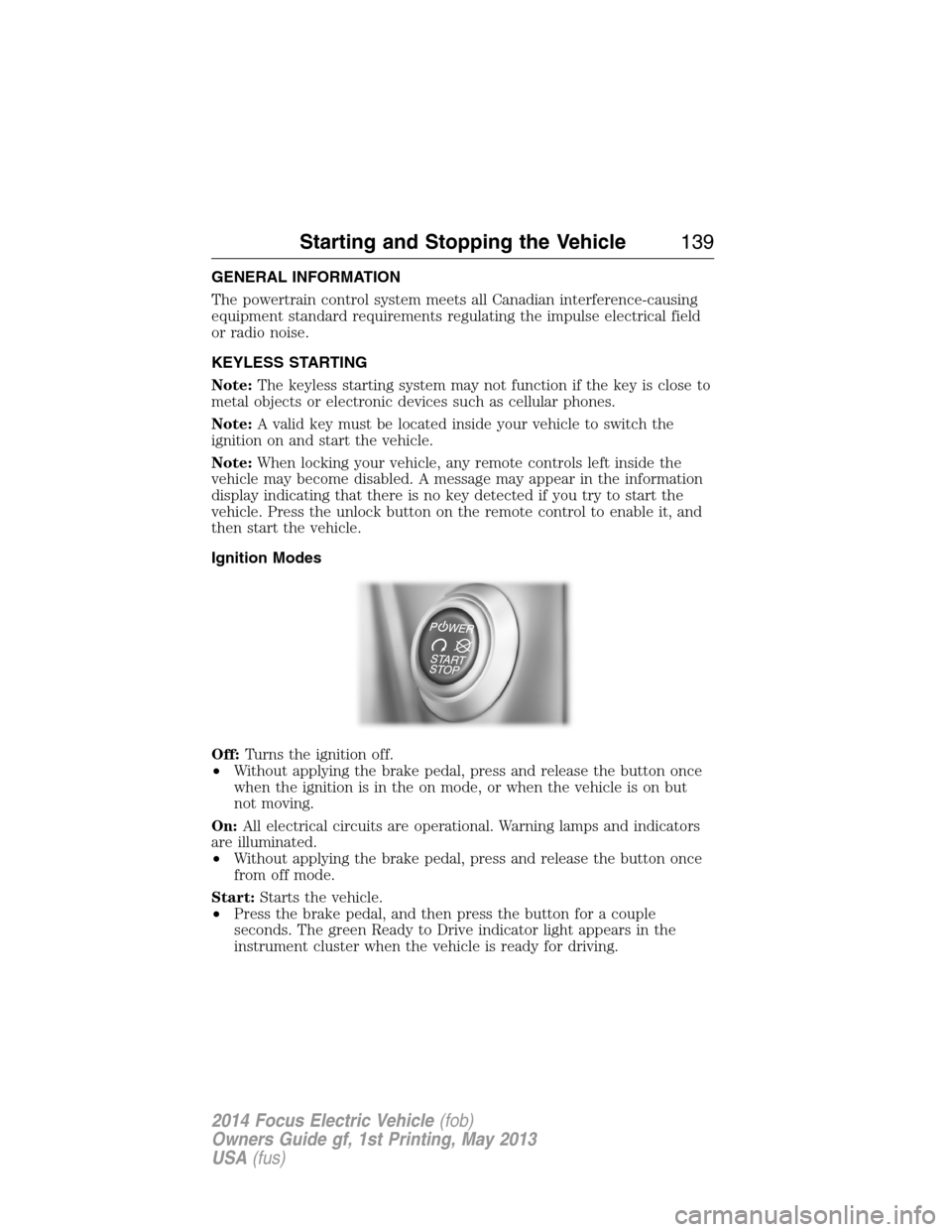
Ignition Modes
Off:Turns the ignition off.
•Without applying the brake pedal, press and release the button once
when the ignition is in the on mode, or when the vehicle is on but
not moving.
On:All electrical circuits are operational. Warning lamps and indicators
are illuminated.
•Without applying the brake pedal, press and release the button once
from off mode.
Start:Starts the vehicle.
•Press the brake pedal, and then press the button for a couple
seconds. The green Ready to Drive indicator light appears in the
instrument cluster when the vehicle is ready for driving.
Starting and Stopping the Vehicle139
2014 Focus Electric Vehicle(fob)
Owners Guide gf, 1st Printing, May 2013
USA(fus)
Page 346 of 403
Charge Point Light Ring
Press the Settings icon >Settings>Charge Port Light Ring,
then select from the following:
Charge port light ring
OnIlluminates when plugging in, opening doors,
pressing the unlock button on your remote,
and while charging.
OffDoes not illuminate.
Limited Cord Acknowledgement:Illuminates when
plugging in.
Charge Status:Illuminates when opening
doors or pressing the unlock button on your
remote.
Note:See theHigh Voltage Batterychapter for details on the charge
port light ring functions.
Voice Control
Press the Settings icon >Settings>Voice Control,then
select from the following:
Voice control
Interaction ModeStandard interaction mode provides more
detailed interaction and guidance. Advanced
mode has less audible interaction and more
tone prompts.
Confirmation
PromptsHave the system ask you short questions if it
has not clearly heard or understood your
request.
Note:Even with confirmation prompts turned
off, the system may occasionally ask you to
confirm settings.
Media Candidate
ListsCandidate lists are possible results from your
voice commands. The system simply makes a
best guess at your request with these turned
off.
MyFord Touch®345
2014 Focus Electric Vehicle(fob)
Owners Guide gf, 1st Printing, May 2013
USA(fus)
Page 403 of 403
T
Temperature control
(see Climate control) ...............352
Temporary mobility kit .............256
Text messaging .........................315
Tilt steering wheel ......................75
Tires ...................................236–237
alignment ................................250
care ..........................................236
checking the pressure ............246
inflating ...................................244
label .........................................243
replacing ..................................248
rotating ....................................251
safety practices .......................250
sidewall information ...............239
snow tires and chains ............251
Temporary mobility kit ..........256
terminology .............................238
tire grades ...............................237
treadwear ........................237, 246
Touchscreen features
(climate) ....................................352
Towing .......................................177
recreational towing .................178
trailer towing ..........................177
wrecker ....................................177
Traction control ........................156
Traffic preferences ...................360
Transmission
brake-shift interlock (BSI) ....150fluid, checking and adding
(automatic) .............................215
fluid, refill capacities ..............265
lubricant specifications ..........265
Trunk ...........................................72
remote release ..........................68
U
USB port ............................278, 305
V
Vehicle health report ................339
Vehicle Identification Number
(VIN) ..........................................267
Vehicle loading ..........................170
Voice recognition ......................287
W
Warning lights (see Lights) .......97
Washer fluid ..............................215
Water, Driving through .............179
Windows
power .........................................89
rear wiper/washer .....................79
Windshield washer fluid and
wipers
checking and adding fluid .....215
replacing wiper blades ...218–219
Wrecker towing .........................177
402Index
2014 Focus Electric Vehicle(fob)
Owners Guide gf, 1st Printing, May 2013
USA(fus)
Page:
< prev 1-8 9-16 17-24