2014 FORD FOCUS ELECTRIC wheel
[x] Cancel search: wheelPage 327 of 403
StartandFinishdisplay the times, which you can modify, using the
following:
•+and-allow you to change the hours and minutes of your start and
finish times.
•AMandPMallow you to change the time of your start and finish
time. This setting is viewable in 12-hour mode.
240Vand120Vrepresent the voltage service the default profile is using.
The system uses this selection to calculate estimated charge times.
Clearerases the Default Value Charge preferences.
Save Allstores your Default Value Charge preferences.
•Note:Make sure you save your settings before returning to the
previous screen. If you do not touchSave,your settings are not
stored in the system.
Power
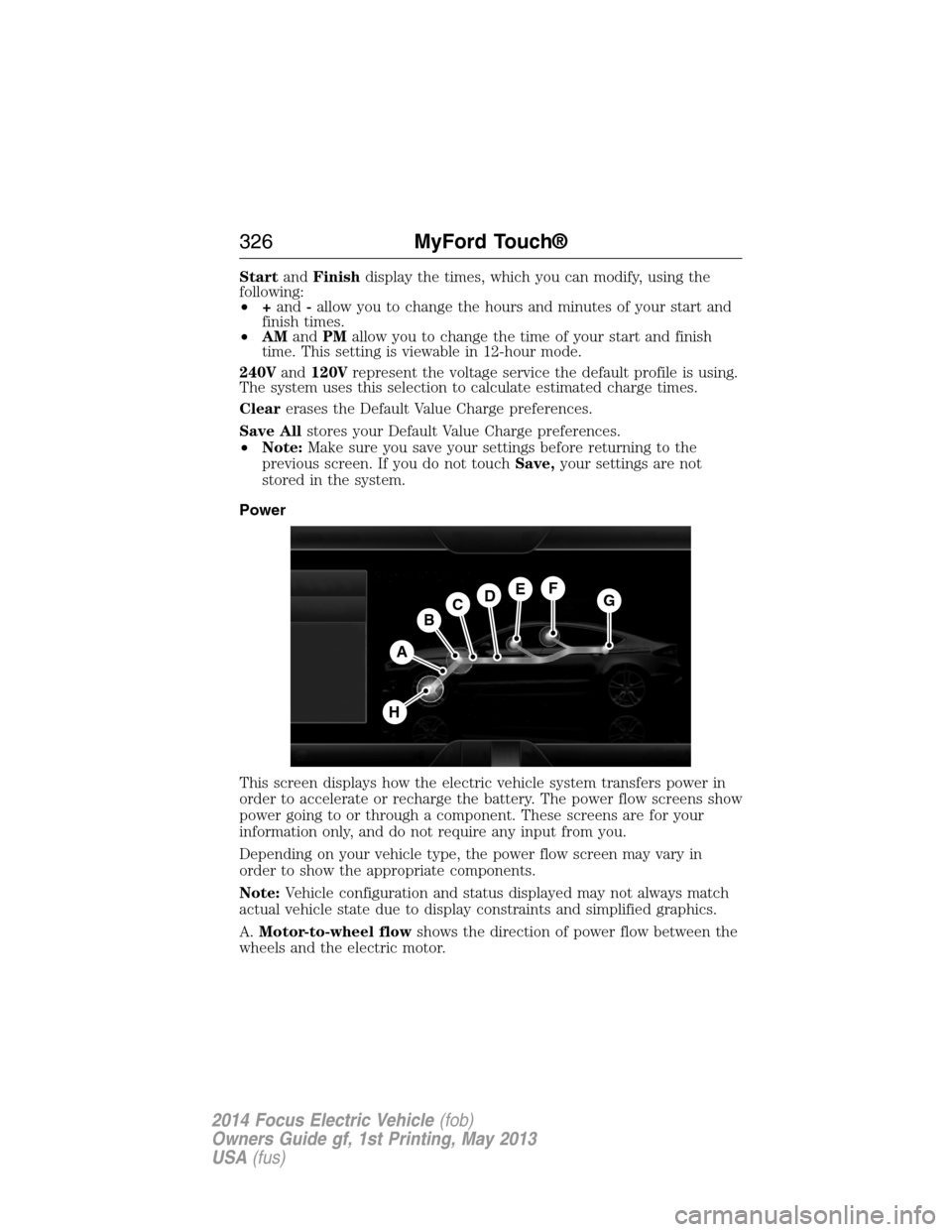
This screen displays how the electric vehicle system transfers power in
order to accelerate or recharge the battery. The power flow screens show
power going to or through a component. These screens are for your
information only, and do not require any input from you.
Depending on your vehicle type, the power flow screen may vary in
order to show the appropriate components.
Note:Vehicle configuration and status displayed may not always match
actual vehicle state due to display constraints and simplified graphics.
A.Motor-to-wheel flowshows the direction of power flow between the
wheels and the electric motor.
A
DGEF
BC
H
326MyFord Touch®
2014 Focus Electric Vehicle(fob)
Owners Guide gf, 1st Printing, May 2013
USA(fus)
Page 328 of 403
B.Electric Motorrepresents the electric motor. The higher the motor
power is, the larger the circle around this node. Any time the vehicle is
ready to be driven, the motor node illuminates.
C.Battery-to-motor flowshows the direction of power flow between
the high-voltage battery and the electric motor. Flow toward the motor
indicates the battery is providing power to accelerate the vehicle
(discharging the battery). Flow toward the battery indicates the electric
motor is providing power to the battery (charging the battery).
Note:The battery-to-motor flow includes battery power the vehicle is
using for acceleration. It does not include energy the vehicle is using for
accessories (such as air conditioning, headlights and radio). This screen
displays accessories and climate usage separately.
D.Plugappears when you plug your vehicle into the wall. When
charging the high voltage battery from the wall, you can see flow from
the plug to the battery on the screen.
•Accessoriesindicates electrical power demands from your vehicle’s
accessory systems. Accessories use power but do not contribute to
making the vehicle move. The power flow displays power usage from
the climate control system and other accessories separately.
E.Otherincludes all power usage from the low voltage accessories such
as the climate control fan, headlights and heated seats. The higher the
power usage is from these accessories, the larger the circle around the
node. This node illuminates anytime the vehicle is on since there is
always some low level power in use.
F.Climateincludes the power usage from the high-voltage climate
control components such as the electric A/C compressor and the electric
heater. The higher the power usage is from these components, the larger
the circle around this node.
Note:The climate control system may determine A/C is necessary even
when you turn it off. In this case, you may see some climate power when
the A/C is off.
G.High voltage battery powerrepresents your high-voltage battery.
A circle illuminates around the node when the high-voltage battery is
receiving power from regenerative braking or external charging (when
you plug it in). The higher the power going into the high-voltage battery,
the larger the circle around this node.
H.Drive powerrepresents the power going to the wheels. The higher
the wheel power is, the larger the circle around this node.
MyFord Touch®327
2014 Focus Electric Vehicle(fob)
Owners Guide gf, 1st Printing, May 2013
USA(fus)
Page 331 of 403
Note:The driver is ultimately responsible for the safe operation of the
vehicle, and therefore, must evaluate whether it is safe to follow the
suggested directions. Any navigation features are provided only as an aid.
Make your driving decisions based on your observations of local conditions
and existing traffic regulations. Do not follow the route suggestions if doing
so would result in an unsafe or illegal maneuver, if you would be placed
in an unsafe situation, or if you would be directed into an area that you
consider unsafe. Maps used by this system may be inaccurate because of
errors, changes in roads, traffic conditions or driving conditions.
Note:When you connect, the service uses GPS technology and advanced
vehicle sensors to collect your vehicle’s current location, travel direction
and speed to help provide you with the directions, traffic reports, or
business searches you request. Further, to provide the services you
request, for continuous improvement, the service may collect and record
call details and voice communications. For more information, see SYNC
Services Terms and Conditions at www.SYNCMyRide.com. If you do not
want Ford or its service providers to collect your vehicle travel
information or other information identified in the Terms and Conditions,
do not subscribe or use the service.
SYNC Services uses advanced vehicle sensors, integrated GPS technology
and comprehensive map and traffic data, to give you personalized traffic
reports, precise turn-by-turn directions, business search, news, sports,
weather and more. For a complete list of services, or to learn more,
please visit www.SYNCMyRide.com.
Connecting to SYNC Services Using Voice Commands
Press the voice button on the steering wheel controls.
1. When prompted, say “Services”. This initiates an outgoing
call to SYNC Services using your paired and connected
Bluetooth-enabled cellular phone.
2. Once you connect to the service, follow the voice prompts to request
the desired service, such as “Traffic” or “Directions”. You can also
say, “What are my choices?” to receive a list of available services
from which to choose.
3. Say, “Services” to return to the Services main menu or for help, say,
“Help”.
330MyFord Touch®
2014 Focus Electric Vehicle(fob)
Owners Guide gf, 1st Printing, May 2013
USA(fus)
Page 333 of 403
If you miss a turn, SYNC automatically asks if you want the route
updated. Just say, “Yes” when prompted and the system delivers a new
route to your vehicle.
If your vehicle is equipped with Navigation, SYNC Services downloads
your requested destination to the navigation system. The navigation
system then calculates the route and provides driving instructions.
See theNavigation systemsection for more information.
Disconnecting from SYNC Services
1. Press and hold the hang-up phone button on the steering wheel.
2. Say “Good-bye” from the SYNC Services main menu.
SYNC Services quick tips
PersonalizingYou can personalize your Services feature to
provide quicker access to your most used or
favorite information. You can save address
points, such as work or home. You can also
save favorite information like sports teams,
such as Detroit Lions, or a news category.
You can learn more about personalization by
logging onto www.SYNCMyRide.com.
Push to interruptPress the voice button at any time (while
connected to SYNC Services) to interrupt a
voice prompt or an audio clip (such as a
sports report) and say your voice command.
PortableYour subscription is associated with your
Bluetooth-enabled cellular phone number,
not your VIN (Vehicle Identification Number).
You can pair and connect your phone to any
vehicle equipped with SYNC Services and
continue enjoying your personalized services.
332MyFord Touch®
2014 Focus Electric Vehicle(fob)
Owners Guide gf, 1st Printing, May 2013
USA(fus)
Page 334 of 403
SYNC Services Voice Commands
When a route has been downloaded (non-navigation systems),
press the voice button on the steering wheel control. When
prompted, say any of the following commands:
“SERVICES”
“Cancel route”
“Navigation voice off”
“Navigation voice on”
“Next turn”
“Route status”
“Route summary”
“Services”
“Update route”
“Help”
Sirius Travel Link (If Equipped and If Activated)
WARNING:Driving while distracted can result in loss of vehicle
control, crash and injury. We strongly recommend that you use
extreme caution when using any device that may take your focus off
the road. Your primary responsibility is the safe operation of your
vehicle. We recommend against the use of any hand-held device while
driving and encourage the use of voice-operated systems when possible.
Make sure you are aware of all applicable local laws that may affect the
use of electronic devices while driving.
Note:In order to use Sirius Travel Link, your vehicle must be equipped
with navigation and your navigation SD card must be in the SD card slot.
Note:A paid subscription is required to access and use these features.
Go to www.siriusxm.com/travellink for more information.
Note:Visit www.siriusxm.com/traffic# and click on Coverage map and
details for a complete listing of all traffic areas covered by Sirius Travel
Link.
Note:Neither Sirius nor Ford is responsible for any errors or
inaccuracies in the Sirius Travel Link services or its use in vehicles.
When you subscribe to Sirius Travel Link, it can help you locate the best
gas prices, find movie listings, get current traffic alerts, view the current
weather map, get accurate ski conditions and see scores to current
sports games.
MyFord Touch®333
2014 Focus Electric Vehicle(fob)
Owners Guide gf, 1st Printing, May 2013
USA(fus)
Page 336 of 403
Sirius Travel Link Voice Commands
Note:In order to use Sirius Travel Link, your vehicle must be equipped
with navigation and your navigation SD card must be in the SD card slot.
Press the voice button on the steering wheel controls and, when
prompted, say any of the following:
Travel Link voice commands
“5–day weather forecast” “Sports scores”*
“Fuel prices” “Traffic”
“Movie listings” “Travel Link”**
“Sports headlines”*“Weather”
“Sports schedule”*“Weather map”
*If you have said, “Sports headlines”, “Sports schedule” or “Sports
scores”, you may say any of the commands in the “Sports headlines,
Sports schedules and Sports scores” commands chart:
**If you have said, “Travel Link”, you may say any of the commands in
the “Travel Link” chart:
Sports headlines, sports schedules and sports scores voice
commands
“Baseball” “My teams”
“College basketball” “NBA”
“College football” “NFL”
“Golf” “NHL”
“MLS” “WNBA”
“Motor sports”
“TRAVEL LINK”
“5–day weather
forecast”“Golf schedule” “NBA scores”
“Baseball headlines” “MLS headlines” “NFL headlines”
“Baseball schedule” “MLS schedule” “NFL schedule”
“Baseball scores” “MLS scores” “NFL scores”
“College basketball
headlines”“Motor sports” “NHL headlines”
MyFord Touch®335
2014 Focus Electric Vehicle(fob)
Owners Guide gf, 1st Printing, May 2013
USA(fus)
Page 339 of 403
Setting 911 Assist On
If your vehicle is equipped with Navigation, touch the i
(Information) button to access these features. If your vehicle
is not equipped with Navigation, touch the corner of the
touchscreen with the green tab.
PressApps>911 Assist,>On.
You can also access 911 Assist by:
•Pressing the Settings icon >Settings>Phone>911
Assist,or
•Pressing the Settings icon >Help>911 Assist.
To Make Sure that 911 Assist Works Properly
•SYNC must be powered and working properly at the time of the
incident and throughout feature activation and use.
•The 911 Assist feature must be set on before the incident.
•You must pair and connect a Bluetooth-enabled and compatible phone
to SYNC.
•A connected Bluetooth-enabled phone must have the ability to make
and maintain an outgoing call at the time of the incident.
•A connected Bluetooth-enabled phone must have adequate network
coverage, battery power and signal strength.
•The vehicle must have battery power and be located in the United
States, Canada or in a territory in which 911 is the emergency
number.
In the Event of a Crash
Not all crashes deploy an airbag or activate the fuel pump shut-off
(which would trigger 911 Assist); however, SYNC tries to contact
emergency services if 911 Assist triggers. If a connected phone sustains
damage or loses connection to SYNC, SYNC searches for, and tries to
connect to, any available previously paired phone and tries to make the
call to 911.
Before making the call:
•SYNC provides a short window of time (about 10 seconds) to cancel
the call. If you fail to cancel the call, SYNC attempts to dial 911.
•SYNC says the following, or a similar message: “SYNC will attempt to
call 911, to cancel the call, press Cancel on your screen or press and
hold the phone button on your steering wheel.”
338MyFord Touch®
2014 Focus Electric Vehicle(fob)
Owners Guide gf, 1st Printing, May 2013
USA(fus)
Page 341 of 403
Note:In order to allow a break-in period for your vehicle, you may not
be able to create a Vehicle Health Report until your vehicle odometer has
reached 200 miles.
Note:Cellular phone and SMS charges may apply when making a report.
Register for Vehicle Health Report and set your report preferences at
www.SYNCMyRide.com. After registering, you can request a Vehicle
Health Report (inside your vehicle). Return to your account at
www.SYNCMyRide.com to view your report. You can also choose for
SYNC to remind you automatically to run reports at specific mileage
intervals. Cellular phone airtime usage may apply when reporting.
The system allows you to check your vehicle’s overall health in the form
of a diagnostic report card. The Vehicle Health Report contains valuable
information, such as:
•Vehicle Diagnostic Information
•Scheduled maintenance
•Open Recalls and Field Service Actions
•Items noted during vehicle inspections by your authorized dealer that
still need servicing.
Making a Report
If your vehicle is equipped with Navigation, touch the i
(Information) button to access these features. If your vehicle is
not equipped with Navigation, touch the corner of the
touchscreen with the green tab.
If you want to run a report by using the touchscreen, touchApps>
Vehicle Health Report.
To run a report by voice command, press the voice button on
the steering wheel and, when prompted, say “Vehicle health
report”.
Vehicle Health Report Privacy Notice
When you create a Vehicle Health Report, Ford Motor Company may
collect your cellular phone number (to process your report request) and
diagnostic information about your vehicle. Certain versions or updates to
Vehicle Health Report may also collect more vehicle information. Ford
may use your vehicle information it collects for any purpose. If you do
not want to disclose your cellular phone number or vehicle information,
do not run the feature or set up your Vehicle Health Report profile at
www.SYNCMyRide.com. See www.SYNCMyRide.com (Vehicle Health
Report Terms and Conditions, and Privacy Statement) for more
information.
340MyFord Touch®
2014 Focus Electric Vehicle(fob)
Owners Guide gf, 1st Printing, May 2013
USA(fus)