2014 FORD FLEX change time
[x] Cancel search: change timePage 137 of 554

D.Recirculated air:Press to switch between outside air and
recirculated air. When the LED on the button is lit, the air currently in
the passenger compartment is being recirculated. Using recirculated air
can reduce the time needed to cool the interior and reduce unwanted
odors from entering your vehicle.
E.MAX A/C:Distributes recirculated air through the instrument panel
vents to cool the vehicle. This position is more economical and efficient
than normal A/C.
F.Front temperature control:Controls the temperature of the air
circulated in the front of your vehicle. Turn to select the desired
temperature.
G.Rear fan speed control:Controls the volume of air circulated in the
rear your vehicle. Press + or - to select the desired fan speed.
H.Rear temperature control:Controls the temperature of the air
circulated in the rear of your vehicle. Press TEMP + and TEMP - to
select the desired temperature.
I.REAR CTRL:Press to change control of the rear climate controls
system from the front controls to the rear controls.
J.Rear climate control system power:Press to turn the rear climate
control system off and on.
K.Front fan speed control:Controls the volume of air circulated in
your vehicle. Turn to select the desired fan speed or switch off. If you
switch the fan off, the windshield may fog up.
L.Rear defrost:Turns the heated windows and mirrors off and on.
SeeHeated windows and mirrorslater in this chapter for more
information.
M.Defrost:Distributes air through the windshield defroster vents and
demister vents. This setting can also be used to defog and clear the
windshield of a thin covering of ice.
136Climate Control
2014 Flex(471)
Owners Guide gf, 1st Printing, April 2013
USA(fus)
Page 171 of 554

Programing the transmitters
To program HomeLink to the transmitter you must first put the
transmitter into programming mode. To do this:
A. Red LED
B. Green LED
1. Press and hold one of the buttons on the hand-held transmitter for
10 seconds. The LED light will change from green to green and red.
2. Press the same button twice to confirm the change to Programming
mode. If done properly the LED light will appear red.
3. Hold the transmitter within 1–3 inches (2–8 centimeters) of the
button on the sun visor you want to program.
4. Press and hold both the programmed Genie button on the hand-held
transmitter and the button on the sun visor you want to program. The
indicator light on the sun visor will flash rapidly when the programming
is successful.
Note:the Genie transmitter will transmit for up to 30 seconds. If
HomeLink does not program within 30 seconds the Genie transmitter will
need to be pressed again. If the Genie transmitter LED displays green
and red, release the button until the LED turns off before pressing the
button again.
Once HomeLink has been programmed successfully, the Genie
transmitter must be changed out of program mode. To do this:
1. Press and hold the previously programmed Genie button on the
hand-held transmitter for 10 seconds. The indicator light will change
from red to red and green.
2. Press the same button twice to confirm the change. If done correctly
the LED will turn green.
BA
170Universal Garage Door Opener (If Equipped)
2014 Flex(471)
Owners Guide gf, 1st Printing, April 2013
USA(fus)
Page 172 of 554

Programming HomeLink to the Genie Intellicode garage door
opener motor
Note:You may need a ladder to access the garage door opener motor.
To program HomeLink to the garage
door opener motor:
1. Press and hold the PROGRAM
button on the garage door opener
motor until both blue LED’s turn on.
2. Release the PROGRAM button.
Only the smaller round LED should
be on.
3. Press and release the program
button. The larger purple LED will
flash
Note:The next two steps must be completed in 30 seconds.
4. Press and release the Genie Intellicode 2 hand-held transmitter’s
previously programmed button. Both indicator lights on the garage door
opener motor unit should now flash purple.
5. Press and hold the previously programmed button on the sun visor for
two seconds. Repeat this step up to 3 times until the garage door moves.
Programming is now complete.
Clearing a HomeLink device
To erase programming from the three HomeLink buttons, press and hold
the two outer HomeLink buttons until the indicator light begins to flash.
The LED will begin flashing in 10 to 20 seconds, at which time both
buttons should be released. Programming has now been erased, and the
LED should blink slowly to indicate the device is in train mode when any
one of the three HomeLink buttons is pressed.
FCC and RSS-210 Industry Canada Compliance
This device complies with Part 15 of the FCC Rules and with RSS-210 of
Industry Canada. Operation is subject to the following two conditions:
(1) this device may not cause harmful interference, and (2) this device
must accept any interference received, including interference that may
cause undesired operation.
Changes or modifications to your device not expressly approved by the
party responsible for compliance can void the user’s authority to operate
the equipment.
Universal Garage Door Opener (If Equipped)171
2014 Flex(471)
Owners Guide gf, 1st Printing, April 2013
USA(fus)
Page 177 of 554
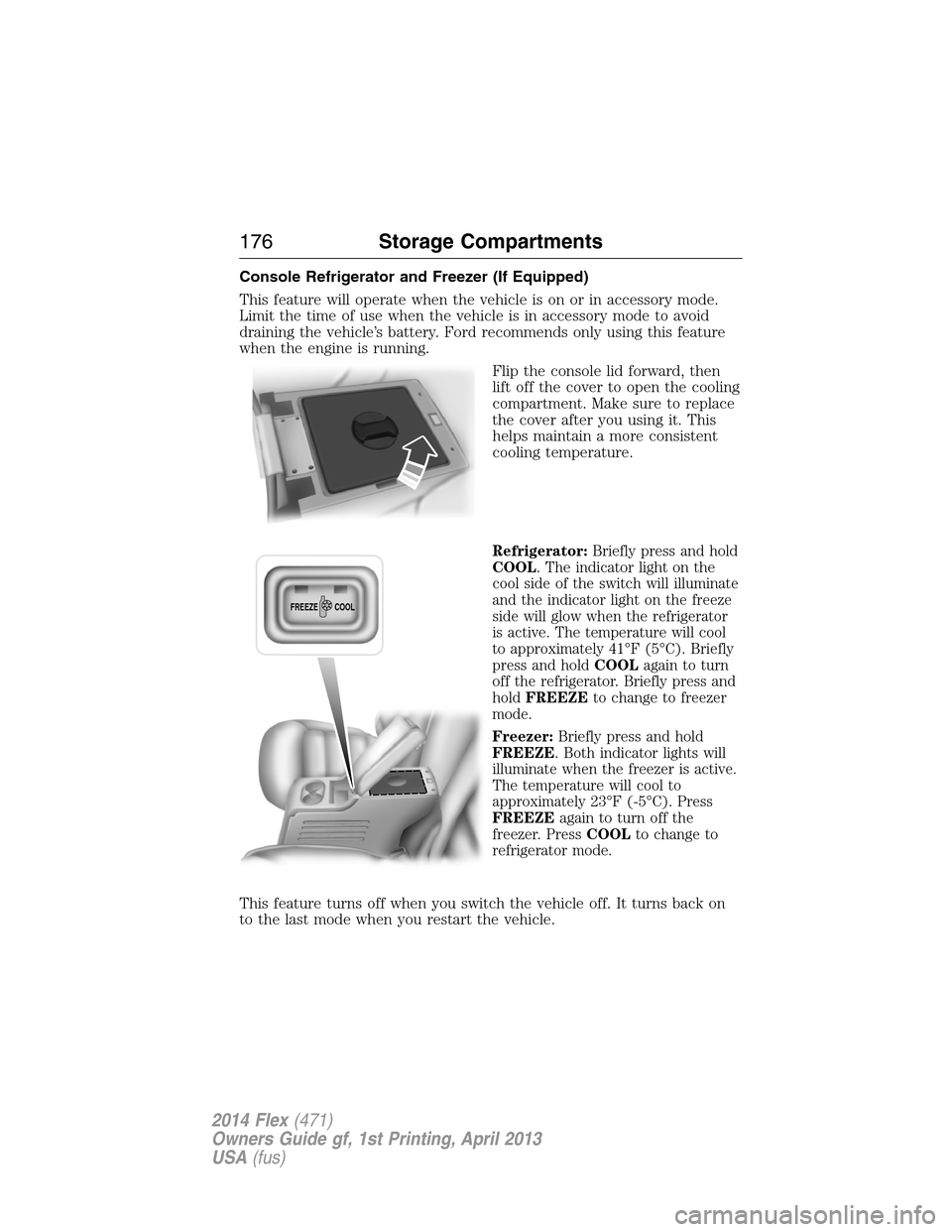
Console Refrigerator and Freezer (If Equipped)
This feature will operate when the vehicle is on or in accessory mode.
Limit the time of use when the vehicle is in accessory mode to avoid
draining the vehicle’s battery. Ford recommends only using this feature
when the engine is running.
Flip the console lid forward, then
lift off the cover to open the cooling
compartment. Make sure to replace
the cover after you using it. This
helps maintain a more consistent
cooling temperature.
Refrigerator:Briefly press and hold
COOL. The indicator light on the
cool side of the switch will illuminate
and the indicator light on the freeze
side will glow when the refrigerator
is active. The temperature will cool
to approximately 41°F (5°C). Briefly
press and holdCOOLagain to turn
off the refrigerator. Briefly press and
holdFREEZEto change to freezer
mode.
Freezer:Briefly press and hold
FREEZE. Both indicator lights will
illuminate when the freezer is active.
The temperature will cool to
approximately 23°F (-5°C). Press
FREEZEagain to turn off the
freezer. PressCOOLto change to
refrigerator mode.
This feature turns off when you switch the vehicle off. It turns back on
to the last mode when you restart the vehicle.
FREEZE
COOL
176Storage Compartments
2014 Flex(471)
Owners Guide gf, 1st Printing, April 2013
USA(fus)
Page 194 of 554

Do not make any unauthorized changes to your vehicle or engine. By
law, vehicle owners and anyone who manufactures, repairs, services,
sells, leases, trades vehicles, or supervises a fleet of vehicles are not
permitted to intentionally remove an emission control device or prevent
it from working. Information about your vehicle’s emission system is on
the Vehicle Emission Control Information Decal located on or near the
engine. This decal also lists engine displacement.
Please consult your warranty information for complete emission warranty
information.
On-board Diagnostics (OBD-II)
Your vehicle is equipped with a computer that monitors the engine’s
emission control system. This system is commonly known as the
on-board diagnostics system (OBD-II). The OBD-II system protects the
environment by ensuring that your vehicle continues to meet
government emission standards. The OBD-II system also assists your
authorized dealer in properly servicing your vehicle.
When the service engine soon indicator illuminates, the OBD-II
system has detected a malfunction. Temporary malfunctions
may cause the service engine soon indicator to illuminate.
Examples are:
1. The vehicle has run out of fuel—the engine may misfire or run poorly.
2. Poor fuel quality or water in the fuel—the engine may misfire or run
poorly.
3. The fuel fill inlet may not have been properly closed. SeeEasy Fuel®
No Cap Fuel Systemin this chapter.
4. Driving through deep water—the electrical system may be wet.
These temporary malfunctions can be corrected by filling the fuel tank
with good quality fuel, properly closing the fuel fill inlet or letting the
electrical system dry out. After three driving cycles without these or any
other temporary malfunctions present, the service engine soon indicator
should stay off the next time the engine is started. A driving cycle
consists of a cold engine start-up followed by mixed city or highway
driving. No additional vehicle service is required.
If the service engine soon indicator remains on, have your vehicle
serviced at the first available opportunity. Although some malfunctions
detected by the OBD-II may not have symptoms that are apparent,
continued driving with the service engine soon indicator on can result in
increased emissions, lower fuel economy, reduced engine and
transmission smoothness, and can lead to more costly repairs.
Fuel and Refueling193
2014 Flex(471)
Owners Guide gf, 1st Printing, April 2013
USA(fus)
Page 203 of 554

Note:Do not rock the vehicle if the engine is not at normal operating
temperature or damage to the transmission may occur.
Note:Do not rock the vehicle for more than a few minutes or damage to
the transmission and tires may occur or the engine may overheat.
If your vehicle gets stuck in mud or snow it may be rocked out by
shifting between forward and reverse gears, stopping between shifts, in a
steady pattern. Press lightly on the accelerator in each gear.
If your vehicle is equipped with AdvanceTrac® with Roll Stability
Control™, it may be beneficial to disengage the AdvanceTrac® with Roll
Stability Control™ system while attempting to rock the vehicle.
Emergency Maneuvers
•In an unavoidable emergency situation where a sudden sharp turn
must be made, remember to avoid “over-driving” your vehicle (i.e.,
turn the steering wheel only as rapidly and as far as required to avoid
the emergency). Excessive steering will result in less vehicle control,
not more. Additionally, smooth variations of the accelerator and/or
brake pedal pressure should be utilized if changes in vehicle speed are
called for. Avoid abrupt steering, acceleration or braking which could
result in an increased risk of loss of vehicle control, vehicle rollover
and/or personal injury. Use all available road surface to return the
vehicle to a safe direction of travel.
•In the event of an emergency stop, avoid skidding the tires and do not
attempt any sharp steering wheel movements.
•If the vehicle goes from one type of surface to another (i.e., from
concrete to gravel) there will be a change in the way the vehicle
responds to a maneuver (steering, acceleration or braking). Again,
avoid these abrupt inputs.
Sand
When driving over sand, try to keep all four wheels on the most solid
area of the trail. Avoid reducing the tire pressures but shift to a lower
gear and drive steadily through the terrain. Apply the accelerator slowly
and avoid excessive wheel slip.
Do not drive your vehicle in deep sand for an extended period of time.
This could cause the AWD system to overheat and default to front-wheel
drive. If this occurs AWD Off will be displayed in the Information Display.
202All-Wheel Drive (If Equipped)
2014 Flex(471)
Owners Guide gf, 1st Printing, April 2013
USA(fus)
Page 215 of 554

The system detects an available parallel parking space and automatically
steers the vehicle into the space (hands-free) while you control the
accelerator, gearshift and brakes. The system visually and/or audibly
instructs the driver to park the vehicle.
The system may not function correctly if something passes between the
front bumper and the parking space (i.e. a pedestrian or cyclist) or if the
edge of the neighboring parked vehicle is high from the ground (i.e. a
bus, tow truck or flatbed truck).
Note:The sensors may not detect objects in heavy rain or other
conditions that cause disruptive reflections.
Note:The sensors may not detect objects with surfaces that absorb
ultrasonic waves.
Note:After a tire change the system will go through a relearning
procedure. During this time the system performance may deteriorate.
The system should not be used if:
•a foreign object (i.e. bike rack or trailer) is attached to the front or
rear of the vehicle or at another location close to the sensors.
•an overhanging object (i.e. surfboard) is attached to the roof.
•the front bumper or side sensors are damaged (i.e. in a collision) or
obstructed by a foreign object (i.e. front bumper cover).
•a mini-spare tire is in use.
Using Active Park Assist
Press the button; the touch screen
displays a message and a
corresponding graphic to indicate
it’s searching for a parking space.
Use the turn signal to indicate
which side of the vehicle you want
the system to search on.
Note:If the turn signal is not on, the system automatically searches on
the vehicle’s passenger side.
AUTO
P
214Parking Aids
2014 Flex(471)
Owners Guide gf, 1st Printing, April 2013
USA(fus)
Page 219 of 554
![FORD FLEX 2014 1.G Owners Manual The system does not position the vehicle where I want in the
space
The vehicle is rolling in the opposite direction of the transmission (i.e.
rolling forward when R [Reverse] is selected)
The transmis](/manual-img/11/5114/w960_5114-218.png "FORD FLEX 2014 1.G Owners Manual The system does not position the vehicle where I want in the
space
The vehicle is rolling in the opposite direction of the transmission (i.e.
rolling forward when R [Reverse] is selected)
The transmis")
The system does not position the vehicle where I want in the
space
The vehicle is rolling in the opposite direction of the transmission (i.e.
rolling forward when R [Reverse] is selected)
The transmission is in R (Reverse); the vehicle must be moving
forward to detect a parking space
An irregular curb along the parking space prevents the system from
aligning the vehicle properly
Vehicles or objects bordering the space may not be positioned correctly
The vehicle was pulled too far past the parking space. The system
performs best when you drive the same distance past the parking
space
The tires may not be installed or maintained correctly (i.e. not inflated
correctly, improper size, or of different sizes)
A repair or alteration has changed detection capabilities
A parked vehicle has a high attachment (i.e. salt sprayer, snowplow,
moving truck bed, etc.)
The parking space length or position of parked objects changed after
your vehicle passed
The temperature around your vehicle changes quickly (i.e. driving from
a heated garage into the cold, or after leaving a car wash)
REAR VIEW CAMERA SYSTEM (IF EQUIPPED)
WARNING:The rear view camera system is a reverse aid
supplement device that still requires the driver to use it in
conjunction with the interior and exterior mirrors for maximum
coverage.
WARNING:Objects that are close to either corner of the
bumper or under the bumper, might not be seen on the screen
due to the limited coverage of the camera system.
WARNING:Back up as slow as possible since higher speeds
might limit your reaction time to stop the vehicle.
218Parking Aids
2014 Flex(471)
Owners Guide gf, 1st Printing, April 2013
USA(fus)