2014 FORD F250 climate settings
[x] Cancel search: climate settingsPage 362 of 460
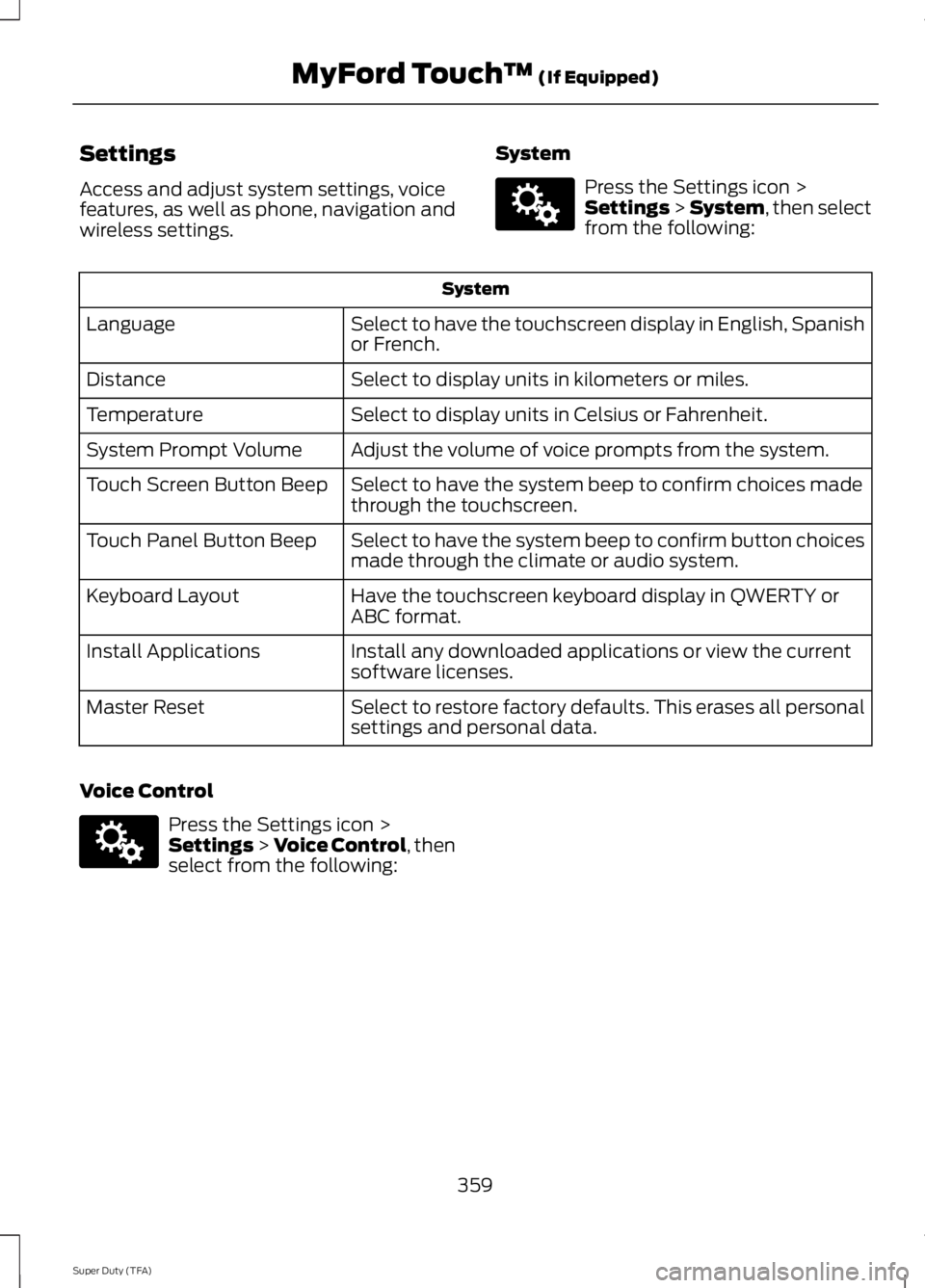
Settings
Access and adjust system settings, voice
features, as well as phone, navigation and
wireless settings.
System Press the Settings icon >
Settings > System, then select
from the following: System
Select to have the touchscreen display in English, Spanish
or French.
Language
Select to display units in kilometers or miles.
Distance
Select to display units in Celsius or Fahrenheit.
Temperature
Adjust the volume of voice prompts from the system.
System Prompt Volume
Select to have the system beep to confirm choices made
through the touchscreen.
Touch Screen Button Beep
Select to have the system beep to confirm button choices
made through the climate or audio system.
Touch Panel Button Beep
Have the touchscreen keyboard display in QWERTY or
ABC format.
Keyboard Layout
Install any downloaded applications or view the current
software licenses.
Install Applications
Select to restore factory defaults. This erases all personal
settings and personal data.
Master Reset
Voice Control Press the Settings icon >
Settings
> Voice Control, then
select from the following:
359
Super Duty (TFA) MyFord Touch
™
(If Equipped)E142607 E142607
Page 401 of 460
To run a report by voice
command, press the voice
button on the steering wheel
and, when prompted, say "Vehicle health
report".
Vehicle Health Report Privacy Notice
When you create a Vehicle Health Report,
Ford Motor Company may collect your
cellular phone number (to process your
report request) and diagnostic information
about your vehicle. Certain versions or
updates to Vehicle Health Report may also
collect more vehicle information. Ford may
use your vehicle information it collects for
any purpose. If you do not want to disclose your cellular phone number or vehicle
information, do not run the feature or set
up your Vehicle Health Report profile at
www.SYNCMyRide.com. See
www.SYNCMyRide.com (Vehicle Health
Report Terms and Conditions, and Privacy
Statement) for more information.
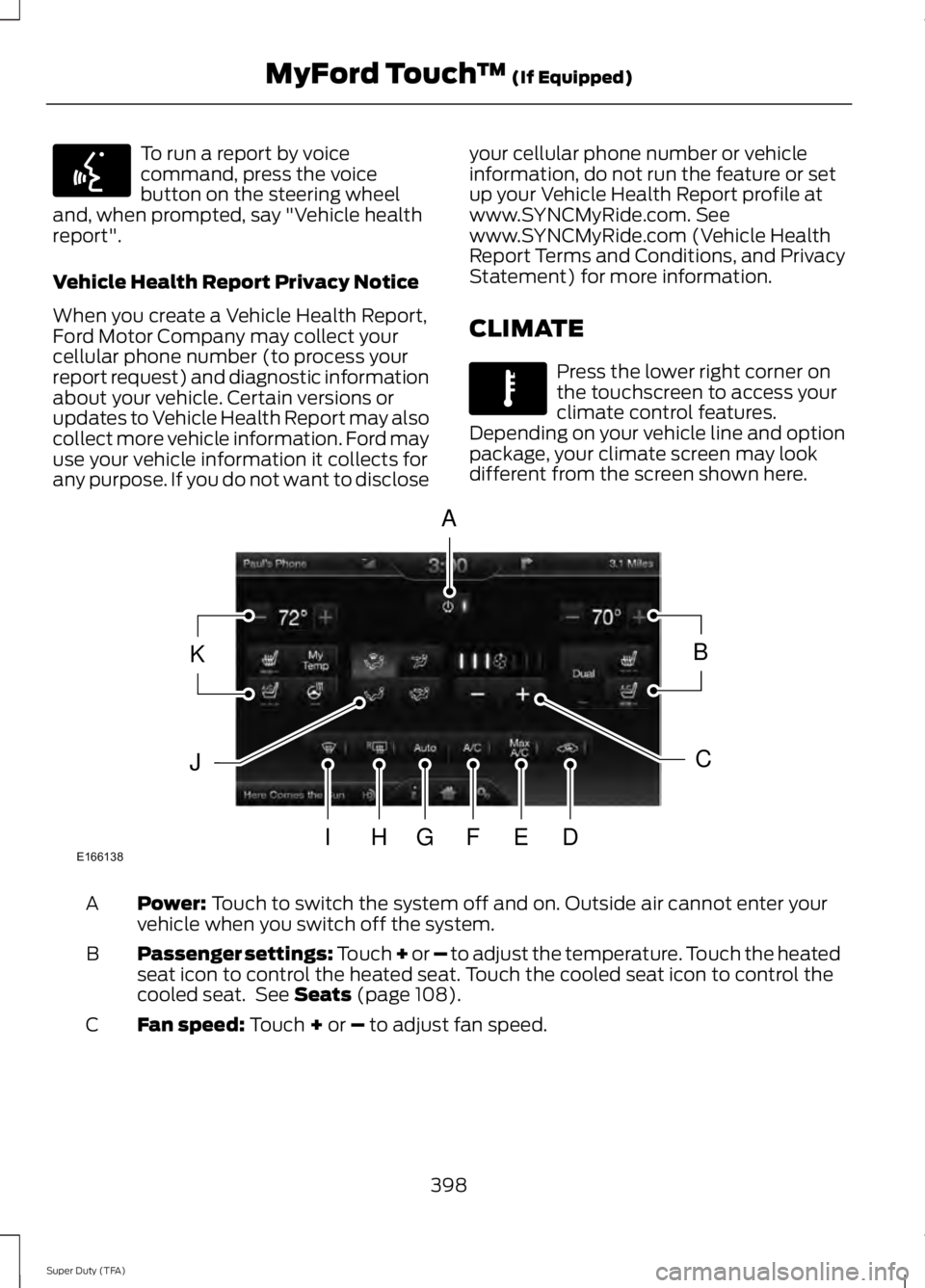
CLIMATE Press the lower right corner on
the touchscreen to access your
climate control features.
Depending on your vehicle line and option
package, your climate screen may look
different from the screen shown here. Power: Touch to switch the system off and on. Outside air cannot enter your
vehicle when you switch off the system.
A
Passenger settings:
Touch + or – to adjust the temperature. Touch the heated
seat icon to control the heated seat. Touch the cooled seat icon to control the
cooled seat. See
Seats (page 108).
B
Fan speed:
Touch + or – to adjust fan speed.
C
398
Super Duty (TFA) MyFord Touch
™
(If Equipped)E142599 E142612 E166138
A
KB
JC
IHGFED
Page 402 of 460

Recirculated air: Touch to turn the recirculated air on or off which may reduce
the amount of time needed to cool down the interior and help reduce odors
from reaching the interior. Recirculated air also engages automatically when
you select MAX A/C and may turn on manually in any airflow mode except
defrost. It may also turn off in all airflow modes except MAX A/C to reduce fog
potential.
D
MAX A/C: Touch to cool your vehicle with recirculated air. Touch again for
normal A/C operation. MAX A/C distributes air through instrument panel vents
and may help reduce odors from entering your vehicle. MAX A/C is more
economical and efficient than normal A/C mode.
E
A/C:
Touch to turn the air conditioning on or off. Use A/C with recirculated air
to improve cooling performance and efficiency. A/C engages automatically in
MAX A/C, defrost and floor/defrost.
F
AUTO:
Touch to engage automatic operation, then set the temperature using
the temperature control. The system automatically controls fan speed, airflow
distribution, A/C on or off and the use of fresh or recirculated air.
G
Rear defrost:
Touch to turn the rear window defroster and heated mirrors.
H
Defrost:
Touch to clear the windshield of fog and thin ice. Touch again to return
to the previous airflow selection. When on, defrost provides outside air to reduce
window fogging and distributes air through the windshield defroster vents and
demister vents.
I
Manual airflow distribution controls:
Floor and Defrost: Distributes air
through the windshield defroster vents, demister vents, floor vents and rear
seat floor vents, and provides outside air to reduce window fogging. Panel:
Distributes air through the instrument panel vents. Panel and Floor: Distributes
air through the instrument panel vents, demister vents, floor vents and rear seat
floor vents. Floor:
Distributes air through the demister vents, floor vents and
rear seat floor vents.
J
Driver settings:
Touch + or – adjust the temperature. Touch the heated seat
icon to control the heated seat. Touch the cooled seat icon to control the cooled
seat. See
Seats (page 108). Touch and hold MyTemp to select a temperature
you would like your vehicle to remember and maintain for you. If your vehicle
is equipped with a heated steering wheel, touch the heated steering wheel icon
to warm the steering wheel.
K
Note: If your vehicle is equipped with a
wood-trimmed steering wheel, it does not
heat between the 10 o'clock and 2 o'clock
positions. Climate Control Voice Commands Press the voice button on the
steering wheel controls. When
prompted, say any of the
following commands:
399
Super Duty (TFA) MyFord Touch
™
(If Equipped)E142599
Page 451 of 460

Car Wash
See: Cleaning the Exterior............................... 247
Center Console..............................................129
Removable Front Cupholders........................ 129
Changing a Bulb............................................241 Lamp Assembly Condensation..................... 241
Replacing Brake/Tail/Turn/Reverse Lamp Bulbs.................................................................. 242
Replacing Cargo Lamp and High-mount Brake Lamp Bulbs........................................ 242
Replacing Fog Lamp Bulbs (If Equipped.......................................................... 242
Replacing Front Clearance and Identification Lamp Bulbs (If
Equipped)......................................................... 241
Replacing the License Plate Lamp Bulb.................................................................... 243
Changing a Fuse............................................214 Fuses....................................................................... 214
Changing a Road Wheel
............................279
Dissimilar Spare Wheel and Tire Assembly
Information...................................................... 279
Location of the Spare Tire and Tools........280
Removing the Spare Tire (With Spare Tire Carrier Only).................................................... 281
Tire Change Procedure.................................... 282
Changing the 12V Battery.........................235 Battery Management System (If
Equipped)........................................................ 236
Changing the Engine Air Filter.................245
Changing the Wiper Blades......................237
Checking MyKey System Status...............52
Checking the Wiper Blades
......................237
Child Restraint and Safety Belt Maintenance.................................................35
Child Safety
.......................................................15
General Information............................................. 15
Child Safety Locks..........................................27
Child Seat Positioning..................................26
Cleaning Leather Seats
..............................251
Cleaning Products........................................247
Cleaning the Alloy Wheels........................251
Cleaning the Engine....................................248
Cleaning the Exhaust
.................................249 Cleaning the Exterior
...................................247
Cleaning Plastic Exterior Parts..................... 248
Exterior Chrome.................................................. 247
Stripes or Graphics (if equipped)................247
Underbody........................................................... 248
Cleaning the Instrument Panel and Instrument Cluster Lens........................250
Cleaning the Interior
...................................250
Cleaning the Windows and Wiper Blades...........................................................249
Clearing All MyKeys.......................................52
Climate............................................................398 Climate Control Voice Commands.............399
Climate Control
.............................................103
Coolant Check See: Engine Coolant Check............................ 227
Crash Sensors and Airbag Indicator.......44
Creating a MyKey
...........................................50
Programming/Changing Configurable
Settings................................................................ 51
Cruise Control...................................................61 Principle of Operation....................................... 174
Cruise control See: Using Cruise Control................................. 174
Customer Assistance
................................208
D
Data Recording
..................................................9
Event Data Recording.......................................... 10
Service Data Recording........................................ 9
Daytime Running Lamps
............................66
Digital Radio..................................................306
HD Radio Reception and Station
Troubleshooting............................................ 307
Direction Indicators
........................................67
Lane Change.......................................................... 67
Driver and Passenger Airbags....................37 Children and Airbags........................................... 42
Passenger Airbag On and Off Switch ..........37
Proper Driver and Front Passenger Seating Adjustment......................................................... 41
Driving Aids
......................................................175
Driving Hints..................................................200
Driving Through Water................................201
DRL See: Daytime Running Lamps........................ 66
448
Super Duty (TFA) Index
Page 458 of 460

Using Cruise Control....................................174
Switching Cruise Control Off.......................... 174
Switching Cruise Control On........................... 174
Using Four-Wheel Drive.............................149 4WD Indicator Lights........................................ 150
Driving Off-Road With Truck and Utility Vehicles............................................................. 153
Electronic Shift-On-the-Fly (ESOF) 4WD system............................................................... 149
How Your Vehicle Differs From Other Vehicles............................................................. 153
Manual Shift On Stop (MSOS) 4WD system............................................................... 149
Using a Manual Shift On Stop (MSOS) 4wd system............................................................... 150
Using the Electronic Shift on the Fly 4WD system................................................................ 152
Using Hill Descent Control........................168 Hill descent modes............................................ 168
Using MyKey With Remote Start Systems..........................................................52
Using Snow Chains......................................273
Using Stability Control...............................165
AdvanceTrac® with Roll Stability Control ™
(RSC®).............................................................. 165
Using SYNC™ With Your Media Player.............................................................335
Accessing Your Play Menu............................. 339
Connecting Your Digital Media Player to the USB Port........................................................... 335
Media Menu Features...................................... 338
Media Voice Commands................................ 336
System Settings.................................................. 341
What's Playing?................................................. 336
Using SYNC™ With Your Phone..............317 Accessing Features through the Phone
Menu................................................................... 321
Accessing Your Phone Settings.................... 324
Making Calls........................................................ 320
Pairing a Phone for the First Time................318
Pairing Subsequent Phones........................... 318
Phone Options during an Active Call.........320
Phone Voice Commands................................. 318
Receiving Calls................................................... 320
System Settings................................................. 325
Text Messaging................................................... 323Using Traction Control
................................163
System Indicator Lights and
Messages.......................................................... 164
Using Voice Recognition
............................315
Initiating a Voice Session................................. 315
System Interaction and Feedback...............316
Utilizing the Mediation/Arbitration Program (Canada Only).........................210
V
Vehicle Care
...................................................247
General Information.......................................... 247
Vehicle Certification Label
.......................294
Vehicle Identification Number................294
Vehicle Storage.............................................252 Battery.................................................................... 253
Body........................................................................\
252
Brakes..................................................................... 253
Cooling system................................................... 253
Engine..................................................................... 252
Fuel system.......................................................... 253
General.................................................................. 252
Miscellaneous..................................................... 253
Removing Vehicle From Storage.................. 253
Tires........................................................................\
. 253
Ventilated Seats
............................................116
Heated and Ventilated Seats Air Filter
Replacement ................................................... 116
Ventilation See: Climate Control......................................... 103
VIN See: Vehicle Identification Number............294
Voice Control....................................................61
455
Super Duty (TFA) Index