2014 FORD F250 ESP
[x] Cancel search: ESPPage 80 of 460

Variations:
Distance-to-empty
Fuel gauge position
Driving type (fuel economy
conditions)
35 miles to 80 miles (56 kmto 129 km)
1/16th
Highway driving
35 miles (56km)
1/16th
Severe duty driving (trailer
towing, extended idle)
Information Display
Odometer
Located in the bottom of the information
display Registers the accumulated
distance your vehicle has traveled.
Trip Computer
See General Information (page 81).
Vehicle Settings and Personalization
See
General Information (page 81).
WARNING LAMPS AND
INDICATORS
The following warning lamps and
indicators will alert you to a vehicle
condition that may become serious. Some
lamps will illuminate when you start your
vehicle to make sure they work. If any
lamps remain on after starting your vehicle,
refer to the respective system warning
lamp for further information.
Note: Some warning indicators appear in
the information display and function the
same as a warning lamp but do not display
when you start your vehicle. Anti-Lock Braking System If it illuminates when you are
driving, this indicates a
malfunction. You will continue
to have the normal braking system
(without ABS) unless the brake system
warning lamp is also illuminated. Have the
system checked by your authorized dealer.
Battery If it illuminates while driving, it
indicates a malfunction. Switch
off all unnecessary electrical
equipment and have the system checked
by your authorized dealer immediately.
Brake System Illuminates when you engage the
parking brake with the ignition
on.
If it illuminates when you are driving, check
that the parking brake is not engaged. If
the parking brake is not engaged, this
indicates low brake fluid level or a brake
system malfunction. Have the system
checked immediately by your authorized
dealer.
77
Super Duty (TFA) Instrument Cluster E144522
Page 81 of 460

WARNING
Driving your vehicle with the warning
lamp on is dangerous. A significant
decrease in braking performance
may occur. It will take you longer to stop
your vehicle. Have your vehicle checked by
your authorized dealer immediately. Driving
extended distances with the parking brake
engaged can cause brake failure and the
risk of personal injury. Check Fuel Cap (If Equipped)
Illuminates when the fuel cap
may not be properly installed.
Continued driving with this light
on may cause the Service engine
soon warning indicator to come on.
Cruise Control
(If Equipped) Illuminates when you switch this
feature on. See
Using Cruise
Control (page 174).
Direction Indicator Illuminates when the left or right
turn signal or the hazard warning
flasher is turned on. If the
indicators stay on or flash faster, check for
a burned out bulb.
Door Ajar Displays when the ignition is on
and any door is not completely
closed.
Electronic Locking Differential Illuminates when using the
electronic locking differential. Engine Coolant Temperature Illuminates when the engine
coolant temperature is high.
Stop the vehicle as soon as
possible, switch off the engine and let cool.
Engine Oil If it illuminates with the engine
running or when you are driving,
this indicates a malfunction.
Stop your vehicle as soon as it is safe to
do so and switch the engine off. Check the
engine oil level. See
Engine Oil Check
(page 226).
Note: Do not resume your journey if it
illuminates despite the level being correct.
Have the system checked by your authorized
dealer immediately.
Fasten Safety Belt It will illuminate and a chime will
sound to remind you to fasten
your safety belt.
Front Airbag If it fails to illuminate when you
start your vehicle, continues to
flash or remains on, it indicates
a malfunction. Have the system checked
by your authorized dealer.
High Beam Illuminates when you switch the
high beam headlamps on. It will
flash when you use the
headlamp flasher.
Hill Descent
(If Equipped) Illuminates when hill descent is
switched on.
78
Super Duty (TFA) Instrument Cluster E71340 E163170 E163171
Page 84 of 460
GENERAL INFORMATION
WARNING
Driving while distracted can result in
loss of vehicle control, crash and
injury. We strongly recommend that
you use extreme caution when using any
device that may take your focus off the
road. Your primary responsibility is the safe
operation of your vehicle. We recommend
against the use of any hand-held device
while driving and encourage the use of
voice-operated systems when possible.
Make sure you are aware of all applicable
local laws that may affect the use of
electronic devices while driving. Various systems on your vehicle can be
controlled using the information display
controls on the steering wheel.
Corresponding information is displayed in
the information display.
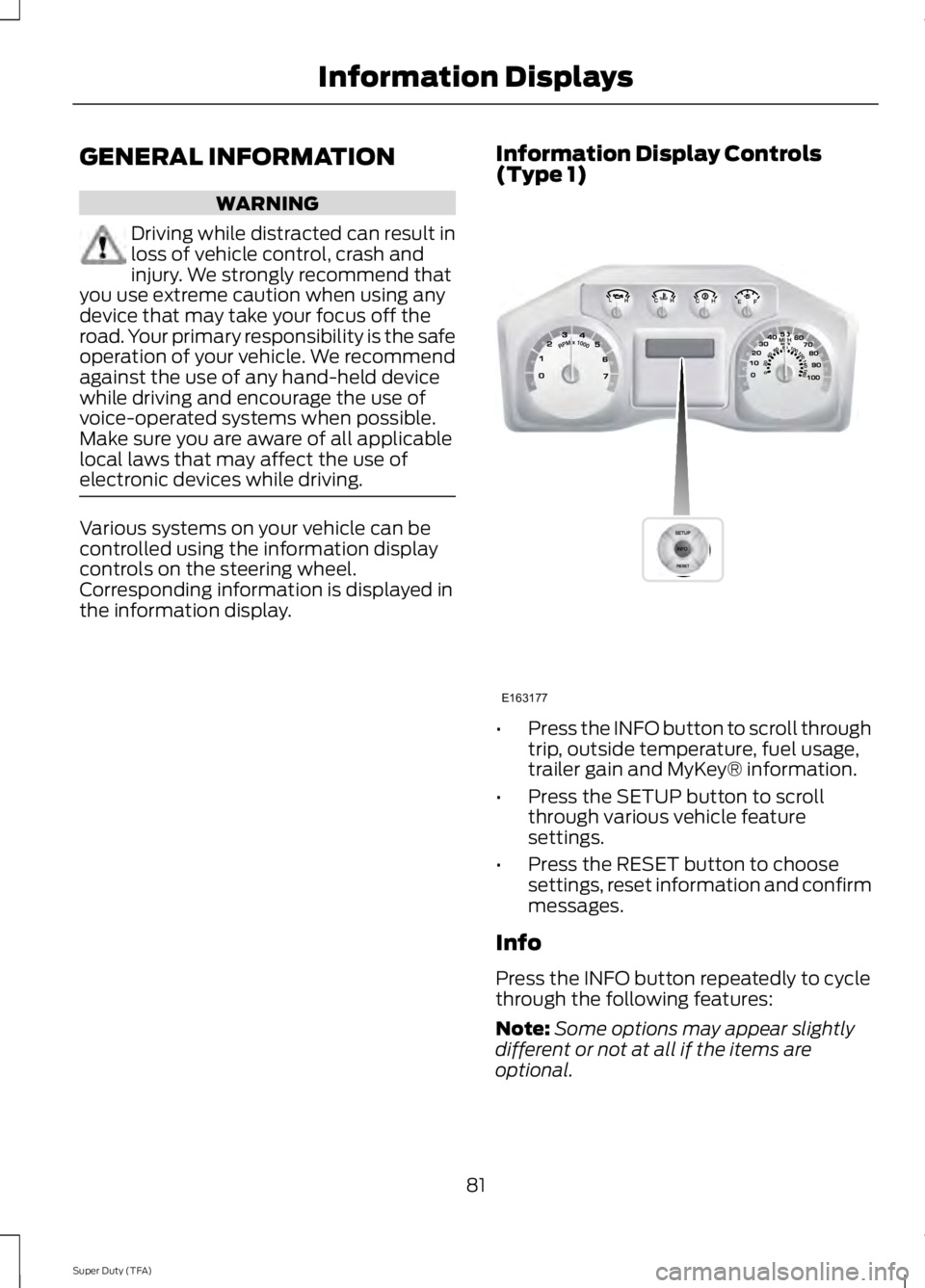
Information Display Controls
(Type 1) •
Press the INFO button to scroll through
trip, outside temperature, fuel usage,
trailer gain and MyKey® information.
• Press the SETUP button to scroll
through various vehicle feature
settings.
• Press the RESET button to choose
settings, reset information and confirm
messages.
Info
Press the INFO button repeatedly to cycle
through the following features:
Note: Some options may appear slightly
different or not at all if the items are
optional.
81
Super Duty (TFA) Information DisplaysE163177
Page 94 of 460

Settings (cont’
d)
Hold OK to Create MyKey
Create MyKey
MyKey
Always On or Selectable
AdvanceTrac
80 MPH (130 km/h) or Off
MAX Speed
45, 55 or 65 MPH (75, 90 or 105 km/h), Off
Speed Warning
On or Off
Volume Limiter
Hold OK to Clear MyKey
Clear MyKey
English, Français, Español
Language
English
Distance
Units
Metric
Fahrenheit (°F)
Temperature
Celsius (°C)
Information In this mode, you can view
different vehicle system
information and perform a
system check. Information
Admin Keys (Number of admin keys)
MyKey
MyKeys (Number of MyKeys programmed)
MyKey Miles (km) (Distance traveled using a programmed
MyKey)
Some items will only display during a system check if a
problem has been detected. If an issue exists on one of
the monitored systems, the number of warnings that need
immediate attention will display in red and the number of
informational warnings will display in amber. Use the up/
down arrow buttons to scroll through the list; press the
right arrow button to display specific information on the
highlighted warning
System Check
91
Super Duty (TFA) Information DisplaysE144642
Page 97 of 460

Action
Message
The powertrain control module will intentionally turn the
engine off due to your vehicle being in the final second of a countdown. The diesel engine shutdown is a (regulatory)
requirement, which may be required of a particular diesel
vehicle for sale in states requiring this feature. Refer to your diesel supplement for more information..
ENGINE TURNS OFF IN
1 SECOND
The powertrain control module will intentionally turn the
engine off due to your vehicle being in the final 30 seconds of
a countdown. The diesel engine shutdown for extended idling is an optional feature. Refer to your diesel supplement for more information.
ENGINE TURNS OFF IN
XX SECONDS
Appears after the 30 second countdown. Refer to your dieselsupplement for more information.
ENGINE TURNED OFF
In extremely cold weather, typically below – 15°F (–26°C)
and if the engine block heater is not utilized, your engine will
not respond to accelerator pedal movement for 30 seconds.
This restriction allows your engine to circulate the oil properly
in order to avoid engine damage. Refer to your diesel supple- ment for more information.
ENGINE WARMING
PLEASE WAIT
Your diesel particulate filter is clean. Refer to your dieselsupplement for more information.
EXHAUST FILTER DRIVE
COMPLETE
Your diesel particulate filter is clean. Refer to your dieselsupplement for more information.
EXHAUST FILTER
CLEANED
The manual operator commanded regeneration process hasstopped. Refer to your diesel supplement for more informa- tion.
EXHAUST CLEAN
STOPPED
The distance you can travel before depleting the remaining
diesel exhaust fluid. Refer to your diesel supplement for more information.
EXHAUST FLUID RANGE
XXX MI
Your diesel exhaust fluid is nearing empty. Your vehicle ’s top
speed will become limited in the displayed distance. You must
replenish the diesel exhaust fluid to resume normal operation of your vehicle. Refer to your diesel supplement for more information.
IN XX MILES, SPEED
LIMITED TO XX MPH
EXHAUST FLUID EMPTY
Your remaining diesel exhaust fluid has depleted. Your speedwill be limited upon restart. You must replenish the dieselexhaust fluid to resume normal operation of your vehicle. Refer to your diesel supplement for more information.
SPEED LIMITED TO XX
MPH UPON RESTART
EXHAUST FLUID EMPTY
94
Super Duty (TFA) Information Displays
Page 99 of 460
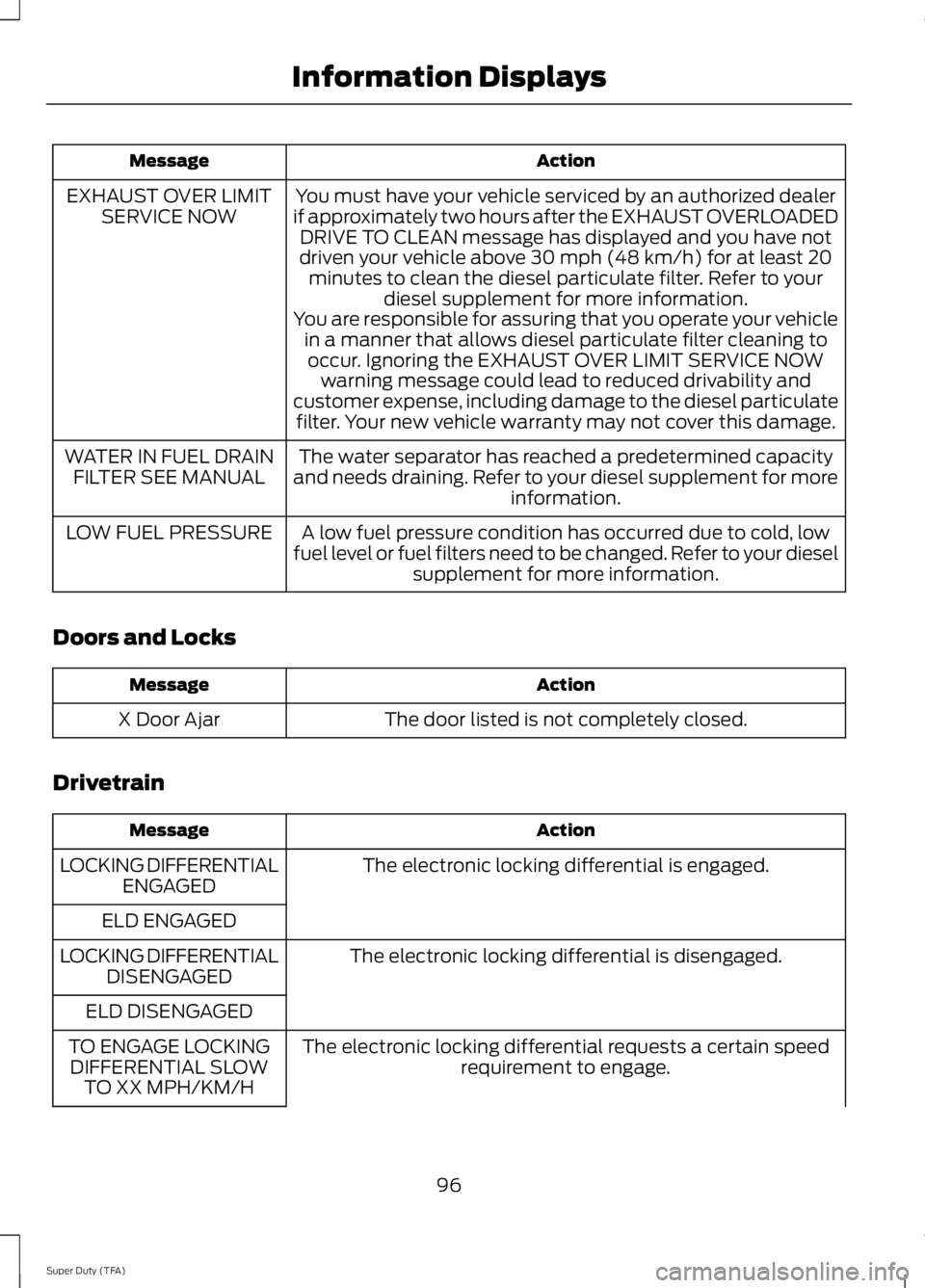
Action
Message
You must have your vehicle serviced by an authorized dealer
if approximately two hours after the EXHAUST OVERLOADED DRIVE TO CLEAN message has displayed and you have not
driven your vehicle above 30 mph (48 km/h) for at least 20 minutes to clean the diesel particulate filter. Refer to your diesel supplement for more information.
EXHAUST OVER LIMIT
SERVICE NOW
You are responsible for assuring that you operate your vehiclein a manner that allows diesel particulate filter cleaning tooccur. Ignoring the EXHAUST OVER LIMIT SERVICE NOW warning message could lead to reduced drivability and
customer expense, including damage to the diesel particulate filter. Your new vehicle warranty may not cover this damage.
The water separator has reached a predetermined capacity
and needs draining. Refer to your diesel supplement for more information.
WATER IN FUEL DRAIN
FILTER SEE MANUAL
A low fuel pressure condition has occurred due to cold, low
fuel level or fuel filters need to be changed. Refer to your diesel supplement for more information.
LOW FUEL PRESSURE
Doors and Locks Action
Message
The door listed is not completely closed.
X Door Ajar
Drivetrain Action
Message
The electronic locking differential is engaged.
LOCKING DIFFERENTIAL
ENGAGED
ELD ENGAGED The electronic locking differential is disengaged.
LOCKING DIFFERENTIAL
DISENGAGED
ELD DISENGAGED The electronic locking differential requests a certain speedrequirement to engage.
TO ENGAGE LOCKING
DIFFERENTIAL SLOW TO XX MPH/KM/H
96
Super Duty (TFA) Information Displays
Page 104 of 460
![FORD F250 2014 Owners Manual Trailer
Action
Message
The current gain setting for the trailer brake.
TRAILER BRAKE GAIN: XX.X
[OUTPUT]
The current gain setting for the trailer brake when atrailer is not connected.
TRAILER BRAKE GA](/manual-img/11/58775/w960_58775-103.png "FORD F250 2014 Owners Manual Trailer
Action
Message
The current gain setting for the trailer brake.
TRAILER BRAKE GAIN: XX.X
[OUTPUT]
The current gain setting for the trailer brake when atrailer is not connected.
TRAILER BRAKE GA")
Trailer
Action
Message
The current gain setting for the trailer brake.
TRAILER BRAKE GAIN: XX.X
[OUTPUT]
The current gain setting for the trailer brake when atrailer is not connected.
TRAILER BRAKE GAIN: XX.X NO
TRAILER
Accompanied by a single chime, in response to faults
sensed by the TBC. See Trailer Sway Control (page 188).
TRAILER BRAKE MODULE
FAULT
A correct trailer connection (a trailer with electric trailerbrakes) is sensed during a given ignition cycle.
TRAILER CONNECTED
A trailer connection becomes disconnected, either
intentionally or unintentionally, and has been sensed during a given ignition cycle. Disregard this status if
your vehicle is not equipped with a factory installed
trailer brake controller. This message may appear when an aftermarket TBC is used even when the trailer is connected.
TRAILER DISCONNECTED
Your trailer sway control has detected trailer sway soyou need to reduce your speed.
TRAILER SWAY REDUCE
SPEED
Faults with your vehicle wiring and trailer wiring orbrake system. See
Towing a Trailer (page 187).
WIRING FAULT ON TRAILER
4WD Action
Message
A fault is present in your 4X4 system. See
Using
Four-Wheel Drive (page 149).
CHECK 4X4
Your 4X4 system is making a shift.
4X4 SHIFT IN PROGRESS
You need to apply the brake in order to shift into4X4 LOW.
FOR 4X4 LOW APPLY BRAKE
When your vehicle is at a stop and you need to shiftinto Neutral before you select 4X4 LOW.
FOR 4X4 LOW SHIFT TO N
When your vehicle is moving and you need toreduce your speed to select 4X4 LOW.
FOR 4X4 LOW SLOW TO 3 MPH
101
Super Duty (TFA) Information Displays
Page 117 of 460
Rear Under Seat Storage (Crew
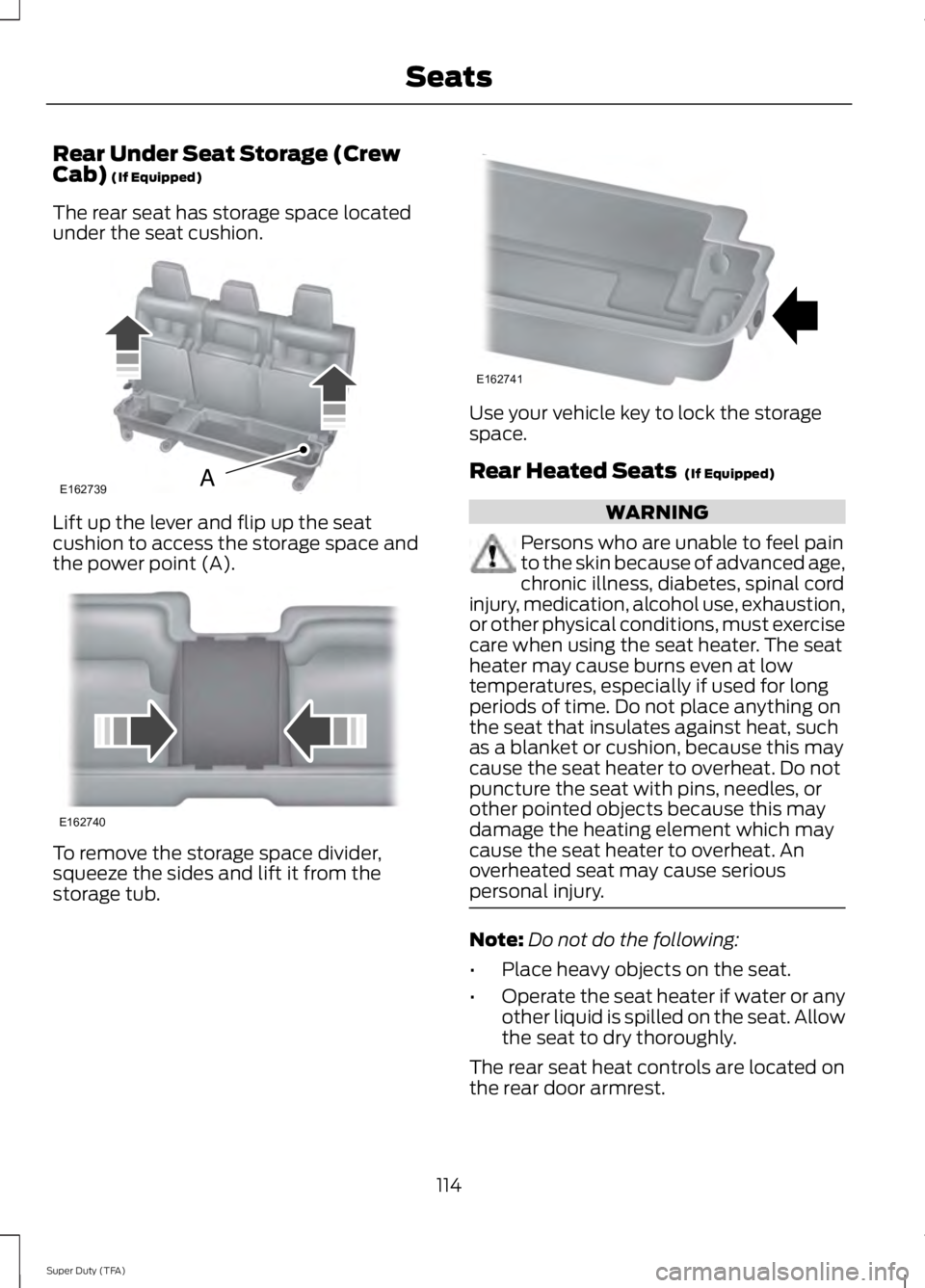
Cab) (If Equipped)
The rear seat has storage space located
under the seat cushion. Lift up the lever and flip up the seat
cushion to access the storage space and
the power point (A).
To remove the storage space divider,
squeeze the sides and lift it from the
storage tub. Use your vehicle key to lock the storage
space.
Rear Heated Seats
(If Equipped)
WARNING
Persons who are unable to feel pain
to the skin because of advanced age,
chronic illness, diabetes, spinal cord
injury, medication, alcohol use, exhaustion,
or other physical conditions, must exercise
care when using the seat heater. The seat
heater may cause burns even at low
temperatures, especially if used for long
periods of time. Do not place anything on
the seat that insulates against heat, such
as a blanket or cushion, because this may
cause the seat heater to overheat. Do not
puncture the seat with pins, needles, or
other pointed objects because this may
damage the heating element which may
cause the seat heater to overheat. An
overheated seat may cause serious
personal injury. Note:
Do not do the following:
• Place heavy objects on the seat.
• Operate the seat heater if water or any
other liquid is spilled on the seat. Allow
the seat to dry thoroughly.
The rear seat heat controls are located on
the rear door armrest.
114
Super Duty (TFA) SeatsE162739A E162740 E162741