2014 FORD F150 trailer
[x] Cancel search: trailerPage 6 of 472

Transmission
Automatic Transmission............................147
Four-Wheel Drive
Using Four-Wheel Drive
.............................153
Rear Axle
Limited Slip Differential..............................161
Electronic Locking Differential
.................161
Brakes
General Information
....................................163
Hints on Driving With Anti-Lock Brakes...........................................................163
Parking Brake.................................................164
Hill Start Assist..............................................164
Traction Control
Principle of Operation................................166
Using Traction Control...............................166
Stability Control
Principle of Operation.................................167
Using Stability Control...............................168
Terrain Response
Principle of Operation.................................170
Using Hill Descent Control........................170
Parking Aids
Parking Aid
.......................................................172
Rear View Camera........................................173
Cruise Control
Principle of Operation.................................176
Using Cruise Control
....................................176
Driving Aids
Steering
.............................................................177 Load Carrying
Load Limit
........................................................179
Tailgate.............................................................186
Towing
Towing a Trailer..............................................191
Trailer Sway Control....................................192
Recommended Towing Weights............192
Essential Towing Checks...........................201
Transporting the Vehicle
...........................207
Towing the Vehicle on Four Wheels......208
Driving Hints
Breaking-In......................................................210
Economical Driving
......................................210
Driving Through Water.................................211
Floor Mats.........................................................211
Snowplowing..................................................212
Roadside Emergencies
Roadside Assistance...................................215
Hazard Warning Flashers
..........................216
Fuel Shutoff....................................................216
Jump Starting the Vehicle.........................216
Post-Crash Alert System
...........................218
Customer Assistance
Getting the Services You Need................219
In California (U.S. Only)
............................220
The Better Business Bureau (BBB) Auto Line Program (U.S. Only).......................221
Utilizing the Mediation/Arbitration Program (Canada Only)
........................221
Getting Assistance Outside the U.S. and Canada........................................................222
Ordering Additional Owner's Literature.....................................................223
Reporting Safety Defects (U.S. Only).............................................................223
Reporting Safety Defects (Canada Only).............................................................224
3
F150 (TF6) , enUSA Table of Contents
Page 80 of 472

Fold-Away Exterior Mirrors
Push the mirror toward the door window
glass. Make sure that you fully engage the
mirror in its support when returning it to its
original position.
Power-Folding Mirrors (If Equipped)
Note:
Moving the mirrors 10 or more times
within one minute, or repeated folding and
unfolding of the mirrors while holding the
control down during full travel, may disable
the system to protect the motors from
overheating. Wait approximately three
minutes with the vehicle running, and up to
10 minutes with the vehicle off, for the
system to reset and for function to return to
normal.
Pull the control back to fold the mirrors in
or out.
Loose Mirror
You can manually fold a power-folding
mirror by pulling it toward the door window
glass. This may cause the mirror to appear
loose and it will need to be
re-synchronized. Pull and hold the control
to fold the mirrors in until the movement
stops. You will hear a click that indicates
re-synchronization. If you do not hear a
click, use the control to fold the mirrors all
the way out, then in again. Once you hear
the click, the mirrors will operate normally
until you fold them manually again. Heated Exterior Mirrors (If Equipped)
See Heated Windows and Mirrors (page
112
).
Memory Mirrors
(If Equipped)
You can save and recall the mirror
positions through the memory function.
See
Memory Function (page 118).
Auto-dimming Feature (if
equipped)
The driver exterior mirror automatically
dims when the interior auto-dimming
mirror turns on.
Signal Indicator Mirrors
(If Equipped)
The rear-facing portion of the appropriate
mirror housing will blink when you switch
on the turn signal.
Clearance Lamps
(If Equipped)
The lower, outer part of the mirror housings
light when you switch the headlamps or
parking lamps on.
Telescoping Mirrors
(If Equipped) This feature lets you extend the mirror
about 3 inches (75 millimeters). It is useful
when towing a trailer. You can manually
pull out or push in the mirrors to the desired
position.
77
F150 (TF6) , enUSA Windows and MirrorsE163060 E163061
Page 90 of 472
GENERAL INFORMATION
WARNING
Driving while distracted can result in
loss of vehicle control, crash and
injury. We strongly recommend that
you use extreme caution when using any
device that may take your focus off the
road. Your primary responsibility is the safe
operation of your vehicle. We recommend
against the use of any handheld device
while driving and encourage the use of
voice-operated systems when possible.
Make sure you are aware of all applicable
local laws that may affect the use of
electronic devices while driving. Various systems on your vehicle can be
controlled using the information display
controls on the steering wheel.
Corresponding information is displayed in
the information display.
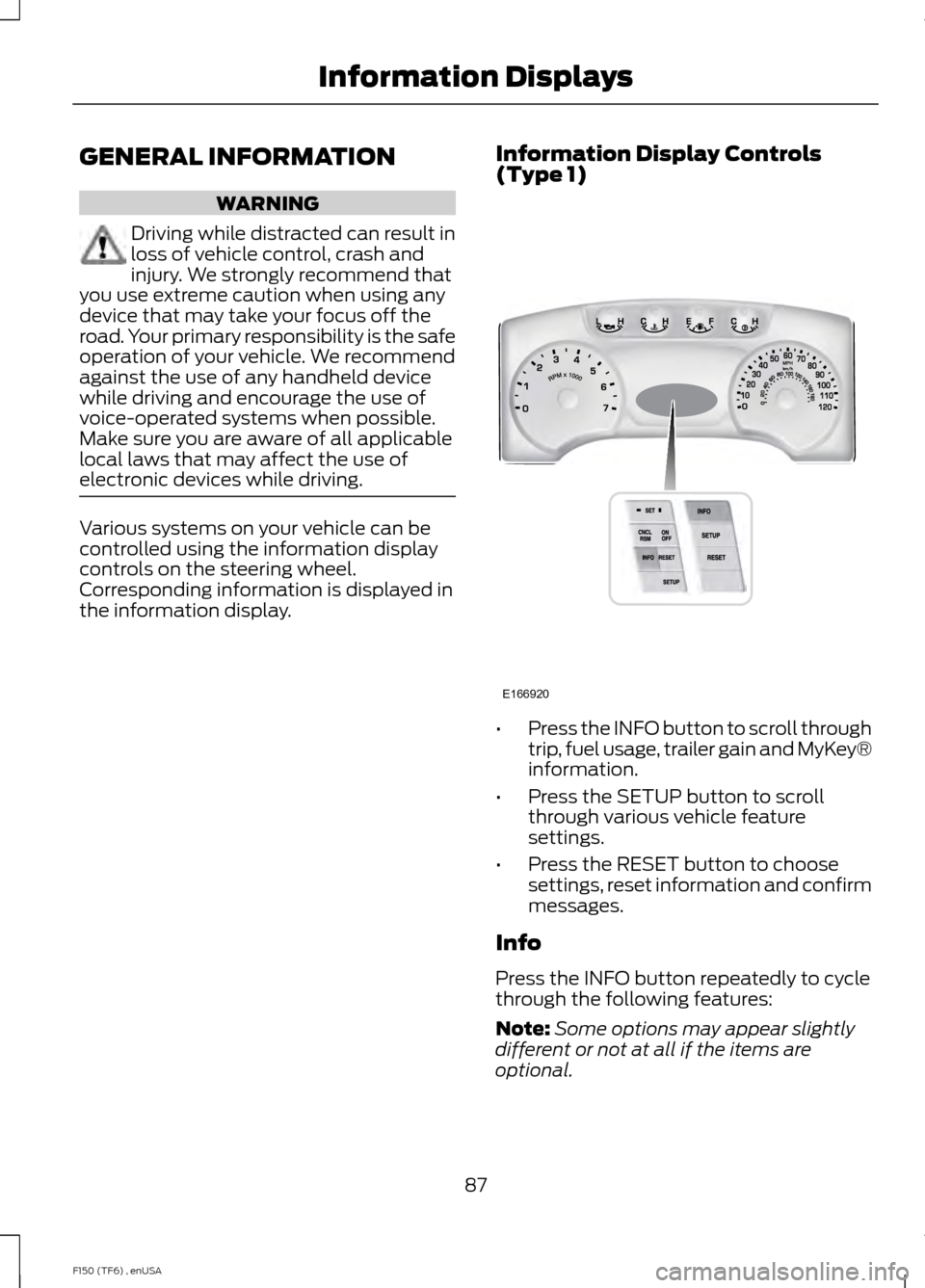
Information Display Controls
(Type 1) •
Press the INFO button to scroll through
trip, fuel usage, trailer gain and MyKey®
information.
• Press the SETUP button to scroll
through various vehicle feature
settings.
• Press the RESET button to choose
settings, reset information and confirm
messages.
Info
Press the INFO button repeatedly to cycle
through the following features:
Note: Some options may appear slightly
different or not at all if the items are
optional.
87
F150 (TF6) , enUSA Information DisplaysE166920
Page 91 of 472
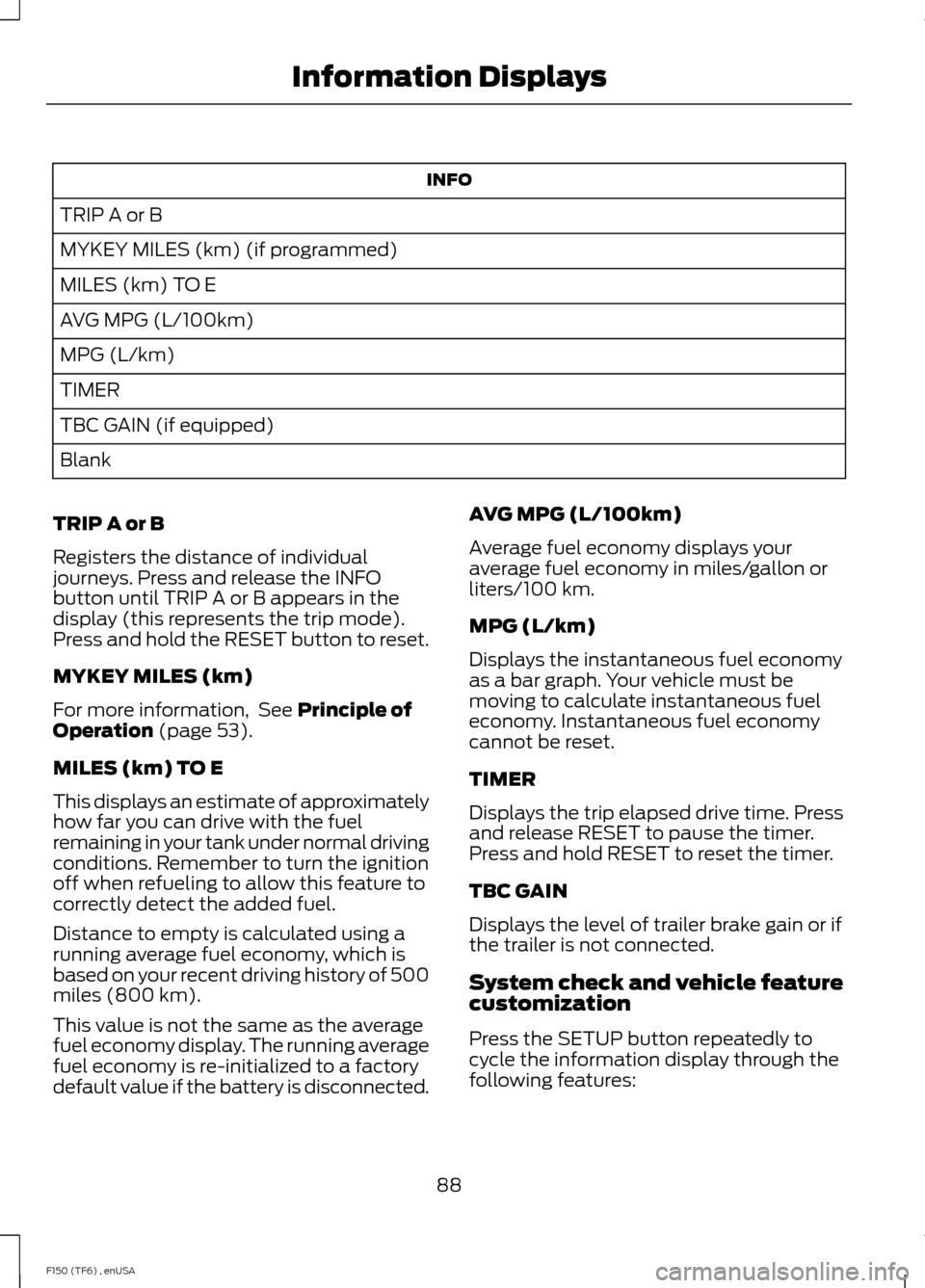
INFO
TRIP A or B
MYKEY MILES (km) (if programmed)
MILES (km) TO E
AVG MPG (L/100km)
MPG (L/km)
TIMER
TBC GAIN (if equipped)
Blank
TRIP A or B
Registers the distance of individual
journeys. Press and release the INFO
button until TRIP A or B appears in the
display (this represents the trip mode).
Press and hold the RESET button to reset.
MYKEY MILES (km)
For more information, See Principle of
Operation (page 53).
MILES (km) TO E
This displays an estimate of approximately
how far you can drive with the fuel
remaining in your tank under normal driving
conditions. Remember to turn the ignition
off when refueling to allow this feature to
correctly detect the added fuel.
Distance to empty is calculated using a
running average fuel economy, which is
based on your recent driving history of 500
miles (800 km).
This value is not the same as the average
fuel economy display. The running average
fuel economy is re-initialized to a factory
default value if the battery is disconnected. AVG MPG (L/100km)
Average fuel economy displays your
average fuel economy in miles/gallon or
liters/100 km.
MPG (L/km)
Displays the instantaneous fuel economy
as a bar graph. Your vehicle must be
moving to calculate instantaneous fuel
economy. Instantaneous fuel economy
cannot be reset.
TIMER
Displays the trip elapsed drive time. Press
and release RESET to pause the timer.
Press and hold RESET to reset the timer.
TBC GAIN
Displays the level of trailer brake gain or if
the trailer is not connected.
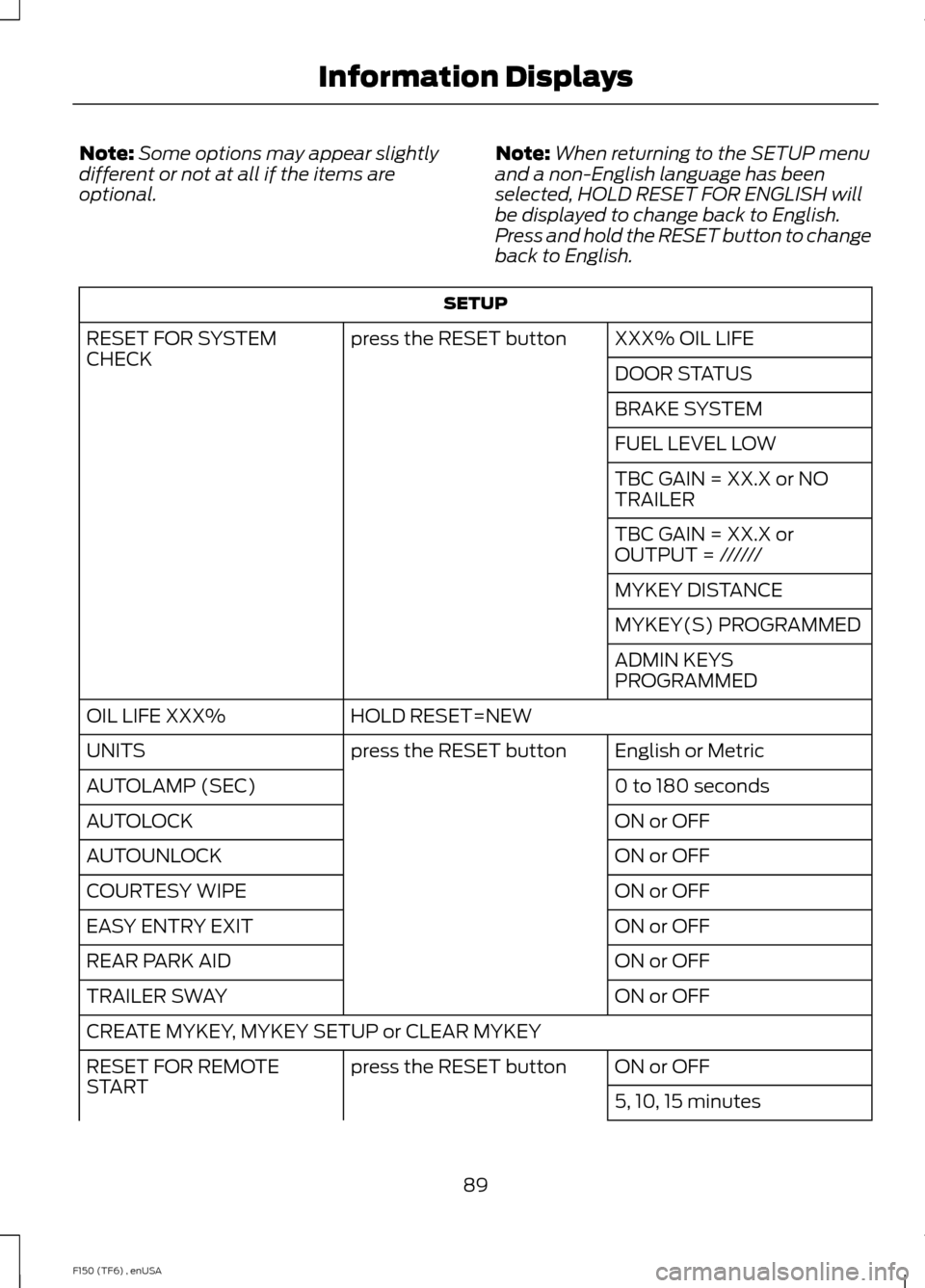
System check and vehicle feature
customization
Press the SETUP button repeatedly to
cycle the information display through the
following features:
88
F150 (TF6) , enUSA Information Displays
Page 92 of 472
Note:
Some options may appear slightly
different or not at all if the items are
optional. Note:
When returning to the SETUP menu
and a non-English language has been
selected, HOLD RESET FOR ENGLISH will
be displayed to change back to English.
Press and hold the RESET button to change
back to English. SETUP
XXX% OIL LIFE
press the RESET button
RESET FOR SYSTEM
CHECK
DOOR STATUS
BRAKE SYSTEM
FUEL LEVEL LOW
TBC GAIN = XX.X or NO
TRAILER
TBC GAIN = XX.X or
OUTPUT = //////
MYKEY DISTANCE
MYKEY(S) PROGRAMMED
ADMIN KEYS
PROGRAMMED
HOLD RESET=NEW
OIL LIFE XXX%
English or Metric
press the RESET button
UNITS
0 to 180 seconds
AUTOLAMP (SEC)
ON or OFF
AUTOLOCK
ON or OFF
AUTOUNLOCK
ON or OFF
COURTESY WIPE
ON or OFF
EASY ENTRY EXIT
ON or OFF
REAR PARK AID
ON or OFF
TRAILER SWAY
CREATE MYKEY, MYKEY SETUP or CLEAR MYKEY
ON or OFF
press the RESET button
RESET FOR REMOTE
START
5, 10, 15 minutes
89
F150 (TF6) , enUSA Information Displays
Page 93 of 472
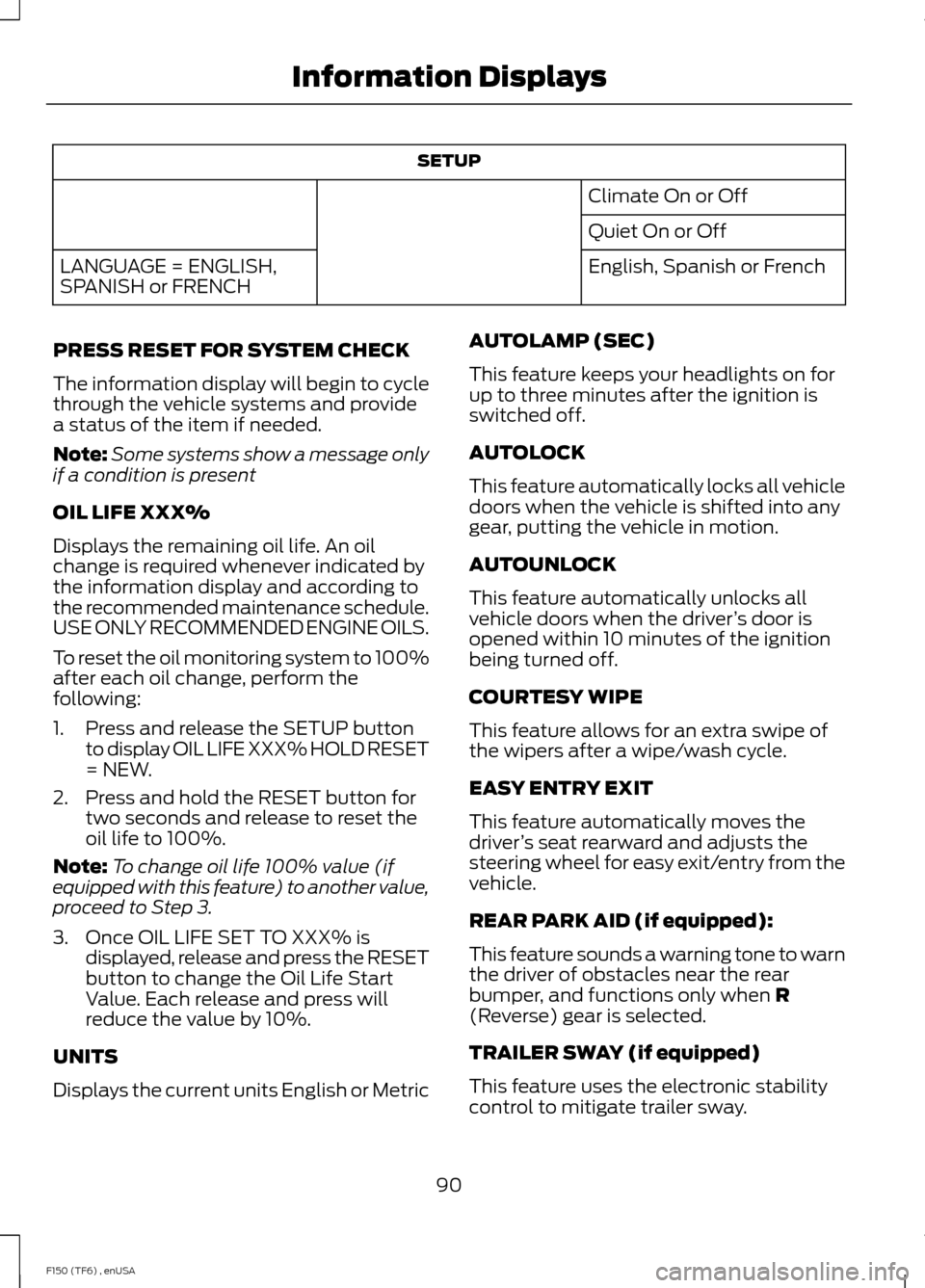
SETUP
Climate On or Off
Quiet On or Off
English, Spanish or French
LANGUAGE = ENGLISH,
SPANISH or FRENCH
PRESS RESET FOR SYSTEM CHECK
The information display will begin to cycle
through the vehicle systems and provide
a status of the item if needed.
Note: Some systems show a message only
if a condition is present
OIL LIFE XXX%
Displays the remaining oil life. An oil
change is required whenever indicated by
the information display and according to
the recommended maintenance schedule.
USE ONLY RECOMMENDED ENGINE OILS.
To reset the oil monitoring system to 100%
after each oil change, perform the
following:
1. Press and release the SETUP button to display OIL LIFE XXX% HOLD RESET
= NEW.
2. Press and hold the RESET button for two seconds and release to reset the
oil life to 100%.
Note: To change oil life 100% value (if
equipped with this feature) to another value,
proceed to Step 3.
3. Once OIL LIFE SET TO XXX% is displayed, release and press the RESET
button to change the Oil Life Start
Value. Each release and press will
reduce the value by 10%.
UNITS
Displays the current units English or Metric AUTOLAMP (SEC)
This feature keeps your headlights on for
up to three minutes after the ignition is
switched off.
AUTOLOCK
This feature automatically locks all vehicle
doors when the vehicle is shifted into any
gear, putting the vehicle in motion.
AUTOUNLOCK
This feature automatically unlocks all
vehicle doors when the driver
’s door is
opened within 10 minutes of the ignition
being turned off.
COURTESY WIPE
This feature allows for an extra swipe of
the wipers after a wipe/wash cycle.
EASY ENTRY EXIT
This feature automatically moves the
driver ’s seat rearward and adjusts the
steering wheel for easy exit/entry from the
vehicle.
REAR PARK AID (if equipped):
This feature sounds a warning tone to warn
the driver of obstacles near the rear
bumper, and functions only when R
(Reverse) gear is selected.
TRAILER SWAY (if equipped)
This feature uses the electronic stability
control to mitigate trailer sway.
90
F150 (TF6) , enUSA Information Displays
Page 96 of 472
Gal used
Shows the amount of fuel used for a given
trip.
Avg MPG
Shows the average distance traveled per
unit of fuel used for a given trip.
Fuel Economy Use the arrow buttons to choose
the desired fuel economy
display.
Fuel Economy
Instant MPG (L/100km)
Fuel Econ.
mi (km) to E
AVG MPG (L/100km)
5, 10, 30 Minutes or Last 5 Resets
Options
Fuel Hist.
Hold OK to Reset, this resets the currently
displayed fuel economy information.
Instant MPG
Shows your instantaneous fuel usage.
mi to E
Shows the approximate distance your
vehicle can travel before running out of
fuel.
Average MPG
Shows the average fuel usage based on
time. Press and hold OK to reset this value. Fuel Hist.
Shows fuel usage as a bar graph based on
time. The graph is updated each minute
with the fuel economy that was achieved
during the prior 5, 10, 30 minutes of driving.
Truck Apps In this mode, off-road
information depicted with
graphics and trailer towing
application options are available.
Note: Some items are optional and may
not appear. Truck Apps
AdvanceTrac® mode, hill descent control, off-road mode, off-road camera:
Displays which modes are active. (SVT Raptor)
Off Road
Pitch and bank angle (in degrees)
Steering angle (in degrees)
Differential lock/unlock
Torque flow 4X4 System
Press OK for Info
93
F150 (TF6) , enUSA Information DisplaysE163180 E163181
Page 97 of 472
Truck Apps
AdvanceTrac®
2 –speed Auto 4X4
ELD (Electronic Locking Differential)
Hill Descent Control Truck Apps (cont’
d)
Off-Road Mode
Press OK for Info
Off Road
(cont’ d)
Press OK to Enable / Disable
Off-Road Camera (SVT
Raptor)
Trailer Disconnected
Trailer
Active trailer name or default trailer
Accumulated trailer distance
Trailer gain and output Change Active Trailer
Press OK for options
Conventional, Fifth
Wheel or Gooseneck.
Connection Checklist (if
equipped)
Delete Trailer
Tow Haul mode or
Trailer Brake Controller
Information Screen
Rename Trailer
Reset Trailer Mileage / Kilometers (if equipped)
Pitch and bank angle (in degrees)
Displays the pitch angle (front to rear) and
bank angle (side to side) of the road
surface.
Steering angle (in degrees)
Displays the steering angle of the front
wheels after the vehicle has been driven
for a period of time. Differential lock/unlock
Displays the state (locked or unlocked) of
the electronic locking differential.
Torque flow
Displays the torque flow to the front and
rear driveline and operating mode of the
transfer case: 4X2, 4X4 High, 4X4 Low, 4X4
Auto.
94
F150 (TF6) , enUSA Information Displays