2014 FORD F150 tow
[x] Cancel search: towPage 151 of 472
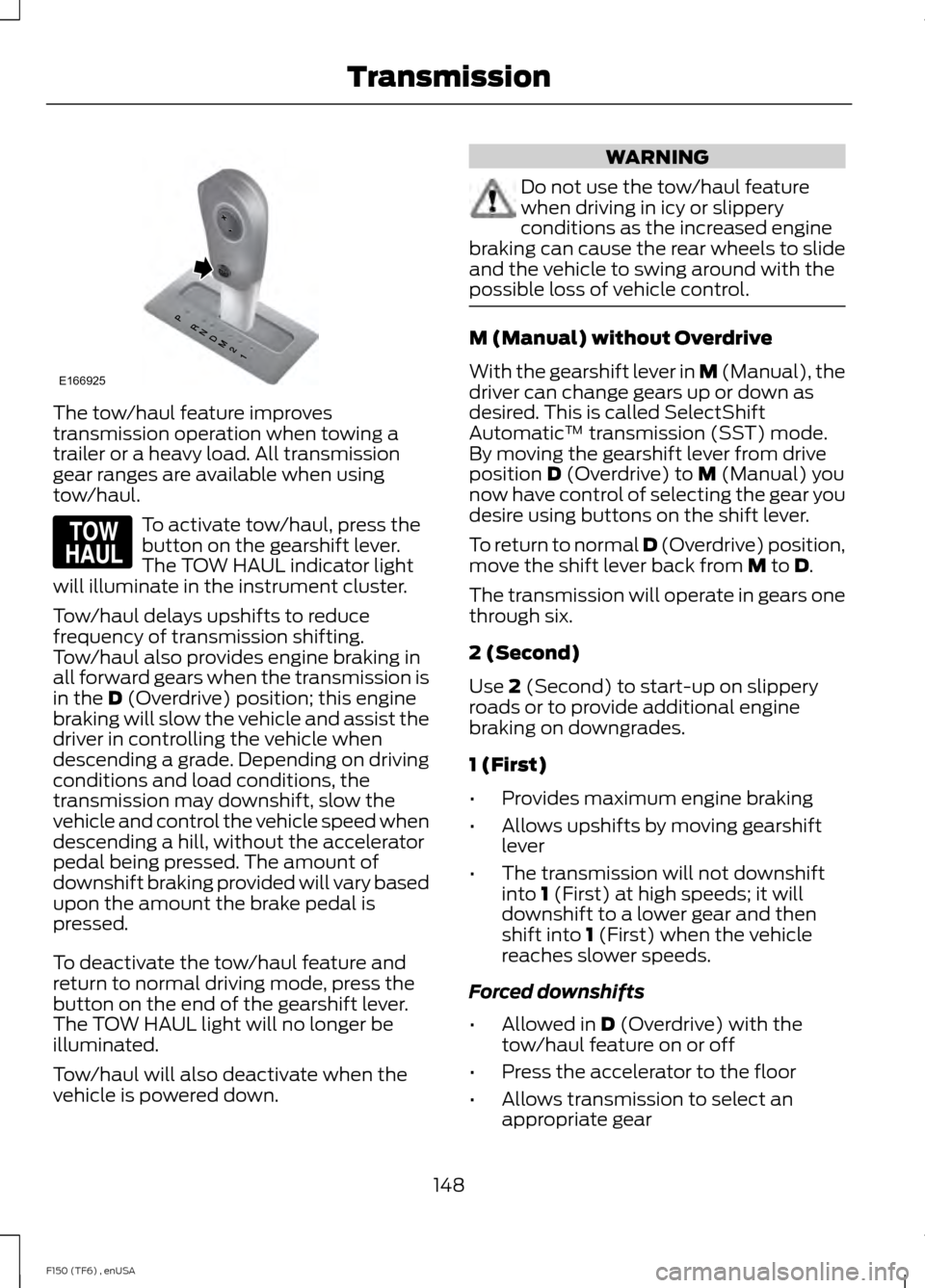
The tow/haul feature improves
transmission operation when towing a
trailer or a heavy load. All transmission
gear ranges are available when using
tow/haul.
To activate tow/haul, press the
button on the gearshift lever.
The TOW HAUL indicator light
will illuminate in the instrument cluster.
Tow/haul delays upshifts to reduce
frequency of transmission shifting.
Tow/haul also provides engine braking in
all forward gears when the transmission is
in the D (Overdrive) position; this engine
braking will slow the vehicle and assist the
driver in controlling the vehicle when
descending a grade. Depending on driving
conditions and load conditions, the
transmission may downshift, slow the
vehicle and control the vehicle speed when
descending a hill, without the accelerator
pedal being pressed. The amount of
downshift braking provided will vary based
upon the amount the brake pedal is
pressed.
To deactivate the tow/haul feature and
return to normal driving mode, press the
button on the end of the gearshift lever.
The TOW HAUL light will no longer be
illuminated.
Tow/haul will also deactivate when the
vehicle is powered down. WARNING
Do not use the tow/haul feature
when driving in icy or slippery
conditions as the increased engine
braking can cause the rear wheels to slide
and the vehicle to swing around with the
possible loss of vehicle control. M (Manual) without Overdrive
With the gearshift lever in M (Manual), the
driver can change gears up or down as
desired. This is called SelectShift
Automatic
™ transmission (SST) mode.
By moving the gearshift lever from drive
position
D (Overdrive) to M (Manual) you
now have control of selecting the gear you
desire using buttons on the shift lever.
To return to normal
D (Overdrive) position,
move the shift lever back from M to D.
The transmission will operate in gears one
through six.
2 (Second)
Use
2 (Second) to start-up on slippery
roads or to provide additional engine
braking on downgrades.
1 (First)
• Provides maximum engine braking
• Allows upshifts by moving gearshift
lever
• The transmission will not downshift
into
1 (First) at high speeds; it will
downshift to a lower gear and then
shift into
1 (First) when the vehicle
reaches slower speeds.
Forced downshifts
• Allowed in
D (Overdrive) with the
tow/haul feature on or off
• Press the accelerator to the floor
• Allows transmission to select an
appropriate gear
148
F150 (TF6) , enUSA TransmissionE166925 E161509
Page 154 of 472
Column-shifter
1. Apply the parking brake. Turn the
ignition key to the off position, then
remove the key.
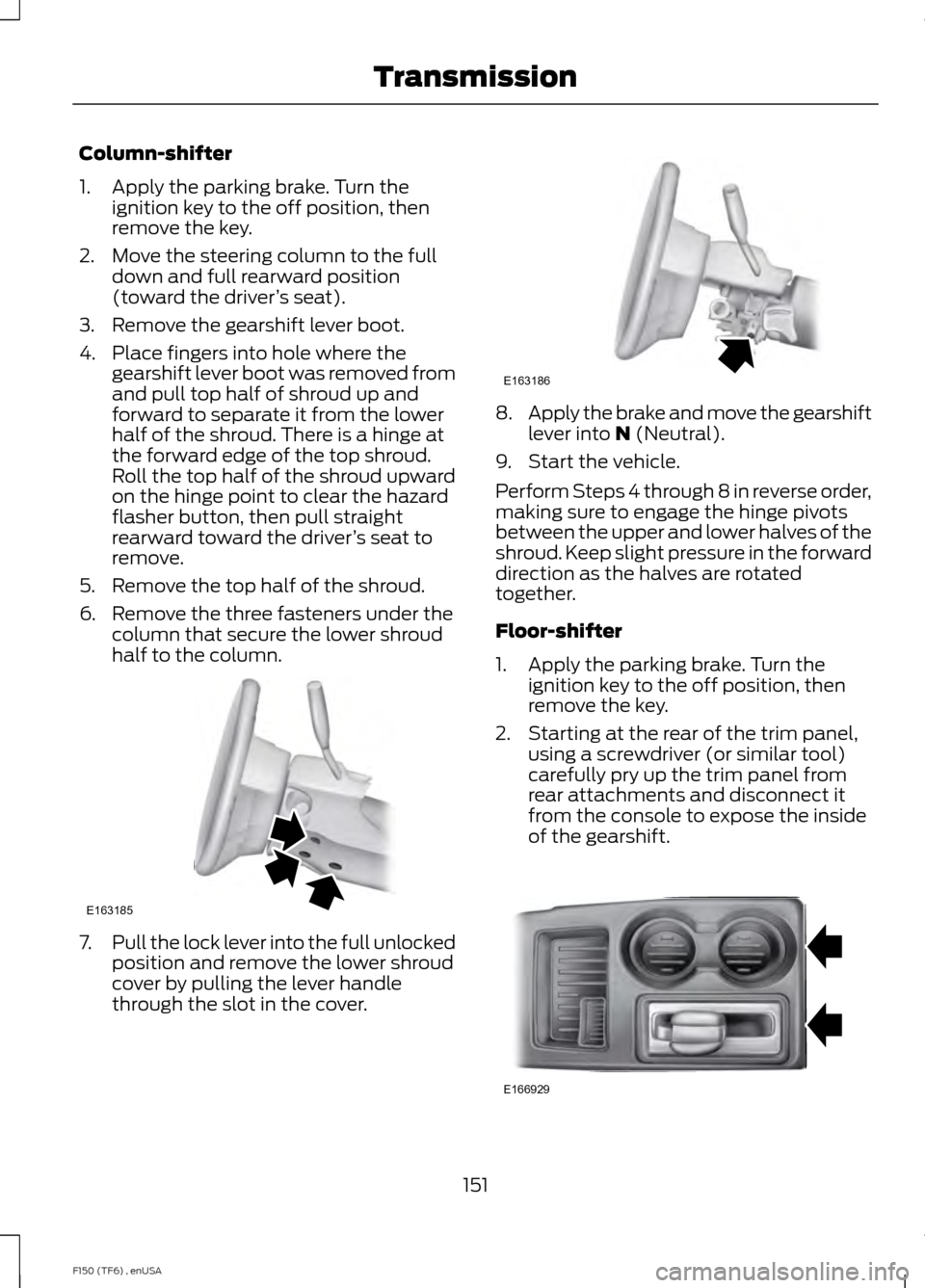
2. Move the steering column to the full down and full rearward position
(toward the driver ’s seat).
3. Remove the gearshift lever boot.
4. Place fingers into hole where the gearshift lever boot was removed from
and pull top half of shroud up and
forward to separate it from the lower
half of the shroud. There is a hinge at
the forward edge of the top shroud.
Roll the top half of the shroud upward
on the hinge point to clear the hazard
flasher button, then pull straight
rearward toward the driver ’s seat to
remove.
5. Remove the top half of the shroud.
6. Remove the three fasteners under the column that secure the lower shroud
half to the column. 7.
Pull the lock lever into the full unlocked
position and remove the lower shroud
cover by pulling the lever handle
through the slot in the cover. 8.
Apply the brake and move the gearshift
lever into N (Neutral).
9. Start the vehicle.
Perform Steps 4 through 8 in reverse order,
making sure to engage the hinge pivots
between the upper and lower halves of the
shroud. Keep slight pressure in the forward
direction as the halves are rotated
together.
Floor-shifter
1. Apply the parking brake. Turn the ignition key to the off position, then
remove the key.
2. Starting at the rear of the trim panel, using a screwdriver (or similar tool)
carefully pry up the trim panel from
rear attachments and disconnect it
from the console to expose the inside
of the gearshift. 151
F150 (TF6) , enUSA TransmissionE163185 E163186 E166929
Page 165 of 472
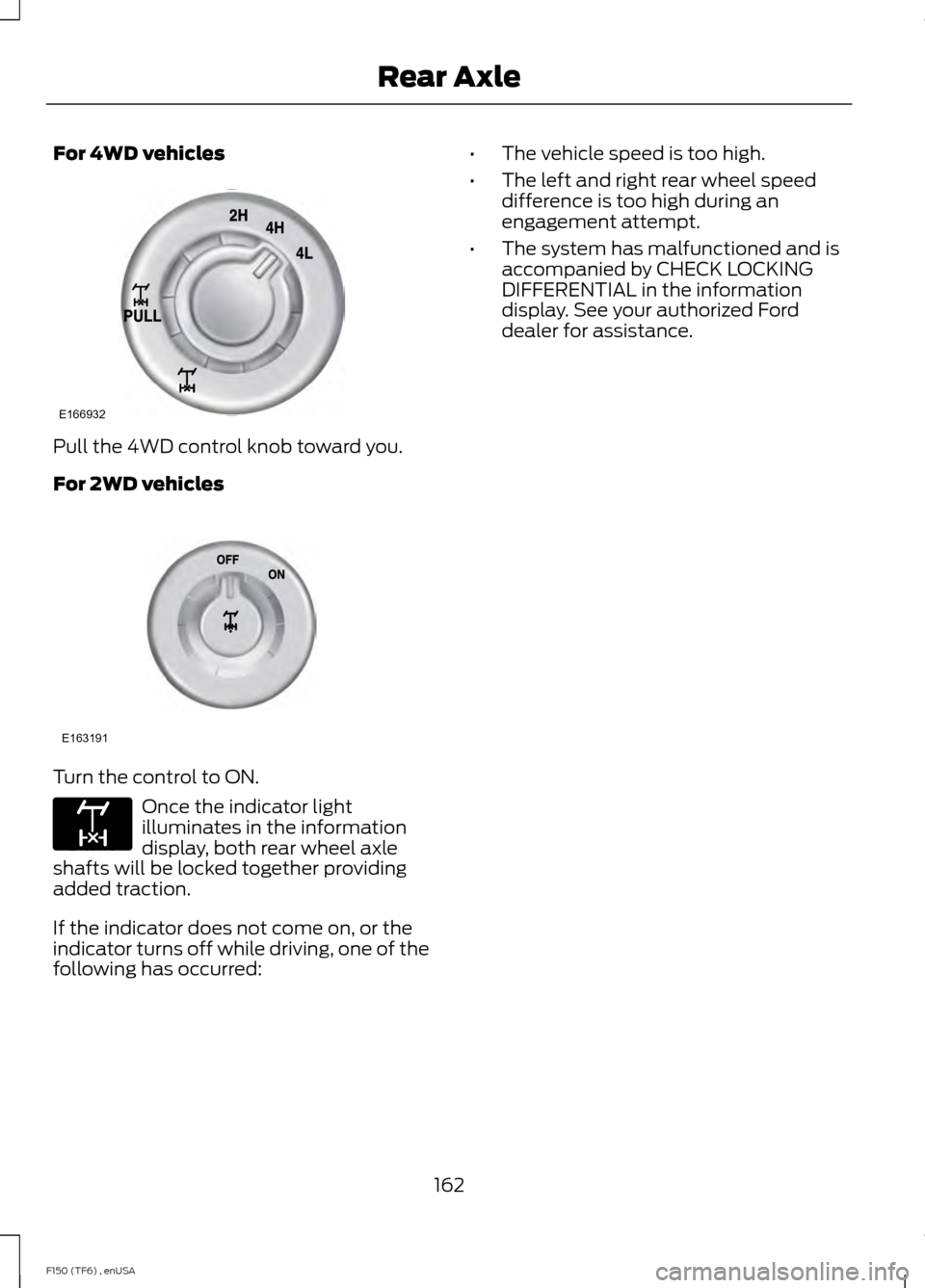
For 4WD vehicles
Pull the 4WD control knob toward you.
For 2WD vehicles
Turn the control to ON.
Once the indicator light
illuminates in the information
display, both rear wheel axle
shafts will be locked together providing
added traction.
If the indicator does not come on, or the
indicator turns off while driving, one of the
following has occurred: •
The vehicle speed is too high.
• The left and right rear wheel speed
difference is too high during an
engagement attempt.
• The system has malfunctioned and is
accompanied by CHECK LOCKING
DIFFERENTIAL in the information
display. See your authorized Ford
dealer for assistance.
162
F150 (TF6) , enUSA Rear AxleE166932 E163191 E163170
Page 166 of 472
GENERAL INFORMATION
Note:
Occasional brake noise is normal. If
a metal-to-metal, continuous grinding or
continuous squeal sound is present, the
brake linings may be worn-out. Have the
system checked by an authorized dealer. If
your vehicle has continuous vibration or
shudder in the steering wheel while braking,
have it checked by an authorized dealer.
Note: Brake dust may accumulate on the
wheels, even under normal driving
conditions. Some dust is inevitable as the
brakes wear and does not contribute to
brake noise. See Cleaning the Alloy
Wheels (page 264). See
Warning Lamps and
Indicators (page 82).
Wet brakes result in reduced braking
efficiency. Gently press the brake pedal a
few times when driving from a car wash or
standing water to dry the brakes.
Brake Over Accelerator
In the event the accelerator pedal
becomes stuck or entrapped, apply steady
and firm pressure to the brake pedal to
slow the vehicle and reduce engine power.
If you experience this condition, apply the
brakes and bring your vehicle to a safe
stop. Move the transmission selector lever
to position
P, switch the engine off and
apply the parking brake. Inspect the
accelerator pedal for any interference. If
none are found and the condition persists,
have your vehicle towed to the nearest
authorized dealer. Brake Assist
Brake assist detects when you brake
rapidly by measuring the rate at which you
press the brake pedal. It provides
maximum braking efficiency as long as you
press the pedal, and can reduce stopping
distances in critical situations.
Anti-lock Brake System
This system helps you maintain steering
control during emergency stops by keeping
the brakes from locking.
This lamp momentarily
illuminates when you turn the
ignition on. If the light does not
illuminate during start up, remains on or
flashes, the system may be disabled. Have
the system checked by an authorized
dealer. If the system is disabled, normal
braking is still effective. If the
brake warning lamp illuminates
when you release the parking brake, have
the system checked by an authorized
dealer.
HINTS ON DRIVING WITH
ANTI-LOCK BRAKES
Note: When the system is operating, the
brake pedal will pulse and may travel
further. Maintain pressure on the brake
pedal. You may also hear a noise from the
system. This is normal.
The anti-lock braking system will not
eliminate the risks when:
• you drive too closely to the vehicle in
front of you
• your vehicle is hydroplaning
• you take corners too fast
• the road surface is poor.
163
F150 (TF6) , enUSA BrakesE144522 E144522
Page 176 of 472
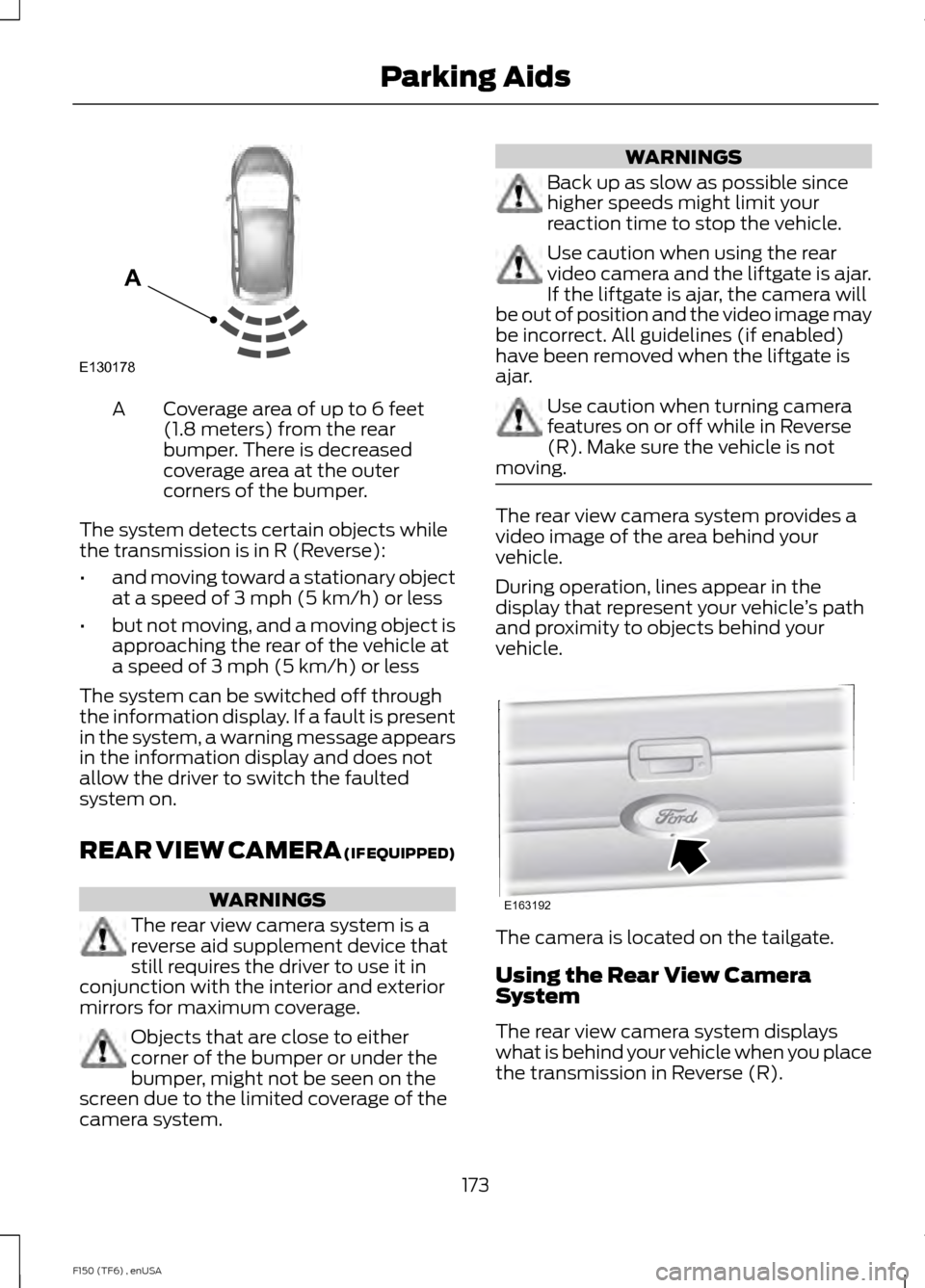
Coverage area of up to 6 feet
(1.8 meters) from the rear
bumper. There is decreased
coverage area at the outer
corners of the bumper.
A
The system detects certain objects while
the transmission is in R (Reverse):
• and moving toward a stationary object
at a speed of 3 mph (5 km/h) or less
• but not moving, and a moving object is
approaching the rear of the vehicle at
a speed of 3 mph (5 km/h) or less
The system can be switched off through
the information display. If a fault is present
in the system, a warning message appears
in the information display and does not
allow the driver to switch the faulted
system on.
REAR VIEW CAMERA (IF EQUIPPED) WARNINGS
The rear view camera system is a
reverse aid supplement device that
still requires the driver to use it in
conjunction with the interior and exterior
mirrors for maximum coverage. Objects that are close to either
corner of the bumper or under the
bumper, might not be seen on the
screen due to the limited coverage of the
camera system. WARNINGS
Back up as slow as possible since
higher speeds might limit your
reaction time to stop the vehicle.
Use caution when using the rear
video camera and the liftgate is ajar.
If the liftgate is ajar, the camera will
be out of position and the video image may
be incorrect. All guidelines (if enabled)
have been removed when the liftgate is
ajar. Use caution when turning camera
features on or off while in Reverse
(R). Make sure the vehicle is not
moving. The rear view camera system provides a
video image of the area behind your
vehicle.
During operation, lines appear in the
display that represent your vehicle
’s path
and proximity to objects behind your
vehicle. The camera is located on the tailgate.
Using the Rear View Camera
System
The rear view camera system displays
what is behind your vehicle when you place
the transmission in Reverse (R).
173
F150 (TF6) , enUSA Parking AidsE130178
A E163192
Page 177 of 472
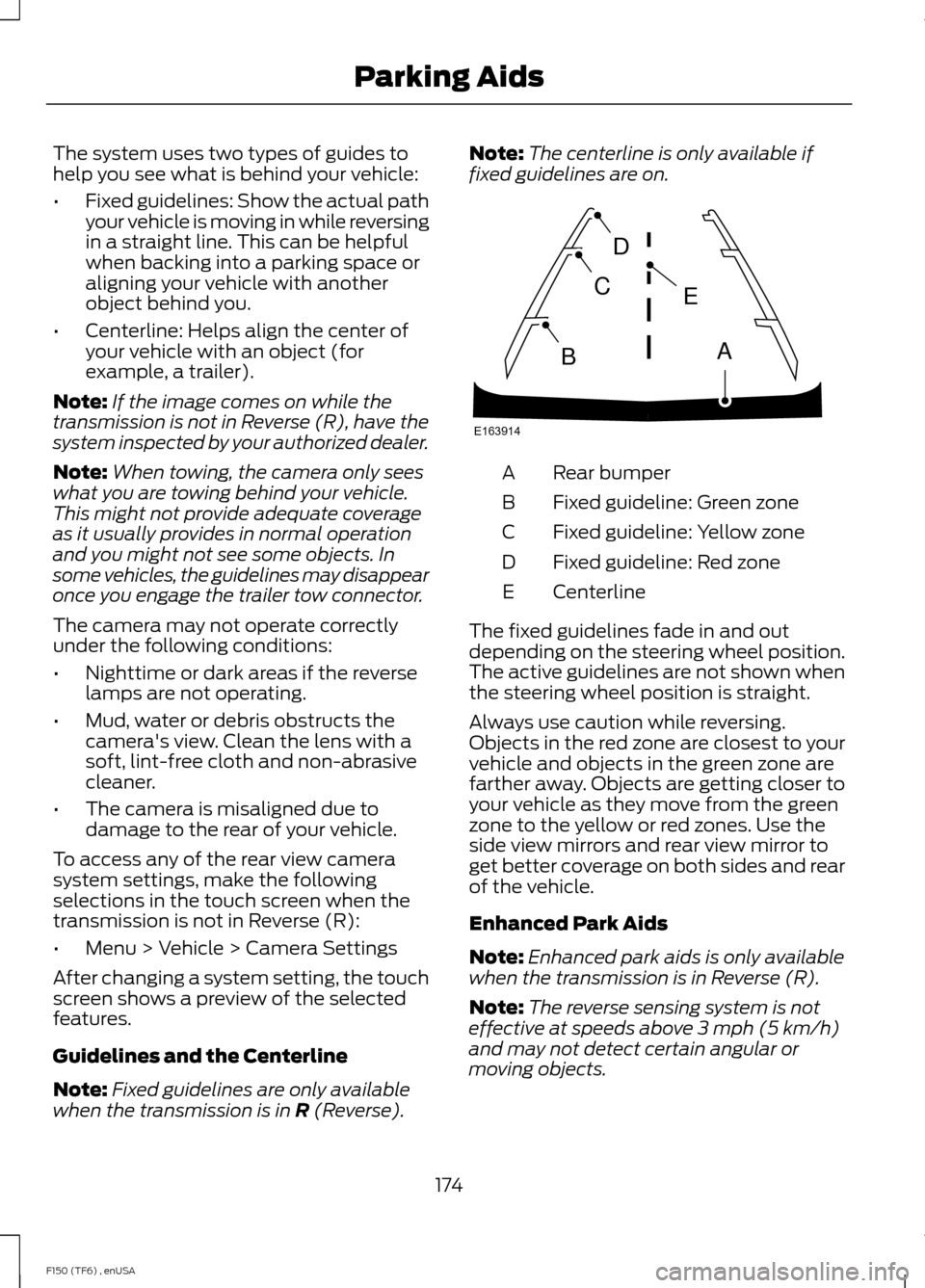
The system uses two types of guides to
help you see what is behind your vehicle:
•
Fixed guidelines: Show the actual path
your vehicle is moving in while reversing
in a straight line. This can be helpful
when backing into a parking space or
aligning your vehicle with another
object behind you.
• Centerline: Helps align the center of
your vehicle with an object (for
example, a trailer).
Note: If the image comes on while the
transmission is not in Reverse (R), have the
system inspected by your authorized dealer.
Note: When towing, the camera only sees
what you are towing behind your vehicle.
This might not provide adequate coverage
as it usually provides in normal operation
and you might not see some objects. In
some vehicles, the guidelines may disappear
once you engage the trailer tow connector.
The camera may not operate correctly
under the following conditions:
• Nighttime or dark areas if the reverse
lamps are not operating.
• Mud, water or debris obstructs the
camera's view. Clean the lens with a
soft, lint-free cloth and non-abrasive
cleaner.
• The camera is misaligned due to
damage to the rear of your vehicle.
To access any of the rear view camera
system settings, make the following
selections in the touch screen when the
transmission is not in Reverse (R):
• Menu > Vehicle > Camera Settings
After changing a system setting, the touch
screen shows a preview of the selected
features.
Guidelines and the Centerline
Note: Fixed guidelines are only available
when the transmission is in R (Reverse). Note:
The centerline is only available if
fixed guidelines are on. Rear bumper
A
Fixed guideline: Green zone
B
Fixed guideline: Yellow zone
C
Fixed guideline: Red zone
D
Centerline
E
The fixed guidelines fade in and out
depending on the steering wheel position.
The active guidelines are not shown when
the steering wheel position is straight.
Always use caution while reversing.
Objects in the red zone are closest to your
vehicle and objects in the green zone are
farther away. Objects are getting closer to
your vehicle as they move from the green
zone to the yellow or red zones. Use the
side view mirrors and rear view mirror to
get better coverage on both sides and rear
of the vehicle.
Enhanced Park Aids
Note: Enhanced park aids is only available
when the transmission is in Reverse (R).
Note: The reverse sensing system is not
effective at speeds above 3 mph (5 km/h)
and may not detect certain angular or
moving objects.
174
F150 (TF6) , enUSA Parking AidsE163914
A
E
D
C
B
Page 184 of 472
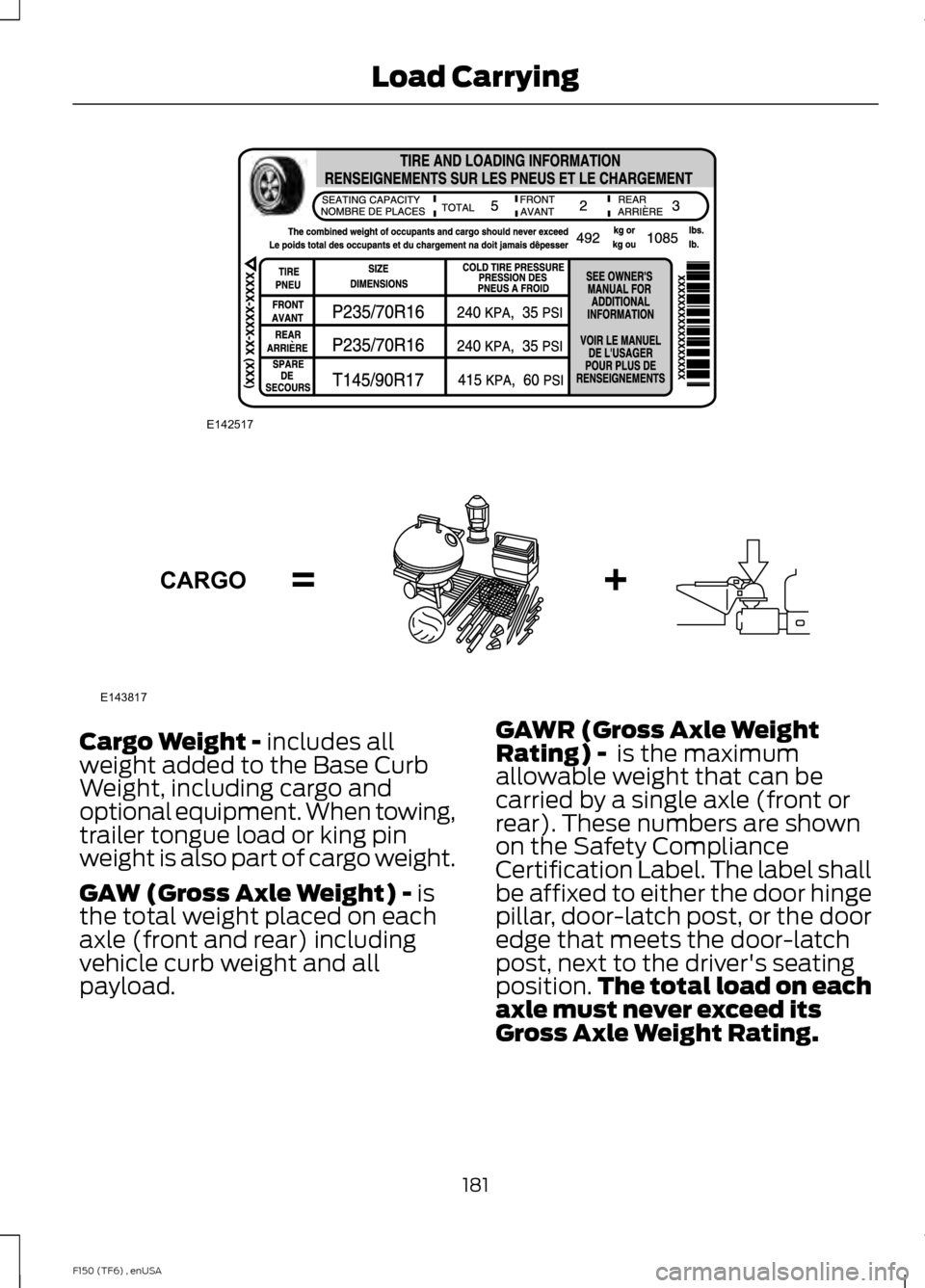
Cargo Weight - includes all
weight added to the Base Curb
Weight, including cargo and
optional equipment. When towing,
trailer tongue load or king pin
weight is also part of cargo weight.
GAW (Gross Axle Weight) -
is
the total weight placed on each
axle (front and rear) including
vehicle curb weight and all
payload. GAWR (Gross Axle Weight
Rating) -
is the maximum
allowable weight that can be
carried by a single axle (front or
rear). These numbers are shown
on the Safety Compliance
Certification Label. The label shall
be affixed to either the door hinge
pillar, door-latch post, or the door
edge that meets the door-latch
post, next to the driver's seating
position. The total load on each
axle must never exceed its
Gross Axle Weight Rating.
181
F150 (TF6) , enUSA Load CarryingE142517 E143817CARGO
Page 185 of 472
Note:
For trailer towing
information refer to the RV and
Trailer Towing Guide available at
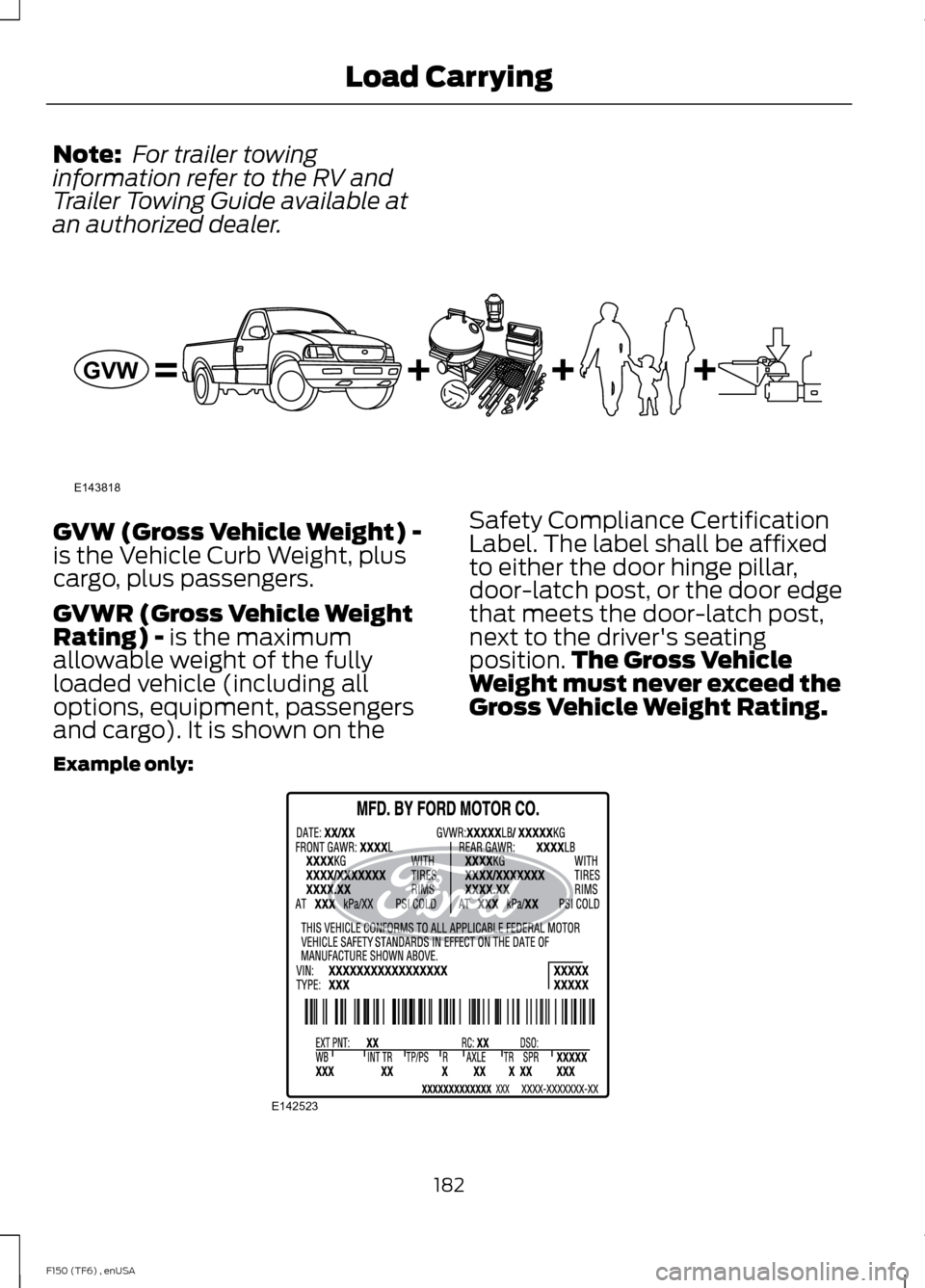
an authorized dealer. GVW (Gross Vehicle Weight) -
is the Vehicle Curb Weight, plus
cargo, plus passengers.
GVWR (Gross Vehicle Weight
Rating) - is the maximum
allowable weight of the fully
loaded vehicle (including all
options, equipment, passengers
and cargo). It is shown on the Safety Compliance Certification
Label. The label shall be affixed
to either the door hinge pillar,
door-latch post, or the door edge
that meets the door-latch post,
next to the driver's seating
position.
The Gross Vehicle
Weight must never exceed the
Gross Vehicle Weight Rating.
Example only: 182
F150 (TF6) , enUSA Load CarryingE143818GVW E142523