2014 FORD F150 engine
[x] Cancel search: enginePage 102 of 472
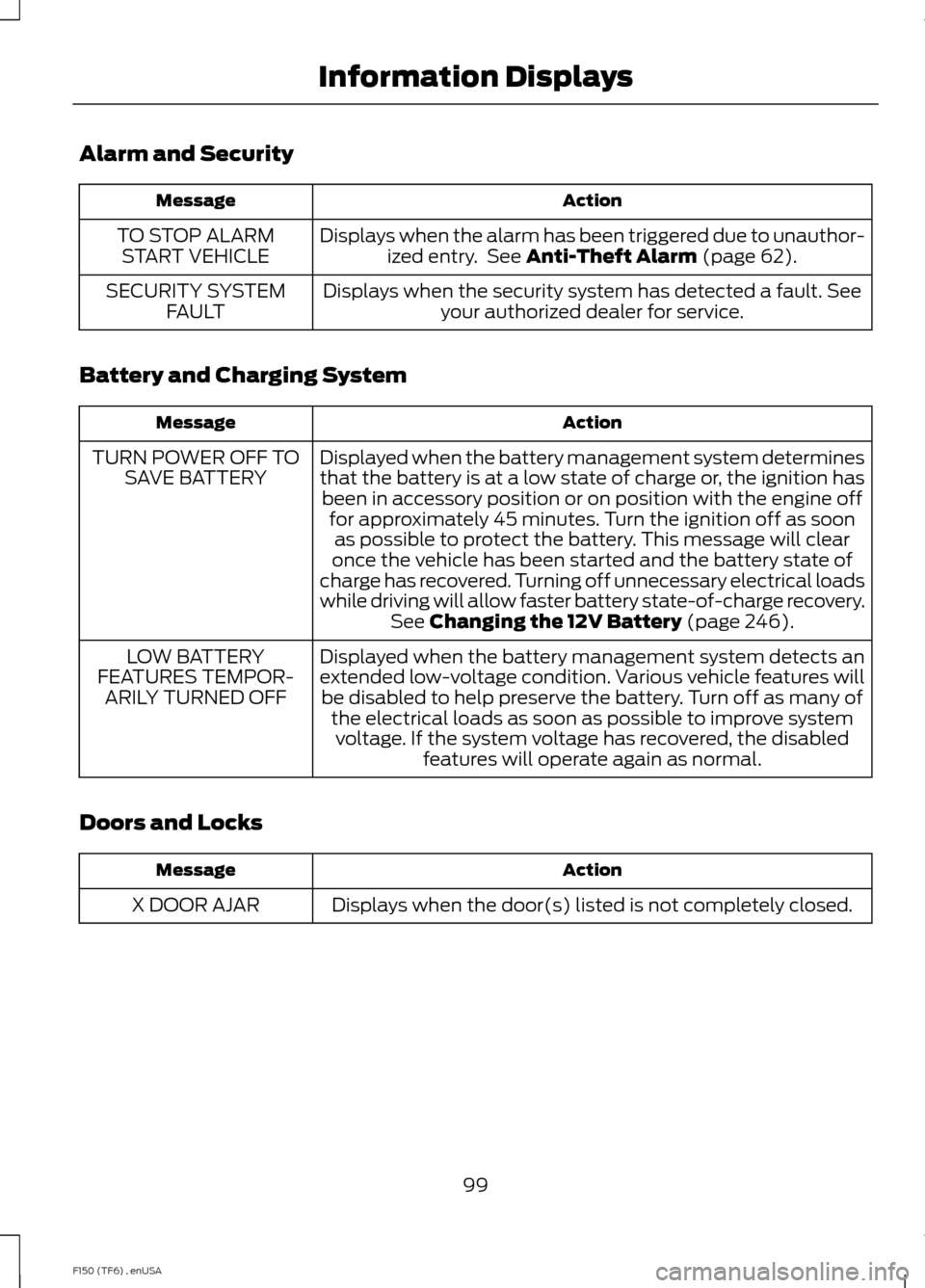
Alarm and Security
Action
Message
Displays when the alarm has been triggered due to unauthor-ized entry. See Anti-Theft Alarm (page 62).
TO STOP ALARM
START VEHICLE
Displays when the security system has detected a fault. Seeyour authorized dealer for service.
SECURITY SYSTEM
FAULT
Battery and Charging System Action
Message
Displayed when the battery management system determines
that the battery is at a low state of charge or, the ignition hasbeen in accessory position or on position with the engine off for approximately 45 minutes. Turn the ignition off as soonas possible to protect the battery. This message will clear
once the vehicle has been started and the battery state of
charge has recovered. Turning off unnecessary electrical loads
while driving will allow faster battery state-of-charge recovery. See
Changing the 12V Battery (page 246).
TURN POWER OFF TO
SAVE BATTERY
Displayed when the battery management system detects an
extended low-voltage condition. Various vehicle features willbe disabled to help preserve the battery. Turn off as many of the electrical loads as soon as possible to improve systemvoltage. If the system voltage has recovered, the disabled features will operate again as normal.
LOW BATTERY
FEATURES TEMPOR- ARILY TURNED OFF
Doors and Locks Action
Message
Displays when the door(s) listed is not completely closed.
X DOOR AJAR
99
F150 (TF6) , enUSA Information Displays
Page 103 of 472
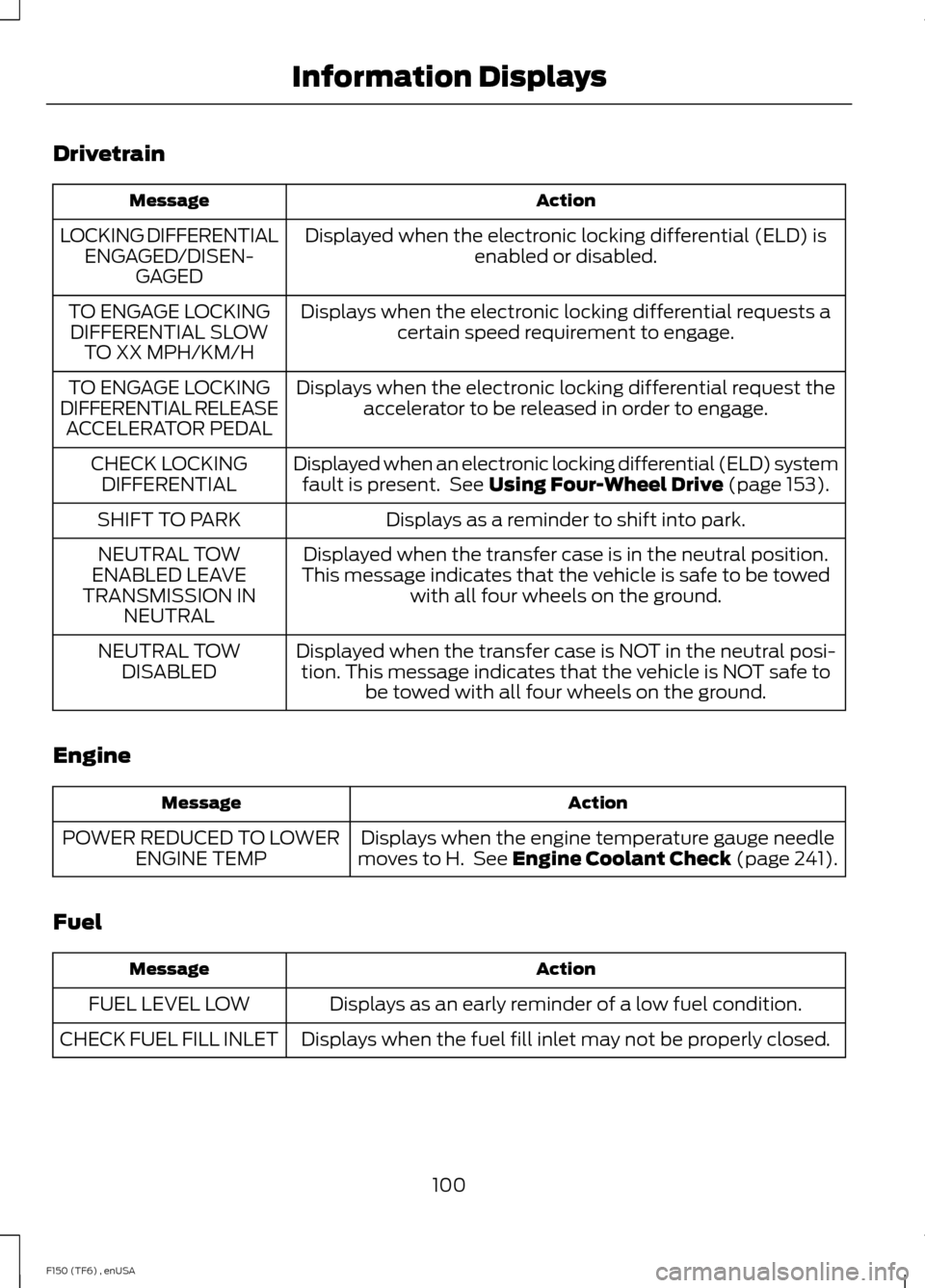
Drivetrain
Action
Message
Displayed when the electronic locking differential (ELD) isenabled or disabled.
LOCKING DIFFERENTIAL
ENGAGED/DISEN- GAGED
Displays when the electronic locking differential requests acertain speed requirement to engage.
TO ENGAGE LOCKING
DIFFERENTIAL SLOW TO XX MPH/KM/H
Displays when the electronic locking differential request theaccelerator to be released in order to engage.
TO ENGAGE LOCKING
DIFFERENTIAL RELEASE ACCELERATOR PEDAL
Displayed when an electronic locking differential (ELD) systemfault is present. See Using Four-Wheel Drive (page 153).
CHECK LOCKING
DIFFERENTIAL
Displays as a reminder to shift into park.
SHIFT TO PARK
Displayed when the transfer case is in the neutral position.
This message indicates that the vehicle is safe to be towed with all four wheels on the ground.
NEUTRAL TOW
ENABLED LEAVE
TRANSMISSION IN NEUTRAL
Displayed when the transfer case is NOT in the neutral posi-tion. This message indicates that the vehicle is NOT safe to be towed with all four wheels on the ground.
NEUTRAL TOW
DISABLED
Engine Action
Message
Displays when the engine temperature gauge needle
moves to H. See
Engine Coolant Check (page 241).
POWER REDUCED TO LOWER
ENGINE TEMP
Fuel Action
Message
Displays as an early reminder of a low fuel condition.
FUEL LEVEL LOW
Displays when the fuel fill inlet may not be properly closed.
CHECK FUEL FILL INLET
100
F150 (TF6) , enUSA Information Displays
Page 104 of 472
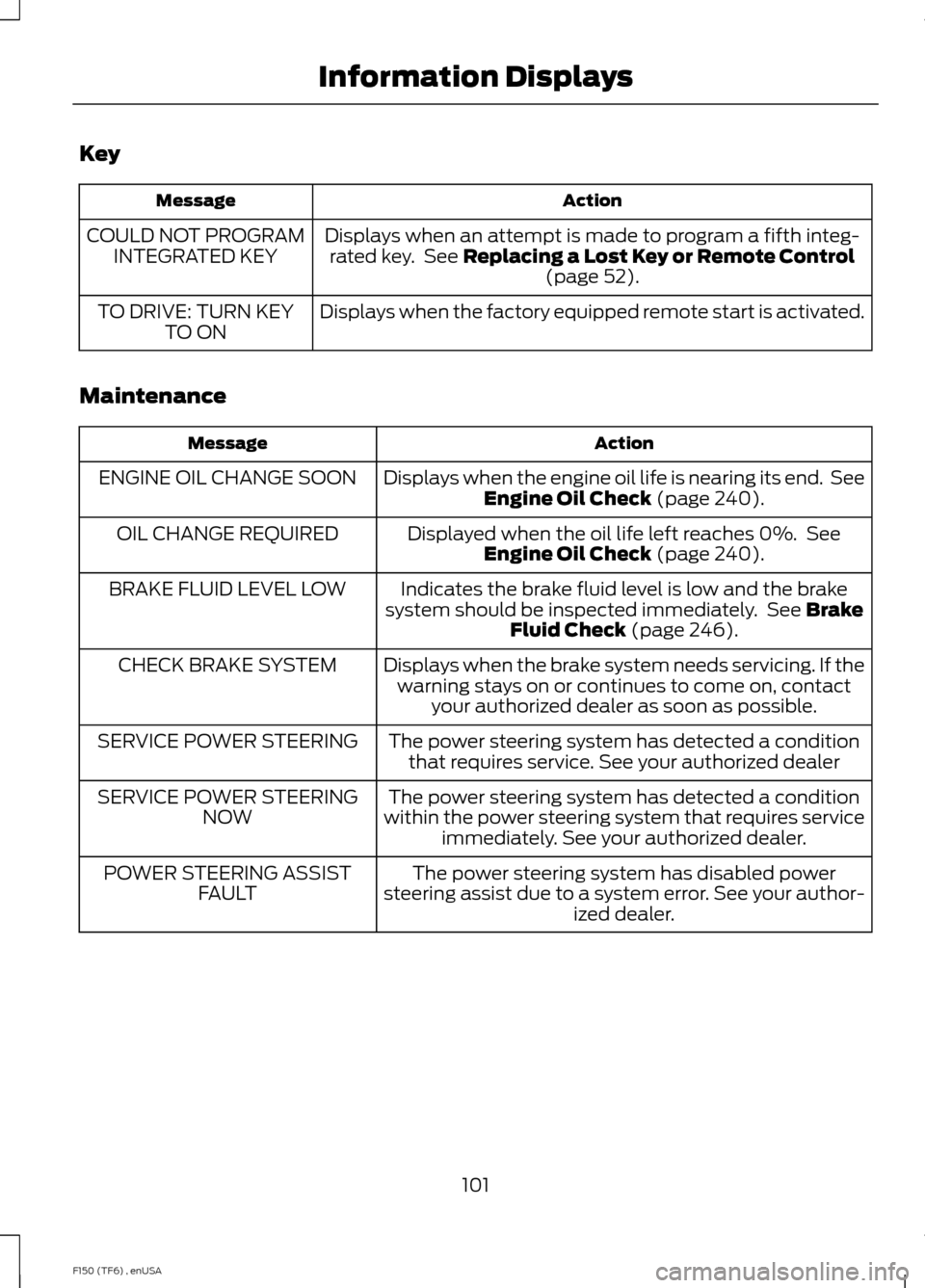
Key
Action
Message
Displays when an attempt is made to program a fifth integ-rated key. See Replacing a Lost Key or Remote Control (page 52).
COULD NOT PROGRAM
INTEGRATED KEY
Displays when the factory equipped remote start is activated.
TO DRIVE: TURN KEY
TO ON
Maintenance Action
Message
Displays when the engine oil life is nearing its end. SeeEngine Oil Check
(page 240).
ENGINE OIL CHANGE SOON
Displayed when the oil life left reaches 0%. SeeEngine Oil Check
(page 240).
OIL CHANGE REQUIRED
Indicates the brake fluid level is low and the brake
system should be inspected immediately. See
Brake
Fluid Check (page 246).
BRAKE FLUID LEVEL LOW
Displays when the brake system needs servicing. If thewarning stays on or continues to come on, contact your authorized dealer as soon as possible.
CHECK BRAKE SYSTEM
The power steering system has detected a conditionthat requires service. See your authorized dealer
SERVICE POWER STEERING
The power steering system has detected a condition
within the power steering system that requires service immediately. See your authorized dealer.
SERVICE POWER STEERING
NOW
The power steering system has disabled power
steering assist due to a system error. See your author- ized dealer.
POWER STEERING ASSIST
FAULT
101
F150 (TF6) , enUSA Information Displays
Page 114 of 472
Note:
If you select AUTO during cold
outside temperatures, the system directs
airflow to the windshield and side window
vents. In addition, the fan may run at a
slower speed until the engine warms up. Note:
If you select AUTO during hot outside
temperatures, or when the inside of the
vehicle is hot, the system automatically uses
recirculated air to maximize interior cooling.
When the interior reaches the selected
temperature, the system automatically
switches to using outside air.
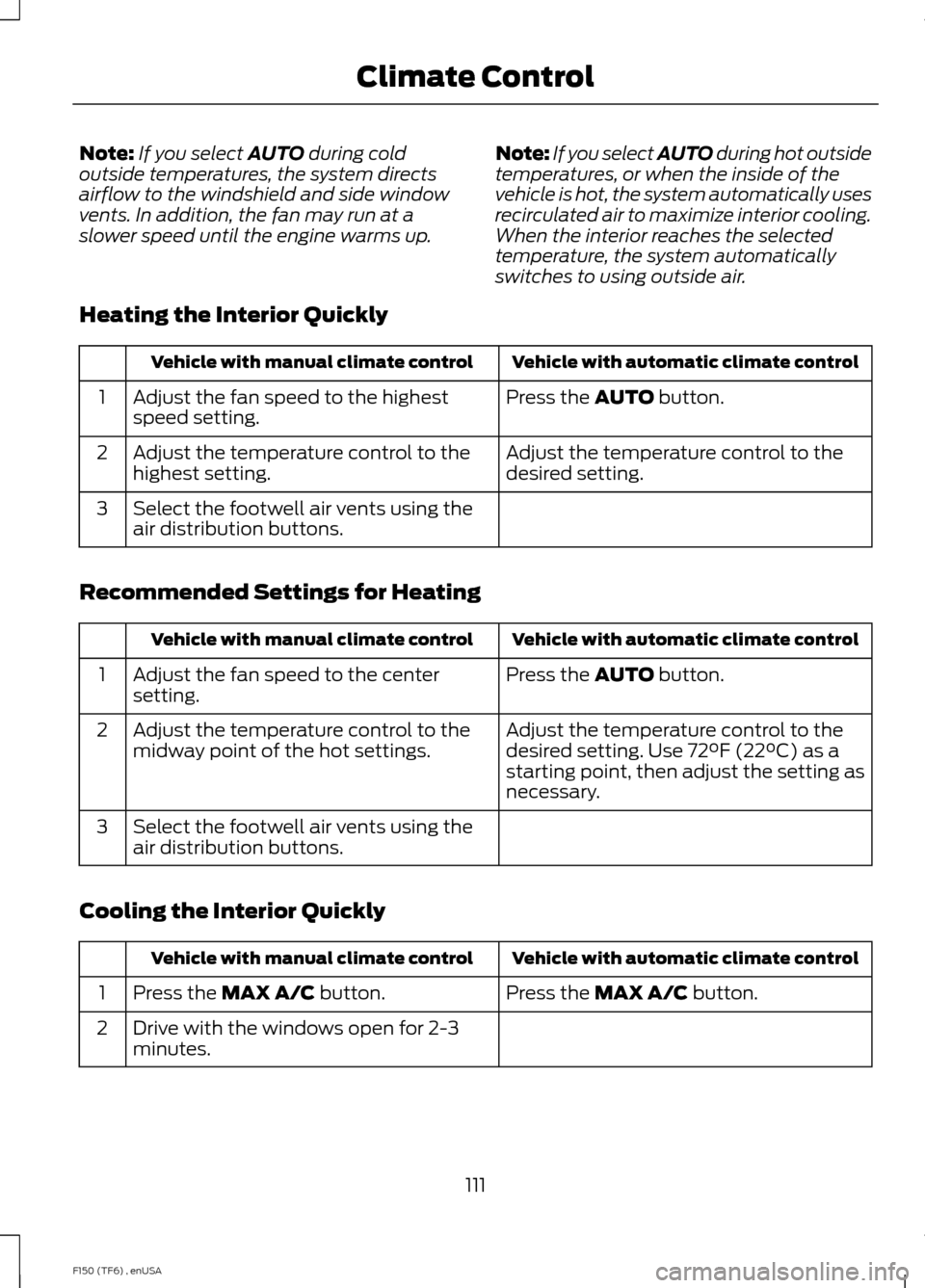
Heating the Interior Quickly Vehicle with automatic climate control
Vehicle with manual climate control
Press the
AUTO button.
Adjust the fan speed to the highest
speed setting.
1
Adjust the temperature control to the
desired setting.
Adjust the temperature control to the
highest setting.
2
Select the footwell air vents using the
air distribution buttons.
3
Recommended Settings for Heating Vehicle with automatic climate control
Vehicle with manual climate control
Press the
AUTO button.
Adjust the fan speed to the center
setting.
1
Adjust the temperature control to the
desired setting. Use 72°F (22°C) as a
starting point, then adjust the setting as
necessary.
Adjust the temperature control to the
midway point of the hot settings.
2
Select the footwell air vents using the
air distribution buttons.
3
Cooling the Interior Quickly Vehicle with automatic climate control
Vehicle with manual climate control
Press the
MAX A/C button.
Press the MAX A/C button.
1
Drive with the windows open for 2-3
minutes.
2
111
F150 (TF6) , enUSA Climate Control
Page 115 of 472
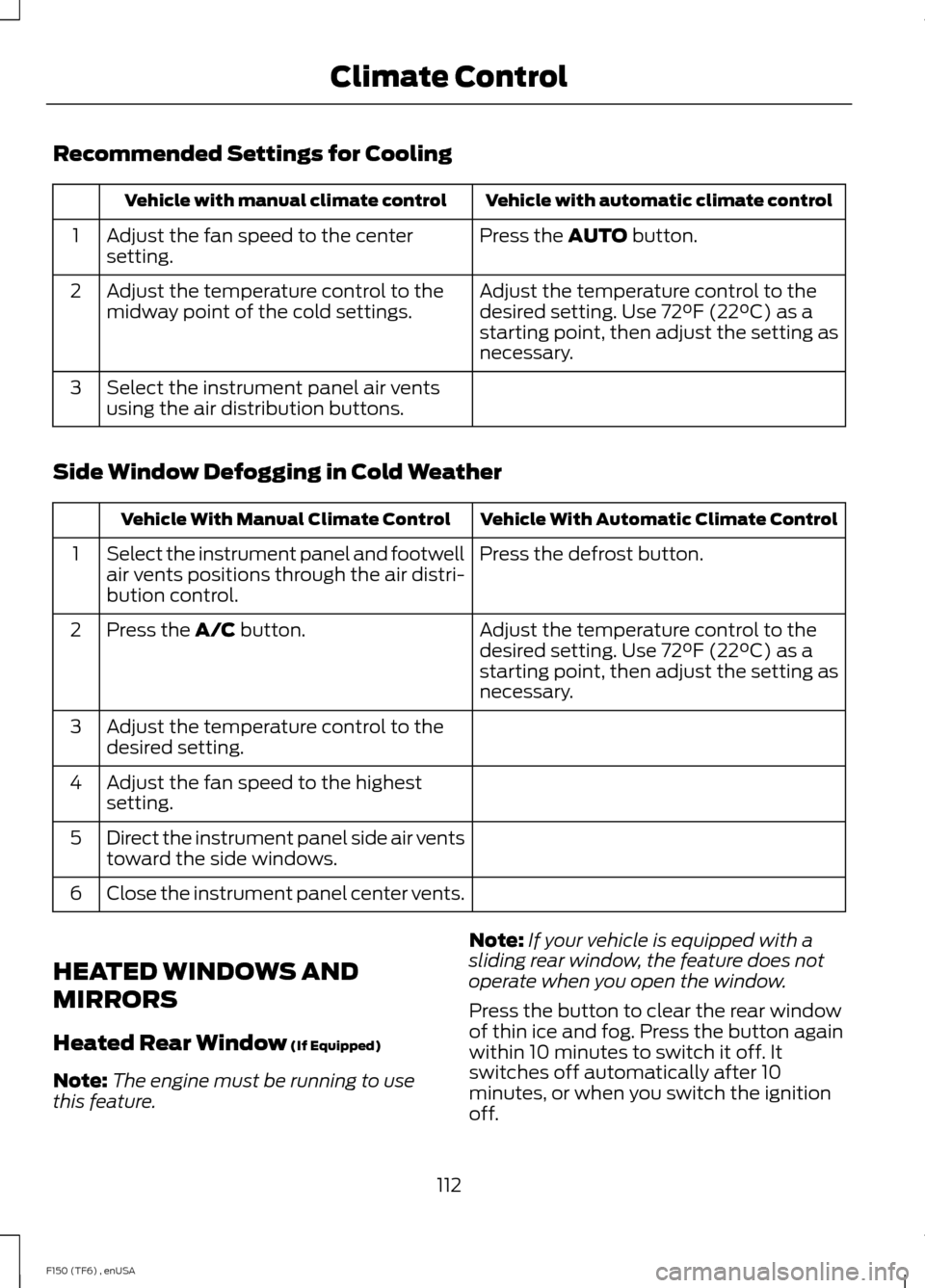
Recommended Settings for Cooling
Vehicle with automatic climate control
Vehicle with manual climate control
Press the AUTO button.
Adjust the fan speed to the center
setting.
1
Adjust the temperature control to the
desired setting. Use 72°F (22°C) as a
starting point, then adjust the setting as
necessary.
Adjust the temperature control to the
midway point of the cold settings.
2
Select the instrument panel air vents
using the air distribution buttons.
3
Side Window Defogging in Cold Weather Vehicle With Automatic Climate Control
Vehicle With Manual Climate Control
Press the defrost button.
Select the instrument panel and footwell
air vents positions through the air distri-
bution control.
1
Adjust the temperature control to the
desired setting. Use 72°F (22°C) as a
starting point, then adjust the setting as
necessary.
Press the
A/C button.
2
Adjust the temperature control to the
desired setting.
3
Adjust the fan speed to the highest
setting.
4
Direct the instrument panel side air vents
toward the side windows.
5
Close the instrument panel center vents.
6
HEATED WINDOWS AND
MIRRORS
Heated Rear Window
(If Equipped)
Note: The engine must be running to use
this feature. Note:
If your vehicle is equipped with a
sliding rear window, the feature does not
operate when you open the window.
Press the button to clear the rear window
of thin ice and fog. Press the button again
within 10 minutes to switch it off. It
switches off automatically after 10
minutes, or when you switch the ignition
off.
112
F150 (TF6) , enUSA Climate Control
Page 123 of 472
Returning the Seat to the Seating
Position
WARNING
Make sure that cargo or any objects
are not trapped underneath the seat
cushion before returning the seat
cushion to its original position, and that the
seat cushion locks into place. Failure to do
so may prevent the seat from operating
properly in the event of a crash, which
could increase the risk of serious injury. 1. Pull the control on the bottom of the
seat cushion to release the seat
cushion from the storage position.
2. Push the seat cushion down until it locks into the horizontal position. HEATED SEATS (IF EQUIPPED) WARNING
People who are unable to feel pain
to their skin because of advanced
age, chronic illness, diabetes, spinal
cord injury, medication, alcohol use,
exhaustion or other physical conditions,
must exercise care when using the heated
seat. The heated seat may cause burns
even at low temperatures, especially if
used for long periods of time. Do not place
anything on the seat that insulates against
heat, such as a blanket or cushion. This
may cause the heated seat to overheat.
Do not puncture the seat with pins, needles
or other pointed objects. This may damage
the heating element which may cause the
heated seat to overheat. An overheated
seat may cause serious personal injury. Do not do the following:
•
Place heavy objects on the seat.
• Operate the heated seat if water or any
other liquid is spilled on the seat. Allow
the seat to dry thoroughly.
• Operate the heated seats unless the
engine is running. Doing so can cause
the battery to lose charge. To operate the heated seats, press the
heated seat symbol to cycle through the
various heat settings and off. Warmer
settings are indicated by more indicator
lights.
120
F150 (TF6) , enUSA SeatsE166704 E146322
Page 124 of 472
Rear Heated Seats (If Equipped)
WARNING
People who are unable to feel pain
to the skin because of advanced age,
chronic illness, diabetes, spinal cord
injury, medication, alcohol use, exhaustion,
or other physical conditions, must exercise
care when using the seat heater. The seat
heater may cause burns even at low
temperatures, especially if used for long
periods of time. Do not place anything on
the seat that insulates against heat, such
as a blanket or cushion, because this may
cause the seat heater to overheat. Do not
puncture the seat with pins, needles, or
other pointed objects because this may
damage the heating element which may
cause the seat heater to overheat. An
overheated seat may cause serious
personal injury. Do not do the following:
•
Place heavy objects on the seat.
• Operate the seat heater if water or any
other liquid is spilled on the seat. Allow
the seat to dry thoroughly.
The rear seat heat controls are located on
the rear door armrest.
To operate the heated seats: •
Press this symbol for maximum heat.
• Press again to turn off. •
Press this symbol for minimum heat.
• Press again to turn off.
The heated seat module resets at every
ignition run cycle. While the ignition is in
the on position, press the high or low
heated seat switch to enable heating
mode. When activated, they will turn off
automatically when the engine is turned
off.
The indicator light will illuminate when the
heated seats have been activated.
VENTILATED SEATS
(IF EQUIPPED)
The ventilated seats will only function
when the engine is running. To operate the ventilated seats, press the
ventilated seat symbol to cycle through
the various cooling settings and off. Cooler
settings are indicated by more indicator
lights.
If the engine falls below 350 RPM while
the ventilated seats are on, the feature will
turn itself off. You will need to reactivate
it.
121
F150 (TF6) , enUSA SeatsE146322 E166817 E146309
Page 135 of 472
12 Volt DC Power Point
WARNING
Do not plug optional electrical
accessories into the cigar lighter
socket (if equipped). Improper use
of the lighter can cause damage not
covered by your warranty, and can result
in fire or serious injury. Note:
If used when the engine is not
running, the battery will discharge. There
may be insufficient power to restart your
engine.
Note: Do not insert objects other than an
accessory plug into the power point. This
will damage the outlet and blow the fuse.
Note: Do not hang any type of accessory or
accessory bracket from the plug.
Note: Do not use the power point over the
vehicle capacity of 12 volt DC 180 watts or
a fuse may blow.
Note: Do not use the power point for
operating a cigar lighter element.
Note: Improper use of the power point can
cause damage not covered by your
warranty.
Note: Always keep the power point caps
closed when not in use.
Run the engine for full capacity use of the
power point. To prevent the battery from
being discharged:
• do not use the power point longer than
necessary when the engine is not
running
• do not leave devices plugged in
overnight or when the vehicle is parked
for extended periods.
Locations
Power points may be found: •
in the front of the center console
• inside the center console storage bin
• on the rear of the center console.
110 Volt AC Power Points (If Equipped) WARNING
Do not keep electrical devices
plugged in the power points when
the devices are not in use. Do not use
any extension cord with the 110 volt AC
power points, since it will defeat the safety
protection design. Do not use a single
power point to power multiple devices. It
may cause the power point to exceed the
150 watt load limit and overload, resulting
in fire or serious injury. Note:
Keep the engine running to use the
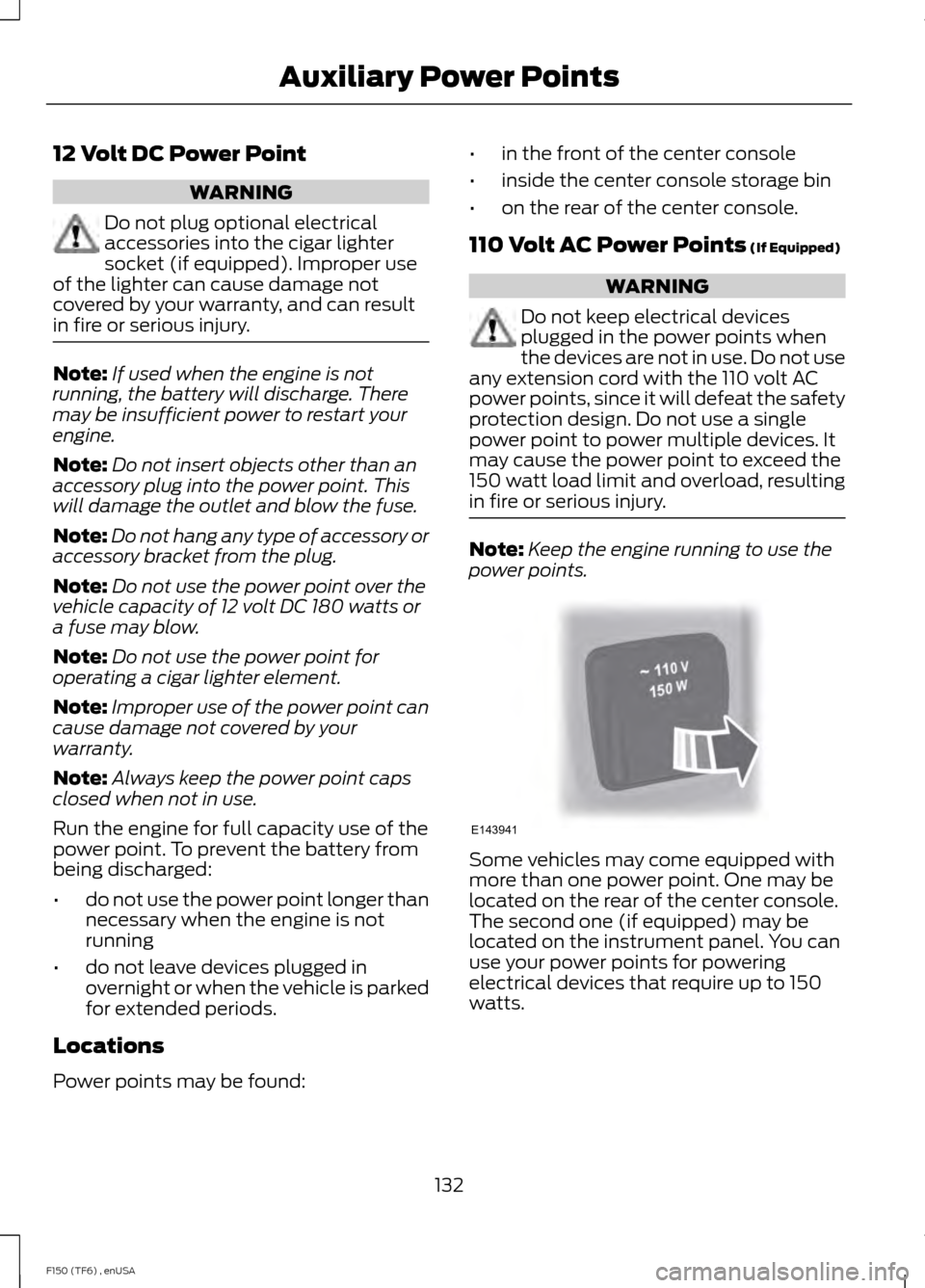
power points. Some vehicles may come equipped with
more than one power point. One may be
located on the rear of the center console.
The second one (if equipped) may be
located on the instrument panel. You can
use your power points for powering
electrical devices that require up to 150
watts.
132
F150 (TF6) , enUSA Auxiliary Power PointsE143941