2014 FORD F150 center console
[x] Cancel search: center consolePage 231 of 472

Protected components
Fuse amp rating
Fuse or relay number
Blower motor relay power
40A*
51
Run/start – Electronic power assist
steering, Blower relay coil
5A**
52
Run/start – Powertrain control module
5A**
53
Run/start – 4x4 module, Back-up lamps,
Roll stability control /Anti-lock brake
system, Trailer tow battery charge relay
coil, Rear window defroster relay coil, Front
camera washer relay coil (SVT Raptor)
5A**
54
Not used
—
55
Heated mirrors
15A**
56
Not used
—
57
Not used
—
58
Not used
—
59
Not used
—
60
Not used
—
61
Wiper motor
Relay
62
Electric fan relay power
25A*
63
Not used
—
64
Auxiliary power point (instrument panel)
20A*
65
Auxiliary power point (inside center
console)
20A*
66
Trailer tow park lamps relay power
20A*
67
4x4 module, 4x2 elocker module
25A*
68
Front heated or heated/cooled seats
30A*
69
Not used
—
70
Heated rear seats
20A*
71
Auxiliary power point (rear)
20A*
72
Trailer tow stop/turn lamps relay power
20A*
73
228
F150 (TF6) , enUSA Fuses
Page 324 of 472
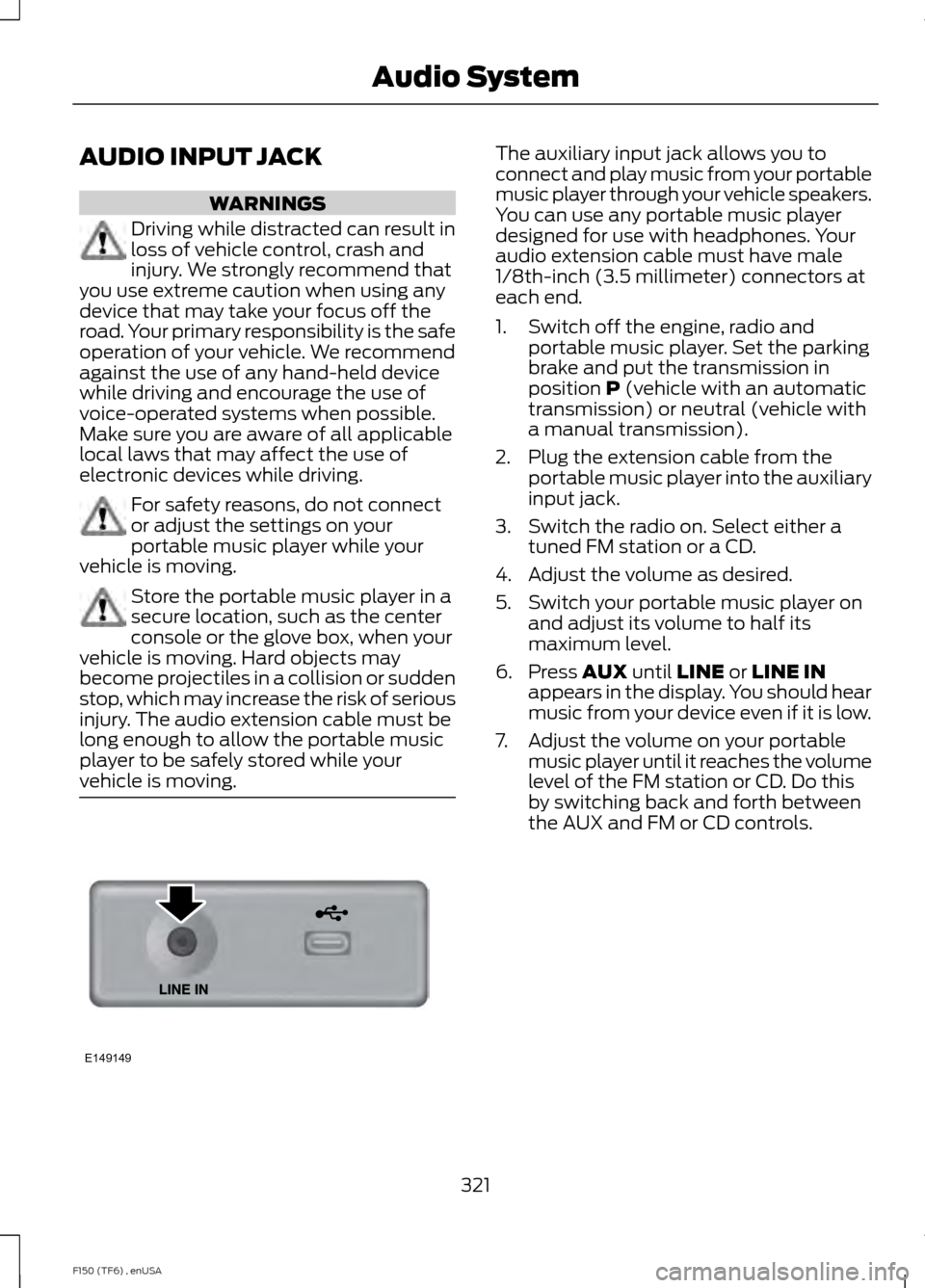
AUDIO INPUT JACK
WARNINGS
Driving while distracted can result in
loss of vehicle control, crash and
injury. We strongly recommend that
you use extreme caution when using any
device that may take your focus off the
road. Your primary responsibility is the safe
operation of your vehicle. We recommend
against the use of any hand-held device
while driving and encourage the use of
voice-operated systems when possible.
Make sure you are aware of all applicable
local laws that may affect the use of
electronic devices while driving. For safety reasons, do not connect
or adjust the settings on your
portable music player while your
vehicle is moving. Store the portable music player in a
secure location, such as the center
console or the glove box, when your
vehicle is moving. Hard objects may
become projectiles in a collision or sudden
stop, which may increase the risk of serious
injury. The audio extension cable must be
long enough to allow the portable music
player to be safely stored while your
vehicle is moving. The auxiliary input jack allows you to
connect and play music from your portable
music player through your vehicle speakers.
You can use any portable music player
designed for use with headphones. Your
audio extension cable must have male
1/8th-inch (3.5 millimeter) connectors at
each end.
1. Switch off the engine, radio and
portable music player. Set the parking
brake and put the transmission in
position P (vehicle with an automatic
transmission) or neutral (vehicle with
a manual transmission).
2. Plug the extension cable from the portable music player into the auxiliary
input jack.
3. Switch the radio on. Select either a tuned FM station or a CD.
4. Adjust the volume as desired.
5. Switch your portable music player on and adjust its volume to half its
maximum level.
6. Press
AUX until LINE or LINE IN
appears in the display. You should hear
music from your device even if it is low.
7. Adjust the volume on your portable music player until it reaches the volume
level of the FM station or CD. Do this
by switching back and forth between
the AUX and FM or CD controls.
321
F150 (TF6) , enUSA Audio SystemE149149
Page 325 of 472
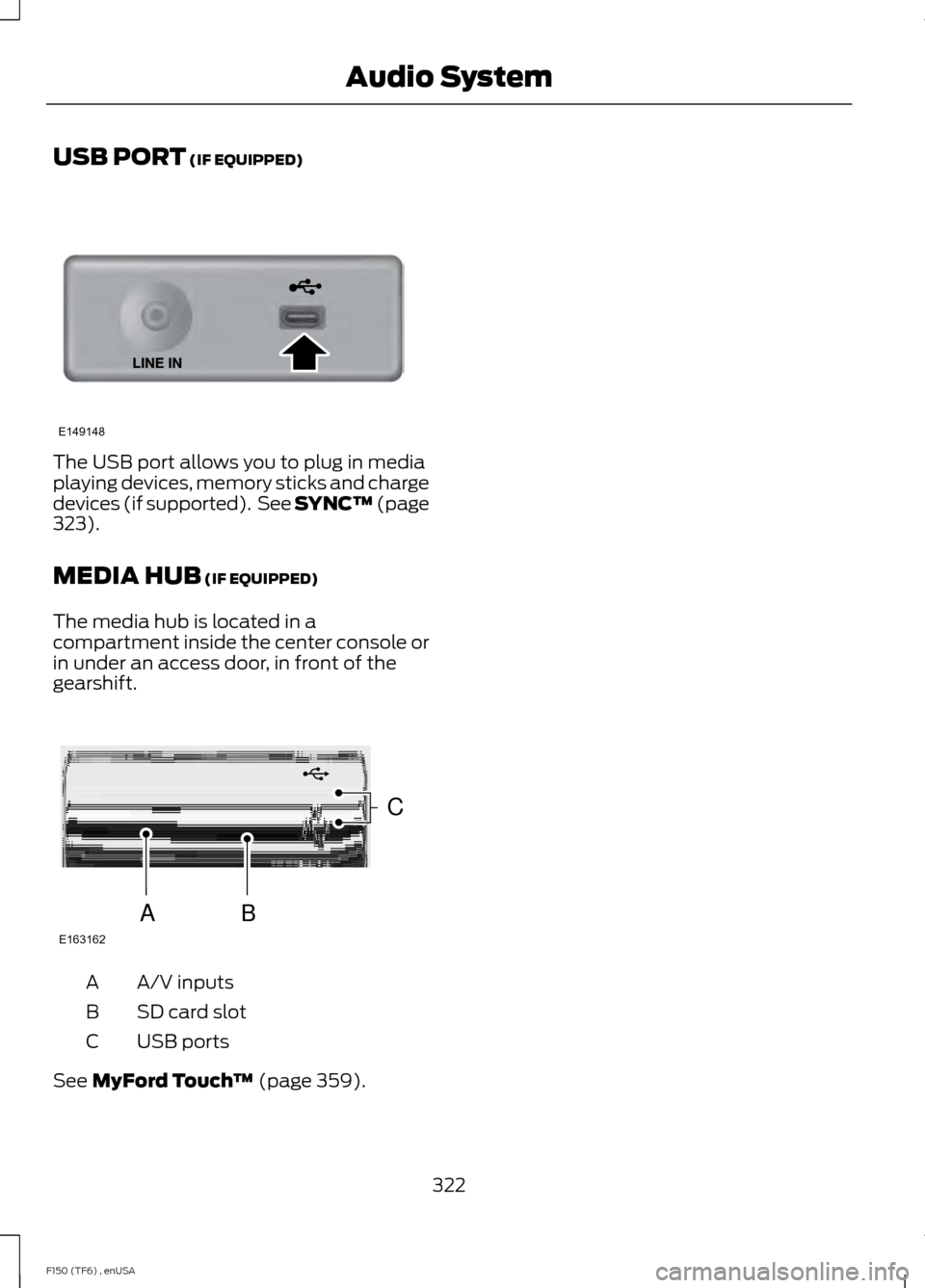
USB PORT (IF EQUIPPED)
The USB port allows you to plug in media
playing devices, memory sticks and charge
devices (if supported). See SYNC™
(page
323).
MEDIA HUB
(IF EQUIPPED)
The media hub is located in a
compartment inside the center console or
in under an access door, in front of the
gearshift. A/V inputs
A
SD card slot
B
USB ports
C
See
MyFord Touch ™ (page 359).
322
F150 (TF6) , enUSA Audio SystemE149148 E163162
C
BA
Page 348 of 472
To Access Using the Media Menu
1. Press the AUX button on the center
console.
2. Press
MENU to access the SYNC
menu.
3. Select "SYNC-Media" by pressing
OK.
4. Scroll to Mobile Apps and press OK to
access a list of available applications.
5. Scroll through the list of available applications and press
OK to select a
particular app.
6. Once an app is running through SYNC,
you can access an app ’s menu by
pressing the
MENU button to first
access the SYNC menu.
7. Select "SYNC-Media" by pressing
OK.
8. Scroll until "
then press
OK. From here, you can
access an application's features, such
as Thumbs up and Thumbs down. For
more information, please visit
www.SYNCMyRide.com.
To Access Using Voice Commands
1. Press the voice icon.
2. When prompted, say "Mobile Apps".
3. Say the name of the application after the tone.
4. The app should start. While an app is running through SYNC, you can press
the voice button and speak commands
specific to the app, such as "Play
Station Quickmix". Say "Help" to
discover available voice commands. USING SYNC™ WITH YOUR
MEDIA PLAYER
You can access and play music from your
digital music player over your vehicle's
speaker system using the system's media
menu or voice commands. You can also
sort and play your music by specific
categories, such as artist and album.
Note:
The system is capable of indexing up
to 30,000 songs.
SYNC is capable of hosting nearly any
digital media player including: iPod®,
Zune ™, Plays from device players, and
most USB drives. SYNC also supports
audio formats, such as MP3, WMA, WAV
and ACC.
Connecting Your Digital Media
Player to the USB Port
Note: If your digital media player has a
power switch, make sure you switch it on
before plugging it in.
To Connect Using Voice Commands
1. Plug the device into the USB port.
2. Press the voice icon and when prompted, say "USB".
3. You can now play music by saying any of the appropriate voice commands.
See the media voice commands.
To Connect Using the System Menu
1. Plug the device into the USB port.
2. Press
AUX and then MENU to enter
the media menu.
3. Scroll to Select Source. Press
OK.
4. Scroll to USB. Press
OK.
5. Depending on how many digital media
files are on your connected device,
Indexing
may appear in the radio
display. When indexing is complete, the
screen returns to the Play menu.
345
F150 (TF6) , enUSA SYNC™
Page 391 of 472
"CD"
"Pause" "Play"
"Play next track"
"Play previous track" "Play track <1-512>" "Repeat"
"Repeat folder" *
"Repeat off"
"Repeat track" "Shuffle"
"Shuffle CD" *
"Shuffle folder" *
"Shuffle off" "Help"
* This applies to WMA or MP3 files only.
SD Card Slot and USB Port
SD Card
Note: Your SD card slot is spring-loaded.
To remove the SD card, press the card in
and the system ejects it. Do not attempt to
pull the card to remove it as this could cause
damage.
Note: The navigation system also uses this
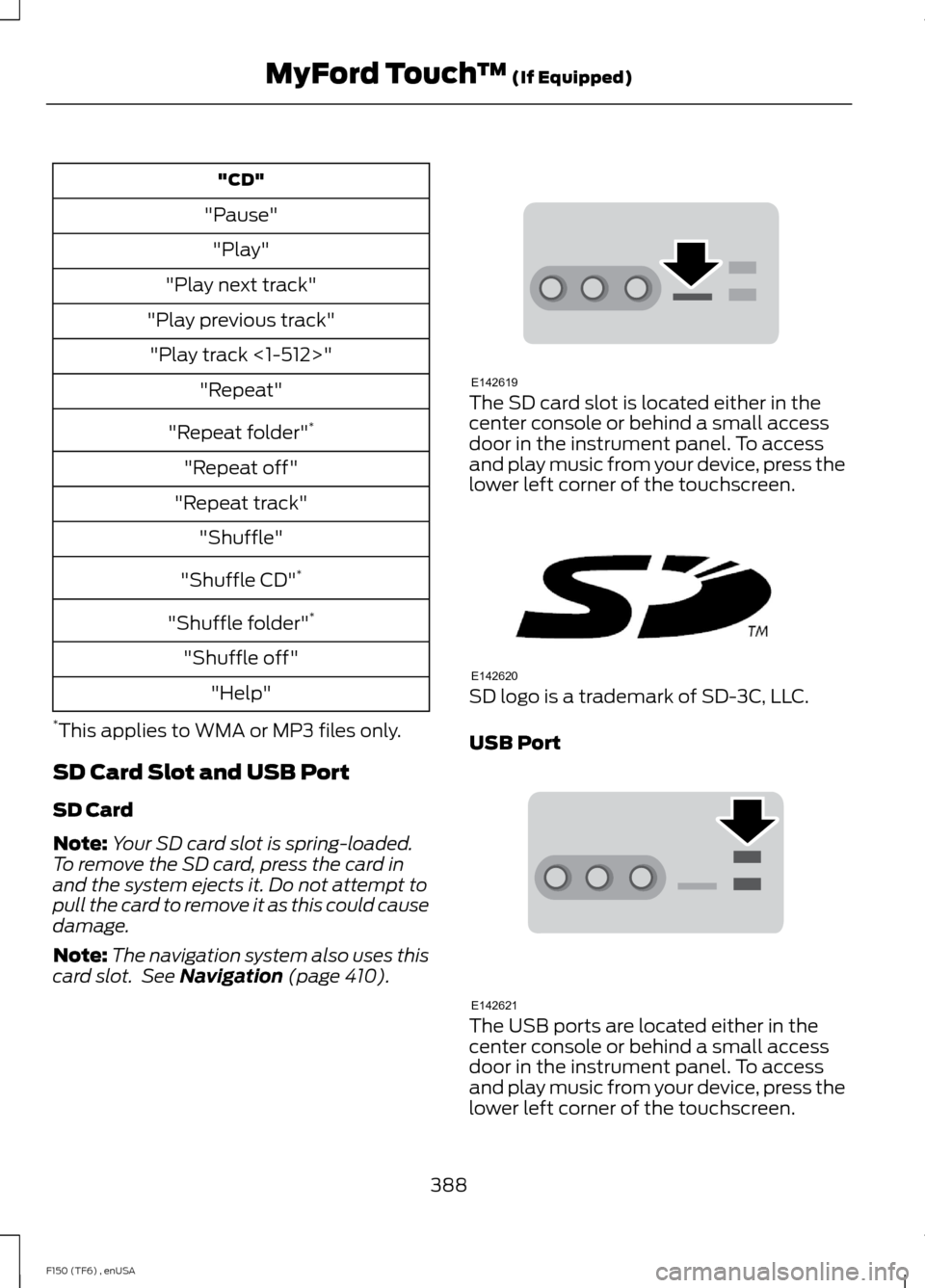
card slot. See Navigation (page 410). The SD card slot is located either in the
center console or behind a small access
door in the instrument panel. To access
and play music from your device, press the
lower left corner of the touchscreen.
SD logo is a trademark of SD-3C, LLC.
USB Port
The USB ports are located either in the
center console or behind a small access
door in the instrument panel. To access
and play music from your device, press the
lower left corner of the touchscreen.
388
F150 (TF6) , enUSA MyFord Touch
™
(If Equipped)E142619 E142620 E142621
Page 395 of 472
To access, press the lower left
corner on the touchscreen, then
select the BT Stereo tab.
Bluetooth Audio Voice Commands If you are listening to a Bluetooth
audio device, press the voice
button on the steering wheel
control. When prompted, say "Next song",
"Pause", "Play" or "Previous song".
If you are not listening to a Bluetooth audio
device, press the voice button and, after
the tone, say "Next song", "Pause", "Play"
or "Previous song".
A/V Inputs WARNINGS
Driving while distracted can result in
loss of vehicle control, crash and
injury. We strongly recommend that
you use extreme caution when using any
device that may take your focus off the
road. Your primary responsibility is the safe
operation of your vehicle. We recommend
against the use of any handheld device
while driving and encourage the use of
voice-operated systems when possible.
Make sure you are aware of all applicable
local laws that may affect the use of
electronic devices while driving. For safety reasons, do not connect
or adjust the settings on your
portable music player while your
vehicle is moving. Store the portable music player in a
secure location, such as the center
console or the glove box, when your
vehicle is moving. Hard objects may
become projectiles in a crash or sudden
stop, which may increase the risk of serious
injury. The audio extension cable must be
long enough to allow the portable music
player to be safely stored while your
vehicle is moving. Your A/V inputs allow you to connect an
auxiliary audio/video source (such as a
gaming systems or a personal camcorder)
by connecting RCA cords (not included)
to these input jacks. The jacks are yellow,
red and white and are located either
behind a small access door on the
instrument panel or in your center console.
You can also use the A/V inputs as an
auxiliary input jack to play music from your
portable music player over your vehicle's
speakers. Plug in your 1/8 inch (3.5
millimeter) RCA adapter into the two left
A/V input jacks (red and white).
Press the lower left corner of the
touchscreen, and then select
A/V In.
To use the auxiliary input jack feature,
make sure that your portable music player
is designed for use with headphones and
that it is fully charged. You also need an
audio extension cable with stereo male
1/8-inch (3.5 millimeter) connectors at one
end and a RCA jack at the other.
1. Switch off the engine, radio and portable music player. Set the parking
brake and put the transmission in
position
P.
2. Attach one end of the audio extension
cable to the headphone output of your
player and the other end into the
adapter in one of the two left A/V input
jacks (white or red) inside the center
console.
392
F150 (TF6) , enUSA MyFord Touch
™
(If Equipped)E142611 E142599 E142622
Page 463 of 472

Car Wash
See: Cleaning the Exterior.............................. 259
Center Console..............................................134
Changing a Bulb...........................................252 Lamp Assembly Condensation.................... 252
Replacing Brake/Tail/Turn/Reverse Lamp Bulbs.................................................................. 253
Replacing Cargo Lamp and High-mount Brake Lamp Bulbs........................................ 253
Replacing exterior mounted mirror turn signal indicator lamp bulbs...................... 254
Replacing Fog Lamp Bulbs (If Equipped.......................................................... 253
Replacing the License Plate Lamp Bulb.................................................................... 254
Changing a Fuse
...........................................233
Fuses....................................................................... 233
Changing a Road Wheel
...........................289
Dissimilar Spare Wheel and Tire Assembly
Information..................................................... 289
Location of the Spare Tire and Tools........290
Tire Change Procedure..................................... 291
Changing the 12V Battery.........................246 Battery Management System (If
Equipped)........................................................ 248
Changing the Engine Air Filter - 3.5L Ecoboost™.................................................256
Changing the Engine Air Filter - 3.7L/ 5.0L/6.2L......................................................257
Changing the Wiper Blades
.....................249
Checking MyKey System Status...............55
Checking the Wiper Blades
.....................249
Child Restraint and Safety Belt Maintenance..................................................37
Child Safety.......................................................14 General Information............................................. 14
Child Safety Locks.........................................28 Left-Hand Side...................................................... 29
Right-Hand Side................................................... 29
Child Seat Positioning..................................26
Cleaning Leather Seats.............................262 WITHOUT THE KING RANCH
EDITION............................................................ 262
WITH THE KING RANCH EDITION..............263
Cleaning Products.......................................259
Cleaning the Alloy Wheels.......................264
Cleaning the Engine...................................260 Cleaning the Exterior..................................259
Cleaning Plastic Exterior Parts..................... 260
Exterior Chrome................................................. 259
Stripes or Graphics (if equipped)................259
Underbody........................................................... 260
Cleaning the Instrument Panel and Instrument Cluster Lens..........................261
Cleaning the Interior....................................261
Cleaning the Windows and Wiper Blades............................................................261
Clearing All MyKeys.......................................55
Climate...........................................................408 Climate Control Voice Commands............409
Climate Control
............................................106
Coolant Check See: Engine Coolant Check............................. 241
Crash Sensors and Airbag Indicator.......48
Creating a MyKey............................................53 Programming/Changing Configurable
Settings............................................................... 54
Cruise Control..................................................67 Principle of Operation....................................... 176
Cruise control See: Using Cruise Control................................ 176
Customer Assistance..................................219
D
Data Recording
..................................................9
Event Data Recording........................................... 9
Service Data Recording........................................ 9
Daytime Running Lamps.............................72
Digital Radio...................................................316 HD Radio Reception and Station
Troubleshooting.............................................. 317
Direction Indicators
........................................73
Lane Change.......................................................... 73
Driver and Passenger Airbags
...................40
Children and Airbags.......................................... 40
Proper Driver and Front Passenger Seating Adjustment....................................................... 40
Driving Aids......................................................177
Driving Hints...................................................210
Driving Through Water.................................211
DRL See: Daytime Running Lamps.......................... 72
460
F150 (TF6) , enUSA Index
Page 467 of 472
Lug Nuts
See: Changing a Road Wheel....................... 289
M
Maintenance..................................................235 General Information......................................... 235
Manual Climate Control............................106
Manual Seats..................................................116 Manual Lumbar .................................................... 117
Moving the Seat Backward and Forward............................................................... 117
Recline Adjustment............................................. 117
Media Hub......................................................322
Memory Function
..........................................118
Easy Entry and Exit Feature............................. 119
Message Center See: Information Displays................................. 87
Mirrors See: Heated Windows and Mirrors................112
See: Windows and Mirrors................................ 75
Mobile Communications Equipment
.......12
Moonroof...........................................................79 Bounce-Back......................................................... 80
Opening and Closing the Moonroof.............80
Venting the Moonroof........................................ 80
Motorcraft Parts..........................................298
MyFord Touch ™
...........................................359
General Information......................................... 359
MyKey Troubleshooting...............................56
MyKey ™
.............................................................53
Principle of Operation......................................... 53
N
Navigation.......................................................410 cityseekr................................................................. 412
Map Mode............................................................. 414
Navigation Map Updates................................. 417
Navigation Voice Commands......................... 417
Point of Interest (POI) Categories................412
Quick-touch Buttons........................................ 416
Setting a Destination......................................... 411
Setting Your Navigation Preferences..........413
Normal Scheduled Maintenance...........441 Intelligent Oil-Life Monitor® (Vehicles with
a 3.5L, 3.7L and 5.0L Engine).................... 441
Normal Maintenance Intervals..................... 443O
Oil Check
See: Engine Oil Check...................................... 240
Opening and Closing the Hood..............235
Ordering Additional Owner's Literature......................................................223
Obtaining a French Owner ’s Manual..........223
Overhead Console........................................134
P
Parking Aid
.......................................................172
Rear Sensing System......................................... 172
Parking Aids
.....................................................172
Parking Brake.................................................164
Passive Anti-Theft System..........................61 SecuriLock ™........................................................... 61
PATS See: Passive Anti-Theft System...................... 61
Pedals................................................................68
Perchlorate.........................................................11
Personal Safety System ™
..........................38
How Does the Personal Safety System
Work?.................................................................. 38
Phone...............................................................393 Making Calls........................................................ 395
Pairing Subsequent Phones.......................... 395
Pairing Your Phone for the First Time................................................................... 394
Phone Menu Options....................................... 395
Phone Settings................................................... 397
Phone Voice Commands............................... 398
Receiving Calls................................................... 395
Text Messaging.................................................. 396
Post-Crash Alert System
...........................218
Power Door Locks See: Locking and Unlocking.............................. 57
Power Running Boards
................................63
Power Seats.....................................................117 Power Lumbar...................................................... 118
Power Recline........................................................ 117
Power Steering Fluid Check....................246 3.5L, 3.7L and 5.0L Engines........................... 246
6.2L Engines........................................................ 246
464
F150 (TF6) , enUSA Index