2014 FORD EXPLORER warning
[x] Cancel search: warningPage 263 of 586

This system is designed to alert the
driver of certain collision risks.
A radar detects if your vehicle is
rapidly approaching another vehicle
traveling in the same direction as
yours.
If it is, a red warning light
illuminates and an audible warning
chime sounds.
The brake support system assists the driver in reducing the collision
speed by charging the brakes. If the risk of collision further increases
after the warning light illuminates, the brake support prepares the brake
system for rapid braking. This may be apparent to the driver. The system
does not automatically activate the brakes but, if the brake pedal is
pressed, full force braking is applied even if the brake pedal is lightly
pressed.
Using the Collision Warning System
WARNING:The collision warning system’s brake support can
only help reduce the speed at which a collision occurs if the
driver applies the vehicle’s brakes. The brake pedal must be pressed
just like any typical braking situation.
The warning system and chime can be turned on and off separately; the
warning system sensitivity can be adjusted to one of three possible
settings by using the information display control. Refer to the
Information Displayschapter.
Note:If the system cannot be turned off in a vehicle equipped with
MyKey®, refer to theMyKey®chapter.
Note:If collision warnings are perceived as being too frequent or
disturbing then the warning sensitivity can be reduced, though the
manufacturer recommends using the highest sensitivity setting where
possible. Setting lower sensitivity would lead to fewer and later system
warnings. Refer to theInformation Displayschapter for instructions on
reducing the sensitivity.
262Driving Aids
2014 Explorer(exp)
Owners Guide gf, 1st Printing, April 2013
USA(fus)
Page 264 of 586

Blocked Sensors
If a message regarding a blocked
sensor appears in the information
display, the radar signals from the
sensor have been obstructed. The
sensors are located behind a fascia
cover near the driver side of the
lower grille. When the sensors are
obstructed, a vehicle ahead cannot
be detected and the collision
warning system does not function.
The following table lists possible
causes and actions for this message
being displayed.
Cause Action
The surface of the radar in the
grille is dirty or obstructed in
some wayClean the grille surface in front of
the radar or remove the object
causing the obstruction
The surface of the radar in the
grille is clean but the message
remains in the displayWait a short time. It may take
several minutes for the radar to
detect that it is no longer
obstructed
Heavy rain, spray, snow, or fog is
interfering with the radar signalsThe collision warning system is
temporarily disabled. Collision
warning should automatically
reactivate a short time after the
weather conditions improve.
Swirling water, or snow or ice on
the surface of the road may
interfere with the radar signalsThe collision warning system is
temporarily disabled. Collision
warning should automatically
reactivate a short time after the
weather conditions improve.
Driving Aids263
2014 Explorer(exp)
Owners Guide gf, 1st Printing, April 2013
USA(fus)
Page 265 of 586

System Limitations
WARNING:The collision warning system’s brake support can
only help reduce the speed at which a collision occurs if the
driver applies the vehicle’s brakes. The brake pedal must be pressed
just like any typical braking situation.
Due to the nature of radar technology, there may be certain instances
where vehicles do not provide a collision warning. These include:
•Stationary vehicles or vehicles moving below 6 mph (10 km/h).
•Pedestrians or objects in the roadway.
•Oncoming vehicles in the same lane.
•Severe weather conditions (see blocked sensor section).
•Debris build-up on the grille near the headlamps (see blocked sensor
section).
•Small distance to vehicle ahead.
•Steering wheel and pedal movements are large (very active driving
style).
•High interior temperatures, which may deactivate the illumination or
the warning lamps until the interior temperature reduces (audible
warning still sounds).
Certain conditions may reduce the visibility of the warning lamp;
therefore, it is recommended to keep the audible warning on.
If the front end of the vehicle is hit or damaged, the radar sensing zone
may be altered causing missed or false collision warnings. See your
authorized dealer to have your collision warning radar checked for
proper coverage and operation.
STEERING
Electric Power Steering
WARNING:The electric power steering system has diagnostic
checks that continuously monitor the system to ensure proper
operation. When a system error is detected a steering message will
appear in the information display.
264Driving Aids
2014 Explorer(exp)
Owners Guide gf, 1st Printing, April 2013
USA(fus)
Page 266 of 586

WARNING:The electric power steering system has diagnostic
checks that continuously monitor the system to ensure proper
operation of the electronic system. When an electronic error is detected, a
message will be displayed in the information display. If this happens, stop
the vehicle in a safe place, and turn off the engine. After at least
10 seconds, reset the system by restarting the engine, and watch the
information display for a steering message. If a steering message returns, or
returns while driving, take the vehicle to your dealer to have it checked.
WARNING:Obtain immediate service if a system error is
detected. You may not notice any difference in the feel of your
steering, but a serious condition may exist. Failure to do so may result
in loss of steering control.
Your vehicle is equipped with an electric power-assisted steering system.
There is no fluid reservoir to check or fill.
If your vehicle loses electrical power while you are driving (or if the
ignition is turned off), you can steer the vehicle manually, but it takes
more effort. Extreme continuous steering may increase the effort it
takes for you to steer. This occurs to prevent internal overheating and
permanent damage to your steering system. If this should occur, you will
neither lose the ability to steer the vehicle manually nor will it cause
permanent damage. Typical steering and driving maneuvers will allow the
system to cool and steering assist will return to normal.
When a steering system error is detected, steering messages may appear
in the information display.
Steering Tips
If the steering wanders or pulls, check for:
•an improperly inflated tire
•uneven tire wear
•loose or worn suspension components
•loose or worn steering components
•improper vehicle alignment
A high crown in the road or high crosswinds may also make the steering
seem to wander/pull.
Driving Aids265
2014 Explorer(exp)
Owners Guide gf, 1st Printing, April 2013
USA(fus)
Page 267 of 586
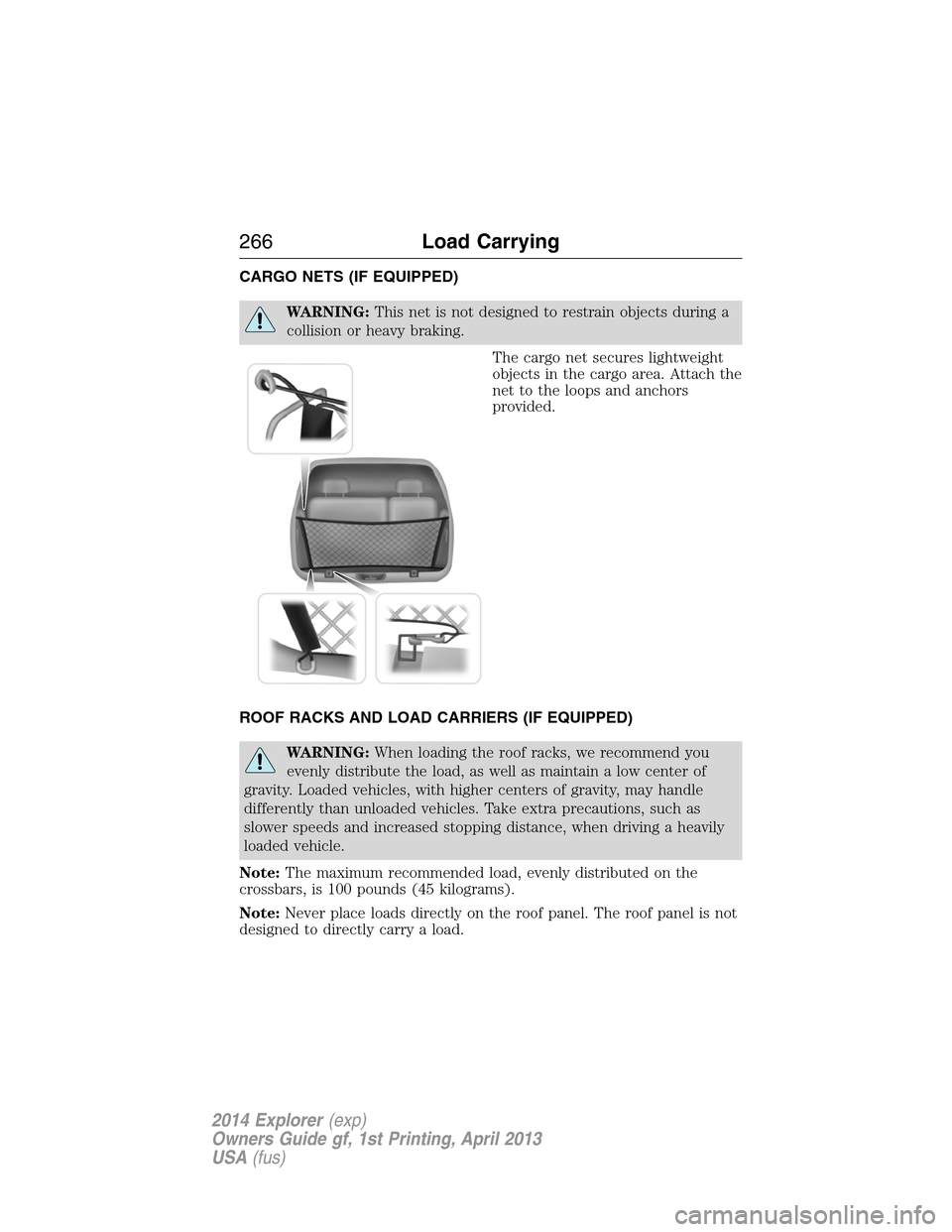
CARGO NETS (IF EQUIPPED)
WARNING:This net is not designed to restrain objects during a
collision or heavy braking.
The cargo net secures lightweight
objects in the cargo area. Attach the
net to the loops and anchors
provided.
ROOF RACKS AND LOAD CARRIERS (IF EQUIPPED)
WARNING:When loading the roof racks, we recommend you
evenly distribute the load, as well as maintain a low center of
gravity. Loaded vehicles, with higher centers of gravity, may handle
differently than unloaded vehicles. Take extra precautions, such as
slower speeds and increased stopping distance, when driving a heavily
loaded vehicle.
Note:The maximum recommended load, evenly distributed on the
crossbars, is 100 pounds (45 kilograms).
Note:Never place loads directly on the roof panel. The roof panel is not
designed to directly carry a load.
266Load Carrying
2014 Explorer(exp)
Owners Guide gf, 1st Printing, April 2013
USA(fus)
Page 269 of 586

Vehicle Curb Weight– is the weight of your new vehicle when you
picked it up from your authorized dealer plus any aftermarket
equipment.
Payload– is the combined weight of cargo and passengers that the
vehicle is carrying. The maximum payload for your vehicle can be found
on the Tire Label on the B-Pillar or the edge of the driver’s door
(vehicles exported outside the US and Canada may not have a Tire
Label). Look for“THE COMBINED WEIGHT OF OCCUPANTS AND
CARGO SHOULD NEVER EXCEED XXX kg OR XXX lb.”for
maximum payload. The payload listed on the Tire Label is the maximum
payload for the vehicle as built by the assembly plant. If any aftermarket
or authorized-dealer installed equipment has been installed on the
vehicle, the weight of the equipment must be subtracted from the
payload listed on the Tire Label in order to determine the new payload.
WARNING:The appropriate loading capacity of your vehicle can
be limited either by volume capacity (how much space is
available) or by payload capacity (how much weight the vehicle should
carry). Once you have reached the maximum payload of your vehicle,
do not add more cargo, even if there is space available. Overloading or
improperly loading your vehicle can contribute to loss of vehicle control
and vehicle rollover.
268Load Carrying
2014 Explorer(exp)
Owners Guide gf, 1st Printing, April 2013
USA(fus)
Page 273 of 586
WARNING:Exceeding the Safety Compliance Certification Label
vehicle weight rating limits could result in substandard vehicle
handling or performance, engine, transmission and/or structural
damage, serious damage to the vehicle, loss of control and personal
injury.
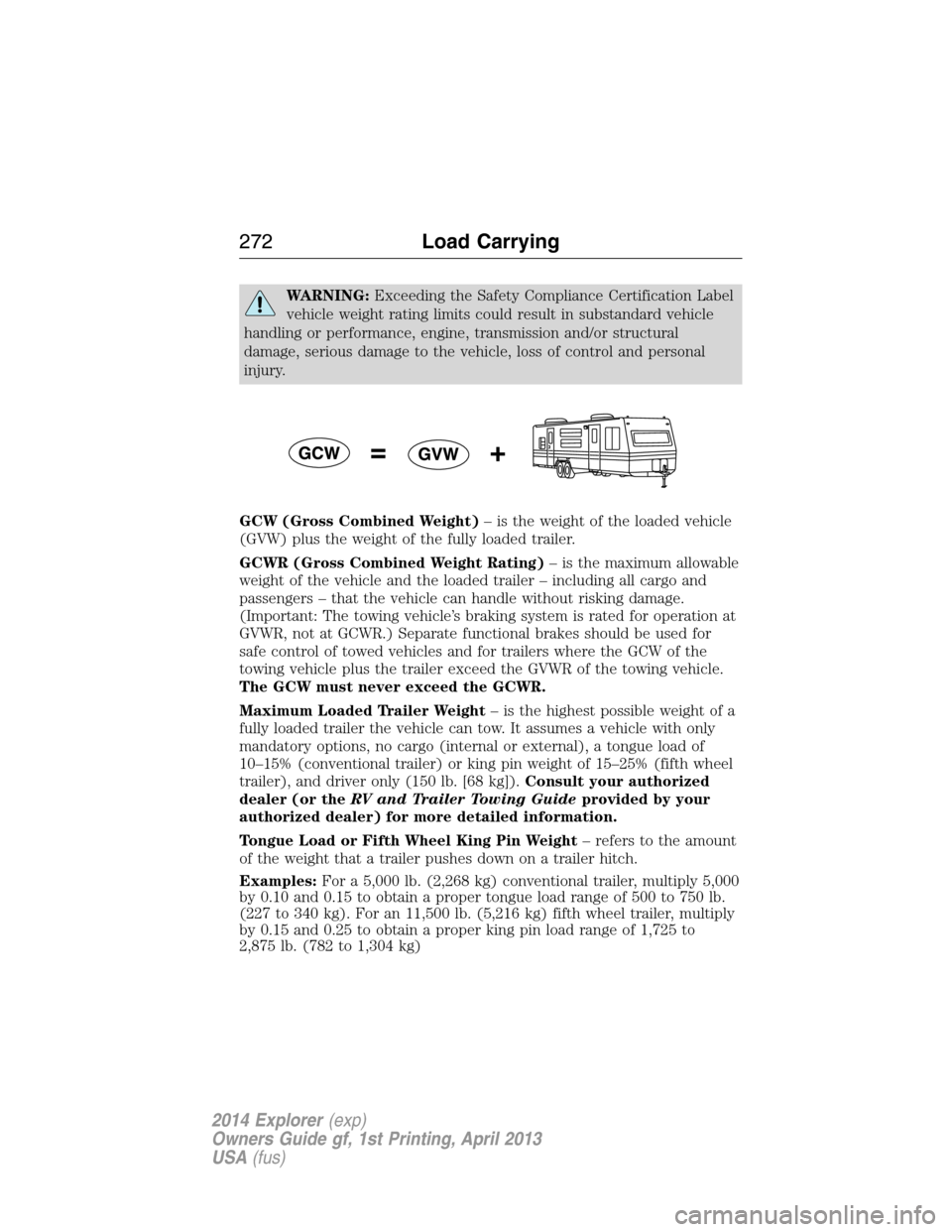
GCW (Gross Combined Weight)– is the weight of the loaded vehicle
(GVW) plus the weight of the fully loaded trailer.
GCWR (Gross Combined Weight Rating)– is the maximum allowable
weight of the vehicle and the loaded trailer – including all cargo and
passengers – that the vehicle can handle without risking damage.
(Important: The towing vehicle’s braking system is rated for operation at
GVWR, not at GCWR.) Separate functional brakes should be used for
safe control of towed vehicles and for trailers where the GCW of the
towing vehicle plus the trailer exceed the GVWR of the towing vehicle.
The GCW must never exceed the GCWR.
Maximum Loaded Trailer Weight– is the highest possible weight of a
fully loaded trailer the vehicle can tow. It assumes a vehicle with only
mandatory options, no cargo (internal or external), a tongue load of
10–15% (conventional trailer) or king pin weight of 15–25% (fifth wheel
trailer), and driver only (150 lb. [68 kg]).Consult your authorized
dealer (or theRV and Trailer Towing Guideprovided by your
authorized dealer) for more detailed information.
Tongue Load or Fifth Wheel King Pin Weight– refers to the amount
of the weight that a trailer pushes down on a trailer hitch.
Examples:For a 5,000 lb. (2,268 kg) conventional trailer, multiply 5,000
by 0.10 and 0.15 to obtain a proper tongue load range of 500 to 750 lb.
(227 to 340 kg). For an 11,500 lb. (5,216 kg) fifth wheel trailer, multiply
by 0.15 and 0.25 to obtain a proper king pin load range of 1,725 to
2,875 lb. (782 to 1,304 kg)
272Load Carrying
2014 Explorer(exp)
Owners Guide gf, 1st Printing, April 2013
USA(fus)
Page 274 of 586

WARNING:Do not exceed the GVWR or the GAWR specified on
the Safety Compliance Certification Label.
WARNING:Do not use replacement tires with lower load
carrying capacities than the original tires because they may lower
the vehicle’s GVWR and GAWR limitations. Replacement tires with a
higher limit than the original tires do not increase the GVWR and
GAWR limitations.
WARNING:Exceeding any vehicle weight rating limitation could
result in serious damage to the vehicle and/or personal injury.
Steps for determining the correct load limit:
1. Locate the statement “The combined weight of occupants and cargo
should never exceed XXX kg or XXX lb.” on your vehicle’s placard.
2. Determine the combined weight of the driver and passengers that will
be riding in your vehicle.
3. Subtract the combined weight of the driver and passengers from
XXX kg or XXX lb.
4. The resulting figure equals the available amount of cargo and luggage
load capacity. For example, if the “XXX” amount equals 1,400 lb. and
there will be five 150 lb. passengers in your vehicle, the amount of
available cargo and luggage load capacity is 650 lb. (1400-750 (5 x 150)
= 650 lb.).
5. Determine the combined weight of luggage and cargo being loaded on
the vehicle. That weight may not safely exceed the available cargo and
luggage load capacity calculated in Step 4.
6. If your vehicle will be towing a trailer, load from your trailer will be
transferred to your vehicle. Consult this manual to determine how this
reduces the available cargo and luggage load capacity of your vehicle.
The following gives you a few examples on how to calculate the available
amount of cargo and luggage load capacity:
•Suppose your vehicle has a 1400 lb. (635 kg) cargo and luggage
capacity. You decide to go golfing. Is there enough load capacity to
carry you, 4 of your friends and all the golf bags? You and four friends
average 220 lb. (99 kg) each and the golf bags weigh approximately
30 lb. (13.5 kg) each. The calculation would be: 1400 - (5 x 220) - (5
Load Carrying273
2014 Explorer(exp)
Owners Guide gf, 1st Printing, April 2013
USA(fus)