2014 FORD EXPEDITION transmission
[x] Cancel search: transmissionPage 331 of 519
WARNING:Do not attempt to change a tire on the side of the
vehicle close to moving traffic. Pull far enough off the road to
avoid the danger of being hit when operating the jack or changing the
wheel.
WARNING:Always use the jack provided as original equipment
with your vehicle. If using a jack other than the one provided as
original equipment with your vehicle, make sure the jack capacity is
adequate for the vehicle weight, including any vehicle cargo or
modifications.
WARNING:Disable the power running boards before jacking,
lifting, or placing any object under the vehicle. Never place your
hand between the power running board and vehicle as extended power
running boards will retract when the doors are closed. Failure to follow
these instructions may result in personal injury.
Note:Passengers should not remain in the vehicle when the vehicle is
being jacked.
Park on a level surface, activate the hazard flashers and set the parking
brake. Then, place the transmission selector lever in positionPand turn
the engine off.
Location of the spare tire and tools
The spare tire and tools for your vehicle are stowed in the following
locations:
Item Location
Spare tire Under the vehicle, just forward of
the rear bumper
Jack tools Under the access panel located in
the floor compartment behind the
rear seat
330Wheels and Tires
2014 Expedition(exd)
Owners Guide gf, 1st Printing, June 2013
USA(fus)
Page 339 of 519
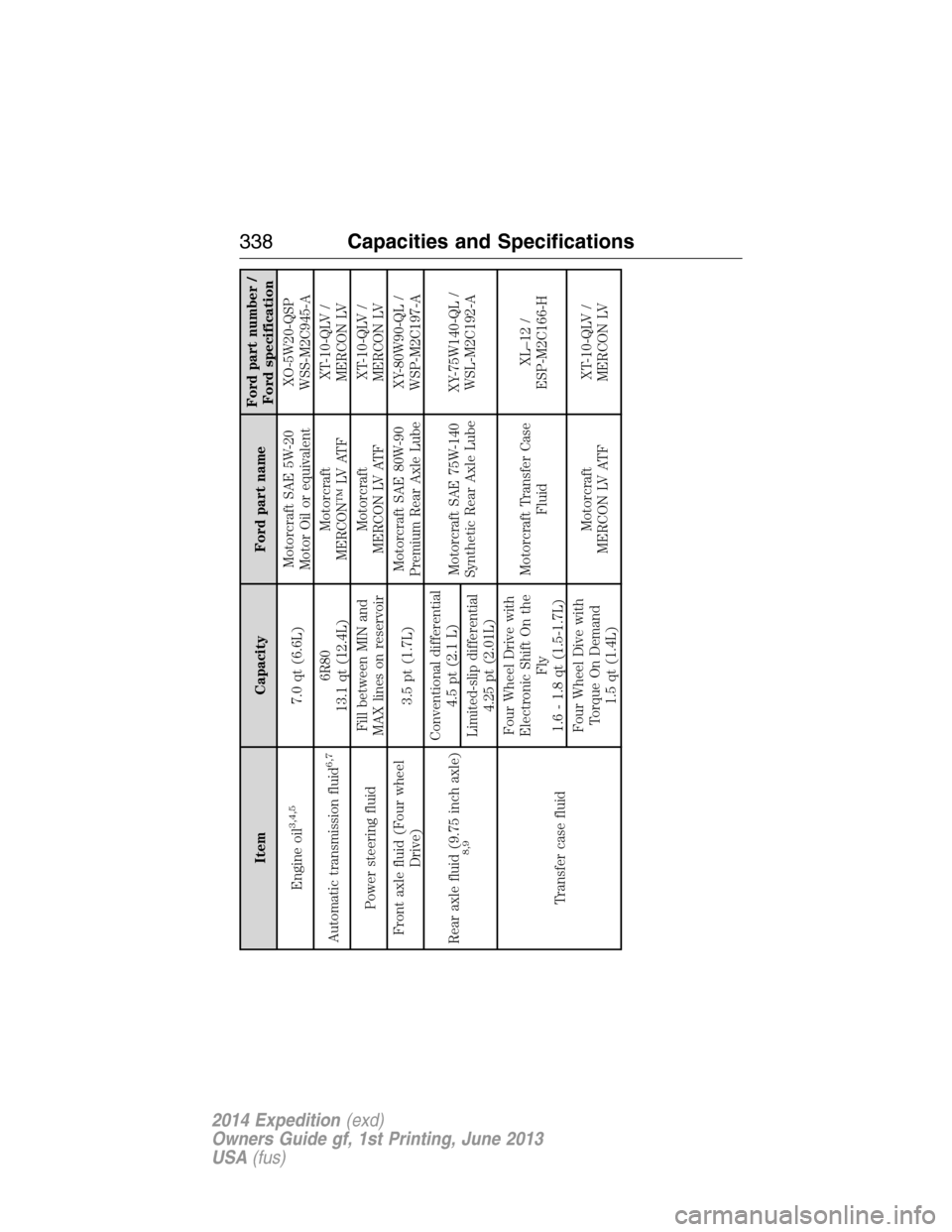
Item Capacity Ford part nameFord part number /
Ford specification
Engine oil
3,4,5
7.0 qt (6.6L)Motorcraft SAE 5W-20
Motor Oil or equivalentXO-5W20-QSP
WSS-M2C945-A
Automatic transmission fluid
6,7
6R80
13.1 qt (12.4L)Motorcraft
MERCON™ LV ATFXT-10-QLV /
MERCON LV
Power steering fluidFill between MIN and
MAX lines on reservoirMotorcraft
MERCON LV ATFXT-10-QLV /
MERCON LV
Front axle fluid (Four wheel
Drive)3.5 pt (1.7L)Motorcraft SAE 80W-90
Premium Rear Axle LubeXY-80W90-QL /
WSP-M2C197-A
Rear axle fluid (9.75 inch axle)
8,9
Conventional differential
4.5 pt (2.1 L)
Motorcraft SAE 75W-140
Synthetic Rear Axle LubeXY-75W140-QL /
WSL-M2C192-A
Limited-slip differential
4.25 pt (2.01L)
Transfer case fluidFour Wheel Drive with
Electronic Shift On the
Fly
1.6 - 1.8 qt (1.5-1.7L)Motorcraft Transfer Case
FluidXL–12 /
ESP-M2C166-H
Four Wheel Dive with
Torque On Demand
1.5 qt (1.4L)Motorcraft
MERCON LV ATFXT-10-QLV /
MERCON LV
338Capacities and Specifications
2014 Expedition(exd)
Owners Guide gf, 1st Printing, June 2013
USA(fus)
Page 341 of 519

Item Capacity Ford part nameFord part number /
Ford specification
3We have designed your engine to use Motorcraft motor oils or equivalent oil brands that meet our
specifications. Motor oils of the recommended viscosity grade that meet API SN requirements and display
the API Certification Mark for gasoline engines are also acceptable.4Do not use API S category oils labeled as SN, SM, SL or lower category unless the label also displays the
API certification mark. These oils do not meet all the requirements of your vehicles engine and emission
system.5Do not use supplemental engine oil additives in your engine. They are unnecessary and could lead to
engine damage that is not covered by your Ford warranty.6Automatic transmissions that require MERCON™ LV should only use MERCON LV fluid. Refer to
scheduled maintenance informationto determine the correct service interval. Use of any fluid other than
the recommended fluid may cause transmission damage.7Indicates only approximate dry-fill capacity. Some applications may vary based on cooler size and if
equipped with an in-tank cooler.8Your vehicle’s rear axle is filled with a synthetic rear axle lubricant and is considered lubricated for life.
These lubricants are not to be checked or changed unless a leak is suspected, service is required or the axle
has been submerged in water. The axle lubricant should be changed any time the axle has been submerged
in water.9Add 4 oz. (118 ml) of Additive Friction Modifier XL-3 or equivalent for complete refill of Ford limited slip
rear axles.10Warning:The air conditioning refrigerant system contains refrigerant R–134a under high pressure.
Opening and air conditioning refrigerant system can cause personal injury. Only qualified personnel should
service the air conditioning refrigerant system.
340Capacities and Specifications
2014 Expedition(exd)
Owners Guide gf, 1st Printing, June 2013
USA(fus)
Page 344 of 519
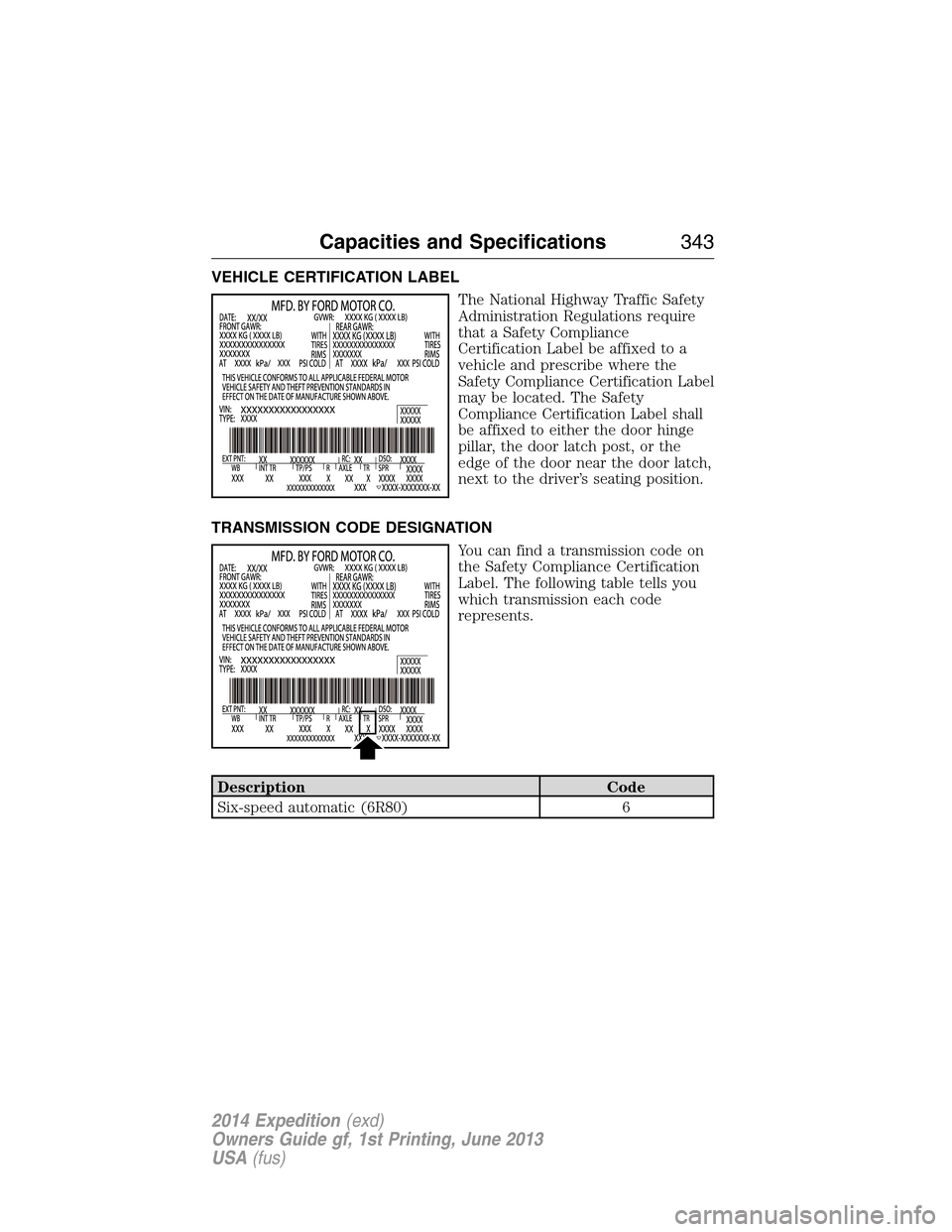
VEHICLE CERTIFICATION LABEL
The National Highway Traffic Safety
Administration Regulations require
that a Safety Compliance
Certification Label be affixed to a
vehicle and prescribe where the
Safety Compliance Certification Label
may be located. The Safety
Compliance Certification Label shall
be affixed to either the door hinge
pillar, the door latch post, or the
edge of the door near the door latch,
next to the driver’s seating position.
TRANSMISSION CODE DESIGNATION
You can find a transmission code on
the Safety Compliance Certification
Label. The following table tells you
which transmission each code
represents.
Description Code
Six-speed automatic (6R80) 6
Capacities and Specifications343
2014 Expedition(exd)
Owners Guide gf, 1st Printing, June 2013
USA(fus)
Page 361 of 519

AUXILIARY INPUT JACK
WARNING:Driving while distracted can result in loss of vehicle
control, crash and injury. We strongly recommend that you use
extreme caution when using any device that may take your focus off
the road. Your primary responsibility is the safe operation of your
vehicle. We recommend against the use of any hand-held device while
driving and encourage the use of voice-operated systems when possible.
Make sure you are aware of all applicable local laws that may affect the
use of electronic devices while driving.
WARNING:For safety reasons, do not connect or adjust the
settings on your portable music player while your vehicle is
moving.
WARNING:Store the portable music player in a secure location,
such as the center console or the glove box, when your vehicle is
moving. Hard objects may become projectiles in a crash or sudden stop,
which may increase the risk of serious injury. The audio extension cable
must be long enough to allow the portable music player to be safely
stored while your vehicle is moving.
The auxiliary input jack allows you
to connect and play music from
your portable music player through
your vehicle speakers. You can use
any portable music player designed
for use with headphones. Your audio
extension cable must have male
18-inch (3.5 millimeter) connectors
at each end.
1. Switch off the engine, radio and portable music player. Set the
parking brake and put the transmission in positionP.
2. Plug the extension cable from the portable music player into the
auxiliary input jack.
3. Switch the radio on. Select either a tuned FM station or a CD.
LINE IN
360Audio System
2014 Expedition(exd)
Owners Guide gf, 1st Printing, June 2013
USA(fus)
Page 364 of 519
Your system does not play the following types of discs:
•Optical disc CD-1
•CD-ROM
•DVD-ROM mini disc-CDG (audio only, not graphics)
Important Notice
It is unlawful in most jurisdictions for a person to drive a motor vehicle
which is equipped with a television viewer or screen that is located in
the motor vehicle at any point forward of the back of the driver’s seat, or
that is visible, directly or indirectly, to the driver while operating your
vehicle. In the interest of safety, do not install the unit where it is visible,
directly or indirectly, by the operator of the motor vehicle. If your vehicle
is equipped with a wireless rear seat audio system or any other wireless
infrared device, power the system off in order to operate the DVD
headrest system. If the system is on, the two systems may interfere with
each other canceling out or creating undesirable audio through the
wireless headphones.
Safety Precaution
For safety reasons:
•Do not change discs while your vehicle is moving.
•Do not allow children to unfasten their safety belts to change discs or
make changes to the system.
•Make changes with the remote control, while safety belts remain
fastened.
Enjoy your entertainment system, but remember that safety of your
passengers is the highest priority.
Wireless Headphones
This unit includes a built-in dual channel infrared transmitter for use
with your wireless headphones. You can change headphone volume using
the individual controls on each headset. To use wireless headphones
effectively, you must maintain line-of-sight between headphones and
transmitter. Allowing obstructions to come between headphone and
transmitter, or body motions that allow the user to conceal the
headphone from the transmitter (like reaching or bending), adversely
affect audio performance. Infrared transmission, like visible light, travels
only in a straight line.
Audio System363
2014 Expedition(exd)
Owners Guide gf, 1st Printing, June 2013
USA(fus)
Page 365 of 519

Wired Headphones
You can use any standard stereo headphones by plugging them into the
1/8–inch (3.5 millimeter) headphone jack on each of the headrest DVD
systems. Remove and save the protective plastic cover to access the
jacks. Remember to replace the cover when the jacks are not in use.
A/V Input
You can connect an external audio/video device that uses common RCA
interface cables to the Ford DVD system, such as a video game device or
VCR. Connect the device RCA cables to the AV RCA INPUT jacks
according to color: yellow for video, red for right audio and white for left
audio. The signal from the external audio/video source overrides other
video sources for that monitor.
Wireless FM Transmitter
Your device has an internal FM transmitter. This allows you to listen to
the DVD player audio signal by tuning your vehicle FM radio to a radio
frequency that you select, then accessing the SOUND-AROUND feature
by using the remote control. SOUND-AROUND allows the user to choose
from a number of pre-programmed frequencies to play back the rear-seat
entertainment system audio over the radio. When you engage
SOUND-AROUND, as long as the DVD player is active, it adversely
affects the FM radio reception of other stations, especially neighboring
stations nearest to whichever station is in use for the DVD player.
Performance of SOUND-AROUND varies based on geographic location.
You may need to change the SOUND-AROUND frequency periodically
when travelling long distances. This helps maintain the best performance
when listening to DVD system content over the radio. Audio heard
through wireless headphones remains unaffected by SOUND-AROUND.
There may also be a reduction in AM radio performance as well. AM and
FM radio performance can be expected to return to normal when the
DVD system is turned off.
How to use the FM Transmitter
1. Switch on the system and place a disc in Monitor A.
2. Point the remote control at the monitor, and then press DVD A.
3. PressSOUND AROUND ON/OFFto turn FM transmission off and
on.
4. Select a radio frequency (88.3, 88.7, 89.1, 89.5, 89.9, and 90.3MHz)
by pressingSOUND AROUND SELECT.
5. Select a frequency, and then tune your radio to the corresponding
frequency. Try each station frequency until you achieve a clear audio
signal.
364Audio System
2014 Expedition(exd)
Owners Guide gf, 1st Printing, June 2013
USA(fus)
Page 387 of 519
•Speak naturally, without long pauses between words.
•At any time you can interrupt the system while it is speaking by
pressing the voice icon.
USING SYNC WITH YOUR PHONE
Hands-free calling is one of the main features of SYNC. While the system
supports a variety of features, many are dependent on your cellular
phone’s functionality. At a minimum, most cellular phones with Bluetooth
wireless technology support the following functions:
•Answering an incoming call
•Ending a call
•Using privacy mode
•Dialing a number
•Redialing
•Call waiting notification
•Caller ID.
Other features, such as text messaging using Bluetooth and automatic
phonebook download, are phone-dependent features. To check your
phone’s compatibility, see your phone’s user manual and visit
www.SYNCMyRide.com, www.SYNCMyRide.ca or www.syncmaroute.ca.
Pairing a Phone for the First Time
Note:SYNC can support downloading up to approximately 1000 entries
per Bluetooth-enabled cellular phone.
Note:Make sure the vehicle ignition and radio are turned on and the
transmission is in positionP.
Note:To scroll through the menus, press the up and down arrows on
your audio system.
Wirelessly pairing your phone with SYNC allows you to make and receive
hands-free calls.
1. Press the phone button; when the display indicates no phone is
paired, pressOK.
2. WhenFind SYNCappears in the display, pressOK.
3. Put your phone into Bluetooth discovery mode. See your phone’s
user guide if necessary.
4. When prompted on your phone’s display, enter the six-digit PIN
provided by SYNC in the radio display.
5. The display indicates when the pairing is successful.
386SYNC®
2014 Expedition(exd)
Owners Guide gf, 1st Printing, June 2013
USA(fus)