Page 72 of 519
LIFTGATE
WARNING:It is extremely dangerous to ride in a cargo area,
inside or outside of a vehicle. In a crash, people riding in these
areas are more likely to be seriously injured or killed. Do not allow
people to ride in any area of your vehicle that is not equipped with
seats and safety belts. Be sure everyone in your vehicle is in a seat and
using a safety belt properly.
Manual Liftgate
WARNING:Make sure to close and latch the liftgate to prevent
drawing exhaust fumes into your vehicle. This will also prevent
passengers and cargo from falling out. If you must drive with the
liftgate open, keep the vents or windows open so outside air comes into
your vehicle. Failure to follow this warning could result in serious
personal injury.
Note:Be careful when opening or closing the liftgate in a garage or
other enclosed area to avoid damaging the liftgate.
Note:Do not hang anything (bike rack, etc.) from the spoiler, glass or
liftgate. This could damage the liftgate and its components.
Note:Do not leave the liftgate open while driving. This could damage
the liftgate and its components.
The liftgate area is only intended for cargo, not passengers.
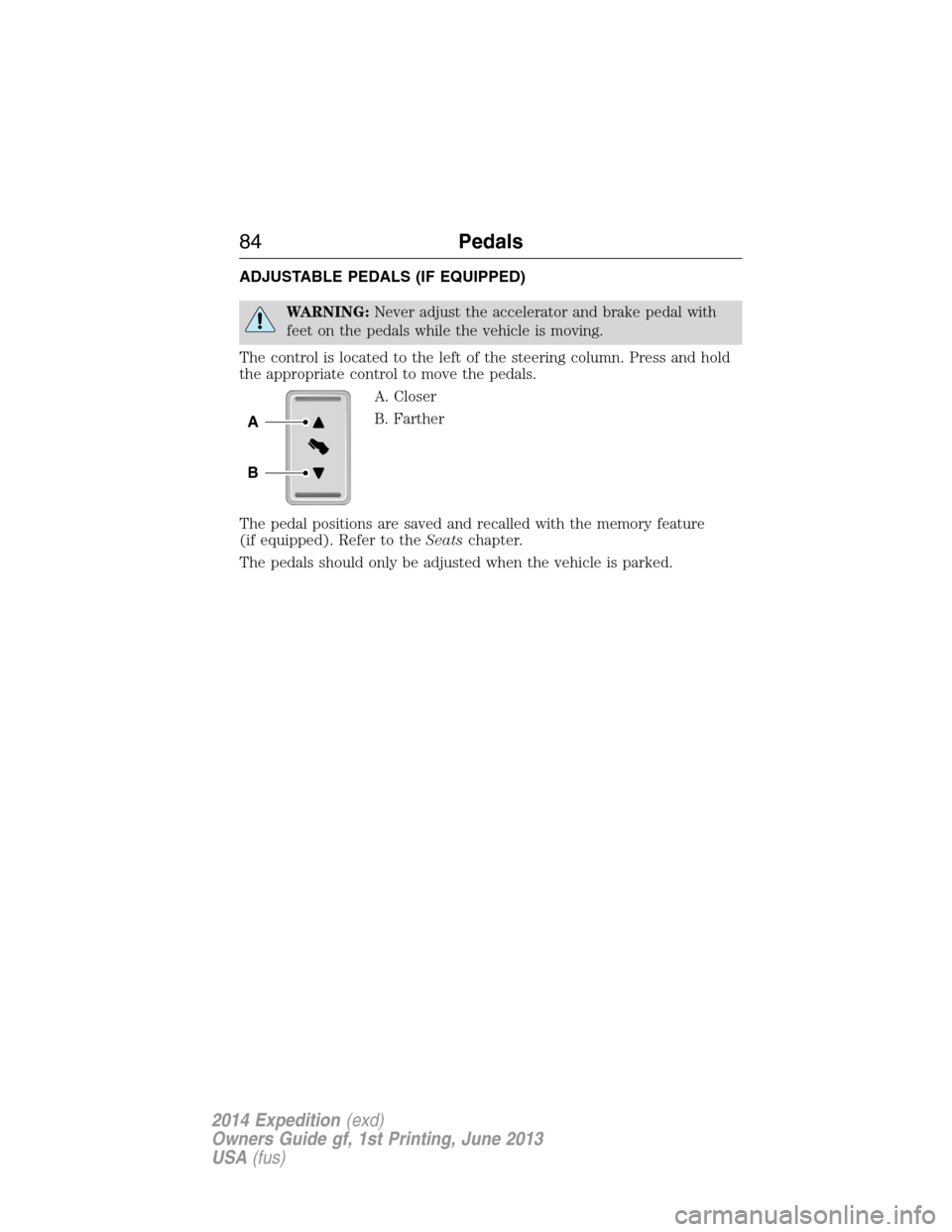
To open the liftgate:Press the
button located on the inside of
the liftgate handle to unlatch the
liftgate, then pull on the outside
handle.
Locks71
2014 Expedition(exd)
Owners Guide gf, 1st Printing, June 2013
USA(fus)
Page 85 of 519
ADJUSTABLE PEDALS (IF EQUIPPED)
WARNING:Never adjust the accelerator and brake pedal with
feet on the pedals while the vehicle is moving.
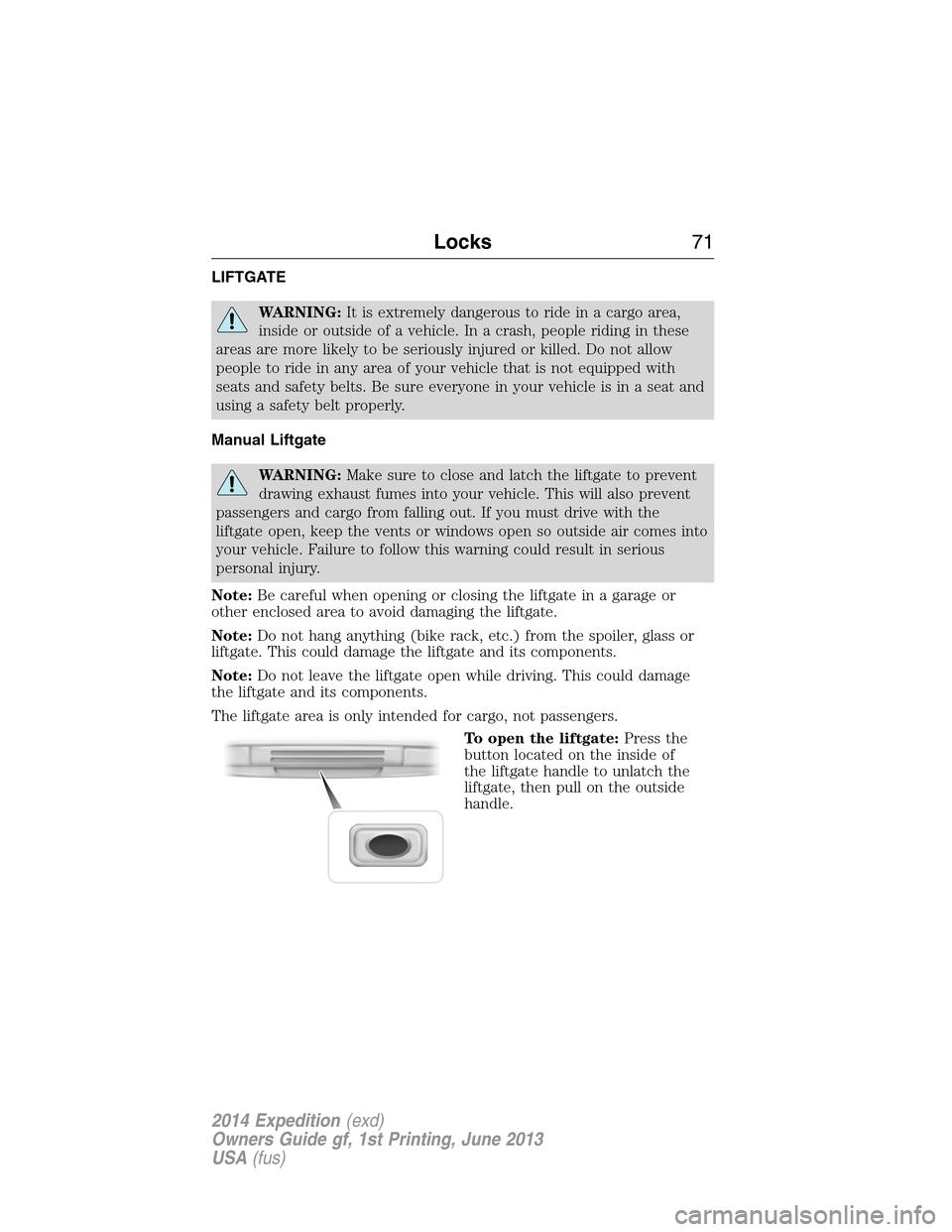
The control is located to the left of the steering column. Press and hold
the appropriate control to move the pedals.
A. Closer
B. Farther
The pedal positions are saved and recalled with the memory feature
(if equipped). Refer to theSeatschapter.
The pedals should only be adjusted when the vehicle is parked.
A
B
84Pedals
2014 Expedition(exd)
Owners Guide gf, 1st Printing, June 2013
USA(fus)
Page 91 of 519
INTERIOR LAMPS
Front Row Map Lamps (If Equipped)
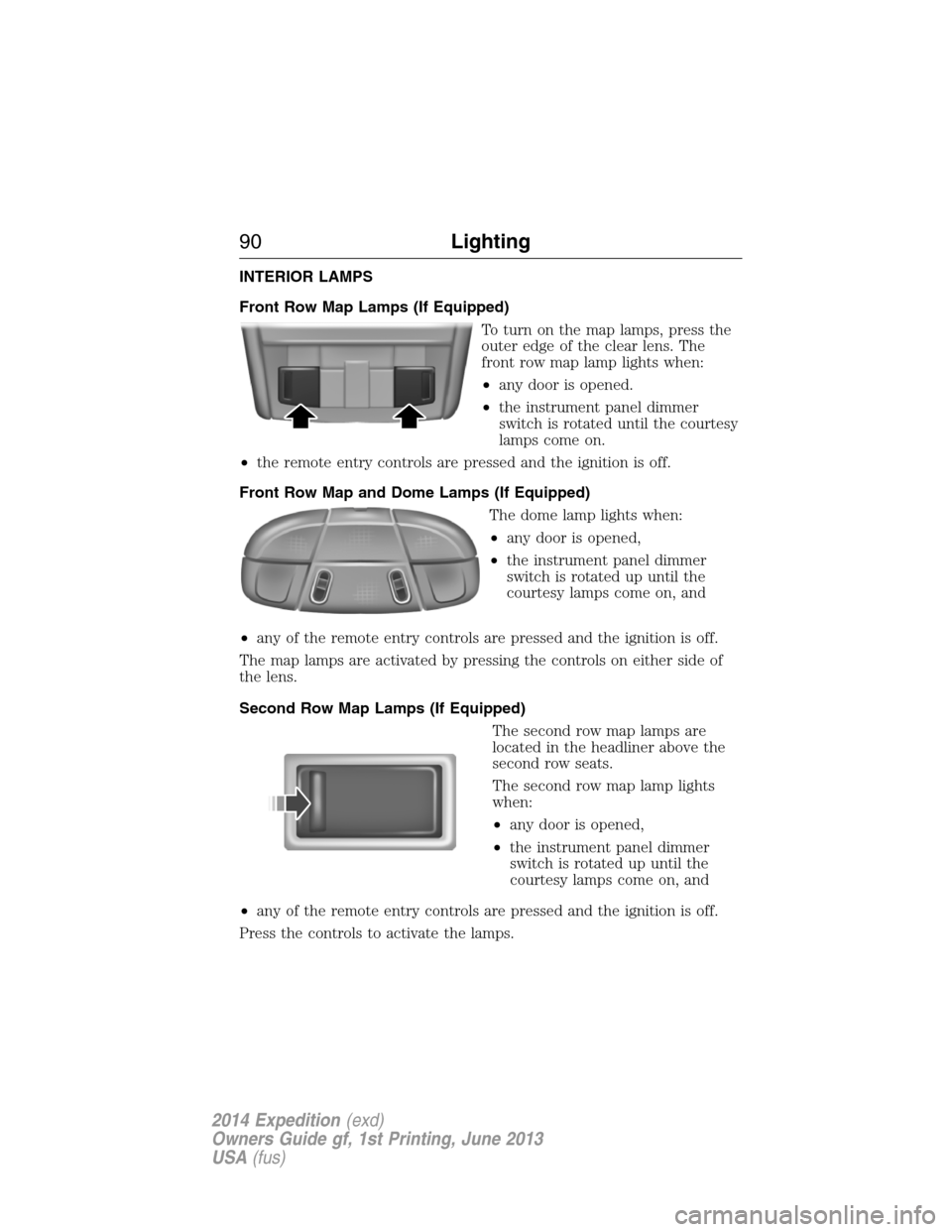
To turn on the map lamps, press the
outer edge of the clear lens. The
front row map lamp lights when:
•any door is opened.
•the instrument panel dimmer
switch is rotated until the courtesy
lamps come on.
•the remote entry controls are pressed and the ignition is off.
Front Row Map and Dome Lamps (If Equipped)
The dome lamp lights when:
•any door is opened,
•the instrument panel dimmer
switch is rotated up until the
courtesy lamps come on, and
•any of the remote entry controls are pressed and the ignition is off.
The map lamps are activated by pressing the controls on either side of
the lens.
Second Row Map Lamps (If Equipped)
The second row map lamps are
located in the headliner above the
second row seats.
The second row map lamp lights
when:
•any door is opened,
•the instrument panel dimmer
switch is rotated up until the
courtesy lamps come on, and
•any of the remote entry controls are pressed and the ignition is off.
Press the controls to activate the lamps.
90Lighting
2014 Expedition(exd)
Owners Guide gf, 1st Printing, June 2013
USA(fus)
Page 95 of 519
Power-Folding Mirrors (If Equipped)
Note:Using the mirrors 10 or more times within one minute, or
repeated folding and unfolding of the mirrors while holding the control
down during full travel, may disable the system to protect motors from
overheating. Wait approximately three minutes with your vehicle running,
and up to 10 minutes with your vehicle off, for the system to reset and
for function to return to normal.
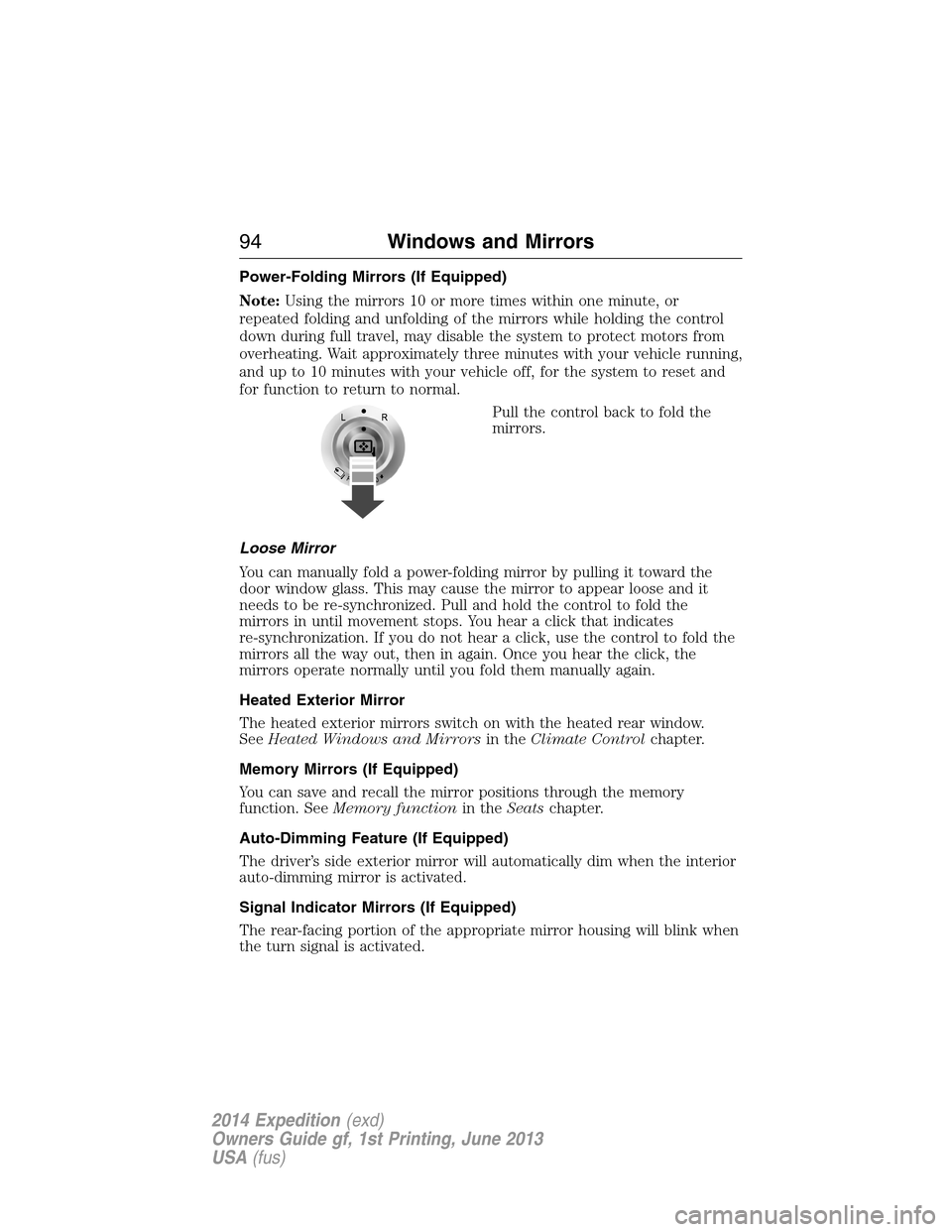
Pull the control back to fold the
mirrors.
Loose Mirror
You can manually fold a power-folding mirror by pulling it toward the
door window glass. This may cause the mirror to appear loose and it
needs to be re-synchronized. Pull and hold the control to fold the
mirrors in until movement stops. You hear a click that indicates
re-synchronization. If you do not hear a click, use the control to fold the
mirrors all the way out, then in again. Once you hear the click, the
mirrors operate normally until you fold them manually again.
Heated Exterior Mirror
The heated exterior mirrors switch on with the heated rear window.
SeeHeated Windows and Mirrorsin theClimate Controlchapter.
Memory Mirrors (If Equipped)
You can save and recall the mirror positions through the memory
function. SeeMemory functionin theSeatschapter.
Auto-Dimming Feature (If Equipped)
The driver’s side exterior mirror will automatically dim when the interior
auto-dimming mirror is activated.
Signal Indicator Mirrors (If Equipped)
The rear-facing portion of the appropriate mirror housing will blink when
the turn signal is activated.
94Windows and Mirrors
2014 Expedition(exd)
Owners Guide gf, 1st Printing, June 2013
USA(fus)
Page 126 of 519
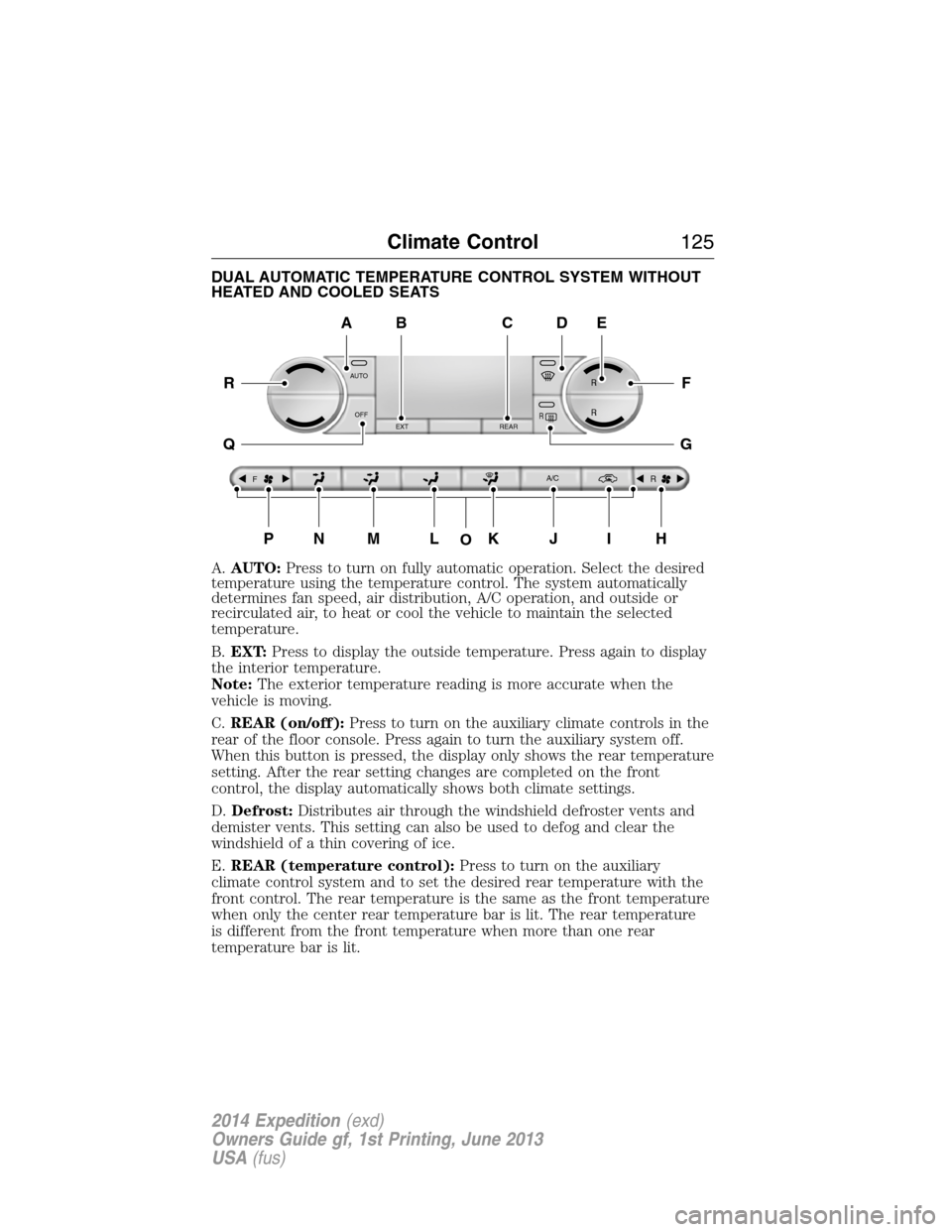
DUAL AUTOMATIC TEMPERATURE CONTROL SYSTEM WITHOUT
HEATED AND COOLED SEATS
A.AUTO:Press to turn on fully automatic operation. Select the desired
temperature using the temperature control. The system automatically
determines fan speed, air distribution, A/C operation, and outside or
recirculated air, to heat or cool the vehicle to maintain the selected
temperature.
B.EXT:Press to display the outside temperature. Press again to display
the interior temperature.
Note:The exterior temperature reading is more accurate when the
vehicle is moving.
C.REAR (on/off):Press to turn on the auxiliary climate controls in the
rear of the floor console. Press again to turn the auxiliary system off.
When this button is pressed, the display only shows the rear temperature
setting. After the rear setting changes are completed on the front
control, the display automatically shows both climate settings.
D.Defrost:Distributes air through the windshield defroster vents and
demister vents. This setting can also be used to defog and clear the
windshield of a thin covering of ice.
E.REAR (temperature control):Press to turn on the auxiliary
climate control system and to set the desired rear temperature with the
front control. The rear temperature is the same as the front temperature
when only the center rear temperature bar is lit. The rear temperature
is different from the front temperature when more than one rear
temperature bar is lit.
AUTO
OFF
EXT REAR
FA/C
R
R R
R
O
A
PNMLKJIH
DE
F
G
R
Q
BC
Climate Control125
2014 Expedition(exd)
Owners Guide gf, 1st Printing, June 2013
USA(fus)
Page 128 of 519

DUAL AUTOMATIC TEMPERATURE CONTROL SYSTEM WITH
HEATED AND COOLED SEATS
A.AUTO:Press to turn on fully automatic operation. Select the desired
temperature using the temperature control. The system automatically
determines fan speed, air distribution, A/C operation, and outside or
recirculated air, to heat or cool the vehicle to maintain the selected
temperature.
B.A/C:Press to turn air conditioning off and on. Air conditioning cools
the vehicle using outside air. To improve air conditioning when starting
your vehicle, drive with the windows slightly open for two to three
minutes.
C.EXT:Press to display the outside temperature. Press again to display
the interior temperature.
Note:The exterior temperature reading is more accurate when the
vehicle is moving.
D.Recirculated air:Press to switch between outside air and
recirculated air. Using recirculated air can reduce the time needed to
cool the interior and reduce unwanted odors from entering your vehicle.
E.Defrost:Distributes air through the windshield defroster vents and
demister vents. This setting can also be used to defog and clear the
windshield of a thin covering of ice.
AUTO
OFF
A/C EXT
FREAR
R
R R
R
A
PONMLKJI
EF
G
H
R
Q
BDC
Climate Control127
2014 Expedition(exd)
Owners Guide gf, 1st Printing, June 2013
USA(fus)
Page 129 of 519
F.REAR (temperature control):Press to turn on the auxiliary climate
control system and to set the desired rear temperature with the front
control. The rear temperature is the same as the front temperature when
only the center rear temperature bar is lit. The rear temperature is
different from the front temperature when more than one rear
temperature bar is lit.
When this button is pressed, the display only shows the rear temperature
setting. After the rear setting changes are completed on the front
control, the display automatically shows both climate settings.
G.Passenger temperature control:Press and turn to increase or
decrease the air temperature on the passenger side of the vehicle.
H.Rear defrost:Press to turn the heated windows and mirrors off and
on. SeeHeated windows and mirrorslater in this chapter for more
information.
I.Auxiliary climate control fan speed:Press to turn on the auxiliary
climate control system or to adjust the rear fan speed from the front
control.
J.Passenger heated seat control:Press to switch the passenger
heated seat off and on. SeeHeated seatsin theSeatschapter for more
information.
K.Passenger cooled seat control:Press to switch the passenger
cooled seat off and on. SeeHeated and cooled seatsin theSeats
chapter for more information.
L.REAR (on/off):Press to turn on the auxiliary climate controls in the
rear of the floor console. Press again to turn the auxiliary system off.
When this button is pressed, the display only shows the rear temperature
setting. After the rear setting changes are completed on the front
control, the display automatically shows both climate settings.
M.Air distribution control:Turn to set the air distribution to a
position listed below:
Distributes air through the instrument panel vents.
Distributes air through the instrument panel vents, floor vents,
and demister vents.
128Climate Control
2014 Expedition(exd)
Owners Guide gf, 1st Printing, June 2013
USA(fus)
Page 130 of 519
Distributes air through the floor vents.
Distributes air through the windshield defroster vents, demister
vents and floor vents.
N.Driver heated seat control:Press to switch the driver heated seat
off and on. SeeHeated seatsin theSeatschapter for more information.
O.Driver cooled seat control:Press to switch the driver cooled seat
off and on. SeeHeated and cooled seatsin theSeatschapter for more
information.
P.Front fan speed control:Controls the volume of air circulated in
your vehicle. Press to increase or decrease fan speed.
Q.OFF:Turn the climate control system off. When the system is off,
outside air cannot enter the vehicle.
R.Driver temperature control:Press to turn the climate control
system off and on. Turn to increase or decrease the air temperature for
the driver side of the vehicle.
This control also adjusts the passenger side temperature when dual zone
operation is disengaged.
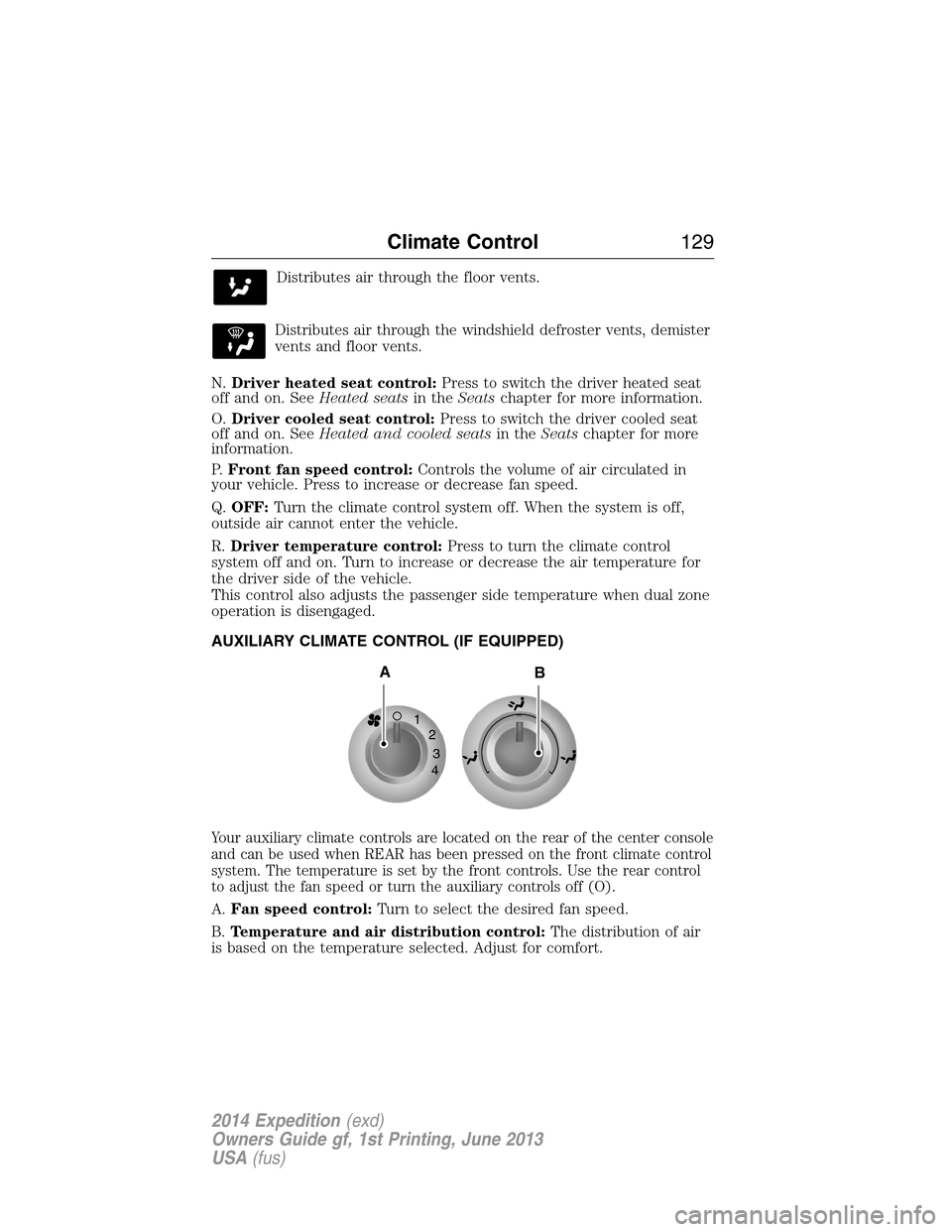
AUXILIARY CLIMATE CONTROL (IF EQUIPPED)
Your auxiliary climate controls are located on the rear of the center console
and can be used when REAR has been pressed on the front climate control
system. The temperature is set by the front controls. Use the rear control
to adjust the fan speed or turn the auxiliary controls off (O).
A.Fan speed control:Turn to select the desired fan speed.
B.Temperature and air distribution control:The distribution of air
is based on the temperature selected. Adjust for comfort.
1
2
3
4
AB
Climate Control129
2014 Expedition(exd)
Owners Guide gf, 1st Printing, June 2013
USA(fus)