2014 FORD EXPEDITION fuel
[x] Cancel search: fuelPage 100 of 519
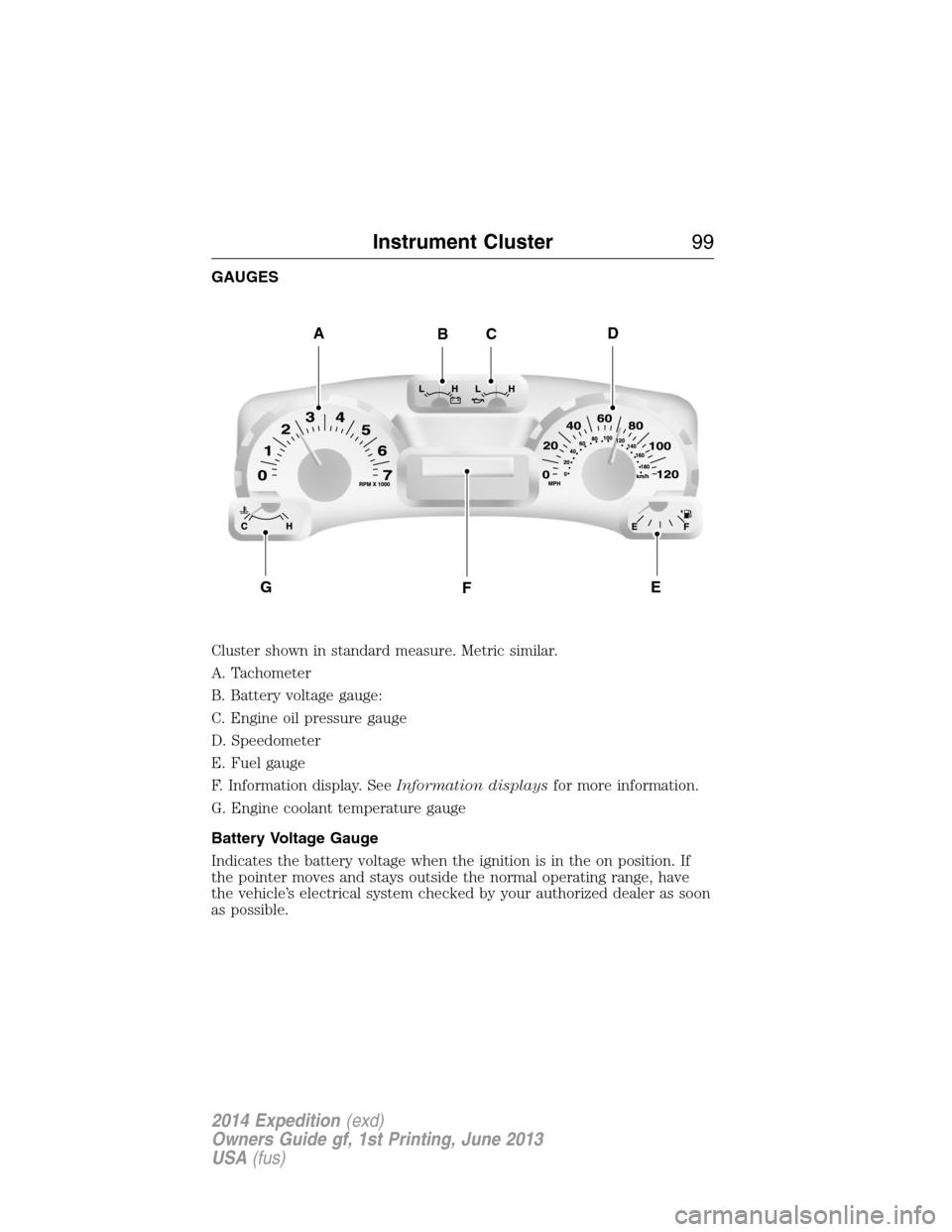
GAUGES
Cluster shown in standard measure. Metric similar.
A. Tachometer
B. Battery voltage gauge:
C. Engine oil pressure gauge
D. Speedometer
E. Fuel gauge
F. Information display. SeeInformation displaysfor more information.
G. Engine coolant temperature gauge
Battery Voltage Gauge
Indicates the battery voltage when the ignition is in the on position. If
the pointer moves and stays outside the normal operating range, have
the vehicle’s electrical system checked by your authorized dealer as soon
as possible.
ADBC
FGE
Instrument Cluster99
2014 Expedition(exd)
Owners Guide gf, 1st Printing, June 2013
USA(fus)
Page 101 of 519
Engine Oil Pressure Gauge
Indicates engine oil pressure. The needle should stay in the normal
operating range. If the needle falls below the normal range, stop the
vehicle, turn off the engine and check the engine oil level. Add oil if
needed. If the oil level is correct, have your vehicle checked at your
authorized dealer.
Fuel Gauge
Indicates approximately how much fuel is left in the fuel tank (when the
ignition is on). The fuel gauge may vary slightly when the vehicle is in
motion or on a grade. The fuel icon and arrow indicates which side of
the vehicle the fuel filler door is located.
Information Display
Odometer
Located in the bottom of the information display Registers the
accumulated distance your vehicle has travelled.
Trip Computer
SeeTrip A/BinInformation Displays.
Vehicle Settings and Personalization
SeeInformation Displays.
Engine Coolant Temperature Gauge
Indicates engine coolant temperature. At normal operating temperature,
the level indicator will be in the normal range. If the engine coolant
temperature exceeds the normal range, stop the vehicle as soon as safely
possible, switch off the engine and let the engine cool.
WARNING:Never remove the coolant reservoir cap while the
engine is running or hot.
100Instrument Cluster
2014 Expedition(exd)
Owners Guide gf, 1st Printing, June 2013
USA(fus)
Page 104 of 519
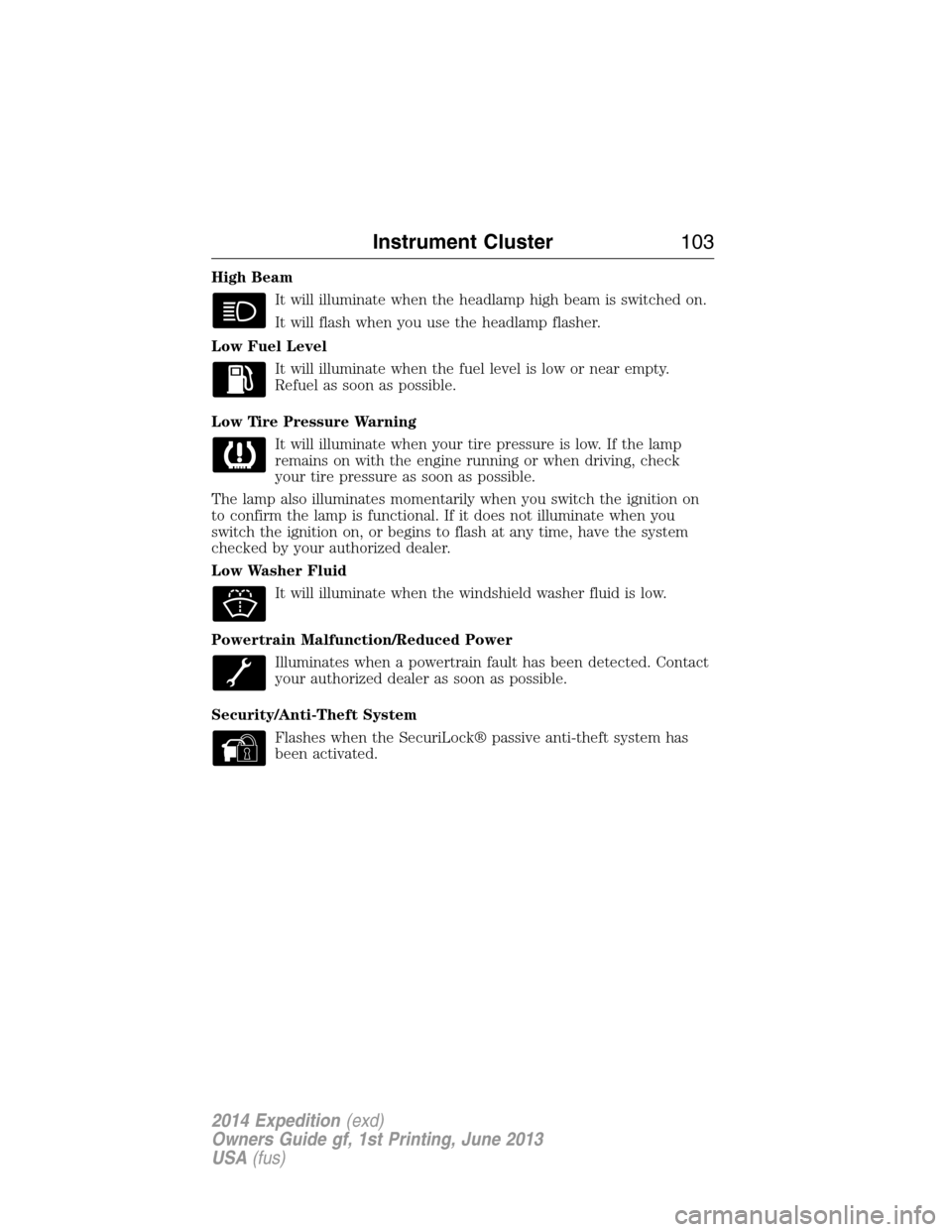
High Beam
It will illuminate when the headlamp high beam is switched on.
It will flash when you use the headlamp flasher.
Low Fuel Level
It will illuminate when the fuel level is low or near empty.
Refuel as soon as possible.
Low Tire Pressure Warning
It will illuminate when your tire pressure is low. If the lamp
remains on with the engine running or when driving, check
your tire pressure as soon as possible.
The lamp also illuminates momentarily when you switch the ignition on
to confirm the lamp is functional. If it does not illuminate when you
switch the ignition on, or begins to flash at any time, have the system
checked by your authorized dealer.
Low Washer Fluid
It will illuminate when the windshield washer fluid is low.
Powertrain Malfunction/Reduced Power
Illuminates when a powertrain fault has been detected. Contact
your authorized dealer as soon as possible.
Security/Anti-Theft System
Flashes when the SecuriLock® passive anti-theft system has
been activated.
Instrument Cluster103
2014 Expedition(exd)
Owners Guide gf, 1st Printing, June 2013
USA(fus)
Page 105 of 519

Service Engine Soon
Theservice engine soonindicator light illuminates when the
ignition is first turned to the on position to check the bulb and to
indicate whether the vehicle is ready for Inspection/Maintenance
(I/M) testing. Normally, the “service engine soon” light will stay on until the
engine is cranked, then turn itself off if no malfunctions are present.
However, if after 15 seconds the “service engine soon” light blinks eight
times, it means that the vehicle is not ready for I/M testing. See the
Readiness for inspection/maintenance (I/M) testingin theFuel and
Refuelingchapter.
Solid illumination after the engine is started indicates the on-board
diagnostics system (OBD-II) has detected a malfunction. Refer to
On-board diagnostics (OBD-II)in theFuel and Refuelingchapter.
If the light is blinking, engine misfire is occurring which could damage
your catalytic converter. Drive in a moderate fashion (avoid heavy
acceleration and deceleration) and have your vehicle serviced
immediately by your authorized dealer.
WARNING:Under engine misfire conditions, excessive exhaust
temperatures could damage the catalytic converter, the fuel
system, interior floor coverings or other vehicle components, possibly
causing a fire.
Stability Control System
Displays when the AdvanceTrac®/Traction control is active.
If the light remains on, have the system serviced immediately.
Stability Control System Off
Illuminates when AdvanceTrac®/Traction control has been
disabled by the driver.
Transmission Tow/Haul
Illuminates when the Tow/Haul feature has been activated.
Refer to theTransmissionchapter for transmission function
and operation. If the light flashes steadily, have the system
serviced immediately, damage to the transmission could occur.
104Instrument Cluster
2014 Expedition(exd)
Owners Guide gf, 1st Printing, June 2013
USA(fus)
Page 108 of 519
•MILES (km) TO E: This displays an estimate of approximately how far
you can drive with the fuel remaining in your tank under normal
driving conditions. Remember to turn the ignition off when refueling
to allow this feature to correctly detect the added fuel. Distance to
empty is calculated using a running average fuel economy, which is
based on your recent driving history of 500 miles (800 km). This value
is not the same as the average fuel economy display. The running
average fuel economy is re-initialized to a factory default value if the
battery is disconnected.
•AVG MPG (L/100km): Average fuel economy displays your average fuel
economy in miles/gallon or liters/100 km.
•XX°F / XX°C: The outside air temperature is shown together with the
compass heading in the bottom row of the message center display.
Refer toUnitsin this section for information on selecting °F or °C.
•
COMPASS DISPLAY (if equipped): Displays the vehicle’s heading direction.
The compass reading may be affected when you drive near large
buildings, bridges, power lines and powerful broadcast antenna. Magnetic
or metallic objects placed in, on or near the vehicle may also affect
compass accuracy. If the compass appears to be inaccurate, a manual
calibration may be necessary. Refer toCompass zone adjustment
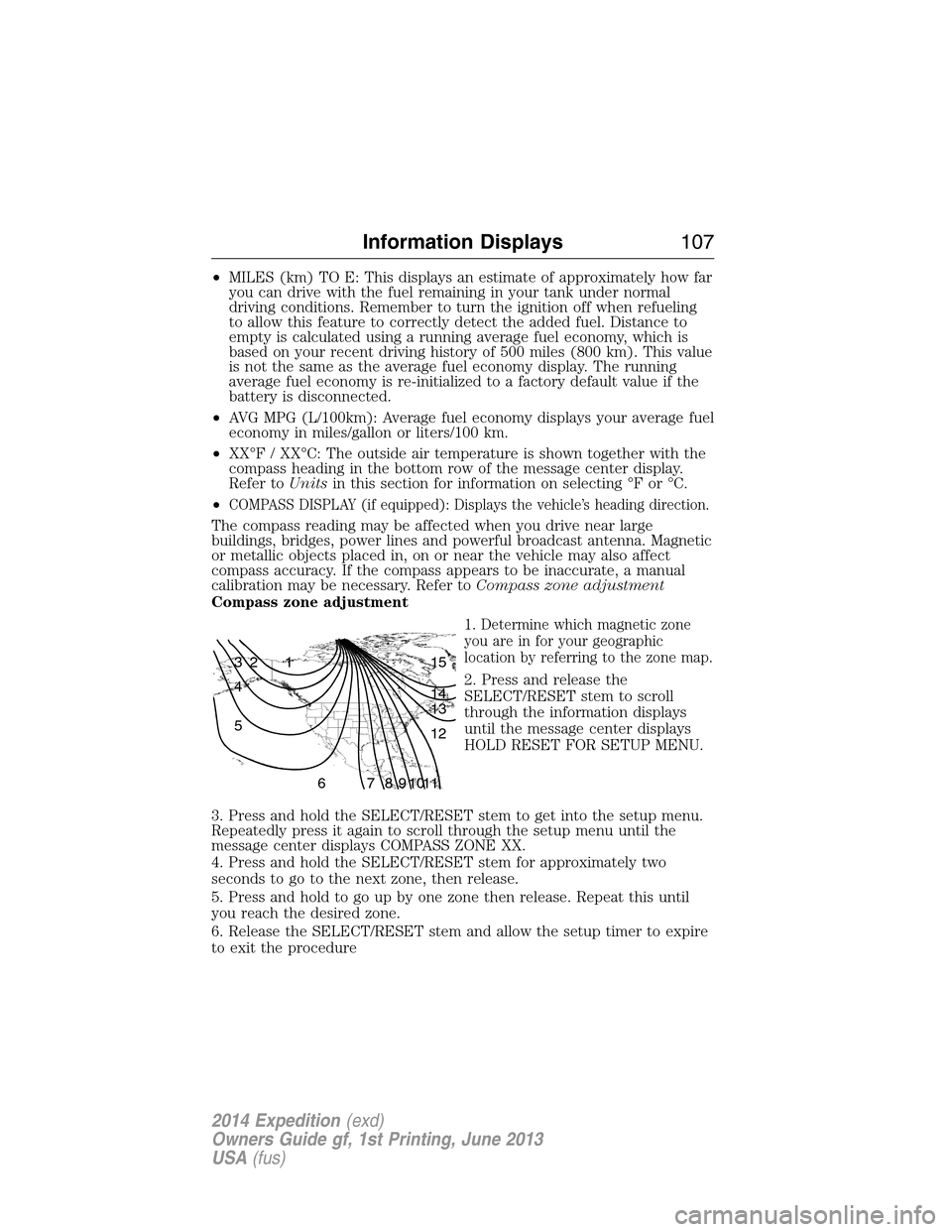
Compass zone adjustment
1. Determine which magnetic zone
you are in for your geographic
location by referring to the zone map.
2. Press and release the
SELECT/RESET stem to scroll
through the information displays
until the message center displays
HOLD RESET FOR SETUP MENU.
3. Press and hold the SELECT/RESET stem to get into the setup menu.
Repeatedly press it again to scroll through the setup menu until the
message center displays COMPASS ZONE XX.
4. Press and hold the SELECT/RESET stem for approximately two
seconds to go to the next zone, then release.
5. Press and hold to go up by one zone then release. Repeat this until
you reach the desired zone.
6. Release the SELECT/RESET stem and allow the setup timer to expire
to exit the procedure
1 2 3
4
5
6 7 8 9 101112 13 14 15
Information Displays107
2014 Expedition(exd)
Owners Guide gf, 1st Printing, June 2013
USA(fus)
Page 112 of 519
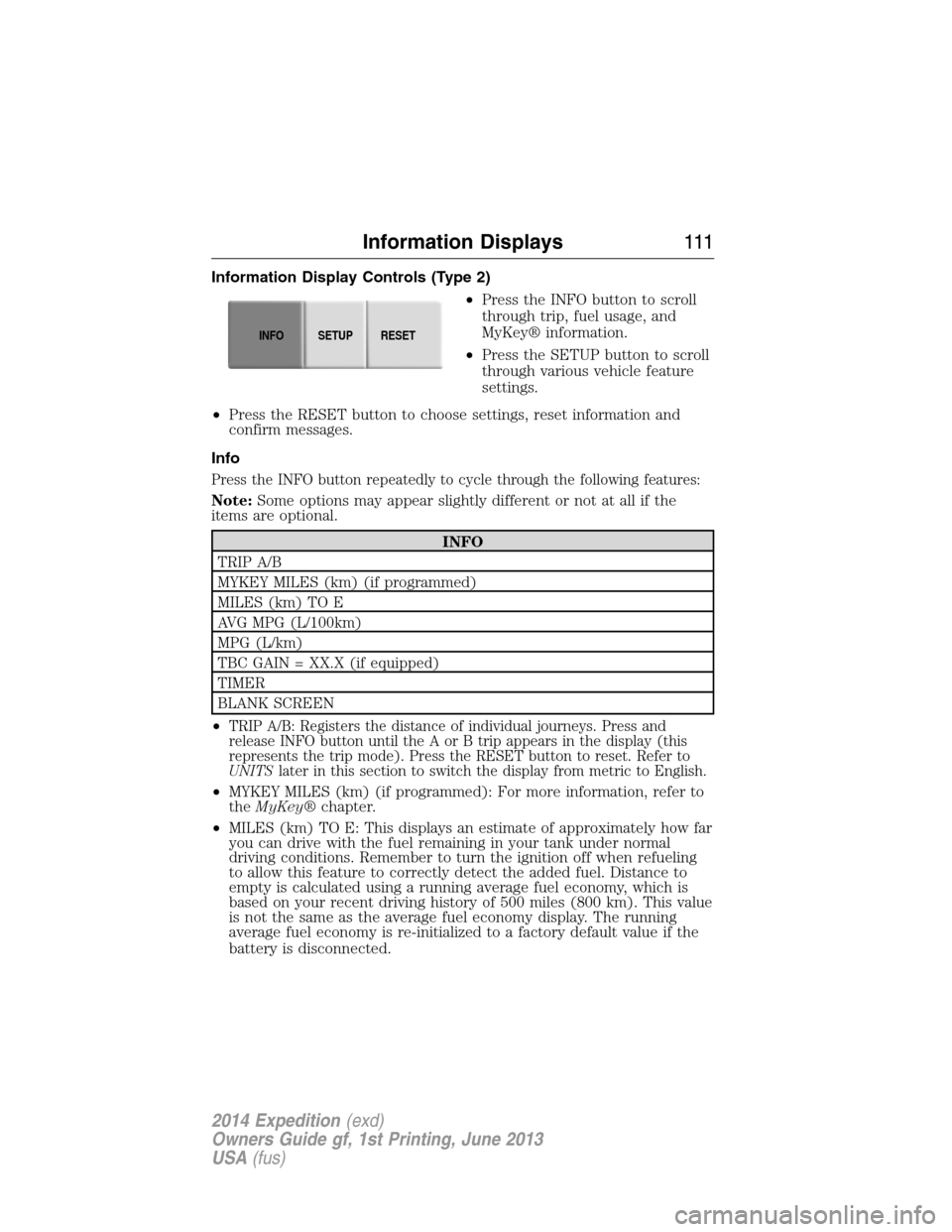
Information Display Controls (Type 2)
•Press the INFO button to scroll
through trip, fuel usage, and
MyKey® information.
•Press the SETUP button to scroll
through various vehicle feature
settings.
•Press the RESET button to choose settings, reset information and
confirm messages.
Info
Press the INFO button repeatedly to cycle through the following features:
Note:Some options may appear slightly different or not at all if the
items are optional.
INFO
TRIP A/B
MYKEY MILES (km) (if programmed)
MILES (km) TO E
AVG MPG (L/100km)
MPG (L/km)
TBC GAIN = XX.X (if equipped)
TIMER
BLANK SCREEN
•
TRIP A/B: Registers the distance of individual journeys. Press and
release INFO button until the A or B trip appears in the display (this
represents the trip mode). Press the RESET button to reset. Refer to
UNITSlater in this section to switch the display from metric to English.
•MYKEY MILES (km) (if programmed): For more information, refer to
theMyKey®chapter.
•MILES (km) TO E: This displays an estimate of approximately how far
you can drive with the fuel remaining in your tank under normal
driving conditions. Remember to turn the ignition off when refueling
to allow this feature to correctly detect the added fuel. Distance to
empty is calculated using a running average fuel economy, which is
based on your recent driving history of 500 miles (800 km). This value
is not the same as the average fuel economy display. The running
average fuel economy is re-initialized to a factory default value if the
battery is disconnected.
INFOSETUP
RESET
Information Displays111
2014 Expedition(exd)
Owners Guide gf, 1st Printing, June 2013
USA(fus)
Page 113 of 519
•AVG MPG (L/100km): Average fuel economy displays your average fuel
economy in miles/gallon or liters/100 km.
•MPG (L/km): This displays instantaneous fuel economy as a bar graph.
Your vehicle must be moving to calculate instantaneous fuel economy.
Instantaneous fuel economy cannot be reset.
•TBC GAIN = XX.X (if equipped): Displays the level of trailer brake
gain or if the trailer is not connected.
•TIMER: Displays the trip elapsed drive time. Press and release RESET
to pause the timer. Press and hold RESET to reset the timer.
System Check and Vehicle Feature Customization
Press the SETUP button repeatedly
to cycle the message center through
the following features:
SETUP
RESET FOR
SYSTEM CHECKpress the RESET
buttonOIL LIFE
CHARGING SYSTEM
WASHER FLUID LEVEL
DOOR STATUS
LIFTGATE/GLASS
BRAKE SYSTEM
MYKEY MILES (if programmed)
X MYKEYS PROGRAMMED
X ADMIN KEYS PROGRAMMED
MILES TO EMPTY
TBC GAIN = XX.X
INFOSETUP
RESET
11 2Information Displays
2014 Expedition(exd)
Owners Guide gf, 1st Printing, June 2013
USA(fus)
Page 118 of 519
Battery and
Charging System
MessagesAction / Description
CHECK CHARGING
SYSTEMDisplayed when the charging system needs
servicing. If the warning stays on or continues
to come on, contact your authorized dealer as
soon as possible.
Brake System
MessagesAction / Description
BRAKE FLUID
LEVEL LOWIndicates the brake fluid level is low and the
brake system should be inspected immediately.
Refer toBrake fluidin theMaintenance
chapter.
CHECK BRAKE
SYSTEMDisplayed when the brake system needs
servicing. If the warning stays on or continues
to come on, contact your authorized dealer as
soon as possible.
PARK BRAKE
ENGAGEDDisplayed when the parking brake is set and
the vehicle is in motion.
Door Messages Action / Description
DOOR AJARDisplayed when a door is not completely
closed.
LIFTGATE / GLASS
AJARDisplayed when the liftgate or liftgate glass is
not completely closed.
Fuel Messages Action / Description
CHECK FUEL FILL
INLETDisplayed when the fuel fill inlet may not be
properly closed.
XXX MILES TO E
FUEL LEVEL LOWDisplayed as an early reminder of a low fuel
condition.
Information Displays11 7
2014 Expedition(exd)
Owners Guide gf, 1st Printing, June 2013
USA(fus)