2014 FORD ESCAPE shift
[x] Cancel search: shiftPage 54 of 428

NUMBER OF MYKEY(S)
Indicates the number of MyKeys
programmed to your vehicle. Use this
feature to detect how many MyKeys you
have for your vehicle and determine when
a MyKey has been deleted.
NUMBER OF ADMIN KEY(S)
Indicates how many admin keys are
programmed to your vehicle. Use this
feature to determine how many
unrestricted keys you have for your vehicle,
and detect if an additional MyKey has been
programmed.
USING MYKEY WITH REMOTE
START SYSTEMS
MyKey is not compatible with
non-Ford-approved aftermarket remote
start systems. If you choose to install a
remote start system, please see your Ford
authorized dealer for a Ford-approved
remote start system.
Vehicles With Ford-approved
Aftermarket Remote Start Systems
When using a Ford-approved aftermarket
remote start system, the vehicle recognizes
the remote start system as an additional
admin key. It is the vehicle’s default setting.
You can also program the remote start as
a MyKey. As a result, the MyKey system
status menu display includes the remote
start system as an additional key in the
total count of MYKEY(S) PROGRAMMED
or ADMIN KEYS PROGRAMMED. See
Checking MyKey System Status (page
50).When you start your vehicle with a
Ford-approved aftermarket remote start
system, the system stalls the engine after
you open the door or shift the vehicle into
gear. This is intentional. When you restart
your vehicle, it reads your real key
(traditional key or intelligent key fob)
status instead of the remote start system’s
status.
As an added precaution, owners of vehicles
equipped with traditional keys may want
to program the remote start system as a
MyKey, if the MyKey driver uses the remote
start fob. That way, when the MyKey driver
starts the vehicle with the remote start
system, the MyKey restrictions remain
active.
With a Ford-approved aftermarket remote
start system, it is possible to program all
real keys as MyKeys unintentionally. If this
happens, then the remote start fob is the
admin key. If you want to have only one
real key as a MyKey, or do not want to have
any MyKeys, then you need to use your
remote start to clear all MyKeys. In that
case, follow these steps:
• Enter the vehicle and close all doors.
• Remote start the vehicle using your
remote start fob.
•See Clearing All MyKeys (page 50).
Follow Steps 1-3.
After clearing your MyKeys, you can create
a new MyKey. See Creating a MyKey
(page 50).
Note:For vehicles with Intelligent Access
keys (push-button start), you cannot
program the remote start system as a
MyKey. Always treat the remote start fob
as you would any other admin key.
Vehicles With Non-Ford-approved
Aftermarket Remote Start Systems
51
MyKey™
Page 60 of 428

Smart Unlocks For Integrated
Keyhead Transmitter
This feature helps to prevent you from
locking yourself out of your vehicle if your
key is still in the ignition.
When you open one of the front doors and
lock your vehicle with the power door lock
control, all the doors will lock then unlock
if your key is still in the ignition.
You can still lock your vehicle with the key
in the ignition by either:
• using the keyless entry keypad with the
driver door closed
• pressing the lock button on the
transmitter even if the doors are not
closed.
If both front doors are closed, you can lock
your vehicle by any method, regardless of
whether the key is in the ignition or not.
Smart Unlocks For Intelligent
Access Keys (If Equipped)
This feature helps to prevent you from
unintentionally locking your intelligent
access key inside your vehicle’s passenger
compartment or rear cargo area.
When you lock your vehicle using the
power door lock control (with the door
open, vehicle in park and ignition off), your
vehicle will search for an intelligent access
key in the passenger compartment after
you close the door. If you vehicle finds a
key, all of the doors will immediately
unlock.
In order to override the smart unlock
feature and intentionally lock the
intelligent access key inside your vehicle,
you can lock your vehicle after all doors
are closed by using the keyless entry
keypad, pressing the lock button on
another intelligent access key or touching
the locking area on the handle with another
intelligent access key in your hand.When you open one of the front doors and
lock your vehicle using the power door lock
control, all doors will lock then unlock if
the ignition is on.
Autolock (If Equipped)
The autolock feature will lock all the doors
when:
• all doors are closed,
• the ignition is on,
• you shift into any gear putting your
vehicle in motion, and
• your vehicle attains a speed greater
than 4 mph (7 km/h).
Autounlock (If Equipped)
The autounlock feature will unlock all the
doors when:
• the ignition is on, all the doors are
closed, and your vehicle has been in
motion at a speed greater than 4 mph
(7 km/h);
• your vehicle comes to a stop and you
switch the ignition off or to accessory;
and
• you open the driver door within 10
minutes of the switching the ignition
off or to accessory.
Note:The doors will not autounlock if you
electronically lock your vehicle after you
switch the ignition off and before you open
the driver door.
Enabling or Disabling Autolock and
Autounlock
Note:Your authorized dealer can perform
this procedure, or you can do the procedure
yourself.
To enable or disable these features, do the
following:
Note:You will have 30 seconds to
complete the procedure.
57
Locks
Page 75 of 428

Press the top of the button at the end of
the lever to change between intermittent
and low speed wipe. Press the bottom of
the button to turn the wiper off.
When you shift into R (Reverse), the rear
wiper will switch on to intermittent if the
front wipers are activated.
Rear Window Washer
E168044
The washer will spray for as long as you
push the lever away from you. When you
release the lever, the wiper will operate for
a short time.
72
Wipers and Washers
Page 102 of 428
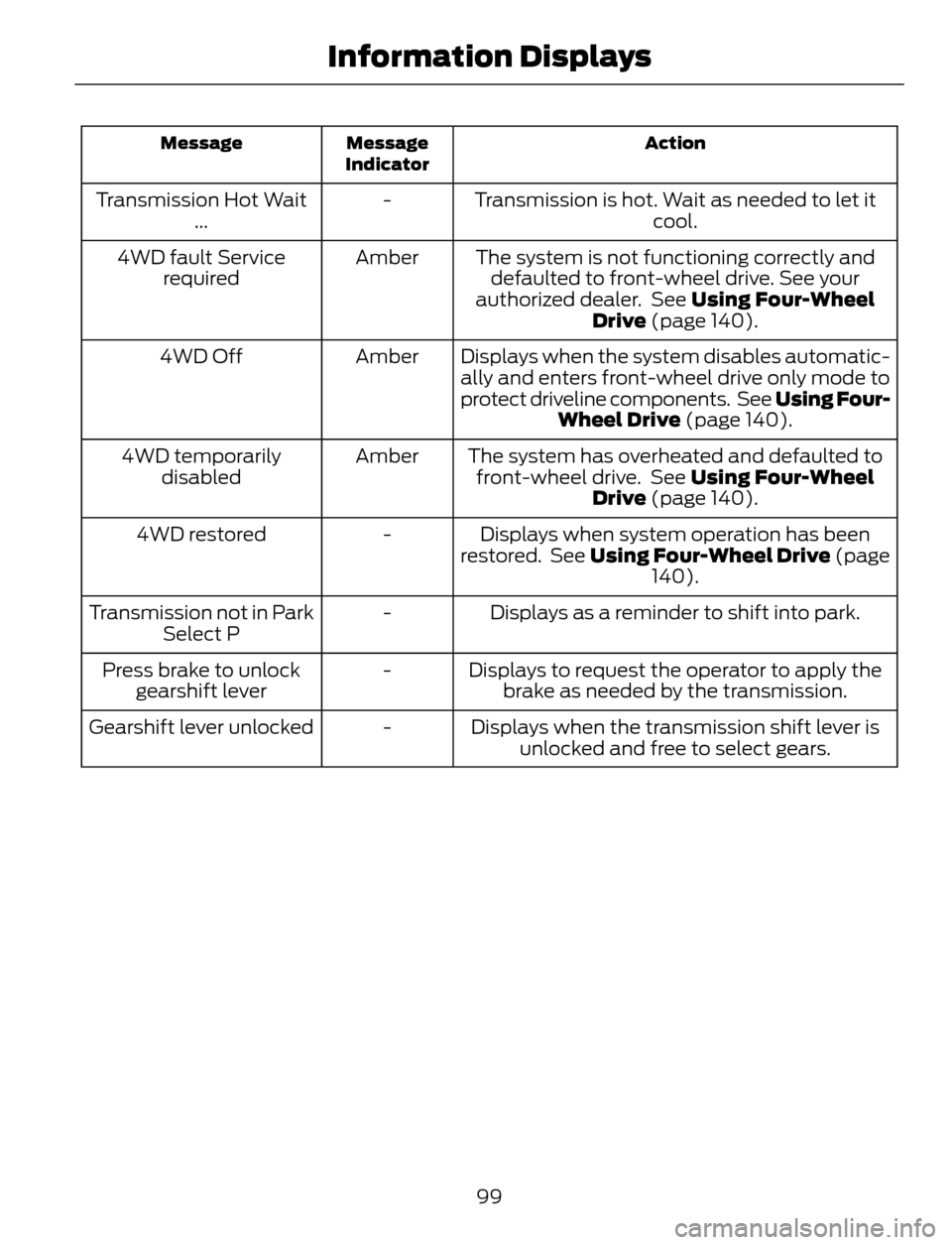
Action Message
Indicator Message
Transmission is hot. Wait as needed to let it
cool. - Transmission Hot Wait
...
The system is not functioning correctly and
defaulted to front-wheel drive. See your
authorized dealer. See Using Four-Wheel
Drive (page 140). Amber 4WD fault Service
required
Displays when the system disables automatic-
ally and enters front-wheel drive only mode to
protect driveline components. See Using Four-
Wheel Drive (page 140). Amber 4WD Off
The system has overheated and defaulted to
front-wheel drive. See Using Four-Wheel
Drive (page 140). Amber 4WD temporarily
disabled
Displays when system operation has been
restored. See Using Four-Wheel Drive (page
140). - 4WD restored
Displays as a reminder to shift into park. - Transmission not in Park
Select P
Displays to request the operator to apply the
brake as needed by the transmission. - Press brake to unlock
gearshift lever
Displays when the transmission shift lever is
unlocked and free to select gears. - Gearshift lever unlocked
99
Information Displays
Page 139 of 428

AUTOMATIC TRANSMISSION
WARNINGS
Always set the parking brake fully
and make sure the gearshift is
latched in P (Park). Turn the ignition
to the off position and remove the key
whenever you leave your vehicle.
Do not apply the brake pedal and
accelerator pedal simultaneously.
Applying both pedals simultaneously
for more than three seconds will limit
engine rpm, which may result in difficulty
maintaining speed in traffic and could lead
to serious injury.
Understanding the Positions of
Your Automatic Transmission
Putting your vehicle in gear:
1. Fully press down the brake pedal.
2. Press and hold the button on the front
of the gearshift lever.
3. Move the gearshift lever into the
desired gear.
4. Release the button and your
transmission will remain in the selected
gear.
E133124
P (Park)
This position locks the transmission and
prevents the front wheels from turning.
Come to a complete stop before putting
your vehicle into and out of P (Park)
R (Reverse)
With the gearshift lever in R (Reverse), the
vehicle will move backward. Always come
to a complete stop before shifting into and
out of R (Reverse).
N (Neutral)
With the gearshift lever in N (Neutral), the
vehicle can be started and is free to roll.
Hold the brake pedal down while in this
position.
D (Drive)
The normal driving position for the best
fuel economy. Transmission operates in
gears one through six.
S (Sport)
Moving the gearshift lever to S (Sport):
• Provides additional grade (engine)
braking and extends lower gear
operation to enhance performance for
uphill climbs, hilly terrain or
mountainous areas. This will increase
engine RPM during engine braking.
• Provides additional lower gear
operation through the automatic
transmission shift strategy.
• Gears are selected more quickly and
at higher engine speeds.
SelectShift Automatic®
Transmission (If Equipped)
Your SelectShift automatic transmission
gives you the ability to manually change
gears.
136
Transmission
Page 140 of 428

To use SelectShift, move the gearshift
lever into S (Sport). Use the +/- buttons
on the side of your gearshift lever to
manually change gears.
• Press the (+) button to upshift.
• Press the (-) button to downshift.
Note:After you have assumed manual
control with SelectShift your vehicle will
remain in this mode until you return the
gearshift lever from (S) Sport, back to (D)
Drive.
Upshift to the recommended shift speeds
according to the following chart:
Upshifts when accelerating (recom-
mended for best fuel economy)
Shift from:
15 mph (24 km/h) 1 - 2
25 mph (40 km/h) 2 - 3
40 mph (64 km/h) 3 - 4
45 mph (72 km/h) 4 - 5
50 mph (80 km/h) 5 - 6
The instrument cluster will display the
selected gear that you are currently in and
a shift indicator arrow to assist in
optimizing shifting.
SelectShift will automatically make some
shifts for you in the event that your engine
speed is running at too high, or to low an
RPM.
Note:Engine damage may occur if
excessive engine revving is held without
shifting.Manual Shifting in D (Drive) (If
Equipped)
The transmission can be manually
controlled temporarily when in D (Drive)
by using the +/- buttons on the gearshift
lever. The system will determine when
temporary manual control is no longer
desired and will revert back to automatic
control. Move the shifter to the S (sport)
position for extensive manual control.
Brake-Shift Interlock
WARNINGS
Do not drive your vehicle until you
verify that the brake lamps are
working.
When doing this procedure, you will
be taking the vehicle out of park
which means the vehicle can roll
freely. To avoid unwanted vehicle
movement, always fully set the parking
brake prior to doing this procedure. Use
wheel chocks if appropriate.
If the parking brake is fully released,
but the brake warning lamp remains
illuminated, the brakes may not be
working properly. See your authorized
dealer.
Use the brake shift interlock lever to move
the gearshift lever from the park position
in the event of an electrical malfunction or
if your vehicle has a dead battery.
Apply the parking brake and turn the
ignition off before performing this
procedure.
1. Insert a screwdriver (or similar tool)
between the shifter bezel and the top
finish panel.
2. Use the tool to unsnap the shifter bezel
from the finish panel.
137
Transmission
Page 141 of 428

E142627
3. Locate the white lever located on the
left side of the shifter.
4. Using the tool move the white lever
towards the rear of the shifter.
5. While holding the white lever in the rear
position, move the shifter from the park
position.
6. Press the shifter bezel back into the top
finish panel until it snaps back into
position.
7. Apply the brake pedal, start the vehicle
and release the parking brake.
Note:See your authorized dealer as soon
as possible if this procedure is used.
If Your Vehicle Gets Stuck In Mud
or Snow
Note:Do not rock the vehicle if the engine
is not at normal operating temperature or
damage to the transmission may occur.
Note:Do not rock the vehicle for more than
a minute or damage to the transmission and
tires may occur, or the engine may overheat.
If your vehicle gets stuck in mud or snow,
it may be rocked out by shifting between
forward and reverse gears, stopping
between shifts in a steady pattern. Press
lightly on the accelerator in each gear.
HILL START ASSIST
WARNINGS
The system does not replace the
parking brake. When you leave your
vehicle, always apply the parking
brake and put the vehicle in P (Park).
You must remain in your vehicle once
you have activated the system.
During all times, you are responsible
for controlling your vehicle,
supervising the system and
intervening, if required.
If the engine is revved excessively, or
if a malfunction is detected, the
system will be deactivated.
The system makes it easier to pull away
when your vehicle is on a slope without the
need to use the parking brake.
When the system is active, your vehicle will
remain stationary on the slope for two to
three seconds after you release the brake
pedal. This allows you time to move your
foot from the brake to the accelerator
pedal. The brakes are released
automatically once the engine has
developed sufficient drive to prevent your
vehicle from rolling down the slope. This
is an advantage when pulling away on a
slope, (for example from a car park ramp,
traffic lights or when reversing uphill into
a parking space).
The system will activate automatically on
any slope that will cause significant vehicle
rollback.
Using Hill Start Assist
1. Press the brake pedal to bring your
vehicle to a complete standstill. Keep
the brake pedal pressed.
2. If the sensors detect that your vehicle
is on a slope, the system will activate
automatically.
138
Transmission
Page 144 of 428

When driving at slow speeds off road under
high load conditions, use a low gear when
possible. Low gear operation will maximize
the engine and transmission cooling
capability.
Under severe operating conditions, the air
conditioning may cycle on and off to
prevent the engine from overheating.
Basic Operating Principles
• Drive slower in strong crosswinds which
can affect the normal steering
characteristics of your vehicle.
• When driving your vehicle on surfaces
made slippery by loose sand, water,
gravel, snow or ice proceed with care.
If Your Vehicle leaves the Road
If your vehicle leaves the road, reduce your
vehicle speed and avoid severe braking.
When your vehicle speed has been reduced
ease your vehicle back onto the road. Do
not turn the steering wheel sharply while
returning your vehicle to the road.
It may be safer to stay on the shoulder of
the road and slow down gradually before
returning to the road. You may lose control
if you do not slow down or if you turn the
steering wheel too sharply or abruptly.
It may be less risky to strike small objects,
such as freeway reflectors, with minor
damage to your vehicle rather than
attempt a sudden return to the road which
could cause your vehicle to slide sideways
out of control or roll over. Remember, your
safety and the safety of others should be
your primary concern.
Emergency Maneuvers
In an unavoidable emergency situation
where a sudden sharp turn must be made,
remember to avoid over-driving your
vehicle (i.e. turn the steering wheel only as
rapidly and as far as required to avoid the
emergency). Excessive steering can resultin loss of vehicle control. Apply smooth
pressure to the accelerator pedal or brake
pedal when changes in vehicle speed are
required. Avoid abrupt steering,
acceleration and braking. This could result
in an increased risk of vehicle roll over, loss
of vehicle control and personal injury. Use
all available road surface to bring your
vehicle to a safe direction of travel.
In the event of an emergency stop, avoid
skidding the tires and do not attempt any
sharp steering wheel movements.
If your vehicle goes from one type of
surface to another (i.e. from concrete to
gravel) there will be a change in the way
your vehicle responds to a maneuver (i.e.
steering, acceleration or braking).
Sand
When driving over sand, try to keep all four
wheels on the most solid area of the trail.
Avoid reducing the tire pressures but shift
to a lower gear and drive steadily through
the terrain. Apply the accelerator slowly
and avoid excessive wheel slip.
Do not drive your vehicle in deep sand for
an extended period of time. This will cause
the system to overheat. A message will be
displayed in the information display. See
Information Messages (page 91).
To resume operation, switch the ignition
off and allow the system to cool down for
a minimum of 15 minutes. After the system
has cooled down, a message will be
displayed briefly in the information display.
See Information Messages (page 91).
When driving at slow speeds in deep sand
under high outside temperatures, use a low
gear when possible. Low gear operation
will maximize the engine and transmission
cooling capability.
141
Four-Wheel Drive (If Equipped)