2014 FORD ESCAPE display
[x] Cancel search: displayPage 100 of 428

Action Message
Indicator Message
Displays when trying to create a MyKey with a
key already designated as a MyKey. - Key is Already a MyKey
Displays when programming a MyKey. - Hold key next to symbol
on steering column
Displays when programming a MyKey. - MyKey ESC cannot be
deactivated
Park Aid
Action Message
Indicator Message
Displays when the system has detected a
condition that requires service. Contact your
authorized dealer. See Parking Aid (page 150). Amber Parking aid malfunction
Service required
Park Brake
Action Message
Indicator Message
Displays when the parking brake is set, the
engine is running and the vehicle is driven more
than 3 mph (5 km/h). If the warning stays on
after the parking brake is released, contact your
authorized dealer. Red Park brake applied
97
Information Displays
Page 101 of 428

Power Steering
Action Message
Indicator Message
The power steering system is not working. Stop
the vehicle a safe place. Contact your author-
ized dealer. Red Steering loss Stop safely
The power steering system is not working. Stop
the vehicle a safe place. Contact your author-
ized dealer. Amber Steering assist fault
Service required
The power steering system has detected a
condition within the power steering system or
passive entry or passive start system requires
service. Contact your authorized dealer. Amber Steering fault Service
now
Starting System
Action Message
Indicator Message
Displays when starting the vehicle as a reminder
to apply the brake. - Press brake to start
Displays when the vehicle fails to start. - Cranking time exceeded
Transmission and Four-Wheel Drive
Action Message
Indicator Message
See your authorized dealer. - Transmission fault
Service now
The transmission is overheating and needs to
cool. Stop in a safe place as soon as it’s
possible. Amber Transmission overtem-
perature Stop safely
See your authorized dealer. Amber Transmission Service
required
Transmission is getting hot. Stop to let it cool
or speed up. - Transmission Hot Stop
or Speed Up
98
Information Displays
Page 102 of 428
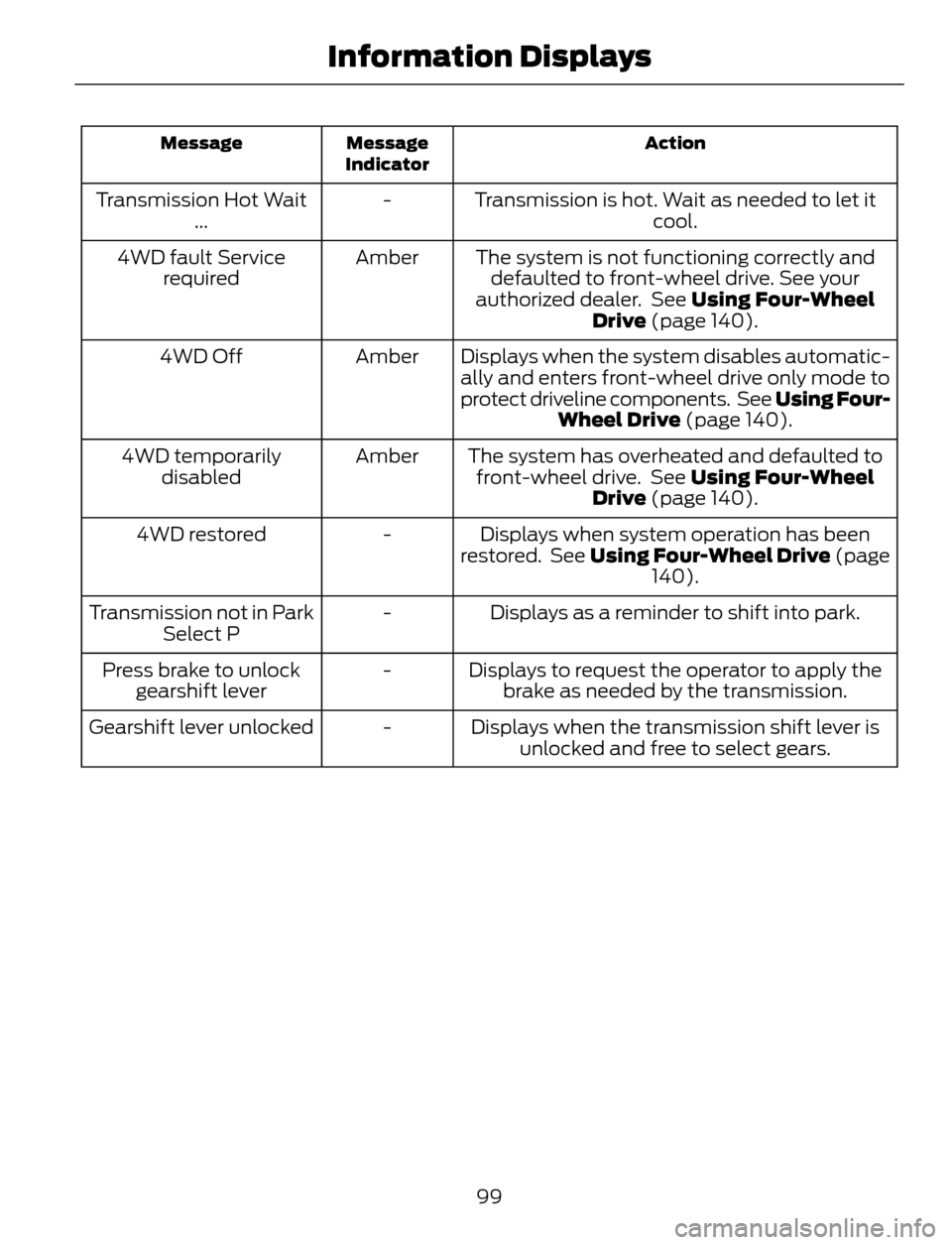
Action Message
Indicator Message
Transmission is hot. Wait as needed to let it
cool. - Transmission Hot Wait
...
The system is not functioning correctly and
defaulted to front-wheel drive. See your
authorized dealer. See Using Four-Wheel
Drive (page 140). Amber 4WD fault Service
required
Displays when the system disables automatic-
ally and enters front-wheel drive only mode to
protect driveline components. See Using Four-
Wheel Drive (page 140). Amber 4WD Off
The system has overheated and defaulted to
front-wheel drive. See Using Four-Wheel
Drive (page 140). Amber 4WD temporarily
disabled
Displays when system operation has been
restored. See Using Four-Wheel Drive (page
140). - 4WD restored
Displays as a reminder to shift into park. - Transmission not in Park
Select P
Displays to request the operator to apply the
brake as needed by the transmission. - Press brake to unlock
gearshift lever
Displays when the transmission shift lever is
unlocked and free to select gears. - Gearshift lever unlocked
99
Information Displays
Page 103 of 428

Tire Pressure Monitoring System
Action Message
Indicator Message
Displays when one or more tires on your vehicle
have low tire pressure. See Tire Pressure
Monitoring System (page 251). Amber Low Tire Pressure
Displays when the tire pressure monitoring
system is malfunctioning. If the warning stays
on or continues to come on, contact your
authorized dealer. See Tire Pressure Monit-
oring System (page 251). Amber Tire Pressure Monitor
Fault
Displayed when a tire pressure sensor is
malfunctioning, or your spare tire is in use. For
more information on how the system operates
under these conditions, see See Tire Pressure
Monitoring System (page 251). If the warning
stays on or continues to come on, contact your
authorized dealer as soon as possible. Amber Tire Pressure Sensor
Fault
Traction Control
Action Message
Indicator Message
Displays when the traction control system has
been switched off. See Using Traction
Control (page 147). - Traction control off
100
Information Displays
Page 105 of 428

Select to distribute air through
the windshield air vents. You can
also use this setting to defog andclear the windshield of a thin covering of
ice. You can also increase the temperature
and fan speed to improve clearing.
AUTOMATIC CLIMATE CONTROL
E141422JIHGF
ABCDE
AUTO: Press to engage full automatic operation. Once you select your desired
temperature using the temperature control, the system then automatically
determines fan speed, airflow distribution, A/C on or off, and outside or
recirculated air, to heat or cool the vehicle to reach and maintain the desired
temperature. A
Fan speed: Press the large fan icon to increase the fan speed; press the small
fan icon to decrease the fan speed. Pressing one of the fan speed buttons while
in AUTO takes the system out of AUTO fan mode. B
On and off button: Press to turn the system on or off. C
MAX Defrost: Distributes outside air through the windshield defroster vents
and demister vents. You can use this mode to clear the windshield of fog and
thin ice. Automatically turns on rear window defroster and heated mirrors. Press
this button again to return to the previous airflow selection. D
MAX A/C: Press to distribute recirculated air through the instrument panel
vents to cool the vehicle. Air conditioning automatically turns on, the fan speed
automatically adjusts to the highest speed and the temperature display returns
to the full cool position. This re-cooling of the interior air is more economical
and efficient than normal air conditioning. Recirculated air may help reduce
undesirable odors from entering the vehicle. E
102
Climate Control
Page 106 of 428

Recirculated air: Press to turn air recirculation in cabin on or off. Recirculated
air may reduce the amount of time to cool down the interior of the vehicle and
may help reduce undesired odors from reaching the interior of the vehicle.
Recirculated air engages automatically when you select MAX A/C, or manually
in any airflow mode except defrost. Recirculated air may turn off automatically
in all airflow modes except MAX A/C to reduce fog potential. F
Defrost: Distributes air through the windshield defroster vents and demister
vents. The system automatically provides outside air to reduce window fogging.
Press again to turn off defrost mode. G
Instrument panel: Press to distribute air through the instrument panel vents.
Press again to turn off panel mode. H
Floor: Distributes air through the demister vents and front and rear seat floor
vents. Press again to turn off floor mode. I
A/C: Press to turn air conditioning on or off. Use with recirculated air to improve
cooling performance and efficiency. Air conditioning also engages automatically
in some modes. J
Temperature Control
E133115
You can set the temperature between
60°F (15.5°C) and 85°F (29.5°C) in steps
of 1°F (0.5°C). In position LO, 59°F (15°C),
the system switches to permanent cooling.
In position HI, 86°F (30°C), the system
switches to permanent heating.Single Zone Temperature Control
In this mode, the climate control system
links the temperature settings for both the
driver's side and passenger's side. If you
adjust the setting using the rotary control
on the driver’s side, the system adjusts the
temperature to the same setting on the
passenger’s side.
Dual Zone Temperature Control
Select a temperature for the passenger’s
side using the rotary control on the
passenger’s side. Single zone temperature
control automatically switches off. The
temperature on the driver’s side remains
unchanged. You can now adjust the
driver's side and passenger's side
temperatures independently. The display
shows the temperature settings for each
side.
Switching Back to Single Zone
Temperature Control
Press and hold AUTO for 2-4 seconds. The
passenger’s side temperature switches to
the driver’s side temperature setting.
103
Climate Control
Page 111 of 428
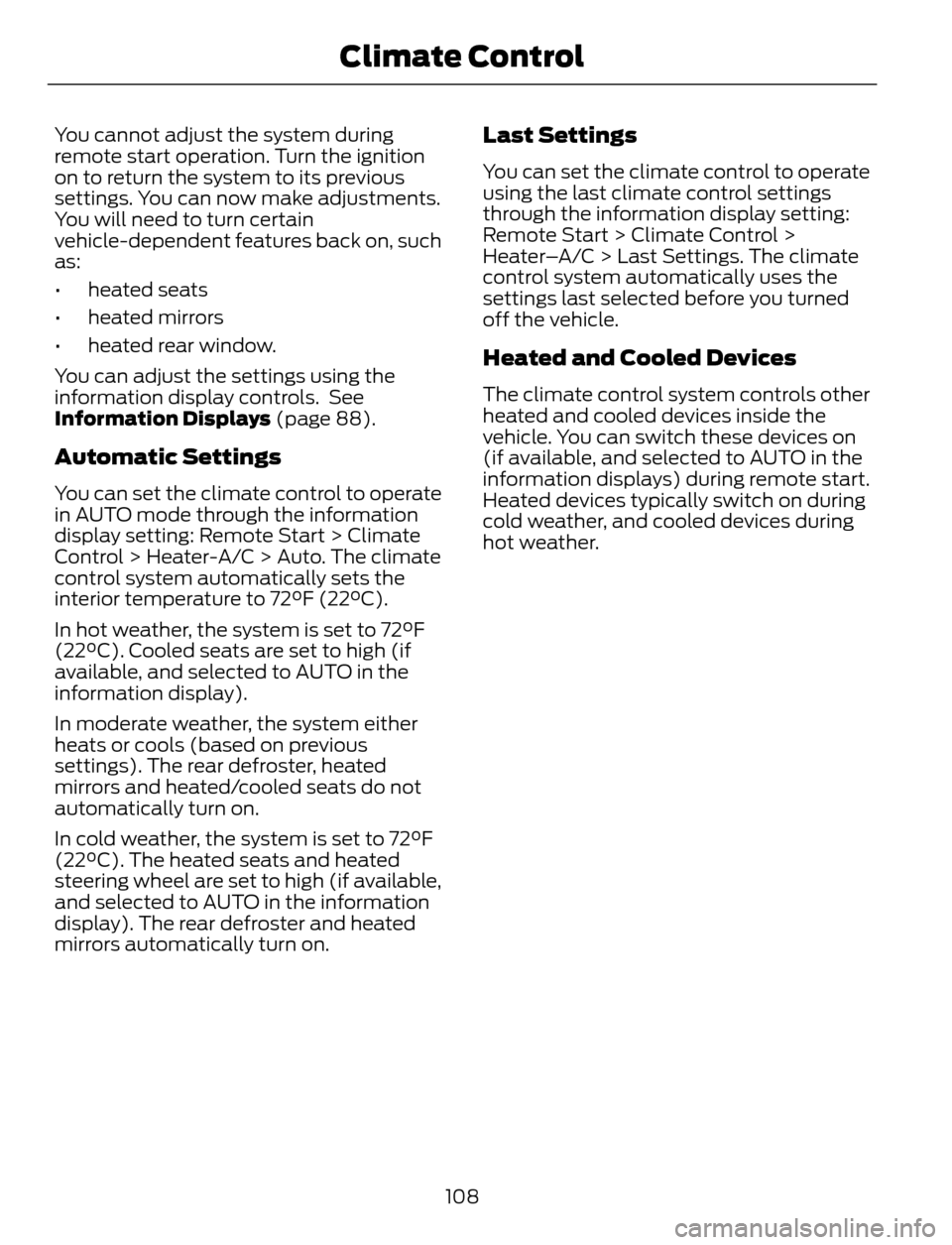
You cannot adjust the system during
remote start operation. Turn the ignition
on to return the system to its previous
settings. You can now make adjustments.
You will need to turn certain
vehicle-dependent features back on, such
as:
• heated seats
• heated mirrors
• heated rear window.
You can adjust the settings using the
information display controls. See
Information Displays (page 88).
Automatic Settings
You can set the climate control to operate
in AUTO mode through the information
display setting: Remote Start > Climate
Control > Heater-A/C > Auto. The climate
control system automatically sets the
interior temperature to 72°F (22°C).
In hot weather, the system is set to 72°F
(22°C). Cooled seats are set to high (if
available, and selected to AUTO in the
information display).
In moderate weather, the system either
heats or cools (based on previous
settings). The rear defroster, heated
mirrors and heated/cooled seats do not
automatically turn on.
In cold weather, the system is set to 72°F
(22°C). The heated seats and heated
steering wheel are set to high (if available,
and selected to AUTO in the information
display). The rear defroster and heated
mirrors automatically turn on.
Last Settings
You can set the climate control to operate
using the last climate control settings
through the information display setting:
Remote Start > Climate Control >
Heater–A/C > Last Settings. The climate
control system automatically uses the
settings last selected before you turned
off the vehicle.
Heated and Cooled Devices
The climate control system controls other
heated and cooled devices inside the
vehicle. You can switch these devices on
(if available, and selected to AUTO in the
information displays) during remote start.
Heated devices typically switch on during
cold weather, and cooled devices during
hot weather.
108
Climate Control
Page 121 of 428

E142660
1. Press and hold the outer two function
buttons simultaneously for
approximately 20 seconds until the
indicator lights above the buttons flash
rapidly.
2. When the indicator lights flash, release
the buttons. The codes for all buttons
are erased.
Reprogramming a Single Button
To program a device to a previously trained
button, follow these steps:
1. Press and hold the desired button. Do
NOT release the button.
2. The indicator light will begin to flash
after 20 seconds. Without releasing the
button, follow Step 1 in the
Programming section.
For questions or comments, contact
HomeLink at www.homelink.com or
1-800-355-3515.
Programming to a Genie Intellicode 2
Garage Door Opener
Note:The Genie Intellicode 2 transmitter
must already be programmed to operate
with the garage door opener.
Note:To program HomeLink to the
transmitter you must first put the
transmitter into programming mode.
BAE142661
Red indicator light A.
Green indicator light B.
1. Press and hold one of the buttons on
the hand-held transmitter for 10
seconds. The indicator light will change
from green to red and green.
2. Press the same button twice to confirm
the change to programming mode. If
done properly the indicator light will
appear red.
3. Hold the transmitter within 1–3 inches
(2–8 centimeters) of the button on the
visor you want to program.
4. Press and hold both the programmed
Genie button on the hand-held
transmitter and the button you want
to program. The indicator light on the
visor will flash rapidly when the
programming is successful.
Note:The Genie transmitter will transmit
for up to 30 seconds. If HomeLink does not
program within 30 seconds the Genie
transmitter will need to be pressed again. If
the Genie transmitter indicator light displays
green and red, release the button until the
indicator light turns off before pressing the
button again.
Once HomeLink has been programmed
successfully, the Genie transmitter must
be changed out of program mode. To do
this:
118
Universal Garage Door Opener (If Equipped)