2014 FORD ESCAPE wheel
[x] Cancel search: wheelPage 91 of 428

GENERAL INFORMATION
WARNING
Driving while distracted can result in
loss of vehicle control, crash and
injury. We strongly recommend that
you use extreme caution when using any
device that may take your focus off the
road. Your primary responsibility is the safe
operation of your vehicle. We recommend
against the use of any handheld device
while driving and encourage the use of
voice-operated systems when possible.
Make sure you are aware of all applicable
local laws that may affect the use of
electronic devices while driving.
Various systems on your vehicle can be
controlled using the information display
controls on the steering wheel.
Corresponding information is displayed in
the information display.
Information Display Controls
E138659
• Press the up and down arrow buttons
to scroll through and highlight the
options within a menu.
• Press the right arrow button to enter a
sub-menu.
• Press the left arrow button to exit a
menu.
• Press and hold the left arrow button at
any time to return to the main menu
display (escape button).
• Press the OK button to choose and
confirm settings or messages. The OK
button may also be used to reset some
Trip values.
Menu Structure - Information
Display
All Vehicles
You can access the menu using the
information display control.
Note:Some options may appear slightly
different or not at all if the items are
optional.
88
Information Displays
Page 101 of 428

Power Steering
Action Message
Indicator Message
The power steering system is not working. Stop
the vehicle a safe place. Contact your author-
ized dealer. Red Steering loss Stop safely
The power steering system is not working. Stop
the vehicle a safe place. Contact your author-
ized dealer. Amber Steering assist fault
Service required
The power steering system has detected a
condition within the power steering system or
passive entry or passive start system requires
service. Contact your authorized dealer. Amber Steering fault Service
now
Starting System
Action Message
Indicator Message
Displays when starting the vehicle as a reminder
to apply the brake. - Press brake to start
Displays when the vehicle fails to start. - Cranking time exceeded
Transmission and Four-Wheel Drive
Action Message
Indicator Message
See your authorized dealer. - Transmission fault
Service now
The transmission is overheating and needs to
cool. Stop in a safe place as soon as it’s
possible. Amber Transmission overtem-
perature Stop safely
See your authorized dealer. Amber Transmission Service
required
Transmission is getting hot. Stop to let it cool
or speed up. - Transmission Hot Stop
or Speed Up
98
Information Displays
Page 102 of 428
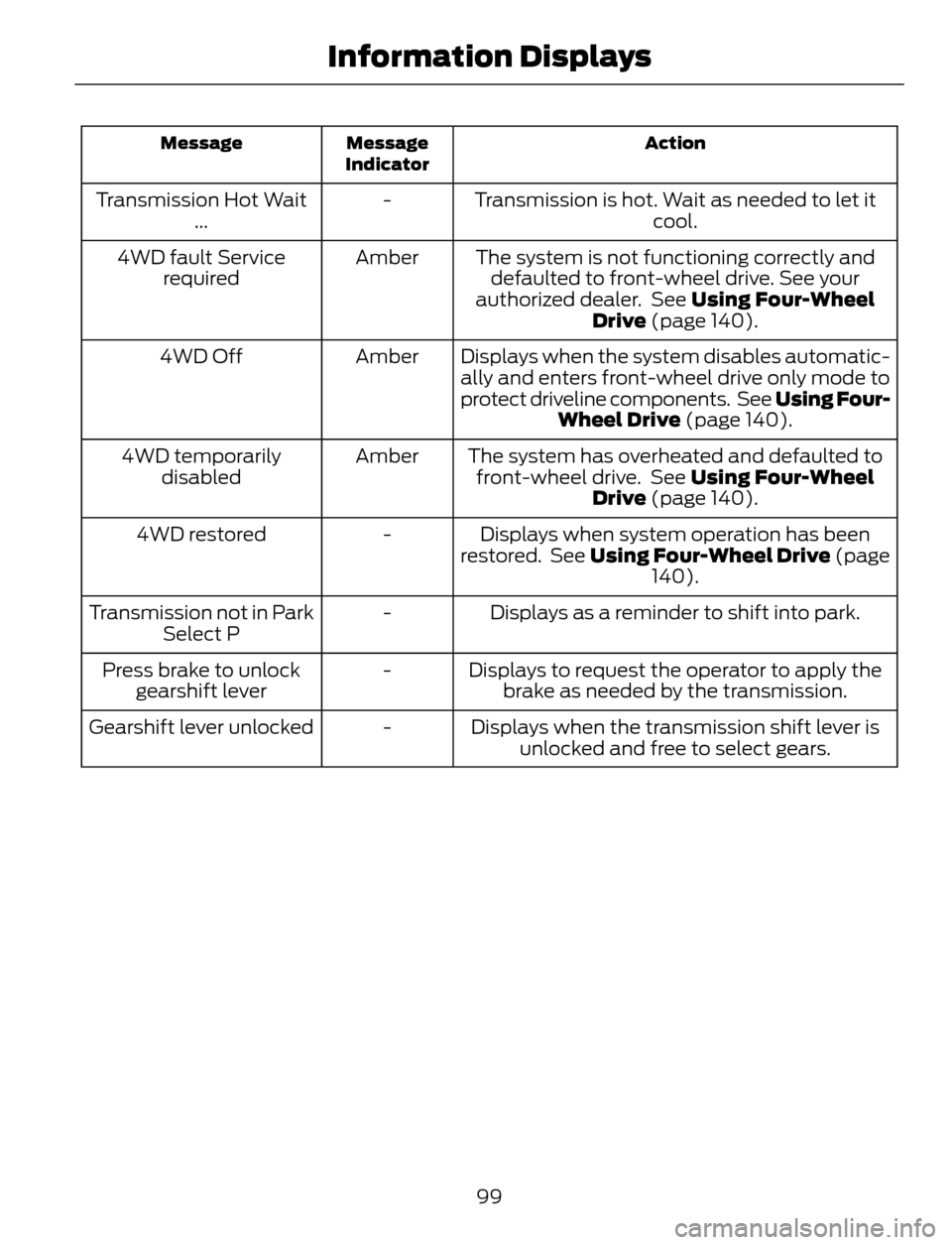
Action Message
Indicator Message
Transmission is hot. Wait as needed to let it
cool. - Transmission Hot Wait
...
The system is not functioning correctly and
defaulted to front-wheel drive. See your
authorized dealer. See Using Four-Wheel
Drive (page 140). Amber 4WD fault Service
required
Displays when the system disables automatic-
ally and enters front-wheel drive only mode to
protect driveline components. See Using Four-
Wheel Drive (page 140). Amber 4WD Off
The system has overheated and defaulted to
front-wheel drive. See Using Four-Wheel
Drive (page 140). Amber 4WD temporarily
disabled
Displays when system operation has been
restored. See Using Four-Wheel Drive (page
140). - 4WD restored
Displays as a reminder to shift into park. - Transmission not in Park
Select P
Displays to request the operator to apply the
brake as needed by the transmission. - Press brake to unlock
gearshift lever
Displays when the transmission shift lever is
unlocked and free to select gears. - Gearshift lever unlocked
99
Information Displays
Page 111 of 428
You cannot adjust the system during
remote start operation. Turn the ignition
on to return the system to its previous
settings. You can now make adjustments.
You will need to turn certain
vehicle-dependent features back on, such
as:
• heated seats
• heated mirrors
• heated rear window.
You can adjust the settings using the
information display controls. See
Information Displays (page 88).
Automatic Settings
You can set the climate control to operate
in AUTO mode through the information
display setting: Remote Start > Climate
Control > Heater-A/C > Auto. The climate
control system automatically sets the
interior temperature to 72°F (22°C).
In hot weather, the system is set to 72°F
(22°C). Cooled seats are set to high (if
available, and selected to AUTO in the
information display).
In moderate weather, the system either
heats or cools (based on previous
settings). The rear defroster, heated
mirrors and heated/cooled seats do not
automatically turn on.
In cold weather, the system is set to 72°F
(22°C). The heated seats and heated
steering wheel are set to high (if available,
and selected to AUTO in the information
display). The rear defroster and heated
mirrors automatically turn on.
Last Settings
You can set the climate control to operate
using the last climate control settings
through the information display setting:
Remote Start > Climate Control >
Heater–A/C > Last Settings. The climate
control system automatically uses the
settings last selected before you turned
off the vehicle.
Heated and Cooled Devices
The climate control system controls other
heated and cooled devices inside the
vehicle. You can switch these devices on
(if available, and selected to AUTO in the
information displays) during remote start.
Heated devices typically switch on during
cold weather, and cooled devices during
hot weather.
108
Climate Control
Page 112 of 428

SITTING IN THE CORRECT
POSITION
WARNINGS
Sitting improperly, out of position or
with the seat back reclined too far
can take weight off the seat cushion
and affect the decision of the passenger
sensing system, resulting in serious injury
or death in the event of a crash. Always sit
upright against your seat back, with your
feet on the floor.
Do not recline the seat back as this
can cause the occupant to slide
under the safety belt, resulting in
serious injury in the event of a crash.
Do not place objects higher than the
seat back to reduce the risk of
serious injury in the event of a crash
or during heavy braking.
E68595
When you use them properly, the seat,
head restraint, safety belt and air bags will
provide optimum protection in the event
of a crash.We recommend that you follow these
guidelines:
• Sit in an upright position with the base
of your spine as far back as possible.
• Do not recline the seat back more than
30 degrees.
• Adjust the head restraint so that the
top of it is level with the top of your
head and as far forward as possible.
Make sure that you remain
comfortable.
• Keep sufficient distance between
yourself and the steering wheel. We
recommend a minimum of 10 inches
(25 centimeters) between your
breastbone and the air bag cover.
• Hold the steering wheel with your arms
slightly bent.
• Bend your legs slightly so that you can
press the pedals fully.
• Position the shoulder strap of the
safety belt over the center of your
shoulder and position the lap strap
tightly across your hips.
Make sure that your driving position is
comfortable and that you can maintain full
control of your vehicle.
HEAD RESTRAINTS
WARNINGS
Fully adjust the head restraint before
you sit in or operate your vehicle. This
will help minimize the risk of neck
injury in the event of a crash. Do not adjust
the head restraint when your vehicle is
moving.
The head restraint is a safety device.
Whenever possible it should be
installed and properly adjusted when
the seat is occupied. An improperly
adjusted head restraint may not
adequately protect an occupant during an
impact from the rear.
109
Seats
Page 139 of 428

AUTOMATIC TRANSMISSION
WARNINGS
Always set the parking brake fully
and make sure the gearshift is
latched in P (Park). Turn the ignition
to the off position and remove the key
whenever you leave your vehicle.
Do not apply the brake pedal and
accelerator pedal simultaneously.
Applying both pedals simultaneously
for more than three seconds will limit
engine rpm, which may result in difficulty
maintaining speed in traffic and could lead
to serious injury.
Understanding the Positions of
Your Automatic Transmission
Putting your vehicle in gear:
1. Fully press down the brake pedal.
2. Press and hold the button on the front
of the gearshift lever.
3. Move the gearshift lever into the
desired gear.
4. Release the button and your
transmission will remain in the selected
gear.
E133124
P (Park)
This position locks the transmission and
prevents the front wheels from turning.
Come to a complete stop before putting
your vehicle into and out of P (Park)
R (Reverse)
With the gearshift lever in R (Reverse), the
vehicle will move backward. Always come
to a complete stop before shifting into and
out of R (Reverse).
N (Neutral)
With the gearshift lever in N (Neutral), the
vehicle can be started and is free to roll.
Hold the brake pedal down while in this
position.
D (Drive)
The normal driving position for the best
fuel economy. Transmission operates in
gears one through six.
S (Sport)
Moving the gearshift lever to S (Sport):
• Provides additional grade (engine)
braking and extends lower gear
operation to enhance performance for
uphill climbs, hilly terrain or
mountainous areas. This will increase
engine RPM during engine braking.
• Provides additional lower gear
operation through the automatic
transmission shift strategy.
• Gears are selected more quickly and
at higher engine speeds.
SelectShift Automatic®
Transmission (If Equipped)
Your SelectShift automatic transmission
gives you the ability to manually change
gears.
136
Transmission
Page 140 of 428

To use SelectShift, move the gearshift
lever into S (Sport). Use the +/- buttons
on the side of your gearshift lever to
manually change gears.
• Press the (+) button to upshift.
• Press the (-) button to downshift.
Note:After you have assumed manual
control with SelectShift your vehicle will
remain in this mode until you return the
gearshift lever from (S) Sport, back to (D)
Drive.
Upshift to the recommended shift speeds
according to the following chart:
Upshifts when accelerating (recom-
mended for best fuel economy)
Shift from:
15 mph (24 km/h) 1 - 2
25 mph (40 km/h) 2 - 3
40 mph (64 km/h) 3 - 4
45 mph (72 km/h) 4 - 5
50 mph (80 km/h) 5 - 6
The instrument cluster will display the
selected gear that you are currently in and
a shift indicator arrow to assist in
optimizing shifting.
SelectShift will automatically make some
shifts for you in the event that your engine
speed is running at too high, or to low an
RPM.
Note:Engine damage may occur if
excessive engine revving is held without
shifting.Manual Shifting in D (Drive) (If
Equipped)
The transmission can be manually
controlled temporarily when in D (Drive)
by using the +/- buttons on the gearshift
lever. The system will determine when
temporary manual control is no longer
desired and will revert back to automatic
control. Move the shifter to the S (sport)
position for extensive manual control.
Brake-Shift Interlock
WARNINGS
Do not drive your vehicle until you
verify that the brake lamps are
working.
When doing this procedure, you will
be taking the vehicle out of park
which means the vehicle can roll
freely. To avoid unwanted vehicle
movement, always fully set the parking
brake prior to doing this procedure. Use
wheel chocks if appropriate.
If the parking brake is fully released,
but the brake warning lamp remains
illuminated, the brakes may not be
working properly. See your authorized
dealer.
Use the brake shift interlock lever to move
the gearshift lever from the park position
in the event of an electrical malfunction or
if your vehicle has a dead battery.
Apply the parking brake and turn the
ignition off before performing this
procedure.
1. Insert a screwdriver (or similar tool)
between the shifter bezel and the top
finish panel.
2. Use the tool to unsnap the shifter bezel
from the finish panel.
137
Transmission
Page 143 of 428

PRINCIPLE OF OPERATION
This system is a proactive system. It has
the ability to anticipate wheel slip and
transfer torque to the rear wheels before
slip occurs. Even when wheel slip is not
present, the system is continuously making
adjustments to the torque distribution, in
an attempt to improve straight line and
cornering behavior, both on and off road.
The system automatically turns on every
time you switch the ignition on.
All components of the system are sealed
and do not require maintenance.
USING FOUR-WHEEL DRIVE
Note:When a system malfunction is
present, a warning message will be
displayed in the information display. See
Information Messages (page 91). This
means the system is not functioning
correctly and has defaulted to front-wheel
drive only. Have your vehicle checked by an
authorized dealer.
Note:A message will be displayed in the
information display when the system
overheats and switches to front-wheel drive.
This condition may occur if you operate your
vehicle in extreme high load conditions or
with excessive wheel slip, (i.e. deep sand).
To resume four-wheel drive function as soon
as possible, stop your vehicle in a safe
location and switch the ignition off. After
the system cools and normal four-wheel
drive functionality resumes, a message will
be displayed for approximately five seconds.
Note:If a warning message appears in the
information display when using the spare
tire, it should turn off after reinstalling the
repaired or replaced road tire and you switch
the ignition on.Note:It is recommended that you reinstall
the repaired tire or replace the tire as soon
as possible. Major dissimilar tire sizes
between the front and rear axles could
cause system damage or default the system
to front-wheel drive.
The system gives your vehicle some limited
off-road capabilities. Operating your
vehicle in conditions other than moderate
sand, snow, mud or rough roads could
subject it to excessive stress and heat
which could result in system damage. This
will not be covered by your vehicle
warranty.
E142669
A graphic will be displayed in the
information display to advise you of the
power distribution between the front and
rear wheels. The more the area is filled the
more power is being distributed to that
wheel.
Driving in Special Conditions With
Four-Wheel Drive
Four-wheel drive vehicles are suitable for
driving on sand, snow, mud and rough
roads and have operating characteristics
that are somewhat different from
conventional vehicles, both on and off the
freeway.
Note:It may be useful to switch Traction
control off. This allows for more wheel spin
and engine torque in certain off road
conditions or if your vehicle becomes stuck.
140
Four-Wheel Drive (If Equipped)