2014 FORD ESCAPE Transmission
[x] Cancel search: TransmissionPage 102 of 428
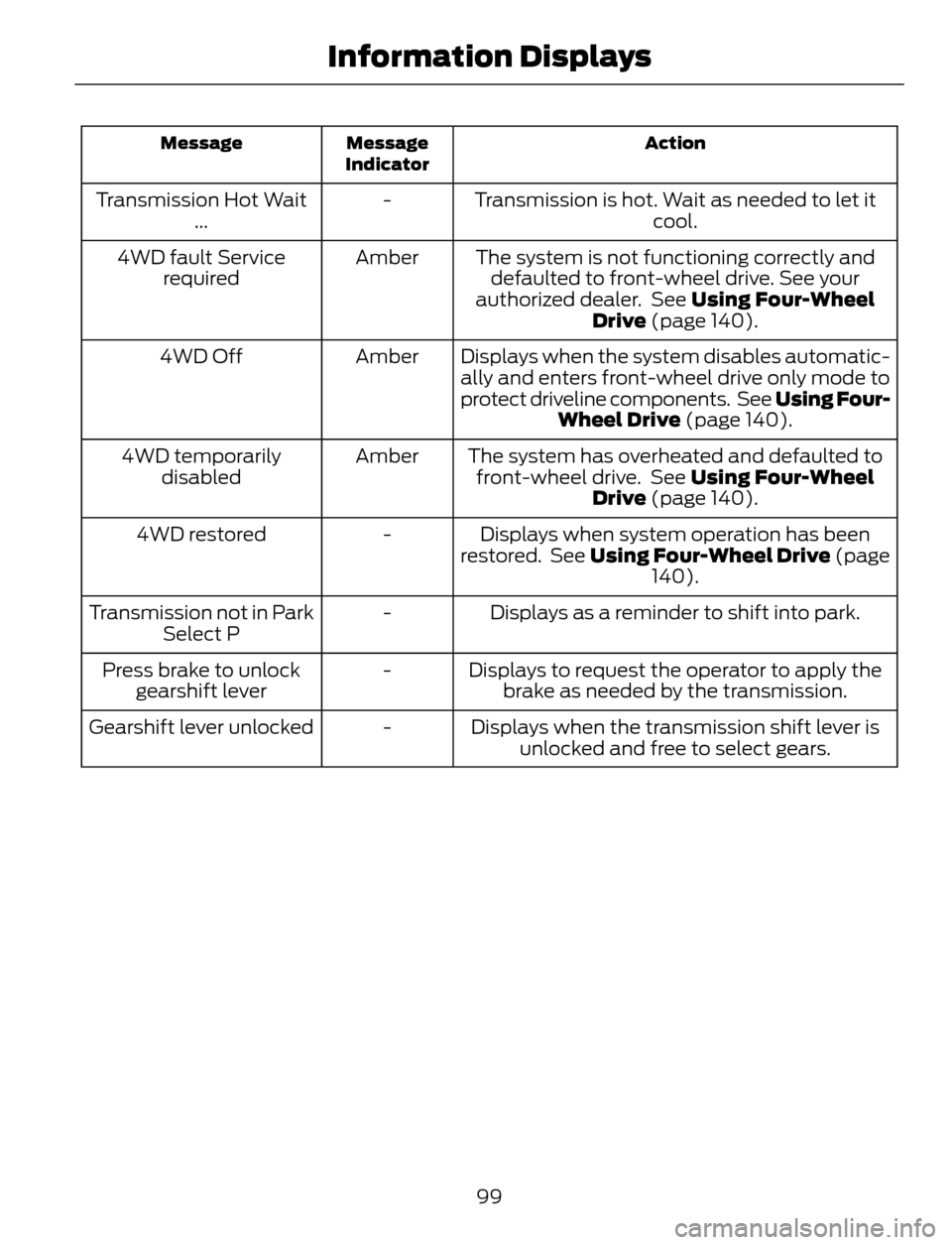
Action Message
Indicator Message
Transmission is hot. Wait as needed to let it
cool. - Transmission Hot Wait
...
The system is not functioning correctly and
defaulted to front-wheel drive. See your
authorized dealer. See Using Four-Wheel
Drive (page 140). Amber 4WD fault Service
required
Displays when the system disables automatic-
ally and enters front-wheel drive only mode to
protect driveline components. See Using Four-
Wheel Drive (page 140). Amber 4WD Off
The system has overheated and defaulted to
front-wheel drive. See Using Four-Wheel
Drive (page 140). Amber 4WD temporarily
disabled
Displays when system operation has been
restored. See Using Four-Wheel Drive (page
140). - 4WD restored
Displays as a reminder to shift into park. - Transmission not in Park
Select P
Displays to request the operator to apply the
brake as needed by the transmission. - Press brake to unlock
gearshift lever
Displays when the transmission shift lever is
unlocked and free to select gears. - Gearshift lever unlocked
99
Information Displays
Page 109 of 428

Vehicle Stationary for Extended Periods during Extreme High Ambient
Temperatures
Vehicle with automatic climate control Vehicle with manual climate control
Apply the parking brake. Apply the parking brake. 1
Move the transmission selector lever to
position P. Move the transmission selector lever to
position P. 2
Press the MAX A/C button. Adjust the temperature control to the
MAX A/C position. 3
Adjust the fan speed to the lowest speed
setting. 4
Side Window Defogging in Cold Weather
Vehicle with automatic climate control Vehicle with manual climate control
Press the windshield defrosting and
defogging button. Adjust the air distribution control to the
instrument panel and floor air vents
positions. 1
Adjust the temperature control to the
desired setting. Press the A/C button. 2
Adjust the temperature control to the
desired setting. 3
Adjust the fan speed to the highest
setting. 4
Direct the instrument panel side air vents
toward the side windows. 5
Close the instrument panel vents. 6
106
Climate Control
Page 119 of 428

HomeLink Wireless Control
System (If Equipped)
WARNING
Do not use the system with any
garage door opener that does not
have the safety stop and reverse
feature as required by U.S. Federal Safety
Standards (this includes any garage door
opener manufactured before April 1, 1982).
A garage door opener which cannot detect
an object, signaling the door to stop and
reverse, does not meet current federal
safety standards. Using a garage door
opener without these features increases
the risk of serious injury or death.
Note:Make sure that the garage door and
security device are free from obstruction
when you are programming. Do not program
the system with the vehicle in the garage.
Note:Make sure you keep the original
remote control transmitter for use in other
vehicles as well as for future system
programming.
Note:We recommend that upon the sale
or lease termination of your vehicle, you
erase the programmed function buttons for
security reasons. See Erasing the function
button codes later in this section.
Note:You can program a maximum of
three devices. To change or replace any of
the three devices after it has been initially
programmed, you must first erase the
current settings. See Erasing the function
button codes later in this section.
E142657
The universal garage door opener replaces
the common hand-held garage door
opener with a three-button transmitter
that is integrated into the driver’s sun visor.
The system includes two primary features,
a garage door opener and a platform for
remote activation of devices within the
home. As well as being programmed for
garage doors, the system transmitter can
be programmed to operate entry gate
operators, security systems, entry door
locks and home or office lighting.
Additional system information can be
found online at www.homelink.com or by
calling the toll-free help line on
1-800-355-3515.
In-vehicle programming
This process is to program your hand-held
transmitter and your in-vehicle HomeLink
button.
Note:Put a new battery in the hand-held
transmitter. This will ensure quicker training
and accurate transmission of the
radio-frequency signal.
E142658
1. With your vehicle parked outside of the
garage, turn your ignition to the on
position, but do not start your vehicle.
2. Hold your hand-held garage door
transmitter 1–3 inches (2–8
centimeters) away from the HomeLink
button you want to program.
116
Universal Garage Door Opener (If Equipped)
Page 127 of 428

Ignition Modes
E142555
The keyless starting system has three
modes:
•Off: Turns the ignition off.
• Without applying the brake pedal,
press and release the button once
when the ignition is in the on mode,
or when the engine is running but
the vehicle is not moving.
•On: All electrical circuits are
operational and the warning lamps and
indicators illuminate.
• Without applying the brake pedal,
press and release the button once.
•Start: Starts the engine.
• Press the brake pedal, and then
press and hold the button until the
engine starts.
STARTING A GASOLINE
ENGINE
When you start the engine, the idle speed
increases, this helps to warm up the
engine. If the engine idle speed does not
slow down automatically, have your
vehicle checked by an authorized dealer.
Before starting the engine check the
following:
• Make sure all occupants have fastened
their safety belts.
• Make sure the headlamps and
electrical accessories are off.• Make sure the parking brake is on.
• Move the transmission selector lever
to position P.
• Turn the ignition key to position II. If
your vehicle is equipped with a keyless
ignition, see the following instructions.
Vehicles with an Ignition Key
Note:Do not touch the accelerator pedal.
1. Fully press the brake pedal.
2. Turn the key to position III to start the
engine. Release the key when the
engine starts.
Note:The engine may continue cranking
for up to 15 seconds or until it starts.
Note:If you cannot start the engine on the
first try, wait for a short period and try again.
Vehicles with Keyless Start
Note:Do not touch the accelerator pedal.
1. Fully press the brake pedal.
2. Press the button.
The system does not function if:
• The key frequencies are jammed.
• The key battery has no charge.
If you are unable to start the engine, do the
following:
124
Starting and Stopping the Engine
Page 128 of 428

3-button remote
E145988
5-button remote
E142874
1. Hold the key next to the symbol on the
steering column.
2. With the key in this position, you can
use the start button to switch the
ignition on and start your vehicle.
Fast Restart
The fast restart feature allows you to
restart the engine within 20 seconds of
switching it off, even if a valid key is not
present.
Within 20 seconds of switching the engine
off, press the brake pedal and press the
button. After 20 seconds have expired, you
can no longer restart the engine without
the key present inside your vehicle.Once the engine has started, it remains
running until you press the button, even if
the system does not detect a valid key. If
you open and close a door while the engine
is running, the system searches for a valid
key. You cannot restart the engine if the
system does not detect a valid key within
20 seconds.
Failure to Start
If you cannot start the engine after three
attempts, wait 10 seconds and follow this
procedure:
1. Fully press the brake pedal.
2. Fully press the accelerator pedal and
hold it there.
3. Start the engine.
Stopping the Engine When Your
Vehicle is Stationary
Vehicles with an Ignition Key
1. Move the transmission selector lever
to position P.
2. Turn the key to position 0.
3. Apply the parking brake.
Vehicles with Keyless Start
1. Move the transmission selector lever
to position P.
2. Press the button once.
3. Apply the parking brake.
Note:This switches off the ignition, all
electrical circuits, warning lamps and
indicators.
125
Starting and Stopping the Engine
Page 129 of 428

Stopping the Engine When Your
Vehicle is Moving
WARNING
Switching off the engine when the
vehicle is still moving will result in a
loss of brake and steering assistance.
The steering will not lock, but higher effort
will be required. When the ignition is
switched off, some electrical circuits,
warning lamps and indicators may also be
off.
Vehicles with an Ignition Key
1. Move the transmission selector lever
to position N and use the brakes to
bring your vehicle to a safe stop.
2. When your vehicle has stopped, move
the transmission selector lever to
position P and turn the key to position
0.
3. Apply the parking brake.
Vehicles with Keyless Start
1. Move the transmission selector lever
to position N and use the brakes to
bring your vehicle to a safe stop.
2. When your vehicle has stopped, move
the transmission selector lever to
position P.
3. Press and hold the button for one
second, or press it three times within
two seconds.
4. Apply the parking brake.
Guarding Against Exhaust Fumes
WARNING
If you smell exhaust fumes inside
your vehicle, have your vehicle
checked by your authorized dealer
immediately. Do not drive your vehicle if
you smell exhaust fumes. Carbon
monoxide is present in exhaust fumes.
Take precautions to avoid its dangerous
effects.
Important Ventilating Information
If you stop your vehicle and the leave the
engine idling for long periods of time, we
recommend that you do one of the
following:
• Open the windows at least 1 inch (2.5
centimeters)
• Set your climate control to outside air.
ENGINE BLOCK HEATER (IF
EQUIPPED)
WARNINGS
Failure to follow engine block heater
instructions could result in property
damage or serious personal injury.
Do not use your heater with
ungrounded electrical systems or
two-pronged adapters. There is a risk
of electrical shock.
Note:The heater is most effective when
outdoor temperatures are below 0°F
(-18°C).
126
Starting and Stopping the Engine
Page 136 of 428

On-Board Diagnostics (OBD-II)
Your vehicle is equipped with a computer
that monitors the engine’s emission control
system. This system is commonly known
as the on-board diagnostics system
(OBD-II). The OBD-II system protects the
environment by ensuring that your vehicle
continues to meet government emission
standards. The OBD-II system also assists
your authorized dealer in properly servicing
your vehicle.
When the service engine soon
indicator illuminates, the OBD-II
system has detected a
malfunction. Temporary malfunctions may
cause the service engine soon indicator to
illuminate. Examples are:
1. The vehicle has run out of fuel—the
engine may misfire or run poorly.
2. Poor fuel quality or water in the
fuel—the engine may misfire or run
poorly.
3. The fuel fill inlet may not have been
properly closed. See Refueling (page
130).
4. Driving through deep water—the
electrical system may be wet.
These temporary malfunctions can be
corrected by filling the fuel tank with good
quality fuel, properly closing the fuel fill
inlet or letting the electrical system dry out.
After three driving cycles without these or
any other temporary malfunctions present,
the service engine soon indicator should
stay off the next time the engine is started.
A driving cycle consists of a cold engine
startup followed by mixed city/highway
driving. No additional vehicle service is
required.If the service engine soon indicator remains
on, have your vehicle serviced at the first
available opportunity. Although some
malfunctions detected by the OBD-II may
not have symptoms that are apparent,
continued driving with the service engine
soon indicator on can result in increased
emissions, lower fuel economy, reduced
engine and transmission smoothness, and
lead to more costly repairs.
Readiness for
Inspection/Maintenance (I/M)
Testing
Some state/provincial and local
governments may have
Inspection/Maintenance (I/M) programs
to inspect the emission control equipment
on your vehicle. Failure to pass this
inspection could prevent you from getting
a vehicle registration.
If the service engine soon
indicator is on or the bulb does
not work, the vehicle may need
to be serviced. See On-Board Diagnostics
(OBD-II).
Your vehicle may not pass the I/M test if
the service engine soon indicator is on or
not working properly (bulb is burned out),
or if the OBD-II system has determined
that some of the emission control systems
have not been properly checked. In this
case, the vehicle is considered not ready
for I/M testing.
If the vehicle’s engine or transmission has
just been serviced, or the battery has
recently run down or been replaced, the
OBD-II system may indicate that the
vehicle is not ready for I/M testing. To
determine if the vehicle is ready for I/M
testing, turn the ignition key to the on
position for 15 seconds without cranking
133
Fuel and Refueling
Page 139 of 428

AUTOMATIC TRANSMISSION
WARNINGS
Always set the parking brake fully
and make sure the gearshift is
latched in P (Park). Turn the ignition
to the off position and remove the key
whenever you leave your vehicle.
Do not apply the brake pedal and
accelerator pedal simultaneously.
Applying both pedals simultaneously
for more than three seconds will limit
engine rpm, which may result in difficulty
maintaining speed in traffic and could lead
to serious injury.
Understanding the Positions of
Your Automatic Transmission
Putting your vehicle in gear:
1. Fully press down the brake pedal.
2. Press and hold the button on the front
of the gearshift lever.
3. Move the gearshift lever into the
desired gear.
4. Release the button and your
transmission will remain in the selected
gear.
E133124
P (Park)
This position locks the transmission and
prevents the front wheels from turning.
Come to a complete stop before putting
your vehicle into and out of P (Park)
R (Reverse)
With the gearshift lever in R (Reverse), the
vehicle will move backward. Always come
to a complete stop before shifting into and
out of R (Reverse).
N (Neutral)
With the gearshift lever in N (Neutral), the
vehicle can be started and is free to roll.
Hold the brake pedal down while in this
position.
D (Drive)
The normal driving position for the best
fuel economy. Transmission operates in
gears one through six.
S (Sport)
Moving the gearshift lever to S (Sport):
• Provides additional grade (engine)
braking and extends lower gear
operation to enhance performance for
uphill climbs, hilly terrain or
mountainous areas. This will increase
engine RPM during engine braking.
• Provides additional lower gear
operation through the automatic
transmission shift strategy.
• Gears are selected more quickly and
at higher engine speeds.
SelectShift Automatic®
Transmission (If Equipped)
Your SelectShift automatic transmission
gives you the ability to manually change
gears.
136
Transmission