2014 FORD EDGE light
[x] Cancel search: lightPage 113 of 540

Menu
You can access the menus using the information display control.
Note:Some options may appear slightly different or not at all if the
items are optional.
†Trip1/2
Distance to E
Trip Odometer
Trip Timer
Inst Fuel Econ
Average Fuel
Fuel Used
Compass (located in lower line of display).Note:this will also display
in other menus.
Total Odometer (located in lower line of display).Note:this will also
display in other menus.
†SeeTrip computerlater in this section for more information.
Information
Intelligent AWD — Displays power distribution between the front and
rear wheels. More power to either front or rear wheels will be
displayed by more area filled in.
MyKey® Distance (if key is programmed) — Distance traveled when a
programmed key is in use.
MyKey® Information — Number of MyKeys and admin keys programmed)
Coolant Temp. — The engine coolant indicator will change colors
indicating: blue for cool, gray for normal and red for hot. If the engine
coolant temperature exceeds the normal range, stop the vehicle as
soon as safely possible, switch off the engine and let the engine cool.
11 2Information Displays
2014 Edge(edg)
Owners Guide gf, 2nd Printing, March 2014
USA(fus)
Page 117 of 540

Information Display Controls (Type 2)
•Press the up and down arrow
buttons to scroll through and
highlight the options within a
menu.
•Press the right arrow button to
enter a sub-menu.
•Press the left arrow button to exit
a menu.
•Press the OK button to choose
and confirm a setting/messages.
The menu travel icon in the upper left corner displays the available
button options.
Main menu
From the main menu bar on the left side of the information display, you
can choose from the following categories:
•Display Mode
•Trip1&2
•Fuel Economy
•Driver Assist
•Settings
Scroll up/down to highlight one of the categories, then press the right
arrow key to enter into that category. Press the left arrow key as needed
to exit back to the main menu.
Display Mode
Use the left/right arrow buttons to choose the following display options.
Display mode †Option 1 Option 2 Option 3 †Option 4
XXX mi (km) to empty X
Bar tachometer X X
Round tachometer X X
Engine coolant temp
gaugeX
11 6Information Displays
2014 Edge(edg)
Owners Guide gf, 2nd Printing, March 2014
USA(fus)
Page 118 of 540

Display mode †Option 1 Option 2 Option 3 †Option 4
Intelligent AWD X
Fuel gauge Always
PresentAlways
PresentAlways
PresentAlways
Present
Total odometer
(lower left corner)Always
PresentAlways
PresentAlways
PresentAlways
Present
†Vehicles with Intelligent AWD only. You can choose to have only the
fuel gauge show in this mode. Refer toDisplay>Gauge Display
found in the table under theSettingssection later in this chapter.
Regardless of display mode chosen, when SelectShift Automatic™
transmission (SST) is activated, the cluster will change to the round
tachometer if not already selected. After the round tachometer displays,
other display modes with the bar tachometer can also be chosen.
•XXX mi (km) to empty: Shows approximate fuel level before the fuel
tank reaches empty. The value is dynamic and can change (raise or
lower) depending on driving style.
•Fuel gauge: Indicates approximately how much fuel is left in the fuel
tank. The fuel gauge may vary slightly when the vehicle is in motion
or on a grade. When the fuel level becomes low, the level indicator will
change to amber. When the fuel level becomes critically low, the level
indicator will change to red.
Note:When a MyKey® is in use, low fuel warnings will display earlier.
The fuel icon and arrow indicates which side of the vehicle the fuel
filler door is located.
•Bar/Round tachometer: Indicates the engine speed in revolutions per
minute. Driving with your tachometer pointer continuously at the top
of the scale may damage the engine. During SelectShift Automatic™
transmission (SST) use, the currently selected gear will appear in the
display. Refer toTransmissionchapter.
•Engine coolant temperature gauge: Indicates engine coolant
temperature. At normal operating temperature, the level indicator will
be in the normal range. If the engine coolant temperature exceeds the
normal range, stop the vehicle as soon as safely possible, switch off
the engine and let the engine cool.
•Intelligent AWD (if equipped): displays power distribution between the
front and rear wheels. More power to either front or rear wheels will
be displayed by more area filled in.
Information Displays11 7
2014 Edge(edg)
Owners Guide gf, 2nd Printing, March 2014
USA(fus)
Page 121 of 540
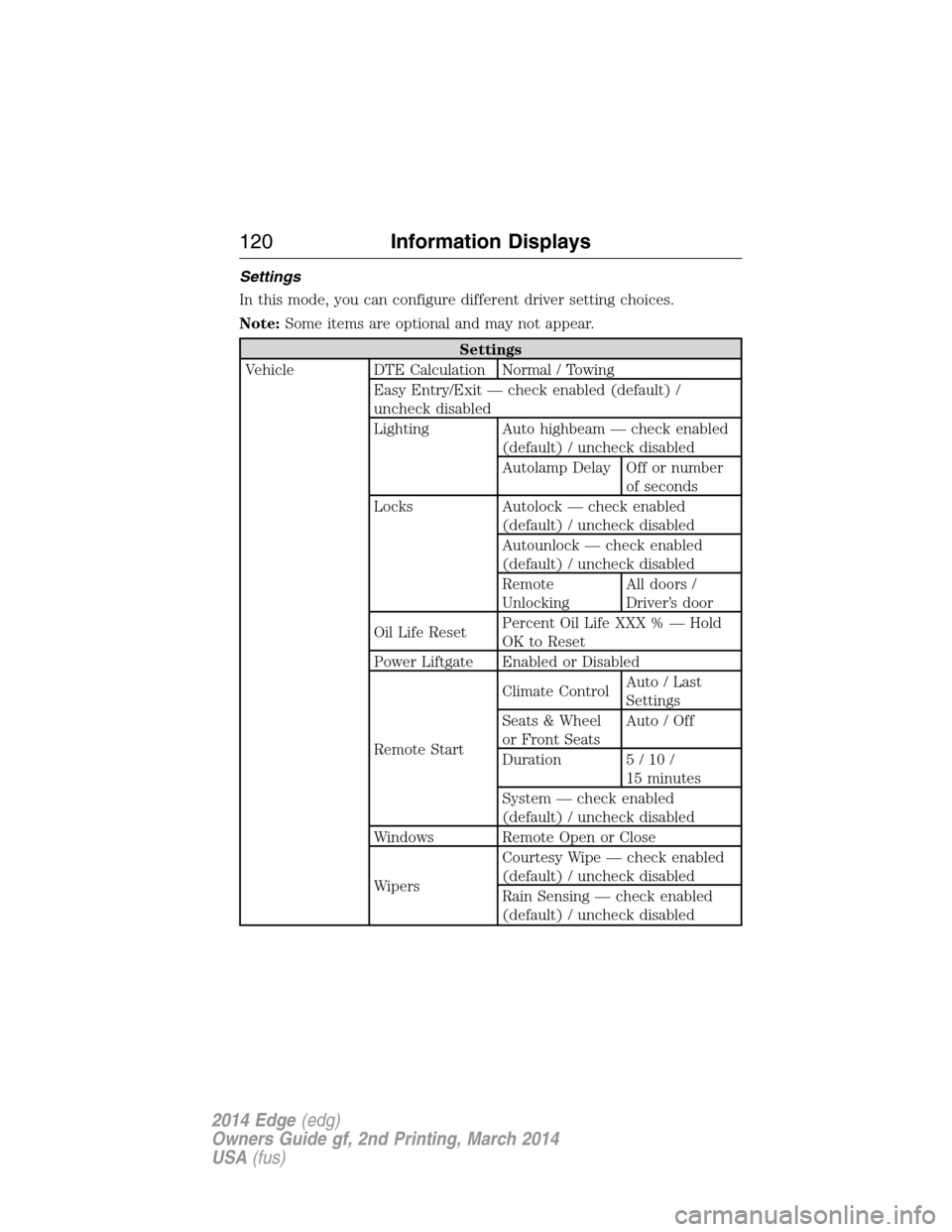
Settings
In this mode, you can configure different driver setting choices.
Note:Some items are optional and may not appear.
Settings
Vehicle DTE Calculation Normal / Towing
Easy Entry/Exit — check enabled (default) /
uncheck disabled
Lighting Auto highbeam — check enabled
(default) / uncheck disabled
Autolamp Delay Off or number
of seconds
Locks Autolock — check enabled
(default) / uncheck disabled
Autounlock — check enabled
(default) / uncheck disabled
Remote
UnlockingAll doors /
Driver’s door
Oil Life ResetPercent Oil Life XXX % — Hold
OK to Reset
Power Liftgate Enabled or Disabled
Remote StartClimate ControlAuto / Last
Settings
Seats & Wheel
or Front SeatsAuto / Off
Duration 5/10/
15 minutes
System — check enabled
(default) / uncheck disabled
Windows Remote Open or Close
WipersCourtesy Wipe — check enabled
(default) / uncheck disabled
Rain Sensing — check enabled
(default) / uncheck disabled
120Information Displays
2014 Edge(edg)
Owners Guide gf, 2nd Printing, March 2014
USA(fus)
Page 124 of 540

Alarm/Security
MessagesAction / Description
To Stop Alarm, Start
VehicleDisplayed when the perimeter alarm system is
armed and the vehicle is entered using the key
on the driver’s side door. In order to prevent
the perimeter alarm system from triggering,
the ignition must be turned to start or on
before the 12 second chime expires.
AWD Messages Action / Description
AWD Off Displayed when the AWD system has been
automatically disabled to protect itself. This is
caused by operating the vehicle with the
compact spare tire installed or if the system is
overheating. The AWD system will resume
normal function and clear this message after
driving a short distance with the road tire
re-installed or after the system is allowed to
cool.
Check AWD Displayed in conjunction with the Throttle
Control/Transmission/AWD light when the
AWD system is not operating properly. If the
warning stays on or continues to come on,
contact your authorized dealer as soon as
possible.
Battery and
Charging System
MessagesAction / Description
Check Charging
SystemDisplayed when the charging system needs
servicing. If the warning stays on or continues
to come on, contact your authorized dealer as
soon as possible.
Information Displays123
2014 Edge(edg)
Owners Guide gf, 2nd Printing, March 2014
USA(fus)
Page 138 of 540

E.MAX A/C:Press the button to maximize cooling. Recirculated air
flows through the instrument panel vents, air conditioning automatically
turns on, and the fan automatically adjusts to the highest speed.
F.A/C:Press the button to turn air conditioning compressor on or off.
Use air conditioning with recirculated air to improve cooling performance
and efficiency.
G.AUTO:Press the button to turn on automatic operation. Select the
desired temperature using the temperature control. The system adjusts
fan speed, air distribution, air conditioning operation, and selects outside
air or recirculated air to heat or cool the vehicle in order to maintain the
desired temperature. You can also use theAUTObutton to turn off dual
zone operation by pressing and holding the button for more than two
seconds.
H.Heated rear window:Turns the heated rear window on and off.
SeeHeated windows and mirrorslater in this chapter for more
information. If your vehicle is equipped with heated mirrors, this button
turns them on also.
I.Defrost:Press the button to distribute air to the windshield vents and
de-mister. Air distribution to instrument panel and footwell vents turn
off. You can use this setting to defog and clear the windshield of a thin
covering of ice.
GENERAL OPERATING TIPS
General Hints
Note:
Prolonged use of recirculated air may cause the windows to fog up.
Note:You may feel a small amount of air from the footwell air vents
regardless of the air distribution setting.
Note:To reduce humidity build-up inside your vehicle, do not drive with
the system switched off or with recirculated air always switched on.
Note:Do not place objects under the front seats as this may interfere
with the airflow to the rear seats.
Note:Remove any snow, ice or leaves from the air intake area at the
base of the windshield.
Note:To improve the time to reach comfort in hot weather, drive with
the windows slightly open for 2-3 minutes after start-up or until your
vehicle airs out.
Climate Control137
2014 Edge(edg)
Owners Guide gf, 2nd Printing, March 2014
USA(fus)
Page 145 of 540

SITTING IN THE CORRECT POSITION
WARNING:Sitting improperly out of position or with the seat
back reclined too far can take off weight from the seat cushion
and affect the decision of the passenger sensing system, resulting in
serious injury or death in a crash. Always sit upright against your seat
back, with your feet on the floor.
WARNING:Do not recline the seat back as this can cause the
occupant to slide under the seat’s safety belt, resulting in severe
personal injury in the event of a crash.
WARNING:Do not place objects higher than the seat backs to
reduce the risk of injury in a crash or during heavy braking or
when stopping suddenly.
When you use them properly, the
seat, head restraint, safety belt and
airbags will provide optimum
protection in the event of a crash.
We recommend that you follow these guidelines:
•Do not recline the seat back more than 30 degrees from vertical.
•Sit in an upright position with the base of your spine as far back as
possible.
•Adjust the head restraint so that the top of it is level with the top of
your head and as far forward as possible, remaining comfortable.
•Keep sufficient distance between yourself and the steering wheel.
We recommend a minimum of 10 inches (25 centimeters) between
your breastbone and the airbag cover.
•Hold the steering wheel with your arms slightly bent.
144Seats
2014 Edge(edg)
Owners Guide gf, 2nd Printing, March 2014
USA(fus)
Page 146 of 540

•Bend your legs slightly so that you can press the pedals fully.
•Position the shoulder strap of the safety belt over the center of your
shoulder and position the lap strap tightly across your hips.
Make sure that your driving position is comfortable and that you can
maintain full control of your vehicle.
HEAD RESTRAINTS
WARNING:To minimize the risk of neck injury in the event of a
crash, the driver and passenger occupants should not sit in or
operate the vehicle, until the head restraint is placed in its proper
position. The driver should never adjust the head restraint while the
vehicle is in motion.
WARNING:The adjustable head restraint is a safety device.
Whenever possible it should be installed and properly adjusted
when the seat is occupied.
WARNING:Install the head restraint properly to minimize the
risk of neck injury in the event of a crash.
Note:Before adjusting any head restraint, adjust the seatback to an
upright driving or riding position. Properly adjust the head restraint so
that the top of the head restraint is even with the top of your head and
positioned as close as possible to the back of your head. For occupants
of extremely tall stature, adjust the head restraint to its full up position.
To adjust the head restraint, do the following:
Front Seat and Rear Seat
Outboard Head Restraints
A
C
B
D
Seats145
2014 Edge(edg)
Owners Guide gf, 2nd Printing, March 2014
USA(fus)