2014 FORD E SERIES fuel
[x] Cancel search: fuelPage 321 of 438

In the Event of a Crash
Not all crashes deploy an airbag or activate the fuel pump shut-off
(which would activate 911 Assist); however, if 911 Assist is triggered,
SYNC tries to contact emergency services. If a connected phone is
damaged or loses connection to SYNC, SYNC searches for, and tries to
connect to, any available previously paired phone and tries to make the
call to 911.
Before making the call:
•SYNC provides a short window of time (about 10 seconds) to cancel
the call. Failure to cancel the call results in SYNC attempting to dial
911.
•SYNC says the following, or a similar message: “SYNC will attempt to
call 911, to cancel the call, press Cancel on your screen or press and
hold the phone button on your steering wheel.”
If the call is not cancelled and a successful call is made, a pre-recorded
message is played for the 911 operator, then the occupant(s) in the
vehicle is able to talk with the operator. Be prepared to provide your
name, phone number and location immediately, because not all 911
systems are capable of receiving this information electronically.
911 Assist May Not Work If
•Your cellular phone or 911 Assist hardware was damaged in a crash.
•The vehicle’s battery or SYNC system has no power.
•The phone(s) paired and connected to the system was thrown from
the vehicle.
911 Assist Privacy Notice
Once 911 Assist is set on, it may disclose to emergency services that the
vehicle has been in a crash involving the deployment of an airbag or
activation of the fuel pump shut-off. Certain versions or updates to 911
Assist may also be capable of electronically or verbally disclosing to 911
operators the vehicle location, and/or other details about the vehicle or
crash to assist 911 operators to provide the most appropriate emergency
services. If you do not want to disclose this information, do not turn the
feature on.
320SYNC®
2014 Econoline(eco)
Owners Guide gf, 1st Printing, November 2012
USA(fus)
Page 379 of 438

Press the I (information) button, then select Sirius Travel Link.
Choose from any of the following services:
When you select: You can:
Traffic On RouteIdentify traffic incidents on your route, nearby
your vehicle’s current location or near any of
your favorite places (if programmed). Traffic Nearby
My Places
WeatherView the nearby weather, current weather, or
the 5–day forecast for the chosen area. Select
Weather Map to see storms, radar
information, charts and winds. Select Area to
select from a listing of weather locations. In
addition, you can view ski conditions for a
specific area.
Fuel PricesView fuel prices at stations close to your
vehicle’s location or on an active navigation
route.
Movie ListingsView nearby movie theaters and their show
times (if available).
Sports Info.View scores and schedules from a variety of
sports. You can also save up to 10 favorite
teams for easier access. The score
automatically refreshes when a game is in
progress.
Sirius Travel Link Voice Commands
Press the voice button and, after the tone, say “Travel Link”,
then any of the commands in the following chart:
“TRAVEL LINK”
“5–day weather forecast” “NBA schedule”
“Baseball schedule” “NBA scores”
“Baseball scores” “NFL schedule”
“College basketball schedule” “NFL scores”
“College basketball scores” “NHL schedule”
“College football schedule” “NHL scores”
378Navigation System (If Equipped)
2014 Econoline(eco)
Owners Guide gf, 1st Printing, November 2012
USA(fus)
Page 380 of 438

“TRAVEL LINK”
“College football scores” “Sports schedule”*
“Fuel prices” “Sports scores”**
“Golf leaders” “Traffic”
“Golf schedule” “Travel link help”
“Motor sports order” “Weather”
“Motor sports schedule” “Weather map”
“Movie listings”
*If you have said, “Sports schedule”, you may say any of the commands
in the “Sports schedule” chart:
**If you have said, “Sports scores”, you may say any of the commands in
the “Sports scores” chart:
“SPORTS SCHEDULES”
“Baseball schedule” “NBA schedule”
“College basketball schedule” “NFL schedule”
“College football schedule” “NHL schedule”
“Golf schedule” “Travel link help”
“Motor sports schedule”
“SPORTS SCORES”
“Baseball scores” “NBA scores”
“College basketball scores” “NFL scores”
“College football scores” “NHL scores”
“Golf leaderboard” “Travel link help”
“Motor sports results”
Calendar
Press the I (information) button, then select Calendar. You can
then select which month you would like to view by using the
arrow buttons or selecting Go to Today.
You can view calendars from one previous year and the next 10 years.
Note:Not all tab selections may be available in all markets. Check with
an authorized dealer for availability.
Navigation System (If Equipped)379
2014 Econoline(eco)
Owners Guide gf, 1st Printing, November 2012
USA(fus)
Page 395 of 438

Navigation Preferences
Avg. Speed: Main
RoadsWhen this feature is on, the system displays
the average speed on a main road, initially set
to 45 mph (72 km/h). You can change the
setting for specific roads and for your driving
preferences. This setting helps estimate your
arrival time at a destination based on your
driving preferences.
Avg. Speed: FreewaysWhen this feature is on, the system displays
the average speed on a freeway, initially set to
65 mph (105 km/h). You can change the
setting for specific roads and for your driving
preferences. This setting helps estimate your
arrival time at a destination based on your
driving preferences.
Parking POI
NotificationWhen this feature is on, the system displays
available parking accommodations around a
destination that is part of your route.
Low Fuel POI
NotificationWhen this feature is on, the system displays
gas station icons when the fuel level is low.
Fuel Price DisplayWhen this feature is on, the system displays
fuel prices at local stations. You can choose to
display prices forUnleadedorDiesel.
*
Calibrate Positionallows you to adjust the direction of
your vehicle by pressing the arrow buttons on
the screen.
Distanceallows you to recalibrate the
distance to the destination while your vehicle
is moving.
Restore Default
SettingsTouch theResetbutton to return the settings
to factory defaults.
*This feature requires activation of Sirius Travel Link, which is only
available in the United States.
394Navigation System (If Equipped)
2014 Econoline(eco)
Owners Guide gf, 1st Printing, November 2012
USA(fus)
Page 427 of 438
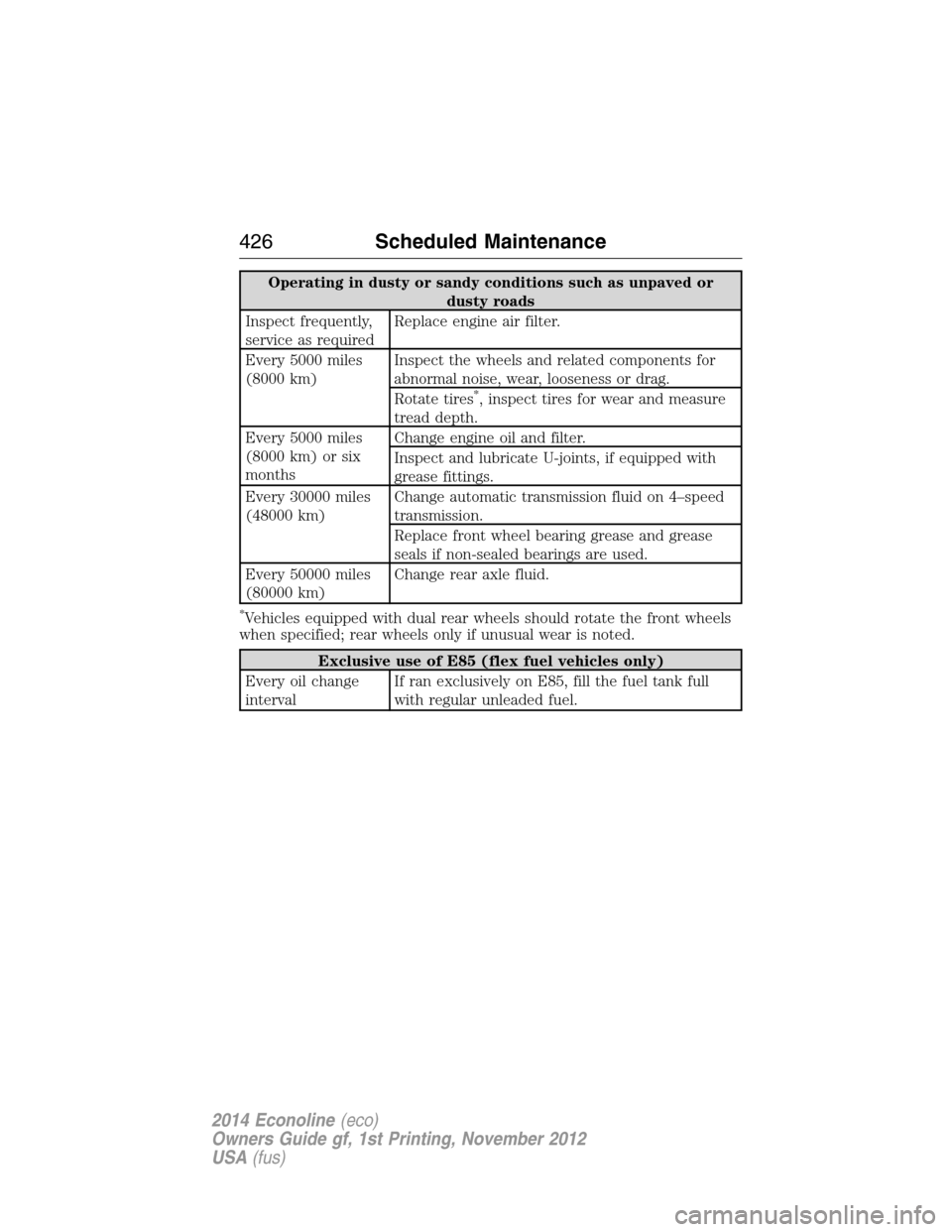
Operating in dusty or sandy conditions such as unpaved or
dusty roads
Inspect frequently,
service as requiredReplace engine air filter.
Every 5000 miles
(8000 km)Inspect the wheels and related components for
abnormal noise, wear, looseness or drag.
Rotate tires
*, inspect tires for wear and measure
tread depth.
Every 5000 miles
(8000 km) or six
monthsChange engine oil and filter.
Inspect and lubricate U-joints, if equipped with
grease fittings.
Every 30000 miles
(48000 km)Change automatic transmission fluid on 4–speed
transmission.
Replace front wheel bearing grease and grease
seals if non-sealed bearings are used.
Every 50000 miles
(80000 km)Change rear axle fluid.
*Vehicles equipped with dual rear wheels should rotate the front wheels
when specified; rear wheels only if unusual wear is noted.
Exclusive use of E85 (flex fuel vehicles only)
Every oil change
intervalIf ran exclusively on E85, fill the fuel tank full
with regular unleaded fuel.
426Scheduled Maintenance
2014 Econoline(eco)
Owners Guide gf, 1st Printing, November 2012
USA(fus)
Page 430 of 438

EXCEPTIONS
Normal vehicle axle maintenance:Rear axles and power take-off
units with synthetic fluid and light-duty trucks equipped with
Ford-design axles are lubricated for life; do not check or change fluid
unless a leak is suspected, service is required or the assembly has been
submerged in water. During long periods of trailer towing with outside
temperatures above 70°F (21°C) and at wide-open throttle for long
periods above 45 mph (72 km/h), non-synthetic rear axle fluids should
be changed every 3000 miles (4800 kilometers) or three months,
whichever comes first. This interval can be waived if the axle is filled
with 75W140 synthetic gear fluid meeting Ford specification
WSL-M2C192-A, part number F1TZ-19580-B or equivalent. Add friction
modifier XL-3 (EST-M2C118-A) or equivalent for complete refill of
Traction-Lok rear axles (seeTechnical specificationsin theCapacities
and Specificationschapter for details).
Police/Taxi/Livery vehicle axle maintenance:Change rear axle fluid
every 100000 miles (160000 kilometers). Rear axle fluid change may be
waived if the axle was filled with 75W140 synthetic gear fluid meeting
Ford specification WSL-M2C192-A, part number FITZ-19580-B or
equivalent. Add four ounces (118 mL) of additive friction modifier XL-3
(EST-M2C118-A) or equivalent for complete refill of Traction-Lok rear
axles. The axle fluid should be changed anytime the axle has been
submerged in water.
California fuel filter replacement:If the vehicle is registered in
California, the California Air Resources Board has determined that the
failure to perform this maintenance item will not nullify the emission
warranty or limit recall liability prior to the completion of the vehicle’s
useful life. Ford Motor Company, however, urges you to have all
recommended maintenance services performed at the specified intervals
and to record all vehicle service.
Hot climate oil change intervals:Vehicles operating in the Middle
East, North Africa, Sub-Saharan Africa or locations with similar climates
using an American Petroleum Institute (API) Certified for Gasoline
Engines (Certification mark) oil of SM or SN quality, the normal oil
change interval is 5000 miles (8000 kilometers).
If the available API SM or SN oils are not available, then the oil change
service interval is 3000 miles (4800 kilometers).
Engine air filter replacement:Engine air filter life is dependent on
exposure to dusty and dirty conditions. Vehicles operated in these
conditions require frequent inspection and replacement of the engine air
filter.
Scheduled Maintenance429
2014 Econoline(eco)
Owners Guide gf, 1st Printing, November 2012
USA(fus)
Page 434 of 438

E
Electronic message center .........82
Electronic stability control ......133
Emergencies, roadside
jump-starting ..........................174
running out of fuel .................114
Emergency Flashers .................173
Emission control system ..........117
End user license agreement ....402
Engine ................................270–271
cleaning ...................................226
coolant .....................................197
fail-safe cooling .......................200
lubrication specifications .......272
refill capacities ........................272
service points ..........................196
Engine block heater .................109
Engine oil
checking and adding ..............196
dipstick ....................................196
filter, specifications ................279
refill capacities ........................272
specifications ..........................272
Event data recording ..................11
Exhaust fumes ..........................108
F
Fail safe cooling ........................200
Floor mats .................................169
Fluid capacities .........................272
Four-Wheel Drive vehicles
preparing to drive your
vehicle .....................................165Fuel
cap ...........................................115
capacity ...................................272
choosing the right fuel ...112–113
filler funnel .............................114
filling your vehicle
with fuel ..................................115
filter, specifications ................208
fuel pump shut-off ..................173
octane rating ...........113, 270–271
quality ......................................112
running out of fuel .................114
safety information relating to
automotive fuels .....................111
Fuel - flex fuel vehicle
(FFV) .........................................113
Fuses ..........................185–186, 190
G
Gas cap (see Fuel cap) ............115
Gauges .........................................76
H
Hazard flashers .........................173
HD Radio™ ...............................359
Headlamps ...................................67
aiming ..............................214–215
bulb specifications ..................223
checking alignment ........214–215
daytime running lights .............68
flash to pass ..............................67
high beam .................................67
replacing bulbs .......................217
turning on and off ....................67
Head restraints ...........................95
Heating ..................................90–91
Hood ..........................................194
Index433
2014 Econoline(eco)
Owners Guide gf, 1st Printing, November 2012
USA(fus)
Page 437 of 438

Safety restraints -
LATCH anchors ...........................28
Safety seats for children ............24
Safety Compliance
Certification Label ....................281
Satellite Radio ...........................367
Scheduled Maintenance Guide
Normal Scheduled
Maintenance and Log .............419
SD card ......................................381
Seats
child safety seats ......................24
front seats ...........................96–97
SecuriLock passive anti-theft
system ..........................................62
Selecting your media source
(USB, Line in, BT audio) .........330
Setting a destination ................381
Setting the clock ...............290–291
SIRIUS® satellite radio ....363, 381
SIRIUS satellite radio voice
commands .................................366
SIRIUS Travel Link ...................377
SOS Post Crash Alert .................45
Spark plugs,
specifications .............270–271, 279
Special notice
ambulance conversions ............15
utility-type vehicles ..................15
Specification chart,
lubricants ...................................272
Stability system .........................133
Starting a flex fuel vehicle .......108
Starting your vehicle ........106, 108
jump starting ..........................174Status bars ................................349
Steering wheel ............................65
tilting .........................................65
Supplemental Restraint System
(SRS) (see airbags) ....................46
SYNC® AppLink™ ...................325
SYNC® customer support ........299
SYNC® Services ........................323
System overview .......................346
T
Temperature control
(see Climate control) ...........90–91
Text messaging .........................311
Text messaging (sending,
downloading, deleting) .....311, 313
Tilt steering wheel ......................65
Tires ...........................235–236, 260
alignment ................................250
care ..........................................235
changing ..........................260, 263
checking the pressure ............245
inflating ...................................243
label .........................................242
replacing ..........................248, 265
rotating ....................................251
safety practices .......................250
sidewall information ...............238
snow tires and chains ............252
spare tire .........................260–261
terminology .............................236
tire grades ...............................236
treadwear ........................235, 247
Towing ...............................150, 163
recreational towing .................164
Trailer Brake
Controller-Integrated ..............157
436Index
2014 Econoline(eco)
Owners Guide gf, 1st Printing, November 2012
USA(fus)