2014 FORD C MAX HYBRID phone
[x] Cancel search: phonePage 362 of 447
Pairing Your Phone for the First
Time
WARNING
Driving while distracted can result in
loss of vehicle control, crash and
injury. We strongly recommend that
you use extreme caution when using any
device that may take your focus off the
road. Your primary responsibility is the safe
operation of your vehicle. We recommend
against the use of any handheld device
while driving and encourage the use of
voice-operated systems when possible.
Make sure you are aware of all applicable
local laws that may affect the use of
electronic devices while driving. The first thing you must do to use the
phone features of SYNC is to pair your
Bluetooth-enabled cellular phone with
SYNC. This allows you to use your phone
in a hands-free manner.
Note:
Put the transmission in position P.
Turn on your vehicle ignition and the radio.
1. Touch
Add Phone in the upper left
corner of the touchscreen. Find SYNC
appears on the screen, and instructs
you to begin the pairing process from
your device.
2. Make sure that Bluetooth is set to
On
and that your cellular phone is in the
proper mode. See your phone ’s manual
if necessary.
Note: Select
SYNC, and a six-digit PIN
appears on your device.
3. If prompted to enter a PIN on your device, it does not support Secure
Simple Pairing. To pair, enter the PIN
displayed on the touchscreen. Skip the
next step.
4. When prompted on your phone ’s
display, confirm that the PIN provided
by SYNC matches the PIN displayed
on your cellular phone. 5.
The display indicates when the pairing
is successful.
SYNC may prompt you with more phone
options. For more information on your
phone's capability, see your phone's
manual and visit the website.
Pairing Subsequent Phones
Note: Put the transmission in position
P.
Turn on your vehicle ignition and the radio.
1. Press the
Phone corner of the
touchscreen > Settings > BT Devices
>
Add Device.
2. Make sure that Bluetooth is set to
On
and that your cellular phone is in the
proper mode. See your phone ’s manual
if necessary.
Note: Select
SYNC, and a six-digit PIN
appears on your device.
3. If prompted to enter a PIN on your device, it does not support Secure
Simple Pairing. To pair, enter the PIN
displayed on the touchscreen. Skip the
next step.
4. When prompted on your phone ’s
display, confirm that the PIN provided
by SYNC matches the PIN displayed
on your cellular phone.
5. The display indicates when the pairing
is successful.
SYNC may prompt you with more phone
options. For more information on your
phone's capability, see your phone's
manual and visit the website.
Making Calls Press the voice button on your
steering wheel controls. When
prompted, say, "Call
or say "Dial", then the desired number. To end the call or exit phone
mode, press this phone button.
360
C-MAX (CCG) MyFord Touch
™
(If Equipped)E142599 E142632
Page 363 of 447
Receiving Calls
During an incoming call, an audible tone
sounds. Call information appears in the
display if it is available.
Accept the call by pressing
Accept on the touchscreen or
by pressing this phone button on
your steering wheel controls. Reject the call by pressing
Reject
on the touchscreen or by
pressing this phone button on
your steering wheel controls.
Ignore the call by doing nothing. SYNC logs
it as a missed call.
Phone Menu Options
Press the top left corner on your
touchscreen to select from the following
options:
Phone
Touch this button to access the on-screen
numerical pad to enter a number and place
a call. During an active call, you can also
choose to:
• Mute the call
• Put the call on hold
• Turn on the privacy feature
• Join two calls
• End the call.
Quick Dial
Set up favorite contacts from you
phonebook or history folder.
Phonebook
Touch this button to access and call any
contacts in your previously downloaded
phone book. The system places the entries
in alphabetical categories summarized at
the top of the screen. To turn on contact picture settings, if your
device supports this feature, press Phone
>
Settings > Manage Phonebook >
Download photos from Phonebook >
On.
History
After you connect your Bluetooth-enabled
phone to SYNC, you can access any
previously dialed, received or missed calls.
You can also choose to save these to your
Favorites or to Quick Dial.
Note: This is a phone-dependent feature.
If your phone does not support downloading
call history using Bluetooth, SYNC keeps
track of calls made with the SYNC system.
Messaging
Send text messages using your
touchscreen. See
Text messaging later
in this section.
Settings
Touch this button to access various phone
settings, such turning Bluetooth on and off,
managing your phonebook and more. See
Phone settings
later in this section.
Text Messaging
Note: Downloading and sending text
messages using Bluetooth are
phone-dependent features.
Note: Certain features in text messaging
are speed-dependent and not available
when your vehicle is traveling at speeds over
3 mph (5 km/h).
Note: SYNC does not download read text
messages from your phone.
You can send and receive text messages
using Bluetooth, read them aloud and
translate text messaging acronyms, such
as LOL.
1. Touch the top left corner of the display
to access the
Phone menu.
361
C-MAX (CCG) MyFord Touch
™
(If Equipped) E142632
Page 364 of 447
2. Select Messaging.
3. Choose from the following:
• Listen (speaker icon)
• Dial
• Send Text
• View
• Delete.
Composing a Text Message
Note: This is a speed-dependent feature.
It is unavailable when your vehicle is
traveling at speeds over 3 mph (5 km/h).
Note: Downloading and sending text
messages using Bluetooth are
phone-dependent features.
1. Touch the top left corner of the display
to access the
Phone menu.
2. Touch
Messaging > Send Text.
3. Enter a phone number or choose from
your phonebook.
4. You can select from the following options:
• Send
, which sends the message as it
is.
• Edit Text
, which allows you to
customize the pre-defined message or
create a message on your own.
You can then preview the message, verify
the recipient as well as update the
message list. Text message options
I’ll call you back in a few minutes. I just left, I’ll be there soon.Can you give me a call? I’m on my way.
I’m running a few minutes late. Text message options
I’m ahead of schedule, so I’ll be there early.
I’m outside.
I’ll call you when I get there. OK
Yes No
Thanks
Stuck in traffic. Call me later. LOL
Receiving a Text Message
Note: If you select
View and your vehicle
is traveling over 3 mph (5 km/h), the system
offers to read the message to you instead
of allowing you to view it while driving.
When a new message arrives, an audible
tone sounds and the screen displays a
pop-up with the caller name and ID, if
supported by your phone. You can press:
• View
to view the text message.
• Listen
for SYNC to read the message
to you.
• Dial
to call the contact.
• Ignore
to exit the screen.
Phone Settings
Press
Phone > Settings.
Bluetooth Devices
Touch this tab to connect, disconnect, add
or delete a device, as well as save it as a
favorite.
362
C-MAX (CCG) MyFord Touch
™
(If Equipped)
Page 365 of 447
Bluetooth
Touch this tab to turn Bluetooth off or on.
Do Not Disturb
Touch this tab if you want all calls to go
directly to your voice mail and not ring in
the vehicle. When this feature is on, text
message notifications do not ring inside
the cabin either.
911 Assist
Turn on or turn off the 911 Assist feature.
See Information (page 375).
Phone Ringer
Select the ring tone you want to hear when
you receive a call. Choose from possible
system ring tones, your currently paired
phone ’s ring tone, a beep, text-to-speech
or a silent notification.
Text Message Notification
Select a text message notification, if
supported by your phone. Choose from
possible system alert tones,
text-to-speech or silent.
Internet Data Connection
If your phone is compatible, use this screen
to adjust your internet data connection.
Select to make your connection profile
with the personal area network or to turn
off your connection. You can also choose
to adjust your settings or have the system
always connect, never connect when
roaming or query on connect. Press
? for
more information.
Manage Phonebook
Touch this button to access features such
as automatic phonebook download,
re-download your phonebook, add
contacts from your phone as well as delete
or upload your phonebook. Roaming Warning
Touch this button to have the system alert
you when your phone is in roaming mode.
Phone Voice Commands
Press the voice button on the
steering wheel controls. When
prompted, say any of the
following commands: "PHONE"
"Call"
"Call
"Call
"Call
"Do not disturb off" "Do not disturb on"
"Forward text messages"
"Go to hands free" *
"Hold call off" *
"Hold on" *
"Join calls" *
"Listen to text message <#>" "Listen to text messages"
"Messages" **
"Mute call" *
363
C-MAX (CCG) MyFord Touch
™
(If Equipped)E142599
Page 366 of 447

"PHONE"
"Pair phone"
"Privacy on" *
"Read text message"
"Reply to text messages" "Turn ringer off""Turn ringer on"
"Unmute call" *
"Help"
* This command is only available during an
active call.
** If you say "Messages", see the following
"Messages" chart for additional
commands. "MESSAGES"
"Call"
"Forward text messages"
"Listen to text message <#>" "Listen to text messages""Reply to text messages" "Help"
ELECTRIC VEHICLE
INFORMATION Your system has special electric
vehicle screens, which display
power flow and charge settings.
To access these screens, press
the EV Info button.
Settings
A
Power
B
364
C-MAX (CCG) MyFord Touch
™ (If Equipped)E161716 E169382
A
B
Page 367 of 447
Settings (Energi Only)
This screen allows you to set up the
charging convenience features.
MyFord Mobile
You can also set up the charging
convenience features using MyFord Mobile
over the internet or smartphone
application. For more information on
MyFord Mobile, and to set up your MyFord
Mobile account, visit
www.myfordmobile.com.
Privacy Notice and GPS Mapping with
MyFord Mobile in the US and Canada
MyFord Mobile allows for GPS mapping
when you register your vehicle to a MyFord
Mobile account. To remove your vehicle
from the account, thereby removing GPS
mapping ability, you can perform a Master
Reset in your vehicle. See Settings (page
330).
Prior to transferring ownership of your
vehicle, owners may choose to execute a
Master Reset or Factory Reset (completed
via the MyFord Mobile website). Either
method will remove your vehicle from all
MyFord Mobile accounts.
We recommend you perform a Master
Reset upon taking possession of your
vehicle to remove it from any existing
MyFord Mobile accounts. The new owner
can activate a MyFord Mobile account by
going to www.myfordmobile.com and
following the registration process. Convenience Features
To improve the charging experience, your
vehicle has the following convenience
features:
•
Value Charge:
Your vehicle schedules
its charging time for when the utility
rates are lowest. Contact your utility
company to see what rates are
available.
• Charge Now:
Your vehicle starts
charging immediately after you
connect the charging plug.
• GO Time: Setting GO Times allows you
to control charging schedules and
cabin conditioning settings so your
vehicle is ready to drive when you are.
By setting a GO Time, your vehicle can
use your value charge settings to
minimize your electricity costs but still
prioritize getting a full charge before
your GO Time. A calendar view allows
you to program two GO Times per day
for each day of the week.
Note: Remember, you must plug in your
vehicle for My GO Time to work.
• Cabin Conditioning:
Get the most
miles out of every charge by
conditioning your vehicle while it is
plugged in. Set the cabin temperature
when you set your GO Time in order to
use energy from your home (or
charging station) instead of from your
vehicle ’s battery.
365
C-MAX (CCG) MyFord Touch
™
(If Equipped)
Page 372 of 447

Note:
Make sure you save your settings
before returning to the previous screen. If
you do not touch Save, your settings are not
stored in the system.
Value Charge Profiles
Touch the Edit button next to the profile
name on the Settings screen to see the
value charge profiles.
Default
This displays the charging mode and
off-peak times for your Default Value
Charge profile. The system displays
off-peak times for weekdays; the
remaining hours of the day are considered
peak time. The system displays similar
off-peak times for weekend days.
• Charge Now
if you want your vehicle
to immediately charge when you plug
it in at this profile location.
• Value Charge
if you want to take
advantage of off-peak electricity rates.
The vehicle optimizes the charge
schedule to be complete by the next
GO Time.
• Edit
to access your Default Value
Charge Profile settings screen (see
Default Value Charge Profile later in
this section).
Customer Defined Value Charge Profiles
Once you create profile names, this section
displays the Value Charge Profile names
and current Charge Mode for specific
locations. You can set up and edit these
profiles using the MyFord Mobile internet
or smartphone application. You can
program up to nine unique charge profiles. Default Value Charge Profile
Weekday and Weekend
Touch the
Edit button to set the off-peak
charge times. Set the Weekday times and
Weekend time (by touching the Weekday
and
Weekend buttons), then touch Save.
The system does not store your settings
until you make selections for both
Weekday and Weekend. If you touch the
back arrow button to return to the previous
screen without saving your settings, the
system does not store them and you need
to enter them again.
Start and Finish
These buttons display the times, which you
can modify, using the following:
• +
and - allow you to change the hours
of your start and finish times.
• AM
and PM allow you to change the
time of your start and finish time. This
setting is viewable in 12-hour mode.
240V and 120V
These represent the voltage service the
default profile is using. The system uses
this selection to calculate estimated
charge times.
Clear
Touching this button erases the Default
Value Charge preferences.
Save All
Touching this button stores your Default
Value Charge preferences
Note: Make sure you save your settings
before returning to the previous screen. If
you do not touch Save, your settings are not
stored in the system.
370
C-MAX (CCG) MyFord Touch
™
(If Equipped)
Page 377 of 447
INFORMATION
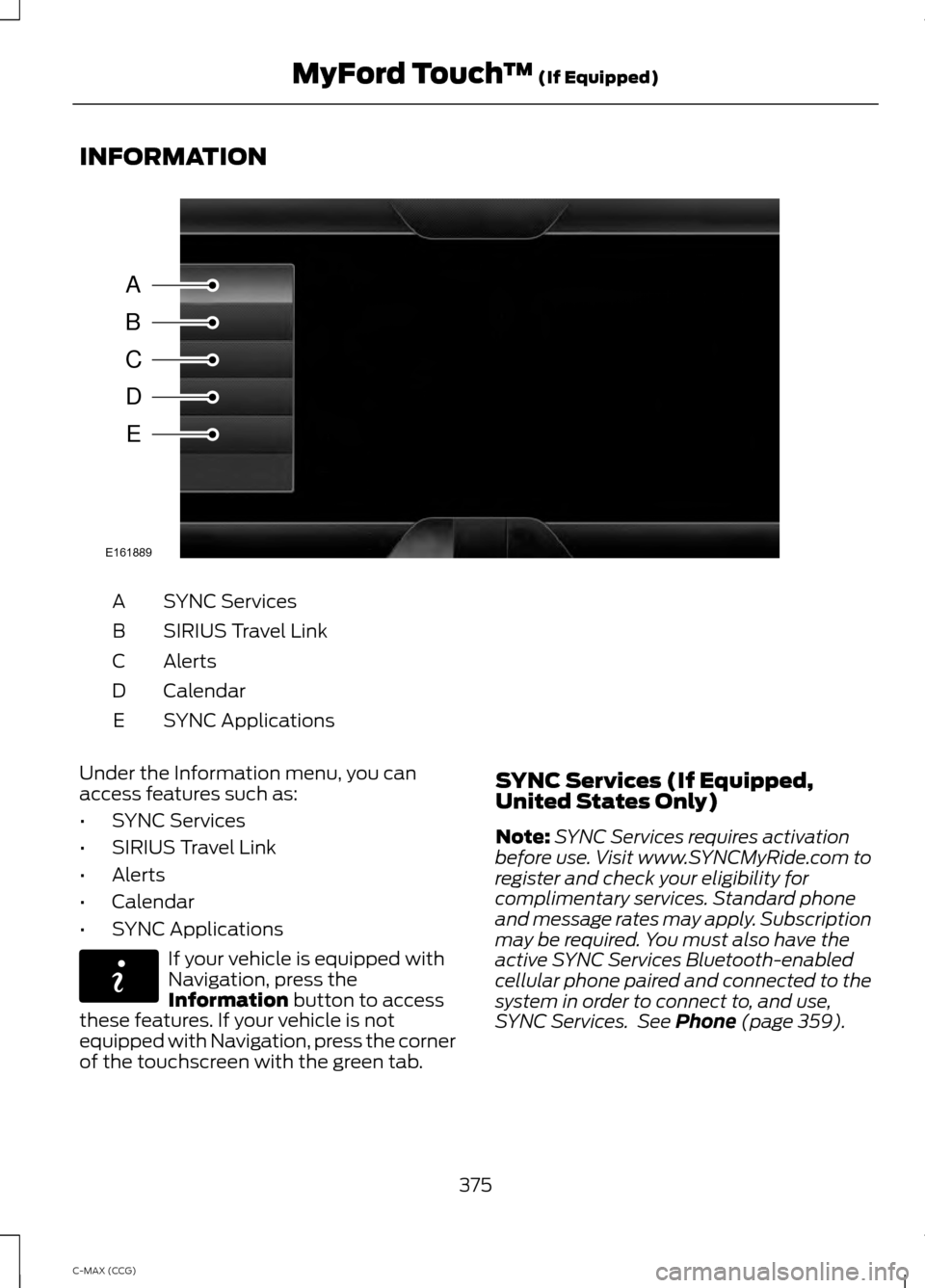
SYNC Services
A
SIRIUS Travel Link
B
Alerts
C
Calendar
D
SYNC Applications
E
Under the Information menu, you can
access features such as:
• SYNC Services
• SIRIUS Travel Link
• Alerts
• Calendar
• SYNC Applications If your vehicle is equipped with
Navigation, press the
Information button to access
these features. If your vehicle is not
equipped with Navigation, press the corner
of the touchscreen with the green tab. SYNC Services (If Equipped,
United States Only)
Note:
SYNC Services requires activation
before use. Visit www.SYNCMyRide.com to
register and check your eligibility for
complimentary services. Standard phone
and message rates may apply. Subscription
may be required. You must also have the
active SYNC Services Bluetooth-enabled
cellular phone paired and connected to the
system in order to connect to, and use,
SYNC Services. See Phone (page 359).
375
C-MAX (CCG) MyFord Touch
™
(If Equipped)A
B
C
D
E
E161889 E142608