2014 FIAT 500E tire
[x] Cancel search: tirePage 2 of 92

This guide has been prepared to help you get quickly acquainted with
your new FIAT and to provide a convenient reference source for common
questions. However, it is not a substitute for your Owner’s Manual.
For complete operational instructions, maintenance procedures and
important safety messages, please consult your Owner’s Manual,
Navigation/Uconnect
® Manuals and other Warning Labels in your vehicle.
Not all features shown in this guide may apply to your vehicle. For
additional information on accessories to help personalize your vehicle,
visit www.mopar.com (U.S.), www.mopar.ca (Canada) or your
local FIAT Dealer.
DRIVING AND ALCOHO L: Drunken driving is one of the most frequent
causes of collisions. Your driving ability can be seriously impaired with
blood alcohol levels far below the legal minimum. If you are drinking,
don’t drive. Ride with a designated non-drinking driver, call a cab, a friend,
or use public transportation.
Driving after drinking can lead to a collision. Your perceptions are less
sharp, your reflexes are slower, and your judgment is impaired when you
have been drinking. Never drink and then drive.
WARNING
If you are the first registered retail owner of your vehicle,
you may obtain a complimentary printed copy of the
Owner’s Manual, Navigation/Uconnect
® Manuals or
Warranty Booklet by calling 1-888-242-6342 (U.S.) or
1-800-387-1143 (Canada) or by contacting your dealer.
1632900_14c_500e_UG_030314.indd 23/3/14 2:17 PM
The driver’s primary responsibility is the safe operation of
the vehicle. Driving while distracted can result in loss of
vehicle control, resulting in a collision and personal injury.
Chrysler Group LLC strongly recommends that the driver use
extreme caution when using any device or feature that may take
their attention off the road. Use of any electrical devices such as
cell phones, computers, portable radios, vehicle navigation or
other devices by the driver while the vehicle is moving is
dangerous and could lead to a serious collision. Texting while
driving is also dangerous and should never be done while the
vehicle is moving. If you find yourself unable to devote your full
attention to vehicle operation, pull off the road to a safe location
and stop your vehicle. Some States or Provinces prohibit the use
of cellular telephones or texting while driving. It is always the
driver’s responsibility to comply with all local laws.
IMPORTANT : This User Guide is intended to familiarize you
with the important features of your vehicle. The DVD enclosed
contains your Owner’s Manual, Navigation/Uconnect
® Manuals,
Warranty Booklets, Tire Warranty and 24-Hour Towing
Assistance (new vehicles purchased in the U.S.) or Roadside
Assistance (new vehicles purchased in Canada) in electronic
format. We hope you find it useful. 5eplacement '9' kits
may be purchased by visiting www.techauthority.com.
FIAT is a registered trademark of FIAT Group Marketing &
Corporate Communication S.p.A, used under license by
Chrysler Group LLC. Copyright 2014 Chrysler Group LLC.
Page 3 of 92

INTRODUCTION/WELCOMEWELCOME FROM FIAT...............2
IMPORTANT VEHICLE INFORMATION......4
CONTROLS AT A GLANCEDRIVER COCKPIT..................6
INSTRUMENT CLUSTER..............8
GETTING STARTEDELECTRIC VEHICLE FEATURES..........10
ELECTRIC SYSTEM OPERATION.........13
CHARGING THE HIGH VOLTAGE BATTERY...16
STARTING YOUR 500e...............19
KEY FOB......................20
VEHICLE SECURITY ALARM...........21
POWER DOOR LOCKS..............21
SEAT BELT......................21
SUPPLEMENTAL RESTRAINT SYSTEM (SRS) —
AIR BAGS......................22
CHILD RESTRAINTS................23
FRONT SEATS....................28
REAR SEATS.....................30
HEATED SEATS...................31
TILT STEERING...................32
OPERATING YOUR VEHICLEEXTENDING YOUR DRIVING RANGE
PER CHARGE....................33
TURN SIGNAL/LIGHTS/HIGH BEAM LEVER...34
WIPER/WASHER LEVER..............36
SPEED CONTROL..................37
POWER WINDOWS................39
AUTOMATIC TEMPERATURE
CONTROLS (ATC).................39
REAR PARK ASSIST.................40
POWER SUNROOF.................40
WIND BUFFETING.................41
ELECTRONICSYOUR VEHICLE'S SOUND SYSTEM........42
AM/FM RADIO WITH CD PLAYER AND
SiriusXM SATELLITE RADIO............44
BLUE&ME™ HANDS-FREE OPERATION.....45
iPod®/USB/MP3 CONTROL............51
ELECTRONIC VEHICLE INFORMATION
CENTER (EVIC)...................51
PROGRAMMABLE FEATURES...........52
TRIP BUTTON....................53
POWER OUTLET..................54
UTILITY
TRAILER TOWING WEIGHTS
(MAXIMUM TRAILER WEIGHT RATINGS)....55
RECREATIONAL TOWING
(BEHIND MOTORHOME, ETC.).........55
WHAT TO DO IN EMERGENCIES
24-HOUR ROADSIDE ASSISTANCE........56INSTRUMENT CLUSTER WARNING LIGHTS...56
TIREFIT KIT......................59
JUMP-STARTING PROCEDURE —
12 VOLT BATTERY.................65
MANUAL PARK RELEASE.............68
TOWING A DISABLED VEHICLE.........69
ENHANCED ACCIDENT RESPONSE
SYSTEM.......................70
FREEING A STUCK VEHICLE............70
EVENT DATA RECORDER (EDR).........71
MAINTAINING YOUR VEHICLE
OPENING THE HOOD..............72
UNDERHOOD COMPARTMENT........73
FLUIDS AND CAPACITIES.............74
MAINTENANCE SCHEDULE...........75
FUSES.........................77
TIRE PRESSURES..................79
TIRE ROTATION RECOMMENDATIONS....80
WHEEL AND WHEEL TRIM CARE........81
EXTERIOR BULBS.................81
CUSTOMER ASSISTANCE
FIAT CUSTOMER CENTER.............82
ASSISTANCE FOR THE HEARING IMPAIRED..82
PUBLICATIONS ORDERING...........82
REPORTING SAFETY DEFECTS IN THE
UNITED STATES...................83
MOPAR® ACCESSORIES
AUTHENTIC ACCESSORIES BY MOPAR®...84
FREQUENTLY ASKED QUESTIONS
FAQ ’s.........................85
INDEX.......................86
TABLE OF CONTENTS
1
Page 6 of 92

IMPORTANT VEHICLE INFORMATION
•Your 500e operates entirely on electricity stored in the high voltage battery.Unlike a
conventional vehicle or Hybrid there is no internal combustion engine.Battery Electric
Vehicles have unique operating characteristics that you should become familiar with to
ensure you are getting the optimal performance from your vehicle.
High Voltage Battery
•Your vehicle is equipped with a Lithium-ion high voltage battery that is used to power
the electric powertrain systems and the 12 Volt vehicle electrical system.
•The high voltage battery is located under the vehicle.The high voltage battery is main-
tenance free and designed to last for the life of the vehicle.
Lithium-ion batteries provide the following
benefits:
•Lithium-ion batteries are much lighter
than other types of rechargeable batter-
ies of the same size.
•Lithium-ion batteries hold their charge;
they only lose approximately 3% of their
charge per month.
•Lithium-ion batteries have no memory,
which means that you do not have to
completely discharge them before re-
charging, as with some other batteries.
•Lithium-ion batteries can be recharged
and discharged thousands of times.
INTRODUCTION/WELCOME
4
Page 10 of 92

INSTRUMENT CLUSTER
1.Speedometer
2.Battery Usage
3.Messages, Blue & Me and Interface Options
4.Range Projection Indicators
Warning Lights
- Electric Vehicle System
Warning Light
- Regenerative Brake System
Warning Light
- 12 Volt Battery Charging
System Light
- Anti-Lock Brake (ABS)
Light
- Air Bag Warning Light
- Seat Belt Reminder Light
- Power Steering System
Warning Light
- Service Propulsion System
Warning Light
BRAKE- Brake Warning Light
- Tire Pressure Monitoring
System (TPMS) Light
(See page 56 for more information.)
CONTROLS AT A GLANCE
8
Page 18 of 92

CHARGING THE HIGH VOLTAGE BATTERY
1.Put the vehicle in PARK.
2.Turn the ignition to the OFF position.
3.Remove the Level 1 EVSE from its storage bin by lifting the rear cargo cover.
4.Uncoil the entire length of the EVSE
(charge cord).
5.Plug the EVSE into a standard 120V AC
outlet that is properly grounded.It is
recommended that the EVSE is con-
nected to an AC outlet on a circuit
which is not electrically loaded by other
devices.Extension cords may not be
used.
NOTE:
All of the EVSE LED’s illuminate green.
6.Open the charge receptacle door.
NOTE:
The charge receptacle door is locked
whenever the vehicle is locked.Unlock the
doors to unlock the charge receptacle door
for charging.
GETTING STARTED
16
Page 35 of 92

EXTENDING YOUR DRIVING RANGE PER CHARGE
•A little knowledge will go a long way to extend your driving range on the 500e.First
and foremost understand that the drive system and cabin temperature management
features use the most energy from the high voltage battery.Reducing energy draw
from these features are the easiest and most effective way to extend driving range.
•Just like a conventional vehicle, 500e likes to keeps things smooth and steady for most
efficient operation.When driving, avoid aggressive driving styles and high speeds for
extended times.When practical, choose surface streets over the highway, work to
maintain a steady speed to extend range.
•The 500e uses high voltage components to heat and cool the cabin, so a little aware-
ness can go a long way to extend range.When using automatic climate control, con-
sider setting temperatures a few degrees higher or lower during hot and cold days.
If your 500e has been soaking in hot or cold temperatures for an extended period, it
is recommended that the car be preconditioned via the mobile application while still
plugged into a charging source.This will allow 500e to use external power to establish
a comfortable cabin temperature before the drive, and allow the battery to maintain
the temperature using significantly less energy.
Additional Tips:
•Keep tires properly inflated
•Avoid carrying nonessential cargo
•Be mindful of adding external accessories that may increase aerodynamic drag
•Perform all scheduled maintenance at recommended intervals
Driver Behavior Gauge
•To help the driver extend the driving
range of the high voltage battery your
vehicle is equipped with a Driver Behav-
ior Gauge.The Driver Behavior Gauge is
located on the right side of the instru-
ment cluster and displays three driving
ranges:
Power
•The Driver Behavior Gauge will move
into the Power range when under
acceleration.
Power
ECO
Charge
OPERATING YOUR VEHICLE
33
Page 39 of 92

SPEED CONTROL
The Speed Control switches are located on the steering wheel.
Cruise ON/OFF
•Push the ON/OFF button to activate the
Speed Control.
CRUISE READY will appear on the instru-
ment cluster to indicate the Speed Control
is on.
•Push the ON/OFF button a second time
to turn the system off.
•Speed Control will be disabled if the
front tires lose traction.To restore, press
the Cruise ON/OFF button.
Set
•With the Speed Control on, push and
release the SET – button to set a de-
sired speed.
NOTE:
The set speed will be displayed on the clus-
ter for approximately 2–3 seconds.
Accel/Decel
To Increase Speed
•
When the Electronic Speed Control is set, you can increase speed by pushing the RES+
button.
The speed increment shown is dependant on the chosen speed unit of U.S.(mph) or
Metric (km/h):
U.S.Speed (mph)
•Pressing the RES+button once will result in a 1 mph increase in set speed.Each sub-
sequent tap of the button results in an increase of 1 mph.
•If the button is continually pressed, the set speed will continue to increase until the
button is released, then the new set speed will be established.
Metric Speed (km/h)
•Pressing the RES+button once will result in a 2 km/h increase in set speed.Each sub-
sequent tap of the button results in an increase of 2 km/h.
•If the button is continually pressed, the set speed will continue to increase until the
button is released, then the new set speed will be established.
Speed Control Switches
1 — Push ON/OFF
2 — Push Resume +/Accel
3 — Push Set –/Decel
4 — Push Cancel
OPERATING YOUR VEHICLE
37
Page 55 of 92
TRIP BUTTON
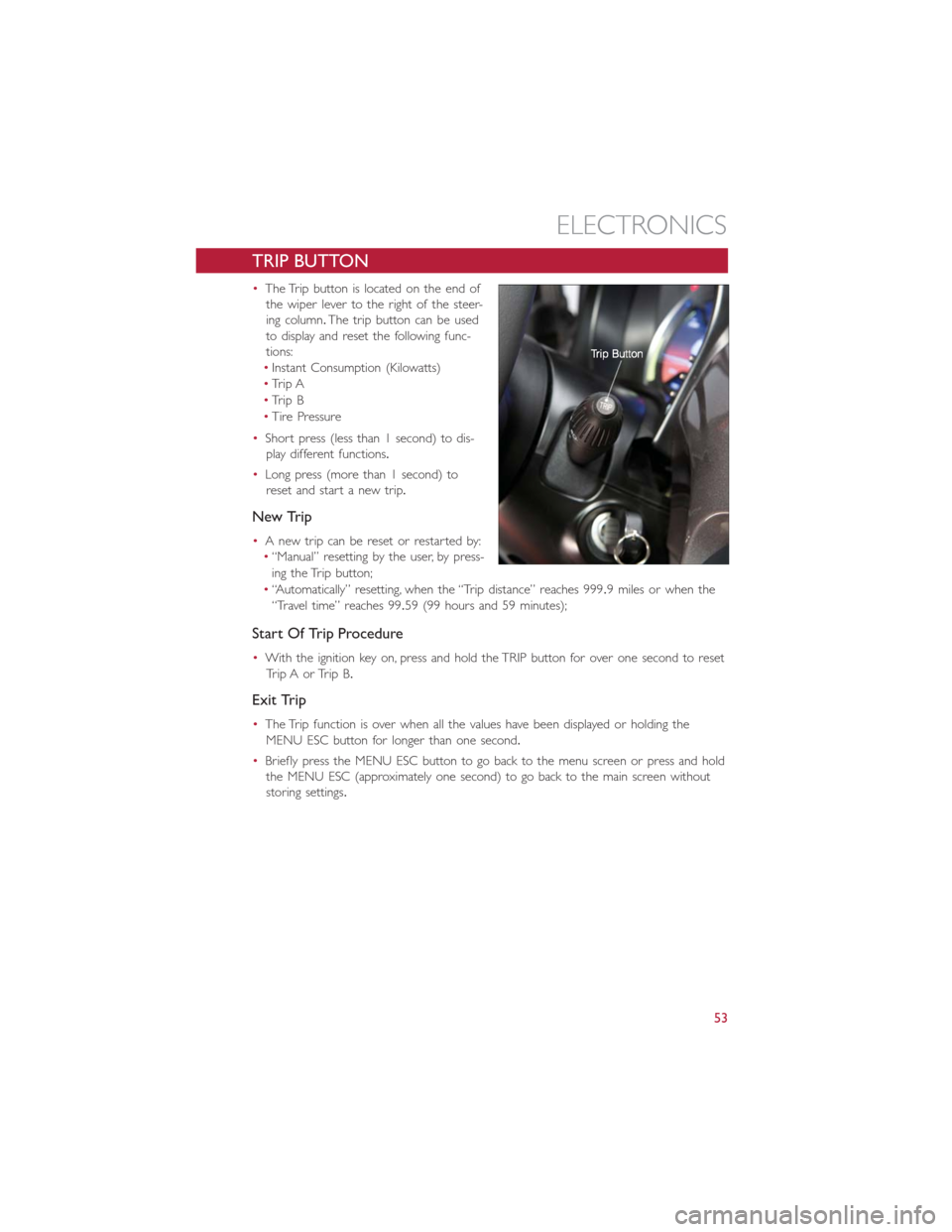
•The Trip button is located on the end of
the wiper lever to the right of the steer-
ing column.The trip button can be used
to display and reset the following func-
tions:
•Instant Consumption (Kilowatts)
•Trip A
•Trip B
•Tire Pressure
•Short press (less than 1 second) to dis-
play different functions.
•Long press (more than 1 second) to
reset and start a new trip.
New Trip
•A new trip can be reset or restarted by:
•“Manual” resetting by the user, by press-
ing the Trip button;
•“Automatically” resetting, when the “Trip distance” reaches 999.9 miles or when the
“Travel time” reaches 99.59 (99 hours and 59 minutes);
Start Of Trip Procedure
•With the ignition key on, press and hold the TRIP button for over one second to reset
Trip A or Trip B.
Exit Trip
•The Trip function is over when all the values have been displayed or holding the
MENU ESC button for longer than one second.
•Briefly press the MENU ESC button to go back to the menu screen or press and hold
the MENU ESC (approximately one second) to go back to the main screen without
storing settings.
ELECTRONICS
53