Page 161 of 392

3. Briefly press theMENUbutton to select the displayed
submenu option and to open the relevant setup menu.
4. Press the UPor DOWNbutton (by single
presses) to select the new setting for this submenu
option.
5. Briefly press theMENUbutton to store the new
setting and go back to the previously selected sub-
menu option.
6. Press and hold theMENUbutton to return to the main
menu (short hold) or the main screen (longer hold).
Change Engine Oil Indicator System
Change Engine Oil
Your vehicle is equipped with an engine oil change
indicator system. The “Change Engine Oil” message will
flash in the EVIC display for approximately 10 seconds
after a single chime has sounded to indicate the next
scheduled oil change interval. The engine oil change
indicator system is duty cycle based, which means the
engine oil change interval may fluctuate, dependent
upon your personal driving style.
Unless reset, this message will continue to display each
time you turn the ignition switch to the ON/RUN
position. To turn off the message temporarily, press and
release theMENUbutton. To reset the oil change indica-
tor system (after performing the scheduled maintenance),
refer to the following procedure.
1. Turn the ignition switch to the ON position. (do not
start the engine.)
2. Fully depress the accelerator pedal slowly, three times
within 10 seconds.
3. Turn the ignition switch to the OFF/LOCK position.
4
UNDERSTANDING YOUR INSTRUMENT PANEL 159
Page 162 of 392

NOTE:If the indicator message illuminates when you
start the vehicle, the oil change indicator system did not
reset. If necessary, repeat this procedure.
Trip Computer
The Trip Computer is located in the instrument cluster. It
features a driver-interactive display (displays informa-
tion such as; trip information, range, fuel consumption,
average speed and travel time).
Trip Button
TheTRIPbutton, located on the right steering column
stalk, can be used to display and to reset the previously
described values.
•A short button press displays the different values.
•A long button press resets the system and then starts a
new trip.
New Trip
To reset:
•Press and hold theTRIPbutton to reset the system
manually.
•When the “Trip distance” reaches 99999.9 miles or
kilometers or when the “Travel time” reaches 999.59
(999 hours and 59 minutes), the system is reset auto-
matically.
•Disconnecting/Reconnecting the battery resets the
system.
NOTE:If the reset operation occurs in the presence of
the screens concerning Trip A or Trip B, only the infor-
mation associated with Trip A or Trip B functions will be
reset.
160 UNDERSTANDING YOUR INSTRUMENT PANEL
Page 163 of 392
Start Of Trip Procedure
With the ignition on, press and hold theTRIPbutton for
over one second to reset.
Exit Trip
To exit the Trip function, wait until all the values have
been displayed or hold theMENUbutton for longer than
one second.
Briefly press theMENUbutton to go back to the menu
screen or press and hold theMENU(approximately one
second) to go back to the main screen without storing
settings.
Trip Functions
Both trip functions are resettable (reset — start of new
trip).
“Trip A” can be used to display the figures relating to:
•Range
•Trip distance A
•Average consumption A
•Instantaneous consumption
•Average speed A
•Travel time A (driving time)
“Trip B” can be used to display the figures relating to:
•Trip distance B
•Average consumption B
•Average speed B
•Travel time B (driving time)
NOTE:“Trip B” functions may be excluded (see “Trip B
Data”). “Range” and “Instantaneous consumption” can-
not be reset.
4
UNDERSTANDING YOUR INSTRUMENT PANEL 161
Page 164 of 392

Values Displayed
Range
This indicates the distance which may be traveled with
the fuel remaining in the tank, assuming that driving
conditions will not change. The message “----” will
appear on the display in the following cases:
•Distance less than 30 miles (or 50 km).
•The vehicle is parked for a long time with the engine
running.
NOTE:The range depends on several factors: driving
style, type of route (freeway, residential, mountain roads,
etc.), conditions of use of the car (load, tire pressure, etc.).
Trip planning must take into account the above notes.
Distance Traveled
This value shows the distance covered since the last reset.
Average Consumption
This value shows the approximate average consumption
since the last reset.
Instant Consumption
This indicates the fuel consumption. The value is con-
stantly updated. The message “----” will appear on the
display if the car is parked with the engine running.
Average Speed
This value shows the vehicle’s average speed as a func-
tion of the overall time elapsed since the last reset.
Travel Time
This value shows the time elapsed since the last reset.
162 UNDERSTANDING YOUR INSTRUMENT PANEL
Page 179 of 392
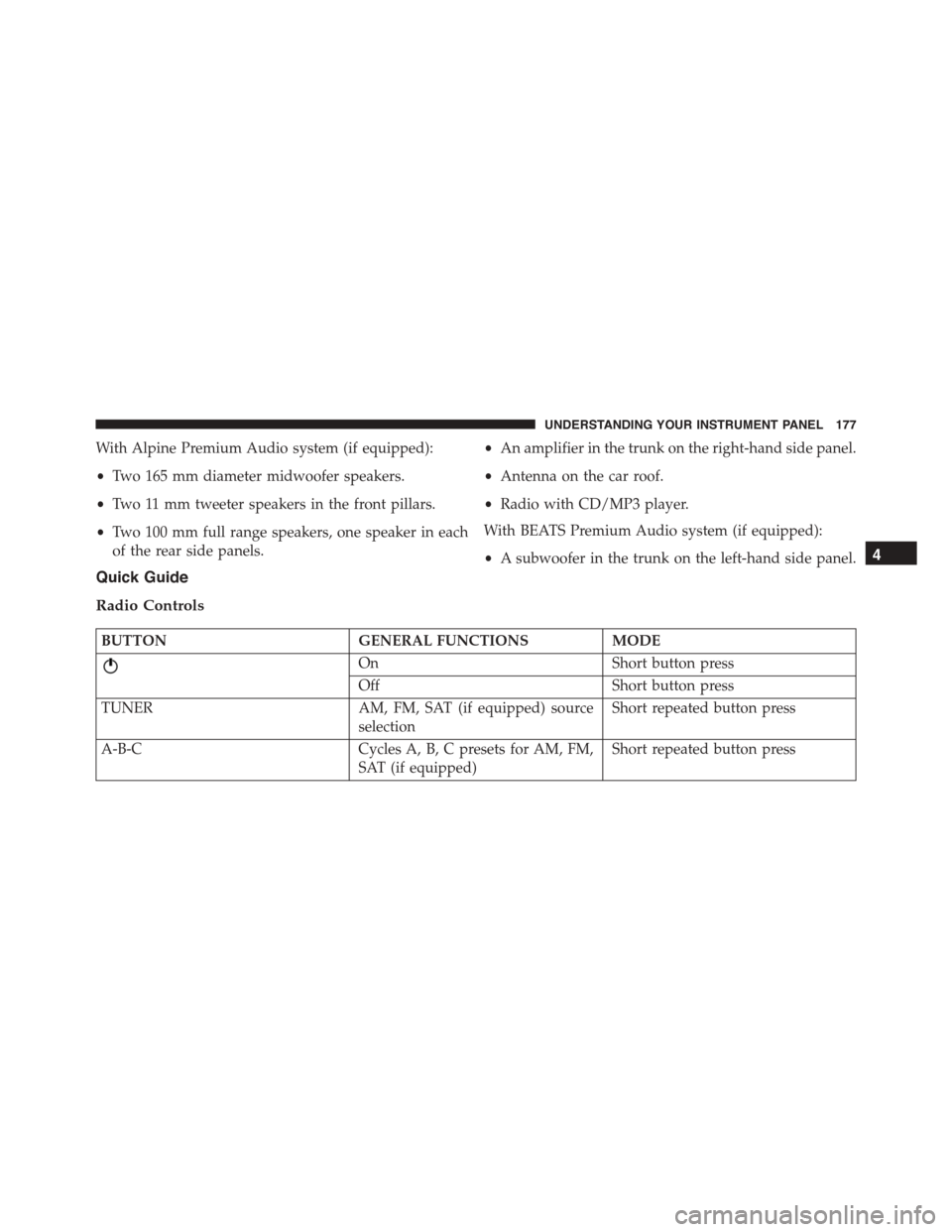
With Alpine Premium Audio system (if equipped):
•Two 165 mm diameter midwoofer speakers.
•Two 11 mm tweeter speakers in the front pillars.
•Two 100 mm full range speakers, one speaker in each
of the rear side panels.
•An amplifier in the trunk on the right-hand side panel.
•Antenna on the car roof.
•Radio with CD/MP3 player.
With BEATS Premium Audio system (if equipped):
•A subwoofer in the trunk on the left-hand side panel.
Quick Guide
Radio Controls
BUTTONGENERAL FUNCTIONSMODE
OnShort button press
OffShort button press
TUNERAM, FM, SAT (if equipped) source
selection
Short repeated button press
A-B-CCycles A, B, C presets for AM, FM,
SAT (if equipped)
Short repeated button press
4
UNDERSTANDING YOUR INSTRUMENT PANEL 177
Page 187 of 392

By pressing theorbuttons briefly, the levels will
change progressively. By pressing them down longer,
the levels will change quickly.
Select the value “0” to set the right and left audio outputs
at the same level.
Loudness Function — If Equipped
The Loudness function improves the volume of the
sound while listening at low volumes, increasing the bass
and treble.
To activate/deactivate this function, select the “Loud-
ness” setting in the AUDIO menu. The condition of the
function (on or off) is shown on the display for a few
seconds by the wording “Loudness On” or “Loudness
Off”.
Preset/User/Classic/Rock/Jazz Functions — If
Equipped
The built-in equalizer can be activated/deactivated.
When the equalizer function is off, the audio settings can
only be changed by adjusting the “Bass” and “Treble”
settings, whereas when the function is on, the acoustic
curves can be adjusted. To deactivate the equalizer, select
the “EQ Preset” function in the audio menu.
To activate the equalizer, use the AUDIO button or to
select one of the adjustments:
•“EQ User” (adjustment of 7 equalizer bands that can
be changed by the user)
•“Classic” (equalizer preset for optimal classic music
sound)
•“Rock” (equalizer preset for optimal rock and pop
music sound)
4
UNDERSTANDING YOUR INSTRUMENT PANEL 185
Page 188 of 392

•“Jazz” (equalizer preset for optimal jazz music sound)
When one of the equalizer adjustments is activated the
wording “EQ” lights up.
User EQ Settings Function — If Equipped
To set a personalized equalizer adjustment:
1. Press AUDIO button.
2. Use theorbuttons to set EQ function.
3. Useorbuttons to select#EQ User.#
4. Press MENU button to start adjusting equalizer.
5. On the display a seven bar graph will appear, in which
each bar represents a frequency. Select the bar to be
adjusted by using theorbuttons. The selected
bar will start to flash and it can be adjusted using
orbuttons.
6. To store the setting, press the MENU or AUDIO
buttons.
Menu
MENU Button Functions
Press the MENU button briefly to activate the Menu
function.
Use theorbuttons to scroll through the menu
functions. To change the setting of the selected func-
tion, use theorbuttons.
The current status of the selected function appears on the
display.
The functions managed by the Menu are:
•Speech Volume
•Aux Audio Offset
•Radio Off
186 UNDERSTANDING YOUR INSTRUMENT PANEL
Page 189 of 392

•Sat ID
•SiriusXM Telephone Number
•System Reset
•Speed Volume
•On Volume Limit
Press the MENU button again to exit the Menu function.
Speed Volume Function — If Equipped
This function automatically adapts the volume level to
the speed of the car, turning up the volume when the
speed increases to maintain the ratio with the noise level
inside the passenger compartment. To activate/
deactivate the function, use the buttons. The wording
“Speed volume” appears on the display, followed by the
current status of the function:
•Off: function deactivated
•Low: function activated (low sensitivity)
•High: function activated (high sensitivity)
On Volume Limit
This function makes it possible to activate/deactivate the
maximum volume limit when turning the radio on.
The display shows the function status:
•“On volume limit: on” – when the radio is turned on
the volume level will be:
– If the volume level is equal to or higher than the
maximum value, the radio will come on at the
maximum volume.
– If the volume level is between the minimum and
maximum values, the radio will come on at the
same volume as before it was switched off.
– If the volume level is equal to or lower than the
minimum value, the radio will come on at the
minimum volume.
4
UNDERSTANDING YOUR INSTRUMENT PANEL 187