Page 219 of 240

02
10.53
JUMPER-PAPIER_EN_CHAP10B_AUTORADIO_FIAT-4_ED01-2014
STEERING MOUNTED CONTROLS
Pause / restore the CD, USB/iPod, Bluetooth ® sources.
Mute / restore sound from the radio.
Switch the microphone off / on during a telephone call.
Rotate: adjust the volume for audio, hands-free, speaking texts, voice announcements and music sources.
Short press: increase / decrease volume one step.
Long press: increase / decrease volume progressively until released.
Switch voice recognition on.
Interrupt a voice message to start a new voice command.
Interrupt voice recognition.
Accept an incoming call.
Accept a second incoming call and put the current call on hold.
Switch on voice recognition for the telephone function.
Interrupt a voice message to issue another voice command.
Interrupt voice recognition.
Rotate:
- Radio: select the previous / next station.
- Media: select the previous / next track.
Short press:
- C o n fi r m .
Long press:
- Radio: sweep higher / lower frequencies until released.
- Media: fast forward / back until released.
Reject the incoming call.
End the call in progress.
Page 220 of 240
 \
may prevent reception, including RDS alternative fr")
03
10.54
Press the " RADIO " button to select the FM or AM waveband.
The surroundings (hills, buildings, tunnel, parking, under ground...) \
may prevent reception, including RDS alternative frequencies.
This phenomenon is normal in the propagation of radio waves and does not\
in any way imply a fault with the audio system.
Press the " RADIO " button to select the FM or AM waveband.
Press the " A-B-C " button to select one of the three sets of preset stations.
Make a long press one of the buttons to preset the current radio station.
The name of the station is displayed and an audible signal confi rms the preset.
Press " INFO " to display information on the current radio station.
Briefl y press one of the buttons to carry out an automatic search down/up for radio stations.
Turn the dial to carry out a manual search down/up for radio stations.
Press the dial to display the list of stations received locally.
Turn the dial to choose a radio station then press to select it.
RADIO
Selecting a station Presetting a station
Page 221 of 240

03
10.55
JUMPER-PAPIER_EN_CHAP10B_AUTORADIO_FIAT-4_ED01-2014
RADIO
RDS, if displayed, makes it possible to continue listening to the same radio station using the alternative frequencies function. However, in certain conditions it may not be possible to stay with the same station as not all radio stations cover the entire country. When reception is poor the system switches to a regional frequency.
Press the " MENU " button.
The TA (Traffi c Announcement) function gives priority to playing TA alert messages. To be active, this function requires good reception of a radio station that broadcasts this type of message. As soon as traffi c information is broadcast, the media playing is interrupted automatically to transmit the TA message. Normal play of the media is restored after transmission of the message.
Select " Traffi c information (TA) " then press to switch traffi c announcements on or off.
Press the MENU button.
Select " Regional " then press to switch RDS on or off.
Select " Alternative frequencies (AF) " then press to activate or deactivate the frequency.
When the " Regional " function is on, the system can then search for a stronger frequency at any time.
RDS
Alternative frequencies (AF)
Receiving TA messages
Page 223 of 240
04
10.57
JUMPER-PAPIER_EN_CHAP10B_AUTORADIO_FIAT-4_ED01-2014
MEDIA
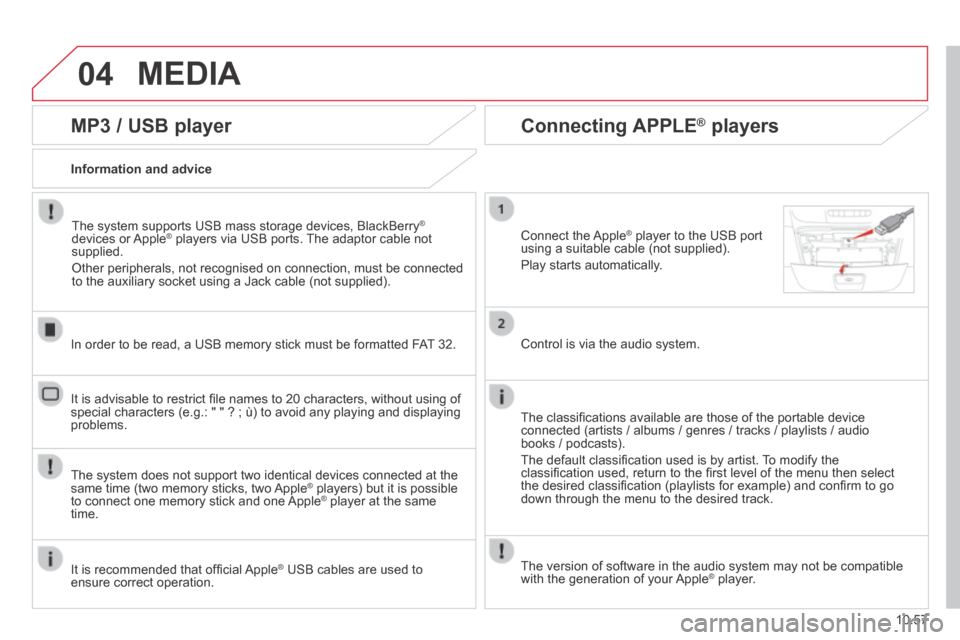
MP3 / USB player
Information and advice
The system supports USB mass storage devices, BlackBerry ®
devices or Apple ® players via USB ports. The adaptor cable not ® players via USB ports. The adaptor cable not ®
supplied.
Other peripherals, not recognised on connection, must be connected to the auxiliary socket using a Jack cable (not supplied).
In order to be read, a USB memory stick must be formatted FAT 32.
The system does not support two identical devices connected at the same time (two memory sticks, two Apple ® players) but it is possible ® players) but it is possible ®
to connect one memory stick and one Apple ® player at the same ® player at the same ®
time.
It is recommended that offi cial Apple ® USB cables are used to ® USB cables are used to ®
ensure correct operation.
It is advisable to restrict fi le names to 20 characters, without using of special characters (e.g.: " " ? ; ù) to avoid any playing and displ\
aying problems.
Connecting APPLE ® Connecting APPLE ® Connecting APPLE players ® players ®
Connect the Apple ® player to the USB port ® player to the USB port ®
using a suitable cable (not supplied).
Play starts automatically.
Control is via the audio system.
The classifi cations available are those of the portable device connected (artists / albums / genres / tracks / playlists / audio books / podcasts).
The default classifi cation used is by artist. To modify the classifi cation used, return to the fi rst level of the menu then select the desired classifi cation (playlists for example) and confi rm to go down through the menu to the desired track.
The version of software in the audio system may not be compatible with the generation of your Apple ® player. ® player. ®
Page 225 of 240
05
10.59
JUMPER-PAPIER_EN_CHAP10B_AUTORADIO_FIAT-4_ED01-2014
Receiving a call
An incoming call is announced by a ring and a superimposed display in the screen.
Press this button to accept the incoming call.
Or press this button to reject the call.
Making a call
Select " Contacts " to display your contacts and use the dial to scroll through the list.
Select " Call log " for access to the recent calls made.
To dial a number, use the system's " Keypad ".
TELEPHONE
Ending a call
To reject a call, press this button at the steering mounted controls.
Page 227 of 240

07
10.61
JUMPER-PAPIER_EN_CHAP10B_AUTORADIO_FIAT-4_ED01-2014
VOICE COMMANDS
Information - Using the system
To ensure that your voice commands are always recognised by the system, we recommend that you follow the advice below:
- speak with a normal tone of voice,
- before speaking, always wait for the "beep" (audible signal),
- the system is able to recognise the voice commands delivered, independent off gender, tone and infl exion of the voice of the person speaking,
- keep the noise level inside the vehicle as low as possible,
- before speaking a voice command, ask other passengers not to speak. As the system recognizes voice commands whatever is said, when more than one person speaks at the same time, it is possible that the system will recognise commands different or additional to the one intended,
- for best operation, it is recommended that the windows and opening roof (for versions/markets where it is available) be closed to avoid interference from extraneous noises.
Instead of touching the screen, you can use your voice to issue commands to the system.
Steering mounted controls
This button switches on the "Telephone" voice recognition mode, which makes it possible to start calls, view the log of recent/received/made, display contacts, etc.
Every time a button is pressed, a "beep" (audible signal) is produced \
and the screen displays a page of suggestions asking the user to speak a command.
This button switches on the "Radio/Media" voice recognition mode, which makes it possible to tune to a specifi c radio station radio or specifi c AF/FM radio frequency, play a track or an album on a USB memory stick/iPod/MP3 CD.
Voice interaction can be quickly used if these buttons are pressed during a voice message from the system, it allows a voice command to be issued directly.
For example, if the system is speaking a voice help message and if you want to know the command to give the system, by pressing these buttons, the voice message is interrupted and the desired voice command can be spoken directly (so avoiding the need to listed to the complete voice help message).
When the system is waiting for a voice command from the user, pressing these buttons closes the voice session.
Page 229 of 240

07
10.63
JUMPER-PAPIER_EN_CHAP10B_AUTORADIO_FIAT-4_ED01-2014
VOICE COMMANDS
"Telephone" voice commands
Level 1Level 2Level 3Comment
Call * Henri Dupont Dials the telephone number associated with contact Henri Dupont.
Call * Henri DupontMobile phone Dials the telephone number labelled mobile phone associated with contact Henri Dupont.
Call number0123456789 Calls the telephone number 0123456789.
Call again Calls the number or contact of the last call made.
Call back Calls the number or contact of the last call received.
Recent calls * Displays the list of recent calls: outgoing, missed and incoming.
Calls made * Displays the list of outgoing calls.
Missed calls * Displays the list of missed calls.
If a telephone is connected to the system, these voice commands can be i\
ssued from any main screen page after pressing the telephone button on the steering wheel, as long as there is no telephone call in progress.
If there is no telephone connected, a voice message announces: "No telep\
hone connected. Connect a telephone and try again" and the voice session will be closed.
* This function is available only if the telephone connected to the system\
supports downloading of contacts and recent calls and if the download has been done.
Page 231 of 240
07
10.65
JUMPER-PAPIER_EN_CHAP10B_AUTORADIO_FIAT-4_ED01-2014
VOICE COMMANDS
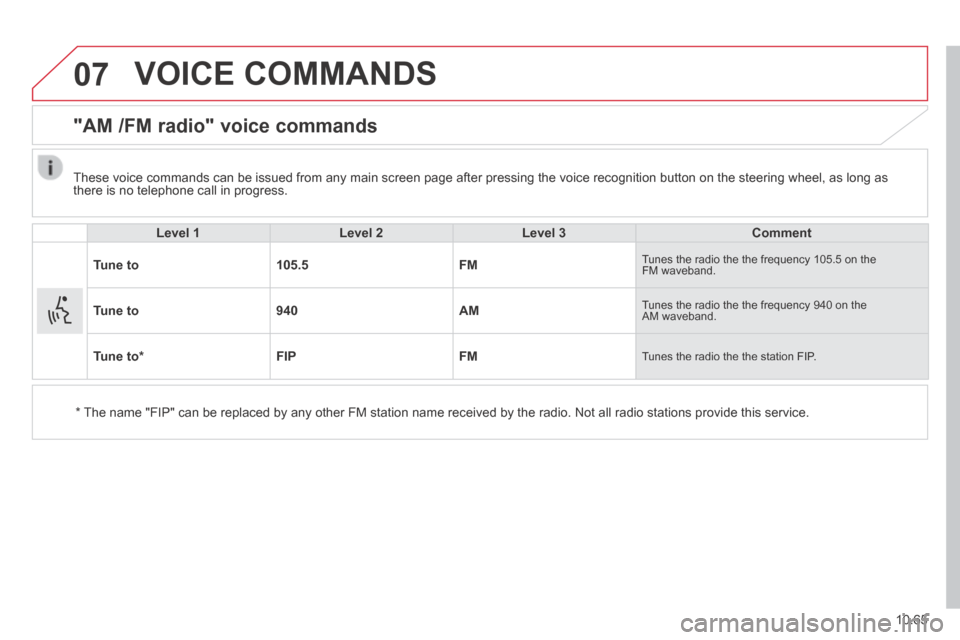
"AM /FM radio" voice commands
Level 1Level 2Level 3Comment
Tune to105.5FM Tunes the radio the the frequency 105.5 on the FM waveband.
Tune to940AM Tunes the radio the the frequency 940 on the AM waveband.
Tune to * FIPFM Tunes the radio the the station FIP.
* The name "FIP" can be replaced by any other FM station name received by \
the radio. Not all radio stations provide this service.
These voice commands can be issued from any main screen page after press\
ing the voice recognition button on the steering wheel, as long as there is no telephone call in progress.