Page 171 of 284
169
Fuse N°Rating Functions
F12 30 AWindscreen wipers slow / fast speed.
F13 40 A
bu
ilt-in systems inter face supply (ignition positive).
F14 30 AValvetronic supply (VTi).
F15 10 ARight-hand main beam headlamps.
F16 10 ALeft-hand main beam headlamps.
F17 15 ALeft-hand dipped beam headlamps.
F18 15 ARight-hand dipped beam headlamps.
F19 15 A
ox
ygen sensors and electrovalves (VTi), electrovalves
(
die
sel), EGR electrovalve (
die
sel).
F20 10 APumps, electronic thermostat (VTi), water in fuel sensor
(
die
sel).
F21 5 AFan assembly control supply,
ab
S
/ESP.
11
Practical information
Page 174 of 284

172
Starting using another
batteryCharging the battery using
a battery charger
When the battery on your vehicle is discharged,
the engine can be started using a slave battery
(external or on another vehicle) and jump leads. F
F ollow the instructions for use provided by
the manufacturer of the charger.
First check that the slave battery has a nominal
voltage of 12 V and a capacity at least equal to
that of the discharged battery.
do n
ot try to start the engine by connecting a
battery charger.
Do not disconnect the (+) terminal when the
engine is running.
F
C
onnect the red cable to the positive
terminal (+) of the flat battery A , then to the
positive terminal (+) of the slave battery B.
F
C
onnect one end of the green or black
cable to the negative terminal (-) of the
slave battery B (or earth point on the other
vehicle).
F
C
onnect the other end of the green or
black cable to the negative terminal C (or
the engine mounting) of the broken-down
vehicle.
F
S
tart the engine of the other vehicle and
allow it to run for a few minutes.
do n
ot disconnect the battery to charge it.
F
O
perate the starter of the broken-down
vehicle and let the engine run.
I
f the engine does not start immediately,
switch off the ignition and wait a few
moments before trying again.
F
W
ait until the engine returns to idle, then
disconnect the jump leads in reverse order.
ba
tteries contain harmful substances such
as sulphuric acid and lead. They must be
disposed of in accordance with regulations
and must not, in any circumstances, be
discarded with household waste.
Take used remote control batteries and
vehicle batteries to a special collection
point.
Practical information
Page 177 of 284
175
Changing a front or rear wiper blade
Removal
F Raise the corresponding wiper arm.
F U nclip the wiper blade and remove it.
Fitting
F At the front, check the size of the wiper blade as the shorter blade is fitted to the
passenger side of the vehicle.
F
P
ut the corresponding new wiper blade in
place and clip it.
F
F
old down the wiper arm carefully.
Before removing a front
wiper blade
F Within one minute after switching off the ignition, operate the wiper stalk to position
the wiper blades in the vertical position.
This position must be used in order to avoid
damaging the wiper blade and the bonnet.
After fitting a front wiper
blade
F Switch on the ignition.
F O perate the wiper stalk again to park the
wiper blades.
Procedure for replacing a worn wiper blade with a new one without the use of tools.
11
Practical information
Page 179 of 284
177
Towing your vehicle
F on the front bumper, unclip the cover by pressing at the bottom.
F
S
crew the towing eye in fully.
F
I
nstall the towing bar.
F
P
lace the gear lever in neutral (position N
for an electronic or automatic gearbox). F
on t he rear bumper, unclip the cover by
pressing at the bottom.
F
S
crew the towing eye in fully.
F
I
nstall the towing bar.
F
S
witch on the hazard warning lamps on
both vehicles.
F
M
ove off gently and drive for a short
distance only.
Towing another vehicle
Failure to observe this special condition
could result in damage to certain
components (braking, transmission...)
and the absence of braking assistance
the next time the engine is started. F
U
nlock the steering by turning the key one
notch in the ignition switch and release the
parking brake.
F
S
witch on the hazard warning lamps on
both vehicles.
F
M
ove off gently and drive for a short
distance only.
11
Practical information
Page 183 of 284
181
Connector lines
a1(+) Right hand rear speaker
A2 (+) Right hand front speaker and tweeter
a
3 (+) Left hand front speaker and tweeter
a
4 (+) Left hand rear speaker
A5 (-) Right hand rear speaker
a
6 (-) Right hand front speaker and tweeter
A7 (-) Left hand front speaker and tweeter
a
8 (-) Left hand rear speaker
a
9
no
t used
a
10
no
t used
a11no
t used
A12 (+) Permanent
a
13
no
t used
a
14
no
t used
A15 (+) Ignition switched (operation of the audio system only with the ignition on)
a
16 Earth Never use a separate wire to connect
the (+) of your audio equipment (risk of
discharging of the battery).
11
Practical information
Page 198 of 284

196
EMERGENCY OR ASSIST ANCE CALL
CITROËN Localised Emergency Call
In an emergency, press this button for more than
2
seconds. Flashing of the green LED and a voice
message confirm that the call has been made to the
C
ITR o Ë n Localised Emergency Call centre*.
Pressing this button again immediately cancels the call. The green LE
d
goes off.
Pressing this button (at any time) for more than 8 seconds cancels the\
call.
CITROËN Localised Assistance Call
When the ignition is switched on, the
green LE d comes on for 3 seconds
indicating that the system is operating
correctly.
If the orange LED flashes: there is a
system fault.
If the orange LE
d is on continuously:
the
backup battery must be replaced.
In either case, contact a CITR
o Ë n
dealer.
Pressing this button again immediately cancels the request.
The cancellation is confirmed by a voice message.
Press this button for more than 2 seconds to request
assistance if the vehicle breaks down.
A voice message confirms that the call has been made*.
Operation of the system
The green LED remains on (without flashing) when communication is
established. It goes off at the end of communication.
This call is dealt with by the
C
ITR o Ë n Localised Emergency Call centre
which receives locating information from the vehicle and can send a
detailed alert to the appropriate emergency services. In countries in
which the team is not operational, or when the locating service has
been expressly declined, the call is dealt with directly by the emergency
services (112) without the vehicle location.
If an impact is detected by the airbag control unit, and
independently of the deployment of any airbags, an emergency call
is made automatically.
*
These services are subject to conditions and availability
.
Consult a CITR
o Ë n dealer. If you purchased your vehicle outside the CITROËN dealer network,
we invite you to have a dealer check the configuration of these services
and, if desired, modified to suit your wishes. In a multi-lingual country
,
configuration is possible in the official national language of your choice.
For technical reasons, particularly to improve the quality of Telematic
services to customers, the manufacturer reserves the right to carry out \
updates to the vehicle's on-board telematic system.
If you benefit from the CITROËN eTouch offer, you also have available
additional services in your MyCITR
o Ë n personal space, via the CITR o Ë n
Internet website in your country, accessible on www.citroen.com.
Page 223 of 284
06
221
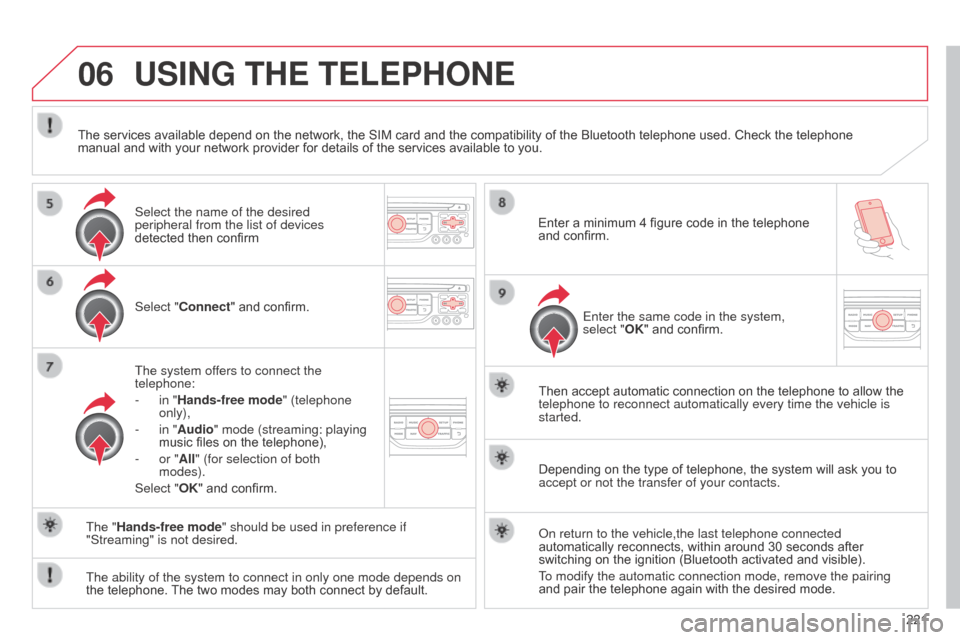
USING THE TELEPHONE
Select "Connect" and confirm.
The system offers to connect the
telephone:
-
in "
Hands-free mode" (telephone
only),
-
in "
Audio" mode (streaming: playing
music files on the telephone),
-
or "
All" (for selection of both
modes).
Select "OK" and confirm. Then accept automatic connection on the telephone to allow the
telephone to reconnect automatically every time the vehicle is
started.
The ability of the system to connect in only one mode depends on
the telephone. The two modes may both connect by default. The "Hands-free mode" should be used in preference if
"Streaming" is not desired.
The services available depend on the network, the SIM card and the compatibility of the Bluetooth telephone used. Check the telephone
manual and with your network provider for details of the services available to you.
Depending on the type of telephone, the system will ask you to
accept or not the transfer of your contacts.
o
n return to the vehicle,the last telephone connected
automatically reconnects, within around 30 seconds after
switching on the ignition (Bluetooth activated and visible).
To modify the automatic connection mode, remove the pairing
and pair the telephone again with the desired mode.
Enter a minimum 4 figure code in the telephone
and confirm.
Enter the same code in the system,
select "OK" and confirm.
Select the name of the desired
peripheral from the list of devices
detected then confirm
Page 236 of 284

08
234Insert the C d in the player, insert the US b
memory stick in the US b player or connect the
US b peripheral to the US b port using a suitable
cable (not supplied).
The system builds playlists (in temporary
memory), an operation which can take from
a few seconds to several minutes at the first
connection.
Reduce the number of non-music files and the
number of folders to reduce the waiting time.
The playlists are updated every time the ignition
is switched off or connection of a USB memory
stick. However, the system memorises these
lists and if they are not modified, the loading
time will be shorter.
Play starts automatically after a period which
depends on the capacity of the US b memory
stick. Selection of source
The SOURCE button on the steering mounted controls allows a
direct change to the next media source. "CD / CD MP3"
"USB, iPod"
"AUX"
"STREAMING"
"RADIO"
Press MUSIC to display the "MEDIA"
menu.
Select "Following media source " and
confirm.
Repeat the operation as many times as necessary to obtain the
desired media source (except for radio which is accessible either
with SOURCE or RADIO).
Sources
MUSIC MEDIA
PLAYERS


