2014 Citroen C3 multifunction screen
[x] Cancel search: multifunction screenPage 4 of 284

.
.
C3_en_Chap00a_sommaire_ed01-2014
C3_en_Chap00a_sommaire_ed01-2014
Child seats 83
dea
ctivating the passenger's front airbag
8
6
IS
oF
IX child seats
9
1
Child lock
9
5
Child safety
Instrument panels 1 0
Indicator and warning lamps
1
2
a
djustment buttons
2
5
Trip computer
2
7
MonitoringOver view
Monochrome screen a 3
0
Monochrome screen C
3
3
16/9 colour screen (eMyWay)
3
7
Multifunction screens
Ventilation 39
Heating
41
Manual air conditioning
4
1
Front demist - defrost
4
3
di
gital air conditioning
4
4
Rear screen demist - defrost
4
6
Scented air freshener
4
7
Front seats
4
8
Rear seats
5
0
M i r r o r s
51
S
teering wheel adjustment
5
2
Comfort
Remote control key 53
Window controls
5
7
do
ors 59
b
oot
6
2
Fuel tank
6
3
Misfuel prevention (
die
sel)
6
5
access
Lighting controls 66
LE
d
lamps
7
0
Headlamp adjustment
7
0
Wiper controls
7
1
Courtesy lamps
7
4
Interior mood lighting
7
5
bo
ot lamp
7
5
Visibility
Interior fittings 76
Boot fittings
8
1
Fittings
Eco-driving
Contents
Page 14 of 284

12
C3_en_Chap01_Controle-de-marche_ed01-2014
C3_en_Chap01_Controle-de-marche_ed01-2014
Visual indicators informing the driver that a system is in operation (operation or deactivation indicator lamps) or of the occurrence of a fault
(warning lamp).
When the ignition is switched on
Certain warning lamps come on for a few
seconds when the vehicle's ignition is
switched
on.
When the engine is started, these same
warning lamps should go off.
If they remain on, before moving off, refer to the
information on the warning lamp concerned.
Operation indicator lamps
If one of the following indicator lamps comes on, this confirms that the corresponding system has
come into operation.
Associated warnings
The illumination of certain warning lamps may
be accompanied by an audible signal and a
message in the multifunction screen.
The warning lamps may come on continuously
(fixed) or flash.
Warning /indicator lampis on Cause Action / Observations
Left-hand direction
indicatorflashing with buzzer. The lighting stalk is pushed down.
Right-hand
direction indicatorflashing with buzzer.The lighting stalk is pushed up.
Sidelamps fixed. The lighting stalk is in the
"Sidelamps" position.
Hazard warning
lamps
flashing with audible
signal. The hazard warning lamps switch,
located on the dashboard, has been
operated. The left-hand and right-hand direction indicators and
their associated indicator lamps flash simultaneously.Certain warning lamps may come on
in one of two different modes. Only by
relating the type of illumination to the
operating status of the vehicle can it
be ascertained whether the situation is
normal or whether a fault has occurred.
Indicator and warning lamps
Monitoring
Page 18 of 284

16
C3_en_Chap01_Controle-de-marche_ed01-2014
C3_en_Chap01_Controle-de-marche_ed01-2014
Deactivation indicator lamps
If one of the following indicator lamps comes on, this confirms that the corresponding system has been switched off intentionally.
This is may be accompanied by an audible signal and a message on the multifunction screen.Passenger's
airbag system fixed.
The control, located in the glove box,
is set to the OFF position.
The passenger's front airbag is
deactivated.
You can install a "rear ward facing"
child seat, unless there is a fault with
the operation of the airbags (
ai
rbag
warning lamp on). Set the control to the ON
position to activate the
passenger's front airbag.
In this case, do not fit a child seat in the rear ward
facing position.
Dynamic
stability control
(DSC/ASR )fixed.
The button, located at the bottom
left of the dashboard, is pressed. Its
indicator lamp is on.
The
d
S
C/
aS
R is deactivated.
dSC
: dynamic stability control.
aS
R: anti-slip regulation.Press the button to activate the
d
S
C/
aS
R. Its
indicator lamp goes off.
The DSC/ASR system is activated automatically when
the vehicle is started.
If deactivated, the system is reactivated automatically
from around 30 mph (50 km/h).
Warning
/indicator lampis on Cause Action / Observations
Monitoring
Page 19 of 284

17
C3_en_Chap01_Controle-de-marche_ed01-2014
C3_en_Chap01_Controle-de-marche_ed01-2014
Any fault resulting in the illumination of a warning lamp must be investigated further by
reading the associated message in the multifunction screen.
If you encounter any problems, do not hesitate to contact a CITROËN dealer or a qualified workshop.
Warning lamps
When the engine is running or the vehicle is
being driven, the illumination of one of the
following warning lamps indicates a fault which
requires action on the part of the driver.Warning /indicator lampis on Cause Action / Observations
STOP fixed, alone or
associated with
another warning lamp,
accompanied by an
audible signal and
a message on the
screen. Illumination of the warning lamp is
associated with a serious braking
system or engine coolant temperature
problem.
Stop as soon as it is safe to do so as the engine may
cut out when driving.
Park, switch off the ignition and call a CITROËN
dealer or a qualified workshop.
Service temporarily. Minor problems have occurred for
which there is no specific warning
lamp.
Identify the problem by reading the message shown in the
screen, such as, for example:
- the engine oil level,- the screenwash level,- the remote control battery,- saturation of the particle emission filter on di esel vehicles
(refer to the "Particle emissions filter (di esel)" section).
For any other faults, contact a CITR
oËn
dealer or a qualified
workshop.
fixed. Major problems have occurred for
which there is no specific warning
lamp. Identify the problem by reading the message shown
in the screen and contact a CITRoËn
dealer or a
qualified workshop.
1
Monitoring
Page 32 of 284
30
C3_en_Chap02_Ecrans-multifonction_ed01-2014
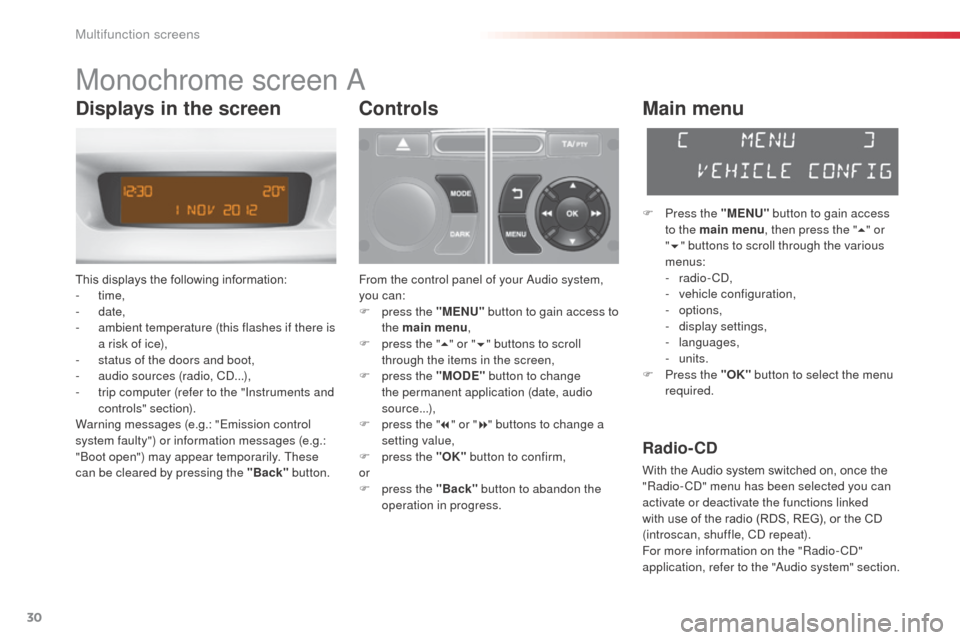
Monochrome screen a
This displays the following information:
- time,
-
date,
-
a
mbient temperature (this flashes if there is
a risk of ice),
-
s
tatus of the doors and boot,
-
a
udio sources (radio, C
d.
..),
-
t
rip computer (refer to the "Instruments and
controls" section).
Warning messages (e.g.: "Emission control
system faulty") or information messages (e.g.:
"
bo
ot open") may appear temporarily. These
can be cleared by pressing the "Back" button.
Controls
From the control panel of your audio system,
you can:
F
p
ress the "MENU" button to gain access to
the main menu ,
F
p
ress the " 5" or " 6" buttons to scroll
through the items in the screen,
F
p
ress the "MODE" button to change
the permanent application (date, audio
source...),
F
p
ress the " 7" or " 8" buttons to change a
setting value,
F
p
ress the "OK" button to confirm,
or
F
p
ress the "Back" button to abandon the
operation in progress.
Main menu
F Press the "MENU" button to gain access
to the main menu , then press the "5" or
" 6 " buttons to scroll through the various
menus:
-
radio - C
d
,
-
v
ehicle configuration,
-
options,
-
d
isplay settings,
-
languages,
-
units.
F
P
ress the "OK" button to select the menu
required.
Radio- CD
With the Audio system switched on, once the
"Radio- Cd" m enu has been selected you can
activate or deactivate the functions linked
with use of the radio (RDS, REG), or the CD
(introscan, shuffle, C
d
repeat).
For more information on the "Radio-C
d"
application, refer to the "
au
dio system" section.
Displays in the screen
Multifunction screens
Page 33 of 284

31
C3_en_Chap02_Ecrans-multifonction_ed01-2014
Vehicle configuration
once the " Vehicle Configuration" menu has
been selected, you can activate or deactivate
the following equipment:
-
w
iper linked with reverse gear (refer to the
"Visibility"),
-
g
uide-me-home lighting (refer to the
"Visibility"),
-
p
arking sensors (refer to the "
dr
iving" section).
Using this menu, you can also reinitialise the
tyre under-inflation detection system (see the
"Safety" section).
Options
once the "op tions" menu has been selected,
you can start diagnostics of the status of the
equipment (active, not active, faulty).
Display settings
once the "di splay settings" menu has been selected,
you can gain access to the following settings:
- year,
- month,
-
d ay,
-
h o u r,
-
minutes,
-
1
2 or 24 hour mode.
F
o
n
ce you have selected a setting, press
the " 7" or " 8" buttons to change its value.
F
P
ress the " 5" or " 6" buttons to switch
respectively to the previous or next setting.
F
P
ress the "OK" button to save the change
and return to the normal display or press
the "Back" button to cancel.
Setting the date and time
F
P ress the MENU button.
F
S
elect "
di
splay settings" using the " 5" or
" 6 " button.
F
Press "OK" to confirm the selection.
F
S
elect the "Year" function using the " 5" or
" 6 " button.
F
Press "OK" to confirm the selection.
F
C
hoose the desired value, using the " 7" or
" 8 " button.
F
Press "OK" to confirm the selection.
F
R
epeat the procedure to set the "Month",
"
da
y", "Hours", and "Minutes".
2
Multifunction screens
Page 34 of 284

32
C3_en_Chap02_Ecrans-multifonction_ed01-2014
Languages
once the "Languages" menu has been
selected, you can change the language used
by the display, by choosing a new language
from the list offered.
Units
once the "Units" menu has been selected,
you can change the units of the following
parameters:
-
t
emperature (°C or °F),
-
f
uel consumption (l/100 km, mpg or km/l). For safety reasons, configuration by the
driver of the multifunction screen must
only be done when stationary.
on
ce the fuel consumption units have
been set to mpg, the information in the
instrument panel screen on speed and
distance will also be in mph and miles.
Multifunction screens
Page 35 of 284

33
C3_en_Chap02_Ecrans-multifonction_ed01-2014
Monochrome screen C
This displays the following information:
- time,
-
date,
-
a
mbient temperature (this flashes if there is
a risk of ice),
-
s
tatus of doors and boot,
-
a
udio sources (radio, C
d, U
S
b
port /
auxiliary socket etc.),
-
t
rip computer (refer to the "Instruments and
controls" section).
Warning messages (E.g. "Emissions control
system faulty") or information messages
(E.g.:
a
u
tomatic headlamps active") may
appear temporarily. These can be cleared by
pressing the "Back" button.
Controls
From your audio system control panel, you can:
F p ress the "MENU" button to gain access to
the main menu ,
F
p
ress the " 5" or " 6" buttons to scroll
through the items in the screen,
F
p
ress the "MODE" button to change the
permanent application (trip computer,
audio source...),
F
p
ress the " 7" or " 8" buttons to change a
setting value,
F
p
ress the "OK" button to confirm,
or
F
p
ress the "Back" button to abandon the
operation in progress.
Main menu
F Press the "MENU" button to gain access
to the main menu :
-
a
udio functions,
-
t
he trip computer,
-
personalisation-configuration,
-
t
elephone (hands-free kit).
F
P
ress the " 5" or " 6" buttons to select the
menu required, then confirm by pressing
the "OK" button.
"Audio functions"
menu
With the Audio system switched on, once this
menu has been selected you can activate
or deactivate the functions linked with use
of the radio (R
dS
, REG, RadioText), the C
d
(introscan, shuffle, C
d
repeat) or the MP3
player (US
b
port / auxiliary socket).
For more information on the "
au
dio functions"
application, refer to the "
au
dio system" section.
Displays in the screen
2
Multifunction screens