Page 136 of 256

134
Fuel tank
Low fuel levelRefuelling
When the low fuel level is reached,
this warning lamp comes on and the
last bar flashes, accompanied by an
audible signal.
You have approximately 5 litres remaining.
In certain driving conditions and depending on the
engine, the distance which can be travelled with the
fuel remaining may be less than 30 miles (50 km).
When the frequency of the flashing increases, you
have approximately 3 litres remaining .
To refuel in complete safety:
F
Y ou must stop the engine and switch off
the ignition (ignition in "LOCK" position
or "OFF" mode) .
F
P
ull the control on the lower dashboard,
driver's side, to release the filler flap.
F
O
pen the fuel filler flap.
If you run out of fuel, the emission
control system warning lamp may come
on in the instrument panel. It will go off
automatically after the engine has been
started a few times. Refuelling must only be done with the engine
stopped and the ignition switched off
( ignition
switch in the " LOCK" position or " OFF" mode).
The capacity of the fuel tank is approximately 35 litres.
Additions of fuel must be of at least 5 litres to
be registered by the fuel gauge.
A label on the inside of the flap reminds you
which type of fuel to use.
There may be an inrush of air when removing
the filler cap. This vacuum is per fectly normal
and results from the sealing of the fuel system.
Practical information
Page 157 of 256
155
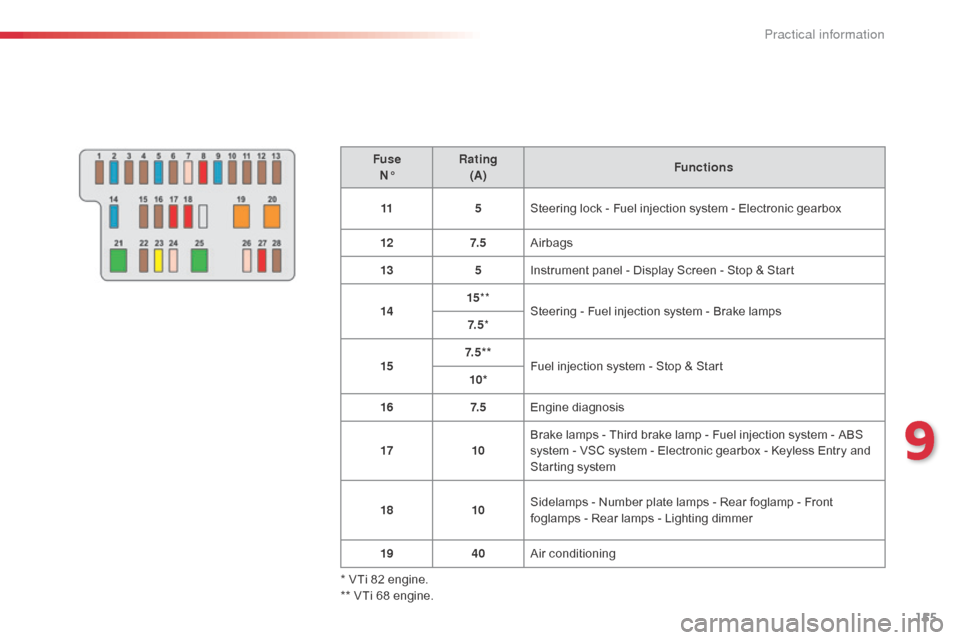
FuseN° Rating
(A) Functions
11 5Steering lock - Fuel injection system - Electronic gearbox
12 7. 5Airbags
13 5Instrument panel - Display Screen - Stop & Start
14 15
**
Steering - Fuel injection system - Brake lamps
7. 5 *
15 7. 5 * *
Fuel injection system - Stop & Start
10*
16 7. 5Engine diagnosis
17 10Brake lamps - Third brake lamp - Fuel injection system -
ABS
system - VSC system - Electronic gearbox - Keyless Entry and
Starting system
18 10Sidelamps - Number plate lamps - Rear foglamp - Front
foglamps - Rear lamps - Lighting dimmer
19 40Air conditioning
* VTi 82 engine.
** VTi 68 engine.
9
Practical information
Page 160 of 256
158
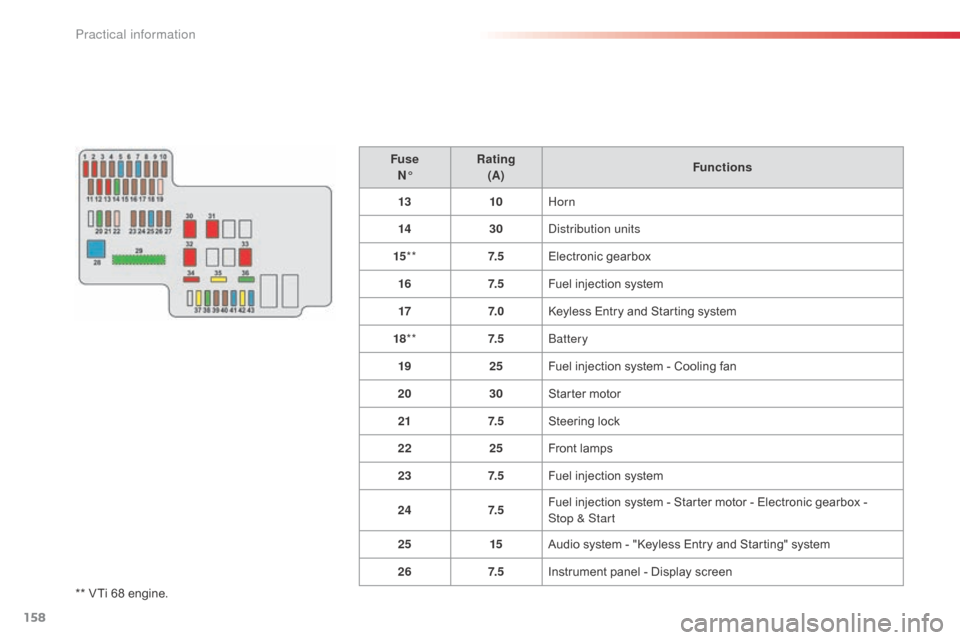
** VTi 68 engine.Fuse
N° Rating
(A) Functions
13 10Horn
14 30
di
stribution units
15 ** 7. 5Electronic gearbox
16 7. 5Fuel injection system
17 7. 0Keyless Entry and Starting system
18 ** 7. 5
bat
tery
19 25Fuel injection system - Cooling fan
20 30Starter motor
21 7. 5Steering lock
22 25Front lamps
23 7. 5Fuel injection system
24 7. 5Fuel injection system - Starter motor - Electronic gearbox -
Stop & Start
25 15Audio system - "Keyless Entry and Starting" system
26 7. 5Instrument panel - Display screen
Practical information
Page 167 of 256

165
Towing the vehicle
F Take the removable towing eye stowed in the tool box, under the boot carpet.
F
U
nclip the plastic cover, by pressing at the
bottom.
F
F
ully screw in the towing eye.
General
recommendations
Observe the legislation in force in your
c o unt r y.
Ensure that the weight of the towing vehicle
is higher than that of the towed vehicle.
The driver must remain at the wheel of the
towed vehicle and must have a valid driving
licence.
When towing a vehicle with all four wheels
on the ground, always use an approved
towing arm; rope and straps are prohibited.
The towing vehicle must move off gently.
When towing a vehicle with the engine off,
there is no longer any power assistance for
braking or steering.
In the following cases, you must always call
on a professional recovery service:
- vehicle broken down on a motor way or fast road,
-
f
our-wheel drive vehicle,
-
w
hen it is not possible to put the
gearbox into neutral, unlock the
steering, or release the parking
brake,
-
t
owing with only two wheels on the
ground,
-
w
here there is no approved towing
arm available...
Your vehicle can only be towed at the front.
F
I
nstall the towing bar.
F
P
ut the gear lever into neutral (position N
for the ETG electronic gearbox).
F
ailure to observe this instruction may
lead to damage to certain components
(braking, transmission, ...) and the absence
of braking assistance when the engine is
started.
F
U
nlock the steering and release the
parking brake.
F
S
witch on the hazard warning lamps on
both vehicles.
Never use the radiator crossmember.
9
Practical information
Page 187 of 256
03
185
STEERING MOUNTED CONTROLS
Short press: change multimedia
source.
Long press: mute / restore sound from
the radio or pause media sources.
Increase volume.
Decrease volume.
Radio: change to preset radio stations
in ascending order.
Media: next track.
Radio: change to preset radio stations
in descending order.
Media: previous track.Accept an incoming call.
Other than on a call: press to open the
list of contacts; a second press opens
the calls history.
Reject the incoming call.
End the call in progress.
Other than on a call: press to return
to the radio screen or the clock if the
radio is not active.
Page 217 of 256
215
Level 1
Level 2 Level 3 Comment
Configuration General Clock
okSave settings.
LanguageSelect the language.
BeepActivate or deactivate beep mode.
Personalise the startup
image
TransferStore images in a folder initially called "Startupimage",
before copying them to the system.
delete all
okSave the settings.
AnimationActivate or deactivate animation mode.
Delete personal
datad
elete
Choose settings, activate or deactivate options.
Do not delete
Update software
Software
information
Configuration Audio Audio Bluetooth sound
configuration
Choose settings.
iPod® sound input
US bActivate or deactivate iPod® sound inputs.aUX
V
ideo input mode
n
TSC
Activate or deactivate the video input modes.PaL
Sleeve configuration
Activate or deactivate sleeve configuration.
Automatic sound
adjustment
off
Activate or deactivate the automatic sound adjustment
modes.Low
Medium
High
Configuration
Display General
Select the display configuration.
Video
Page 221 of 256

FREQUENTLY ASKED QUESTIONS
219
QUESTION
ANSWER SOLUTION
USB, portable player
There is a long waiting
period following the
connection of a US
b
memory stick. When a new medium is inserted, the system reads a certain amount of
data (directory, title, artist, etc.). This may take from a few seconds to a
few minutes.
This phenomenon is normal.
Some characters in the
media information are not
displayed correctly while
playing. The audio system does not display some types of characters.
Use standard characters to name tracks and
folders.
Playing of streaming files
does not start. The peripheral device connected does not support automatic play. Start the playback from the device.
The names of tracks and
the track length are not
displayed on the screen
when streaming audio. The Bluetooth profile does not allow the transfer of this information.
Radio
The quality of reception
of the radio station
listened to gradually
deteriorates or the stored
stations do not function
(no sound, 87.5
Mhz is
displayed...). The vehicle is too far from the transmitter used by the station listened
to or there is no transmitter in the geographical area through which the
vehicle is travelling.
Activate the "RDS" function to enable the system
to check whether there is a more powerful
transmitter in the geographical area.
The environment (hills, buildings, tunnels, basement car parks...) block
reception, including in RDS mode. This phenomenon is normal and does not indicate
a fault with the audio system.
The aerial is absent or has been damaged (for example when going
through a car wash or into an underground car park). Have the aerial checked by a CITROËN dealer.
Page 237 of 256

FREQUENTLY ASKED QUESTIONS
235
QUESTION
ANSWER SOLUTION
USB, portable player
There is a long waiting
period following the
connection of a US
b
memory stick. When a new medium is inserted, the system reads a certain amount of
data (directory, title, artist, etc.). This may take from a few seconds to a
few minutes.
This phenomenon is normal.
Some characters in the
media information are not
displayed correctly while
playing. The audio system does not display some types of characters.
Use standard characters to name tracks and
folders.
Playing of streaming files
does not start. The peripheral device connected does not support automatic play. Start the playback from the device.
The names of tracks and
the track length are not
displayed on the screen
when streaming audio. The Bluetooth profile does not allow the transfer of this information.
Radio
The quality of reception
of the radio station
listened to gradually
deteriorates or the stored
stations do not function
(no sound, 87.5
Mhz is
displayed...). The vehicle is too far from the transmitter used by the station listened
to or there is no transmitter in the geographical area through which the
vehicle is travelling.
Activate the "RDS" function to enable the system
to check whether there is a more powerful
transmitter in the geographical area.
The environment (hills, buildings, tunnels, basement car parks...) block
reception, including in RDS mode. This phenomenon is normal and does not indicate
a fault with the audio system.
The aerial is absent or has been damaged (for example when going
through a car wash or into an underground car park). Have the aerial checked by a CITROËN dealer.
B4_en_Chap12b_Autoradio-Toyota-2_ed01-2014